
Introduction
If you’ve ever bought a wireless charger advertised at 15W, 25W or higher, only to find your phone charges barely faster than a basic 5W wired plug, you’re not alone. For millions of users worldwide, the gap between marketed charging wattage and real-world speed is one of the most frustrating parts of wireless charging technology.
The number printed on a wireless charger usually describes its maximum wireless output capability under ideal lab conditions, not the actual power stored in your phone’s battery. This guide will walk you through simple, repeatable methods to test real wireless charging power, explain how to interpret your results, and help you fix common slow charging issues.
1. Why Advertised Wattage Doesn’t Match Real Charging Speed
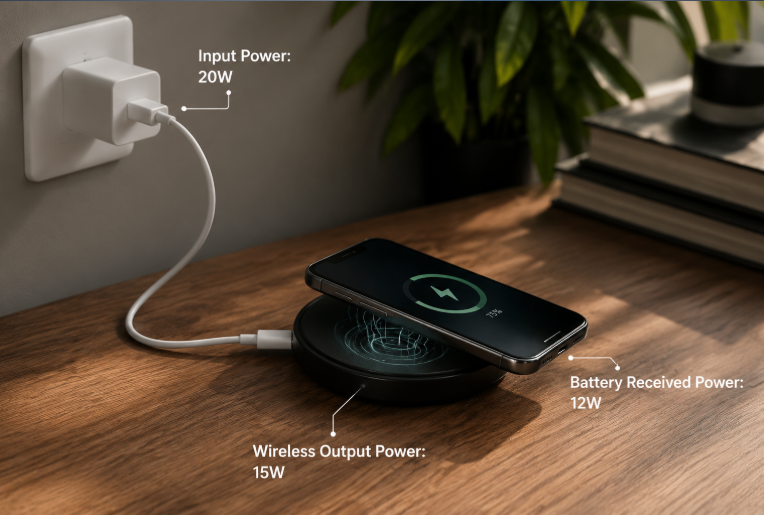
To understand why your charger never hits its labeled speed consistently, you first need to know how wireless charging power moves from the wall to your battery.
Three Key Power Measurements
All wireless charging systems have three separate power values that are easy to mix up:
- Input Power: The total power the wireless charger pulls from the wall adapter. This is what you can measure directly with a USB power meter.
- Wireless Output Power: The power transmitted through the charging coil via magnetic fields.
- Battery Received Power: The power that actually charges your phone’s battery, after all conversion and transmission losses. This is the number that determines real charging speed.
Think of wireless charging like water flowing through a pipe. The adapter provides full pressure at the source, the charger transfers it through a wireless connection, and the battery receives only a portion of it, with losses along the way from misalignment, heat, and circuit conversion.
Advertised wattage almost always refers to peak wireless output power, measured in perfectly controlled lab conditions. In daily use, the actual power reaching your battery is always lower.
Where Energy Is Lost
Wireless charging uses electromagnetic induction: a coil in the charger creates a magnetic field, which induces a current in a coil inside your phone. This process is convenient, but never 100% efficient. Most energy loss comes from three sources:
- Misaligned coils: Even a few millimeters of offset means much of the magnetic energy never reaches the phone.
- Circuit conversion: Power is converted between current types multiple times, wasting small amounts of energy at each step.
- Heat buildup: Lost energy turns into heat, which builds up in both the charger and phone over time.
2. What You Need to Test Wireless Charging Power
You do not need lab equipment to run a reliable wireless charging power test. For most users, you only need three basic items:
- USB-C PD power adapter: A working wall adapter that supports USB Power Delivery and provides enough wattage for your charger.
- USB power meter with PD support: A small inline device that measures voltage, current, and calculated wattage. Choose a model that explicitly supports USB PD measurement — basic meters without PD support may give inaccurate readings with fast chargers.
- Your wireless charger and a compatible phone.
You do not need expensive professional tools. A standard consumer USB power meter (typically $10–$30) is accurate enough for comparing chargers, spotting problems, and verifying real-world performance.
3. How to Test Wireless Charging Power Step-by-Step
This is the core test method used by most reviewers and hobbyists. It measures the input power going into the wireless charger, which gives you a consistent, comparable baseline for judging performance.
Standard Test Setup
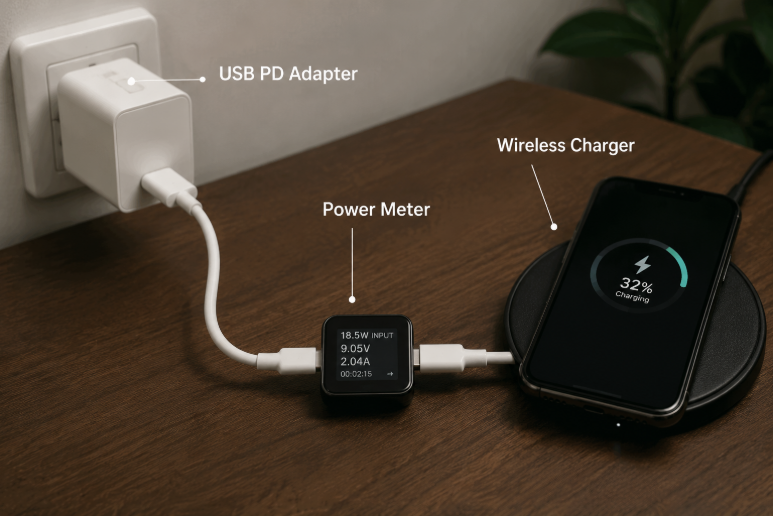
For the most reliable, repeatable results, connect components in this exact order:
USB PD Power Adapter → USB Power Meter → Wireless Charger → Smartphone
Step-by-Step Test Procedure
- Prepare your phone: Use your phone until the battery drops to 20–30%. Turn on airplane mode and close all background apps to eliminate extra power draw that could skew results.
- Connect the test gear: Plug the USB power meter into your wall adapter, then connect the wireless charger’s cable to the output side of the meter. Confirm the meter turns on and shows 0W with no phone on the pad.
- Record peak power: Place your phone carefully in the center of the charging pad. Watch the meter for the first 60 seconds, and note the highest steady wattage that holds for at least 10 seconds. This is your peak input power.
- Record steady-state power: Leave the phone charging for 10 minutes to let temperatures stabilize. Note the wattage once it stops dropping and holds a consistent level. This is your steady-state input power, the number that best reflects real daily charging speed.
If you do not own a power meter, you can get a very rough speed comparison by timing how long it takes to charge from 20% to 50%. This will not give you an exact wattage, but it is enough to tell a very slow charger apart from a fast one.
Standard Test Conditions
For fair comparisons between chargers, cables, or adapters, always keep these conditions the same:
- Fixed starting battery level: Always start tests at roughly 20–30% battery. Power changes dramatically as the battery fills, so tests started at different charge levels are not comparable.
- Controlled room temperature: Test at roughly 20–25°C (68–77°F). Avoid direct sunlight, heaters, or open windows.
- Single variable rule: Only change one thing per test (the charger, cable, or adapter). If you change two things at once, you will not know what caused the result.
Common Testing Mistakes to Avoid
- Testing at different battery levels for different chargers
- Ignoring temperature differences between test runs
- Relying only on phone software readings (these are rough estimates, not precise measurements)
Expected Input Power Ranges (Approximate)
Many users are confused when their USB meter shows a higher number than the charger’s advertised rating. This is normal: input power is always higher than the advertised wireless speed because energy is lost during transmission.
Below are general approximate ranges for common charger ratings. Exact values vary between models based on design and efficiency.
| Rated Wireless Output | Common Input Power Range (Approximate) |
|---|---|
| 5W basic Qi charger | 6–10W |
| 15W Qi / Qi2 charger | 18–25W |
| 25W magnetic charging | 30W+ peak input |
A higher input reading does not mean the charger is mislabeled. It simply reflects the extra power needed to account for wireless transmission losses and heat.
4. How to Read and Interpret Your Test Results
Getting numbers is only useful if you know what they mean. Use this section to judge whether your charger is performing normally, or if something is causing slow speeds.
Peak Power vs Steady-State Power
There are two key numbers from every test, and they mean very different things:
- Peak power: The highest wattage the system hits for a short time, usually in the first minute of charging with a cool, low-battery phone. It shows the absolute maximum the hardware can do under perfect conditions, but it does not reflect real charging speed — it only lasts for minutes at most.
- Steady-state power: The stable power level the system maintains after heat has built up and temperatures have leveled off. This is the single most important number for real charging speed, as it reflects the performance you will actually get during most of a charge cycle.
For almost all wireless chargers, steady-state power will be noticeably lower than the advertised peak wattage. This is normal and expected, not a defect.
Normal vs Abnormal Performance
Signs of normal, healthy performance:
- Power peaks early, then slowly settles to a steady level.
- Power gradually decreases as battery percentage increases.
- The charger and phone feel warm, but not uncomfortably hot to touch.
- Results are consistent from one test run to the next.
Common abnormal patterns:
- Consistently very low power: The charger, adapter, or cable is incompatible or faulty.
- Very fast power drop after starting: Thermal throttling is aggressive, usually due to poor cooling.
- Frequent power jumps up and down: The charger and phone are renegotiating connection repeatedly, often due to bad alignment or a faulty cable.
- Intermittent charging cuts: Intermittent connection, usually from misalignment, a loose cable, or foreign object safety detection triggering.
Quick Troubleshooting Table
Use this table to quickly identify the most likely cause of common test results:
| Test Observation | Most Likely Cause |
|---|---|
| Consistently very low input power | Incompatible or underpowered adapter / faulty cable |
| Fast initial speed, then sharp drop after a few minutes | Thermal throttling from heat buildup |
| Stuck at ~5W even on a “15W” charger | Protocol mismatch; phone or charger lacks fast charging certification |
| Intermittent charging or frequent power drops | Poor coil alignment, thick/metal case, or foreign object detection triggering |
Quick Reference: Charging Standards and Speed
Different charging standards support different maximum speeds, which explains why two “15W” chargers can give different results on the same phone.
| Standard | Typical Power Range | Key Detail |
|---|---|---|
| Qi (WPC) | 5W – 15W | Universal standard, manual alignment |
| Qi2 | 15W+ | Magnetic alignment for more consistent speed |
| MagSafe | Up to 25W on supported iPhone models with compatible chargers | Apple’s magnetic fast charging ecosystem |
All standards work with basic Qi charging, but fast speeds only activate when both the phone and charger support the same standard.
5. How to Improve Wireless Charging Speed
You do not always need to buy a new charger to get faster speeds. Try these adjustments first to maximize the performance of your current setup.
Practical Optimization Tips
- Use a compatible power adapter: Make sure your wall adapter supports the correct fast charging protocol and delivers enough wattage for your charger’s maximum speed.
- Use a high-quality cable: Thin or low-quality cables can limit power delivery. Use a cable rated for at least 3A current.
- Align coils properly: On non-magnetic chargers, take an extra second to center your phone on the pad. Even a small shift can reduce speed significantly.
- Remove thick or metal cases: Use a thin, wireless-charging-friendly case if possible. Remove magnetic card holders or metal accessories before charging.
- Improve cooling: Charge in a cool room, out of direct sunlight. Adding a small fan or moving the charger to a better-ventilated spot can reduce thermal throttling noticeably.
Common Myths Debunked
- Myth: The advertised wattage is what you get all the time.
Truth: Advertised wattage is measured under ideal lab conditions. Real sustained power is always lower. - Myth: Wireless charging wattage compares directly to wired charging wattage.
Truth: Due to conversion losses, wireless charging delivers less battery power than the same wattage wired charge. - Myth: Slower charging past 80% means something is broken.
Truth: Trickle charging at high battery levels is an intentional battery protection feature, and it is normal for all fast charging.
Slow Charging Troubleshooting Steps
If your wireless charger feels too slow, work through this list in order:
- Confirm your wall adapter supports the correct protocol and has enough wattage.
- Try a different known-good USB-C cable.
- Remove your phone case and any metal accessories.
- Carefully re-center the phone on the pad.
- Test again starting from low battery (under 30%).
- Move the charger to a cooler location.
- Verify the charger is certified for your phone’s fast charging standard.
6. Frequently Asked Questions
6.1 Why is my 15W wireless charger slower than advertised?
The 15W number is almost always peak power measured in perfect lab conditions with a cool phone at very low battery. In real use, power drops as the phone warms up and as the battery fills. Also, if your phone does not support the charger’s specific fast protocol, it will fall back to a slower basic speed.
6.2 How do I test my wireless charger’s real power?
The most practical method for everyday users is to use an affordable USB power meter connected between the wall adapter and the wireless charger. Run the test starting from 20–30% battery, in a cool room, and record both peak power and the steady-state power after 10 minutes.
6.3 Do phone cases affect wireless charging speed?
Thin plastic or silicone cases usually have a negligible effect. Thick cases, cases with metal parts, or cases with magnetic card holders can reduce power significantly and increase heat. For best results, use a thin case designed for wireless charging, or remove the case for fastest charging.
6.4 Will a higher-wattage adapter make wireless charging faster?
Only if your current adapter is too weak for the charger. Once the adapter can supply enough power for the charger’s maximum, upgrading to an even bigger adapter will not make charging faster. For a 15W wireless charger, a standard 20W PD adapter is usually sufficient.
6.5 Why does charging slow down past 80%?
This is intentional battery protection. Lithium-ion batteries cannot safely absorb charge at full speed when they are nearly full. Above roughly 80%, the phone switches to trickle charging to top off the last 20% slowly, which reduces wear on the battery and extends its overall lifespan. This is normal for all fast charging, wired and wireless.
6.6 Why does power drop after the first few minutes of charging?
Two main factors cause this. First, the phone and charger heat up quickly during the initial high-power phase, and thermal protection systems reduce power to keep temperatures safe. Second, the battery starts to fill even in the first few minutes, and the charging system begins to taper power slightly as the battery voltage rises. Both effects are normal and expected.
6.7 Is a 30W wireless charger always faster than a 15W one?
Not necessarily. The phone’s maximum receiving power is the limiting factor. If your phone only supports 15W wireless charging, a 30W charger will not charge it any faster than a good 15W charger. The higher-wattage charger may sustain peak speed slightly longer due to better cooling, but it will not exceed the phone’s built-in speed limit.
6.8 Is wireless charging slower than wired charging?
Yes, in almost all cases. For the same advertised wattage, wireless charging delivers less actual power to the battery because of energy lost during transmission and heat. Even high-wattage wireless charging is usually slower than a mid-range wired fast charger. The tradeoff is convenience: no cables to plug in, easy one-handed use, and less wear on charging ports.
6.9 Can a phone app measure wireless charging power accurately?
No, phone apps cannot directly measure wireless input power. Most battery apps estimate current based on battery voltage and system data, which gives only a rough approximation. These readings are useful for spotting very large speed differences, but they are not precise enough for accurate wattage comparisons. For reliable measurements, use a USB power meter.
6.10 Why does my charger show 20W input but my phone only charges at 15W?
This is completely normal. The 20W number is the input power going into the charger from the wall adapter. Some of that power is lost as heat and during electromagnetic transmission, so the actual wireless output power and battery received power are always lower. A gap between input power and advertised output power is expected, not a sign of a faulty charger.
Conclusion
Testing wireless charging power is not about chasing the biggest number on a product box. It is about understanding that wireless charging is a complete system — one where the adapter, cable, charger, phone, and even room temperature all work together to set your real speed.
Core Principles to Remember
- The weakest link rule: Wireless charging power is always limited by the slowest part of the chain. A great charger on a weak adapter will not deliver full speed.
- Sustained power beats peak power: The wattage a charger can hold for 10 minutes matters far more than the wattage it hits for 30 seconds.
- Certification is your best guide: Official charging standard certification is the most reliable way to know a charger will perform as promised.
Three Keys to Accurate Testing
- Control your variables: Always test at the same battery level, same temperature, and same setup.
- Focus on steady state: Ignore the peak number. Watch what happens after 10 minutes of charging.
- Look at the full picture: Combine power numbers with charge time and heat to judge real performance.
Wireless Charging Power Verification Checklist
- [1] Confirm your phone’s maximum wireless charging standard
- [2] Verify your wall adapter supports the correct protocol and wattage
- [3] Use a known-good, high-current USB-C cable
- [4] Center the phone carefully or use a magnetic alignment system
- [5] Remove thick or metal phone cases and accessories
- [6] Test starting from low battery in a cool, room-temperature location
- [7] Measure both peak and steady-state power with a USB power meter
- [8] Compare results against expected performance ranges
- [9] Troubleshoot step-by-step if performance is lower than expected