
Have you ever had this experience: you put your phone on a magnetic charger before bed, thinking it will be fully charged when you wake up, only to find it’s only 20% charged in the morning and the back is scalding hot? Or that your car magnetic mount almost falls off when going over a speed bump? Many people’s first reaction is “the charger is broken”, but more often than not, the problem is “misalignment”.
Many people have the biggest misunderstanding about magnetic charging: being stuck on means it’s aligned and can charge normally. That’s not the case at all — you can think of wireless charging as two coils facing each other to transmit electricity: the one hidden in the charger is called the transmitting coil, responsible for sending power out; the one hidden in the back of the phone is called the receiving coil, responsible for receiving power. The more accurately the centers of the two coils are aligned, the faster, more stable and cooler the power transmission will be; if they are misaligned, just like a misaligned water pipe joint where water spills out, power will be transmitted slowly and wasted as heat. The function of the magnetic ring is only to hold the phone in a rough position and prevent it from sliding; it does not participate in power transmission itself.
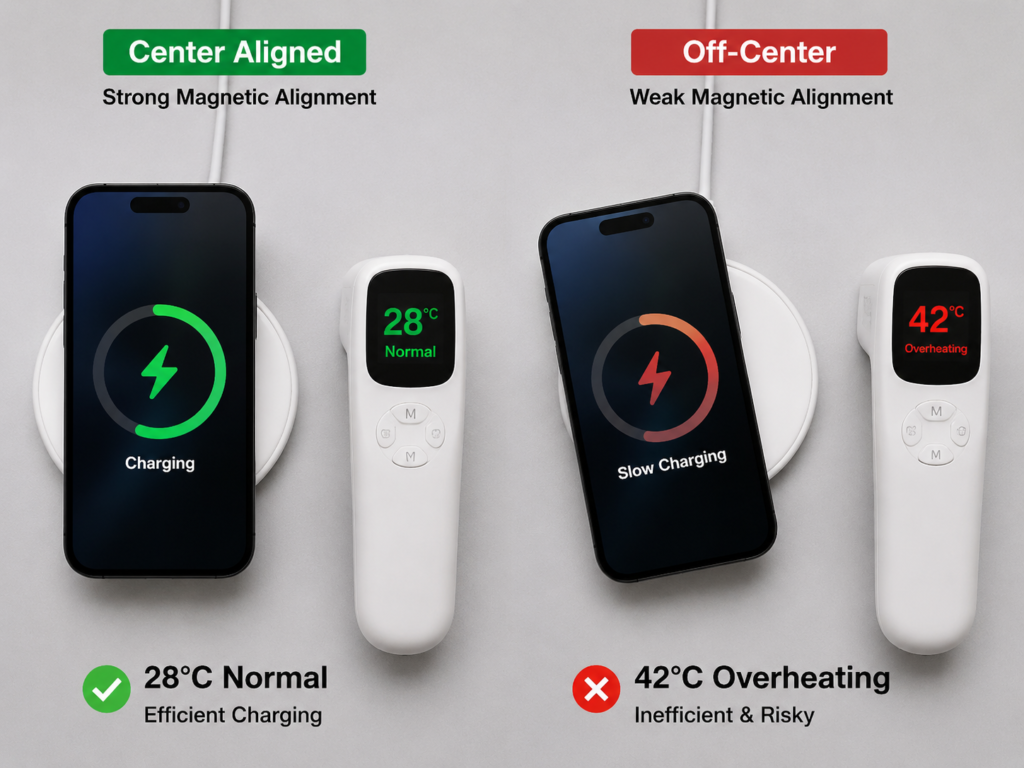
This article applies to magnetic wireless chargers for mobile phones, MagSafe/Qi2 chargers, magnetic power banks, car magnetic mounts and all-in-one wireless charging stations. It explains step by step from basic logic to troubleshooting methods to help you quickly find the problem.
1. Basic Foundation: First Understand the Core Logic of Magnetic Alignment
1.1 The Essence of Alignment: Magnetic Suction is for Firm Attachment, Only Coil Alignment Enables Effective Charging
What we often call “alignment” refers to the degree of center alignment between the charger’s transmitting coil and the phone’s receiving coil. The magnetic ring and the charging coil are two completely independent structures, and their functions cannot be confused:
- The magnetic ring is only responsible for “holding and rough positioning”: it pulls the phone to an approximate position by magnetic force to prevent it from sliding around easily, but it does not participate in power transmission.
- The charging coil is responsible for “power transmission”: only when the centers of the two coils are as coincident as possible can efficient and stable charging be achieved.
This explains why there is a situation of “firmly stuck but poorly charged”: if the magnetic ring and the coil are not concentric during design or assembly, the phone will be firmly attracted to the center of the magnetic ring, but this center is not the center of the coil at all; the farther the deviation, the worse the charging efficiency.
In addition, higher-power wireless charging is more sensitive to misalignment: even a slight deviation of the 15W fast charging coil will cause much more obvious efficiency drop, overheating and automatic speed reduction than a 5W slow charger. As for “how many millimeters of deviation counts as misalignment”, there is actually no fixed number — the actual tolerance range is jointly affected by coil diameter, magnetic ring position, charging power, phone temperature protection rules, charger design and certification standards. For daily use, just remember: slight deviation may still allow normal charging, while obvious deviation will cause slow speed, overheating, charging interruption or even failure to be recognized.
1.2 Two Typical Manifestations of Misalignment
The symptoms of misalignment are basically divided into two categories, and they may also occur at the same time:
- Abnormal suction: unstable suction, slipping at the slightest touch, obvious tilting of the phone, the charger does not follow when rotating the phone, easy to fall after bumping in the car.
- Abnormal charging: charging speed is far lower than the advertised value, obvious overheating of the body or charger, repeated charging interruption, delayed or absent charging animation/popup.
- Composite manifestation: it seems to be just “slow charging” on the surface, but it may actually be the result of the combined effect of misalignment, too thick phone case, insufficient power supply, and temperature protection.
1.3 Actual Impacts of Different Degrees of Misalignment
Different degrees of misalignment have significantly different impacts:
- Slight misalignment: charging can still be recognized normally, but the speed is reduced, and the body temperature is slightly higher than normal.
- Moderate misalignment: unstable charging, possible frequent interruptions, and obvious overheating.
- Severe misalignment: wireless charging cannot be recognized at all, or stops immediately after the charging prompt pops up.
- Long-term misaligned charging: low charging efficiency and continuous overheating may accelerate battery loss and are more likely to trigger overheat protection.
1.4 Alignment Differences of Common Magnetic/Wireless Charging Standards
Different wireless charging standards have very different alignment capabilities and user experiences. First figure out which one you are using:
- Ordinary Qi wireless charging: Qi (pronounced similar to “chee”) is currently the most common wireless charging standard in the world, equivalent to the “universal plug” for wireless charging. Phones and chargers of different brands can be used as long as they support Qi. However, ordinary Qi generally does not have magnetic positioning, and relies entirely on the user to place it manually; when placed crookedly, it is prone to slow charging, overheating or failure to be recognized.
- Apple MagSafe: MagSafe is Apple’s own magnetic wireless charging ecosystem and certification system. iPhone 12 and later models have a built-in magnetic ring in the body, and when paired with certified accessories, positioning stability and charging efficiency are better.
- Qi2 magnetic wireless charging: Qi2 is the latest universal magnetic wireless charging standard, which is equivalent to adding magnetic positioning capability to the universal Qi standard. Only when both the phone end and the charger end support Qi2 will the stability of magnetic alignment be much better than ordinary Qi. The actual power also depends on the charging head, cable, temperature and the device’s charging rules.
- Magnetic case/magnetic ring sticker solution: accessories that increase suction for devices without a built-in magnetic ring or with weak magnetic force. However, the position of the sticker, the thickness of the case and the position of the coil will significantly affect the alignment accuracy; if stuck crookedly, it will be even worse.
- No-name “fake magnetic”: some low-cost accessories claim to be magnetic, but in fact they just add a few random magnets and are not calibrated according to the center of the coil at all. The common result is “sticks but charges poorly”, and overheating is particularly obvious.
1.5 Applicable Boundaries of Different Devices
Different devices have different magnetic configurations. Don’t mistake normal conditions for faults:
- iPhone 12 and later models: the body has a built-in MagSafe magnetic ring, and the bare phone can directly attach to MagSafe/Qi2 magnetic chargers. However, being able to attach does not mean it will definitely reach the maximum power. Non-certified or cross-standard accessories may only work at a lower ordinary Qi power. The actual power upper limit depends on accessory certification, charging head, cable and system temperature protection.
- Ordinary Android phones without magnetic ring: most old or non-Qi2 Android phones do not have a built-in magnetic ring. It is normal that the bare phone cannot be magnetically attached. It needs to be paired with a magnetic case or magnetic sticker to achieve suction positioning — but the premise is that the phone itself supports Qi wireless charging. Magnetic stickers can only improve suction, and will not give a phone that does not support wireless charging the wireless charging function out of thin air.
- Android phones that support Qi2: the entire link of phone, charger, cable and charging head needs to meet Qi2 requirements to obtain stable magnetic positioning and corresponding power experience.
- Small devices such as AirPods: small devices like earphone cases have smaller coil areas, and may be more prone to misalignment when placed on a large-area magnetic suction pad for mobile phones. They should be placed in the dedicated small device area marked on the charger.
- Dedicated devices such as Apple Watch: they usually use an exclusive magnetic charging structure, which is not compatible with mobile phone magnetic charging. You cannot use the mobile phone magnetic charging area to charge the watch, nor apply the mobile phone troubleshooting logic to it.
2. Core Causes: Sorted by Daily Troubleshooting Probability from High to Low
Daily troubleshooting should start with external accessories first, as such problems account for the highest proportion. In order of occurrence probability from high to low, they are:
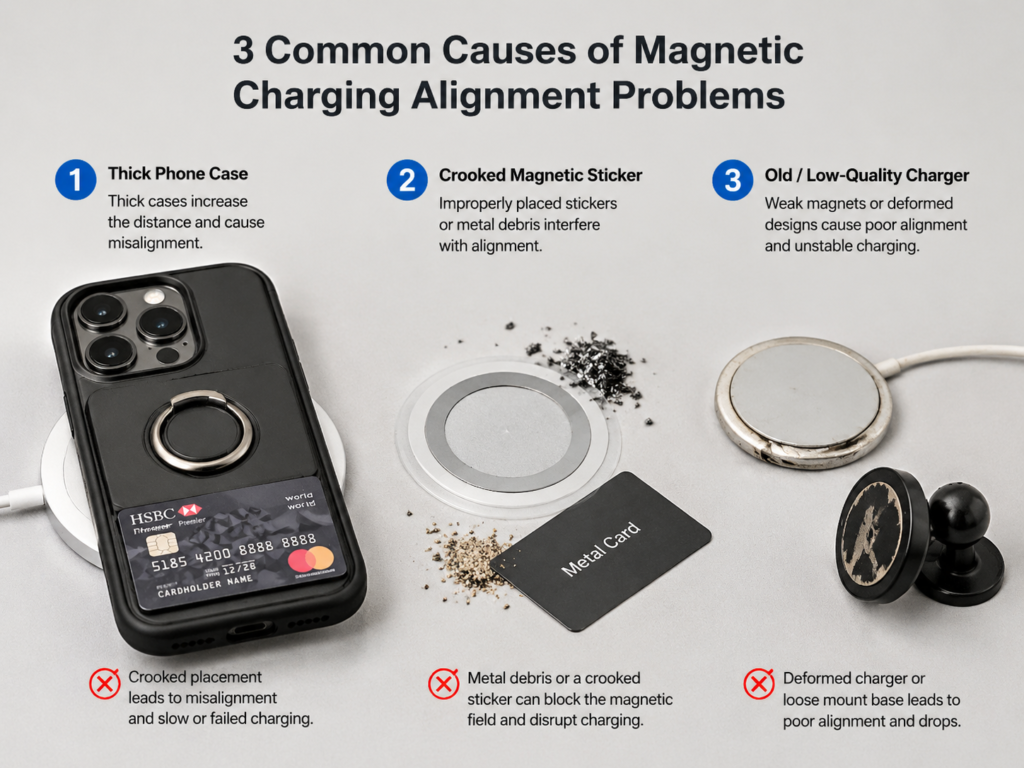
2.1 External Accessory Problems (Most Common)
- Mismatched phone case: non-magnetic cases do not have a corresponding magnetic ring, so naturally the suction is unstable; even for a magnetic case, if you buy the wrong model and the magnetic ring position does not align with the phone’s coil, it will still be misaligned; a too thick case will not only weaken the magnetic force, but also increase the distance between the two coils, reducing charging efficiency.
- Protrusions on the case surface: ring holders, card holders, metal brackets, thick lens protection rings, etc., will prevent the back of the phone from lying flat on the charger, which is equivalent to raising one side, so the suction angle and coil position will naturally be crooked.
- Problems with magnetic stickers/magnetic patches: crooked sticking, reverse sticking, inappropriate thickness, or the universal model not being aligned with the coil position of this phone will all cause the situation of “stuck but not aligned”.
- Interference from metal or magnetic accessories: bank cards, access control cards, metal sheets, metal stickers, metal brackets, etc., will not only make the phone unable to lie flat due to padding, but may also interfere with the magnetic field of wireless charging, causing local overheating or abnormal recognition.
- Foreign object obstruction: dust, sand grains, metal shavings caught between the magnetic surfaces, even if only a little, will prevent the charger and the phone from fitting flatly, causing misalignment.
2.2 Usage Operation and Scenario Problems
- Improper placement: throwing the phone on crookedly, pressing it crookedly before the magnetic force automatically attaches, or placing it blindly in a dark environment may all cause the phone to stay in the wrong position.
- Cable pulling: if the charging cable is too short and pulls the charger from the side, it will continuously pull the magnetic suction pad to one side, which can easily lead to misalignment over time.
- Touching during charging: picking up the phone to check messages during charging, switching between landscape and portrait screens back and forth, or vibration on the desktop (such as placing it next to a speaker) may turn the original slight misalignment into a complete dislocation, resulting in charging interruption.
- Car scenario: the superposition of multiple problems such as bumps, sudden braking, high temperature and sun exposure in the car, loose mounts, and cable tension is a high-incidence scenario for magnetic misalignment.
- Vertical mount: if the mount angle is too steep or the phone case is too slippery, the phone will slowly slide down due to gravity, and the coil center will gradually deviate.
- Soft surface: placing the charger on a bed, sofa, or soft mouse pad will cause the charger to sink or tilt, resulting in an uneven fitting surface.
- Special body: foldable screen phones have different back shapes when unfolded and folded, or phones with large camera modules have uneven backs themselves, which will affect the fit of the charger.
2.3 Hardware Problems of the Charger Itself
- Weak magnetic components: few magnets, weak magnetic force, unreasonable magnetic ring arrangement, the phone is easy to slide when placed on it, so naturally it cannot be aligned.
- Eccentric magnetic ring assembly: if the magnetic ring is installed crookedly during production, the phone will be attracted to the center of the magnetic ring, but this center is not the center of the transmitting coil; the firmer the suction, the farther the deviation.
- Non-concentric coil and magnetic ring: this is a common problem with low-quality chargers. The typical manifestation is normal suction, but slow charging and obvious overheating, and stable charging can only be achieved when rotated to a specific angle.
- Aging from long-term use: frequent drops and bumps, long-term exposure to high-temperature environments, deformed casing, loose mount joints will all gradually reduce the originally normal positioning accuracy.
- Design problems of all-in-one charging stations: some all-in-one charging stations have unclear charging area markings, small coil areas, and mixed placement areas for different devices, making it easy for users to place them in the wrong position.
2.4 Problems of the Phone Itself
Problems with the phone itself are usually troubleshooted after accessories and chargers. Common situations include:
- No built-in magnetic ring: it is normal that a bare ordinary Qi Android phone cannot be magnetically attached, it is not a fault.
- Differences in coil position: for phones of different brands and sizes, the position of the wireless charging coil is not exactly the same; some are upper, some are centered, and it is easy to be misaligned when using universal magnetic accessories.
- Uneven back: large camera modules, deformed back cover due to drops, etc., will prevent the charger from fitting flat.
- Abnormality after drops or repairs: after a severe drop or back cover repair, the position of the internal coil or magnetic ring may shift, resulting in the situation of “originally normal, suddenly misaligned”, but the probability of such problems is much lower than that of accessory and charger problems.
2.5 Standard and Certification Incompatibility
In many cases, misalignment or slow charging is essentially a normal experience gap caused by standard mismatch, not an accessory fault:
- The positioning accuracy and power requirements of different standards are not completely equivalent: being able to charge wirelessly does not mean that precise magnetic positioning can be achieved, nor does it mean that the advertised fast charging power can be reached.
- Cross-standard mixing is prone to experience gaps: for example, when a MagSafe charger is used for an Android phone without Qi2 or a built-in magnetic ring, it may need to be paired with a magnetic case to attach, and usually can only work at ordinary Qi or lower power.
- Insufficient stability of non-certified accessories: for accessories that have not been certified by the corresponding standard, there may be deviations in magnetic ring size, magnet arrangement, coil position and temperature control strategy, which are prone to misalignment or overheating problems.
- Poor adaptation for small devices: small devices such as earphone cases have smaller coil areas. If the charger does not have a dedicated charging area, the probability of misalignment will be significantly higher.
2.6 False Faults Easily Misjudged as “Misalignment”
There are many situations that look like misalignment, but actually have nothing to do with alignment. Don’t waste your time:
- Insufficient power supply: if the charging head and charging cable do not support the corresponding protocol or power, charging will naturally be slow, which has nothing to do with alignment. For example, using a computer’s low-power USB port to power a magnetic charger will definitely not achieve fast charging speed. The PD charging head mentioned here is the most common fast charging head currently, supporting the USB-PD fast charging protocol. Most magnetic fast charging chargers need to be paired with a compliant PD head to work at full speed.
- Temperature protection: if the ambient temperature is too high, or the phone is used for gaming or navigation while charging, the system will actively reduce the speed or even pause charging to avoid battery overheating. This is a normal protection mechanism, not a fault.
- System charging strategy: battery optimization, night charging protection, and speed reduction after the battery reaches 80% are all intentionally set by the system to extend battery life. Many people mistakenly think that the charger is not aligned.
- Software delay: slow charging popup or no animation does not necessarily mean that charging is not in progress. It is more accurate to check the charging icon in the upper right corner and check the battery level change after a while.
- Misunderstanding of rated power: the “up to 15W” and “up to 20W” advertised by accessories have prerequisites — they require corresponding devices, certification, a charging head with sufficient power, and appropriate temperature. The maximum power cannot be achieved at all times.
3. Quick Troubleshooting: 5 Steps to Locate the Fault, Start with the Easiest to Eliminate
You can troubleshoot in the following 5 steps, and in most cases, the problem can be found within 10 minutes:
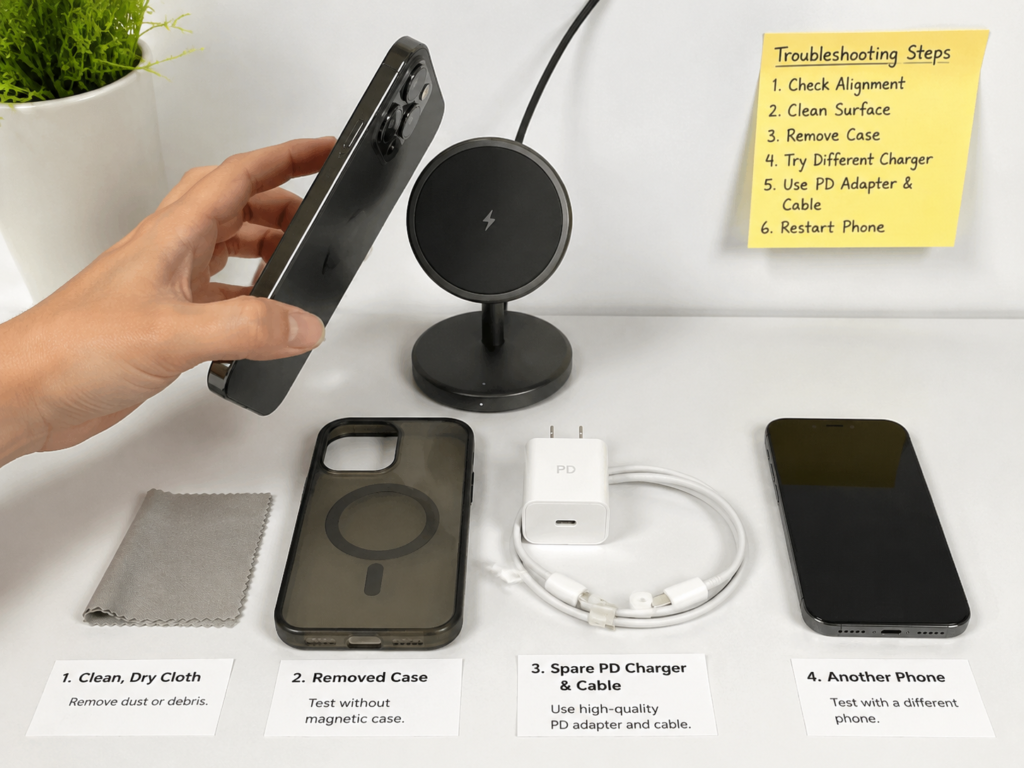
3.1 Step 1: 1-Minute Initial Appearance Check
Do the simplest check first. In many cases, the problem can be solved at a glance:
- Wipe the back of the phone and the surface of the charger with a clean dry cloth, and check for foreign objects such as dust, metal shavings, cards, sticker residue, etc.;
- Remove back protrusion accessories such as ring holders, card holders, metal brackets, thick lens protection rings, etc.;
- Check whether the magnetic case or magnetic sticker is crooked, has lifted edges, is deformed, and whether it matches the phone model;
- If charging returns to normal after cleaning or removing accessories, it can be prioritized as a problem of foreign objects, protrusions, or accessory fit.
3.2 Step 2: Test Charging with Bare Phone, Rule Out Phone Case and Stickers
If the appearance check is fine, the next step is to remove all back accessories and test directly with the bare phone. This is the key to distinguishing between “accessory problems” and “device itself problems”:
Remove the phone case, magnetic sticker and all back accessories, bring the phone close to the charger, wait for the magnetic force to automatically attach in place before letting go, do not press hard.
Observe three points: whether the phone can naturally be attracted to the center position, whether it starts charging immediately, and whether it obviously overheats or interrupts charging within 10 minutes.
If the bare phone test is normal but abnormal when wearing the case, prioritize checking the phone case problem — such as offset magnetic ring position, too thick case, protrusions on the back, or crooked magnetic sticker.
Note: It is normal that a bare ordinary Android phone without a magnetic ring cannot be attracted. You cannot directly judge that the charger is damaged. It is best to cross-test with other devices of the same standard.
3.3 Step 3: Distinguish Between “Insufficient Suction” and “Position Dislocation”
If there is also a problem with the bare phone, first figure out whether it cannot be attracted, or it can be attracted but charges poorly. The causes of the two situations are completely different:
- Test suction: gently touch the phone. If it slides easily or falls directly, it is mostly due to insufficient magnetic force, too thick case, too slippery surface or too heavy device.
- Test alignment: if the phone is firmly attracted but charges slowly, overheats, or interrupts charging, it is mostly a problem of non-concentric magnetic ring and coil.
- Test rotation: gently rotate the phone. If only a certain angle can charge stably and other angles cannot, it indicates that there may be eccentricity, abnormal single-side magnet, or mount angle problem.
- Test fit: look from the side to see if there is a gap between the phone and the charger. If one side is lifted, prioritize checking for camera module protrusion, uneven case surface, or foreign objects.
3.4 Step 4: Cross Replacement Test to Locate the Specific Fault End
If the problem has not been found in the previous steps, use the replacement method to eliminate one by one. This is the most accurate method:
- Replace with a charger of the same standard that is confirmed to be normal for testing: if it returns to normal, it means the original charger may have problems such as offset magnetic ring, offset coil, or hardware aging.
- Replace with another phone of the same standard that is confirmed to be normal for testing: if it returns to normal, it means there is a problem with the original phone or phone case.
- Replace with a certified magnetic case for testing: if it returns to normal, it means the original case or magnetic sticker is misaligned.
- Replace with a set of charging head and cable that are confirmed to be fine for testing: if it returns to normal, it means it is a problem of power supply capacity or protocol, which has nothing to do with alignment.
When testing, pay attention to fixed conditions: the same position, similar battery level range, same ambient temperature, to avoid misjudgment caused by variables such as temperature and battery level.
3.5 Step 5: Rule Out Non-Alignment Interference Factors
Finally, rule out the easily confused false faults:
- Power supply elimination: use a compliant PD charging head and a reliable data cable. Do not test with a computer’s low-power USB port or an old charging head.
- Temperature elimination: put the phone and charger in a cool and ventilated place, turn off background high-load applications, and try again after 5-10 minutes.
- Battery level elimination: it is best to test in the 20%-80% battery level range to avoid misjudgment caused by the system’s natural speed reduction when nearly full.
- System elimination: restart the phone, update to the latest system, and check whether battery optimization or charging protection settings are enabled.
If there is odor, local scalding, metal sheet heating, casing deformation, repeated charging interruption and continuous temperature rise, be sure to stop using it immediately, replace accessories or send it for repair to avoid safety risks.
4. Advanced Judgment: Lock the Root Cause from Details
After completing the basic troubleshooting, you can further lock the root cause through the following scenario-based symptoms to determine whether accessories need to be replaced:
4.1 Typical Symptoms Corresponding to Core Causes
| Typical Scenario Symptoms | Most Likely Core Cause | Priority Handling Direction |
|---|---|---|
| Very strong suction but slow charging/overheating | Non-concentric magnetic ring and coil, or poor charger coil design | Rotate slightly to find a stable position, cross-replace with a charger of the same standard |
| Normal with bare phone, abnormal with case | Offset magnetic ring of the phone case, too thick case, back protrusion, or crooked magnetic sticker | Replace with a dedicated magnetic case for the corresponding model, or re-stick the dedicated magnetic sticker |
| Slips at the slightest touch, easy to fall | Insufficient magnetic force, too thick case, too slippery surface, too heavy device, or too steep mount angle | Test suction with bare phone, replace with compatible case/mount, prioritize models with a bottom support |
| Only stable charging at a single angle | Eccentric coil, eccentric magnetic ring, abnormal single-side magnet, or uneven phone back | Confirm with rotation test, cross-replace charger and phone case for positioning |
| Frequent charging interruption/falling only in car scenarios | Superposition of vibration, cable pulling, high temperature in the car, and loose mount fixation | Check mount fixation, leave enough cable slack, choose a mount with a bottom support |
| Frequent charging interruption in summer, normal in winter | High temperature amplifies offset heating, triggering temperature control protection | Move to a cool place to charge, avoid running high-load applications while charging |
| Small devices such as earphones often fail to charge | The device coil is too small, not placed in the dedicated charging area | Place in the corresponding small device charging area according to the marking |
| Unstable charging of all-in-one charging station | Placed in the wrong charging area, coil positions of different devices are not universal | Confirm the exclusive charging area, do not mix different devices |
| Gradual charging interruption when using a vertical mount | Sliding due to gravity, too steep mount angle, insufficient friction of the case surface | Adjust the mount angle, check the bottom support, replace with a case with appropriate friction |
4.2 Troubleshooting Logic for Different Scenarios
The high-incidence problems are different in different usage scenarios, and targeted troubleshooting can be carried out:
- Flat on desktop: this is the most stable scenario. If there are still problems, prioritize checking the phone case, foreign objects, and the concentricity of the charger’s coil and magnetic ring.
- Vertical mount: focus on checking whether the phone slides due to gravity, whether the mount angle is too steep, whether the suction is sufficient, and whether there is a bottom support.
- Car mount: focus on checking whether the mount is loose, whether there is a bottom support, whether the cable is pulling, and whether the car is exposed to high temperature and sun.
- Magnetic power bank: focus on checking whether the weight of the power bank pulls the phone, whether it is dislocated when moving, and whether the phone case is too slippery.
- All-in-one charging station: focus on checking whether it is placed in the wrong area. Phones, earphones, and watches each have dedicated coil positions and cannot be mixed.
4.3 Alignment Accuracy Boundaries of Different Standards
During troubleshooting, you can refer to the normal experience boundaries of different standard combinations to avoid mistaking normal limitations for faults:
- MagSafe to MagSafe: positioning stability is usually the best, but fast charging power is still limited by certification, power supply and temperature control, which is within the normal range.
- Qi2 to Qi2: only when both the transmitting end and the receiving end support Qi2, the alignment reliability is better than ordinary Qi. Single-end support cannot achieve the corresponding experience.
- Ordinary Qi wireless charging: no magnetic assistance, alignment tolerance depends on coil area and manual placement, higher probability of misplacement.
- Cross-standard mixing: being able to charge does not mean precise magnetic suction, and being able to attach does not mean reaching the maximum power. Reduced experience is a normal limitation.
- No-name magnetic accessories: no unified quality standard, eccentric magnetic ring, uneven suction, and poor heat control are high-incidence problems, and alignment stability is not guaranteed.
4.4 Distinguish Between “Normal Limitations” and “Need for Replacement/Repair”
In many cases, it is not a fault, but a normal usage limitation. Don’t replace accessories at every turn; but don’t force it when it’s time to replace:
- Normal limitations: speed reduction with thick case but normal with bare phone; speed reduction in high temperature environment; speed reduction when battery is above 80% or full; cross-standard mixing cannot reach rated power.
- Recommended to replace phone case/sticker: normal with bare phone, misaligned suction, slow charging, overheating or charging interruption when wearing the case.
- Recommended to replace charger: multiple phones of the same standard tested bare have misalignment; the magnetic suction pad is obviously eccentric; the charger casing is deformed; the suction is significantly reduced.
- Recommended to stop using immediately: abnormal overheating, odor, local heating of metal foreign objects, repeated charging interruption and continuous temperature rise.
- Recommended to send phone for repair: multiple regular chargers cannot perform wireless charging; sudden abnormality after severe drop or repair; problems with both wireless and wired charging.
5. Solutions and Pitfall Avoidance: Practical Methods to Reduce Misalignment
5.1 Immediate Adjustment: Small Things You Can Do Right Now
If you are encountering a misalignment problem right now, try these methods first. In many cases, it will improve immediately:
- Correct placement: bring the phone close to the charger, wait for the magnetic force to automatically attach in place before letting go, do not throw it crookedly or press hard.
- Slight alignment: after attaching, you can rotate the phone slightly to find the position where the suction is the most natural and the charging is the most stable.
- Organize cables: leave enough slack for the charging cable, try to let it hang naturally from the bottom or rear of the charger, avoid pulling from the side.
- Improve the environment: place the charger on a hard flat surface, away from high temperature environments, and try not to play large games or use navigation while charging.
- Car optimization: prioritize choosing a mount with a bottom support or locking structure, do not rely solely on magnetic force to withstand bumps and the weight of the phone.
5.2 Accessory Purchase: Reduce Alignment Risk from the Source
Choosing the right compatible accessories can significantly reduce the probability of misalignment. Pay attention to these points when purchasing:
- Charger: prioritize certified models of the same standard, such as Apple official or MagSafe certified accessories, Qi2 certified accessories, or products that the brand clearly marks as compatible with your model. Try not to buy no-name products that only say “universal magnetic”. The actual charging power still depends on the device’s compatible standard, charging head power, cable specifications and system temperature control strategy.
- Phone case: choose a dedicated magnetic case for the corresponding phone model, with the magnetic ring position matching the model, the case as thin as possible, and the back flat without extra protrusions.
- Magnetic sticker: prioritize dedicated models corresponding to the coil position of the model, stick according to the instructions. It is not recommended to buy universal iron rings randomly and stick them casually.
- Car mount: don’t just look at the advertising claim of “magnetic force X times that of ordinary ones”, but comprehensively consider suction, whether there is a bottom support, heat dissipation effect, and mount stability.
- All-in-one charging station: confirm the device type corresponding to each charging area before buying, to avoid mixing areas for different devices.
5.3 Daily Maintenance: Extend the Life of Magnetic Accessories
Pay attention to maintenance at ordinary times, and the positioning accuracy of accessories can be maintained longer:
- Regular cleaning: wipe the back of the phone, phone case and charger surface with a dry cloth. Pay special attention to metal shavings and sand grains, which will not only affect the fit, but may also scratch the casing.
- Avoid high temperature: do not place it on a car dashboard exposed to direct sunlight or in a closed high-temperature environment for a long time. Long-term high temperature may affect the structural stability of magnetic components, adhesive layers and casings.
- Avoid strong drops and bumps: charger drops, deformed phone back covers, and loose mount joints will all affect the alignment of the coil and magnetic ring. Handle with care during daily use.
- Check sticker status: if the magnetic sticker has lifted edges, shifted, or deformed, replace it with a new one in time, do not continue to force use.
6. Clarification of Common Misconceptions
Misconception 1: Being stuck on = aligned correctly
Correction: Magnetic suction is only responsible for fixation and rough positioning. When the coil centers are not coincident, no matter how firm the suction is, charging may be slow, overheating, or interrupted. Especially for low-cost magnetic chargers, many only have magnet adsorption, and have not calibrated the positions of the coil and magnetic ring at all.
Misconception 2: The greater the suction, the more accurate the alignment
Correction: Strong suction does not mean high alignment between the center of the magnetic ring and the coil. If the magnetic ring itself is crooked, strong suction will only firmly fix the phone in the wrong position, and the charging effect will be worse. Do not buy accessories solely based on advertising claims like “magnetic force X times that of ordinary ones”.
Misconception 3: Ordinary wireless chargers can achieve precise alignment by sticking a magnetic sticker
Correction: Magnetic stickers can only increase suction capacity, and cannot automatically ensure that the transmitting coil of an ordinary wireless charger coincides with the phone’s coil. If stuck crookedly, on the wrong model, or near metal parts, it may instead cause overheating and charging interruption.
Misconception 4: Misalignment only affects charging speed
Correction: Misalignment will reduce charging efficiency and increase heat generation. In severe cases, it will cause repeated charging interruptions or trigger temperature control to stop charging. If there is a metal foreign object in between, it may also cause local overheating, which has safety risks. Clean it immediately after discovery.
Misconception 5: The more expensive the magnetic charger, the more accurate the alignment
Correction: Alignment accuracy mainly depends on standard compatibility, concentricity of the magnetic ring and coil, structural stability and temperature control design. Price is not the only judgment standard. When purchasing, prioritize referring to certification, compatible model instructions and real user feedback.
Misconception 6: If the charging popup does not appear, it must be misaligned
Correction: The appearance time of the charging popup is affected by the system version, lock screen status, accessory certification, and animation delay, so it is not necessarily misaligned. To judge whether charging is in progress, it is more reliable to check the charging icon in the upper right corner, check the battery level change after a while, and make a comprehensive judgment combined with temperature and charging interruption.
7. Summary: A Set of the Most Practical Judgment Paths
When encountering the problem of magnetic charger misalignment, don’t panic, just follow this order:
The first step is to judge the type: is it unstable suction and easy to fall, or stable suction but slow charging, overheating, and charging interruption.
The second step is to rule out accessories: clean the surface, remove accessories such as phone case, card holder, ring holder, magnetic sticker, etc., and test with a bare phone or a device of the same standard.
The third step is to do cross testing: replace the charger of the same standard, replace the phone, replace the certified magnetic case, replace the charging head and cable, and eliminate one by one.
Finally, judge the handling method: if it’s a case problem, replace the case; if the charger is eccentric, replace the charger; if multiple regular chargers are abnormal and the phone has a history of drops or repairs, then consider sending the phone for repair.
Most misalignment problems can be solved by choosing the right same-standard certified accessories, magnetic cases compatible with the model, standardized placement methods, and avoiding high temperatures and metal foreign objects. Choosing the right one is more important than choosing the expensive one.