
Have you ever had this experience: you just bought a nice phone case, put it on your phone, and set it on a wireless charging pad—either nothing happens for ages, or after half an hour of charging the battery only goes up a tiny bit, and the phone feels scalding hot? Is it the case’s fault, is the charger broken, or is there something wrong with the phone itself?
If you’re troubled by abnormal wireless charging when using a case, aren’t sure where the problem comes from, and don’t know what kind of phone cases are safe for wireless charging, this article will explain the causes, troubleshooting methods, and case selection tips clearly—you don’t need any electronics knowledge to understand it.
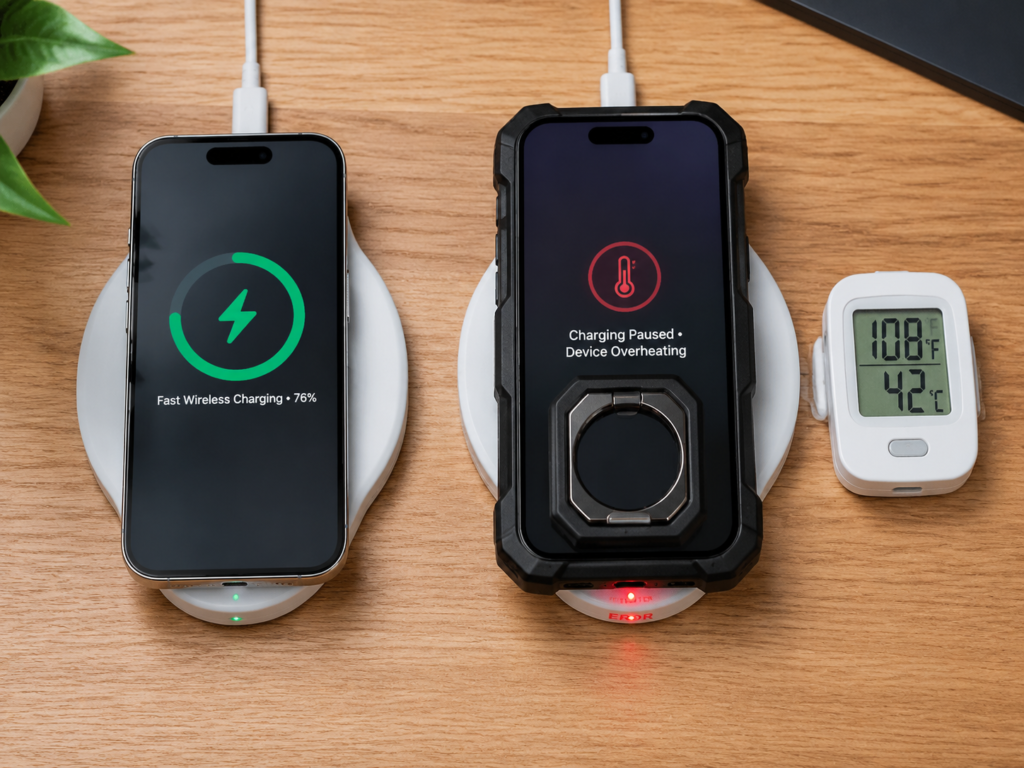
If you encounter the following types of charging abnormalities when using a case, you can troubleshoot and solve them with the methods below:
- No response at all: No charging indicator appears after placing the phone on the wireless charger, or the base indicator light flashes, reports an error, or turns on and off repeatedly
- Slow charging / false charging: Shows it’s charging, but the battery level increase in the same amount of time is significantly lower than when using the phone without a case; in severe cases, the battery drains while charging
- Frequent disconnection / strict alignment requirements: You need to move the phone repeatedly to get it to charge, and it disconnects and reconnects after a few minutes of charging
- Abnormal heating: The back of the phone, the phone case, or the wireless charging base gets noticeably hot, while the charging speed slows down or stops
This article mainly discusses the most common short-range inductive wireless charging types such as Qi, Qi2, and MagSafe, and does not cover wired charging, long-range radio frequency charging, or other types.
The core logic for judging whether the fault is related to the phone case is: under the same conditions (same phone, same wireless charger, same power adapter and cable, same placement position, similar ambient temperature), if the phone charges normally without a case but has abnormalities with a case, it is most likely related to the phone case; if there are also abnormalities when the phone is used without a case, prioritize troubleshooting the charger, power supply, phone system, battery temperature, or wireless charging coil fault.
Plain-language principle: Why is wireless charging interfered with by phone cases?
You don’t need to memorize complicated physics formulas. You can think of wireless charging as two “energy rings” that transmit energy through the air: one is the transmitting coil inside the wireless charging base, and the other is the receiving coil inside the back of the phone. When the base is powered on, the transmitting coil generates an invisible magnetic field. When the receiving coil is aligned, it captures the magnetic field and converts the energy into electricity to store in the battery.
For energy to come out of the base, it has to pass through the surface of the charging pad, the phone case, and the back cover of the phone before reaching the receiving coil. Anything that blocks the path, increases the distance, or misaligns the position in between will affect the energy transmission efficiency.
Moreover, the phone and the charger will “negotiate” the charging power: they decide what power to use based on the magnetic field induction strength, temperature, whether foreign objects are detected, and whether they support the same fast charging protocol. If the induction weakens, loss increases, or the temperature is too high, the system will automatically reduce the power, and in severe cases, simply disconnect the charging to avoid problems.
Sandwiched in the middle, the phone case mainly changes three things:
First is distance: the thicker the case, the farther apart the two energy rings are, and the less energy is received.
Second is the medium in between: if there is metal, conductive material, magnets, or cards inside the case, they may block, absorb, or even disrupt the magnetic field, preventing energy from being transmitted.
Third is alignment: if there is a raised stand, ring holder on the back of the case, or the magnetic ring is misaligned, the two energy rings will not be aligned properly, so naturally energy cannot be transmitted well.
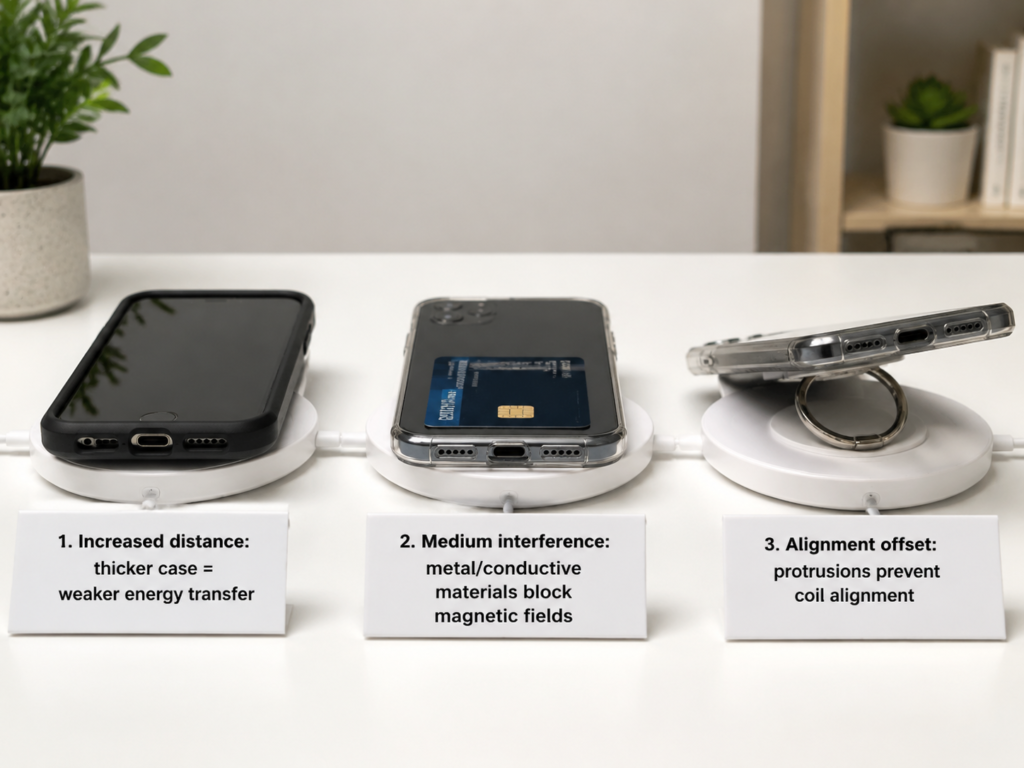
By the way, here are two terms that will be mentioned frequently later, they are actually very simple:
- Coil alignment: this is the degree to which the two energy rings are aligned; the more offset they are, the more likely it is to have slow charging, disconnection, and heating.
- Transmission loss: this is when energy does not enter the battery, but is wasted as heat in the intermediate material or near the coils; the most direct manifestations are scalding heat and speed reduction.
Core analysis: 4 key paths by which phone cases affect wireless charging
The interference of phone cases with wireless charging is mainly achieved through 4 paths, and they often occur in combination.
1. Material interference: Metal, conductive materials, and low-quality magnetic components are the hardest hit areas
Metal and conductive materials have a significant impact on magnetic fields: they may shield or disrupt the magnetic field path, or generate eddy current losses and additional heat, which in turn triggers the charger’s foreign object detection, automatic power reduction, or even disconnection. The degree of impact depends on the area, position, thickness of the metal, and whether it is directly facing the coil area.
The most common high-risk components include all-metal phone cases, large-area metal backplates on the back, metal stands, metal ring holders, and metal decorative sheets—as long as they are located in the coil area in the middle of the back of the phone, the impact is particularly large. Even a car-mounted magnetic iron sheet stuck on the case, if it is stuck right in the middle, may directly make wireless charging unable to work.
Some materials don’t look like metal, but they can also interfere: for example, some carbon fiber cases with conductive structures, cases with metal coatings, and low-quality magnetic conductive sheets in no-name magnetic cases—they may look black or plastic-like, but they still affect the magnetic field.
Many people ask: MagSafe or Qi2 magnetic cases also have magnets, why can they usually be used? Compliant MagSafe/Qi2 magnetic cases have magnetic rings designed in accordance with standard position and material requirements, and their main function is to assist alignment. Under normal circumstances, they are more reliable than randomly pasted magnetic sheets; but the actual charging performance still depends on the case thickness, heat dissipation, charger protocol matching degree, and phone model, so they are not completely without impact.
As for ordinary non-metallic cases, such as those made of plastic, silicone, TPU, or PC, as long as they are regular products, they have little impact on the magnetic field themselves, but if they are too thick, have an uneven back, have cards sandwiched in them, or have poor heat dissipation, problems may still occur.
2. Thickness and distance: It’s not just about the nominal thickness of the case, but the actual spacing of the coils
Wireless charging is particularly sensitive to the distance between the two coils. The farther apart they are, the weaker the energy transfer between the two coils, the lower the transmission efficiency, and the more likely it is to slow down, disconnect, and heat up.
Generally speaking, if the main thickness of the flat back of the phone case is within 2-3mm, it is no problem for most wireless chargers; if it exceeds 3-5mm, the risk of problems will increase significantly—of course, this value is not fixed, and it also depends on the phone’s coil position, wireless charging power, coil size, and supported protocols.
Special attention should be paid here: don’t just look at the “case thickness 2mm” marked on the product page. Many extra protrusions will increase the actual spacing, and even make the phone unable to lie flat. For example, the stand on the back, card holder, ring holder, decorative buckle, protruding lens protection ring, and anti-drop protrusions on the frame all count. For example, a case with a nominal thickness of 2mm has a 3mm thick stand on the back, so the distance between the coils is directly increased by 3mm, which will definitely affect it.
In addition, high-power wireless chargers (such as fast chargers above 15W) have stricter requirements for distance and heat dissipation. On the contrary, old 5W slow chargers may be more durable and more tolerant of thick cases, but their speed is already slow.
3. Alignment offset: The design of the case may make the coils impossible to align at all
Even if the material is completely fine, as long as the case design makes the phone unable to lie flat or sit straight, the two coils will not be aligned, and problems will still occur.
The most common is protrusions on the back of the case: ring holders, folding stands, card holders, extra-thick lens rings, and anti-drop structures on the frame—all of these will lift the phone up, either making the back tilted up or the whole phone slanted, so the two coils naturally cannot be aligned properly. Sometimes you think the phone is placed on the charger, but actually only half of the back is touching the charging pad, and the coil is offset by a lot, so of course it won’t charge well.
There’s also the problem of no-name magnetic cases: the magnetic ring is not positioned accurately, so the magnetism instead fixes the phone in the wrong position—the manifestation is that it sticks very firmly, but it charges slowly and disconnects easily, and many people think it’s the charger’s problem.
This alignment problem is especially obvious on car wireless chargers: the car vibrates while driving, plus the thick phone case, protruding lens, and incorrect clamp arm position—several factors add up, and the coil can easily become misaligned, leading to charging and stopping all the way.
4. Poor heat dissipation: Accumulated heat will trigger the phone’s protection mechanism
The efficiency of wireless charging is already lower than that of wired charging, and under normal circumstances it will also generate a little heat—after all, part of the energy is wasted as heat. If the phone case is too stuffy and the heat cannot escape, accumulating on the back of the phone, it will trigger the phone’s battery protection mechanism: automatically reduce the charging power, and if the temperature is too high, it may even stop charging directly.
What kinds of cases tend to trap heat? Thick silicone cases, full-coverage anti-drop cases, leather cases, and wallet cases with card holders—these are all types with relatively poor heat dissipation, equivalent to covering the back of the phone with a quilt.
This heat dissipation problem is particularly obvious in summer, when the car is exposed to direct sunlight, when charging while navigating, or when charging while playing games. For example, a case that works fine in winter will charge very slowly in the car in summer, because the ambient temperature is high, plus the case traps heat, so the heat cannot escape, and the system actively reduces the speed.
Quick comparison: How much does your phone case affect wireless charging?
The degree of impact of common phone cases on wireless charging can be referred to in the table below:
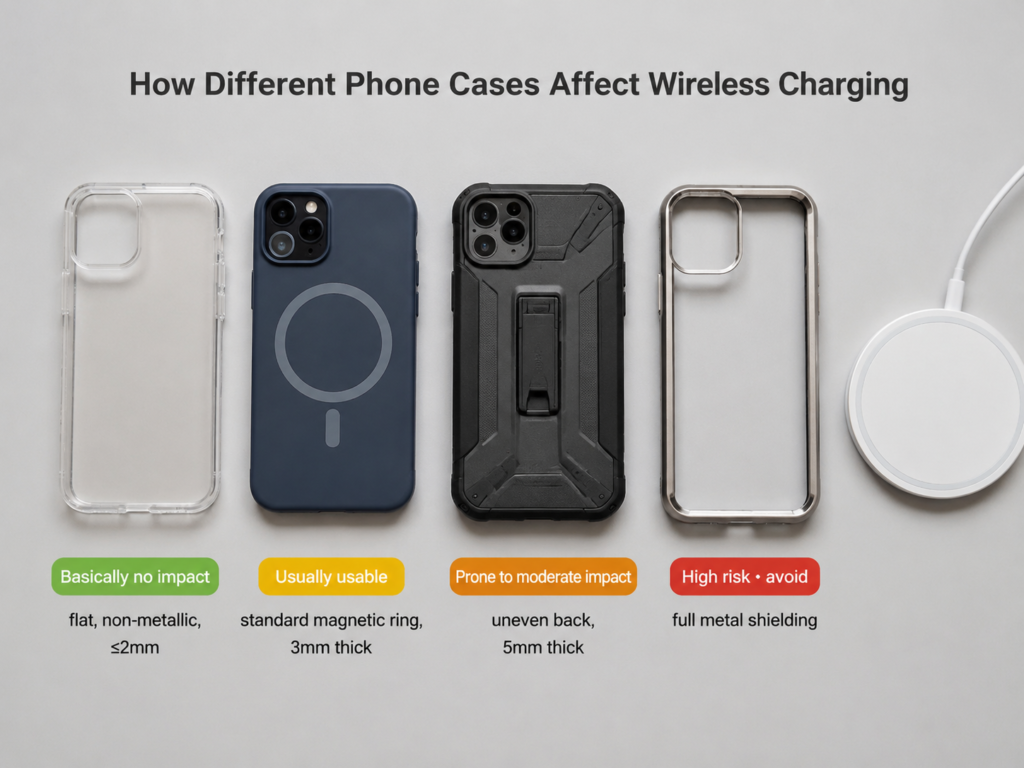
| Impact level | Common case types | Core features |
|---|---|---|
| Basically no impact | Thin plastic cases, silicone cases, TPU cases, PC cases | Flat back, no metal parts in the coil area, no cards sandwiched |
| Usually usable (may be slightly slower) | 3-4mm light anti-drop cases, cases with slightly thick but flat back, compliant MagSafe/Qi2 magnetic cases | Used with compatible wireless chargers, moderate overall thickness, accurate alignment |
| Prone to moderate impact | Thicker anti-drop cases, cases with plastic stands on the back, wallet cases with card slots, cases that cannot lie flat due to lens ring/stand | Either exceeds thickness standard, or has uneven back, easily leading to slow charging or disconnection |
| High risk (recommended to avoid) | All-metal cases, cases with large-area metal parts, cases with metal/magnetic patches in the coil area, no-name magnetic cases, wallet cases with multiple cards | Either directly interferes with the magnetic field, or seriously affects alignment and heat dissipation, most likely unable to charge normally |
You can also quickly judge based on the following 5 points:
- Feel the thickness: If the flat part on the back of the phone case is close to the thickness of several bank cards stacked together, you should focus on testing the stability of wireless charging; if the product’s nominal main back thickness exceeds about 3mm, the risk will increase significantly—this is just an empirical value, and actual measurement is still required for specifics.
- Check the position: If metal parts, magnets, stands, or card holders are near the middle of the back of the phone (the area where most phone wireless charging coils are located), the risk is very high; even if they are at the corners, they may affect heat dissipation or alignment, so you can’t let your guard down completely. Note that the specific position of the coil varies by model, it is recommended to refer to official instructions, magnetic positioning marks, or actual movement test results.
- Check flatness: Turn the phone upside down on a flat table, gently press the four corners to see if it wobbles. If it wobbles, it means there are protrusions on the back, and it may also be uneven when placed on the charging pad.
- Check the markings: If a case from a regular brand is marked with “supports Qi wireless charging”, “MagSafe compatible”, or “Qi2 compatible”, it is generally more reliable, but don’t just look at the markings—you still have to judge based on thickness, material, and whether there are additional accessories.
- Test actually: The most accurate way is to try it yourself. If the phone is significantly hotter, slower, more picky about position, or more prone to disconnection with the case than without, it means the case is indeed affecting charging.
Of course, this conclusion is not set in stone. Different phones have different coil positions, back cover materials, and temperature control strategies; different chargers have different coil sizes, power, and heat dissipation capabilities; even different ambient temperatures will affect the final performance. For example, a low-power charger with a large coil is much more tolerant of thick cases than a high-power fast charger with a small coil; a case that has no problem at room temperature may slow down in a car in summer.
Step-by-step troubleshooting: Confirm if it’s the phone case’s problem in 1 to 10 minutes
If you’re still not sure where the fault comes from, you can test according to the following methods, starting with the simplest 1-minute quick troubleshooting, then moving to a more accurate 10-minute test, step by step.
1-minute simplest comparison test method
This is the fastest judgment method, only three steps:
Step 1: Take off the phone case, place the bare phone in the same position on the same wireless charger, and see if it can charge normally, and whether the speed and heating are normal.
Step 2: Put on the phone case, test in the same position, and see if there is no response, slow charging, disconnection, or heating.
Step 3: If there is a problem with the case on, remove all attachments on the case—such as sandwiched bank cards, access control cards, installed metal stands, ring holders, magnetic patches—and test again.
If the bare phone is normal, the case-on is abnormal, and it gets better after removing the attachments, then it can basically be confirmed that the problem is with the phone case or the accessories on the case.
More reliable 10-minute test process
If the 1-minute test is still uncertain, or if you want to judge the degree of impact more accurately, you can do a more complete test, paying attention to controlling variables as much as possible:
First, try to test when the phone battery is in the middle range of 30%-70%, because when the battery is low, nearly full, the temperature is high, or the battery protection function is enabled, different brands and models may adopt different charging strategies, making the test results difficult to compare.
Then, observe each test group for 10-15 minutes. Don’t just look at whether there is a charging icon; record how much the battery level has increased, whether there is disconnection, and feel the degree of heating.
You can test these situations separately: bare phone, with the full case on, with the case on but cards/stands removed, switching to a low-power wireless charger, switching to another different wireless charger.
If the problem only occurs when using a certain charger, it may be that the charger itself has a too small coil, mismatched protocol, or insufficient power supply, and it’s not all the phone case’s fault.
Quickly locate the cause according to the fault symptom
You can also prioritize troubleshooting the most likely cause based on the fault symptom you encounter:
- No response at all: First check if there are metal parts blocking the coil area, if the case is too thick, if the phone is placed straight, then rule out the problem of insufficient power supply from the charging head and cable, or incompatible charger.
- Slow charging / false charging: First check the thickness of the case and how well it dissipates heat, then rule out protocol mismatch, too many high-power-consuming apps in the background, or the phone limiting power due to high temperature.
- Frequent disconnection / strict alignment requirements: First check if the magnetic ring is positioned accurately, if there are protrusions on the back of the case, if the lens ring lifts the phone up, then rule out the problem of car mount vibration or too small charger coil.
- Abnormal heating: First check if there are metal accessories, if there are cards sandwiched in, if the ambient temperature is too high, then rule out the problem of too high fast charging power or high load while charging.
“False faults” that are easily blamed on the phone case
There are several situations that look like the case’s problem, but actually have nothing to do with the case, don’t wrong a good case:
- Problems with the charger itself: For example, the wireless charging power is too low, the base coil is too small, heat dissipation is poor, the protocol is mismatched, or it has aged after being used for too long.
- Power supply problems: The charging head has insufficient power, the cable is broken, the interface is loose, resulting in the wireless charger not getting enough power at all, so of course it won’t charge well.
- Placement problems: The phone is not placed straight, there are foreign objects on the charging pad, the phone’s lens ring is too thick and tilts the phone up—these can be fixed by adjusting the position.
- Problems with the phone’s own state: For example, the system has a charging limit setting, the battery temperature is too high, the background power consumption is too large, or the speed is automatically reduced when the battery is almost full—these are all normal protection mechanisms and have nothing to do with the case.
Solutions and pit avoidance: From temporary adjustments to choosing the right case without stepping in pitfalls
Temporary adjustment methods without changing the case
If the problem only occurs occasionally, or you don’t want to change the case right away, you can try these temporary solutions:
- Realign: Slowly move the phone to find the position where charging is most stable and heating is lowest—usually the very center of the charging pad. If it is a magnetic wireless charger, confirm whether the phone is really attracted to the correct coil position. Sometimes it can stick even if it’s misaligned, but charging won’t work.
- Remove attachments: Take off metal stands, ring holders, magnetic patches, card holders, bank cards, access control cards, transportation cards, etc., especially those in the center of the back. Many times it will work normally after removing them. Note that bank cards, access control cards, transportation cards, etc. are not recommended to be sandwiched between the phone and the wireless charger: they will increase the coil spacing, and may also interfere with the magnetic field environment. Long-term or high-temperature conditions may also damage cards with magnetic stripes, chips, or induction coils. It is best to remove them before charging.
- Level the phone: If the back of the case is only slightly protruding, try adjusting the angle to make the phone lie as flat as possible on the charging pad. But don’t pad thick things to level it, that will further increase the coil distance, making it worse instead.
- Reduce power: If you often have disconnection or severe heating when using fast charging, try switching to a low-power wireless charger, or use normal Qi mode charging, sacrificing a little speed for stability.
- Optimize heat dissipation: When charging, turn off high-power-consuming background apps like games, navigation, and video recording. Place the phone in a ventilated and cool place, not on a quilt or in direct sunlight. When charging in the car in summer, try to turn on the air conditioner a little.
Several situations where it is recommended to change the case directly
If you encounter the following situations, adjustments won’t help, it is recommended to directly change to a suitable case:
- All-metal case, or a case with non-removable large-area metal parts in the center of the back.
- The main back of the case is particularly thick, and after adjusting the position, there are still frequent disconnections or obvious heating.
- The no-name magnetic case has inaccurate adsorption position, leading to slow charging, disconnection, and heating—this kind of case’s magnetism is counterproductive.
- The wallet case’s card slot is in the center of the back, and you usually have to use it with cards.
- With the same wireless charger, the bare phone works very stably, but it is always abnormal with the case on, even after removing all attachments.
Safety signals that must be stopped immediately
If the following situations occur, don’t hesitate, stop wireless charging immediately, otherwise there may be safety risks:
- The phone, phone case, sandwiched cards, or charging base are too hot to hold, and the temperature is still rising.
- The charging base’s indicator light frequently reports errors, the phone repeatedly starts and stops charging, and at the same time the heating is very obvious.
- The metal sheets, bank cards, access control cards, etc. inside the case are hot.
- There is a peculiar smell, the case or charger is deformed, there is abnormal noise, or the surface of the charger is abnormally hot.
When encountering these situations, first take off the phone, remove the case and the things sandwiched in between, wait for the temperature to drop, then switch to wired charging, or try again with compliant accessories, don’t force it to use.
To choose a phone case that does not interfere with wireless charging, remember 3 core standards
When choosing a case, don’t just look at the appearance. As long as you remember these three core standards, you can basically avoid 90% of the pitfalls:
- Appropriate thickness: Prioritize styles with a main back thickness within 2-3mm and no extra thickening in the coil area. Don’t choose heavy-duty anti-drop cases with an overly thick back.
- Safe material: Avoid styles with metal, magnetic conductive sheets, metal patches, metal stands, or unknown magnetic structures in the center of the back. Try to choose non-metallic materials such as ordinary plastic, silicone, TPU, and PC.
- Flat structure: Prioritize styles with a flat back, no card holder, no stand, no large protrusions in the wireless charging coil area. Don’t choose extra-thick lens protection rings either, otherwise they will lift the phone up.
If it is a regular brand and clearly marked as supporting Qi, Qi2, or MagSafe compatible, it will be more reliable, but don’t just look at the markings—it still has to meet the above three standards, otherwise even the biggest brand may have problems.
Case selection suggestions for different needs
Everyone has different needs for using their phone, you can choose according to your own situation:
- Only want stable wireless charging: Choose thin TPU, silicone, or PC cases with a flat back, no metal decoration, simple and easy to use.
- Want magnetic fast charging: Choose regular brand magnetic cases that meet MagSafe or Qi2 design, and match them with corresponding compatible chargers, otherwise the magnetism is just a decoration and fast charging won’t reach full speed.
- Need anti-drop: Choose anti-drop cases with cushioning at the four corners and reinforced frame but not overly thick back. Don’t choose the kind with a whole thick backplate—those are not only heavy, but also affect charging and heat dissipation.
- Want wallet function: Prioritize detachable card holders, or styles with card slots on the side of the phone that avoid the coil area. It is best to take out the cards before wireless charging.
- Frequently use car wireless charger: Prioritize cases with accurate magnetic ring position, flat back, and good heat dissipation. It’s best to try before buying, to see if it can align with the coil after being clipped on the car mount, and whether it wobbles.
Common case selection misconceptions
When choosing a case, avoid the following common misconceptions:
- Transparent cases definitely support wireless charging? Not necessarily. Some transparent cases have metal frames, metal decorative strips, or hidden magnetic patches, which will also affect charging.
- All magnetic cases support fast charging? Wrong. Magnetism only helps with alignment. Whether fast charging is possible depends on protocol compatibility, and if the magnetic ring is not positioned accurately, it will instead lead to disconnection and heating.
- Thick cases definitely don’t work, thin cases definitely work? Wrong. Material, whether there are metal parts, accurate alignment, and flatness are just as important as thickness. A thin metal case has a much greater impact than a thick silicone case.
- Official cases are the fastest on all wireless chargers? Wrong. For example, Apple’s official MagSafe case, when used on a normal Qi charger, can only reach normal Qi charging speed, and can’t reach full MagSafe power, because the protocol doesn’t match.
There are also several wrong practices that must never be done: don’t stick metal heat conduction sheets or magnetic iron sheets on the case randomly; don’t tear or modify the magnetic ring of official magnetic cases casually; don’t dig holes in the case yourself for wireless charging, which not only damages the structure of the case, but may also lead to more serious problems.
Final summary
Finally, a cause comparison table and 4 core judgment logics are sorted out for quick reference:
| Problem type | Typical symptoms | Key troubleshooting directions | Solution |
|---|---|---|---|
| Material problem | No response at all, heating, base error | Metal parts, conductive materials, magnetic patches | Remove accessories or replace the phone case |
| Thickness problem | Slow charging, disconnection, particularly strict alignment | Case back thickness, back protrusions | Change to a thin case or reduce charging power |
| Alignment problem | Charges when moved a little, disconnects when slightly offset | Magnetic ring position, stand, lens ring, car mount clamp | Realign or change to a flat case |
| Heat dissipation problem | Charges at first, then slows down or stops after a while | Ambient temperature, thick case, using while charging | Cool down, stop high load, change to a case with good heat dissipation |
4 core judgment logics:
- Under the same conditions, when the bare phone is normal and the case-on is abnormal, prioritize suspecting the phone case or accessories on the case
- Metal parts, cards, and magnetic patches on the case are the most common interference sources, you can remove them first for testing
- The thicker the case, the more uneven the back, and the worse the heat dissipation, the more likely it is to have slow charging and disconnection
- The core of magnetic cases is standard and alignment, not that being able to stick equals being able to fast charge
Actually, the relationship between wireless charging and phone cases is not that complicated. The core is “don’t block the magnetic field, don’t be too far away, don’t trap the heat”. You don’t have to give up all nice phone cases for wireless charging. As long as you choose the right one, you can have both good looks and convenience.