
You just unboxed a Qi2 wireless charging pad, set your phone on it — it clicks into place magnetically, but after waiting ages, the battery level hasn’t gone up at all? Or it charges for two minutes then disconnects, with repeated notification sounds that drive you crazy? When Qi2 charging malfunctions, many people’s first reaction is “I bought a fake product,” but in reality, the vast majority of minor issues can be fixed on your own in 5 minutes, as long as you first figure out which situations are safe to test and which require you to stop immediately.
First Determine If It Is a Dangerous Fault: Do Not Continue Testing in These Situations
Wireless charging involves energy transmission. When encountering abnormal situations, prioritizing safety risk checks is more important than directly testing functionality.
Situations That Require Immediate Discontinuation of Use
If any of the following situations occur, immediately stop all testing operations, do not repeatedly plug or unplug or attempt to recharge: the charging pad, phone, or charging cable has an unusual odor, smokes, has a deformed casing, is obviously hot to the touch, or has a bulging surface; the charging pad has signs of liquid ingress, cracking from a fall, loose ports, or the USB-C cable has damaged insulation, blackening, or a deformed plug; there are metal or easily conductive items such as metal sheets, coins, magnetic card holders, keys, or metal brackets sandwiched between the back of the phone and the surface of the charging pad.
Handling method: Immediately disconnect the power supply, remove the device, place it in a cool, ventilated place to cool down before performing an appearance inspection; do not disassemble the charging pad or phone on your own to avoid secondary damage or safety risks.
Safety Prerequisites for Continued Troubleshooting
It is only suitable to continue troubleshooting on your own if all of the following conditions are met simultaneously: the device only exhibits phenomena such as no response, charging disconnection, slow charging, or protective charging stop after heating, with no abnormalities such as unusual odor, deformation, or damage; use original or reliable brand adapters, cables, and charging pads, and avoid using unbranded products of unknown origin; the testing environment is a cool, dry hard desktop, avoiding beds, under quilts, direct sunlight, or high-temperature areas inside cars.
First Match Your Situation: What Type of Qi2 Fault Do You Have?
Qi2 charging problems are not just limited to “not charging at all.” Different symptoms correspond to completely different causes. Finding your specific situation first can save you a lot of unnecessary detours.
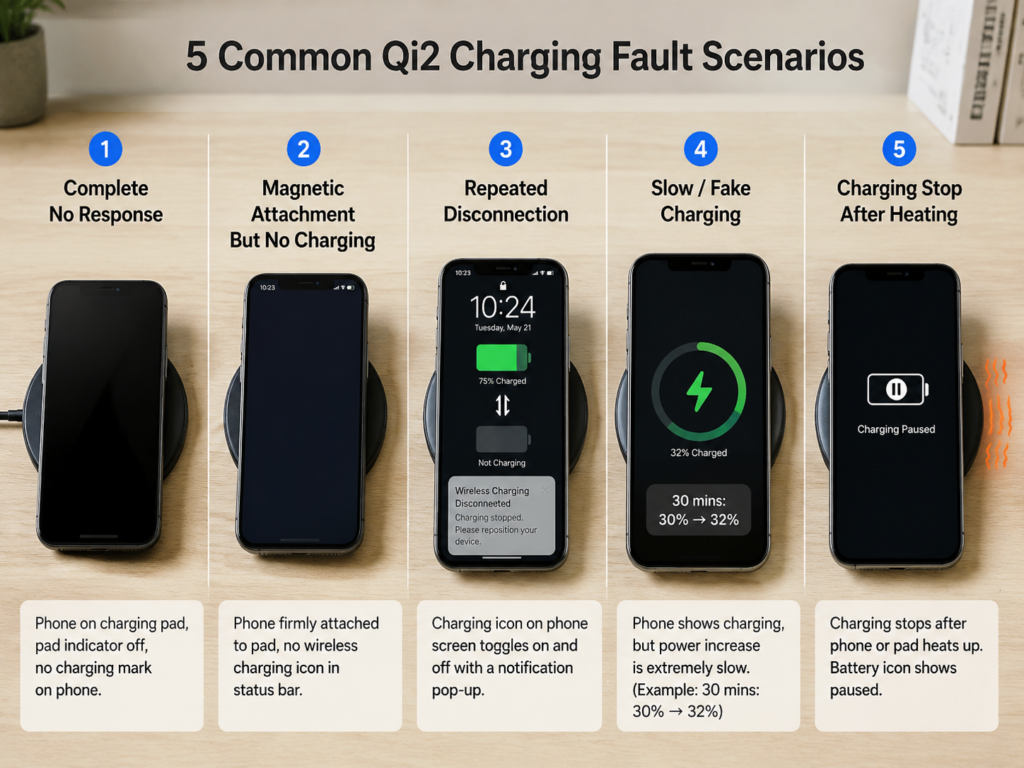
1. Complete No Response Type
When you place your phone on the charging pad, there is no charging icon, charging animation, notification sound, or vibration, and the charging pad’s indicator light shows no change at all, as if it is not plugged in. This situation is mostly related to a broken power supply link, the charging pad not starting at all, or an abnormality in the phone’s wireless charging module.
2. Magnetic Attachment But No Charging Type
The phone can be firmly attached to the charging pad magnetically, but there is no wireless charging indicator in the system. Many people mistakenly think that “being attached magnetically means it’s charging,” but that’s not the case — the magnet is only responsible for alignment and fixation. Whether it can charge depends on whether the phone and charging pad have completed the protocol handshake and can transmit energy normally. The core of judgment is to check whether the phone system displays a wireless charging indicator, and whether the charging pad’s indicator light has entered the normal charging state (such as a steady green light, refer to the manual for specifics). Common causes of this situation are fake Qi2 charging pads, misaligned magnetic rings on phone cases, the device itself not supporting Qi2, or insufficient power input.
3. Repeated Disconnection Type
It charges when first placed on the pad, but stops after a few seconds to a few minutes. Notification sounds, vibrations, or the charging icon repeatedly appear and disappear, and the charging pad’s indicator light may flash, turn red, or enter a protection state. Different brands have different light effect definitions, so refer to the product manual for specifics. This situation is usually related to triggered foreign object detection, misaligned coils, unstable power supply, temperature protection, or firmware compatibility issues.
4. Slow Charging / Fake Charging Type
The phone shows it is charging, but after half an hour the battery level hasn’t increased much, or even decreases — don’t rush to say the charging pad is broken. In many cases, this is normal. For example, when the battery level is above 80%, when playing games/using navigation/turning on a hotspot while charging, or when the phone heats up due to high background load, a decrease in charging speed is normal and not a fault.
If you want to accurately determine whether it is truly slow charging, you can test with the bare phone, screen locked, at room temperature, paired with a reliable 20W+ PD adapter, and leave it undisturbed for 10 to 15 minutes before checking the battery level change, to eliminate interfering factors. Real slow charging / fake charging is usually caused by failed power negotiation, only running at low ordinary Qi power, insufficient adapters or cables, or restrictions from smart charging strategies.
5. Charging Stop After Heating Type
Everything is normal at the start of charging. After 10 to 20 minutes, the phone or charging pad gets hot, then charging stops automatically or the speed slows down significantly. After cooling down, placing it back on the pad restores normal charging. The vast majority of these cases are the device’s protection mechanism at work, not necessarily a hardware failure. Common causes are too high ambient temperature, too thick phone case, high-load use while charging, poor heat dissipation, or the charging pad itself having low efficiency and insufficient certification.
| Fault Type | First Priority Check |
|---|---|
| Complete no response | Whether the power port is plugged in tightly, whether the charging pad is powered on |
| Magnetic attachment but no charging | Whether the phone displays a wireless charging indicator, whether the device supports Qi2 |
| Repeated disconnection | Whether there are metal foreign objects, whether the coils are aligned, whether the temperature is too high |
| Slow charging / fake charging | Whether the battery level is in the 20%-70% range, whether the test is done with the screen locked and bare phone |
| Charging stop after heating | Whether the ambient temperature is too high, whether high-load use is happening while charging |
First Understand Why Qi2 Fails to Charge
Many people, when first exposed to Qi2, equate “magnetic attachment” with “Qi2,” and can’t figure out why the phone is attached but not charging. Let’s clarify the basic logic here first, so troubleshooting later will be smoother.
Qi2 is a new generation of wireless charging standard launched by the WPC (Wireless Power Consortium). The biggest difference from the older Qi standard is the addition of a magnetic alignment design, which makes it easier for the charging coil inside the phone and the coil of the charging pad to align, eliminating the need to repeatedly move the phone to find the charging area. Currently, the maximum target power of mainstream Qi2 devices on the market is 15W, but note that this is peak power, not constant throughout the charging process — the actual charging power will be adjusted at any time according to the phone’s battery level, body temperature, and system charging strategy, and will not always run at full 15W. In the future, Qi2 may launch higher-power versions. Whether you can use them depends on the certification specifications of both your phone and charging pad; it’s not that all products labeled “Qi2” will support them.
Let’s first explain a few common terms that will be used later in plain language to avoid confusion: the industry organization that develops wireless charging standards such as Qi and Qi2 is called the WPC, or Wireless Power Consortium. The Qi certification we often refer to means that the product has passed the WPC’s compatibility and safety tests, but note that passing certification does not mean that all device combinations can run at full speed. The rule in Qi2 that specifically governs magnetic alignment and standardized energy transmission is called MPP, or Magnetic Power Profile, which is also one of the core differences between Qi2 and the older Qi standard. In addition, you will often see the term FOD, which is actually the foreign object detection function of the charging pad. If there are items that may heat up, such as coins or metal sheets, sandwiched in between, it will automatically stop charging or disconnect to avoid danger. As for PD and QC, these are the two most common fast charging input protocols. For a Qi2 charging pad to stably output 15W, the adapter and cable must provide sufficient input power.
In fact, Qi2 charging is a step-by-step process. If a problem occurs at any step, the corresponding fault will appear, which you can match against: The first step is magnetic attachment and coil alignment. If this step is not done well, the phone may not attach, attach crookedly, or attach but not charge at all. The second step is identification and handshake between the device and the charging pad. If the handshake fails, there will either be no response at all, or a prompt that “this accessory is not supported.” The third step is power negotiation. If the two sides cannot reach an agreement, they can only charge at low power, which manifests as extremely slow charging. The fourth step is continuous energy transmission and safety monitoring. At this stage, if temperature protection or foreign object detection is triggered, charging will disconnect, stop after heating, or the indicator light will give an alarm.
In summary, for Qi2 to charge normally, five conditions must be met simultaneously: the phone itself supports Qi2 or the official clearly states that it can support Qi2 after a system upgrade; the charging pad is Qi2 certified and supports the corresponding power level; the adapter, cable, and socket can meet the input requirements of the charging pad; the phone is flat against the charging pad without interference from thick cases, metal foreign objects, or misaligned magnetic rings; plus the ambient temperature and system charging strategy allow charging.
5-Minute Quick Self-Check: Solve 80% of Minor Problems First
After understanding the basic logic, spend 5 minutes doing these steps first. The vast majority of minor problems can be solved directly without further in-depth investigation.
Step 1: First Confirm Whether It Is Really Not Charging
Don’t just judge by “it’s attached magnetically” or “there’s no notification sound.” Check two places first: On the phone side, check if the battery icon in the status bar has a wireless charging indicator, if there is a charging animation on the lock screen, or go to the battery settings page to see if there is a “wireless charging” prompt. On the charging pad side, check if the indicator light is on, if it has turned to the charging state color, or if it is flashing or turning red. Different brands have different light effect definitions, so you can first confirm against the manual. After confirmation, combined with the previous fault classification, first note which type you have, corresponding to the troubleshooting direction later.
Step 2: Reset the Simplest Power Supply Link
Many times, the failure to charge is because a certain port is not plugged in tightly, or the power supply port has insufficient power: Unplug all ports of the wall socket, adapter, USB-C cable, and charging pad, then plug them all the way back in to ensure there is no looseness. Test with a different wall socket; do not use USB ports on power strips, computer USB ports, or car USB ports, as most of these have insufficient power to drive Qi2. Find a reliable 20W+ PD adapter paired with a qualified C-to-C cable for a baseline test to rule out problems with the adapter and cable. If the phone is completely dead and won’t turn on, first charge it with a wired charger for 10 to 15 minutes to activate the battery, then try wireless charging — a completely dead phone may not be able to start the wireless charging module immediately.
Step 3: Remove All Potentially Interfering Accessories
Phone cases, card holders, and the like are the most common sources of interference. Remove all of them first: Take off the phone case, magnetic card holder, bank cards, ring holders, metal brackets, and back-adhesive magnetic rings, leave none of them. Wipe dust, oil, and residual glue off the back of the phone and the surface of the charging pad with a clean cloth; these things can also affect charging. Place the bare phone centered on the charging pad, gently push it to confirm the magnetic attachment is stable, then lock the screen and leave it undisturbed for 5 minutes, then check if it is charging.
Step 4: Rule Out Temporary System Issues
Sometimes it’s a temporary abnormality in the phone system, not a hardware failure: First restart the phone; many temporary system freezes and abnormal wireless charging services can be fixed with a restart. Temporarily turn off extreme power saving mode, third-party power saving apps, and device management policies installed by enterprises or schools, all of which may restrict charging. Check if there is a system update, especially for newly released models or newly purchased charging pads; sometimes a system update can solve compatibility issues.
Compatibility Check: Do Your Phone and Charging Pad Really Support Qi2?
If the quick self-check doesn’t work, then you must first confirm a core issue: do the phone and charging pad you have really support Qi2? Many people don’t pay attention when buying, and bring home ordinary magnetic chargers thinking they are Qi2, which of course don’t work well.
How to Tell If Your Phone Supports Qi2?
Don’t just listen to the seller’s verbal promotion. Check official information yourself; you must clearly see terms like “Qi2”, “Qi2 wireless charging”, or “Qi2 certified”. Just writing “supports wireless charging” does not count. Some phones require a system upgrade to support Qi2. For example, some iPhone 13/14 series models need to be upgraded to iOS 17.2 or above to support Qi2, subject to Apple’s official instructions. For Android models, pay attention to distinguishing between different statements such as “Qi2 certified”, “Qi2 Ready”, and “alignment achieved via magnetic case”. These expressions are not equivalent to clear Qi2 certification; some may only assist alignment through a magnetic case, or reserve space for future system upgrade compatibility. If necessary, check the brand’s official specification page, compatibility list, and system version requirements. The same phone model may have configuration differences in different regions and versions, subject to the markings on the local official website and product packaging.
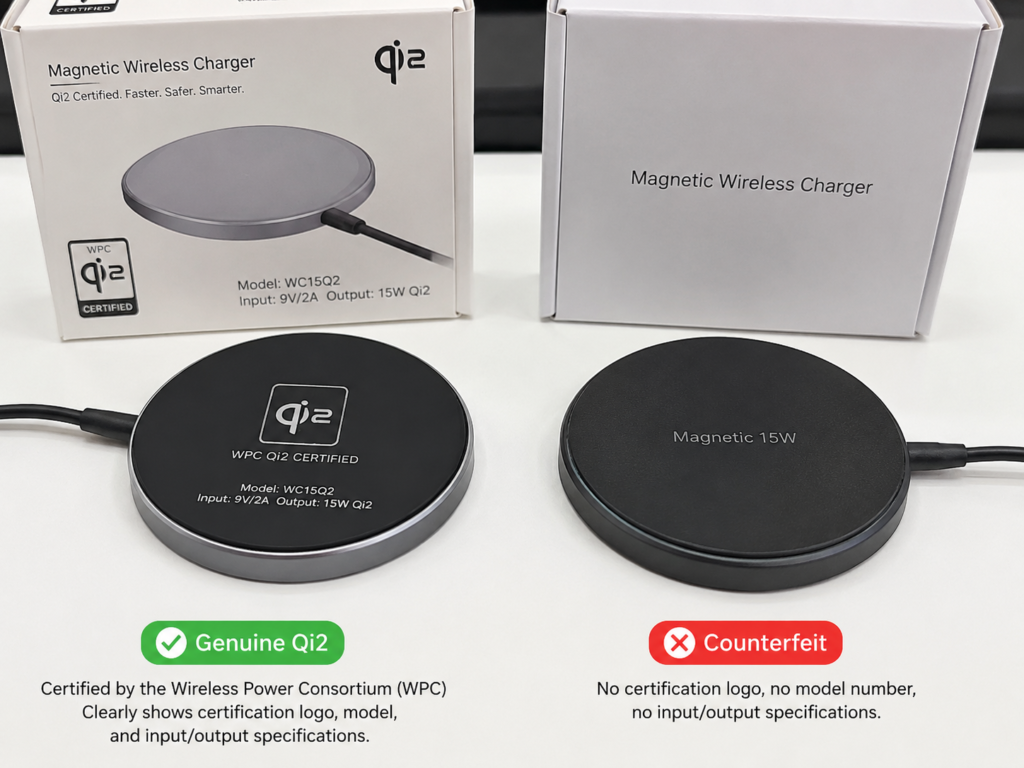
How to Tell If a Charging Pad Is Genuine Qi2?
There are many promotional tricks for fake Qi2, don’t just look at the words “magnetic 15W”: First check if there is a WPC Qi2 certification mark and a clear product model on the packaging, the charging pad itself, and the manual. You can check the model on the brand’s official website or the WPC’s official certification database. “Magnetic 15W”, “MagSafe compatible”, and “Qi compatible” are all not equivalent to Qi2 certification. Be careful of different versions with similar appearances from the same brand: Many brands sell Qi2 versions, ordinary magnetic versions, and MagSafe compatible versions at the same time. They look similar, but the protocols and prices are very different. Check the model clearly when buying. Products with prices significantly lower than mainstream qualified products, and lacking certification numbers, clear input and output parameters, and over-temperature protection instructions, have higher risks and are not recommended as Qi2 baseline testing devices.
The Boundaries Between Qi2, Qi1, MagSafe, and Proprietary Fast Charging: Stop Confusing Them
Many compatibility problems arise from not understanding the differences between these. Let’s clarify them all at once:
Qi2 charging pad charging Qi1 devices: Usually works according to ordinary Qi capabilities, does not necessarily support magnetic alignment, and does not necessarily reach 15W power, depending on the maximum supported level of the Qi1 device.
Qi2 device placed on a Qi1 charging pad: Usually can only work according to Qi1 ordinary wireless charging capabilities, which may be 5W, 7.5W, 10W, or EPP levels. The upper power limit is determined by the lower of the two sides’ specifications.
MagSafe compatible ≠ Qi2 certified: MagSafe is Apple’s proprietary solution. Many MagSafe accessories can charge Qi2 phones, but they are not necessarily Qi2 certified, and there is no guarantee that they can run at full Qi2 15W power.
Manufacturer’s proprietary wireless fast charging ≠ Qi2: Some Android brands’ proprietary wireless fast charging can reach 50W or 80W, with much higher power than Qi2, but this is not the Qi2 standard. It can only be used with the original charging pad and adapter. When placed on a third-party Qi2 charging pad, it can only work at Qi2 levels if the phone itself also supports Qi2 and is compatible with the charging pad; otherwise, it may fall back to ordinary Qi/EPP or lower power.
Older Qi1 charging pads cannot be upgraded to genuine Qi2: Because Qi2 requires a magnetic ring, a specific coil layout, and WPC certification, older hardware does not support it, and upgrading the firmware alone is useless.
Compatibility Boundaries of Phone Cases and Magnetic Accessories
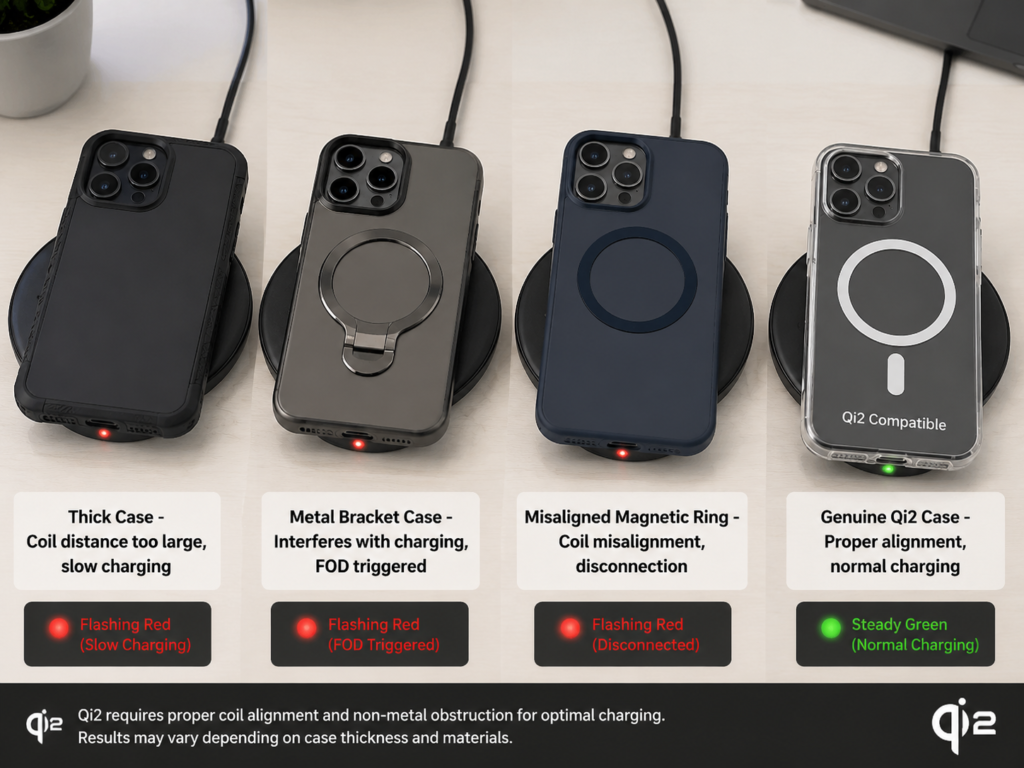
Phone cases may seem insignificant, but they are the culprit of many Qi2 faults: Thick cases, metal cases, and cases with metal brackets either increase the distance between the coils or directly interfere with wireless charging, easily leading to slow charging, disconnection, or failure to charge. Ordinary magnetic phone cases, even if they can attach, may have misaligned magnetic rings, leading to coil misalignment, resulting in slow charging, heating, and disconnection. Prioritize official phone cases or those clearly marked “Qi2 compatible” or “MagSafe compatible”, which have more accurate magnetic ring positions. When troubleshooting, be sure to test with a bare phone first. After confirming that the bare phone can charge normally, then test with the case on to determine if the case is the problem.
In-Depth Troubleshooting: Locate the Problem in Order from Easiest to Hardest
If there are no compatibility issues and the quick self-check doesn’t work, then follow the steps below in order, starting with the easiest-to-solve power supply problems, moving to the most complex firmware compatibility issues, and gradually narrowing down the scope.
1. Power Supply Link Not Meeting Requirements
Qi2 has higher power supply requirements than ordinary wireless charging. Many cases of slow charging and disconnection are due to insufficient power supply: First read the charging pad’s manual to confirm the input requirements: Common 15W Qi2 charging pads generally require 9V level input, and the adapter power requirement is 18W, 20W, or higher, subject to the manual. You can’t just grab any fast charger. Check the adapter: Confirm that the adapter supports the USB-PD protocol, or the QC level required by the charging pad. Don’t just look at “maximum power 65W” and think it’s enough — some multi-port chargers have high total power, but the PD level of a single C port is insufficient, so they still can’t drive it. Check the cable: Prioritize C-to-C cables from reliable brands. Cables that are too long, low-spec, have poor contact, or have no clear charging capability marking are more prone to voltage drop and unstable power supply. For baseline testing, prioritize short, qualified C-to-C cables. Avoid these power supply pitfalls: Computer USB ports, monitor USB ports, USB ports on cheap power strips, and multi-port chargers with all ports fully occupied may all have insufficient power supply, leading to Qi2 disconnection or speed reduction. Judgment method: If charging becomes normal after replacing with a reliable 20W+ PD adapter and short cable, then the original power supply link was basically insufficient.
2. Physical Alignment and Foreign Object Interference
Even with magnetic attachment, misalignment can occur, especially when using third-party accessories: If the bare phone can charge but cannot charge with the case on, first suspect that the phone case is too thick, the magnetic ring is misaligned, or there is a metal structure inside the case (such as a hidden bracket or metal patch). If manual position adjustment allows charging but automatic magnetic attachment does not, then the charging pad’s magnetic ring may be offset, or the back-adhesive magnetic ring attached to the phone is not aligned with the internal coil of the phone. If the phone’s camera module is particularly large, causing the back of the phone to not lie flat on the charging pad, the coil distance becomes longer, which easily leads to slow charging, heating, and disconnection. Another common situation is triggered FOD foreign object detection: If there are items such as coins, bank card magnetic strips, metal patches, or keys sandwiched in between, the charging pad will directly stop charging or disconnect when detected, making it look broken. Verification method: Test with the bare phone, without any accessories, placed flat on a hard desktop. If it works normally, add back accessories such as the phone case and card holder one by one to find out which one is the problem.
3. Temperature, Environment, and Usage Habits
Wireless charging is very sensitive to temperature. Many times, failure to charge is the protection mechanism at work: High temperature protection: High ambient temperature in summer, direct sunlight, exposure to the sun in a car, or poor heat dissipation when placed on a bed or under a quilt will all increase the temperature of the phone and charging pad, triggering protection, reducing speed or stopping charging. This is normal and not a fault. Low temperature impact: If in an extremely low temperature environment below zero degrees, the battery will actively restrict charging, and will resume when the temperature rises to the normal range, which is also normal protection. High-load scenarios: Playing large games, using navigation, shooting 4K videos, or turning on a hotspot while charging means the phone itself consumes a lot of power, which may be close to or even exceed the input power of the wireless charger, making it look like “not charging” or “the battery is draining while charging”. This is also not a problem with the charging pad. High battery level range: When the battery level reaches 80% to 100%, the system will actively reduce the charging speed, or even pause charging, to protect the battery. Slow charging at this stage is normal and cannot be used to judge that the charging pad is broken. Verification method: Remove the phone case, lock the screen and leave it undisturbed, test on a hard desktop at room temperature for 10 to 15 minutes. If it returns to normal, it means the problem is with the environment or usage habits.
4. Software, System, and Charging Strategies
Sometimes the problem lies in software settings, not hardware: First check the wireless charging switch: Some Android models have independent wireless charging switches, reverse wireless charging switches, and even wireless fast charging switches. If accidentally turned off, charging will not work. Search for “wireless charging” in settings to find it. Check smart charging strategies: Functions such as “optimized battery charging”, “nighttime charging”, and “pause at 80% charge” are all designed to protect the battery, and are not Qi2 faults. Just turn them off or wait for them to resume automatically. Turn off temporary restrictions: Extreme power saving mode, third-party power saving apps, and enterprise or school device management policies may all limit the power of wireless charging or turn it off directly. Try turning them off temporarily. Upgrade the system: Whether it’s the phone or the charging pad, new standards, new models, and new accessory combinations may require system updates to fix handshake and compatibility issues. Restart the device: Although this is cliché, it really can solve many temporary system freezes and abnormal wireless charging service problems. Don’t skip it.
5. Firmware Compatibility and Product Batch Issues
If only a specific combination of phone and charging pad has problems, and everything else works normally, then it is most likely a firmware compatibility issue: Charging pad firmware is too old: If the charging pad was bought when Qi2 first came out, and the phone is a newly released Qi2 model, the old firmware of the charging pad may be incompatible with the new phone, manifesting as failure to charge or frequent disconnection. Phone system is too old: The phone’s system version is too low, which may prevent the Qi2 function from being enabled, or prevent correct identification of the new charging pad. Not all Qi2 charging pads can have their firmware upgraded: Some require downloading the brand’s exclusive app to upgrade, some require sending back to after-sales for upgrade, and some do not support firmware upgrade at all. Pay attention when buying. Typical characteristics: The same phone works normally with other Qi2 charging pads; the same charging pad works normally when charging other Qi2 phones. Only this pair has problems, which is basically a compatibility issue. Handling suggestions: Check the brand’s official website for relevant compatibility announcements, upgrade the charging pad’s firmware (if supported), or contact customer service to confirm the compatibility list.
Special Scenario Troubleshooting: Different Qi2 Devices Have Different Troubleshooting Priorities
The above troubleshooting is universal, but if you use special products such as stand mounts, car chargers, or all-in-one charging stations, there are some additional troubleshooting priorities.
Desktop Flat Charging Pad
First confirm whether the phone is completely flat against the charging pad, whether it is placed in the correct charging area, and whether there are small metal debris on the surface. If the charging pad is relatively small, or the phone’s camera protrudes too much, causing the phone to be tilted or pressed against the edge when placed, it will cause coil misalignment, leading to failure to charge or disconnection.
Vertical Qi2 Charging Stand
First check if the phone has slid down, and whether the magnetic position stops the coil at the correct height — some stands have magnetic positions that are too high or too low, which will cause the coils to be misaligned. Landscape and portrait orientations may correspond to different coil positions. Some vertical stands can only charge stably in portrait orientation, and will be slow or disconnect in landscape. A large camera module or thick case will make the back of the phone hang in the air, increasing the coil distance, which easily leads to slow charging, heating, and disconnection.
Car Qi2 Wireless Charger
Prioritize checking the power supply: Many cars’ original USB ports are only suitable for data transmission or slow phone charging, with power that is simply not enough for Qi2 requirements. It is best to use a cigarette lighter to PD adapter for power supply. High temperature inside the car is a major issue: In summer, when exposed to direct sunlight and the air conditioner is not on, the temperature inside the car is very high, which easily triggers temperature protection, stopping charging after a while. Driving vibration also has an impact: If the magnetic attraction is insufficient, or the stand is not clamped stably, vibration while driving will cause the phone to shift, leading to repeated disconnection.
All-in-One Charging Station
First check if the total input power is sufficient: If charging a phone, watch, and earbuds at the same time, the total power must be sufficient, otherwise the phone’s power will be divided and become slower. Different charging areas cannot be swapped randomly: The charging areas for watches and earbuds have very small coils, which cannot stably charge a phone. Don’t put the phone in the watch charging area. When multiple devices are charging at the same time, the phone’s power will be actively reduced. This is normal and not a fault.
Earbud Cases and Small Devices
Most wireless earbud cases only support ordinary Qi wireless charging, or the manufacturer’s own charging solution, and do not necessarily support Qi2 magnetic charging. It is normal for there to be no response when placed on the pad. Small devices have very small coils, and a slight misalignment may result in no response. They must be aligned with the charging area and cannot rely on automatic magnetic alignment. If unsure, check the official specifications of the earbud case to confirm whether it supports Qi, Qi2, or can only use the original charger.
Cross-Verification: Locate the Exact Problem with Minimal Variables
If the previous troubleshooting hasn’t found the cause, then use the cross-test method to minimize variables and accurately find out whether the problem is with the phone, charging pad, cable, or environment.
Establish a Standard Environment Before Testing
To eliminate interference, unify the conditions during testing: The phone is bare, no case, no cards sandwiched, no exposed magnetic rings attached. Use a reliable 20W+ PD adapter paired with a short, qualified C-to-C cable. Place on a cool hard desktop, with the phone locked and undisturbed. Keep the phone’s battery level between 20% and 70%, avoiding smart speed reduction at high battery levels and battery protection at low battery levels.
Do Three Sets of Cross-Tests to Locate the Problem
The first set is the same phone, replaced with another confirmed normal Qi2 charging pad: If it still doesn’t work after replacement, the problem is most likely on the phone side; if it returns to normal after replacement, it means the problem is with the original charging pad or power supply.
The second set is the same charging pad, replaced with another confirmed Qi2-supporting phone: If it still doesn’t work after replacing the phone, the problem is most likely with the charging pad or power supply; if it works normally after replacement, it means the problem is with the original phone.
The third set is the same phone and charging pad, with the adapter, cable, and socket replaced: If it returns to normal after replacing the power supply kit, it means the problem is with the power supply link; if it still doesn’t work, then it is a compatibility problem between the phone and the charging pad, or one of them has a hardware fault.
Quick Result Matching
Problem follows the phone: If it still doesn’t work after replacing the charging pad, check the phone’s system settings, battery health, whether the back has been dropped, and whether the wireless charging module is broken. If necessary, contact the phone brand’s after-sales service for testing.
Problem follows the charging pad: If it still doesn’t work after replacing the phone, check the charging pad’s Qi2 certification, input requirements, firmware version, and heat dissipation. If necessary, contact the charging pad brand’s after-sales service.
Problem follows the power supply: If it gets better after replacing the adapter and cable, then just replace with a set of PD/QC fast charging kit that meets the charging pad’s input requirements.
Problem only occurs when wearing a case or in specific scenarios: Then there’s no need to suspect hardware. Just adjust the phone case, card holder, magnetic ring, or improve the ambient temperature and change usage habits.
Fake Qi2 Charging Pad Identification: Why Does It Attach But Not Work Well?
If the charging pad you bought can attach magnetically, but always has slow charging, disconnection, and heating, then you most likely bought an uncertified Qi2 or low-quality magnetic charger.
Common Promotional Traps, Don’t Be Fooled
Many merchants mislead consumers with word games. These statements are not equivalent to genuine Qi2: “Magnetic 15W” only means it has magnetism and can reach up to 15W, but does not say it has passed Qi2 certification. It may be a proprietary protocol, only reaching 15W with specific phones, and only slow charging with other phones. “MagSafe compatible” only means it can attach to MagSafe-supporting phones, does not mean it has passed Qi2 certification, and does not support Qi2’s standard power. “Qi compatible” only indicates support for ordinary Qi wireless charging, has nothing to do with Qi2, and the magnetism may be added by the manufacturer on its own. “Up to 15W” is only peak power, which may only be achieved by a certain phone model, and the maintenance time is short, not 15W throughout the process.
Typical Characteristics of Uncertified / Low-Quality Magnetic Chargers
If your charging pad has the following situations, it is recommended to further verify its certification qualifications: Weak magnetic attraction, unstable position, charging disconnects with a slight touch or vibration. Charging speed is significantly slower than the official nominal value, heating is particularly obvious, and the phone gets seriously hot after half an hour of charging. The indicator light frequently shows abnormal states (such as irregular flashing, steady red light). First confirm the light effect definition against the manual; if the manual indicates that this state represents a fault, or it is accompanied by disconnection, overheating, inability to recognize devices, etc., there may be quality problems. Specific phones cannot be recognized at all, or can only charge slowly at the low power level of ordinary Qi. After several months of use, situations such as casing deformation, loose ports, and severe cable heating occur.
Purchase and Replacement Suggestions
If it is confirmed that the product does not meet requirements, it is recommended to replace it as soon as possible. Not only is the experience poor, but there may also be safety hazards: Prioritize products with clear WPC Qi2 certification marks, clear models, and clear input and output parameters. Before buying, check the brand’s official website for the compatibility list and whether there is a firmware upgrade channel. Don’t just use “low price, magnetism, 15W” as purchasing criteria. Qi2 certification and hardware have fixed costs. Products with obviously abnormal prices and lacking certification and parameter descriptions have higher risks. When buying an all-in-one charging station, look at the total power and the individual power of each charging position, not just the total wattage — total power of 65W but only 10W for the phone position still can’t run full Qi2.
Final Decision: Fix It Yourself, Replace Accessories, or Contact After-Sales Service?
After troubleshooting to this point, you should probably know where the problem is. Next is how to handle it.
Situations That Can Be Resolved On Your Own
If it is the following situations, you don’t need to contact after-sales service, just adjust on your own: Returns to normal after replacing the adapter, cable, and socket: Just directly replace with a set of fast charging power supply kit that meets the charging pad’s input requirements. Normal with bare phone, abnormal with case: Replace with a phone case clearly marked Qi2/MagSafe compatible, and remove metal card holders and misaligned back-adhesive magnetic rings. Recovers after cooling: Improve heat dissipation conditions, don’t use in high-temperature environments, don’t use high-load apps while charging, and don’t use too thick a case. Recovers after system update or restart: Just keep the phone system and charging pad firmware updated regularly, it’s not a hardware problem.
Situations Where Replacing Accessories Is Recommended
If it is the following situations, replacing accessories can solve it, no need for repair: The charging pad has no Qi2 certification, with long-term slow charging, disconnection, and obvious heating: Directly replace with a regular Qi2-certified charging pad, the experience will be much better. The adapter or cable does not meet the charging pad’s input requirements: Replace with a reliable PD fast charging kit, no need to replace the charging pad. Phone cases, stands, and card holders always cause coil misalignment or trigger foreign object detection: Just replace with compatible accessories. The total power of the all-in-one charging station is insufficient to meet the needs of charging multiple devices at the same time: Either reduce the number of devices charging at the same time, or replace with a product with higher total power.
Situations Requiring After-Sales Testing
If the following situations occur, don’t tinker with it yourself, contact after-sales service directly: The phone cannot charge wirelessly on multiple reliable Qi2 charging pads, most likely the phone’s wireless charging module is abnormal. The charging pad has no response on multiple Qi2 phones, or repeatedly enters protection state, most likely it is a hardware problem with the charging pad. Wireless charging faults only start after a fall, liquid ingress, or replacement of the phone’s back panel, which may be due to internal hardware displacement or damage; repeated abnormal heating, unusual odor, casing deformation, loose ports, or the device has experienced liquid ingress, cracking from a fall, or damaged cables — you should immediately stop using it and contact after-sales service, do not disassemble it on your own.
Final Summary
Don’t panic when encountering Qi2 charging malfunctions. First do a safety check, then match the fault type, start with the simplest quick self-check, and gradually narrow down the scope. By now, you should be able to do these things: Distinguish the 5 types of faults: complete no response, magnetic attachment but no charging, repeated disconnection, slow charging, and charging stop after heating. Understand that Qi2 is not “just having a magnet is enough”, it requires the device, charging pad, power supply, alignment, and environment to all meet requirements. Be able to distinguish the compatibility boundaries between Qi2, Qi1, MagSafe, and manufacturer proprietary fast charging. Be able to locate the source of the problem using a bare phone, reliable power supply, and cross-testing. And be able to judge when to handle it yourself, when to replace accessories, and when to contact after-sales service.