
If you have ever bought a USB-C cable, you must have seen numbers like 3A, 5A, 60W, 100W or even 240W printed on the packaging, which can be confusing: is bigger always better? Do I need a 5A cable to charge my phone? Why is charging still slow after switching to a 5A cable?
Many merchants deliberately confuse concepts — they sell ordinary 5A cables as 240W ones, and market braided outer jackets as a high-power selling point. It is easy to waste money on the wrong product, or even encounter safety hazards. This article starts with the most basic definitions, covers how to identify the cables you have, how to choose cables for different scenarios, and troubleshooting methods for slow charging. After reading it, you will be able to choose the right USB-C cable on your own.
First Things First for Beginners: What 3A/5A Means, and What We Are Comparing
Plain-Language Explanation of 3A/5A
3A and 5A refer to the maximum current that a USB-C cable can carry under compliant conditions, measured in amperes (A), and are parameters of power delivery capability. They are not equal to the power of the charger, nor to the actual power received by the device, and have no direct relation to data transmission, video output, or Thunderbolt capabilities.
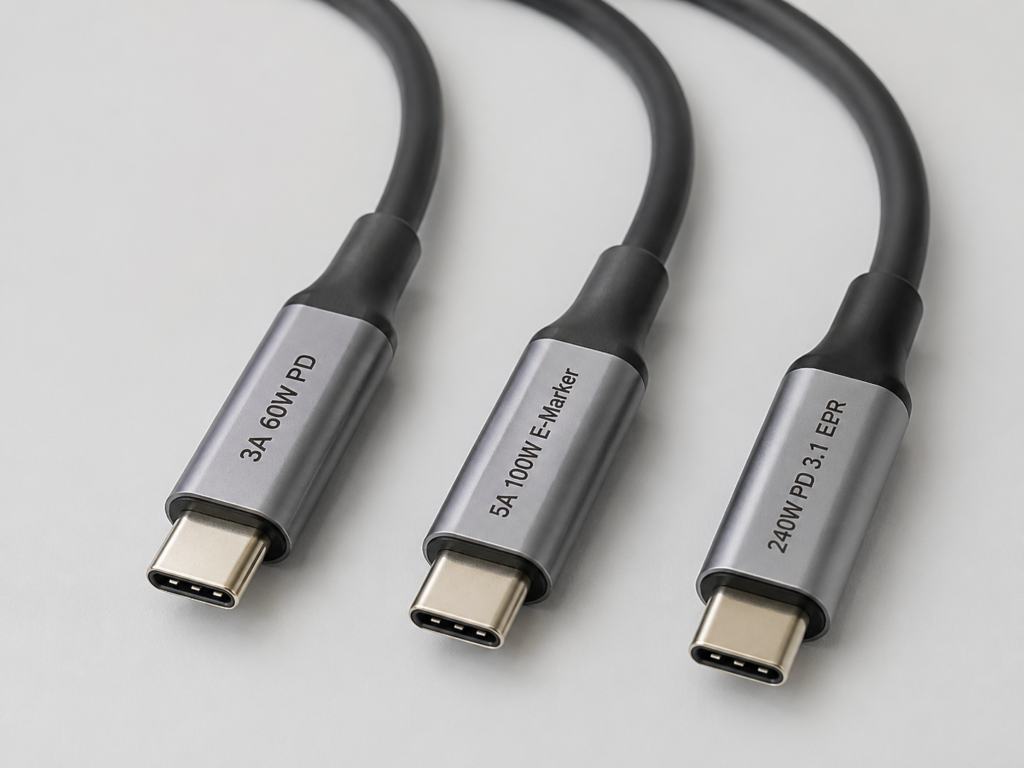
Currently, common USB-C power cables fall into three categories:
- 3A cable: Within the standard power range of universal USB PD, the maximum is usually 20V/3A, approximately 60W.
- Ordinary 5A cable: Also within the standard power range of universal PD, with a maximum of 20V/5A (approximately 100W). It must be equipped with an E-Marker chip (you can think of it as the cable’s “electronic ID card”, whose function will be explained in detail later) to declare 5A capability.
- 5A EPR cable: The current is still 5A, but it supports higher voltage, up to 48V/5A (240W). It is usually marked with 240W, PD 3.1, EPR or 50V/5A.
Scope of Comparison in This Article
To avoid misunderstanding, we first clarify the scope of our discussion:
- The comparison targets consumer-grade, compliant USB-C to USB-C cables, with a focus on charging and power delivery capabilities.
- This excludes USB-A to USB-C cables, magnetic cables, industrial cables, modified cables, low-quality adapters, and non-detachable fixed cables included with chargers.
- The default premise is regular brands with accurate parameters, and both devices and chargers comply with USB-C/USB PD specifications.
- Applicable scenarios include general charging/power delivery for mobile phones, tablets, laptops, power banks, docking stations, USB-C monitors, etc.
- Note: Although some brands’ proprietary fast charging cables also mark high current, the judgment logic is different, which will be explained separately later.
What Is the Use of Distinguishing Between 3A and 5A?
Understanding this difference can help you solve three of the most practical problems:
- Know the power upper limit: Most PD devices exceeding 60W must use a 5A cable to reach full power.
- Avoid wasting money: For devices like ordinary mobile phones, earphones, controllers, and low-power tablets, a 3A cable is usually sufficient, and there is no need to buy an expensive 5A cable.
- Avoid safety risks: Falsely labeled or low-quality cables may experience overheating, large voltage drops, unstable contact, power fluctuations and other problems under high current.
- Avoid cognitive pitfalls: USB-C interface, PD support, thick cable body, and braided outer jacket cannot be directly equated with a 5A cable.
Special reminder: Do not judge solely by total power. A small number of devices that support PPS (Programmable Power Supply specification, simply put, a fast charging mode that can flexibly adjust voltage and current, used by many Android phones for high-power fast charging) or proprietary fast charging may have a charging current exceeding 3A even if the total power is less than 60W. For example, some 45W PPS fast charging scenarios may still require a 5A cable to achieve full speed.
Underlying Logic: What Determines Charging Power
Before understanding the difference between 3A and 5A, you must first understand the basic rules of charging, otherwise it is easy to be misled by merchant marketing.
Basic Relationship Between Voltage, Current and Power
The core formula is very simple: Power (W) = Voltage (V) × Current (A).
Using a water pipe as an analogy: voltage is like water pressure, current is like water flow rate, and power is how much water you can receive per unit time. To get higher power, you either increase the water pressure (voltage), increase the flow rate (current), or increase both.
Corresponding to the three types of cables:
- Standard PD upper limit of 3A cable: 20V × 3A = 60W
- Standard PD upper limit of ordinary 5A cable: 20V × 5A = 100W
- 5A EPR cables can reach 240W by increasing the voltage (up to 48V), while the current remains 5A (48V×5A=240W), not by increasing the current.
Of course, actual charging speed is determined by the charger, cable, device, battery level, temperature, and protocol together, not just by the cable’s specifications.
The “Short Board Effect” of Charging: The Weakest Link Determines Power
The complete charging chain is: Charger → Cable → Device. The final charging power is the minimum value of the capabilities and current states of the three, which is the “short board effect” — the speed is determined by the weakest link.
Here are some of the most common examples:
- 100W charger + 3A cable + 100W laptop: The maximum is only about 60W, because the cable can only carry 3A.
- 100W charger + 5A cable + 45W tablet: The maximum is still 45W, because the tablet only accepts that much power.
- Multi-port 100W charger with both a phone and laptop plugged in: Single-port power may drop to 45W or 65W. Switching to a 5A cable will not help in this case, because the charger itself only allocates that much power.
- 140W EPR charger + ordinary 100W 5A cable + 140W laptop: The maximum is only 100W, because the cable does not support EPR high voltage and cannot negotiate a higher power level.
E-Marker Chip: The Cable’s “Electronic ID Card”
Some people may ask: How do the charger and device know how much current this cable can carry? They can’t just guess, right? This brings us to an important chip in USB-C cables: E-Marker (Electronic Marker Chip).
You can think of the E-Marker as the cable’s electronic ID card, which stores all the capability information of the cable: maximum current, maximum voltage, data transmission capability, cable type, manufacturer information, etc. When you plug the cable into the charger and device, both ends will first “read” this ID card, then negotiate the power level for charging.
According to USB-IF compliance rules: If a USB-C cable is to support current exceeding 3A, it must be equipped with an E-Marker chip to declare 5A capability. In a compliant USB-C/USB PD chain, 5A will usually not be negotiated if 5A capability is not declared via E-Marker — this is a safety mechanism to prevent low-quality cables from overheating due to overcurrent.
Here are a few points that are easy to get wrong:
- Ordinary 5A cables must have an E-Marker, but ordinary 3A charging cables usually do not (because there is no need to declare capability exceeding 3A).
- Having an E-Marker does not mean it is a 5A cable, nor does it mean it supports 240W: Some high-speed data cables (such as USB 3.2, USB4, Thunderbolt cables) have an E-Marker to declare high-speed data capability even if they are 3A/60W; some E-Markers only declare 5A/100W and do not support PD 3.1 EPR high voltage.
- Ordinary power meters can only show the negotiated voltage, current and power. To directly read the information in the E-Marker, a dedicated cable tester is required.
Where Do the Common 60W, 100W, and 240W Ratings Come From?
Many people are confused about the difference between these power levels. In fact, they belong to two different PD standards:
- 60W and 100W: Belong to USB PD SPR (Standard Power Range, which you can think of as PD’s “basic power level”, with a maximum voltage limit of 20V). Power is distinguished by current level — 3A corresponds to 60W, and 5A corresponds to 100W.
- 140W, 180W, 240W: Belong to EPR (Extended Power Range) added in PD 3.1, which you can think of as PD’s “high power level” that breaks through the 100W limit by increasing voltage. The current is still 5A, but the voltage is increased to 28V, 36V, and 48V, corresponding to 140W, 180W, and 240W respectively.
A key conclusion to remember: 240W is not an automatic capability of ordinary 5A cables; the entire chain (charger, cable, device) must support PD 3.1 EPR.
The 4 Most Easily Confused Groups of Concepts
Many people’s misunderstandings about USB-C come from mixing parameters of different dimensions. Here is a clear explanation:
- USB-C is the interface shape, it does not represent any capability: Do not assume that USB-C means fast charging, high-speed data, or monitor connectivity. These capabilities require checking separate parameters.
- Supporting PD fast charging does not mean supporting 5A/100W/240W: The PD protocol has many power levels. 3A cables can also support PD 60W; having PD does not mean high power.
- 3A/5A is power delivery capability, unrelated to data speed: USB 2.0, USB 3.2, USB4, and Thunderbolt are data/expansion capabilities, not necessarily bound to current capability — a 5A cable may only have USB 2.0 speed, and a 3A cable may support high-speed data.
- Thunderbolt/USB4 cables are not necessarily the best charging cables: The advantage of these cables is data and video capability. Charging power still depends on the marked 60W, 100W or 240W rating. Using Thunderbolt cables purely for charging has very low cost-effectiveness.
Core Parameter Comparison of Three Types of Cables
Now that you understand the basic logic, we have organized the core differences of the three most common types of USB-C cables into a table for quick reference:
| Comparison Dimension | 3A 60W Cable | Ordinary 5A 100W Cable | 5A EPR 240W Cable |
|---|---|---|---|
| Maximum Carrying Current | 3A | 5A | 5A |
| Typical PD Power Upper Limit | 60W (20V/3A) | 100W (20V/5A) | 240W (48V/5A, backward compatible with 140W/180W) |
| Built-in E-Marker Required | No (ordinary charging cables usually do not have one) | Yes | Yes |
| Supported PD Power Range | PD SPR (Standard Power Range) | PD SPR (Standard Power Range) | PD 3.1 EPR (Extended Power Range) |
| Data Transmission Capability | No binding (can be USB 2.0/3.2) | No binding (can be USB 2.0/3.2) | No binding (can be USB 2.0/3.2/USB4) |
| Power Conductor (same length, same material) | Relatively thinner, higher resistance | Thicker, lower resistance | Thick conductors and thicker high-voltage insulation layer |
| Core Applicable Scenarios | Charging devices of 60W and below | Charging devices of 65W-100W | Charging EPR devices of 140W and above |
Many people wonder: since they are all USB-C cables, why is there such a big difference in current capability? The core difference lies in the internal hardware structure:
First is the thickness of the power conductors. The industry commonly uses AWG (American Wire Gauge) to mark conductor specifications; the smaller the number, the thicker the conductor and the lower the resistance. However, different manufacturers have different cable lengths, materials, and structural designs, so current capability cannot be judged solely by AWG value — official parameters and certifications should be the standard. For the same material and length, 5A cables require thicker power conductors to carry large currents, reducing heat generation and voltage loss. Second is the E-Marker chip, which must be built into all compliant cables supporting currents over 3A, to “report” their own capabilities to the charger and device.
In addition, 5A cables have higher requirements for the contact resistance of plug terminals and welding technology, to prevent overheating at contact points under high current. Because 240W EPR cables must withstand voltages up to 48V, their internal insulation layer is thicker to prevent high-voltage breakdown. As for the braided outer jackets, metal plugs, and cable thickness that people often see, these mainly affect durability, feel, and anti-interference ability, and have no direct equivalent relationship with current capability — some cables look thick, but may only have a thick outer jacket, while the internal power conductors are actually very thin.
Another special reminder: current specifications and data transmission capabilities are completely unbound. When buying a cable, be sure to check the two types of parameters separately: for charging only, focus on the 60W/100W/240W power markings; for transferring large files, check data rate markings such as 5Gbps, 10Gbps, 20Gbps, 40Gbps; for connecting a monitor, confirm whether it supports USB4, Thunderbolt, or DP Alt Mode (video output mode); for connecting a desktop docking station, you need to confirm power delivery, data rate, and video output capability at the same time — missing any one may make it unusable.
In terms of price and cable length: for cables of the same brand, same length, and same data specification, 5A cables are usually more expensive than 3A cables, and 240W EPR cables have higher costs. When the cable length exceeds 2 meters, the differences in voltage drop and heat generation under high power will be more obvious. When buying long cables, be sure to prioritize products with clearly marked current and power specifications. For long cables of 2 meters or more used to connect USB4/Thunderbolt devices, high-speed docking stations, or high-resolution monitors, in addition to power specifications, you also need to confirm whether they are active or passive cables, and the cable length limit corresponding to the nominal data rate — for example, passive Thunderbolt 4 cables usually support up to 2 meters, and longer active cables cost much more. You must never assume high-speed data or video output support just based on the “240W” marketing claim.
How to Tell if Your Cable Is 3A or 5A?
If you have a pile of USB-C cables with unknown specifications, you can judge them from easy to difficult using the methods below, no need to buy a tester right away.
Step 1: Check Parameter Markings (Fastest Preliminary Judgment)
First look for the printed text on the cable body, packaging, laser marking on the plug, or check the parameters of the corresponding model on the brand’s official website:
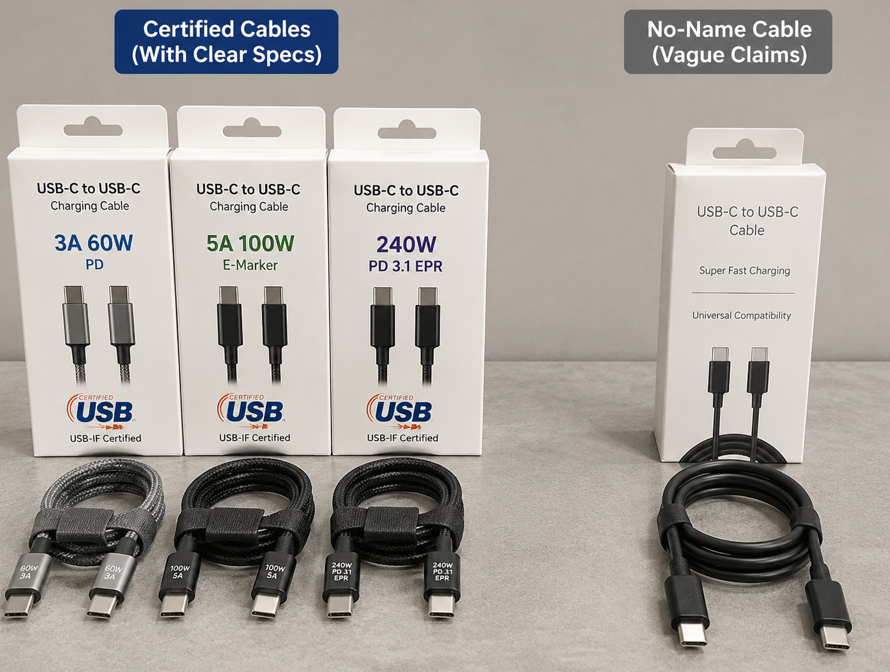
- If marked with 3A, 60W, or PD 60W, treat it as a 3A cable.
- If marked with 5A, 100W, 20V/5A, or E-Marker, treat it as an ordinary 5A 100W cable.
- Only if marked with 240W, PD 3.1, EPR, 48V/5A, or 50V/5A can it be treated as a high-power EPR cable.
If it only has vague phrases like “PD fast charging”, “Type-C fast charging”, “super fast charging”, “compatible with Apple/Android”, “fully compatible fast charging”, without clear current or power values, it basically has no judgment value — don’t take it seriously.
Step 2: Check Certifications and Official Parameters (Highest Credibility)
If the markings are unclear, or you suspect the specifications are falsely labeled, you can refer to this credibility hierarchy for judgment. Note that different methods have different functions:
- The most reliable is USB-IF certification + brand official model parameters: the premise is that the model you bought corresponds to the official parameter page, with no counterfeit branding. USB-IF certified products have clear markings, such as power markings like “Certified USB 60W” and “Certified USB 240W”, as well as data rate markings like 5Gbps, 10Gbps, 20Gbps, 40Gbps. A single certification mark may include both power and data capabilities, which is highly referential.
- Next is clear markings on packaging and cable body: this can only be used for preliminary screening, because no-name products may have falsely printed specifications. It is best to confirm with official parameters before trusting it.
- Dedicated testers that support E-Marker reading: can directly read the actual capabilities declared by the cable, suitable for verifying whether the purchased cable is consistent with the marketing claims.
- Ordinary power meter: can only show the negotiated voltage, current and power during actual charging, and cannot directly judge the maximum specification of the cable, because power is also limited by the device and charger.
- Appearance thickness, price level: can only be used to rule out obviously inferior products, and must never be used as a basis for judgment.
USB-IF certification is not the only standard, but it is much more reliable than “three-no” products with no brand, no parameters, and no after-sales service. The product pages of regular brands usually clearly mark parameters such as power, maximum current, PD version, data rate, cable length, video support, and whether it supports USB4/Thunderbolt, instead of just writing “fast charging cable”.
Pay special attention to 240W cables: be sure to check for PD 3.1 EPR or 50V/5A markings, and do not assume it is 240W just because it says “5A”.
Step 3: Actual Measurement with a Power Meter (Suitable for Ruling Out False Labeling, But With Prerequisites)
If you have a power meter, you can test it yourself, but pay attention to the test conditions, otherwise the results will be inaccurate:
- Test prerequisites: Both the charger and device support PD levels exceeding 3A, the device is in a low battery, normal temperature state, the charger is used with a single port, and the device does not have active power limiting.
- Judgment logic: If it can stably negotiate and maintain power above 60W, it usually indicates that the cable has 5A negotiation capability.
- If the maximum is stuck around 60W, it is not necessarily a 3A cable — it may also be due to limitations of the device or charger, or caused by temperature, battery level, or multi-port power sharing.
- Testing with an ordinary phone is usually unreliable, because most phones have power below 60W and cannot distinguish between 3A and 5A; only some phones that support high-current PPS may show a difference.
- In addition, exceeding 60W only proves that the cable has 5A capability, not that it supports 240W — to verify EPR capability, you need an EPR charger, EPR device, or a dedicated tester that can read E-Marker/EPR capabilities.
Auxiliary Judgment: For Reference Only, Not Definitive
Some situations can help you rule out obviously fake 5A cables, but cannot be used as a definitive basis:
- Cables that are extremely thin, have no parameter markings, and are abnormally low in price are most likely not reliable 5A cables.
- A thick cable is not necessarily 5A; it may just have a thick outer jacket, multiple shielding layers, or be purely decorative design.
- Magnetic cables, adapters, and extension cables may affect PD recognition and contact resistance, and are not recommended for high-power charging.
- If the plug is loose, the interface is oxidized, or the cable body is damaged, even if it was originally a 5A cable, it is not recommended to use it for high-power charging, as it is prone to safety problems.
Choose Cables According to Needs: How to Choose for Different Devices
Now that you understand how to judge cable specifications, the next step is to choose according to your actual needs. There is no need to pursue the highest specifications; the most suitable one is the most cost-effective.
Scenarios Where a 3A Cable Is Sufficient
If your device falls into the following categories, an ordinary 3A 60W cable is completely sufficient, and there is no need to spend extra money on a 5A cable:
- Low-power devices such as mobile phones, earphones, watches, game controllers, and ordinary power banks under 30W;
- Tablets, thin-and-light laptops, and portable monitors of 60W and below, and the device does not require PPS or proprietary fast charging levels exceeding 3A;
- Only used to connect low-power peripherals such as keyboards, mice, ordinary USB flash drives, and card readers, with no need for high-power charging or high-speed data;
- Limited budget, and you clearly know that your device’s power is below 60W, with no high-current fast charging needs.
Scenarios Where an Ordinary 5A 100W Cable Is Recommended
If any of the following situations apply, prioritize an ordinary 5A 100W cable with E-Marker for better compatibility and practicality:
- Laptops with nominal 65W, 90W, 100W USB-C charging;
- Using a 100W PD charger and wanting to achieve full power on a single port;
- High-power power banks that need to power laptops, or USB-C monitors and docking stations that require higher reverse power delivery;
- Some devices that support PPS fast charging, although their total power is below 60W, require current exceeding 3A to trigger full speed;
- Wanting one cable to be compatible with multiple devices such as phones, tablets, and laptops, or may switch to higher-power devices in the future;
- Long cables of 2 meters or more, and needed for high-power charging scenarios; 5A cables usually have better power delivery stability.
Scenarios Where a 5A EPR 240W Cable Is Required
You only need to buy a 240W cable supporting PD 3.1 EPR in the following situations. Don’t waste money for the sake of “one-step upgrade”:
- Device or charger with nominal USB PD 3.1 EPR power of 140W and above;
- High-power laptops, workstations, gaming laptops, or professional devices that support USB-C EPR input;
- Wanting to reserve space for future higher-power PD devices, and able to accept the higher price and slightly thicker cable body.
When purchasing, be sure to confirm that the packaging or parameter page has PD 3.1, EPR, 240W, 48V/5A or 50V/5A markings. Do not assume 240W support just because it says “5A”.
Reminders for Cable Selection in Special Scenarios
There are also several types of special scenarios where you cannot choose solely based on power, and extra attention is needed:
- Proprietary fast charging: Proprietary protocols such as Huawei SCP, OPPO VOOC, vivo FlashCharge, and some of Xiaomi’s high-power fast charging usually require original or brand-certified cables to trigger full speed. Ordinary 5A PD cables may only run at universal PD power, failing to reach the maximum speed of proprietary fast charging.
- PPS fast charging: Some devices require a specific PPS voltage and current combination. The charger, cable, and device must all support the corresponding level; you cannot just look at the total wattage.
- High-speed data/video output: For transferring large files, connecting high-speed hard drive enclosures or monitors, check the USB 3.2, USB4, Thunderbolt, and DP Alt Mode specifications separately. These have no necessary relation to 3A/5A, so don’t buy a cable that only has charging capability.
- Multi-port/car chargers: The nominal total power is not equal to single-port power. Be sure to first confirm the maximum single-port output and the power distribution rules when multiple ports are used simultaneously, then choose a cable of the corresponding specification.
- Travel backup: For ordinary users, bringing one 100W 5A cable when going out is sufficient, with the best balance of compatibility, size, and cost; only users with high-power EPR laptops need to additionally prepare a 240W cable.
Quick Purchase Decision Checklist
If you find the above content too detailed, you can directly use this checklist for quick judgment:
- Choose by device power: ≤60W usually choose 3A 60W cable; 65W-100W choose 5A 100W E-Marker cable; >100W choose PD 3.1 EPR 240W cable.
- Choose by current exceptions: If the device manual requires a 5A cable, supports PPS/proprietary fast charging exceeding 3A, or the original cable is a high-current cable, even if the total power is below 60W, prioritize the corresponding 5A cable or original certified cable.
- Choose by usage: For charging only, check power; for charging + file transfer, check both power and USB speed; for charging + monitor connection, check power, video output, USB4 or Thunderbolt specifications; for desktop docking stations, prioritize high-quality cables officially recommended or of the same specification.
- Search keyword suggestions: For 60W needs, search for “USB-C 3A 60W PD cable”; for 100W needs, search for “USB-C 5A 100W E-Marker PD cable”; for 240W needs, search for “USB-C 240W PD 3.1 EPR cable”; for high-speed expansion, search for “USB4 40Gbps 100W/240W cable”. Try not to search for vague keywords like “Type-C fast charging cable” or “super fast charging cable”, as they have high screening costs and make it easy to buy falsely labeled products.
Still Slow Charging After Switching to a 5A Cable? These May Be the Reasons
Many people buy a 5A cable and find no change in charging speed, so they think the cable is fake — in fact, most of the time, other links in the chain limit the power. Let’s troubleshoot from easy to difficult.
Limitations on the Charger Side
Check the charger first, as this is the most problematic link:
- The nominal total power of a multi-port charger is not equal to single-port power. For example, a dual-port charger with a total power of 100W may have a maximum single-port power of only 65W, and the single-port power will be even lower when two devices are plugged in at the same time.
- The charger does not have the voltage level, PPS level, or EPR level required by the device. Even if the cable is good, full power cannot be negotiated.
- Old, low-quality, or poorly protocol-compatible chargers may have unstable negotiation and frequent level drops, resulting in very low average power.
Active Power Limiting on the Device Side
Many times slow charging is not a problem with the cable, but the device actively limits its own power:
- The device will only charge at the maximum power it supports, and will not exceed that just because the cable is better. For example, a 45W tablet using a 100W cable will still have a maximum of 45W.
- When the battery level is high (usually around 80%) or the temperature is too high, the device will actively reduce power to protect the battery, which is especially noticeable when charging while using in summer.
- During high-load use, system consumption will offset most of the input power, making it seem like charging is slow. For example, when charging a laptop while gaming, the battery level will increase very slowly.
- Some laptops have different charging strategies in different states such as shutdown, sleep, and power-on, and may limit power during sleep.
Impact of Cables and Accessories
If the charger and device are both fine, then check the cable and accessories:
- The longer the cable, the greater the resistance and voltage drop, and the more obvious the problem under high power — for example, a 2-meter low-quality 5A cable may actually be less stable than a 1-meter high-quality 3A cable.
- Dirty, loose, or oxidized interfaces will cause increased contact resistance, leading to power fluctuations, disconnection, or even overheating.
- If the cable is bent, crushed, or damaged, its internal resistance will increase, which not only makes charging slow, but also poses safety risks.
- Accessories such as adapters, extension cables, and magnetic tips may affect PD recognition and contact stability, so try not to use them in high-power scenarios.
- Ordinary 100W 5A cables cannot replace 240W EPR cables. High-voltage capability requires separate declaration via E-Marker, it is not enough just to have sufficient current.
Protocol Matching Issues
Another common situation is protocol mismatch:
- USB PD devices are best paired with PD chargers and compliant USB-C to USB-C cables for the best compatibility. Using A-to-C cables or proprietary protocol chargers may not achieve full power.
- For proprietary fast charging devices, usually only original chargers and original/certified cables can trigger full speed. Ordinary PD 5A cables may only run at universal PD power.
- Some devices’ USB-C ports only support data or low-power charging, and do not support high-power PD input — for example, the second USB-C port on some thin-and-light laptops can only transfer data and cannot charge.
- For EPR high-power scenarios, the charger, cable, and device must all support PD 3.1 EPR — none can be missing. As long as one does not support it, the power will drop to the highest level supported by both sides.
Common Misconceptions and Troubleshooting
Common Cognitive Misconceptions
These 8 are the points that people most often get wrong, explained clearly all at once:
- Misconception: 5A cables always charge faster than 3A cables
Correct understanding: A 5A cable will only increase the power upper limit when the device and charger require current exceeding 3A; if the device itself is only 30W, the charging speed is exactly the same with 3A and 5A cables. - Misconception: All 5A cables support 240W
Correct understanding: Most ordinary 5A cables are 100W. 240W requires support for PD 3.1 EPR high voltage; it is not enough just to have 5A current. - Misconception: Supporting PD means supporting 5A
Correct understanding: The PD protocol has many power levels. 3A cables can also support PD 60W; having PD does not mean high power. - Misconception: 5A cables have faster data speeds
Correct understanding: Current capability and data speed are not bound. A 5A cable may only have USB 2.0 speed, and a 3A cable may support high-speed data. - Misconception: The thicker the cable, the better
Correct understanding: The quality of a cable depends on conductor material, terminal quality, E-Marker, certification, length, and workmanship. Thickness may just mean a thick outer jacket, not thick conductors. - Misconception: 3A cables cannot charge laptops
Correct understanding: Laptops of 60W and below can fully use 3A cables. High-power models just won’t reach full power, not that they can’t be used. - Misconception: Thunderbolt cables are the best charging cables
Correct understanding: The advantage of Thunderbolt cables is data and video capability. They have very low cost-effectiveness for pure charging scenarios, and their charging power also depends on the marking, not necessarily the highest. - Misconception: You never need a 5A cable for power below 60W
Correct understanding: This is true in most cases, but some devices that support high-current PPS or proprietary fast charging, although their total power is below 60W, have a current exceeding 3A and still require a 5A cable to achieve full speed.
Abnormal Charging Troubleshooting Steps
If you encounter problems with slow charging or unstable power, you can troubleshoot step by step in this order, and most problems can be identified:
- Step 1: First confirm the maximum input power and supported protocols of the device, check official parameters, the nameplate of the original adapter, or the user manual.
- Step 2: Confirm the single-port output power and PDO (Power Delivery Object, the voltage and current combinations the charger can provide)/PPS/EPR levels of the charger, don’t just look at total power marketing.
- Step 3: Confirm the cable markings: 60W depends on 3A, 100W depends on 5A/E-Marker, 240W depends on PD 3.1 EPR.
- Step 4: If testing with a power meter, ensure the device has low battery, normal temperature, is charging via a single port, and is not under high load, otherwise the results will be inaccurate.
- Step 5: If power fluctuates greatly, check if the interface is dirty, the plug is loose, the cable is damaged, or if multiple devices are plugged into a multi-port charger at the same time.
- Step 6: If charging is always slow, troubleshoot whether it is a proprietary protocol mismatch, PPS level mismatch, or the device’s own power limiting strategy.
- Step 7: If you want to confirm the actual specification of the cable, use a tester that can read E-Marker, don’t just look at instantaneous power.
Causes of Typical Faults
Several of the most common problems, match them directly:
- Still only 45W after switching to a 5A cable: Most likely the device or charger’s single-port maximum is only 45W, or the current high battery level and high temperature have triggered power limiting.
- 100W charger only runs at 60W: It may be that the cable is a 3A cable, or the 5A cable is falsely labeled and has no E-Marker; it may also be that this port of the charger is currently sharing power with other ports.
- 140W device only runs at 100W: It may be that the cable is an ordinary 5A 100W cable that does not support EPR; it may also be that the charger does not support the 28V EPR level.
- 45W PPS phone not reaching full speed: It may be that the charger’s PPS level does not match, the cable does not support the required current, or the device has high temperature and high battery level.
- Charging slows down after a while: Most likely the battery level has increased and the device is heating up, so the system actively reduces power, which is a normal phenomenon.
- Unstable connection to docking station: It may be that the cable’s data, power delivery, and video capabilities do not match, or the cable is too long, leading to reduced stability.
Safety Red Lines
Finally, here are a few safety red lines that must never be crossed. Don’t joke about safety just to save a few bucks:
- Do not use brandless, parameterless, abnormally low-priced 100W/240W cables for long-term high-power charging. Falsely labeled cables carry high risks.
- Do not use damaged, deformed cables with loose interfaces, hot plugs, or burnt smells. Throw them away immediately and replace them with new ones.
- Do not use magnetic tips, low-quality adapters, or extension cables for high-power PD charging, as they are prone to poor contact and overheating problems.
- If the cable or plug is hot to the touch, has an odor, changes color, or charges intermittently during charging, unplug it immediately and stop using it.
- A compliant PD system will restrict 3A cables without E-Marker from entering 5A negotiation. The real dangers are low-quality cables falsely labeled as 5A, non-compliant accessories, and poorly connected interfaces.
Summary: Choose the Right USB-C Cable in 3 Steps
Finally, let’s condense the core content. After reading this article, you should master these points:
Summary of Core Differences
- The core difference between 3A and 5A is power delivery current capability, which is not directly bound to the USB-C interface shape, data speed, or video output.
- 3A cables usually correspond to power below 60W, ordinary 5A cables correspond to 100W, and 240W requires a 5A cable supporting PD 3.1 EPR.
- High-specification cables are backward compatible, but using a 5A cable with a low-power device will not make it faster, it is just a waste of money.
- For a small number of PPS/proprietary fast charging devices, you need to look at the current requirement, not just whether the total power is below 60W.
Practical Judgment Formula
No need to memorize complex parameters, just choose according to this formula:
- Device power ≤60W: Usually a 3A cable is sufficient, unless there is a PPS/proprietary fast charging need exceeding 3A.
- Device power 65W-100W: Prioritize a 5A 100W E-Marker cable.
- Device power >100W: Choose a PD 3.1 EPR 240W cable, and confirm that both the charger and device also support EPR.
- Unsure of power: First check the device adapter, official parameters, charger single-port output, and cable markings, then choose the cable.
Abilities You Should Master
After reading this article, you should be able to:
- Distinguish the relationship between USB-C interface, PD protocol, current, power, data speed, and video output, and no longer be fooled by merchants’ marketing.
- Judge the actual specification of cables through markings, official parameters, USB-IF certification, power meters, and E-Marker testers.
- Choose suitable and cost-effective cables according to different scenarios such as mobile phones, tablets, laptops, power banks, docking stations, and monitors.
- Identify common pitfalls such as “5A = 240W”, “PD = full speed”, “thick cable = good cable”, “no need for 5A below 60W”, and troubleshoot slow charging problems on your own.
In fact, buying USB-C cables is not that complicated. The core is “buy according to your needs” — there is no need to pursue the highest specifications; the one suitable for your device is the best.