
Many iPhone users have encountered this situation: you put your phone on a magnetic wireless charger before bed, touch it when you wake up in the middle of the night, and the back is scaldingly hot, even popping up an over-temperature warning. Some people think the charger is broken, some worry it will catch fire, and others believe that heat from wireless charging is normal and nothing to worry about. In fact, whether MagSafe overheating is a problem depends on the specific situation: some is normal energy loss, some is caused by incorrect usage, and a small number of cases actually pose safety hazards.
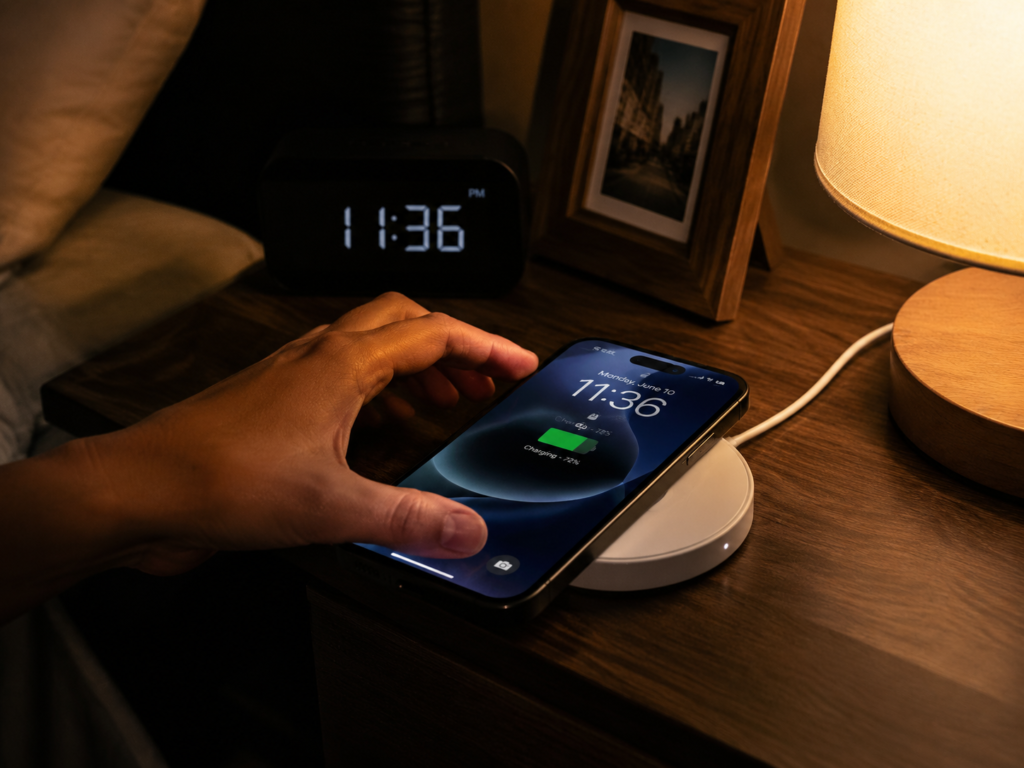
To judge whether MagSafe overheating is abnormal, there are three core things to check: how hot it gets, whether charging is stable, and whether there are temperature warnings or appearance abnormalities. We will start with how to distinguish between normal and abnormal heat, then step by step troubleshoot the causes and find solutions.
First, Understand: Is Your MagSafe Overheating Normal?
Many people get nervous as soon as they feel the charging pad is hot. In fact, the first step is not to contact customer service, but to clarify two basic questions: Is the magnetic wireless charger you are using actually compliant? Is the current heat within the normal range?
First, Distinguish What Type of Magnetic Wireless Charger You Are Using
“MagSafe” was originally Apple’s name for its own magnetic wireless chargers, but now many wireless chargers with magnets call themselves “MagSafe”, and the actual differences are huge. You can first compare with the table below to see which category yours belongs to—different types of chargers have completely different heat levels and safety standards.
| Type | Core Certification/Standard | Typical Peak Power (iPhone) | Temperature Control & Alignment Stability | Remarks |
|---|---|---|---|---|
| Official Apple MagSafe Charger | Apple official | Approximately 15W for most models, ~12W for mini series, iPhone 16 series can reach higher peak when paired with new version | Usually relatively stable | Requires a matching full-capacity USB-C PD adapter |
| MFM Certified Third-Party | Made for MagSafe (Apple certified) | Close to official level | Usually close to official strategy | Certification system is led by Apple |
| Qi2 Magnetic Wireless Charger | Qi2 (Wireless Power Consortium standard) | Approximately 15W for some supported models | Subject to standard constraints, specific performance depends on product implementation | Not equivalent to MFM certification, the standard is more universal |
| Ordinary Magnetic Compatible Model | Ordinary Qi + magnetic structure | Mostly 7.5W or lower | Extremely variable | Only relies on magnet adsorption, no unified magnetic standard |
This article only discusses magnetic wireless chargers with charging function, not including magnetic stands that only hold the phone. For the iPhone 16 series to achieve higher MagSafe peak power, a new version of the MagSafe charger and a full-capacity USB-C PD adapter (usually 30W class or above) are required. Actual power is still limited by model, battery level, temperature, and system strategy, and will not run at full speed all the time.
The Rated 15W Does Not Mean It Runs at Full Speed All the Time
Many people think, “I bought a 15W MagSafe, so it should always charge at 15W, and heat means poor quality”—this is actually a big misunderstanding. The actual power of wireless charging is affected by many factors: your iPhone model, charger type, charging head power, cable quality, system version, phone battery level, temperature, and even whether there are tasks running in the background will affect the power.
Generally speaking, when the phone’s battery level rises from low to around 80%, the power will be higher and the heat will be more obvious; when the battery level reaches above 80%, iOS will actively reduce the charging power to protect the battery, and the temperature should gradually drop at this time. If the phone itself is too hot, the system will even directly reduce power, pause charging, or even pop up a temperature warning—this is a normal protection mechanism, not a broken charger.
To judge whether there is a problem with overheating, the key is not the peak power, but whether the charging is stable, whether there is persistent abnormal high heat, and whether there are abnormal safety signals.
Three Dimensions to Judge Whether Overheating Is Normal
You don’t need to buy a professional temperature gun; ordinary people can make a preliminary judgment based on three dimensions:
The first is temperature feel: Can you hold it in your hand for a long time? Is only the small area corresponding to the coil warm? Is there any spot that is too hot to touch?
The second is charging performance: Is the battery level increasing normally? Is the battery level decreasing while charging? Does it repeatedly disconnect, charging for a while then stopping?
The third is system and appearance signals: Does the phone pop up an “over-temperature” warning? Does the charger have a burnt smell, plastic deformation, or blackened interfaces? Is the cable damaged?
Note: If any safety signal appears (such as burnt smell, smoke, deformation, blackened interface, system temperature warning, extreme local heat), stop using it immediately; if it is just warm, make a comprehensive judgment combined with whether charging is stable, whether the battery level is increasing, and whether the temperature drops after reaching 80% battery.
Preliminary Feel Screening Without Instruments
To avoid misjudgment caused by individual differences in feel, you can make a preliminary judgment against the three-level standard below:
Normal warm: It feels warm during the first half of charging, you can hold it in your hand all the time, the heat is concentrated at the coil position on the back of the phone or the center of the charging pad, it cools down slowly after the battery reaches 80%, charging is very stable, and there are no prompts. This is normal, no need to worry.
Slightly hot: It feels a bit hot, you can hold it but don’t want to hold it for long, the charging speed may be a bit slower, but there is no burnt smell, deformation, nor disconnection or temperature warning. In this case, you can first troubleshoot problems with the environment, phone load, or accessories; it is most likely not a broken charger.
Severe overheating: It is so hot that you can’t hold it at all, you want to let go as soon as you touch it, accompanied by charging disconnection, charging pause, battery drain while charging, system temperature warning, even burnt smell, plastic discoloration and deformation. In this case, you must stop using it immediately and quickly troubleshoot the problem.
It should be noted that feel is greatly affected by ambient temperature and personal sensitivity. For example, at a room temperature of 30°C in summer, it will definitely feel hotter than at 20°C in winter. So don’t draw conclusions only based on feel; you must judge combined with charging performance and abnormal signals.
Step 1: Distinguish Whether the Heat Comes from the Phone or the Charger
Most of the time, a hot charging pad is actually heat transferred from the phone, not a problem with the charger itself. You can do a simple test: charge for 10 to 15 minutes in a normal environment, then take the phone off and touch the back of the phone and the charging pad respectively. If the charging pad cools down significantly after a few minutes once the phone is removed, it is very likely that the phone’s heat is transferred back to the charging pad, and the problem is on the phone side.
There are many common reasons for heat transfer from the phone: playing games, navigating, video calling while charging, or having a hotspot on, background photo indexing, iCloud backup, system update, phone migration, and even battery aging will all make the phone heat up itself, which is then dissipated through the attached charging pad.
If the charging pad is still very hot after removing the phone, even heats up when idle (no phone placed), or the USB-C port position is particularly hot, it still gets the same hot when charging with a different phone, even has odor or deformation, then it is the charger’s own problem.
Most Common Cognitive Misconceptions
Regarding MagSafe overheating, there are several particularly common wrong perceptions that many people have fallen for:
Misconception 1: Heat from wireless charging means poor quality. Wireless charging has inherent conversion losses, and it is normal for compliant products to generate heat within the normal range, not a quality problem.
Misconception 2: A hot phone must mean the MagSafe is broken. The phone itself will heat up under high load, high ambient temperature, or battery aging, and because it is tightly attached to the charging pad, the heat will be directly transferred to the charging pad, making it look like the charger is hot, but the root cause is actually the phone.
Misconception 3: Original MagSafe must not get hot. Whether it is original or certified, as long as it is wireless charging, there will be losses. It will also be warm during the first half of fast charging, but the original one has more stable power control, temperature control, and foreign object detection.
Misconception 4: The lower the rated power, the cooler it is. Inferior low-power wireless chargers with poor coil alignment, poor shielding, and low efficiency may instead charge slowly, generate more heat, and be unstable; lower power is not necessarily better.
Plain Language Principle: Why Does MagSafe Heat Up More Easily Than Wired Charging?
Many people ask: Why isn’t my phone this hot when I use wired charging, but it gets noticeably hot with MagSafe? In fact, there are only two core reasons: first, wireless charging inherently has losses, and second, the design of MagSafe makes the heat more concentrated, making it feel more obvious.
Wireless Power Transmission Has Inherent Losses
During wired charging, current directly enters the phone’s charging management system through the cable and interface, the path is very direct, with small losses, so there is less heat generation.
Wireless charging is different. It first needs to convert the electrical energy in the charger into a magnetic field, which passes through the air and the phone case, then the receiving coil on the back of the phone converts the magnetic field back into electrical energy to charge the battery. During these two conversion processes, a portion of the energy will definitely not be usable, and finally dissipates as heat—this is an inherent characteristic of wireless charging, which no brand can avoid.
According to public test data, the efficiency of ordinary wireless charging is roughly between 60% and 80%. This number is only for popular science reference, and cannot be directly used as a standard for fault judgment, because efficiency fluctuates greatly with different devices and scenarios.
Why Does MagSafe Feel Hotter to the Touch?
Even for wireless charging, MagSafe or Qi2 magnetic models often feel hotter to the touch than previous ordinary Qi wireless chargers, mainly for several reasons:
First is higher power. Most previous ordinary Qi wireless chargers only had 7.5W, while compliant MagSafe can reach 15W or even higher. With higher power, the absolute heat corresponding to losses is also greater, so it is naturally hotter.
Second is tighter fit. The magnetic design makes the phone and the charging pad very close together, so the heat in the coil area cannot dissipate from the middle, and is all concentrated at the contact position, making it more noticeable when touched by hand.
Third is small heat dissipation area. Common MagSafe chargers are small disc-shaped, with small volume, and the heat is concentrated at the center coil position. Unlike wireless chargers with large bases or car mounts with fans, which have large heat dissipation areas and heat is easily dissipated.
Fourth is great impact of alignment. If the coils are not aligned, the magnetic ring position is skewed, or the phone case is too thick, it will reduce the efficiency of energy transmission, increase losses, not only slow down charging but also make it hotter.
Fifth is foreign object risk. If things like metal sheets, coins, keys, or magnetic card holders are sandwiched between the phone and the charging pad, they may interfere with the magnetic field, causing local overheating, and even triggering foreign object detection to pause charging.
Heat Patterns at Different Charging Stages
MagSafe heat generation is not constant; the temperature varies at different charging stages. Mastering this pattern can also help you judge whether it is normal:
- Low battery to around 80%: At this time, the charging power is relatively high, and it is very common for the phone and charging pad to get warm. As long as it is not too hot to hold, it is normal.
- Above 80%: The system will gradually reduce the charging power, and under normal circumstances, the temperature should slowly drop.
- After fully charged: Originally, only very low power is needed to maintain trickle charging, so it should only be slightly warm. But if there are background backups, photo indexing, system updates, or a hotspot is on, StandBy is always on, plus high ambient temperature, it may also heat up.
If after full charge, the phone is on standby, the environment is ventilated, there is no high background load, and the charging pad is still severely hot, then you need to be alert to whether there is a fault.
Ranked by Commonness: Core Causes of Severe MagSafe Overheating
Now that we understand the standards for normal heat, let’s talk about why abnormal high heat occurs. We rank them from highest to lowest probability of occurrence. You can troubleshoot against them; most cases are caused by the first three reasons, so there’s no need to rush to replace the charger.
Most Common: Poor Environmental Heat Dissipation and Improper Usage
This is the reason why most people encounter MagSafe overheating, with the highest proportion, and it is also the easiest to solve.
For example, if you place the charging pad on a quilt, pillow, plush mat, thick silicone mat, or soft bag, these are all heat-insulating materials. The heat cannot dissipate, so it accumulates more and more, and the temperature gets higher and higher. Also, after a car is exposed to the sun in summer, on a windowsill with direct sunlight, next to a heater, or in a closed drawer, the ambient temperature itself is high, so overheating will naturally be more severe. If the charger is also covered by books, clothes, or quilts, heat dissipation will be even worse.
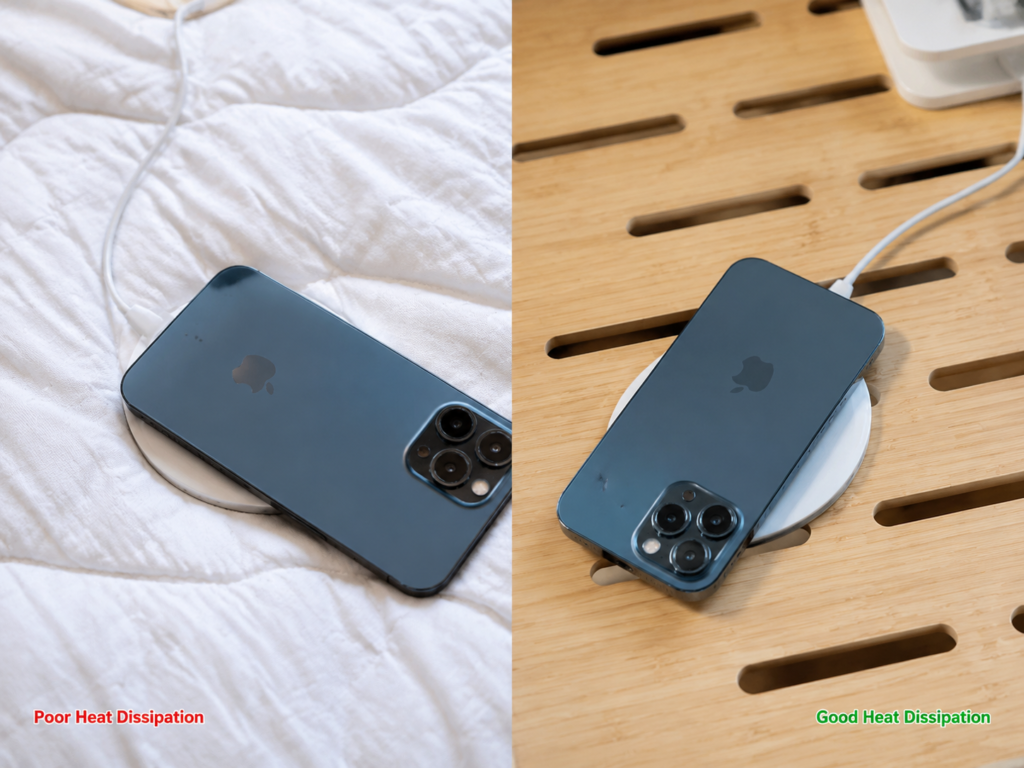
In addition, the high load of the phone itself will also cause heat transfer back—playing games, navigating, 4K recording, video calling, turning on hotspot while charging, or migrating data between phones, the phone’s processor itself will generate a lot of heat, which is then dissipated through the attached charging pad, making it feel like the charger is very hot.
Take the most typical example: when driving in summer, the car has been exposed to the sun all afternoon, the center console temperature may be 40-50°C. You are using CarPlay navigation while charging with MagSafe. At this time, the overheating is the result of the combination of high temperature inside the car, navigation load, wireless charging loss, and unstable car charger power supply, not necessarily a broken charger.
Very Common: Phone Case, Magnetic Accessories, and Coil Alignment Issues
This is the second most common reason. Many people suddenly find that charging gets hotter after changing to a new case, which is exactly this problem.
First is too thick or heat-insulating phone case: A too thick case will increase the distance between the two coils, reduce energy transmission efficiency, and heat is more likely to accumulate in the middle, not only slowing down charging but also making it hotter.
Then is magnetic ring offset: Some inferior magnetic cases or self-adhesive magnetic rings, although they can hold the phone, the position of the magnetic ring is wrong, causing the coils of the charger and the phone to not be truly aligned, the efficiency will drop a lot, charging is slow and heat generation is high.
Also metal part interference: If there are metal patches, car magnetic attraction patches on the back of the phone, or coins, keys, magnetic card holders sandwiched in between, even a metal stand in the case, they will interfere with the magnetic field, causing local high heat, and in severe cases, may trigger foreign object detection and stop charging.
Finally, non-adapted protective cases: Ordinary cases without MagSafe or Qi2 adapted design may have weak magnetism, poor alignment, and poor heat dissipation, which will also lead to increased heat generation.
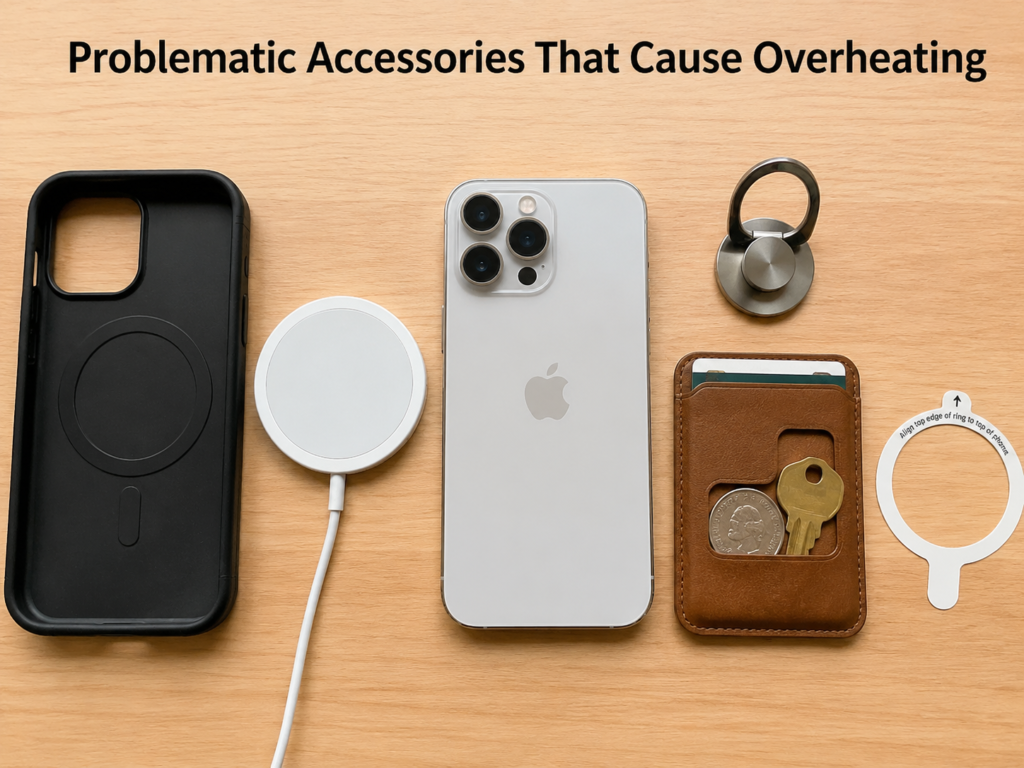
To verify whether this is the cause is very simple: remove all back accessories including the phone case, card holder, metal patch, and magnetic ring, charge with the bare phone for 10 to 15 minutes. If the temperature drops significantly, then it is the accessory’s problem.
Common: Problems with Charging Head, Cable, or Interface
Problems with the power supply end are also very common. Many people just find an old charging head to use with MagSafe, resulting in insufficient power or mismatched protocols, leading to slow charging and overheating.
Generally speaking, a single-pad MagSafe charger requires a 20W or higher USB-C PD adapter to better support high power. If you use an old 10W or 12W charging head, it usually just fails to reach the rated power and charges slowly, and will not directly cause abnormal overheating; while inferior adapters, poor protocol compatibility, poor cable or interface contact are more likely to cause power fluctuations, disconnection and reconnection, local hot interface, or obvious overheating of the adapter itself.
For high-power scenarios of the iPhone 16 series, it needs to be paired with a new version of the MagSafe charger and a full-capacity USB-C PD adapter (usually 30W class or above) to achieve higher peak power, and the actual power will still be limited by temperature control.
If you use an all-in-one charging dock to charge iPhone, Apple Watch, and AirPods at the same time, the total input power requirement is higher. You must match the adapter according to the manufacturer’s marked specifications, otherwise if the power is insufficient, not only will each device charge slowly, but it may also overheat.
The verification method is also very simple: replace with a reliable brand PD charging head and a good cable, wipe the interface clean, then charge for 15 minutes to see. If both temperature and stability improve, it is a problem with the power supply end.
Medium Probability: Phone-Side Load, Battery, and System Factors
After ruling out problems with the environment, accessories, and power supply, the next step is to look at the reasons for the phone itself.
First is declining battery health: Batteries age after long use, internal resistance increases, and heat generation during charging will be more obvious. If the battery health is already below 80%, you can consider official battery replacement service, which will not only improve overheating but also greatly improve battery life.
Then is high background load: Many people think that the phone is not working when the screen is locked. In fact, tasks such as iCloud backup, photo indexing, system update, App background refresh, and phone migration will still run after the screen is locked, keeping the phone’s processor under high load, generating heat, which is transferred back to the charging pad.
Also system abnormality: Individual iOS versions may have wireless charging bugs, leading to overheating, charging disconnection, and power fluctuations. In this case, usually restarting the phone, updating to the latest system, or waiting for Apple to push a fix patch will work.
Finally, hardware abnormality: If the phone has been exposed to water, dropped, or repaired by a third party, it may cause damage to the receiving coil, battery, or charging management circuit, which will also cause overheating and unstable charging.
Low Probability but High Risk: Charger Itself Faulty or Inferior Product
Although this situation is rare, the risk is very high, so you must be vigilant.
First is uncertified inferior products: Many cheap “magnetic wireless chargers” just add a magnet to an ordinary Qi wireless charger, with substandard coils, shielding layers, temperature control, and foreign object detection. Not only do they generate severe heat, but they may also have safety hazards such as fire and short circuit.
Then is internal aging and damage: Even genuine products may have problems such as coil displacement, component aging, shell cracking, and poor interface contact after long use, leading to reduced efficiency and local high heat.
If the charger has bulges, burnt smell, discoloration, blackened interface, plastic deformation, smoke, etc., you must immediately unplug the power supply and absolutely never use it again.
To judge whether it is the charger’s own problem, you can do cross-verification: replace with a normal iPhone, a reliable charging head, and a ventilated environment. If it is still severely overheated, it is most likely the charger’s problem.
15-Minute Quick Troubleshooting: From Zero Cost to Cross-Verification
When encountering severe MagSafe overheating, don’t panic. You can spend 15 minutes troubleshooting according to the steps below. In most cases, you can find the cause, and it won’t cost you a penny.
First Establish a Standard Test Environment
To accurately judge whether overheating is abnormal, you must first eliminate all interfering factors and establish a unified test standard. Otherwise, if you put it in a quilt for a while and play while charging for a while, the results will have no reference value. A standard test environment only needs to meet these conditions:
- Environment: Room temperature 20-25°C, no direct sunlight, away from heaters, high temperature inside cars, and closed spaces
- Placement: The charging pad is placed on a hard, flat, ventilated desktop, not covered by clothes, books, or quilts
- Battery level: The phone’s battery level is in the 20%-60% range (this range has higher power, making it easier to observe heat performance; it is less reference when near full charge)
- Phone status: Let it stand for 2-3 minutes before testing, lock the screen on standby, close high-load tasks such as games, navigation, video calls, and hotspots
- Accessory status: Remove all back accessories such as phone case, card holder, metal patch, and magnetic ring
- Power supply status: Use a reliable brand USB-C PD adapter and good cable, with clean interface free of oxidation and looseness
After preparation, charge for 10-15 minutes, observe temperature feel, battery level changes, whether charging is disconnected, whether there are system prompts or odors, and local hot spots.
First Do a Safety Check: Stop Using Immediately in These Situations
Do a safety check before troubleshooting. If any of the following situations occur, immediately unplug the power supply and stop using:
- The charger has a burnt smell, smoke, plastic deformation, blackened interface, or bulging shell
- The phone pops up an over-temperature warning and pauses charging
- A fixed point on the USB-C interface, cable head, or disc is significantly hotter than other positions
- Foreign objects such as coins, keys, or metal sheets are sandwiched between the phone and the charging pad
If there is a temperature warning, just move the phone to a cool and ventilated place to cool down naturally. Do not use ice packs or put it in the refrigerator to avoid condensation and water ingress.
Zero-Cost Adjustments: First Rule Out the Most Common External Causes
If the safety check is fine, first make a few zero-cost adjustments, which can improve most cases:
- Change environment: Move to a ventilated hard desktop, away from sunlight, high temperature sources, and heat-insulating materials such as quilts, sofas, and plush mats
- Reduce load: Close high-load apps, charge with screen locked on standby
- Remove accessories: Take off all back attachments (case, card holder, metal patch, magnetic ring, etc.)
- Clean foreign objects: Wipe off dust and debris from the back of the phone and the surface of the charging pad
- Check power supply: Confirm that the adapter power and protocol meet the charger’s requirements, and configure the power supply for the all-in-one dock according to the manufacturer’s marking
After adjustment, charge for another 10 minutes. If the temperature drops significantly, it means it is caused by external factors, not a charger failure.
Cross-Verification: Locate Whether the Problem Is the Phone, Charger, or Power Supply End
If it still overheats after zero-cost adjustments, you can do cross-verification to step by step locate where the problem lies:
- Replace power head and cable: Replace with a reliable PD charging head and good cable. If it cools down significantly or no longer disconnects, it means the problem is with the adapter, cable, or interface;
- Test with a different phone: Use the same charger to charge another normal iPhone. If it is still severely overheated, it is most likely a problem with the charger or power supply end;
- Test with a different charger: Use another compliant MagSafe or Qi2 charger to charge your phone. If it is still noticeably hot, the problem may be with the phone, system, battery, or environment;
- Test in a different environment: Move the same set of devices to a standard environment for testing. If it returns to normal, it is a problem with environmental heat dissipation.
Note that you should not draw conclusions based on only one abnormality. After eliminating safety risks, you can test again under standard conditions to avoid interference from accidental factors.
Corresponding Causes for Troubleshooting Results
You can quickly find the problem by comparing the corresponding relationships below:
- Cools down after changing environment: High ambient temperature, heat-insulating placement surface, or the charger is covered
- Cools down after reducing phone load: Heat transfer back caused by high phone load
- Cools down after removing accessories: Problems with phone case, metal parts, magnetic ring, or coil alignment
- Cools down after changing power supply: Problems with adapter, cable, interface, or protocol negotiation
- Still overheated after changing phone: Charger or power supply end is more suspected
- Still overheated after changing charger: Phone side, battery, system, or environment is more suspected
- Still severely overheated under standard test conditions: Stop using immediately, contact customer service for inspection or replace with a compliant product
Quick Check for Overheating in Different Scenarios: What to Suspect First?
If you don’t want to do a full troubleshooting, you can also quickly locate the most likely cause based on your usage scenario:
Still Extremely Hot When on Standby, Bare Phone, on Ventilated Desktop
First suspect charger failure, abnormal power supply accessories, or problems with the phone’s battery or wireless charging module. Next step: replace the PD head and cable, then cross-verify with another phone, observe whether there is still disconnection or local hotness.
Only Gets Hot When Using While Charging
First suspect the superposition of high phone load and wireless charging loss (common when gaming, navigating, video calling, turning on hotspot, shooting videos, migrating data). Next step: charge with screen locked on standby for 10-15 minutes. If it cools down significantly, it is not a charger failure. For high-load scenarios, it is recommended to use wired charging first.
Suddenly Gets Hot After Changing to a New Case or New Magnetic Accessories
First suspect the case is too thick, magnetic ring is offset, there is metal part interference, or it is not a MagSafe/Qi2 adapted design. Next step: test with bare phone. If the bare phone is normal, the problem is mostly with the case or accessories. You can further check the thickness of the case, the position of the magnetic ring, and confirm whether there is a metal sheet or card holder sandwiched in between.
Severe Overheating Only with Car MagSafe
First suspect sun exposure inside the car, high-temperature center console, navigation load, unstable car charger power supply, or poor heat dissipation of the mount. Next step: first cool down the inside of the car, avoid direct sunlight and hot air vents; for long-time navigation, it is recommended to use wired charging first, or choose a compliant car magnetic charger with active heat dissipation.
Overheating When Charging at Bedside at Night
First suspect the charger is covered by bedding, placed on a heat-insulating surface, or there are background iCloud backups, system updates, plus long-time full-charge trickle charging. Next step: move the charging pad to a ventilated desktop, turn on optimized battery charging, and check whether there are background synchronization or update tasks at night.
Continues to Get Hot After Full Charge
First suspect background tasks, high-temperature environment, StandBy always-on, hotspot, or accessory/charger failure. Under normal circumstances, it is only slightly warm after full charge; if it is still severely hot when on standby and ventilated, it is abnormal. Next step: restart the phone, turn off high-load background functions, and retest with a different charger and power supply end.
Different Types of Chargers Cannot Be Directly Compared by Temperature
Many people like to compare their charger with others’, saying “Why is yours not hot but mine is hot?” In fact, chargers of different types and shapes have inherently different heat sensations, so directly comparing temperatures is meaningless.
Different Certification Types Have Different Heat Performance
Official Apple MagSafe and MFM certified models do not necessarily have the lowest heat, but their temperature control, magnetic positioning, and compatibility are usually more stable, and they are less prone to abnormal high heat or repeated disconnection; but under high temperature, being covered, abnormal power supply, high phone load, or hardware failure, official/MFM products may also trigger power reduction, charging pause, or obvious overheating.
Qi2 magnetic wireless chargers are constrained by the unified Qi2 standard, and some iPhones can reach about 15W power, but its certification system is a different matter from MFM and cannot be confused. Although ordinary magnetic Qi models may have lower power, if they have poor alignment, poor shielding, and weak temperature control, they may instead have more obvious overheating and be unstable.
So when choosing a charger, don’t just look at promotional terms like “magnetic”, “15W”, “fast charging”; look at certification, compatible models, power supply requirements, and actual user feedback.
Shape and Structure Also Affect Perceived Temperature
Disc-shaped models are small in size, with heat concentrated in the center, making them feel hotter to the touch, but it doesn’t necessarily mean the actual temperature is higher, just that the heat is concentrated. Vertical bases have larger heat dissipation areas and better air flow, so they may feel cooler, but if multiple devices are charging at the same time, the total heat will also be higher. Car models are greatly affected by direct sunlight, interior temperature, and navigation load, so they cannot be directly compared with indoor desktop scenarios. Active heat dissipation models with fans can improve overheating in high-temperature scenarios, but they still require compliant power supply and correct alignment, otherwise they will still get hot.
Don’t Believe in Fixed Temperature Values
Many people like to measure temperature with a temperature gun and then use a fixed value to judge whether it is normal. In fact, this is very inaccurate. Because the measurement position, ambient temperature, whether there is a case, and which stage of charging it is in will all affect the temperature value, ordinary users simply cannot control so many variables.
For ordinary people, more reliable judgment criteria are: whether it can be touched for a long time, whether it disconnects, whether there is a temperature warning, whether there is odor or deformation, and whether it recurs after eliminating external factors. A single high temperature is not necessarily a fault; only when it recurs repeatedly under a standard environment and is accompanied by abnormal signals does it have diagnostic significance.
Correct Cooling Methods and Usage Taboos
Now that we know the causes of overheating, let’s talk about how to correctly relieve overheating and what things absolutely must not be done, otherwise it will be dangerous instead.
Effective Methods to Relieve MagSafe Overheating
- Prioritize wired charging in high-temperature or high-load scenarios, especially when navigating, gaming, video calling, and turning on hotspot at the same time
- Place on a hard, flat, ventilated, cool surface when charging, away from heat-insulating materials such as bedding, sofas, and plush mats
- Remove unnecessary back accessories such as thick cases, card holders, and metal patches, and prioritize using compliant MagSafe/Qi2 adapted cases
- Choose official Apple, MFM certified, or reliable Qi2 products, and avoid uncertified low-price magnetic chargers
- Use a USB-C PD adapter with matching power, and configure the power supply for the all-in-one dock according to the manufacturer’s requirements
- Observe for 15-30 minutes when using a new charger or new protective case for the first time, confirm there is no abnormal high heat, disconnection, odor, or local hot spots
- Turning on optimized battery charging can reduce long-time full charge stay, which has a certain effect on overheating in the second half of the night, but cannot solve accessory failures, alignment errors, or poor heat dissipation problems
Additional Cooling Suggestions for Car Scenarios
Do not use wireless fast charging immediately after the car has been exposed to the sun. First turn on the air conditioner to cool down the interior of the car and the phone, then start charging. Do not install the magnetic mount in a position with direct sunlight or direct hot air from the air conditioner; try to choose a cool, ventilated place. During long-time navigation, if the phone continues to get hot, loses power, or the screen automatically dims, prioritize switching to wired charging, or appropriately reduce the navigation brightness and close other background apps. In high-temperature areas, you can consider car magnetic chargers with active heat dissipation, but be sure to choose compliant and certified products, and check whether the power supply is stable at the same time.
Cooling or Usage Methods That Must Never Be Done
- Do not put a hot phone or charger in the refrigerator, or apply cold compresses directly with ice packs. Too large a temperature difference may cause internal condensation and water damage
- Do not put a thick protective case on the charging pad or stick thick heat dissipation patches, which will not only hinder heat dissipation but may also increase the distance between the coils, affecting charging efficiency and magnetic strength
- Do not continue to use the phone under high load when it is hot, which will aggravate overheating, trigger the system’s high temperature protection, and even damage the battery
- Do not sandwich things like metal sheets, bank cards, access cards, magnetic card holders, coins, keys between the phone and the charger, which will not only cause overheating but may also damage the cards or cause safety problems
- Do not continue to use chargers with safety signals such as burnt smell, smoke, deformation, blackened interfaces, even if they can still charge, there are great safety hazards
How to Judge If a MagSafe Charger Is Really Broken?
Many people think the charger is broken as soon as they encounter overheating. In fact, most cases are caused by external factors. To judge whether it is really broken, you must first eliminate all external factors, then check whether there are fault signals.
Prerequisite for Judgment: First Eliminate External Factors Through Standard Testing
Before judging that the charger is broken, you must first complete the following troubleshooting, otherwise it is easy to misjudge:
- Has been tested under conditions of around 20-25°C, ventilated hard desktop, no coverage
- The phone is in screen-locked standby state, not running high-load tasks such as games, navigation, hotspots, video calls
- The phone case, card holder, metal patch, and all back magnetic accessories have been removed
- A reliable PD adapter and good cable have been replaced
- Cross-verification has been done by changing the phone or changing the charger
Only after all these external factors are eliminated, if abnormalities still occur, it is most likely a problem with the charger itself.
Charger Failure or High-Risk Signals
After eliminating external factors, if the following situations occur, it means the charger may be faulty, or there is a high safety risk:
- Still so hot that it is difficult to keep touching
- Frequent disconnection, repeated start and stop of charging, accompanied by obvious overheating
- Local extreme hotness at the USB-C interface, cable head, disc edge, or a certain fixed point
- Safety signals such as burnt smell, smoke, plastic deformation, bulging, discoloration, blackened interface appear
- Still severely overheated after replacing with a normal iPhone and reliable power supply
These Situations Usually Do Not Mean the Charger Is Broken
Conversely, if the following situations occur, most are normal or caused by external factors, not a broken charger:
- Warm during the first half of fast charging, gradually cooling down after 80% or after full charge
- Overheating when playing games, navigating, video calling, turning on hotspot
- Overheating in high-temperature environments or when covered
- Overheating when using thick cases, metal accessories, uncertified magnetic rings
- Overheating when the phone is synchronizing, updating, backing up, migrating in the background
Handling Suggestions After Failure
If the aforementioned safety abnormalities occur, immediately unplug the power supply and stop using it, do not take chances. If it is an official Apple or brand genuine product and is still under warranty, contact the official or brand customer service for inspection, and those that meet the conditions can be repaired or replaced. If it is an uncertified low-price product, it is not recommended to continue using it at risk; prioritize replacing it with a compliant certified product, safety is the most important. If the phone still overheats abnormally after changing several compliant chargers, it may be a problem with the phone itself. Check the battery health, system status, or contact official maintenance for inspection.
Purchase and Usage Suggestions: Reduce Recurrence of Overheating
To reduce MagSafe overheating, you need to pay attention from purchase to daily use. Choose the right product and use the right method, and most overheating problems can be avoided.
How to Choose More Reliably When Buying
- Prioritize official Apple, MFM certified, or reliable Qi2 products, and avoid uncertified low-price no-name brands
- Confirm that the product supports your iPhone model and corresponding power, don’t just look at promotional terms like “magnetic”, “15W”, “fast charging”
- Check whether input power, adapter requirements, temperature control protection, foreign object detection, and certification information are clearly marked; those with incomplete information are not recommended to buy
- For all-in-one docks, check the total input power, whether it comes with an adapter, and power distribution when multiple devices are charging at the same time
- For car models, prioritize focusing on heat dissipation structure, fixing stability, power supply requirements, and high-temperature scenario performance, don’t just look at the appearance
How to Reduce Overheating Risk in Daily Use
- Avoid immediate wireless fast charging in high-temperature environments. For example, for a phone just taken out of a sun-exposed car, let it stand to cool down before charging
- Do not place on heat-insulating materials such as quilts, pillows, sofas when charging at night, and do not be covered by clothes or books
- Regularly check the cable, interface, and charging pad surface. Clean dust with a dry soft cloth or air blower; when interface oxidation, looseness, or liquid ingress is found, stop using and contact customer service for handling, do not wipe with liquid by yourself
- If sudden obvious overheating occurs after changing to a new protective case, magnetic accessories, car charger, or updating the system, prioritize tracing back recent changes
- For long-term fixed use at bedside or in car, choose positions with good heat dissipation conditions and compliant power supply solutions, do not make do with inferior accessories
Summary: Quick Handling Logic for MagSafe Overheating
Finally, we sort out the core handling logic into several points, just follow them when encountering overheating:
- Normal cognition: Wireless charging is inherently easier to heat up than wired charging, and warmth during the first half of fast charging is usually normal, no need to be overly nervous
- Abnormal signals: If safety signals such as burnt smell, smoke, deformation appear, or it is too hot to touch, repeated disconnection, charging pause, system temperature warning, be immediately alert
- Troubleshooting order: First adjust the environment and reduce load, then remove accessories and clean foreign objects, then replace power supply accessories, and finally cross-verify to locate the problem
- Common causes: Most overheating is related to poor environmental heat dissipation, high phone load, influence of case/magnetic accessories, and power supply/interface problems, no need to rush to replace the charger
- After-sales indications: If still severely overheated after eliminating all external factors under standard testing, or safety abnormalities occur, stop using immediately and contact after-sales service or replace with compliant products