
Have you ever had this experience? You put your phone on the wireless charging pad before bed, expecting to wake up with a full battery to go out, but when you pick it up in the morning, the battery is just over half, and the charging icon has long since disappeared for who knows when. Or when you’re using navigation while driving, your phone makes a charging notification sound every now and then—it connects after a slight shake, but disconnects again in less than two minutes, repeating over and over and being really annoying.
Many people’s first reaction when encountering this situation is “the charging pad is broken” or “the phone’s wireless charging module has a problem”, and they rush to replace accessories or make an appointment for after-sales service. But in fact, most of the random stops of wireless charging encountered in daily life are not hardware failures, but caused by the usage environment, accessory matching, or normal protection mechanisms.
This article will start with the most basic judgment methods, guiding you step by step to find the cause of the charging stop. You don’t need to understand technology to troubleshoot most problems by yourself.
First, Understand: Is This Normal Protection, or Real Random Charging Stop?
Before rushing to troubleshoot, you must first distinguish between “real failure” and “normal protection”—this step can save you a lot of wasted money on replacing accessories.
What Kind of Charging Stop Counts as a “Real Failure”?
Not every disconnection means it’s broken. The random stops that really need troubleshooting generally meet these characteristics: the phone starts charging normally when placed on it, it is not picked up, there is no obvious collision, and it is not fully charged, but it suddenly disconnects midway, sometimes repeatedly reconnects, or the charging prompt disappears inexplicably; it may recover after repositioning, cooling the phone, or restarting, but it reappears irregularly after a while.
You can use a simple standard to quickly judge: for the same set of devices, if there are 2 or more abnormal interruptions within 1 hour, and clear causes such as full charge, 80% charging optimization, obvious overheating, and obvious displacement are excluded, then you can troubleshoot according to the fault.
Why Does Charging Stop Seem So “Random”?
Many people think this problem has no pattern, but in fact, it is because the conditions that trigger charging stop are often stacked together, and the phone rarely tells you clearly “why it stopped”. For example, if the phone case is a little thicker, plus the hot weather, and apps are updating secretly in the background, several factors combined trigger the protection; when the temperature drops and the background tasks end, it resumes charging by itself, which looks like it disconnects and reconnects for no reason.
Plus, we usually rarely pay special attention to details such as ambient temperature, background status, and phone position during charging, so it’s easier to feel “it stops whenever it wants, completely without pattern”.
5 Normal Situations That Are Most Easily Mistaken for Failures
This is the most common pitfall—many times what you think is “broken” is actually the normal operation of the protection mechanism of the phone or charging pad:
- Battery optimization pause: Common when the battery is around 80%, more obvious during night charging; if you can fully charge normally when you temporarily turn off the relevant function and charge it statically during the day, it is a normal strategy, which helps delay battery aging.
- Intermittent supplementary charging near full charge: When the battery is above 90% and close to 100%, the system will switch to trickle charging, and intermittent supplementary charging is a normal control logic.
- Foreign object detection trigger: When there are coins, keys, metal ring holders or misaligned magnetic rings between the phone and the charging pad, the charging pad will cut off power for protection; it can be restored after removing the foreign object. This safety mechanism is called FOD in the industry, you don’t need to remember the name, just know it’s a protection.
- Temperature control protection: When the phone or charging pad is overheated, or the ambient temperature is too low, the system will pause or reduce the charging power, and automatically resume after the temperature returns to the normal range.
- Position offset protection: When the coil is misaligned due to the phone being placed crookedly, displacement due to vibration, lifting caused by the protruding camera, or bumps in the car, charging will be interrupted, and it can be restored after re-aligning.
Don’t Confuse: These Two Types of Problems Are Not “Random Charging Stop”
The “random stop” mentioned in this article specifically refers to the situation where charging can start normally, but is interrupted irregularly midway and reconnects repeatedly. If there is no response at all when placing it on the charging pad and it doesn’t charge at all, the first thing to check is whether the device supports wireless charging and whether the power is connected, which is not within the scope of our discussion. If it can charge stably but the speed is very slow, the focus should be on charging power, protocol and heat generation, which is also not the same type of problem as “random stop”.
10-Second Quick Narrowing of Scope: Look at 4 Signals
When encountering charging stop, first spend 10 seconds looking at these 4 places, which can help you quickly judge the direction:
First, check the battery level: if it stops near 80%, 90% or 100%, it is most likely normal charging optimization or trickle charging;
Second, check the phone prompt: whether there are clear instructions such as “charging paused”, “temperature too high”, “foreign object detected”;
Third, check the charging pad indicator light: whether it is always on, flashing, red, or directly off; the meaning of light effects of charging pads of different brands is not uniform, flashing, red light or off only means that you need to further check the manual or brand support page, you cannot directly judge the fault type solely by color or light effect;
Fourth, check the phone’s reaction: whether there are repeated charging sounds, vibrations or charging animations, if so, it means it is reconnecting repeatedly.
Must-Know for Beginners: Why Is Wireless Charging Easier to Disconnect Than Wired Charging?
Many people rarely encounter disconnection when using wired charging, but often have problems when switching to wireless charging. This is not because wireless charging is “poor quality”, but because its working principle is inherently more “sensitive” than wired charging.
You can think of wireless charging as two hula hoops that transmit energy through the air: there is a “transmitting coil” in the charging pad, which generates an alternating magnetic field when powered on; there is a “receiving coil” on the back of the phone, which can convert energy into electrical energy to charge the battery after sensing the magnetic field.
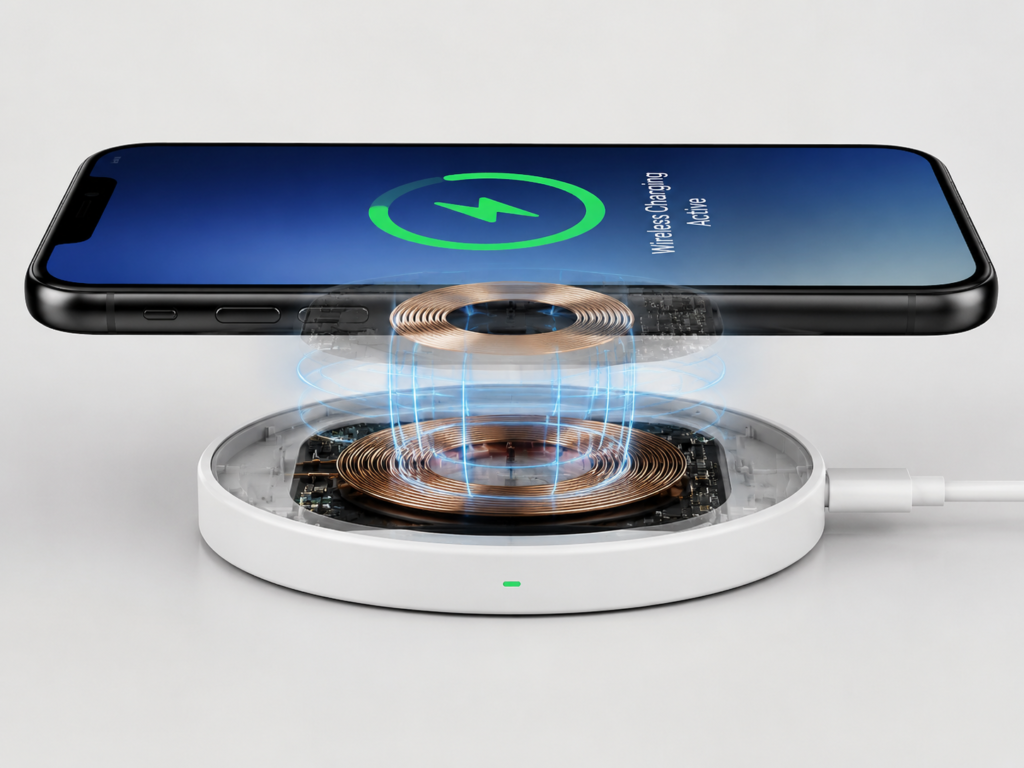
For the whole process to work stably, three basic conditions must be met: the two coils are aligned, the distance is close enough, and there are no obvious metal or strong interference objects in between. If any one is missing, charging may have problems.
Compared with wired charging that directly transmits electricity through metal wires, the “air transmission” of wireless charging is inherently less efficient and more susceptible to influence: the energy loss of air transmission is greater, and it is easier to generate heat, and too much heat will trigger protection; as long as the coil position is slightly offset, the energy that the phone can receive will drop significantly, and if it is offset too much, it will disconnect directly; during wireless charging, the phone and the charging pad need to keep “chatting”, negotiating power, temperature, and safety status at any time, once the communication fails, they will renegotiate or even disconnect directly; because it is air transmission, the safety mechanism is also stricter—when foreign objects, overheating, or abnormal power supply are detected, the system would rather disconnect than force charging to avoid safety problems.
There are 4 key mechanisms that directly determine whether charging will be disconnected:
First is alignment tolerance: ordinary flat wireless chargers are very sensitive to offset, an offset of a few millimeters to one centimeter may reduce power or even disconnect, depending on the size of the phone coil and the design of the charging pad. Magnetic wireless chargers (such as MagSafe, Qi2) are much more stable with the help of adsorption for alignment, but they also require magnetic accessories to match the phone.
Second is foreign object detection, which specifically identifies metal foreign objects to avoid danger caused by heating.
Third is communication handshake: the phone and the charger always confirm each other’s status, and will disconnect if abnormal.
Fourth is temperature control protection: too high or too low temperature will limit charging and protect the battery.
The Most Common Causes of Charging Stop: Alignment, Phone Case, Foreign Objects and Power Supply
Many daily charging stops can be troubleshooted from this part first, because these factors are the easiest to verify and the easiest to correct.
Misaligned Coils: The Number One Culprit of Disconnection with a Slight Shake
This is the most common and most easily overlooked reason: the two “energy coils” are not aligned, so energy cannot be transmitted, at best reducing power, at worst stopping directly.
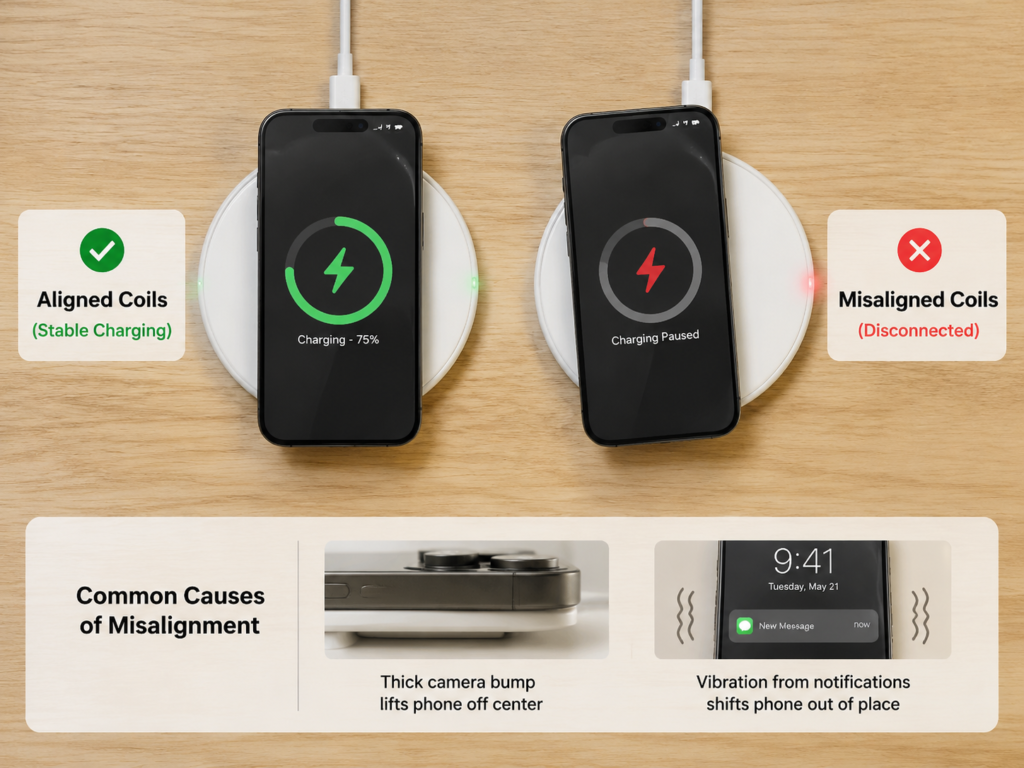
There are many situations that usually lead to misalignment: not centering the phone when placing it, the phone being shaken crooked by vibration notifications, uneven desktop, too thick camera module causing the phone to lift up, the tray height of the vertical charging stand not matching the phone, all of which will cause the coil to be misaligned. For small-sized phones, foldable screens, and phones with particularly thick cameras, the alignment tolerance space is smaller, so they are more prone to problems; car wireless chargers are even more hard-hit areas for misalignment due to bumps while driving.
For example, many people find that the car wireless charger charges well when the car is parked, but disconnects frequently when navigation is turned on. In fact, it is because the bumps cause the coil to offset, plus the phone heats up during navigation, and the two factors combined trigger the charging stop.
It’s easy to judge whether it’s an alignment problem: take off the phone case, align the center of the back of the phone with the center mark of the charging pad, place it on a hard and stable desktop, let it stand for 10 to 20 minutes, and see if it still disconnects. If it becomes stable like this, it is basically an alignment problem.
Too Thick Phone Case or Foreign Objects Trapped: Seemingly Small Problems Have Big Impact
Many people are used to putting thick cases on their phones, sticking magnetic sheets, and installing ring holders. These things may interfere with wireless charging. Common interfering objects include thick anti-drop cases, metal brackets, magnetic patches, ring holders, bank cards, access control cards, coins, keys, and even metal debris on the back of the phone or on the charging pad.
Of course, not all phone cases will affect wireless charging: thin ordinary cases, official or certified magnetic cases, generally will not have problems. Only when the case is too thick, has metal parts, the magnetic ring is misaligned, or the case prevents the phone from lying flat on the charging pad, will it cause disconnection.
Its disconnection logic is also very interesting: if it is only slight interference, it may be able to charge at first, and then suddenly stop after a while due to heat, abnormal communication or the phone moving slightly; if it is a metal foreign object, it may directly trigger foreign object detection and disconnect as soon as it is placed.
For example, many people find that “it sticks but doesn’t charge stably” after sticking a third-party magnetic ring. In fact, the position of the magnetic ring does not match the receiving coil inside the phone, resulting in misalignment. The judgment method is also very straightforward: first test with the bare phone, wipe the back of the phone and the surface of the charging pad clean, don’t put any cards or metal objects in between, and see if it still disconnects.
Unstable Power Supply: The Most Easily Mistaken for a Broken Charging Pad
Many people don’t know that unstable power supply can also cause repeated disconnection of wireless charging, and this problem is particularly easy to be mistaken for a broken charging pad.
Common power supply problems include: insufficient charger power, aging or insufficient specification of USB cable, loose interface, poor contact of power strip, insufficient power supply of computer USB port. There is also a situation that is easily overlooked: when using a multi-port charger, if a second device is plugged in, the charger will redistribute the power of each port, and the wireless charging pad may restart briefly, which is manifested as the phone charging suddenly disconnecting and reconnecting after a while.
There is a simple principle for power matching: for ordinary 5W/7.5W slow wireless chargers, a qualified adapter of about 10W is enough; if it is 15W, Qi2, MagSafe or brand-specific fast charging, be sure to use the corresponding fast charging adapter and cable according to the requirements of the charging pad manual (common fast charging protocols include PD and QC, you don’t need to remember the names, just buy according to the nominal input requirements of the charging pad), don’t just use an old charger.
To judge whether it is a power supply problem, you can use an original or officially certified adapter and a good cable, plug it directly into the wall socket, and power the wireless charging pad alone to see if it is still stable. Note here: the charging pad lighting up does not mean that the power supply is stable enough. High-power wireless chargers have much higher requirements for adapters and cables than low-power ones.
The Second Most Common Cause: Heat Generation and Thermal Protection
If you find that charging is “charging for a few minutes, stopping for a few minutes, then continuing”, it is most likely related to thermal protection.
Why Thermal Protection Makes Charging “Stop and Go”
Wireless charging transmits energy through the air, which itself has a certain energy loss. These losses will turn into heat, causing the back of the phone, the charging pad coil and the battery area to heat up. When the temperature of the phone, battery or charging pad exceeds the safety threshold set by the manufacturer, the system will reduce the charging power, or even directly pause charging; when the temperature drops back to the appropriate range, it will automatically resume charging. As a result, it appears as charging for a while and stopping for a while, which looks very random.
These Scenarios Are Most Likely to Trigger Overheating Charging Stop
- High-load use while charging: Playing large games, navigation, video calls, turning on hotspots, shooting videos, system updates, cloud synchronization, batch updating apps, etc. The high-load heat generation of the processor superimposed with the heat of wireless charging itself is easy to trigger thermal protection.
- Too high ambient temperature: In a car exposed to the sun in summer, on a desktop directly exposed to sunlight, next to a heater, in a quilt, on a sponge desk mat with poor heat dissipation, heat is difficult to dissipate.
- Poor heat dissipation of accessories: Thick anti-drop cases, leather cases, phone cases with metal parts, or the phone cannot be flat against the charging pad, all of which will hinder heat dissipation.
- Poor heat dissipation of the charging pad: No ventilation space at the bottom of the charging pad, placing it on a soft pad blocking the heat dissipation holes, excessive dust accumulation, or insufficient heat dissipation design itself.
Low Temperature May Also Limit Charging
Many people only know that overheating will stop charging, but in fact, too low temperature will also have an impact. In an environment close to 0°C or even lower, the activity of lithium batteries will decrease, and some phones will limit or even pause charging, and resume after the temperature rises. However, the temperature thresholds of different manufacturers are different. Don’t take a fixed temperature value as the unified standard for all phones. As long as the charging stop occurs in a low-temperature environment, first move to a warm place and try.
How to Judge Whether It Is Thermal Protection
The method of judging thermal protection is very simple, no professional tools are needed:
First, when charging is interrupted, touch the back of the phone and the charging pad. If it is obviously hot, prioritize handling it as thermal protection;
Second, take off the phone case, put it in a cool and ventilated place to stand for 10 to 15 minutes, then recharge and try again;
In addition, you can compare: whether it is stable when charging with the screen locked and static, and whether it is easy to disconnect when navigating or playing games while charging. If it is stable when static and disconnects as soon as you use it, then heat generation and high load are the main reasons.
Some phones will also pop up a prompt in the system such as “charging paused due to excessive temperature”, and you can directly confirm that it is thermal protection when you see this.
Easily Overlooked Causes: System Settings, Software and Battery Health
If you have checked the external alignment, accessories, power supply, and temperature and it still disconnects, then you need to see if it is a problem with the phone system or battery.
System Charging Optimization Function: The Software Reason Most Easily Misjudged
If there is no overheating prompt, foreign object prompt, charging pad restart or obvious power supply fluctuation, but it just stops stably at around 80% at night, then prioritize considering charging optimization or charging limit function; if it is accompanied by heat generation, repeated reconnection or abnormal charging pad indicator light, you still need to troubleshoot in the direction of temperature, power supply, etc.
Many new phones or newer system versions provide similar battery protection functions, but the name, entry and default status vary by brand and system version, such as iOS’s “Optimized Battery Charging” and “Charge Limit”, and Android brands’ “Smart Charging”, “Sleep Charging”, “Battery Protection”, “Night Charging Protection”, the principle is the same: by learning your usage habits, it charges to about 80% and pauses during night charging, and then continues to fully charge when it is close to your usual wake-up or phone use time, to avoid the battery being in a full state for a long time and delay aging.
It’s easy to judge whether it’s this problem: temporarily turn off the relevant function, choose to charge for 1 hour during the day with the screen locked and static. If it no longer stops at 80%, it means it is a normal optimization function. Here is a reminder: this type of function is good for the battery. After testing, you can turn it on again according to your needs, don’t keep it off just to fully charge.
Power Saving Mode, System Updates and Background Tasks
Many people will ask: “Will turning on power saving mode cause wireless charging to disconnect?” In fact, power saving mode itself generally does not directly force the disconnection of wireless charging, but it will change the background strategy, performance scheduling and temperature control threshold, indirectly affecting the stability of charging.
There is also a very common situation: after the system is just updated, the phone will do photo indexing, app adaptation, data synchronization, batch updating apps and other operations in the background. These background tasks will increase the heat generation of the phone, which in turn triggers thermal protection, resulting in intermittent charging. The judgment method is not difficult: restart the phone, wait for the background tasks to be completed, turn off the high-power-consuming apps, and retest under normal temperature and screen lock state to see if it still disconnects.
Third-Party Battery or “Charging Speed-Up” Apps
Many people like to install some “battery optimization”, “charging speed-up”, “charging animation” apps, thinking that they can protect the battery or speed up charging. But in fact, ordinary third-party apps can’t really control the wireless charging power of the hardware at all, but may bring problems: for example, popping up misleading charging prompts, increasing background load, resident monitoring causing the phone to heat up, indirectly affecting charging stability.
Especially those apps with “charging speed-up”, “battery doctor”, “cleanup and speed-up” in their names have higher risks. If the charging stop problem occurs after installing such apps recently, you can uninstall them first, restart the phone and then test.
Insufficient Battery Health or Abnormal Battery
If your phone has been used for a long time, battery aging may also cause wireless charging to disconnect easily. The principle is very simple: the internal resistance of an aged battery will increase, and it is easier to generate heat during charging. In order to protect the battery, the system will more actively limit the charging power or even pause charging.
The way to check battery health varies by brand: iPhone can be viewed directly in “Battery Health & Charging” in Settings; the entry for each Android brand is different, some only show diagnostic results, some need to be tested at official after-sales service. Here is a common misunderstanding to note: 80% is the battery maintenance reference line given by Apple officially, but not all brands use this standard. Don’t judge that the wireless charging module is broken solely based on a percentage.
If it is also accompanied by obvious decline in battery life, abnormal heat generation, automatic shutdown, battery level jump, and unstable wired charging, then prioritize considering it is a battery or system problem.
Less Common Deep Causes: Hardware Failures and Compatibility Issues
If you have troubleshooted all the previous problems and it still disconnects, then you need to consider whether it is a hardware failure or compatibility problem. Such situations are not high in proportion, but you also need to understand.
Failure of the Wireless Charging Pad Itself
Although it is not common for the charging pad itself to have problems, it is possible. For example, loose internal coil or connection, abnormal temperature sensor, poor heat dissipation design, water ingress or moisture, loose interface, poor power management chip, firmware compatibility problems, all may cause random charging stop.
If there is a problem with the charging pad, it usually has these manifestations: several different phones disconnect when placed on it, the charging pad indicator light flashes abnormally, the charging pad restarts by itself, and the heat generation is obviously much higher than normal. To judge whether it is a problem with the charging pad, you can find another phone that is confirmed to have normal wireless charging, place it on the same charging pad for testing. If multiple devices have random charging stops, then prioritize suspecting that it is a problem with the charging pad or the power supply link.
Here is also a reminder: don’t use “how many years it has been used” to directly judge whether the charging pad is broken. Its lifespan is greatly affected by the brand, heat dissipation, usage environment, and power quality, and there is no unified service life.
Abnormal Wireless Charging Hardware on the Phone Side
The probability of problems with the wireless charging hardware on the phone side is even lower, and it usually occurs after being dropped, water ingress or maintenance. For example, the receiving coil or cable is loose due to dropping, the coil position is not aligned after replacing the back cover, the temperature sensor misjudges, and the power management chip is abnormal, all of which may cause random charging stop.
If it is a hardware problem on the phone side, it is usually accompanied by these symptoms: it still disconnects after changing several normal wireless charging pads, the phone heats up abnormally, wired charging is also unstable, and the problem appears after dropping or maintenance. The judgment method is: test the same phone with two confirmed normal wireless charging pads. If they all disconnect, then combine the situation of wired charging, battery health and system status to comprehensively judge whether it is a phone hardware problem.
Charging Protocol or Ecosystem Compatibility Issues
Current wireless charging has different standards and ecosystems, and poor compatibility can also cause disconnection, especially in the case of high-power fast charging.
Among the current general wireless charging standards, Qi has been the mainstream for a long time, and Qi2 is a standard that is gradually popularized in new devices and new accessories, emphasizing magnetic alignment; the stability advantage is more obvious only when the phone, charging pad, phone case and adapter link are matched. In addition, there are Apple’s MagSafe and various Android brands’ proprietary wireless fast charging. These proprietary high-power solutions usually require the same brand or officially certified charging pads, adapters and cables to be used together. When mixed, they may return to low-power mode, or cause disconnection due to repeated protocol negotiation.
The most typical manifestation of compatibility problems is: it is stable in basic 5W slow charging, but disconnects frequently as soon as it switches to high-power fast charging mode, and returns to normal after replacing official or certified accessories. To judge whether it is a compatibility problem, you can try switching to a low-power basic charging mode, or replace the official/certified wireless charger, adapter and cable for comparison. Note here: stability at low power only means that the problem is not obvious at low power, and disconnection at high power may also be a problem of heat dissipation, power supply or charging pad hardware under high load, and cannot be directly concluded as a compatibility problem.
Exclusive Problems of Special Scenarios
Some charging stop problems only occur in specific scenarios, we list them separately for your reference:
The first is car wireless charger. Bump displacement while driving, high-load heat generation of navigation, high temperature from direct sunlight, insufficient power supply of the car’s USB port, too thick phone case or misaligned magnetic ring, these factors are often superimposed together, causing the car wireless charger to disconnect very easily, which is the most problematic of all scenarios.
The second is vertical charging stand. If the tray height of the stand does not match your phone, the receiving coil of a small-sized phone or foldable screen may not align with the transmitting coil of the charging pad, resulting in easy disconnection.
The third is multi-device charging base. When charging the phone, earphones, and watch at the same time, the power distribution and heat dissipation pressure are greater, and disconnection is more likely to occur.
The fourth is bedside soft pad scenario. Placing the charging pad on bedding, soft pads, or piles of books will not only block the heat dissipation holes and affect heat dissipation, but also may cause the coil to be misaligned due to the phone sliding slowly, and charging stops in the middle of the night.
Step-by-Step Troubleshooting Guide: From Easy to Difficult, Change Only One Condition at a Time
After understanding various common causes, you can troubleshoot according to the following steps from easy to difficult, adjusting only one condition at each step, which can locate the root cause of the problem the fastest.
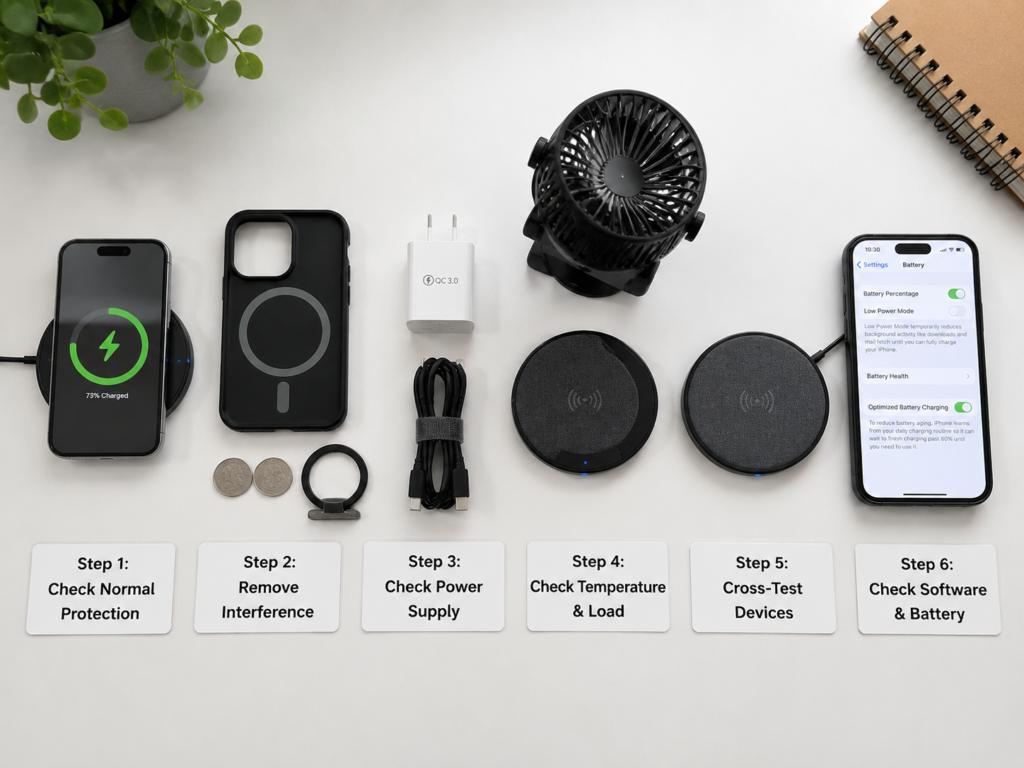
For quick location, first organize the common symptoms and priority troubleshooting directions into a table:
| Fault Manifestation | Priority Troubleshooting Direction |
|---|---|
| Disconnect immediately after placing on the charging pad, charging pad indicator light flashes | Foreign objects, phone case, coil alignment, power supply |
| Stop after charging for 5-30 minutes | Heat generation, high background load, ambient temperature |
| Night charging stops at around 80% | System charging optimization/battery protection function |
| Car wireless charger disconnects frequently | Bump displacement, navigation heat generation, direct sunlight, car power supply |
| Stable in slow charging, frequent disconnection in fast charging | Protocol compatibility, adapter power, cable, heat dissipation, accessory certification |
Many daily problems will reveal the cause in the first few steps, just troubleshoot one by one in order:
Step 1: Eliminate False Faults (2 Minutes)
First spend 2 minutes eliminating the most common normal situations, don’t work in vain:
- Check the current battery level, whether it is close to 80%, 90% or 100%;
- Temporarily turn off battery protection functions such as optimized battery charging, charge limit, and sleep charging;
- Check whether the phone pops up prompts such as excessive temperature, foreign object detected, charging paused;
- Place the phone straight again, confirm that the charging prompt appears stably before observing.
Step 2: Eliminate External Interference (5 Minutes)
If it is confirmed that it is not normal protection, then troubleshoot the easiest to solve external interference:
- Take off the phone case, remove items such as bank cards, access control cards, magnetic stickers, metal brackets, ring holders sandwiched between the phone and the charging pad;
- Wipe the back of the phone and the surface of the charging pad with a clean cloth, confirm that there are no metal debris or dust particles;
- Place the charging pad on a hard and stable desktop, do not place it on bedding, soft pads, or inclined surfaces;
- Let it stand for 10 to 20 minutes, do not touch the phone during this period, see if it will still be interrupted.
Step 3: Troubleshoot the Power Supply Link (5 Minutes)
If the external interference is eliminated and it still disconnects, then check the power supply:
- Replace with an original or officially certified adapter, and a good USB cable;
- Plug directly into the wall socket, do not use loose power strips, computer USB ports or low-power USB ports of the car;
- If you use a multi-port charger, only keep the wireless charging pad as one device during the test, unplug all others;
- If it is a high-power wireless charger, be sure to use the corresponding PD/QC/special adapter and cables that meet the specifications at the same time according to the nominal requirements of the charging pad.
Step 4: Troubleshoot Temperature and Load (10-15 Minutes)
If the power supply is fine, then check heat generation and load:
- Turn off high-load operations such as games, navigation, video calls, hotspots, downloads, app updates;
- Charge with the screen locked and static, compare whether it is obviously easier to disconnect when charging while using;
- Move the phone and charging pad to a cool and ventilated place, avoid environments such as direct sunlight, heaters, high-temperature cars;
- If it becomes stable after taking off the phone case and cooling down, it can basically be determined that it is a heat dissipation or load problem.
Step 5: Cross-Test to Locate the Fault End (10-30 Minutes)
If the previous steps have not solved the problem, you need to use cross-testing to determine whether it is a problem with the charging pad or the phone:
- Test the same phone with another confirmed normal wireless charging pad;
- Test the same wireless charging pad with another normal phone that supports wireless charging;
- Test wired charging with the same set of adapter and cable. If wired charging is also unstable, then prioritize checking the adapter, cable, phone battery or system;
- If multiple phones disconnect on the same charging pad, prioritize suspecting that it is a problem with the charging pad or the power supply link;
- If the same phone disconnects on multiple charging pads, prioritize suspecting that it is a problem with the phone’s system, battery or wireless charging hardware.
Step 6: Troubleshoot Software and Battery (5-15 Minutes)
Finally, troubleshoot software and battery problems:
- Restart the phone first, many small bugs can be solved by restarting;
- Uninstall recently installed charging animation, battery optimization, charging speed-up, cleanup apps;
- Update the system to the latest stable official version. If the problem occurs just after the update, you can observe for 1-2 days first to see if the manufacturer will push a repair patch;
- Check the battery health, see if there are accompanying symptoms such as abnormal heat generation, battery level jump, automatic shutdown.
Common Pitfall Reminders: Don’t Be Misled by These Misconceptions
- Don’t think that wireless charging can be stable just by placing it casually: Wireless charging relies on coil alignment, and ordinary flat charging pads are more sensitive to offset. Try to align with the center mark when placing, and prioritize choosing magnetic accessories with positioning design or official certification.
- Don’t blame the product quality as soon as fast charging disconnects: High-power wireless fast charging has much higher requirements for alignment, power supply, heat dissipation and protocol matching than slow charging. If low power is stable but high power disconnects frequently, first troubleshoot the adapter, cable, heat dissipation, protocol and accessory certification, then judge whether it is a hardware quality problem.
- A charger that can light up may not be sufficient: The charging pad lighting up and the phone being able to start charging do not mean that the power supply is stable enough. Adapters with insufficient power or mismatched protocols will cause the charging pad to restart repeatedly and charging to disconnect. Please select the appropriate adapter and cable according to the nominal input requirements of the wireless charging pad.
- Phone cases not only affect charging speed, but may also cause disconnection: Thick cases, metal parts, misaligned magnetic rings will not only reduce charging speed, but also cause coil alignment deviation and trigger foreign object detection, directly leading to charging stop. When encountering problems, first test with the bare phone. After confirming that it is the case’s problem, you can replace it with a thin case or an officially certified magnetic case.
- Don’t assume that the phone hardware is broken as soon as charging stops: Most daily charging stops can find the cause from alignment, accessories, power supply, heat dissipation or system strategy. But if the same phone disconnects on multiple normal charging pads, accompanied by abnormal heat generation, battery level jump or unstable wired charging, you should troubleshoot hardware problems in time and send it for repair according to the process.
How to Judge Whether to Handle It Yourself, Replace Accessories or Find After-Sales Service?
After troubleshooting the problem, how to judge what to do next? Here is a clear standard for you:
Situations That Can Be Solved by Yourself
If the following situations occur, they are basically small problems, just adjust by yourself:
- After taking off the phone case, removing foreign objects, and re-aligning the coil, charging returns to stable;
- After replacing the adapter, cable or wall socket, it no longer disconnects;
- After cooling the phone, letting it stand with the screen locked, and stopping high-load operations such as navigation/games, charging becomes stable;
- It is confirmed that the charging stop at around 80% is caused by the charging optimization function, which is normal battery protection and does not need repair.
Situations Where It Is Recommended to Replace Accessories
If you encounter the following situations, it means it is a problem with the accessories, and it is recommended to replace them:
- A certain phone case, magnetic ring, or stand case causes charging stop as soon as it is installed, and it recovers after taking it off;
- A certain cable or a certain adapter causes repeated disconnection when used on the wireless charger, and it recovers after replacing with others;
- The same wireless charging pad disconnects for multiple phones, and it is still abnormal after replacing the power supply;
- Non-certified or low-cost wireless fast chargers are unstable for a long time at high power, and after excluding factors such as power supply, phone case and heat dissipation, it is recommended to replace official or certified wireless charging products.
Situations Where It Is Recommended to Contact Official After-Sales Service
If the following situations occur, it is recommended to contact official after-sales service for testing:
- The same phone randomly stops charging on multiple normal wireless charging pads;
- The wireless charging abnormality occurs after the phone has been dropped, water ingress, or maintenance;
- It is accompanied by abnormal heat generation, battery level jump, automatic shutdown, and unstable wired charging at the same time;
- The battery health has dropped significantly, accompanied by frequent charging abnormalities, especially if it is still within the warranty or battery service range.
Safety Red Line for Immediate Stop of Use
If the following situations occur, be sure to stop using immediately to avoid safety problems:
- The phone or charging pad has bulges, deformation, peculiar smell, smoke, or heats up after water ingress;
- It is obviously hot during charging, and after cooling down and using again, it still overheats quickly;
- The interfaces of the charging pad, adapter, and cable have charring, looseness, sparking or burning smell;
- Metal foreign objects are heated and become hot during charging, indicating that there are safety risks in the usage environment or accessories.
If any of the above situations occur, do not continue to test repeatedly; first disconnect the adapter power, remove the metal foreign objects, and contact official after-sales service or replace regular accessories after the device cools down.
In addition, whether it is a mobile phone or a wireless charging pad, private disassembly and repair are not recommended: private disassembly of the mobile phone may damage the waterproof structure, damage the internal coil or cable, and also affect the official warranty. Private disassembly and repair of the wireless charging pad may cause short circuit and damage to the insulation layer, which will increase the risk of subsequent overheating and fire; if you suspect a quality problem, prioritize replacing products from regular brands, or contact the brand’s after-sales service for handling.
Final Summary
When encountering random stop of wireless charging, you can handle it according to three core logics:
First, distinguish true from false first: first exclude normal protections such as 80% charging optimization, full charge supplementary charging, temperature control, foreign object detection, and position offset. Only those that meet “more than 2 abnormal interruptions within 1 hour, excluding clear incentives” should be troubleshooted as faults.
Second, check from easy to difficult: first verify external factors such as phone case, foreign objects, and alignment, then troubleshoot power supply, temperature and load, locate whether it is a charging pad or phone-side problem through cross-testing, and finally check the software and battery status.
Third, keep the safety line: if there are bulges, peculiar smell, continuous overheating, charred interfaces, etc., stop using immediately and contact after-sales service, do not disassemble and repair privately.