
Have you ever had this experience: you bought a 3-meter HDMI cable to connect your gaming console to your TV, and 4K/120Hz and HDR all worked normally. Later you switched to a 10-meter cable to connect to a projector, but you got either a black screen or a flickering screen, and it could only reach 4K/60Hz at most? When you search for solutions at this time, you will most likely come across two terms: passive cables, active cables, and an even more unfamiliar term “AOC active optical cable”.
Many people assume that “active” means more advanced and better, and that a more expensive cable is always the right choice. As a result, they spend several times more money only to find that the cable either doesn’t work if plugged in reverse, or can’t draw enough power from older TV ports, making it less hassle-free than a regular cable.
You don’t need to be intimidated by these terms. Today we will thoroughly explain the differences between passive and active cables, covering quick selection tips, common pitfalls to avoid, and troubleshooting methods for black screens and flickering. You don’t need to understand circuitry to pick the right cable for your needs.
Let’s Start with the Conclusion: How Ordinary Users Can Quickly Judge Which to Buy
You don’t need to understand the principles first. Remember the core difference and selection rules, and you can make a decision directly in most scenarios.
Core Difference in One Sentence
Passive cables have no signal processing chips that require power to operate inside the cable body; they rely entirely on conductors, optical fibers, shielding layers, and connectors themselves to transmit signals. Active cables have built-in powered chips or even photoelectric conversion modules hidden in their connectors or cable bodies, specifically used to amplify, repair, retime, or convert signals.
The corresponding general selection principle is simple: for short-distance, low to medium bandwidth scenarios, prioritize passive cables; for long-distance, high-bandwidth, strong interference environments, or scenarios requiring in-wall pre-installation, prioritize active copper cables or AOC active optical cables (that is, fiber optic cables with integrated photoelectric conversion modules at both ends, which will be explained in detail later).
Ready-to-Use Quick Buying Rules
For short-distance desktop connections, such as computer to monitor, console to TV, or portable hard drive to computer, with cable lengths usually within 3 meters, it is enough to prioritize buying certified passive short cables from reputable brands. They are both cheap and hassle-free, and there is absolutely no need to spend extra money.
If you are using a 4K/120Hz high refresh rate monitor, 8K TV, USB4 or Thunderbolt device, never buy a cable just because the connector shape looks the same. First, confirm that the ports of both devices themselves support these specifications, then check the actual bandwidth of the cable, official certification, and its rated capability at the corresponding length. Many cables claim to support HDMI 2.1, but in reality they cannot reach full maximum bandwidth beyond 5 meters.
For high-specification video transmission or high-speed USB data transmission over 5 meters, the failure rate of passive cables increases significantly. At this point, you can start evaluating active copper cables or AOC.
For projector connections, conference room or exhibition hall wiring over 10 meters, or scenarios requiring in-wall pre-installation, prioritize AOC or compliant fiber optic solutions. Be sure to conduct actual testing at the highest specifications before sealing the conduits or walls to avoid rework later.
If you need special features such as eARC (enhanced Audio Return Channel), CEC (Consumer Electronics Control) device linkage, VRR (Variable Refresh Rate), HDR (High Dynamic Range), HDCP (High-bandwidth Digital Content Protection) copyright authentication, USB return, KVM switching, or touch screen support, be sure to confirm that the product description of the active cable or AOC explicitly states support for these features. These functions relate to core experiences such as audio return, device linkage, gaming experience, copyright handshake, and peripheral return, and the absence of any one of them may directly affect usage.
Establishing Boundaries: What Are Passive Cables and What Are Active Cables
You may still be a bit confused after reading: what exactly counts as passive, and what counts as active? Why aren’t powered charging cables active? Aren’t all fiber optic cables active? Next, we will clarify the boundaries to avoid being misled by merchants.
Core Judgment Criteria
The core criterion for judging whether a cable is passive or active is whether there are signal processing components inside the cable body that require power to operate, which has nothing to do with whether the cable can transmit electricity.
For example, ordinary short HDMI cables, DP cables, USB data cables, and Cat5e/Cat6 Ethernet cables only contain copper conductors, shielding layers, insulation layers, and connectors inside, without any signal chips that require power. These are all passive cables. Those long-distance cables with amplification chips, retiming chips, or marked with direction labels, as well as AOC active optical cables, all belong to active cables because they have internal processing components that require power.
Three Most Easily Confused Concepts
First misconception: Cables with power supply function are active cables. Wrong. For example, USB charging cables and PoE Ethernet cables do transmit electricity, but if there are no active signal processing chips inside the cable, they are still passive cables. Transmitting electricity and processing signals are two different things.
Second misconception: Cables with ferrite cores are active cables. Wrong. Ferrite cores are passive anti-interference components used to suppress electromagnetic noise, like putting “sound insulation cotton” on the cable. They do not amplify or repair signals, so cables with ferrite cores may still be passive.
Third misconception: All fiber optic cables are active cables. Wrong. The bare fiber optic patch cords we usually refer to, the ones with LC or SC connectors at both ends, only have optical fibers and connectors themselves, without any signal processing components that require power. They belong to passive cables and need to be used with switches, optical modules, or fiber optic transceivers. The AOC active optical cables we often talk about are finished cables with integrated electro-optical/photoelectric conversion modules already integrated at both ends. The entire cable requires power to operate, and only these count as active cables.
Type Classification of Common Cables
For clarity, we classify common cables by type:
- Passive copper cables: Ordinary short HDMI cables, short DP cables, ordinary USB data cables, short-distance USB-C cables, Cat5e/Cat6/Cat6A Ethernet cables, passive DAC (Direct Attach Copper) cables for data centers
- Passive fiber optic patch cords: Bare fiber optic patch cords with LC, SC and other interfaces, used with optical modules or fiber optic transceivers
- Active copper cables: HDMI, DP, USB extension cables with equalization, amplification, and retiming chips, as well as some active copper cables for data centers
- Active Optical Cables (AOC): Integrated photoelectric conversion modules at both ends, with signals transmitted through optical fibers in the middle, commonly used in long-distance HDMI, DP, USB, Thunderbolt, and high-speed interconnection scenarios
The scope of this article mainly focuses on consumer electronics, home audio-visual, office display, conference rooms, exhibition halls, and light pre-installation scenarios. It does not cover power cables, RF feeders, carrier optical cable construction, and data center engineering specifications in depth.
Typical Consequences of Choosing the Wrong Cable
Don’t think that if you choose the wrong one, you can just replace it. In some scenarios, the cost of choosing wrong is very high:
- Using passive cables for long-distance high-bandwidth: Mild cases include black screens, flickering, screen artifacts, and transmission speed drops; severe cases include repeated device reconnections, making it completely unusable
- Blindly buying active cables for short distances: Not only do you spend more money, but you may also encounter problems such as reverse plugging, insufficient port power supply, and reduced compatibility
- Choosing the wrong cable for pre-installation: Later replacement is extremely difficult. When you want to upgrade to 4K/120Hz, 8K, USB4 or Thunderbolt in the future, the entire link may be directly scrapped
Working Principle: Why Active Cables Can Transmit Farther, and Passive Cables Are More Hassle-Free
Now that you understand the definitions, you may ask: Since they are all cables, why can active cables transmit farther? Will they have latency? Are they more likely to break? We will briefly explain the logic behind this, which you can understand without knowing circuitry.
Transmission Logic of Passive Cables
The signal transmission of passive cables is very straightforward: signals are sent from the source device, transmitted directly along copper conductors or optical fibers to the receiving end, without any “active repair”环节 in the middle.
Its limitations are also obvious: the longer the cable and the higher the transmission rate, the more severe the signal loss — that is, the signal becomes weaker as it travels (attenuation), its timing varies (jitter), adjacent cables interfere with each other (crosstalk), and signals bounce at the connectors (reflection). These problems become more and more obvious as cable length and rate increase.
Conversely, precisely because of their simple structure and no extra electronic components, passive cables have fewer failure points, and usually have better compatibility over short distances. They are plug-and-play, with no need to consider power supply or direction issues. Of course, high-quality thick wire gauges, good shielding, and formal certification can improve the performance of passive cables, but they cannot break through the limits of physics and protocols, and cannot transmit high-bandwidth signals over infinite distances.
Transmission Logic of Active Cables
Active cables were born to solve the long-distance transmission problem of passive cables. Different types of active cables work in slightly different ways.
Active copper cables add signal processing chips in the connectors or cable body to compensate for copper cable loss through amplification, equalization, and retiming — simply put, they amplify the attenuated and weakened signals, tidy up the distorted signals caused by interference, and realign the signals with inaccurate timing, so that the receiving end can stably recognize them.
The approach of AOC active optical cables is more thorough: the connectors at both ends directly convert electrical signals into optical signals, which are transmitted through optical fibers in the middle, and then converted back to electrical signals at the other end. Optical signals are almost unaffected by electromagnetic interference, and transmission loss is much smaller, so they can transmit farther and with higher bandwidth.
As for power supply, most consumer-grade active cables draw power directly from the port, such as the 5V pin of HDMI and the power pin of USB. Only a few extra-long models or models for special scenarios require additional USB power supply.
Special mention should be made here of the particularity of USB-C and Thunderbolt cables: these cables may involve PD (Power Delivery) power negotiation, e-marker chip identification (the small chip in the cable used to tell the device the rate and power supported by the cable), DP Alt Mode video output, USB4 or Thunderbolt protocol handshake. If the chip has poor compatibility or insufficient power supply, it is very easy to experience speed reduction, missing functions, or even no signal at all.
Costs and Limitations of Active Cables
Although active cables can transmit farther, they are not without costs:
They have higher costs, and their connectors are usually larger due to built-in chips. Many models also have direction requirements, marked with Source/Display, Host/Device, or Input/Output, and cannot be used at all if plugged in reverse.
They rely on the power supply capability of the device and chip compatibility. Devices such as old TVs, old motherboards, docking stations, capture cards, and switches are more prone to insufficient power supply or handshake failure.
Many people worry about the latency of active cables. In fact, the signal processing latency of most active cables is in the nanosecond to microsecond level. Whether you are watching videos, working, or gaming, it is basically imperceptible. Don’t confuse it with the millisecond-level latency of wireless screen casting or video converters.
Unified Comparison Premise: Discussing Pros and Cons Without Specifications Is Meaningless
Many people make a mistake when comparing passive and active cables: they compare a 1-meter passive cable with a 10-meter active cable and say that active cables have poor compatibility; or they compare a no-name passive cable with a branded active cable and say that active cables are more stable. Such comparisons are meaningless. We must first unify the comparison standards.
Default Comparison Criteria
A fair comparison needs to meet several premises:
- Same interface type: Compare HDMI with HDMI, DP with DP, USB with USB, Ethernet with Ethernet. Cross-interface comparison is meaningless
- Same protocol version and rate: The transmission difficulty of HDMI 2.0 and HDMI 2.1 is worlds apart, and USB 5Gbps and USB 40Gbps are not on the same level. They must be compared with the same specifications
- Same target capability: Targets such as resolution, refresh rate, color depth, HDR, audio return channel, data rate, and power supply requirements must be consistent
- Same product quality: By default, all are reputable brands, qualified wire gauges, with clear rated capabilities, preferably with official certification or third-party testing. No-name falsely labeled products should be used for comparison
- Same usage environment: Ordinary home or office environments. Strong interference environments such as high-voltage power, stage lighting, motors, cabinets, and elevator shafts need to be evaluated separately
Key Variables That Can Change the Conclusion
Even if the above premises are met, several variables will directly affect the final choice, and cannot be generalized:
- Cable length: The shorter the cable, the more obvious the advantages of passive cables; the longer the cable, the more prominent the advantages of active cables and AOC
- Bandwidth: For low-bandwidth requirements such as 1080p, USB 2.0, and Gigabit Ethernet, passive cables can transmit very far; but for high-bandwidth requirements such as 4K/120Hz, 8K, USB4, and Thunderbolt 40/80Gbps, the reliable length of passive cables will be greatly shortened
- Cable structure: The wire gauge, shielding method, twisted pair structure, impedance control, and connector workmanship of copper cables, as well as the bending radius of optical fibers, will directly affect transmission capability
- Device power supply capability: Active cables rely on port or external power supply. Low-power portable devices, old devices, and some docking stations may have insufficient power supply, causing active cables to work improperly
- Protocol functions: Features such as eARC, CEC, VRR, ALLM, HDR, Dolby Vision, HDCP, USB PD, DP Alt Mode, e-marker, and Thunderbolt certification all require simultaneous support from both the cable and the device to be used
- Installation method: Desktop mobile use, in-wall pre-installation, conference room floor outlets, and cabinet wiring have different requirements for cable bending resistance, replaceability, and connector size
Core Dimension Comparison: Distance, Stability, Cost, Compatibility, Lifespan and Wiring
Under the premise of unified standards, we compare the differences between passive copper cables, active copper cables, and AOC active optical cables from several dimensions that everyone cares most about, and finally attach a quick reference table for easy lookup.
Transmission Distance and Bandwidth Upper Limit
The overall rule is consistent with the general selection principle we mentioned at the beginning: passive cables are suitable for short distances, active copper cables for medium distances, and AOC for long distances, high bandwidth, and strong interference environments. However, it should be noted that all distance figures are only empirical references, not absolute standard upper limits. Actual results must be based on protocol rate, certification level, wire gauge, device compatibility, and actual testing.
Specific to common cable types:
- HDMI/DP high-bandwidth video: 1-3 meters using passive cables is the safest; 3-5 meters depends on certification and cable quality, high-specification 4K/120Hz and 8K have very high requirements for cables; for high-specification transmission above 5-10 meters, prioritize evaluating active copper cables or AOC
- USB 2.0: The common reference length for traditional specifications is about 5 meters. Longer distances usually require active extension, hub cascading, or special low-speed solutions
- USB 3.x/USB4/Thunderbolt: The higher the rate, the shorter the reliable length of passive cables. For example, the reliable passive length of high-speed cables such as Thunderbolt 4/USB4 is usually short, and common certified passive cables on the market are mostly concentrated in short distances. When purchasing, don’t just look at the USB-C shape or the words “full-featured”. Confirm whether the packaging, cable body, or product page clearly marks USB4 20Gbps/40Gbps/80Gbps or Thunderbolt 3/4/5 certification, the corresponding supported cable length, PD power supply power, and video output capability; when exceeding the officially certified rated length, then consider active cables or AOC.
- Ethernet twisted pair: Cat5e/Cat6/Cat6A are usually designed for within 100 meters in standard links. Beyond 100 meters, switch relays, fiber optic transceivers, fiber optic links, or compliant extension solutions should be used
Signal Quality and Stability
Passive cables have a simple link and good stability over short distances, but once they approach their capability upper limit, they are prone to sudden black screens, flickering, and speed drops, without much buffer space.
Active copper cables have more signal margin at medium and long distances, but their risk points shift from the copper cable itself to chip quality, power supply, and protocol compatibility. If the chip is poor or power supply is insufficient, they may instead be less stable than passive cables.
AOC has strong anti-electromagnetic interference capability, and is widely used in scenarios such as long-distance video, conference rooms, and exhibition halls. However, its optical fibers and connectors are relatively delicate, afraid of bending, dust, and impact, and are prone to problems if not well protected.
Here is a simple judgment method: if the fault disappears after reducing the resolution, refresh rate, color depth, or data rate, it usually means that the link has insufficient bandwidth margin, not that the device is broken.
Cost and Cost-Effectiveness
Short passive cables are the cheapest and most hassle-free, but high-specification long-distance copper cables will become thick, hard, and expensive, and their cost-effectiveness will decline rapidly.
Active copper cables are not cost-effective for short distances, after all, they have additional chip costs. But at medium distances, they may be more stable than thick copper passive cables of the same specification, and the cable body is softer and easier to wire, resulting in higher overall cost-effectiveness.
The unit price of AOC is usually higher, but in long-distance, high-bandwidth, pre-installation, or strong interference scenarios, its overall cost may be lower — after all, the cost of rework after pre-installation and later maintenance is much higher than the cost of a single cable.
Don’t fall into the misconception that “the more expensive, the better”. The fact that active cables of the same length are more expensive does not mean they are more suitable for you. Be sure to look at certification, bandwidth, functional support, and after-sales service, and then judge based on your own scenario.
Usability and Compatibility
Passive cables usually have no direction requirements, do not require additional power supply, are plug-and-play, and have the best compatibility over short distances, with basically no handshake failure problems.
Active cables are more troublesome: they may have direction requirements, may require external power supply, and are more sensitive to device boot sequence, sleep/wake, BIOS stage display, and devices such as switches and matrices, prone to strange compatibility problems.
Special attention should be paid to the functional boundaries of AOC: not all AOC fully support CEC, eARC, DDC (Display Data Channel), HDCP, USB return, or KVM functions. Some AOC are only responsible for transmitting the main video signal, and sideband functions may not be supported. You must check the clear product description and actual testing.
Here we also mention a USB-C shape trap: cables with the same USB-C interface may just be charging cables, USB 2.0 cables, 5Gbps cables, 10Gbps cables, USB4 cables, or Thunderbolt cables, with vastly different functions. You must never buy a cable just by looking at the interface shape.
Reliability and Lifespan
Passive cables have a simple structure and no electronic components, so their long-term reliability is usually better. Common failures are nothing more than conductor breakage, loose connectors, and damaged shielding. They can be used normally for many years without breaking.
Active cables have additional chips, solder joints, and power supply paths. High temperatures, frequent plugging and unplugging, and excessive bending will increase the probability of failure, equivalent to adding several more links that may go wrong.
The optical fiber part of AOC itself has a long lifespan, but it is afraid of excessive bending, stepping, or pulling. The photoelectric modules in the connectors are also afraid of dust, impact, and scratches during conduit threading. More care should be taken during construction and use.
Overall, under the same usage conditions, passive cables are usually more durable; the lifespan of active cables and AOC depends more on chip quality, usage environment, and construction quality.
Wiring Friendliness
For high-speed long-distance passive copper cables, the cable body will be very thick, hard, and heavy, with a large turning radius, making conduit threading particularly difficult, especially during pre-installation, it is very likely that the cable cannot fit into the conduit.
The cable body of active copper cables will be thinner and softer, but the connectors may be thicker due to built-in chips. Before pre-installation, be sure to confirm whether the connectors can pass through the conduit and whether the conduit diameter is sufficient.
AOC cables have thin and light bodies, strong anti-interference capability, and are particularly suitable for projectors, conference rooms, exhibition halls, and pre-installation scenarios. However, their connectors are relatively large, and optical fibers have a minimum bending radius requirement. During construction, special attention should be paid to protecting the connectors and optical fibers, and they must not be bent sharply.
If it is pre-installed wiring, be sure to remember several key points: reserve replaceable conduits, mark the direction of the cable, reserve 10%-20% length redundancy, confirm that the connectors can pass through the conduit, and be sure to conduct continuous testing at the highest specifications before sealing the conduit.
Comparison Quick Reference Table
For easy quick comparison, I have organized the core information into a table:
| Dimension | Passive Copper Cable | Active Copper Cable | AOC Active Optical Cable |
|---|---|---|---|
| Core structure | Copper conductors, shielding, connectors | Copper cable with signal processing chips | Optical fiber with photoelectric conversion modules at both ends |
| Power supply requirement | Usually not required | Mostly draws power from port, few require external power | Mostly draws power from port, few require external power |
| Distance advantage | Short distance | Medium distance | Long distance |
| High-bandwidth performance | Excellent at short distance | More stable at medium distance | More stable at long distance |
| Compatibility | Usually the best | Affected by direction, power supply, and chip | Affected by direction, power supply, and functional support |
| Anti-interference | Depends on shielding | Depends on shielding and chip compensation | Very strong |
| Wiring difficulty | High-speed long cables are thick and hard, difficult to thread through conduit | Medium, connectors may be thicker | Thin cable body, connectors need protection |
| Cost | Lowest for short cables | Medium to relatively high | Relatively high |
| Suitable scenarios | Short desktop connections, ordinary home use | Medium-long distance display or USB extension | Projectors, conference rooms, exhibition halls, pre-installation, strong interference |
Selection by Scenario: How to Choose from Home Use to Office Wiring
After talking about the comparison, you may still not know which one to buy for your situation. Below we give specific suggestions according to the most common scenarios, you can directly match your situation.
Home Audio-Visual: TVs, Projectors, Game Consoles, Amplifiers
For connections within 3 meters, such as game console to TV or computer to monitor, prioritize certified passive HDMI or DP cables, which can be used stably with PS5, Xbox, and PC.
4K/60Hz at 3-5 meters is usually easier to achieve than 4K/120Hz, but it still depends on cable certification, wire gauge, HDR/color depth settings, and device compatibility; if you need to enable HDR, 10-bit color depth at the same time, or pass through an amplifier or switch in the middle, it is still recommended to confirm through actual testing according to the target specifications. For high-specification requirements such as 4K/120Hz, VRR, HDR, and 10-bit color depth, the requirements for cables will be significantly increased. Be sure to check the certification and rated capability at the corresponding length, and confirm that the ports of both devices themselves support these specifications.
For high-specification video transmission of 5-10 meters, prioritize active HDMI cables or HDMI AOC. Don’t force yourself to buy passive copper cables, as there is a high probability of failure.
For distances over 10 meters or projector pre-installation, prioritize AOC. Before buying, be sure to confirm direction, bending radius, connector size, after-sales service, and whether the features you need such as eARC, CEC, VRR, ALLM (Auto Low Latency Mode), HDR, Dolby Vision, and HDCP are explicitly supported.
Desktop Office and Study: Computers, Monitors, Docking Stations
For desktop connections within 2 meters, prioritize certified passive DP, HDMI, USB-C or Thunderbolt short cables, which are both cheap and stable.
If you have a high refresh rate monitor, prioritize using certified short cables, minimize adapters, and consider active cables or AOC when the length is insufficient. Don’t randomly use adapters plus extension cables to make do.
If you use a docking station, be sure to confirm that the USB-C cable you use supports DP Alt Mode video output, the corresponding USB data rate, PD power supply power, and whether it has an e-marker chip. Otherwise, it may only be able to charge or transmit low-speed data.
For multi-screen office work, minimize the number of adapters, extension heads, and switches. Compatibility problems with multi-level links are far more than with a single suitable cable.
Data Transmission and Peripherals: Portable Hard Drives, Cameras, USB Devices, Ethernet Cables
For high-speed SSDs and portable hard drives, prioritize certified passive USB 3.x, USB4, or Thunderbolt cables for short distances, which can reach full speed and are more stable.
For USB cameras, conference equipment, and other devices that require long-distance connections, after exceeding the conventional length, choose active USB extension cables, USB fiber optic cables, or powered USB extension solutions. Don’t use ordinary passive long cables, as they are prone to disconnection or image quality degradation.
Low-speed devices such as keyboards, mice, and USB flash drives have low bandwidth requirements and can use longer cables, but you should also pay attention to power supply and cable quality, and don’t buy too cheap no-name cables.
Home Ethernet cables are basically passive. For Gigabit and short-distance 10 Gigabit in most homes, Cat5e/Cat6/Cat6A are sufficient, and no active amplification is needed. For Ethernet connections over 100 meters, prioritize switch relays, fiber optic transceivers, fiber optic links, or compliant Ethernet extenders. Don’t blindly buy so-called “Ethernet amplifiers”, many of which are unstable.
Conference Rooms, Exhibition Halls, Classrooms, Fixed Wiring
These scenarios are characterized by long distances, many devices, few plugging/unplugging, and high later maintenance costs, so selection should be more cautious.
For long-distance video transmission, prioritize AOC. For medium distances, active copper cables can be evaluated. For short connections inside equipment cabinets, passive cables are fine, with the highest cost-effectiveness.
During construction, be sure to pay attention to: clearly mark the Source/Display direction, seal the conduit only after passing the test, reserve space for pulling and replacement, and don’t seal the cable dead in the wall.
Also note that matrices, splitters, switches, capture cards, KVMs, and wall outlet panels will increase the complexity of protocol handshakes. You can’t just test the cable; you must connect the entire link and test it together, confirming all functions are normal before finishing.
Mobile and Portable Scenarios
For carrying around when going out, prioritize passive short cables. They have a simple structure, are resistant to plugging and unplugging, do not require additional power supply, are convenient to carry in a bag, and there is no need to worry about compatibility issues.
Try not to choose active cables. Portable devices themselves have limited battery power, and the power supply capability of the port may be insufficient, making it easy to be unable to power the cable.
If you really need long-distance connection, choose active copper cables or USB fiber optic cables with clearly rated power supply methods and compatibility ranges. Don’t buy no-name ones.
Quick Selection Decision Steps
If the above scenarios do not cover your situation, you can judge step by step according to the following steps:
- First determine the interface shape and the actual protocol version, such as HDMI, DP, USB-C, Thunderbolt, or RJ45 Ethernet cable. Don’t just look at the shape.
- Determine the target capability you need, such as 4K/120Hz, 8K/60Hz, USB 10Gbps, Thunderbolt 40Gbps, Gigabit or 10 Gigabit Ethernet.
- Confirm whether there are special functional requirements, such as eARC, CEC, VRR, HDR, HDCP, USB return, KVM, touch, power supply.
- Measure the actual required cable length, reserve 10%-20% redundancy. Don’t buy a cable that is just long enough, in case you need to move the position, it will not be enough.
- Check the approximate reliable length of passive cables under this protocol and rate. If passive cables can meet the requirements, prioritize passive ones.
- If passive cables are not enough, active copper cables or AOC can be evaluated for distances of 5-15 meters; for longer distances, strong interference, or pre-installation, prioritize AOC or complete fiber optic solutions.
- Before purchasing, be sure to check certification, direction requirements, power supply method, functional support, bending radius, connector size, and after-sales policy.
Purchase and Arrival Checklist
To avoid buying the wrong one, you can check one by one against the following three checklists:
- Pre-purchase information check: Device models at both ends, interface/protocol version, target resolution/refresh rate/data rate/power supply requirements, actual required cable length, whether it is pre-installed, whether it passes through adapters/wall outlets/matrices/switches in the middle
- Arrival test check: Test functions such as HDR, VRR, and eARC according to the highest target specifications, run at full high-speed data transmission rate, verify whether sleep/wake and boot/BIOS stage screens are normal
- Pre-installation special check: Run continuous stress testing before sealing the conduit, clearly mark the direction of the cable and installation date, reserve conduit space for pull-out and replacement
Parameter Interpretation: How to Read Product Pages Without Being Misled by Marketing Rhetoric
Now many merchants play word games on their product pages. For example, they write “HDMI 2.1 8K cable”, but as a result, it can only reach 4K/60Hz at 10 meters; they write “USB 3.2 high-speed cable”, but the actual speed is only 5Gbps. Here are some ways to read parameters so you won’t be misled by marketing rhetoric.
First Look at Actual Bandwidth, Don’t Just Look at Version Names
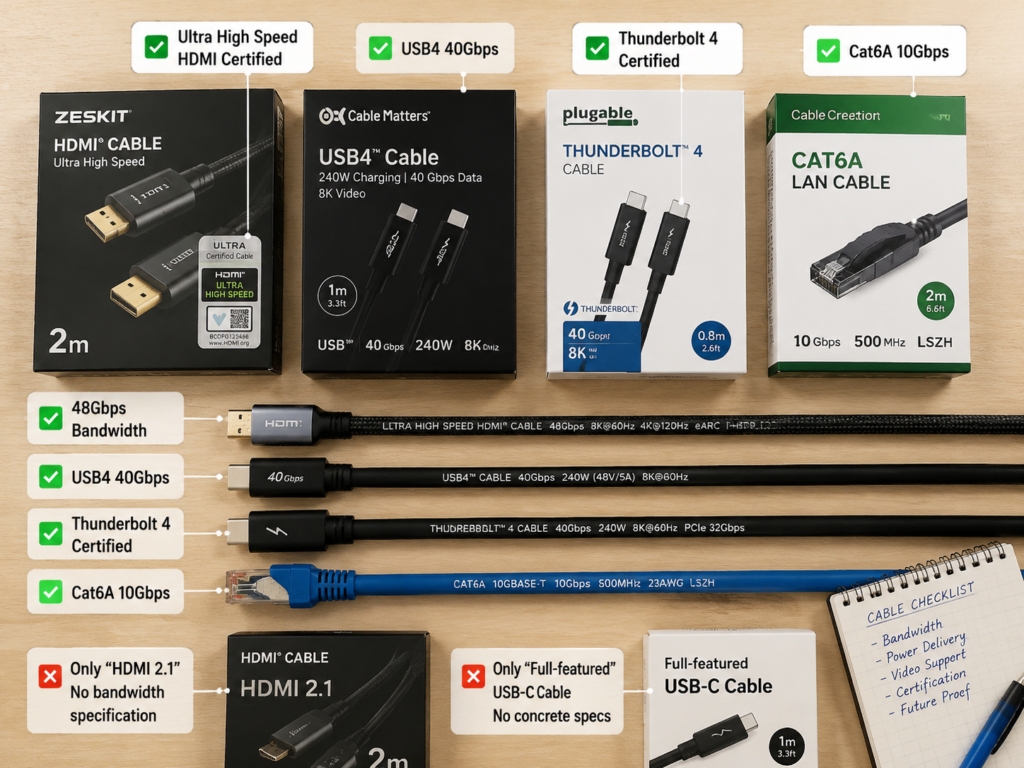
Many merchants like to make a fuss about version names, such as HDMI 2.1 and USB 3.2, which sound very impressive, but in reality they may not be able to reach the maximum rate at all. The correct way is to directly look at the actual bandwidth and rate:
- HDMI: Don’t just look at the words “HDMI 2.1”. Focus on whether it has 48Gbps bandwidth, Ultra High Speed HDMI certification, and the specific supported resolution/refresh rate and functions
- DP: Look at rate levels such as HBR2, HBR3, UHBR10, UHBR13.5, UHBR20, whether it has VESA DP40/DP80 certification, and also note whether it relies on DSC (Display Stream Compression) to achieve high specifications
- USB: The naming of USB 3.x is very confusing. Don’t care if it’s 3.0, 3.1, or 3.2. Directly look at actual rates such as 5Gbps, 10Gbps, 20Gbps
- USB4/Thunderbolt: Check whether the packaging, cable body, or product page clearly marks USB4 20/40/80Gbps, Thunderbolt 3/4/5 official certification, as well as power supply capability at the corresponding cable length and whether it supports video output. Don’t be misled by the vague statement of “full-featured USB-C”
- Ethernet cables: Look at categories such as Cat5e, Cat6, Cat6A and actual test reports. Be wary of copper-clad aluminum and falsely labeled shielding products. There is no need to blindly pursue higher categories
Then Look at the Specific Capability at the Target Length
Many product pages write vague claims such as “up to 10 meters”, “supports 8K”, “USB 3.2”, which are all deceptive. The correct way is: confirm whether the specific capabilities you need, such as 4K/120Hz, HDR, VRR, 48Gbps, USB 10Gbps, Thunderbolt 40Gbps, are still supported at the target length you need.
Especially for AOC, the functional support of different chip solutions varies greatly. Be sure to check whether the functions you need such as CEC, eARC, DDC, HDCP, USB return, etc. are all within the rated range at the target length. Don’t take it for granted.
Look at Certification, Markings and Installation Limitations
Prioritize products with official certification. Although certification is not 100% reliable, it is much more stable than no-name products without certification:
- For HDMI cables, prioritize Ultra High Speed HDMI certification and verifiable labels
- For DP cables, prioritize VESA certification, DP40/DP80 or clear rate levels
- For USB cables, prioritize USB-IF certification, rate markings, PD power markings, and e-marker support
- For Thunderbolt cables, prioritize official Thunderbolt certification markings
- For Ethernet cables, pay attention to pure copper material, wire gauge, shielding type, and category. It is best to have a Fluke test report. For ordinary home Gigabit and most short-distance 10 Gigabit, Cat6/Cat6A is sufficient. Don’t blindly buy just because the numbers of Cat7/Cat8 are higher; Cat7 has relatively chaotic labeling in the consumer market, and Cat8 is more oriented towards short-distance high-speed data center links, with limited benefits for home use.
If it is an active cable or AOC, be sure to additionally check these points: whether there is a direction marking, what the power supply method is, how big the connector size is, what the minimum bending radius is, whether it can be pre-installed, and what the after-sales policy is.
Common Misconceptions: Which Statements Sound Correct but Are Actually Misleading
There are many widely circulated statements about passive and active cables that sound very reasonable, but are actually very misleading. We pick the most common ones to clarify.
Active cables are definitely better than passive cables
Wrong. Over short distances, passive cables are usually cheaper, simpler, more durable, and have better compatibility. There is absolutely no need to use active cables. The advantages of active cables are mainly in long-distance, high-bandwidth, and complex wiring scenarios, which does not mean they are better overall. Using them over short distances instead adds troubles such as direction and power supply issues.
All fiber optic cables are active cables
Wrong. Bare fiber optic patch cords themselves are passive and need to be used with optical modules or fiber optic transceivers; only AOC active optical cables belong to active cables because they have integrated photoelectric conversion modules at both ends.
All active cables require additional power plug-in
Wrong. Most consumer-grade active HDMI, DP, and USB cables draw power directly from the port. Only some long-distance or special solutions require additional power supply. However, note that drawing power from the port does not mean it is necessarily stable. Old devices and portable devices may have insufficient power supply, causing active cables to work improperly.
If the interface is the same, the functions are the same
Wrong. The most typical example is USB-C, which is just an interface shape. It may only support some of charging, USB 2.0, USB 5Gbps, USB4, Thunderbolt, or DP Alt Mode, with vastly different functions. The same is true for HDMI and DP: they may have the same appearance but very different versions, bandwidth, and functions.
Active cables can be connected to adapters casually
Wrong. Adapters may damage signal direction, power supply, protocol handshake, or signal integrity. Especially since active cables themselves have direction requirements, adding adapters makes them more prone to problems. If it can be solved with a single suitable cable, do not use multiple levels of adapters.
A cable claimed to support 8K is definitely suitable for my device
Wrong. 8K is just a resolution, which may correspond to different refresh rates, color depths, compression methods, and color formats. For example, the bandwidth requirements of 8K/30Hz and 8K/60Hz are very different, and it is also different with DSC compression or without compression. Be sure to check the specific conditions you need, such as 8K/60Hz, 4K/120Hz, HDR, VRR, HDCP, DSC, etc.
AOC definitely supports all HDMI/DP functions
Wrong. AOC mainly solves the problem of long-distance high-speed transmission, and does not guarantee full support for all sideband, control, and return functions, such as CEC, eARC, DDC, HDCP, USB return, KVM, touch, etc. Some AOC may not support them. Be sure to check the clear product description.
The higher the Ethernet cable category, the better
Wrong. For home Gigabit and most short-distance 10 Gigabit scenarios, Cat6 or Cat6A is usually sufficient and has the highest cost-effectiveness. Cat7 labeling is relatively chaotic in the consumer market, and many are falsely labeled; Cat8 is mainly oriented towards short-distance high-speed data center links, and the benefit of blind purchase for ordinary families is very limited, which is a pure waste of money.
Tool-Free Troubleshooting: How to Locate Black Screens, Flickering, and Speed Drops
Even if you choose the right cable, you may sometimes encounter problems with black screens, flickering, and speed drops. You don’t need to buy professional testing equipment. Check step by step according to the following steps, and you can find the cause most of the time.
General Troubleshooting Sequence
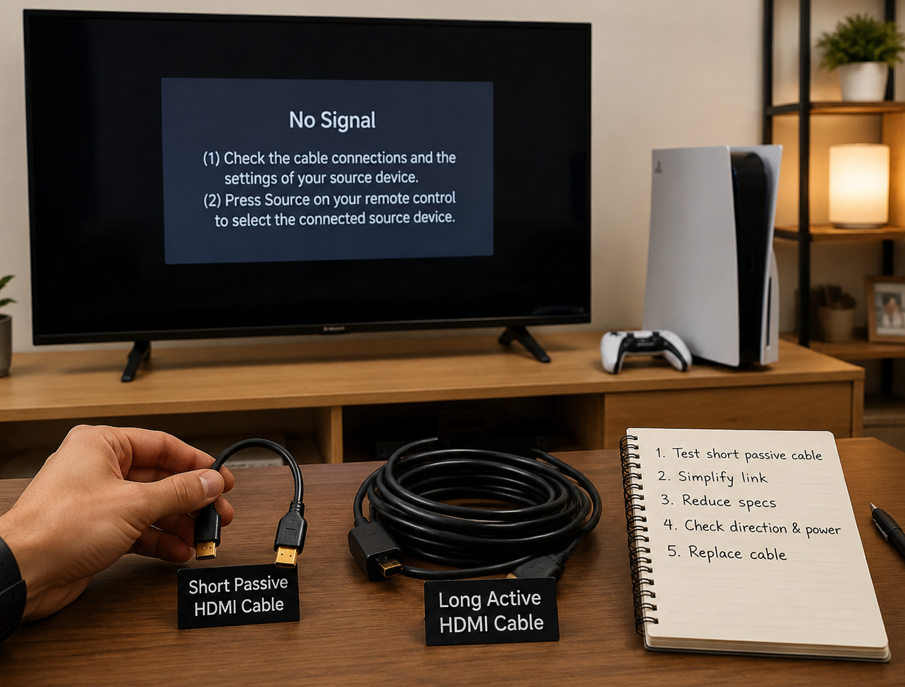
Don’t panic when you encounter problems. Troubleshoot in order from easy to difficult to avoid detours:
- Short cable verification: First find a short, reliable certified passive cable, directly connect the source device and the receiving end, and confirm that the device itself, ports, and settings are normal. Many people blame the long cable right away, but as a result, it is actually the wrong version of the TV’s HDMI port, or the console has not turned on the 4K/120Hz switch, wasting a lot of time for nothing.
- Simplify the link: Remove all adapters, extension heads, switches, splitters, and wall outlets, and let the source device directly connect to the receiving end. Adapter devices are the source of many compatibility problems, especially when multi-level adapters are used, handshake failures are very likely to occur.
- Reduce specifications: Try reducing the resolution, refresh rate, color depth, or data rate, for example, change 4K/120Hz to 4K/60Hz, change USB 10Gbps to 5Gbps, and see if the fault disappears. If it becomes normal after reducing specifications, it is most likely that the link has insufficient bandwidth margin.
- Check details: If you are using an active cable, check if the direction is plugged in reverse — many active cables are marked with Source/Display or Input/Output, and there is no signal at all if plugged in reverse; then check if there is an additional power port that needs to be plugged in, and whether the device’s port has enough power supply. If it is a passive cable, check if the cable is bent sharply, if it is pressed by heavy objects, and if there are strong interference sources such as high-voltage power, motors, or stage lighting nearby.
- Replace the cable: Replace with a reliable cable of the same specification to rule out quality problems with the cable itself. There are many falsely labeled cables on the market now, especially no-name high-specification cables, whose claimed and actual capabilities are very different.
- Locate section by section: If it is fixed wiring, start from the source device and replace and test section by section. For example, first test the short cable from the source device to the wall outlet, then test the pre-installed cable in the wall, then test the cable from the wall outlet to the display end, as well as the matrix and switches in the middle, to locate the fault point one by one.
Typical Phenomena and Cause Judgment
The most probable causes corresponding to the most common faults:
- No signal at all: May be reverse plugging, insufficient power supply, protocol incompatibility, cable damage
- Occasional black screen or flickering: Commonly caused by insufficient bandwidth margin, loose connectors, cable length approaching the upper limit, excessive interference
- Resolution or refresh rate cannot go up: May be insufficient cable bandwidth, unsupported interface version, device setting limitations
- USB devices disconnect repeatedly: May be too long cable length, insufficient power supply, poor hub quality, or poor cable shielding
- No picture only during boot or BIOS stage: Active cables may be unstable during early power supply or handshake stages, which can be verified with a short passive cable
Interpretation of Troubleshooting Results
After troubleshooting, how to judge where the problem is? A few simple conclusions:
- Short passive cable works normally, long cable fails: Most likely a problem with distance, bandwidth, or cable quality
- Normal after reducing refresh rate or speed: Indicates insufficient bandwidth margin of the link
- Normal after removing the adapter: The adapter or multi-level link is the main risk point
- Normal after changing the port: The original port may have problems with power supply, version, or contact status
- All cables are unstable: Prioritize checking the device itself, drivers, firmware, system settings, or power supply
Learning Summary: Core Judgments from Beginner to Semi-Proficient
Finally, we will sort out the core content again. From beginner to semi-proficient, you only need to remember these points:
First, distinguish in one sentence: Passive cables rely on conductors, optical fibers, shielding layers, and connectors themselves to transmit signals, without signal processing chips that require power supply; active cables have built-in chips or photoelectric conversion modules that require power to amplify, repair, or convert signals. The core of judgment is whether there are powered signal processing components, which has nothing to do with whether the cable can transmit electricity.
Second, clarify the boundaries: Charging cables with power supply and PoE Ethernet cables are not active; cables with ferrite cores are not active; bare fiber optic patch cords are not active. Only AOC with integrated photoelectric conversion modules at both ends are active optical cables.
Third, selection depends on six dimensions: interface protocol, target bandwidth, actual cable length, device power supply capability, environmental interference, installation method.
Fourth, core trade-offs: Passive cables are hassle-free, cheap, and durable for short distances; active copper cables are suitable for medium-distance high-bandwidth, and are easier to wire than thick copper cables; AOC is suitable for long-distance, strong interference, and pre-installation scenarios, with strong anti-interference capability and light cable body, but attention should be paid to functional support and connector protection.
Fifth, when reading product pages, don’t just look at the version number. Look at actual bandwidth, official certification, specific functions at the corresponding length, direction requirements, power supply method, and after-sales service.
Sixth, when encountering a fault, first simplify the link, use a short passive cable to rule out device problems, then check direction, power supply, bandwidth margin, and adapter devices, and finally consider the cable itself.
Overall, the core principle of cable selection has never been “the more expensive, the better”, but “sufficient, stable, and suitable for the scenario”: if a qualified passive short cable can stably meet the needs, prioritize passive; when it exceeds the comfort zone of passive cables, then consider active copper cables, AOC, or complete fiber optic links.