
Have you ever touched a USB-C cable while fast charging your laptop or phone, found it warm or even hot to the touch, and immediately worried if it might damage your device or cause a fire? In fact, a heating USB-C cable is not necessarily a malfunction, but some situations do require immediate power disconnection. This article starts with the most basic judgment methods, telling you which heating conditions are normal, which are danger signals, why cables heat up, how to troubleshoot problems step by step, how to choose a suitable cable, and how to use it more safely in daily life. After reading it, you will be able to handle most USB-C cable heating problems on your own.
First, Judge: Is It Normal Warmth or Dangerous Overheating
When you encounter a heating cable, don’t rush to find the cause first. First confirm whether any dangerous conditions that require immediate deactivation are triggered — if even one applies, cut off the power immediately and do not perform any more tests.
Danger Red Lines for Immediate Deactivation
First, local overheating that makes it impossible to hold continuously, such as the metal end of the plug or a small section of the cable body, so hot that you can’t stand to put your finger on it for 3 seconds, especially if only one specific point is extremely hot instead of the entire length heating evenly.
Second, abnormal odors or sounds appear, such as a burnt smell, plastic burning smell, even smoke or crackling noises.
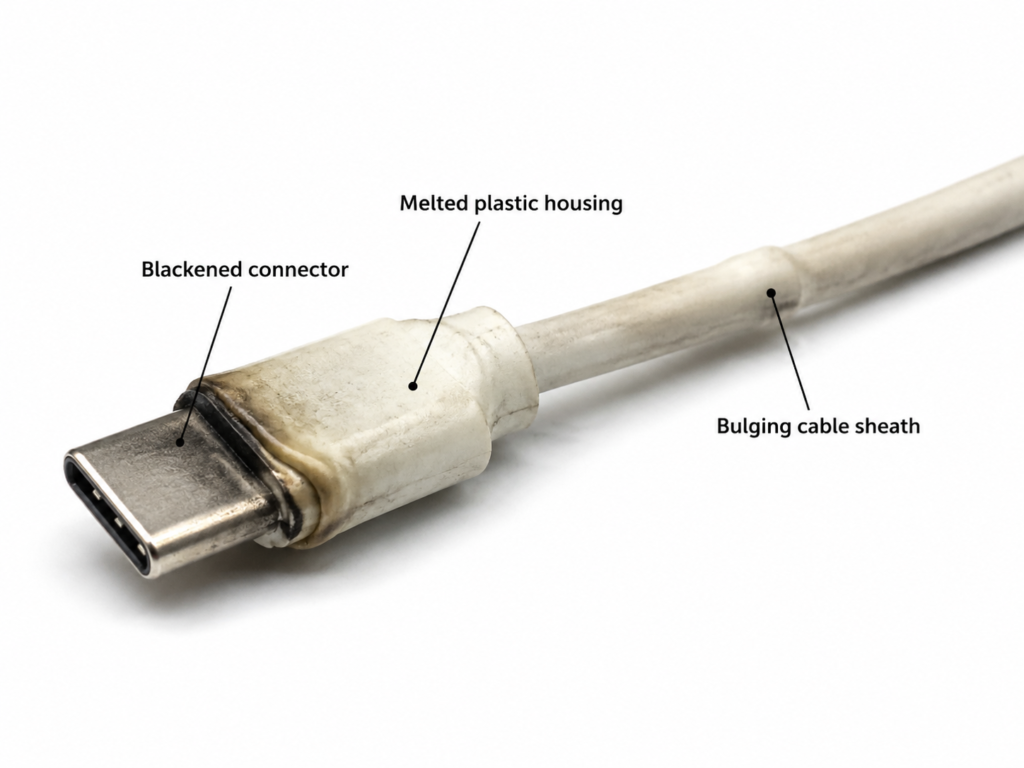
Third, there is damage to the appearance, such as softening, bulging, or cracking of the cable sheath, and blackening, deformation, or obvious melting marks on the connector.
Fourth, the charging status is abnormal, such as intermittent repeated reconnection, or the device pops up prompts like “abnormal interface”, “liquid detected”, “temperature too high”.
Fifth, the temperature rises rapidly as soon as it is plugged in, and it is still obviously hot even after replacing with a low-power charger.
When encountering these situations, the first action is to unplug the power by holding the plastic part of the plug, and do not touch the hot metal terminals. Then place the cable, charger, and device in a ventilated place to cool down naturally. Absolutely do not rinse with water, put in the refrigerator, or wrap with a wet towel, otherwise it is easy to get water in or damage components due to excessive temperature difference. Do not repeatedly plug and unplug for testing while it is hot — the more you test, the higher the risk.
Quick Judgment of Normal vs. Abnormal Heating
Many people struggle with “what temperature is considered normal”. In fact, you don’t have to stick strictly to numbers, after all, not everyone has a temperature gun at home, and perceived temperature is also affected by the environment. Here are 3 simple judgment criteria for you:
- Temperature perception: Most cables that feel warm or hand-warming are normal; be alert if it is so hot that you can’t hold it with your fingers continuously. Usually around 50°C is an empirical reference line, but high summer temperatures or having just touched something cold will affect perception, so there’s no need to obsess over exact numbers.
- Heating uniformity: Normal heating is usually a slight warmth along the entire length of the cable with little temperature difference; abnormal heating is mostly an extremely hot connector, local overheating of a small section of the cable body, or an obvious temperature difference between the metal end of the plug and the plastic shell.
- Accompanying symptoms: Normal heating will not have odors, cable sheath deformation, charging interruption, or speed drop; if these situations occur at the same time, it is definitely abnormal.
Common Scenarios of Normal Heating
Not all heating is bad. The slight warmth in the following situations is mostly normal, so there’s no need to worry too much:
- High-power fast charging: When charging at 45W, 65W, 100W or higher power, the current is larger, and a slight temperature rise of the cable is normal.
- High-load use while charging: Playing large games, recording 4K video, editing video while charging, or running a laptop at full load, the heat of the device itself will be conducted to the interface and cable end, making it feel hotter to the touch.
- Poor heat dissipation conditions: High summer temperatures, the cable being covered by a quilt/sofa cushion, wrapped in a tight coil, placed in sunlight or near a heat source, the heat cannot dissipate, which will amplify the feeling of heating.
- Early stage of fast charging: The charging power is highest when the battery is low, and the cable will be relatively hot; when the battery level rises to 70%-80%, the power automatically drops, and the temperature usually slowly decreases.
The core boundary of normal heating is: stable temperature, no odor, no deformation, no charging interruption, and it will decrease as power drops or heat dissipation improves.
Core Risks of Abnormal Heating
What are the consequences of abnormal heating? They are divided into three categories according to severity:
- Mild risk: Slower charging speed, unstable data transmission, accelerated aging of the cable insulation layer, and shortened service life.
- Moderate risk: Erosion of connector contacts, damage to the device’s USB-C interface, which may lead to problems such as inability to fast charge and frequent disconnection later.
- Severe risk: Short circuit, cable melting, smoke, and there is a fire risk in extreme unattended situations.
What needs more attention is that once the contact points are eroded, the resistance will further increase, and the heating will be more serious, forming a vicious cycle of “the more you use it, the hotter it gets”, so don’t delay dealing with it.
Plain Language Principle: Why Do USB-C Cables Generate Heat?
After talking about judgment, let’s talk about the principle of heating in the simplest terms. Once you understand the principle, you can figure out the subsequent troubleshooting and cable selection on your own.
Basic Logic of Current-Generated Heat
You can imagine electric current as water flow, and the copper core of the cable is the water pipe — the narrower the water pipe, or if there is a blockage in the pipe, energy will be lost when the water flows through. When current passes through the cable core and connectors, it also encounters “resistance”, and part of the electrical energy is converted into heat and dissipated.
This resistance is professionally called resistance, and the phenomenon of electrical energy converting into heat is called Joule heating. There is a very important rule here: the amount of heat generated is proportional to the square of the current — simply put, if the current doubles, the heat generated will be about 4 times the original.
So don’t just look at how many watts the charger is labeled with. What really affects the heating of the cable is the magnitude of the current. For the same 100W power, the 20V voltage + 5A current mode will cause much more obvious cable heating than the 48V voltage + about 2.1A current mode. This is why high-voltage low-current charging solutions keep cables cooler.
Why Do USB-C Cables Heat Up More Easily Than Older USB Cables?
Many people feel that when they used Micro USB or old USB cables before, they weren’t this hot, but after switching to USB-C, they heat up more easily. In fact, it’s not that the cables have gotten worse, but that USB-C has stronger capabilities:
First, USB-C supports much higher power. USB PD fast charging can reach up to 240W, while most old USB cables only have 10W-15W, with small current, so naturally they don’t heat up easily.
Second, it has a wide range of uses. Phones, tablets, laptops, handheld consoles, monitors, and docking stations all use USB-C. Everything from a few watts to hundreds of watts goes through this one cable, so naturally it’s easier to encounter heating situations.
Third, they look similar but have very different capabilities. Ordinary 3A charging cables, 5A fast charging cables, full-featured cables, USB4/Thunderbolt cables, and 240W EPR cables may all have the same USB-C connector appearance, but their load-bearing capabilities are very different. If you use a low-spec cable to charge a high-power device, of course it will heat up easily.
Also, let’s clarify a misconception: the main heat source of high-speed data cables is not data transmission. High-speed cables may have slight heat accumulation due to their shielding layers and complex connector structures, but obvious overheating basically comes from high-current charging, poor contact, high cable core resistance, or poor heat dissipation.
Why Are Connectors Often Hotter Than the Cable Body?
You may have noticed that the most obvious heating is often at the plugs on both ends, not the middle of the cable body. There are three main reasons:
- There are contacts, solder joints, and terminals inside the connector. The contact area is inherently smaller than that of the entire cable core. As long as the contact resistance is slightly larger, local heating is likely to occur.
- Dust, lint, oil, oxidation, moisture, interface deformation, and loose plugs will further increase contact resistance, making heating more obvious.
- The device or charger itself generates heat when working, and the heat will be conducted along the interface to the cable end, which easily makes people mistakenly think it is a problem with the cable itself.
Key judgment point: If the connector heating is accompanied by looseness, charging interruption, blackening, or odor, prioritize treating it as poor contact or contact erosion, and deactivate immediately.
Easily Confused “Fake Cable Heating”
There are several other situations where it looks like the cable is heating up, but it actually has nothing to do with the cable itself. We call this “fake heating”:
- Internal device heat conduction: When a phone or laptop is fast charging, heat from the charging chip, battery, and motherboard will be transferred to the interface, making the cable end feel hot.
- Charger heat conduction: Especially small-sized GaN chargers generate heat when working, and the cable end near the charger will also warm up accordingly.
- Environment amplifies heat sensation: High-temperature rooms, car interiors, direct sunlight, and being covered by fabric will make the original slight heating more obvious.
The method to distinguish is very simple: replace with a reliable cable of the same specification, replace the charger, or reduce the power, observe whether the heating point shifts and whether the temperature drops, and you can roughly judge where the problem lies.
Core Causes of Abnormal Heating
After excluding normal heating and fake heating, let’s talk about the real abnormal heating. There are 6 common types of causes:
1. Insufficient or Falsely Labeled Cable Specifications
This is one of the most common causes. For example, if you use an ordinary cable that can only carry 3A to charge a 100W laptop that requires 5A, the current exceeds the cable’s load capacity, and the cable core has high resistance, so naturally it will heat up obviously, and even fail to charge at full speed.
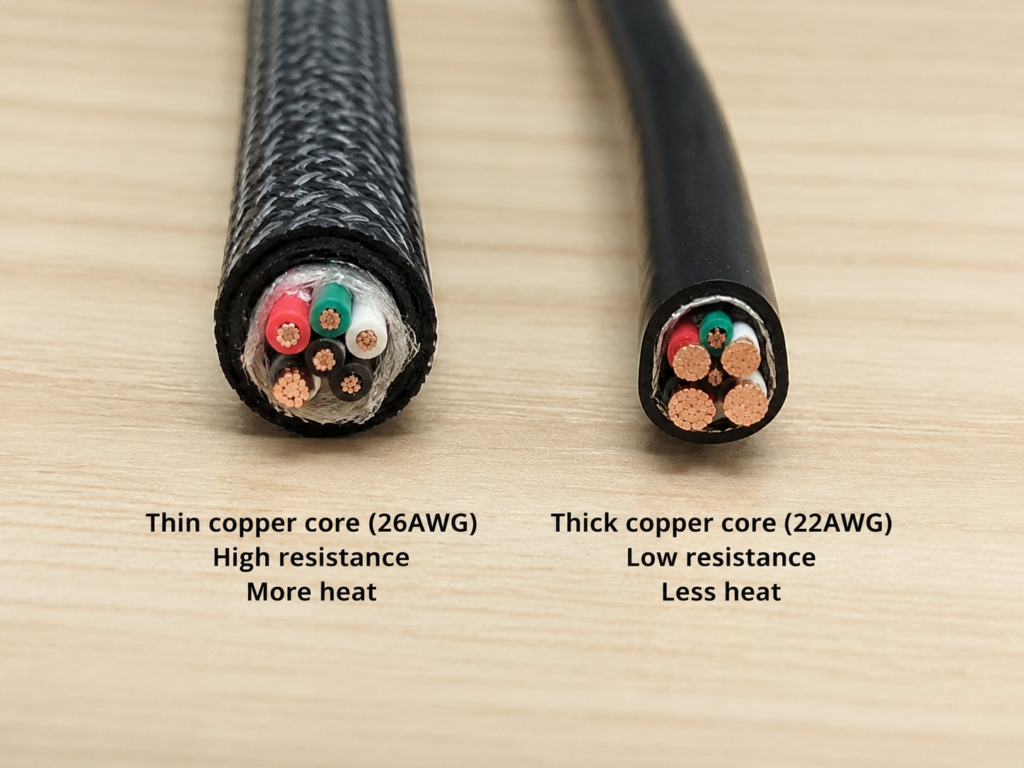
Some cables look thick on the outside, but the inner core is very thin, using inferior conductors such as copper-clad aluminum or impure copper, or the wire gauge (AWG) number is too large — AWG is a standard for measuring conductor thickness. The larger the number, the thinner the wire core, the higher the resistance, and the easier it is to heat up.
Even worse is falsely labeled parameters: the outer sheath is printed with 100W, 240W, but inside it’s actually a 3A thin core, so of course it will get hot when used.
In addition, the longer the cable, the greater the total resistance. When thin and long cheap cables are used to power a laptop at 65W/100W, the entire cable is often relatively hot and the charging speed is unstable.
2. Excessive Contact Resistance: The Most Common Cause of Local Connector Overheating
If the connector is locally overheated, nine times out of ten it’s due to excessive contact resistance. Simply put, the plug and interface are not properly connected, the contact area is small, so the resistance is high. When a large current passes through, it will quickly generate heat at the contact position.
There are many causes of poor contact: the most common is contamination — dust, clothing lint, hand oil get into the plug or device interface, or oxidation and liquid residue after long-term use. There are also mechanical problems: loose plugs, worn device interfaces, and skewed insertion will all reduce the contact area.
In addition, when using inferior adapters, magnetic heads, extension cables, or docking stations, each additional connection point adds one more contact resistance and risk of looseness, making it easier to heat up under high power.
Danger signal: If the connector is significantly hotter than the cable body, accompanied by blackening, charging interruption, wobbling when plugging/unplugging, or odor, use must be stopped immediately.
3. Physical Damage to the Cable
Many cables look intact on the outside, but they are already damaged inside:
- Frequent bending can cause partial breakage of the internal copper wires. The remaining cable core has to carry a larger current, which will cause local heating.
- Long-term bending at the base of the connector can easily damage the internal solder joints or cable core, often manifested as extreme heat near the connector, intermittent charging, and needing to adjust the angle to get a charge.
- If the cable has been pinched by a door or crushed by a heavy object, even if the outer sheath is not broken, the internal structure may already be abnormal.
- If the cable body has local bulges, hard spots, sharp bends, or discoloration, it must never be used for high-power fast charging again.
Note: An intact outer sheath does not mean there is no internal damage. Intermittent charging interruption after repeated bending also requires vigilance.
4. E-Marker or Protocol Identification Abnormality (Low Priority)
You may have heard the term E-Marker. It is actually a small identification chip built into the cable, equivalent to the cable’s “ID card”, used to tell the charger and device the maximum current, power, and some data capabilities supported by this cable.
According to official USB standards, USB-C cables that support 5A current must have an E-Marker; for cables without an E-Marker, the system usually only supplies power according to 3A capability, and will not provide higher current.
So if the E-Marker is abnormal, it mostly leads to failure to recognize 5A, reduced power, and inability to fast charge, and does not necessarily directly cause abnormal heating. There is only one situation where it causes heating: the E-Marker of inferior or counterfeit cables has falsely labeled parameters, clearly only able to withstand 3A, but telling the device it supports 5A, causing the cable to work at a current exceeding its real load capacity, which will cause obvious heating.
When users purchase high-power cables, prioritizing products with clear labels of 5A, 100W/240W, E-Marker, PD/EPR and from trustworthy brands can avoid this pitfall.
5. Mismatch Between Charger, Device, and Protocol
Abnormal heating may also not be a problem with the cable, but with the charger, device, or protocol:
- Poor charger quality: Unstable output, poor protection mechanisms, and poor protocol compatibility may lead to repeated power negotiation and intermittent charging, which in turn causes abnormal temperature rise.
- Device interface problems: Dust, moisture, looseness, or damaged contacts in the device’s USB-C port will cause local heating of the cable end on the device side.
- Protocol incompatibility: The combination of proprietary fast charging protocols, old chargers, and third-party cables may result in unstable power negotiation.
However, it should be noted that protocol mismatch usually manifests as slower charging, inability to fast charge, and repeated reconnection; truly dangerous cable heating is mostly related to high current, poor contact, or physical damage. In addition, high device load (playing games while charging, running large software) will increase the overall heating of the device, and the area near the interface will also be relatively hot.
6. Environmental and Usage Habit Issues
The last category of causes is related to usage methods:
- High-temperature environment: Summer, direct sunlight, car interiors, near heaters or other heat sources, the ambient temperature is high, and the cable heat cannot dissipate.
- Poor heat dissipation: The cable being covered by quilts, clothes, sofa cushions, or wrapped in a tight coil during high-power charging will affect heat dissipation.
- Poor power supply environment: Multiple devices sharing a high-load inferior power strip, or loose sockets, will increase the overall electricity risk.
- Bad usage habits: Pulling the cable body to unplug the plug, long-term bending of the connector base, pressing the cable under table legs or chair wheels will accelerate cable damage, and over time it will easily heat up.
Beginner Troubleshooting Steps: Safety First
If you encounter a heating cable and don’t know where the problem is, you can troubleshoot step by step according to the 6 steps below. Always remember safety first throughout the process.
Step 1: Cut Power and Cool Down, Confirm Whether Deactivation Red Lines Are Triggered
First cut off the power and unplug the cable, place the cable, device, and charger in a ventilated place to cool down naturally.
First check for the danger red lines mentioned earlier: burnt smell, blackening, melting marks, bulges, broken sheath, charging interruption, device alarm. If even one applies, don’t continue testing, just replace or repair directly.
At the same time, note the location of the heating point: is it the entire length of the cable, the device-side connector, the charger-side connector, both ends, or a small section of the cable body? This is very important for locating the cause later.
Note: For cables that have triggered the red lines, absolutely do not repeatedly test with power above 65W; do not directly touch hot metal terminals; do not clean the interface when the power is not cut off.
Step 2: Initially Locate the Cause Based on the Heating Point
Based on the location of the heating, you can first roughly judge the direction of the cause:
- Even warmth along the entire cable: Mostly due to high-power fast charging, too long cable / too thin cable core, high ambient temperature, or poor heat dissipation.
- Device-side connector is significantly hotter: Mostly due to conduction of the device’s own heat, dust/moisture/looseness in the device interface, or high-load operation of the device.
- Charger-side connector is significantly hotter: Mostly due to conduction of the charger’s own heat, poor contact in the charger interface, or charger quality/compatibility issues.
- Both end connectors are hotter than the cable body: Mostly normal temperature rise of contact points under high current. It is necessary to check the cleanliness and tightness of the plug and whether the cable’s rated current is sufficient.
- Local overheating of a small section of the cable body: Prioritize suspicion of internal broken wires, crush damage, or abnormal local resistance of the cable core. Stop high-power use immediately.
- Local overheating of the connector’s metal end or plastic shell: Prioritize checking for contact erosion, looseness, oxidation, or foreign object blockage.
Step 3: Rule Out Normal Heating Scenarios
First think about whether you are in a normal heating scenario: is it fast charging above 65W, is it powering a laptop, is it just starting to charge with low battery, is it high-load use while charging, is it a high-temperature environment or is the cable covered.
If yes, first stop high-load use, move the device and cable to a cool and ventilated place, wait about 10 minutes to observe whether the temperature drops significantly. If the power decreases as the device’s battery level rises, and the cable cools down accordingly, it is a normal power change, so there’s no need to worry.
If after improving heat dissipation and reducing load, there is still persistent local overheating, continue troubleshooting below.
Step 4: Check Cable Specifications and Appearance
First check the specifications: look at the cable body, packaging, or product detail page to see if there are labels for parameters such as 3A/5A, 60W/100W/240W, PD, EPR, E-Marker, and confirm whether they match the power you are using.
Then check the cable body: are there any broken sheath, bulges, crush marks, sharp bends, hard spots, or local discoloration.
Then check the connectors: are there any looseness, skewing, blackening, yellowing, deformation, or melting marks.
Finally, check the device interface: are there any lint, dust, liquid marks, looseness, or foreign object blockage.
If the interface only has slight dust or dirt, it must be cleaned after power is cut off: gently wipe the exposed contacts with a cotton swab dipped in anhydrous alcohol, and wait until it is completely dry before use. Do not use a metal needle to forcibly scrape the contacts, as it is easy to damage the plating; if the interface is already eroded, deformed, or has severe liquid ingress, do not continue using it after cleaning, it should be repaired or replaced.
Step 5: Cross-Replacement Testing to Locate the Fault Source
The replacement method is the most accurate troubleshooting method. Try in order:
- Same charger, same device, replace with a reliable cable of the same specification: If the heating disappears, the original cable is most likely problematic.
- Same cable, same device, replace with a qualified charger: If the heating disappears, the original charger or protocol compatibility may be problematic.
- Same cable, same charger, replace with another device: If the heating disappears, the original device’s interface, load, or battery status may be problematic.
If the same cable heats up abnormally on multiple devices and multiple chargers, don’t hesitate, prioritize replacing the cable.
Safety tip: Do not perform high-power replacement tests on cables that already have a burnt smell, blackening, melting marks, bulges, or charging interruption.
Step 6: Low-Power Verification for Further Confirmation
Finally, verify with a low-power scenario for more safety:
Test with a low-power charger, turn off fast charging, or use a low-load scenario (such as charging while on standby) to see if it still gets hot.
- If it still gets hot at low power: Prioritize suspicion of poor contact, cable damage, interface contamination, or device interface problems.
- If it only heats up at high power: Prioritize checking the cable’s rated current, wire gauge, length, whether it has an E-Marker, and heat dissipation conditions.
- If it is normal at low power, but locally overheats at high power: It is not recommended to continue using it at high power. You should replace a higher-specification cable or check the interface.
Key Parameters and Cable Selection Pitfall Avoidance
Many people only look at “how many watts” when choosing a cable, which actually makes it easy to fall into pitfalls. Below we will explain the most core parameters of cable selection clearly to help you choose a suitable and safe cable.
Rated Current and Power: Current Affects Heating More Than Wattage
Cable heating has a more direct relationship with current, so when choosing a cable, first look at the rated current, then the power. Common specifications are as follows:
| Rated Current | Corresponding Maximum Power (PD Standard) | Required Conditions | Suitable Devices |
|---|---|---|---|
| 3A | Up to 60W (20V×3A) | No E-Marker required | Phones, tablets, earphones, power banks |
| 5A | Up to 100W (20V×5A) | Must have E-Marker chip | Laptops above 65W, gaming handhelds |
| 5A (EPR) | Up to 240W (28V/36V/48V high voltage) | With E-Marker + supports PD 3.1 EPR | 140W/180W/240W high-power devices |
Core conclusion: The amount of heat generated is proportional to the square of the current. For the same 100W, the 20V×5A mode is more likely to cause cable heating than the high-voltage low-current mode. In addition, the device, charger, and cable must all support the corresponding protocol and gear to achieve the rated power.
E-Marker Chip: Required for 5A Cables, Usually Not Needed for 3A Cables
The E-Marker is the “identity chip” in the cable, whose function is to let the charger and device identify the cable’s maximum current, power level, and some data capabilities.
According to official USB rules: USB-C cables that support and are recognized as having 5A capability must have an E-Marker; cables without an E-Marker can usually only negotiate power supply according to 3A capability.
Misconception clarification: Cables without an E-Marker are not necessarily dangerous, as long as they are not used for high-power charging exceeding 3A, there is no problem. What is really dangerous is inferior cables with fake E-Markers, whose falsely labeled parameters cause the cable to work under overload.
User judgment method: Check whether the product page or packaging clearly labels information such as 5A, E-Marker, 100W/240W, PD 3.1, EPR, etc.
Wire Gauge AWG: The Smaller the Number, the Thicker the Wire Core
AWG is a standard for measuring conductor thickness. The smaller the number, the thicker the conductor, the lower the resistance, and usually the less likely it is to heat up.
Common power wire gauges include 22AWG, 24AWG, 26AWG, etc. The actual performance also depends on copper purity, cable structure, and length. Especially for long cables, more attention should be paid to the wire gauge — the longer the cable, the greater the total resistance, and the more obvious the voltage drop and heating.
Note: A thick outer sheath does not mean a thick wire core. Braided layers, fillers, and shielding layers all increase the appearance thickness, but do not represent stronger conductivity. For high-power, long-distance, long-term fixed use scenarios, prioritize products with clearly labeled wire gauges and trustworthy brands.
Common USB-C Cable Types: Same Interface Does Not Mean Same Capability
USB-C is just the shape of the interface, and the internal capabilities vary greatly. Common types and applicable scenarios are as follows:
| Cable Type | Core Capabilities | Suitable Scenarios |
|---|---|---|
| Ordinary charging cable | 3A charging + USB 2.0 data, up to 60W | Phones, tablets, earphones, low-power devices |
| 5A fast charging cable | With E-Marker, up to 100W PD charging | Laptops above 65W, gaming handhelds |
| Full-featured USB-C cable | High-speed data + video output + high-power charging | Connecting monitors, docking stations, high-speed hard drives |
| USB4/Thunderbolt cable | Ultra-high-speed data + video + high-power charging | High-end docking stations, one-cable monitors |
| 240W EPR cable | Supports PD 3.1, up to 240W high power | 140W/240W high-power laptops/devices |
Important reminder: High-speed data capability does not mean it is more suitable for charging. When choosing a cable, still prioritize rated current, power, and protocol. If you don’t need high-speed data, you don’t need to pay for extra functions.
Cable Selection Suggestions for Different Scenarios
Here are some practical cable selection references for you, so you don’t have to struggle:
- Daily fast charging for phones/tablets: Just choose a USB-C cable with clear labeling of 3A or above and reliable workmanship.
- Thin and light laptops or power banks within 65W: 3A/60W cables can also be used. For long-term use, prioritize 100W cables to leave a margin, which is safer.
- Laptops above 65W or gaming handhelds: Choose cables with 5A, 100W or above, and E-Marker.
- 140W, 180W, 240W high-power devices: Choose cables that clearly support USB PD 3.1 EPR, and confirm that the charger and device also support the corresponding gears.
- Long cables over 2 meters: Choose 5A cables with thicker wire cores and trustworthy brands, to avoid thin and long cables working at high power for a long time.
- Docking stations, monitors, high-speed hard drives: In addition to power, also check data rate, video output, and USB4/Thunderbolt support.
- Use in cars and by the bed: Prioritize cables that are bend-resistant, have firm connectors, and are of moderate length, to avoid high-temperature and covered environments.
Purchase Pitfall Avoidance Checklist
Check these points when buying a cable, and you can avoid most pitfalls:
- Prioritize products from trustworthy brands, with clear parameters, and USB-IF certification — certification is not the only standard, but it can greatly reduce the probability of falling into pitfalls.
- Clearly check specific parameters such as rated current, power, data rate, whether it has an E-Marker, and whether it supports PD 3.1 EPR. Avoid products that only write “super fast charging”, “compatible with all Type-C”, “universal for all protocols” but have no specific parameters.
- Avoid cables that are too thin, too long, and have an unusually low price but claim 100W/240W — they are most likely falsely labeled.
- Do not use unknown gift cables, adapter cables, or old cables for high-power devices for a long time.
- Don’t just look at wattage, but also make a comprehensive judgment combined with current, protocol, length, workmanship, and usage scenario.
Common Cognitive Misconceptions
Many people have some misunderstandings about USB-C cable heating. Here is a unified clarification:
Misconception 1: A heating USB-C cable must be of poor quality
Correct: Slight warmth during high-power fast charging, low battery stage, and high-temperature environments is normal.
Key judgment point: Local overheating, accompanied by odor, deformation, charging interruption, and blackening are abnormal signals.
Misconception 2: The thicker the cable, the better
Correct: A thick outer sheath does not mean a thick wire core. Braided layers, fillers, and shielding layers all increase the appearance thickness.
Key judgment point: Look at rated current, wire gauge, material, certification, and connector workmanship, not just the appearance thickness.
Misconception 3: The higher the charger power, the hotter the cable will be
Correct: USB-C PD allows devices to draw power as needed. A 100W charger charging a phone will not always output 100W.
Key judgment point: As long as the charger, cable, and device specifications match and negotiation is normal, a high-power charger will not automatically overload the cable.
Misconception 4: The longer the cable, the more convenient it is, and the heating is the same
Correct: The longer the cable, the greater the total resistance, and the more obvious the voltage drop and heating under the same current.
Key judgment point: For high-power cables over 2 meters, choose products with a thicker wire gauge and clear 5A labeling.
Misconception 5: Only look at wattage, not current and protocol
Correct: Cable heating has a more direct relationship with the square of the current; for the same 100W, 20V×5A is more likely to cause cable heating than 48V×about 2.1A.
Key judgment point: When choosing a cable, first look at the rated current, then the power, and also confirm whether protocols such as PD, EPR, and proprietary fast charging are compatible.
Misconception 6: If it’s not burned out, it can still be used
Correct: Abnormal heating will accelerate the aging of the insulation layer. After the contact points are eroded, the resistance increases, forming a vicious cycle of getting hotter the more you use it.
Key judgment point: If there is a burnt smell, deformation, blackening, or charging interruption, replace it immediately and do not continue observing.
Misconception 7: As long as it’s a USB-C interface, the cable capabilities are the same
Correct: USB-C is just the interface form. Internally, there are great differences from 3A ordinary charging cables to 5A fast charging cables, full-featured cables, USB4/Thunderbolt cables, and 240W EPR cables.
Key judgment point: Distinguish between 3A/5A, charging cables/full-featured cables, and ordinary PD cables/EPR cables.
Misconception 8: Magnetic heads, adapters, and extension cables do not affect heating
Correct: Each additional connection point adds one more contact resistance and risk of looseness.
Key judgment point: During high-power fast charging, laptop power supply, and docking station power supply, minimize inferior adapters and multi-segment series connections.
Misconception 9: 240W cables must heat up more easily than 100W cables
Correct: 240W EPR cables only support higher voltage and power capabilities, which does not mean they will be hotter in any scenario.
Key judgment point: Actual heating depends on the device’s actual power draw, current magnitude, cable resistance, contact status, and heat dissipation environment; qualified high-specification cables are instead safer in matching scenarios.
Abnormal Handling and Daily Protection
Immediate Handling of Abnormal Heating
When encountering abnormal cable heating, follow the steps below:
- Disconnect power: Prioritize cutting off the power supply. When unplugging, hold the plastic part and avoid the hot metal terminals.
- Natural cooling: Place the cable, charger, and device in a ventilated place to cool down naturally.
- Prohibited operations: Do not rinse with water, do not put in the refrigerator, do not wrap with a wet cloth, to avoid water ingress or temperature difference damage.
- Do not test: Do not repeatedly plug and unplug when it is hot, do not use high power to verify dangerous cables, wait until it is completely cooled before checking.
Situations Where the Cable Must Be Replaced
If any of the following situations occur, replace the cable directly without hesitation:
- Local overheating, bulges, broken sheath, obvious creases, hard spots, or discoloration on the cable body.
- Blackened connectors, melting marks, deformation, looseness, or obvious wobbling after plugging in.
- Burnt smell, plastic smell, smoke smell, or smoke marks.
- Frequent charging disconnection, or abnormal heating on multiple devices.
- Unlabeled low-price cables used for high-power scenarios such as fast charging above 100W and laptop power supply.
- If there is still local heating or charging interruption after cleaning, do not make do with it for a long time.
Situations Where You Can Continue Observing After Cleaning
There is only one situation where you can use it after cleaning: only the interface has dust, lint, or slight dirt, and there are no abnormal symptoms such as burnt smell, blackening, deformation, or charging interruption.
Cleaning must be done after power is cut off. Gently wipe the exposed contacts with a cotton swab dipped in anhydrous alcohol, and wait until it is completely dry before use. After cleaning, first test in a low-power scenario, and resume fast charging only if there is no abnormality.
If there is a foreign object deep in the device interface, a liquid ingress prompt, or deformed contacts, it is not recommended to forcefully handle it yourself. It should be sent for repair or checked by a professional.
When to Check the Device or Charger
If there are still problems after replacing the cable, you need to consider that it is a problem with the device or charger:
- After replacing multiple qualified cables, the same device side still heats up, which may be a problem with the device’s interface, battery, or charging management.
- After replacing multiple devices, the same charger side still heats up, which may be a problem with the charger’s output, interface, or protocol compatibility.
- If the device interface has water ingress, severe dust ingress, or the plug is obviously loose, stop using it and clean or repair it.
- If the charger itself is abnormally hot, has abnormal sounds, has a burnt smell, or the shell is deformed, stop using it and replace it with a qualified charger.
Practical Tips to Reduce Heating in Daily Life
Pay attention to these points in daily life, which can both reduce heating and extend the service life of the cable:
- Do not place the device on quilts, sofas, or pillows during fast charging, try to place it on a ventilated desktop.
- Do not wrap the cable in a tight coil or press it under heavy objects during high-power charging.
- Hold the plug when plugging and unplugging, do not pull the cable body.
- Bend naturally when storing, avoid sharp bends, knots, and long-term pressure on the connector base.
- Regularly check whether the connectors and device interface have dust, oxidation, or looseness.
- The specifications of the charger, cable, and device must match, do not upgrade only one of them.
- For high-power devices, prioritize using original cables or cables from trustworthy brands with clear specifications; try to reduce the charging load in scenarios with poor heat dissipation.
Frequently Asked Questions
Can I continue to use a heating USB-C cable?
Slight even warmth, no odor, no deformation, no charging interruption, usually you can continue to observe. If there is local overheating, extremely hot connector, burnt smell, blackening, or charging interruption, you should immediately stop using it and replace the cable or check the interface.
Is it dangerous if a phone’s Type-C charging cable gets hot?
Slight heating during low-battery fast charging, charging while playing, and high-temperature environments is very common for phones. If the cable end is too hot to touch, the phone prompts an abnormal interface, or charging is repeatedly disconnected, there may be poor contact or interface problems, which requires vigilance.
Why is the USB-C cable end hotter than the cable body?
Most are related to contact resistance, dirty interface, loose plug, or heat conduction from the device or charger. If the cable end is blackened, deformed, or wobbles when plugged in, stop using it and do not continue high-power fast charging.
Do 100W or 240W cables heat up more easily?
A high rated power of the cable does not mean it will definitely be hotter. Actual heating depends on the device’s actual power draw, current, cable resistance, and contact status. Qualified high-specification cables are usually more suitable for high-power use than low-specification cables in matching scenarios.
The cable gets hot after replacing with a high-power charger, is it the charger’s problem?
Not necessarily. The device may start charging at a higher power, and the cable will naturally be hotter after the current increases. If it doesn’t get hot after replacing with a qualified cable of the same specification, the original cable may have insufficient specifications; if multiple cables heat up abnormally on the same charger side, the charger should be checked.
Summary
USB-C cable heating is a very common situation. You don’t have to be nervous as soon as you see heating, but you also can’t take it lightly.
One-Sentence Core Conclusion
Slight warmth of a USB-C cable is not necessarily abnormal, but local overheating, connector overheating, odor, deformation, and charging interruption are all danger signals, and the cable should be deactivated immediately.
5-Step Quick Troubleshooting Method
- Check red lines: If there is a burnt smell, blackening, melting marks, bulges, or charging interruption, deactivate directly.
- Check scenario: Whether it is in a normal scenario such as high-power fast charging, using while charging, high temperature, being covered or wrapped.
- Check location: Warmth along the entire length, hot connector, and local overheating correspond to different cause directions respectively.
- Do replacement: Replace the cable, charger, and device to locate the fault source.
- Check parameters: Choose a cable that matches the rated current, power, protocol, length, and usage scenario.
3 Safety Bottom Lines
- Do not use unlabeled cables for high-power fast charging or laptop power supply.
- Do not let cables that are already blackened, deformed, have charging interruption, or have odors continue to work.
- High-power charging must match the capabilities of the charger, cable, and device at the same time, and reduce inferior adapters and multi-segment series connections.
Understanding these, you can easily judge whether USB-C cable heating is normal, and also know how to handle it and how to choose a cable, so you no longer have to worry about safety issues.