
Quick Answer: Are Cheap USB-C Cables Safe?
Cheap USB-C cables are not automatically dangerous, but uncertified, no-name cables have a significantly higher chance of:
- Overheating under high-power loads
- Failing to deliver advertised fast charging speeds
- Using false power or data speed ratings
- Breaking or wearing out far earlier than certified alternatives
- Causing compatibility or connection issues with devices
For high-power laptop charging or critical data transfers, choose a USB-IF certified cable with an E-Marker chip when rated for 5A or higher.
1. Introduction: The Hidden Cost of a Budget USB-C Cable
1.1 Why a $2 Cable Can Underperform With Your $1,000 Device
USB-C is everywhere now — it charges your phone, powers your laptop, transfers photos, and connects external displays. To most people, one USB-C cable looks just like another. But beneath the identical plastic connectors lies a massive gap in build quality, engineering compliance, and real-world performance. A no-name cable bought for pocket change doesn’t just “work worse” — it may deliver slower charging, fail to meet advertised specifications, wear out faster, and in poorly designed cases create electrical safety concerns.
1.2 The Safety Data: Low-Quality Charging Accessories Carry Real Risk
Safety regulators around the world have repeatedly warned about the dangers of uncertified USB charging products. Health Canada has documented over 1,090 USB charging-related incidents between 2011 and 2022, resulting in 268 injuries and 3 fatalities, with burns being the most common harm (Source: Health Canada Consumer Product Incident Database). These figures cover the entire USB charging ecosystem — including chargers, adapters, and cables — and reflect the broader risk of low-quality charging accessories as a whole.
Multiple independent market surveys and safety tests have found that a significant share of unbranded, uncertified charging accessories fail to meet basic electrical and fire safety standards.
1.3 The Big Myth: “If It Fits, It’s Safe”
The most common mistake shoppers make is assuming all USB-C cables are interchangeable. The connector shape is universal, but the cable’s internal design, wire thickness, chips, and safety features are not. A cable made only for basic charging will not reliably handle 100W laptop power, and a cable with missing compliance components can confuse your device’s charging system.
1.4 What You’ll Learn in This Guide
By the end of this article, you’ll understand:
- What’s actually inside a properly built USB-C cable
- Exactly how cheap cables fail and what problems they can cause
- Which safety certifications actually mean something
- How to spot a bad cable before you buy it
- How to choose the right cable for your phone, laptop, or monitor
📋 Quick Buying Checklist
If you don’t have time to read the full guide, follow these simple rules:
- ✅ For laptop charging: Buy a 100W or 240W cable with E-Marker and USB-IF/UL certification
- ✅ For phone charging only: A 60W quality cable is sufficient
- ✅ For SSDs or monitors: Choose USB 3.2 Gen 2 or USB4 rated cable
- ❌ Avoid: $2 “100W” no-name cables, products with no brand or specs, and blurry fake certification logos
2. What a USB-C Cable Actually Is (It’s Not Just Wires)
2.1 The All-in-One Port: Charging, Data, and Video in One Connector
USB-C is more than a charging port. It’s a multi-purpose interface that handles power delivery, data transfer, video output, and accessory connections all through one compact connector. This versatility is convenient, but it also means a cable has to do much more than old USB-A cables ever did — and that makes proper design far more important.
2.2 Inside a Quality USB-C Cable: The Parts That Matter
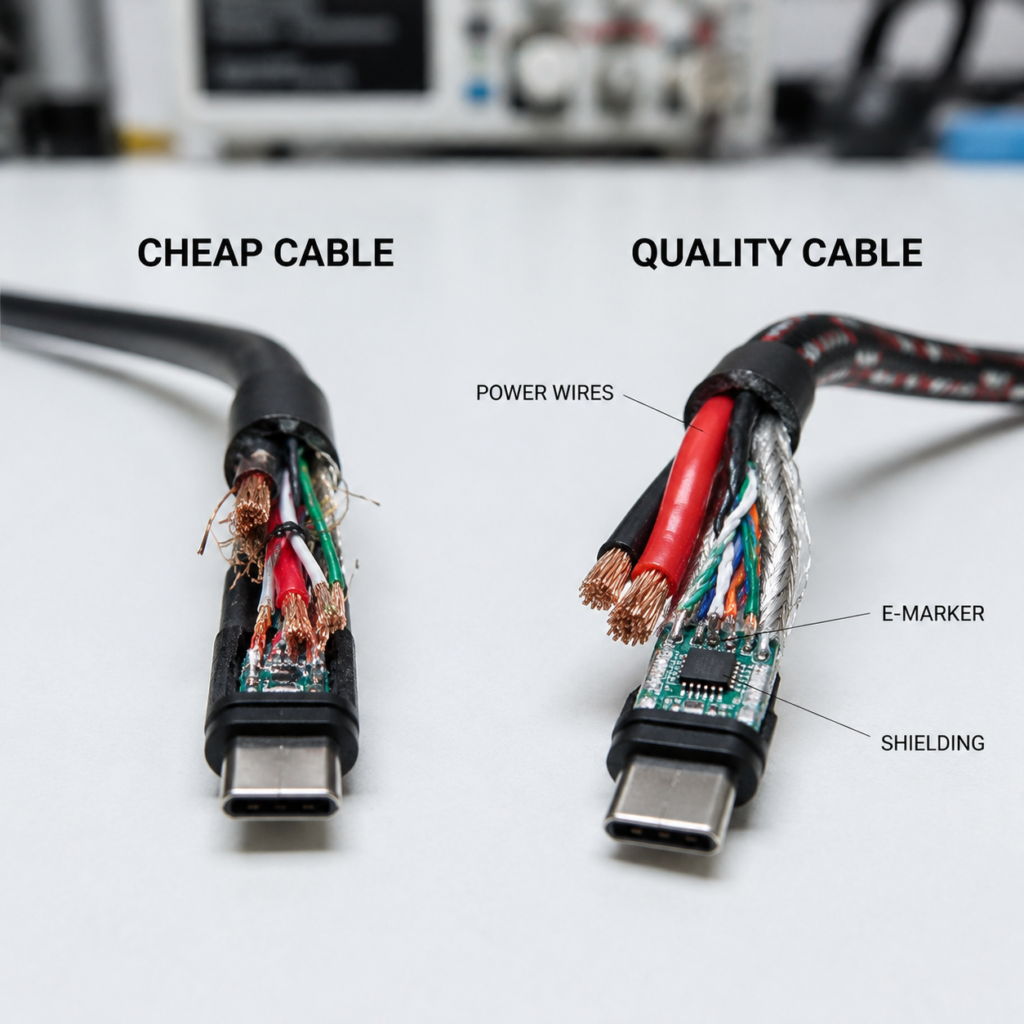
A well-built USB-C cable contains more than just copper wires. Its core components include:
- Power conductors (VBUS and GND): Thick copper wires that carry charging current
- Data pairs: Twisted, shielded wires for file transfers and video
- Shielding layers: Foil and braided metal that block signal interference
- Connector housing: Reinforced plugs that survive thousands of insertions
- Onboard electronics: Small chips and resistors that manage safe power negotiation
2.3 Key Components That Keep Your Devices Working Properly
2.3.1 56kΩ Pull-Up Resistor: Legacy Power Identification for USB-C to USB-A Cables
The 56kΩ pull-up resistor is a USB-C compliance component used mainly in USB-C to USB-A legacy cables. Mounted on the CC pin inside the USB-C connector, it lets the USB-C device correctly identify the power capability of an older USB-A charger before drawing current. This prevents the device from requesting more power than the USB-A port can safely deliver.
This issue is specific to older USB-C to USB-A adapter cables. Modern USB-C to USB-C PD cables use dedicated CC channel communication for power negotiation and do not rely on this resistor for power management.
2.3.2 E-Marker (Electronic Marker Chip): The Cable’s Official Specification ID
An E-Marker chip is a tiny onboard memory chip built into high-current USB-C cables. It stores the cable’s official specifications — current capacity, voltage rating, and data transfer capabilities — and shares that data with the charger and device during the PD negotiation process.
Per USB-IF specifications, any cable designed to carry more than 3A of current must include an E-Marker chip. Without an E-Marker, a USB-C cable cannot advertise 5A current capability through USB PD, so a compliant USB PD system will normally limit charging to 3A (60W at 20V), even if the packaging claims a higher rating.
2.3.3 CC (Configuration Channel): The Negotiation Line
The Configuration Channel (CC) is the dedicated wire that lets your charger, cable, and device communicate with each other. Before any power flows, they exchange information and agree on a safe voltage and current level. This negotiation is how USB fast charging works without damaging your hardware.
2.3.4 USB PD (USB Power Delivery): The Fast Charging Rulebook
USB Power Delivery (USB PD) is the official standard that governs high-power USB-C charging. It defines how chargers, cables, and devices should communicate to deliver power safely. For fast charging to work correctly — and safely — all three parts (charger, cable, device) must follow the PD rules.
2.4 The Biggest Misconception: Same Shape ≠ Same Capabilities
This is the #1 reason people buy the wrong cable. Two cables with identical USB-C plugs can be completely different products. Note that data standards like USB 3.2 do not inherently guarantee a specific power rating — power and data are separate specifications.
| Cable Type | Power Rating | Data Speed | Best Use Case |
|---|---|---|---|
| 3A USB-C cable (USB 2.0) | Up to 60W | 480 Mbps | Everyday phone charging only |
| 5A E-Marked USB-C cable (USB 3.2 Gen 2) | Up to 100W | 10 Gbps | Fast charging + file transfers |
| USB4 cable (with PD support) | Up to 240W when equipped for PD 3.1 EPR | Up to 40 Gbps (80 Gbps with USB4 Version 2.0) | Laptops, high-speed SSDs |
| Thunderbolt 4 cable | May support USB PD power delivery depending on certification and implementation; requires Intel certification | 40 Gbps | Docking stations, 8K monitors, high-performance peripherals |
A $2 cable that looks the same as a $20 cable is almost always hiding a downgrade in wire gauge, shielding, or electronics.
2.5 USB-IF Certification: The Baseline for Proper Performance
USB-IF (USB Implementers Forum) is the industry group that writes the official USB-C and USB PD standards. A USB-IF certified cable has been tested against those standards to verify it meets rules for power handling, data speed, and compatibility. Certification is voluntary, but it’s the most reliable sign that a cable will work as advertised.
2.6 Why Fast Charging Depends Entirely on Cable Quality
You can buy the fastest 100W charger on the market, but if you pair it with a thin, cheap cable, you’ll never get full speed. The cable is the bottleneck. If the wires inside are too thin, if the E-Marker chip is missing, or if the connectors have high contact resistance, power gets wasted as heat and your device charges at a fraction of the advertised speed.
3. The 7 Problems Cheap USB-C Cables Can Cause
3.1 #1 Overheating and Electrical Safety Concerns
This is the most serious potential issue. Cheap cables use thin, low-quality wire conductors that have higher electrical resistance. According to the power-loss formula P = I²R, heat rises very quickly as current increases.
When you run high power through a high-resistance cable:
- The plug and wire body get abnormally hot
- Plastic insulation can soften, warp, or melt
- In rare severe cases, short circuits can create fire risk
The risk grows with power level. A 10W phone charge may barely warm a bad cable, but a 100W laptop charge can push a cheap cable well into dangerous temperatures — especially during overnight, unattended charging. UL 9990 is a dedicated safety standard that applies to certain information and communication technology charging cables and accessories, testing flame resistance, insulation strength, and thermal performance under load.
3.2 #2 Fake Fast Charging and Power Shrinkage
You buy a cable labeled “100W Fast Charge,” plug it into your 100W charger, and … your phone still charges slowly. This is not a glitch — it’s intentional cost-cutting.
Cheap cables often:
- Use thin 28 AWG wire instead of the 22–24 AWG wire needed for high current
- Omit the E-Marker chip required for 5A operation
- Print fake power ratings on the packaging
The result: your charger and device never negotiate full power, and you’re stuck with basic 60W (or lower) charging speeds, even though you paid for a high-power cable.
3.3 #3 Port and Compatibility Issues
In the early days of USB-C, Google engineer Benson Leung famously damaged his Chromebook Pixel laptop while testing a cheap third-party cable with incorrect wiring and missing safety components. While modern devices include additional protection circuits, poorly designed cables can still cause compatibility problems or abnormal electrical behavior.
Potential issues include:
- Incorrect CC pin wiring that confuses charging ICs
- High contact resistance at the plug that wears on device ports over time
- Abnormal voltage spikes that stress internal power management circuits
Issues may not appear immediately — they can build up slowly over weeks or months of use.
3.4 #4 Fake Data Speeds: Advertised USB 3.2, Actual USB 2.0
Another classic bait-and-switch: the product page says “USB 3.2 10Gbps,” but inside the cable, the high-speed data wires simply don’t exist. The manufacturer only includes the wires needed for charging and basic USB 2.0 data.
You won’t notice this until you try to transfer large video files from an external SSD, connect a 4K monitor, or use a USB-C docking station. Instead of 10 Gbps or 40 Gbps, you get 480 Mbps — roughly 20x slower. Many buyers never find out because they only use the cable for charging.
3.5 #5 Poor Durability and Short Lifespan
A quality USB-C cable is engineered to survive 10,000+ plug cycles and thousands of bends. A cheap cable is built to survive long enough to arrive at your door. Common failures include cracked plastic jackets, loose plug housings, and broken internal solder joints from light tugging. Thin contact plating also wears off quickly, causing intermittent connections.
You may save $10 upfront, but if you have to replace the cable three times a year, you end up spending more — and dealing with more dead-cable emergencies.
3.6 #6 Long-Term Wear on Batteries and Ports
This issue is slow and gradual. Poor-quality cables generate extra heat at the connector and along the wire during charging. Since heat is one of the main factors that speed up lithium-ion battery degradation, consistent use of an overheating cable can indirectly shorten your device’s battery lifespan over time.
Similarly, poorly made connectors with loose tolerances or thin plating wear down your device’s USB-C port every time you plug in. Over a year or two, you may end up with a loose, unreliable port on an otherwise perfectly good phone or laptop.
3.7 #7 Special Case: Malicious Cables and Data Privacy
So-called “BadUSB” or malicious cables (such as the O.MG Cable) look like normal charging cables but contain hidden electronics that can simulate input devices or intercept data. For everyday consumers buying from normal retail channels, this is extremely rare and not a top concern. The primary risk applies to public charging stations and completely unknown, unbranded products from unverified sources. For regular use, overheating and fake power ratings are far more relevant issues.
4. The Cost Truth: What Cheap Cables Actually Cut Out
4.1 Conductor Downgrades: Thinner Wires and Cheaper Metal
The single biggest cost saving comes from the copper inside the cable. Instead of thick, pure copper conductors, cheap cables often use thinner wire gauge (higher AWG number = thinner wire), copper-clad aluminum (CCA) instead of pure copper, or fewer wire strands inside the insulation. Thinner, lower-quality wire means higher resistance, more heat, and less power reaching your device.
4.2 Component Removal: Missing Chips and Protection Circuits
A proper high-power cable includes multiple electronic components for safety and communication. Cheap cables simply delete them: no E-Marker chip, missing or wrong-value pull-up resistors, no overcurrent protection components, and no ESD (electrostatic discharge) protection. Each deleted part saves a few cents in manufacturing — and removes a layer of reliability for your devices.
4.3 Structure Cutting: Less Shielding and Thinner Insulation
For data and video cables, shielding is critical. Cheap cables reduce or skip aluminum foil shielding around signal pairs, braided copper shielding around the whole cable, and proper insulation thickness between wires. The result: more electromagnetic interference, corrupted file transfers, and weaker electrical safety.
4.4 Cheap Manufacturing: Cut Corners on Build and QC
Good cables have reinforced strain relief where the wire meets the plug, strong solder joints, and basic quality testing. Cheap cables skip all of that, using lower-cost construction methods and skipping functional testing before shipping. This is why so many budget cables break at the plug after a few months.
4.5 Fake Labeling: Printed Certifications and Invented Specs
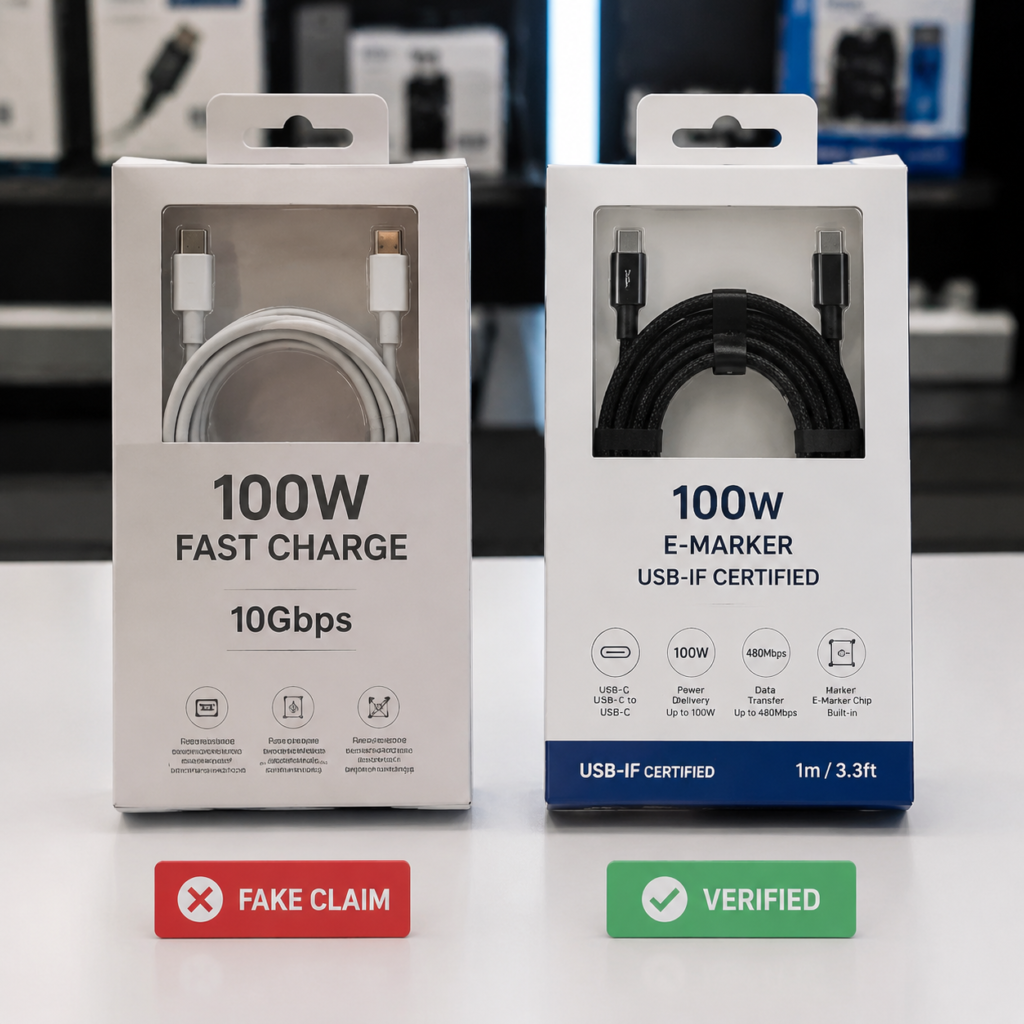
Printing a fake “USB-IF Certified” or “100W” logo on a cable costs almost nothing. Many low-cost sellers print impressive specs and certification marks on packaging even though the product was never tested by any third party. For the average buyer, spotting a fake logo from a product photo is nearly impossible.
4.6 Why Certified Cables Cost More
The price difference isn’t just brand markup. A certified cable costs more because it includes thicker, higher-purity copper wire, genuine E-Marker and protection chips, multi-layer shielding, reinforced connectors, and third-party lab testing and certification fees. In short, you’re paying for engineering, materials, and verification — not just a plastic plug.
4.7 Why Do Bad Cables Still Get Sold?
If cheap cables are so problematic, why are they everywhere? Online marketplaces have limited ability to physically test every product, fake certification marks are hard to police from photos alone, most customers can’t tell a bad cable from a good one by sight, and low prices generate high sales even with high return rates. Major platforms have tightened rules over the years — including requiring UL 9990 safety documentation for USB cables in the US — but enforcement remains imperfect.
5. Certification Guide: The Labels That Actually Mean Something
5.1 Quick Certification Cheat Sheet
| Certification | What It Means | Importance | Best For |
|---|---|---|---|
| USB-IF Certified | Meets official USB performance and protocol standards | ★★★★★ | Verified power, speed, and compatibility |
| UL 9990 | Tests electrical safety, flame resistance, and mechanical reliability for charging cables | ★★★★★ | Physical safety, heat resistance, build quality |
| UL Listed | General product safety certification for North America | ★★★★☆ | Overall electrical safety |
| CE | EU market compliance declaration (not a quality grade) | ★★★☆☆ | Basic regulatory compliance |
| MFi | Apple-certified compatibility for Apple devices | ★★★★☆ | iPhone, iPad, and Mac accessory reliability |
5.2 USB-IF Certified: The Gold Standard for Performance
USB-IF certification confirms that a cable meets the official USB specification for power handling, data transfer, and protocol behavior. If a cable says it supports 100W 5A or USB 3.2 Gen 2, USB-IF certification is the best proof that it actually does. Genuine certified products have a TID (Test ID number) that can be looked up in the USB-IF public product database.
5.3 UL 9990: A Dedicated Cable Safety Standard
UL 9990 is a safety standard developed for information and communication technology charging cables and accessories, covering products up to 60V DC, 8A, and 250W. It complements USB-IF performance certification by testing insulation strength, flame retardance, connector mechanical strength, temperature rise under load, and fault current behavior. Amazon’s US marketplace requires this certification for USB cable sellers.
5.4 Other Labels: What They Do (and Don’t) Guarantee
5.4.1 CE Marking
The CE mark is a European Union regulatory declaration, not a quality or safety certification. It means the manufacturer claims the product meets EU rules, but it does not require independent third-party testing. A CE mark alone is not proof of high quality.
5.4.2 MFi Certification
MFi (Made for iPhone/iPad) is Apple’s compatibility program. It ensures that a cable works properly with Apple devices and won’t trigger “accessory not supported” errors. It’s useful for Apple users, but it’s not a full replacement for USB-IF or UL safety certification.
5.5 How to Verify if a Certification Is Real
Anyone can print a logo. To confirm a certification is genuine:
- Look for a certification number (TID for USB-IF, file number for UL)
- Look up the number in the official online database
- Match the brand and model number to the listing
- Be suspicious of blurry logos, misspelled words, and missing product details
6. Real-World Evidence: Cases, Tests, and the True Cost
6.1 Regulator Data and Market Surveillance
Government safety agencies around the world regularly test and recall uncertified charging products. Health Canada has issued numerous warnings and recalls for USB chargers and accessories that fail shock and fire safety tests (Source: Health Canada Consumer Product Recalls). In Japan, NITE recorded over 80 charging-related injury incidents in a five-year period, many involving damaged or overheating cables and connectors. These incidents are not caused by USB-C itself — they’re caused by products that don’t follow the rules.
6.2 Famous Industry Testing: The Engineer Who Called Out Bad Cables
The most famous wake-up call for USB-C cable safety came from Google engineer Benson Leung. In 2015 and 2016, Leung began testing budget USB-C cables sold on Amazon and publishing his results publicly. He found multiple cables with incorrect resistor values and wiring flaws — and one particularly bad cable permanently damaged his Chromebook Pixel laptop and his test equipment. His reviews led to multiple dangerous products being pulled from sale, and they helped push the industry toward stricter certification requirements.
6.3 Platform Action and Enforcement Limits
Major online marketplaces have introduced stricter policies for USB-C accessories over the years, including requirements for safety documentation and compliance testing. While enforcement has improved, fake and non-compliant products still appear — especially from third-party sellers. Shoppers still need to be careful.
6.4 The Math: Saving $5 Can Cost You Hundreds
Let’s do the math on “cheap” cables:
- Budget no-name cable: $3–$5
- Good certified cable: $12–$25
- Smartphone battery replacement: $50–$100+
- Laptop port or charging IC repair: $150–$400+
A $15 certified cable is not expensive — it’s cheap insurance for devices that cost hundreds or thousands of dollars.
7. How to Spot a Bad USB-C Cable Before You Buy
7.1 Before Buying: 5 Red Flags to Watch For
- Suspiciously low price. If a “100W 10Gbps” cable costs $2, it’s fake.
- No brand name, no specs, no origin. Generic packaging with only a picture is a bad sign.
- Vague descriptions. “Fast charge” and “high speed” mean nothing — look for exact wattage and speed numbers.
- Poor product photos. Blurry images, misaligned logos, and obvious stock photos often mean low quality.
- No certification mentioned. If the listing doesn’t name USB-IF, UL, or MFi, assume there’s a reason.
7.2 During Use: 4 Signs You Should Stop Using It Immediately
- The plug or cable gets uncomfortably hot during normal charging.
- Charging cuts in and out when you move the cable.
- Your device warns about unsupported accessories or charges unusually slowly.
- The cable jacket is cracked, stiff, yellowed, or peeling.
If you see any of these, replace the cable. It’s not worth the risk.
7.3 At-Home Checks for Cables You Already Own
You don’t need lab equipment to do a basic safety check:
- Visual inspection: Look for cracks, bent plugs, and exposed wires.
- Wiggle test: Plug in and gently bend near the plug. If charging cuts out, the internal wires are broken.
- Cross-device test: Try the cable on multiple devices. If it fails everywhere, the cable is bad.
- Power meter check: If you have a USB power meter, verify that the cable supports the advertised current and E-Marker data.
7.4 How Cables Are Professionally Tested
For full certification, cables go through rigorous lab testing including:
- Resistance and voltage drop testing
- PD protocol analysis to verify E-Marker data and CC communication
- Temperature rise testing at full rated load
- Mechanical cycle testing for plug durability and bend lifespan
- Insulation and high-voltage testing for electrical safety
These standardized tests are what separate certified cables from untested budget alternatives.
7.5 Trusted Brands and Where to Buy
Reputable brands such as Anker, Belkin, Cable Matters, UGREEN, and Baseus offer many reliable models, but certification and clear specifications matter more than brand recognition alone.
The safest places to buy are official brand websites, listings sold and shipped by major platforms or official brand stores, and authorized electronics retailers. Avoid random third-party marketplace sellers, dollar stores, and social media “super deal” offers.
7.6 3 Common Buying Myths Debunked
- “Thicker cable = better cable.” Not always. Some cheap cables add thick plastic filler to look heavy-duty while still using thin copper inside.
- “Cable length doesn’t matter.” It does. Longer cables have more resistance and need thicker wire to maintain the same power level.
- “Original cables are always safe, third-party cables are always dangerous.” No. Official first-party cables are generally good, but many third-party brands make excellent certified products.
8. How to Choose the Right Cable for Your Needs
8.1 Understanding USB-C Cable Ratings: What the Numbers Actually Mean
Before you shop, it helps to know what the common wattage labels correspond to under official USB-IF rules:
| Cable Rating | Current Limit | E-Marker Required | Typical Use Case |
|---|---|---|---|
| 60W | 3A | No (optional) | Smartphones, power banks, small tablets |
| 100W | 5A | Yes | Most ultrabooks, tablets, fast-charging phones |
| 140W | 5A (PD 3.1) | Yes | Higher-power ultrabooks and tablets |
| 240W EPR | 5A (PD 3.1 EPR) | Yes | Gaming laptops, high-power PD 3.1 devices |
Higher-rated cables are fully backward compatible — a 240W cable will work perfectly and safely with a 25W phone, it just has extra capacity for larger devices.
8.2 The Charging Safety Triangle
Safe fast charging depends on three parts working together correctly:
- Charger: Must output stable, compliant voltage and current
- Cable: Must safely carry the negotiated power and communicate its specs
- Device: Must regulate incoming power and protect the battery
A single weak link in this triangle reduces safety and performance. Even the best charger can’t compensate for a thin, cheap cable, and even the best cable can’t fix a faulty no-name charger.
8.3 USB-C Cable Buying Guide by Device
| Device Type | Recommended Cable Spec |
|---|---|
| iPhone / standard Android phone | 60W USB-C cable |
| Android fast charging (PD/PPS) | 60W–100W cable with PD/PPS support |
| iPad / tablet | 60W–100W cable |
| MacBook Air / ultrabook | 100W 5A E-Marker cable |
| MacBook Pro / high-power laptop | 140W–240W EPR certified cable |
| Gaming laptop | 240W PD 3.1 EPR cable |
8.4 How Much Should a Good USB-C Cable Cost?
Price alone doesn’t guarantee quality, but extremely low prices are almost always a red flag. Typical reasonable price ranges for certified cables:
- 60W basic charging cable: $8–$15
- 100W 5A E-Marker cable: $15–$30
- 240W EPR high-power cable: $25–$50+
- USB4 / Thunderbolt cable: $30–$80+
Premium brands and longer lengths will fall at the higher end of each range.
8.5 By Use Case: Charging, Data, or Video
- Charging-only: Prioritize power rating, build quality, and safety certification.
- Charging + data: Get a USB 3.2 cable. You pay a little more, but you only need one cable.
- Docking / video output: Go straight to USB4 or Thunderbolt. Cheaper cables will leave you with no video signal.
8.6 How Cable Length Affects Performance
All else being equal, a longer cable has higher resistance and more signal loss. A 1m cable easily handles 100W with moderate wire thickness, but a 2m cable needs thicker wire to hit the same power level, and a 3m+ cable may need active electronics to maintain high data speeds. If you need a long cable for high power or fast data, pay extra for a well-built, certified product.
8.7 Passive vs. Active Cables: What’s the Difference?
- Passive cables have no built-in electronics other than the E-Marker. They work for most short-length charging and data needs.
- Active cables include signal-repeater electronics inside. They’re used for long-distance high-speed data (USB4, Thunderbolt) and can maintain full performance at 2m, 3m, or more.
If your monitor or dock doesn’t work with a long cheap cable, this is usually the reason.
8.8 High-Risk Scenarios Where You Should Never Skimp
You should always use a certified cable in these situations:
- Overnight charging while you sleep
- Charging high-power laptops (65W+)
- Charging in hot environments or enclosed spaces
- Public charging stations where cable quality is unknown
- Any situation where you won’t be nearby to notice overheating
9. Frequently Asked Questions (FAQ)
9.1 Are all cheap USB-C cables dangerous?
Not every budget cable will cause a fire or break your phone. But uncertified, no-name cables carry far higher risk of overheating, false specs, and early failure. The lower the price, the higher the chance of corner-cutting.
9.2 If I only slow-charge and don’t use fast charging, is a cheap cable safe?
Not necessarily. Safety risks come from poor construction, insulation flaws, and wiring errors — not just fast charging. A long, slow overnight charge can actually be more risky than a short fast charge because the cable spends more time under load, and you’re not there to notice if it overheats.
9.3 How can I tell if my cable has an E-Marker chip?
The easiest reliable method is to use a USB-C power meter that can read E-Marker data. You can also make a reasonable guess: if the cable is rated for more than 60W (more than 3A), it should have an E-Marker to be compliant. If it’s advertised as 100W but costs almost nothing, it’s almost certainly missing the chip.
9.4 Are original brand cables always better than third-party?
Official first-party cables are usually well-made and fully compliant, but they’re also often more expensive. Many third-party brands make excellent certified cables that match or exceed original quality at a lower price. What matters is certification and clear specs, not the logo on the plug.
9.5 Are USB-C to USB-C cables safer than USB-C to USB-A?
USB-C to USB-C cables eliminate the 56kΩ resistor compatibility issues that affected early legacy C-to-A cables. However, a cheap USB-C to USB-C cable can still have thin conductors, missing E-Marker chips, poor build quality, and wiring errors. Cable quality, not the connector type, is what ultimately determines safety and performance.
10. Conclusion and Action Plan
10.1 The Big Picture
USB-C cables are not trivial accessories — they’re a critical part of your device’s charging and performance system. A cheap cable saves you a few dollars at checkout, but it can deliver slower charging, break quickly, damage your ports, and in the worst cases create real electrical hazards.
10.2 Your Immediate Action Checklist
- Go through your cable drawer. Discard any cable that’s cracked, loose, discolored, or completely unbranded.
- Check your high-power devices. Laptops and fast-charging phones should always use certified cables.
- Label your cables. Mark high-power, data, and charging-only cables so you don’t mix them up.
- Replace the worst ones first. Start with the cables you use for overnight charging and laptop power.
- Buy smart next time. Look for certification, clear specs, and reputable sellers — not just the lowest price.
10.3 Simple Home Cable Management Tips
- Keep high-power certified cables near your desk and bedside — the places you charge most often.
- Keep a basic budget cable in your bag for emergency top-ups, but don’t rely on it for full-power laptop charging.
- Inspect cables every few months. Replace at the first sign of cracking or stiffening.
- Don’t mix random unknown cables with expensive devices. When in doubt, use one you trust.
10.4 Final Thought
A good USB-C cable is one of the cheapest forms of tech protection you can buy. For $10–$20, you get safety, reliability, and full performance for devices that cost hundreds or thousands of dollars. Skimping on the cable is like buying a quality car and then putting on the cheapest tires you can find — it saves a little money upfront, but it’s never worth the risk.
11. Further Reading and Official Resources
- USB-IF Certified Products Database — Official certification lookup
- UL Product iQ™ — Verify UL safety certifications
- Health Canada Consumer Product Recalls — Official charging accessory safety warnings
- USB-IF Official USB-C and PD Specifications — Full technical standards documents