
You’ve probably run into this confusing situation before: two USB-C cables that look identical on the outside can perform completely differently. One can fast-charge your laptop at full speed, while the other trickles power at a snail’s pace. One delivers crisp 4K video to your monitor, while the other shows nothing but a “no signal” message.
Many people blame their devices for this inconsistency, but the real difference lies in a tiny, invisible chip inside the cable connector: the E-Marker chip. Think of it as an electronic ID card for your USB-C cable — it quietly defines exactly what your cable is capable of.
What Exactly Is an E-Marker Chip?
Short for Electronically Marked Cable chip, the E-Marker is a tiny programmable memory chip built into USB-C cables, serving as the cable’s official “electronic ID card.”
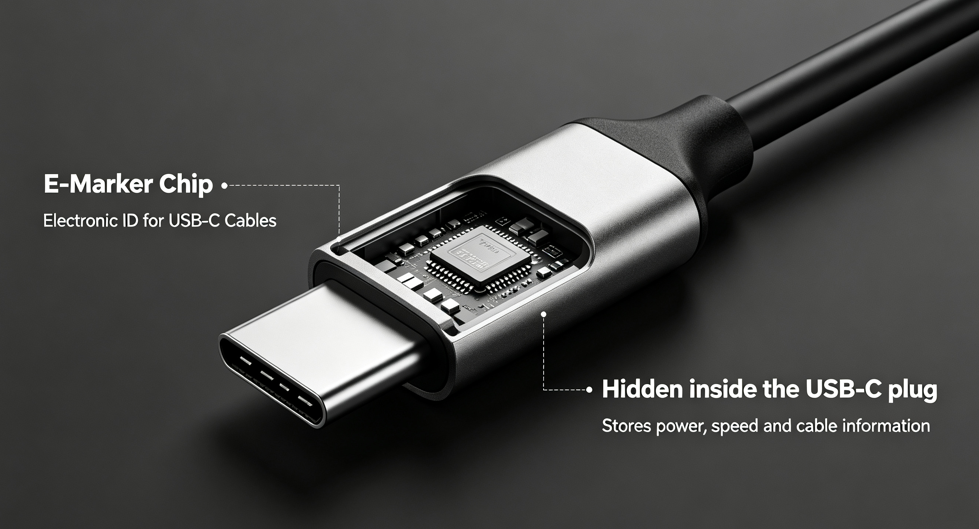
This chip is usually sealed inside the USB-C plug, completely hidden from view. It is not a random gimmick from accessory brands; it is an official standard component defined by the USB Implementers Forum (USB-IF), the global organization that sets USB specifications. It is required by the USB Power Delivery (PD) specification for all high-power, high-performance USB-C cables.
3 Key Roles of the E-Marker Chip
For such a small component, the E-Marker chip serves critical functions that directly affect both safety and performance.
1. Fast-Charging Safety Guard
The E-Marker chip stores the cable’s maximum current, voltage, and power ratings. Before charging begins, the charger and device read these parameters first to determine how much power can safely be delivered.
Without this check, a basic cable forced to carry high power could overheat, degrade quickly, or even create safety risks. The E-Marker acts as a safety gate, keeping power output within the cable’s safe limits.
2. Performance Matching Coordinator
Beyond charging capabilities, the chip also records data transfer specifications — whether the cable only supports USB 2.0, or is capable of USB 3.2, USB4, or even Thunderbolt speeds. It also flags support for video output and alternate modes.
Your host device uses this information to automatically select the right operating mode, so your high-end hardware won’t be held back by a basic cable.
3. Authenticity & Compatibility Credential
The chip also stores the cable’s vendor ID, product model, and certification number. Devices can read this data to verify compatibility, which is why official accessories are often recognized seamlessly, while cheap knockoff cables frequently run into compatibility issues.
How Does an E-Marker Chip Work?
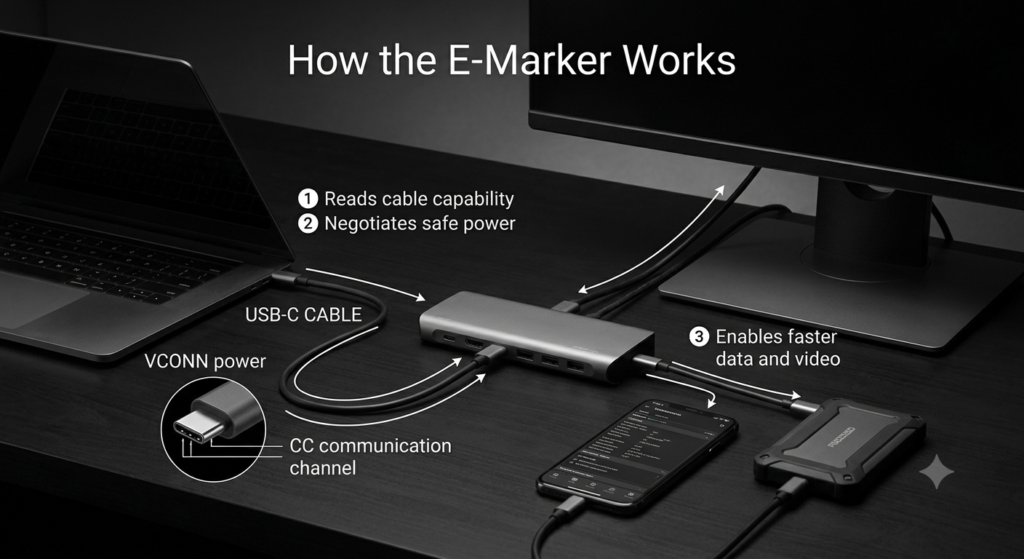
The whole process happens in milliseconds — you’ll never notice it. Here’s a simple breakdown:
First, power-on wake-up. When you plug in the USB-C cable, the host device sends a low voltage called VCONN through the CC (Configuration Channel) pins inside the connector to power on and “wake up” the E-Marker chip.
Second, information reporting. Once powered, the chip immediately sends all its capability parameters to the charger and device via the CC channel — essentially presenting its ID card.
Third, negotiation and decision. The device receives the parameters, matches them with its own needs, and finalizes the charging power, data transfer speed, and functional modes to use.
The entire handshake is finished the moment you plug in the cable, with zero perceptible delay for the user.
Which USB-C Cables Require an E-Marker Chip?
Not every USB-C cable has an E-Marker chip. Per official USB-IF rules, only cables meeting certain performance thresholds are required to include one.
Cables that must include an E-Marker
- PD fast-charging cables rated for over 3A current (over 60W power), such as common 65W, 100W, and 240W data cables
- High-speed data cables supporting USB 3.0 or faster
- Multi-function cables that support video output (Alternate Mode)
- Full-featured cables built to Thunderbolt 3, Thunderbolt 4, or USB4 specifications
Cables that do not need an E-Marker
- Basic charging cables that only support up to 5V3A charging and USB 2.0 data transfer — what most people call “standard charging cables”
Where Will You Encounter E-Marker Cables in Daily Life?
E-Marker chips are far more common than you might think; you just haven’t noticed them.
- High-power charging: Laptops, portable gaming consoles, and large-capacity power banks almost always use E-Marker cables for their high wattage charging needs
- High-speed data transfer: External solid-state drives, high-speed card readers, and video capture cards all require E-Marker-equipped high-speed cables to reach their full transfer speeds
- Video and docking: USB-C monitors, multi-function docks, and external graphics cards rely on E-Marker chips to enable video output features
- Professional use cases: VR headsets, Thunderbolt storage arrays, and high-speed network adapters have even stricter cable requirements, making E-Marker chips a standard feature
How to Tell If Your Cable Has an E-Marker Chip
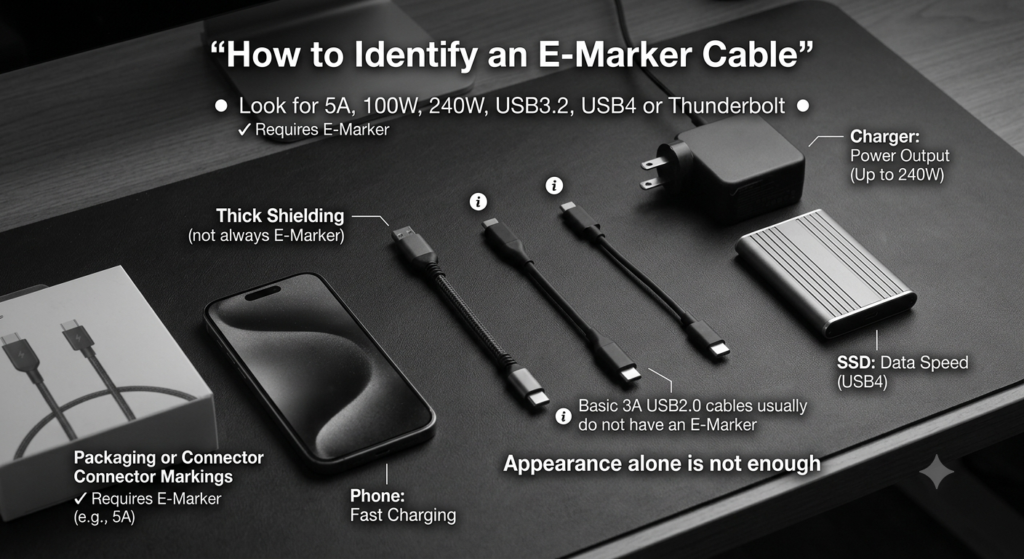
Since the chip is hidden inside the connector, you can’t see it directly — but you don’t have to cut open your cable to find out. Try these two simple methods.
Check the product specifications
This is the most straightforward way:
- If the product listing mentions “5A current”, “100W/240W PD fast charging”, “USB 3.2”, “USB4”, or “Thunderbolt”, the cable definitely has an E-Marker chip
- If it only lists “3A” and “USB 2.0”, it is almost certainly a basic cable without an E-Marker
Do a quick real-world test
- Use the cable to charge a device that supports 65W or higher power. If it triggers full-speed fast charging on the device, it most likely has an E-Marker chip
- Use it to connect a USB 3.0+ flash drive or external hard drive. If it reaches the advertised high transfer speeds, the chip is present
One important note: you cannot tell by looks alone. Cable thickness, connector color, or gold plating are no indication of whether an E-Marker is inside. Many cheap, low-quality cables are made to look thick and premium but contain no E-Marker chip at all.
4 Common Myths About E-Marker Chips
There are plenty of misconceptions about this tiny chip — let’s clear them up.
Myth 1: All USB-C cables have an E-Marker chip
This is the most widespread myth. In reality, most budget charging cables and basic bundled cables do not include an E-Marker. It is only standard on mid-range and high-end cables that meet specific performance standards.
Myth 2: A cable with an E-Marker is always a good cable
The E-Marker chip only “reports” its listed parameters — think of it as the information printed on an ID card. It does not guarantee the information is accurate, nor does it guarantee the cable itself is well-made.
A cable’s real performance ultimately depends on the quality of its internal copper wiring, shielding, and insulation materials. Some low-quality products falsify the chip’s parameters, labeling a 3A cable as 5A, which actually creates safety risks.
Myth 3: E-Marker chips slow down charging or data transfer
Not at all. The E-Marker chip only handles information exchange the moment the cable is plugged in. It does not carry power or data during normal use, so it has zero impact on charging speed or file transfer performance.
Myth 4: You can’t fast-charge without an E-Marker
This is not quite right. Per the official specification, PD fast charging up to 60W (including 5V3A, 9V3A, 12V3A, 15V3A, and 20V3A) works perfectly fine without an E-Marker chip. The chip is only required for power levels above 60W and currents over 3A.
Industry Status and Future of E-Marker Chips
E-Marker chip technology is now very mature, with manufacturers around the world offering options from entry-level to high-end.
- US manufacturers: Cypress and Intel, leading the high-end Thunderbolt and USB4 cable market
- Taiwanese manufacturers: VIA Labs and Realtek, widely used in consumer fast-charging and high-speed cables
- Mainland Chinese manufacturers: including Wiseanalog, EJ Semiconductor, and Injoinic, offering strong cost-performance and holding large market share in domestic fast-charging cables
As USB standards evolve, E-Marker chips continue to improve. They are being updated to support the USB PD 3.1 EPR standard for up to 240W power delivery, and to work with USB4 v2 and Thunderbolt 5 for higher bandwidth cables. The chips themselves are also becoming more integrated and more power-efficient, to fit increasingly compact connector designs.
Practical Buying Tips for Everyday Users
After all this technical background, here are a few simple, easy-to-remember tips for buying USB-C cables. You don’t need to memorize complicated specs — just follow these rules.
- Only charging your phone: A standard 3A USB-C cable is more than enough. There’s no need to pay extra for an E-Marker-equipped cable; a basic option will give you the best value.
- Charging a laptop or transferring high-speed data: Make sure to choose a compliant cable with an E-Marker chip, so you don’t pay for performance you’ll never get.
- Prioritize USB-IF certified products: Officially certified cables have verified chip parameters and build quality, greatly reducing your chance of buying a defective or mislabeled product.