
USB communication is built around four major transfer types: control transfer, bulk transfer, interrupt transfer, and isochronous transfer. Each type is designed for a different balance between reliability, latency, bandwidth, and real-time behavior.
In USB 2.0, these transfer types are scheduled by the host within frames and microframes. In USB 3.0 and later SuperSpeed systems, the same high-level transfer concepts still exist, but the underlying bus scheduling model changes significantly. SuperSpeed USB uses service intervals, bursts, and more advanced endpoint behavior instead of simply following the USB 2.0 frame model.
This article explains the four USB transfer types from a practical engineering perspective, covering their purpose, transfer process, packet size, typical applications, and error-handling behavior.
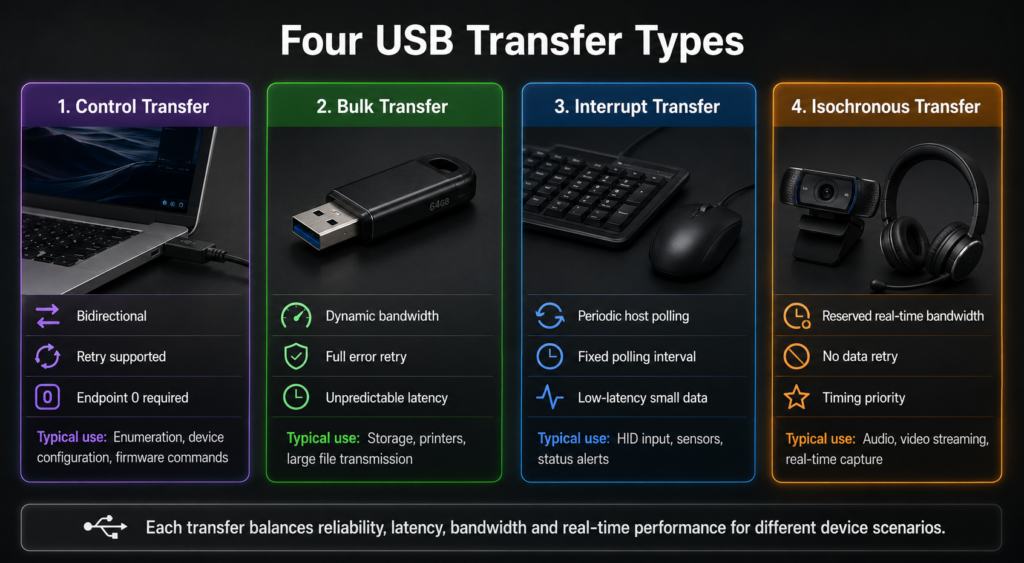
1. Control Transfer
Control transfer is the most fundamental USB transfer type. Every USB device must support control transfers through the default control endpoint, known as endpoint 0.
Control transfers are used for device configuration, status queries, standard USB requests, descriptor access, and many vendor-specific commands. During enumeration, the host uses control transfers to read device descriptors, assign an address, and configure the device.
1.1 Purpose and Characteristics
Control transfer is bidirectional and highly structured. It is mainly used when the host needs to exchange management or configuration information with a device.
Typical uses include:
- Device enumeration and configuration
- Reading device, configuration, interface, and endpoint descriptors
- Sending standard requests such as GetDescriptor, SetAddress, and SetConfiguration
- Querying device status
- Sending vendor-specific control commands
- Performing firmware update control operations, depending on device design
Control transfer is designed for reliability rather than maximum throughput. If an error occurs, the host can retry the transaction or report the failure to software. It should not be described as “absolutely zero loss” in every real-world condition, because device removal, endpoint halt, cable errors, or host-side timeout can still make a transfer fail.
1.2 Transfer Process
A control transfer usually consists of three stages:
- Setup stage: The host sends a setup packet that describes the request.
- Data stage: Optional. Data may move from host to device or from device to host.
- Status stage: Confirms the final result of the control request.
This three-stage structure makes control transfers suitable for command-response style communication. The host remains in control of the process, and the device responds according to the request.
1.3 Maximum Packet Size
| USB Speed | Maximum Control Endpoint Packet Size |
|---|---|
| Low Speed | 8 bytes |
| Full Speed | 8, 16, 32, or 64 bytes, depending on endpoint 0 descriptor |
| High Speed | 64 bytes |
| SuperSpeed USB 3.0 | 512 bytes |
For full-speed devices, it is more accurate to say that endpoint 0 may support 8, 16, 32, or 64 bytes, instead of saying it is always 64 bytes.
1.4 Typical Applications
Control transfers are used whenever reliability and standardized command handling matter more than raw throughput. Common examples include USB enumeration, printer status commands, device configuration, USB class-specific requests, and firmware update control operations.
2. Bulk Transfer
Bulk transfer is designed for large data movement where accuracy matters more than timing. It is commonly used by storage devices, printers, scanners, USB-to-Ethernet adapters, and other peripherals that need reliable data exchange but do not require fixed latency.
2.1 Purpose and Characteristics
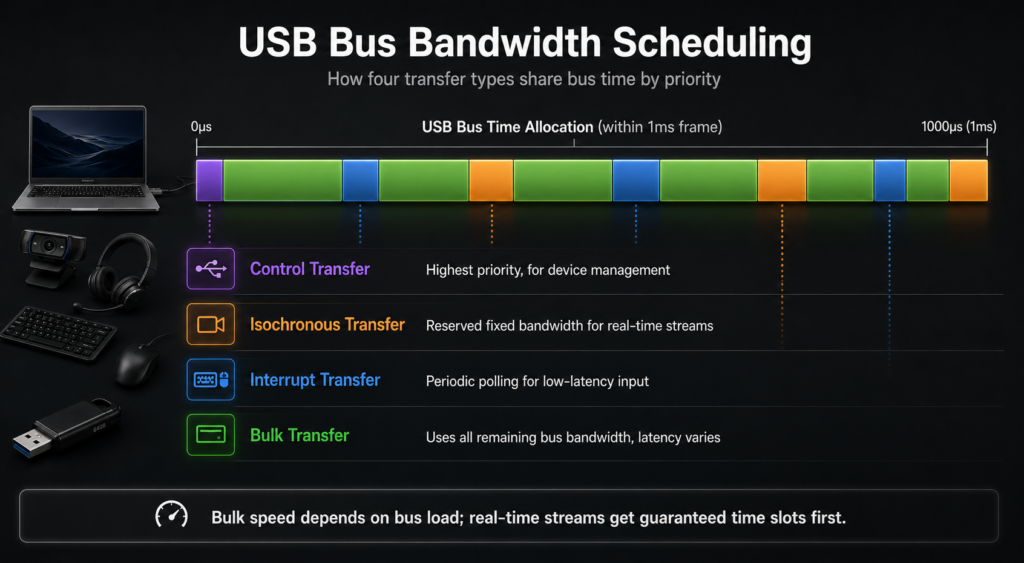
Bulk transfer uses available bus bandwidth dynamically. It does not reserve a fixed portion of bandwidth in advance. Instead, the host schedules bulk transfers when bus time is available after higher-priority traffic has been handled.
This makes bulk transfer efficient for large data blocks, but its latency is not predictable. If the bus is busy with interrupt or isochronous transfers, bulk transfer throughput may decrease.
2.2 Transfer Process
Bulk transfer uses IN and OUT transactions:
- Bulk IN: The host requests data from a device endpoint.
- Bulk OUT: The host sends data to a device endpoint.
The more unused bus bandwidth is available, the faster bulk transfers can proceed. This is why a USB flash drive may perform well on an idle bus but slow down when the same bus is shared with other active devices.
2.3 Maximum Packet Size
| USB Speed | Maximum Bulk Packet Size |
|---|---|
| Low Speed | Not supported |
| Full Speed | 8, 16, 32, or 64 bytes |
| High Speed | 512 bytes |
| SuperSpeed USB 3.0 | 1024 bytes |
Bulk transfer is not supported for low-speed USB devices. Low-speed devices are intended for simple peripherals such as keyboards and mice, where interrupt or control transfers are more appropriate.
2.4 Typical Applications
Bulk transfer is widely used in:
- USB flash drives
- External hard drives
- Printers
- Scanners
- USB network adapters
- Large non-real-time data exchange
2.5 Error Handling
Bulk transfer includes error detection and retry mechanisms. If a packet is corrupted, the host can retry the transaction. This makes bulk transfer suitable for data that must arrive correctly, such as files or print data.
However, it is better to describe bulk transfer as reliable with retry and error reporting, not as absolutely guaranteed to succeed under all conditions.
3. Interrupt Transfer
Interrupt transfer is used for small amounts of data that need predictable latency. Despite the name, USB interrupt transfer is not a hardware interrupt generated by the device. The host still polls the device periodically.
3.1 Purpose and Characteristics
Interrupt transfer is designed for devices that need timely response but do not transfer large amounts of data. A keyboard, mouse, game controller, or sensor may only send a few bytes at a time, but the host needs to receive that information within a predictable interval.
The polling interval is defined in the endpoint descriptor. The host uses this interval to schedule periodic checks of the endpoint.
3.2 Transfer Process
The host periodically polls the interrupt endpoint. If the device has data ready, it responds with data. If it has no data, it may respond with NAK, indicating that no data is currently available.
This polling-based design gives interrupt transfer predictable latency while preserving the USB host-controlled communication model.
3.3 Polling Interval
| USB Speed | Polling Interval Behavior |
|---|---|
| Low Speed | Typically 10 ms to 255 ms |
| Full Speed | 1 ms to 255 ms |
| High Speed | Based on microframes; interval is encoded using powers of two |
| SuperSpeed USB 3.0 | Uses service interval scheduling rather than the USB 2.0 frame model |
For high-speed USB, the minimum scheduling unit is a 125 μs microframe. However, the interval is not simply any arbitrary value; it is encoded through the endpoint descriptor and interpreted using a power-of-two style interval.
3.4 Maximum Packet Size
| USB Speed | Maximum Interrupt Packet Size |
|---|---|
| Low Speed | 8 bytes |
| Full Speed | 64 bytes |
| High Speed | 1024 bytes per transaction |
| SuperSpeed USB 3.0 | 1024 bytes per packet, with additional SuperSpeed endpoint capabilities depending on descriptor configuration |
3.5 Typical Applications
Interrupt transfer is commonly used by human interface and status-reporting devices, such as:
- Keyboards
- Mice
- Game controllers
- Touch panels
- Button sensors
- Device status notification endpoints
3.6 Error Handling
Interrupt transfer supports error detection and retry behavior. It is more reliable than isochronous transfer, but it still does not mean success is guaranteed in every possible failure condition.
The practical goal of interrupt transfer is to provide predictable response time while maintaining reasonable reliability.
4. Isochronous Transfer
Isochronous transfer is designed for real-time data streams. Its priority is timing continuity rather than perfect data delivery.
4.1 Purpose and Characteristics
Isochronous transfer reserves bandwidth for periodic data delivery. It is suitable for audio, video, and other real-time streams where late data is often useless.
Unlike control, bulk, and interrupt transfers, isochronous transfer does not use retry for corrupted data. If an error occurs, the bad data is typically discarded. This avoids delays caused by retransmission and helps preserve real-time timing.
4.2 Transfer Process
In USB 2.0, isochronous transfers are scheduled in frames or microframes. For high-speed USB, high-bandwidth isochronous endpoints can support multiple transactions per microframe.
In USB 3.0 and later SuperSpeed systems, isochronous transfers still serve real-time streaming use cases, but the scheduling model uses SuperSpeed service intervals and endpoint companion descriptors rather than directly following the USB 2.0 microframe model.
4.3 Maximum Packet Size
| USB Speed | Maximum Isochronous Packet Size |
|---|---|
| Low Speed | Not supported |
| Full Speed | 1023 bytes |
| High Speed | 1024 bytes per transaction; up to 3072 bytes per microframe in high-bandwidth mode |
| SuperSpeed USB 3.0 | 1024 bytes per packet, with burst and service interval behavior defined by SuperSpeed descriptors |
For USB 3.0, simply saying “maximum 1024 bytes” is incomplete. SuperSpeed endpoints may use additional descriptor fields such as burst-related settings, so the effective service interval payload can depend on endpoint configuration.
4.4 Typical Applications
Isochronous transfer is used when timing is more important than retransmission-based reliability. Typical examples include:
- USB cameras
- Microphones
- Speakers
- Audio interfaces
- Video capture devices
- VR and real-time sensor streaming devices
4.5 Error Handling
Isochronous transfer does not retry corrupted data. If a packet is damaged, the receiver may drop it and continue with the next scheduled data interval.
This behavior is intentional. In real-time media, retransmitting old data may introduce delay and break timing continuity. For audio and video, a small glitch is often better than a delayed stream.
5. Comparison of USB Transfer Types
| Transfer Type | Reliability | Latency | Bandwidth Behavior | Typical Use |
|---|---|---|---|---|
| Control | High, with retry or error reporting | Not fixed | Prioritized for device management | Enumeration, configuration, standard requests |
| Bulk | High, with retry | Unpredictable | Uses remaining bus bandwidth | Storage, printers, scanners |
| Interrupt | High, with retry | Predictable within polling interval | Periodic scheduling | Keyboard, mouse, game controller |
| Isochronous | No retry for corrupted data | Predictable and time-sensitive | Reserved bandwidth | Audio, video, real-time streams |
6. Speed Support Summary
| Transfer Type | Low Speed | Full Speed | High Speed | SuperSpeed USB 3.0 |
|---|---|---|---|---|
| Control | Supported | Supported | Supported | Supported |
| Bulk | Not supported | Supported | Supported | Supported |
| Interrupt | Supported | Supported | Supported | Supported |
| Isochronous | Not supported | Supported | Supported | Supported |
7. USB 2.0 and USB 3.0 Speed Basics
| USB Version / Mode | Nominal Signaling Rate |
|---|---|
| USB Low Speed | 1.5 Mbps |
| USB Full Speed | 12 Mbps |
| USB 2.0 High Speed | 480 Mbps |
| USB 3.0 SuperSpeed | 5 Gbps |
USB 2.0 high-speed mode divides time into 125 μs microframes. There are 8,000 microframes per second. USB 3.0 SuperSpeed keeps the same high-level transfer categories, but its internal scheduling and data movement model are different from USB 2.0.
8. How to Choose the Right Transfer Type
The simplest way to choose a USB transfer type is to start from the data requirement.
| Requirement | Recommended Transfer Type |
|---|---|
| Device setup, descriptor access, configuration | Control transfer |
| Large data with correctness required but no fixed latency | Bulk transfer |
| Small data with predictable response time | Interrupt transfer |
| Real-time stream with fixed timing requirement | Isochronous transfer |
For example, a USB flash drive uses bulk transfer because file data must be correct, but a few milliseconds of delay is usually acceptable. A mouse uses interrupt transfer because each movement update is small but should be delivered quickly. A microphone or camera may use isochronous transfer because continuous timing matters more than retransmitting every corrupted packet.
Summary
USB transfer types are designed around different engineering trade-offs. Control transfer provides reliable command and configuration exchange. Bulk transfer provides reliable large data movement using available bandwidth. Interrupt transfer provides predictable latency for small status or input data. Isochronous transfer provides reserved timing for real-time streams but gives up retransmission.
The key distinction is not simply speed. The real difference is how each transfer type handles bandwidth, latency, and errors. Once these trade-offs are clear, it becomes much easier to understand why USB storage, HID devices, cameras, microphones, and configuration commands use different transfer models.