
Introduction: Why Do You Always Buy the Wrong USB Cables and Chargers?
Most people have encountered the same annoying problem: You buy a so-called high-speed USB 3.0 cable, but file transfer is extremely slow; All Type-C ports look identical, but some support fast charging while others only support slow basic charging. Confusing marketing terms like USB 3.1, USB4 and Thunderbolt make it harder to pick the right USB devices.
This confusion is not your fault. The official USB standard organization has revised naming rules many times over the past 30 years. Coupled with misleading business promotion from merchants, ordinary users struggle to distinguish USB specifications.
This article explains the full evolution of USB naming in plain language. You will tell the difference among USB version numbers, Gen labels, Type-C ports, fast charging and Thunderbolt protocols, and never fall for false USB product promotion again.
1. Basic Background: Core Common Sense for Beginners
1.1 USB Standard Regulator: USB-IF
The USB Implementers Forum (USB-IF) is the global official organization of all USB standards. It formulates USB naming rules, authorizes official logos, and certifies all qualified USB products. All USB naming changes are decided by USB-IF.
1.2 Official Name VS Marketing Name
This is the main cause of consumer pitfalls:
- Official Standard Name: Mandatory, certification required, strict one-to-one correspondence with hardware parameters, 100% credible
- Business Marketing Name: Customized by merchants, vague and exaggerated, no industry binding force, easy to mislead buyers
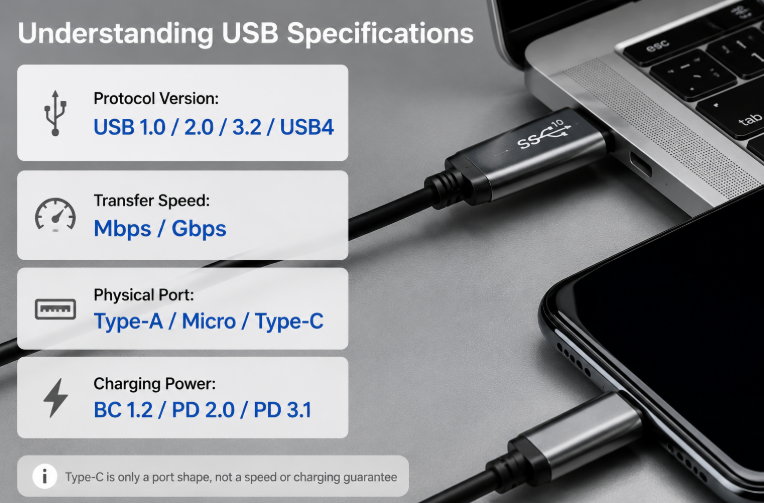
1.3 Four Independent Core USB Concepts (Most Important)
Most user misunderstandings come from mixing these four unrelated dimensions:
- Protocol Version (USB1.0/2.0/3.2/USB4): Only indicates the release time of the standard; it has no relation to transfer speed or charging power
- Transfer Speed (Gbps/Mbps): Decides how fast files transmit
- Physical Port (Type-A/Micro/Type-C): Only refers to port shape; Type-C is just an appearance, not a high-speed or fast-charging standard
- Charging Power: Decides charging speed; USB PD is the only official universal USB fast charging standard
2. Four Stages of USB Naming Evolution
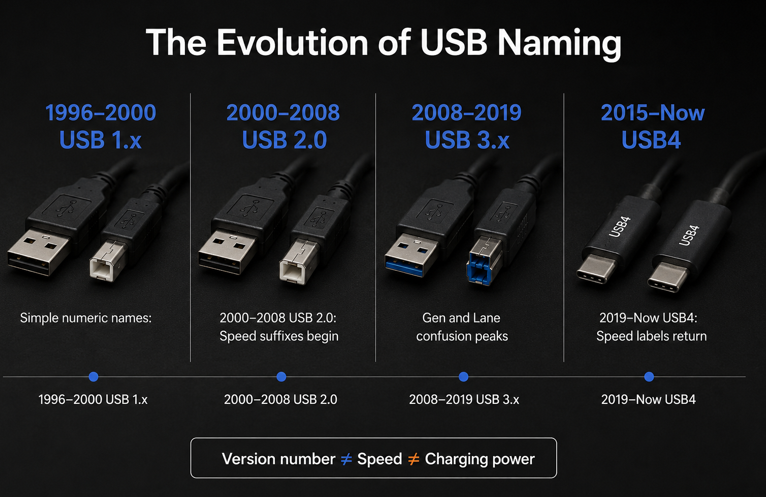
2.1 Stage 1: 1996-2000 | Simple & Unambiguous: USB 1.x
In the early 1990s, computer peripheral ports were fragmented. Mice, printers and external devices adopted different exclusive ports. The USB protocol was created to unify all computer interfaces.
- USB 1.0 (1996): The first generation USB standard, ultra-low speed (1.5Mbps), almost no civilian commercial products
- USB 1.1 (1998): The first widely used USB standard, dual speed mode, basic 2.5W (5V/0.5A) low-power charging
- Main ports: Standard Type-A, Type-B port
Stage Summary: Simple numeric naming, no confusion, no complex suffix code.
2.2 Stage 2: 2000-2008 | Origin of Naming Confusion: USB 2.0
This stage started the long-standing USB naming chaos.
USB 2.0 launched in 2000 with a fixed 480Mbps high-speed transfer rate. USB-IF made a controversial rule: incorporate all old USB 1.x standards into the USB 2.0 system:
- Original USB 1.0 → Renamed to USB 2.0 Low Speed
- Original USB 1.1 → Renamed to USB 2.0 Full Speed
- New native USB 2.0 → Named USB 2.0 High Speed
Market chaos broke out immediately: Merchants uniformly abbreviated all specifications as “USB 2.0 Cable”, selling low-speed cables as high-speed products to consumers.
Mini USB and Micro USB ports for mobile devices were launched in this period. Although USB-IF required speed suffix labels, market confusion could not be controlled.
Stage Summary: USB version number and transfer speed were decoupled; USB specification fraud appeared officially.
2.3 Stage 3: 2008-2019 | Peak Confusion: USB 3.x (Gen Serial Label)
This is the most complicated period in USB history. USB-IF revised the official naming rules twice and launched the confusing Gen identification system.
- 2008 USB 3.0: First SuperSpeed USB standard, 5Gbps transfer speed, max 15W power supply
- 2013 First Renaming (USB 3.1): No hardware upgrade, only name revision! Old USB 3.0 was renamed USB 3.1 Gen1; New 10Gbps specification named USB 3.1 Gen2 (SuperSpeed+)
- 2017 Second Renaming (USB 3.2): All old USB 3.1 specifications were upgraded to USB 3.2 Gen1/Gen2; New 20Gbps dual-channel standard USB 3.2 Gen2×2 (Type-C exclusive)
Critical milestone: Type-C port was standardized in 2014. Its reversible plug design and small size made it popular worldwide. However, the biggest public misunderstanding formed: Most users believed Type-C meant high speed and fast charging.
Stage Summary: USB version numbers lost reference value completely. Complex Gen and channel labels pushed USB naming confusion to the peak.
2.4 Stage 4: 2019-Present | Simplification & Unification: USB4
USB-IF finally abandoned the complex USB 3.x naming system for poor user experience. The official eliminated complicated Gen suffixes and took actual transfer speed as the primary naming standard.
- USB4 V1.0 (2019): Developed based on Thunderbolt 3 protocol; Directly named USB4 20Gbps / 40Gbps; Native Thunderbolt device compatibility
- USB4 V2.0 (2022 Latest Official Standard): Max 80Gbps symmetric transfer speed; Support 240W USB PD EPR full-power fast charging
Thunderbolt protocol was fully integrated into USB4 ecosystem: Thunderbolt 3 was an independent standard; Thunderbolt 4 was incorporated into official USB4 system. For the same Type-C port, Thunderbolt protocol has higher hardware priority than ordinary USB4.
2022 USB-IF New Rule: Deprecate version number promotion; transfer speed + charging power become the only core identification standard.
Stage Summary: USB naming returned to simple and intuitive logic; Type-C became the global mainstream universal port.
3. Auxiliary USB Specification Knowledge for Ordinary Users
3.1 USB Fast Charging Naming System (Independent of Transfer Speed)
USB charging standard is completely independent of data transfer protocol:
- Basic Charging: BC 1.2 standard, maximum 7.5W output
- USB PD (Official Universal USB Fast Charging): PD 2.0 (Max 100W); PD 3.1 EPR (Max 240W high-power charging for laptops)
- Note: Qualcomm QC, Huawei SCP are manufacturer private fast charging protocols, not official USB standards
3.2 USB Cable Classification
- Ordinary Cables: Marked with USB 2.0/3.2/USB4 standard
- E-Marker Chip Cables: High-spec C-to-C cables, support 100W/240W fast charging and high-speed data transmission
3.3 Port Color & Official Logo Identification (Reference Only)
- Black/White Port: USB 1.x / USB 2.0 (low speed)
- Blue Port: 5Gbps SuperSpeed USB port
- Red/Orange Port: 20Gbps high-spec USB port
- New Official Logo: Directly printed with 20G/40G/100W/240W (most accurate identification)
Important Notice: Port color is not a mandatory standard; Manufacturers can change port color arbitrarily.
4. Root Causes of USB Naming Chaos
- Standard Iteration: USB-IF releases new standards without abolishing old rules; new and old naming systems run in parallel for decades
- Commercial Strategy: Priority given to global vendor compatibility instead of user identification simplicity
- Technical Complexity: Superimposed parameters of port shape, transfer channel, speed and charging power increase naming difficulty
- Market Benefit: Merchants exploit naming loopholes for false promotion and cost reduction
- Historical Stock Equipment: Massive old USB devices make it impossible to phase out old standards drastically
5. Practical USB Device Selection Guide for Ordinary Users
- Check printed transfer speed and charging power first (most credible standard)
- Ignore USB version number: A higher version number does not mean faster speed or higher power
- Never judge specification by port appearance: Type-C has no performance attribute
- Avoid vague product labels such as “High-Speed USB” and “Fast Charging Special”
- Professional software detection for accurate hardware parameter verification
6. Future USB Industry Trend
The complex USB 3.x Gen naming system will be completely phased out. Type-C will monopolize consumer electronic device ports. All USB products will be marked only with transfer speed and charging power. USB4 and Thunderbolt standards will achieve full unification; misleading USB commercial promotion will be strictly regulated by USB-IF certification audit.
Core Conclusion (4 Rules for All USB Purchases)
- USB Version Number: Only indicates standard release time, no relation to performance
- Gen Label: Only used for old USB 3.x standards, for internal speed classification
- Type-C: Pure physical port shape, no binding with high speed or fast charging
- The only valid selection criteria: Actual transfer speed + Maximum charging power