
Introduction
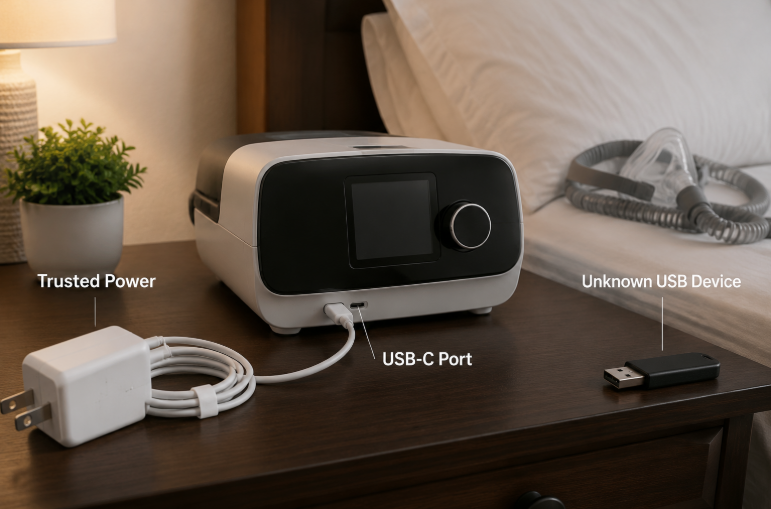
If you’ve ever plugged your phone into a hospital waiting room USB port to charge, used a random USB drive to copy test results from a clinic machine, or grabbed a cheap charging cable from a gas station for your CPAP or glucose meter, you’re not alone. Most people treat USB ports like universal, harmless power outlets — but on medical devices, those small slots are far more than charging holes.
A bad USB connection doesn’t just risk corrupting files. It can expose your private health data, lock critical devices with ransomware, or even change treatment settings that impact your care. The good news? You don’t need a cybersecurity degree to stay safe. This guide breaks down real risks, simple rules to follow, and what clinics and manufacturers are required to do to keep you protected.
Key Takeaways
✅ USB ports on medical devices are not just for charging. Plugging in unknown drives or cables can expose health data, cause device errors, or alter treatment settings.
✅ USB attacks don’t need internet. Malicious USB devices can inject harmful code in seconds, and regular antivirus software often cannot detect these hardware-based threats.
✅ Global regulators have clear rules: HIPAA (U.S.), GDPR (EU), and FDA cybersecurity guidance require USB data protections, with breach penalties reaching millions of dollars for non-compliant clinics.
✅ Regular users can avoid nearly all risks with four simple habits: never plug in unknown USB devices, use manufacturer-approved accessories, only update firmware from official sources, and use a data blocker for public charging.
✅ USB-C is not inherently safer. The multi-function design of USB-C requires careful access controls, and needs the same safety precautions as older USB ports.
1. USB Security Basics: What It Actually Means
When we talk about USB security for medical devices, we’re not throwing around complicated hacker jargon. It boils down to three simple, common-sense goals:
- Confidentiality: Your private health data (blood sugar logs, sleep reports, test results, diagnosis records) is never seen or copied by people who shouldn’t have access.
- Integrity: Your device’s settings, test readings, and core software are never altered without permission — so your glucose meter doesn’t give fake readings, or your CPAP doesn’t switch to an unsafe pressure setting.
- Availability: Your device works when you need it. It won’t get locked by ransomware, bricked by bad firmware, or damaged by a faulty accessory.
1.1 Not All USB Ports Are the Same
Think of every USB port on a medical device as a door into the device’s system. Not all doors have the same lock, and not all doors lead to the same room:
- Charge-only ports: These only carry power, no data pins. Risk level: Low — they work exactly like a regular wall outlet.
- Device data ports: These connect to phones or computers to export health data. Risk level: Medium — they can transfer files between devices.
- Host peripheral ports: These connect to USB drives, printers, barcode scanners, or other accessories. Risk level: High — they can read files from external drives.
- Service/debug ports: These are locked, high-permission ports only for factory technicians to repair or update devices. Risk level: Critical — access to this port lets someone rewrite the device’s entire operating system.
The core difference between medical devices and your personal phone or laptop? Plugging a bad USB into your phone might lose photos or crash apps. Plugging a bad USB into a medical device can alter treatment, shut down critical care functions, or expose thousands of patients’ private records.
1.2 Why Medical Devices Are More Vulnerable Than Regular Electronics
Your work laptop or phone gets security updates every few weeks and runs antivirus software in the background. Medical devices have unique weaknesses that make them easier targets:
- Closed systems: Most medical devices cannot run regular antivirus software or third-party security tools.
- Long lifespans: Medical devices often stay in use for 5–15 years, meaning many run outdated operating systems that stopped getting security patches long ago.
- Controlled updates: System updates have to be tested and approved by the device manufacturer to avoid breaking critical care functions, leaving security gaps open for months or years.
- High value targets: Devices store bulk sensitive health data and control life-sustaining functions, making them far more valuable to attackers than personal electronics.
This is not hypothetical fear-mongering. The U.S. Department of Health and Human Services (HHS) and Cybersecurity and Infrastructure Security Agency (CISA) have repeatedly warned that removable USB drives are one of the most common spread vectors for ransomware in healthcare. The FDA cybersecurity guidance encourages manufacturers to evaluate risks from external interfaces, including USB connections, as part of overall cybersecurity risk management.
2. Real Risks: What Actually Happens When You Plug In a Bad USB
Most USB risks are not Hollywood-style movie hacks. They are simple, proven attacks that target everyday habits.
2.1 Ransomware: The Most Common Threat
Ransomware is malicious code that locks every file on a device (or entire clinic network) with unbreakable encryption. Attackers then demand payment, usually in cryptocurrency, to unlock the files.
Infected USB drives are one of the easiest ways ransomware spreads: a single infected drive plugged into one clinic machine can spread across an entire network, shutting down appointments, test result access, and even emergency care in severe cases.
2.2 BadUSB: The Sneaky Attack You Can’t See
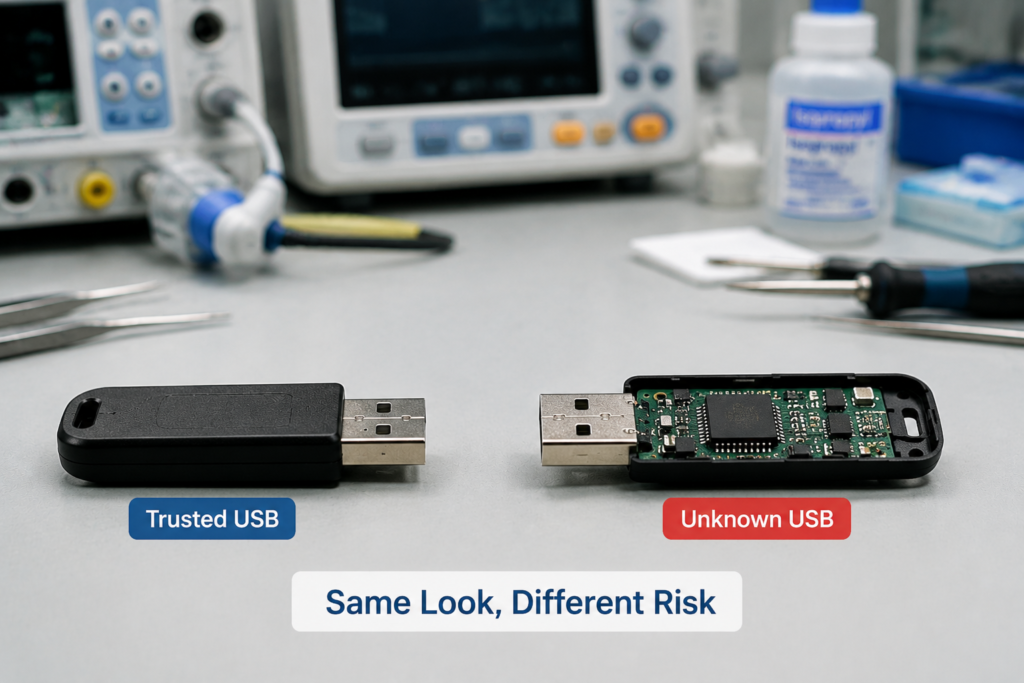
The hardest threat to spot is called BadUSB. These look identical to regular, cheap USB drives — even the free ones you might get at a conference or health fair — but have a reprogrammed chip inside.
When you plug one in, it pretends to be a regular keyboard, and types malicious commands faster than you can follow along. It can execute malicious commands within seconds, depending on the device configuration and security controls: installing backdoors for future access, stealing data, or locking the device. Regular antivirus software cannot catch these attacks, because the malicious code lives on the USB drive’s own hardware, not in a file on your device.
2.3 Firmware Tampering: The Most Dangerous Risk
The high-permission service/debug ports we mentioned earlier are meant only for factory technicians. If an attacker gains access to this port, they can rewrite the device’s core firmware — the permanent software that runs the device.
This can alter calibration values for test equipment, change dosage or pressure settings for treatment devices, or disable safety alarms. The worst part? You may not notice anything is wrong until test results are inaccurate or treatment is delivered incorrectly.
2.4 Accessory Risks: It’s Not Just Flash Drives
You don’t need a USB drive to face risk. Cheap, unbranded charging cables can have tiny hidden chips inside that attempt to make a data connection when plugged in, creating a path for data theft or malware injection.
Even random USB accessories like tiny fans, LED lights, or cheap adapters can carry faulty circuitry that damages device ports or creates security gaps.
2.5 Social Engineering: The Oldest Trick
Most USB attacks don’t require fancy coding skills. Attackers leave USB drives labeled “2026 Salary Info” or “Confidential Patient Results” in hospital parking lots, hallways, and waiting rooms. Curious people pick them up and plug them in to see what’s on the drive — and that’s all it takes to infect a device or network.
Risk Severity at a Glance
| Risk | Impact | Noticeable to regular users? |
|---|---|---|
| Health data leak | Personal privacy exposure | Almost never |
| Ransomware lock | Single device or full clinic shutdown | Immediately obvious |
| Firmware/setting tampering | Inaccurate tests, incorrect treatment | Very hard to detect |
| USB hardware damage | Broken device port or board | Immediately obvious |
3. Simple Safety Rules for Home Users
You don’t need special technical skills to protect yourself. Follow these straightforward steps for every scenario:
3.1 At Home (CPAPs, Glucose Meters, Insulin Pumps, Blood Pressure Monitors)
- Never plug in unknown USB drives, unbranded cheap cables, or free USB storage devices you didn’t purchase directly from a trusted source.
- Only download firmware updates directly from the device manufacturer’s official website. Never click random update pop-ups, and never use update files stored on a random USB drive.
- Before connecting your device to a personal computer to sync data, confirm your computer’s antivirus software is up to date. Never connect medical devices to public shared computers (like those in libraries, internet cafes, or hotel lobbies).
- Before selling, donating, or throwing away an old medical device, use the official factory reset function to fully erase all stored health data.
3.2 At Doctor’s Offices or Hospitals
- Do not unplug or plug in any USB drives already connected to clinic devices. Never plug your own USB drive or phone into clinic medical equipment.
- When charging your personal devices, use a wall outlet whenever possible. Avoid using public USB ports in waiting rooms or exam rooms.
- If you need a copy of your own test results, ask a staff member to send them through official channels (secure portal, printed copy, or clinic-provided encrypted drive). Never plug your personal USB drive into a clinic machine to copy files yourself.
3.3 Traveling or On the Go
- If you must charge from a public USB port (airport, coffee shop, hotel lobby), use a USB data blocker (sometimes called a “USB condom”). These are low-cost, tiny adapters that physically block the data pins in a USB cable, only letting power through — like a door that lets electricity pass, but blocks data and potential malware. For maximum safety, always use your own charger plugged directly into a wall outlet.
- Never borrow charging cables from strangers for your medical devices.
3.4 Quick Judgment Tips
- If you are unsure what a USB port is for, check the device manual or contact the manufacturer’s support team.
- The simplest rule of thumb: if a USB device or cable comes from an unknown source, don’t plug it in. Avoid no-name, ultra-cheap accessories from unvetted sellers.
4. Shared Responsibility: What Manufacturers and Clinics Are Required to Do
USB security is not just on patients. Device makers and healthcare providers have clear responsibilities to keep devices and data safe.
4.1 Device Manufacturer Requirements (Per FDA Rules)
- Secure by default: New devices ship with non-essential USB data features turned off out of the box, with only charging enabled. High-permission debug ports require special tools to access.
- Firmware security: Devices use secure boot, which only runs software signed with the manufacturer’s official key. USB firmware updates will fail if the file is modified or unsigned.
- Vulnerability management: Manufacturers must maintain a public channel to report security flaws, and release timely patches for USB-related vulnerabilities.
- Transparency: Makers provide a clear list of USB port functions and permissions, plus a software bill of materials (SBOM) to outline what code runs on the device.
4.2 Small Clinics: Low-Cost, High-Impact Steps
If you run a small clinic or doctor’s office, you don’t need an expensive enterprise security system to stop 90% of common risks:
- Physical port control: Use cheap USB port locks to block non-essential ports, leaving only 1–2 authorized data ports accessible to designated staff.
- Storage rules: Ban personal USB drives for work use. Purchase a small set of encrypted, clinic-owned USB drives, check them out to staff as needed, and scan them for malware before every use.
- Staff guidance: Train teams to turn in found USB drives instead of plugging them in. Require staff to stay present when third-party repair technicians access device ports.
- Basic auditing: Use built-in system logs to track when USB devices are plugged in, and review logs monthly for unusual activity.
4.3 Large Hospital Requirements
- Deploy USB allowlisting systems that only permit pre-registered, approved USB devices to connect to medical equipment.
- Separate medical device networks from general office Wi-Fi and admin networks with VLAN segmentation to stop malware from spreading.
- Run regular security training and simulated phishing/“lost USB” tests to help staff spot social engineering attacks.
- Maintain a formal incident response plan for USB-related malware outbreaks, including steps to isolate infected devices quickly.
4.4 Full Device Lifecycle Security
USB safety applies from purchase to disposal:
- Procurement: Include USB security requirements in purchase contracts, prioritizing devices that meet FDA and IEC security standards.
- Deployment: Change default debug port passwords, disable non-essential USB features, and set up device allowlists before putting equipment into use.
- Maintenance: Verify all firmware update file signatures before installation, and audit USB access logs regularly.
- Disposal: Fully erase all stored patient data per HIPAA guidelines, and physically destroy storage modules before discarding devices.
5. Global USB Security Rules and Regulations
5.1 United States
- HIPAA Security Rule: Requires covered healthcare providers to implement access controls, encryption, and audit logs for all portable media (including USB drives) holding electronic protected health information (ePHI). Encryption is widely considered a best practice for USB drives containing electronic protected health information (ePHI), with breach penalties reaching up to $1.5 million per year.
- FDA Cybersecurity Guidance: Encourages manufacturers to evaluate risks from external interfaces, including USB connections, as part of overall cybersecurity risk management, and support ongoing security updates for devices on the market.
5.2 European Union
- GDPR: Health data is classified as a special category of personal data. Data transferred via USB must be limited to only what is necessary, encrypted, and any breach must be reported to regulators within 72 hours. Fines can reach up to 4% of global annual revenue or €20 million, whichever is higher.
- Medical Device Regulation (MDR): Lists protection against unauthorized USB access as a basic safety requirement for all medical devices sold in the EU.
5.3 Other Regions
Regulators in Japan (PMDA), Australia (TGA), and Canada (Health Canada) also include physical USB port security as part of medical device pre-market approval requirements.
6. USB-C: New Port, New Risks
Many users assume the newer, reversible USB-C ports are inherently safer than older USB-A ports — this is a common myth.
USB-C is not automatically safer or more dangerous. Because it can support multiple functions such as data transfer and alternate modes, manufacturers must carefully control which features are enabled. Certified USB-C cables use internal chips such as E-Markers to communicate cable capabilities. Poor-quality or counterfeit cables may fail to follow USB specifications and create reliability or safety problems.
Simple protections for USB-C devices:
- Disable non-essential features like video output and high-speed file transfer on clinical devices, leaving only charging and basic data transfer enabled.
- Only use USB-IF certified cables from reputable brands, avoiding ultra-cheap unbranded cables.
- Use USB data blockers when charging from public USB-C ports, just as you would with older USB-A ports.
7. Common USB Security Myths, Debunked
| Myth | Real Risk | Correct Practice |
|---|---|---|
| “USB ports only charge, they can’t transfer data.” | Most devices share pins for charging and data; plugging in creates a potential data connection. | Use a data blocker for public charging, and prioritize wall outlets when possible. |
| “USB-C is safer than USB-A.” | Risk does not come from the port shape itself. Because USB-C can support multiple functions, security depends on which features are enabled and how access is controlled. | Treat unknown USB-C devices the same as unknown USB-A devices: don’t plug them in. |
| “If my device isn’t connected to the internet, it can’t get malware.” | USB-based attacks spread offline via physical connection, no internet required. | Never plug unknown USB drives into offline medical devices. |
| “Antivirus software will catch any USB threats.” | BadUSB attacks run on the USB device’s own hardware, which antivirus cannot scan. | Stop threats at the source by only connecting trusted devices. |
| “Only big hospitals get targeted by hackers.” | Small clinics have smaller security budgets, making them easier, more frequent targets. | Use low-cost controls like port locks and dedicated encrypted drives to block most attacks. |
| “If the cable isn’t broken, it’s safe to use.” | Malicious cables look identical to regular cables, with hidden chips inside the connector housing. | Stick to manufacturer-recommended or certified cables. |
| “If I plug a USB drive in and pull it out right away, nothing bad can happen.” | Many malicious USB attacks complete code injection within seconds, depending on device settings. | Don’t take the risk — never plug in unknown drives, even “just to check.” |
| “The manufacturer already handled all security, so I don’t have to worry.” | Manufacturers build in baseline security, but unsafe use (plugging in unknown devices, unapproved updates) bypasses those protections. | Follow basic safety practices even on secured devices. |
8. Frequently Asked Questions
Q: Can a regular USB cable give my medical device a virus?
A: Genuine, manufacturer-approved charge-only cables only carry power and cannot transfer data or malware. Unbranded or malicious cables may contain hidden chips that attempt data connections, which is why we recommend sticking to certified accessories.
Q: Is it safe to charge my CPAP from a public USB port?
A: Public USB ports carry a small risk of data connection or malicious activity. For maximum safety, use a USB data blocker, or plug your own charger directly into a wall outlet.
Q: Do USB data blockers actually work for medical devices?
A: Yes. Quality data blockers physically remove the data pins from the connection path, only allowing power to pass through. They block all data-based attacks when charging from public ports.
Q: Is USB-C safer than USB-A for medical devices?
A: No. Security depends on how the port is configured, not the shape. USB-C’s multi-function design requires careful access controls, and safe use practices are identical for both port types.
Q: Can I use a regular USB drive to back up my medical device data?
A: We recommend using an encrypted USB drive for health data backups. Scan the drive for malware before use, and do not plug the same drive into public computers or shared devices.
Q: How do I completely erase health data from an old medical device?
A: First, run the official factory reset function from the device settings. For devices holding highly sensitive data, you can physically remove and destroy the internal storage chip to guarantee no data can be recovered.
Q: How can a small clinic improve USB security without an IT team?
A: Three low-cost steps block 90% of risks: lock non-essential USB ports with cheap port blockers, use only dedicated encrypted clinic USB drives, and train staff never to plug in found or personal USB devices.
Q: Will plugging my phone into a hospital USB charger steal my data?
A: Dedicated patient charging ports (with data pins disabled) are safe. For unknown public USB ports, use a data blocker to eliminate risk entirely.
9. What’s Next for Medical USB Security
The industry is already moving toward simpler, more secure USB design:
- Secure by default: New medical devices will ship with USB data features disabled out of the box, requiring explicit user permission to enable data transfer.
- Built-in authentication: USB device authentication will become standard, automatically blocking any unapproved USB device from connecting, even if it is physically plugged in.
- Stricter rules: Global regulators continue to update requirements, making USB security a mandatory check for all new medical devices before they can be sold.
Quick USB Security Checklist
For Home Users
- [ ] I never plug unknown USB drives or unbranded cables into my personal medical devices
- [ ] I only download firmware updates directly from the device manufacturer’s official website
- [ ] I use a USB data blocker or wall outlet when charging from public USB ports
- [ ] I fully erase health data from old devices before selling, donating, or discarding them
For Clinics and Healthcare Providers
- [ ] Non-essential USB ports are physically locked or disabled via system settings
- [ ] Only clinic-owned, encrypted USB drives are used for patient data; personal drives are banned
- [ ] Staff have been trained not to plug in found or unknown USB devices
- [ ] Third-party repair technicians are supervised when accessing device USB ports
- [ ] USB access logs are reviewed regularly for unusual activity
- [ ] A formal response plan exists for USB-related malware incidents
USB security for medical devices does not require fancy tools or expert knowledge. It boils down to treating USB ports like you would a stranger at your door: don’t let unknown devices in, use simple, low-cost locks for public connections, and follow basic common-sense habits. A few seconds of caution can protect your private health data, keep your devices working correctly, and avoid preventable safety risks.