
Introduction: The “Invisible Brain” Inside Every USB Port
We interact with USB ports every day: plugging in a flash drive to transfer files, charging a phone, connecting a keyboard and mouse, or using a dock to hook up an external display. USB has become the universal connector for almost all electronic devices. Yet what most people don’t know is that behind every working USB device lies an unseen “invisible brain” — the USB controller chip.
In the early days, USB had a single, simple job: basic data transfer. As technology evolved, it grew into an all-in-one connectivity system that handles data, fast charging, video output, and even network access. The more features it gained, the more it needed a dedicated chip to coordinate everything, and that is exactly why the USB controller chip exists. Without it, computers and USB devices would not be able to “understand” each other’s commands, let alone carry out complex interactions.
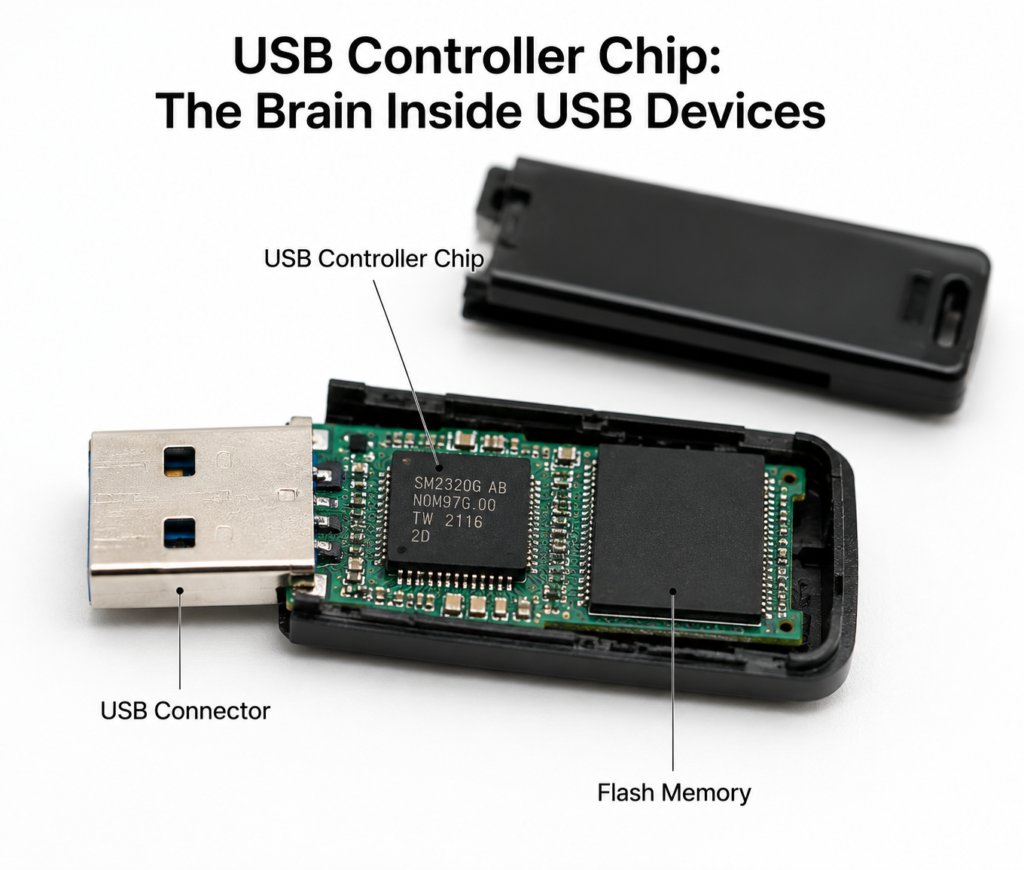
Basics: What Exactly Is a USB Controller Chip?
Core Definition and Function
Put simply, a USB controller chip is the command center inside a USB device. It handles USB protocol interpretation, data transfer scheduling, power state management, and connection control. It acts as the bridge between a host (such as a computer or phone) and the USB device. Everything from a tiny wireless mouse receiver to a high-performance docking station depends on it to function properly.
Common Confusions: Related Chips Compared
Many people mix up USB controller chips with other related chips, but each has a very different job:
| Chip Type | Core Role | Where It’s Found | Simple Analogy |
|---|---|---|---|
| USB Controller Chip | Manages protocols, schedules data, and controls overall device operation | Inside USB devices (flash drives, docks, etc.) | The general manager of the whole system, in charge of everything |
| USB PHY Chip | Handles electrical signals and converts between digital and analog | Inside devices or controller chips | A signal translator that only deals with physical signal transmission |
| E-Marker Chip | Stores cable specifications and indicates cable capabilities | Inside high-end Type-C cables | The cable’s ID card that tells devices how much power and speed the cable supports |
| PD Controller | Handles power negotiation and power delivery control | Chargers, device ports | A power specialist that only negotiates voltage and current |
Its Place in the USB Connection System
In the full USB connection chain, the controller chip sits at the core, linking everything together. It communicates with the host system on one side, manages the device’s hardware on the other, and handles protocol conversion and data relay in between. Its performance directly defines what the entire USB device is capable of.
Evolution: Controller Technology Advances With USB Standards
The development of USB controller chips has always followed the upgrade of USB interface standards. Every generation of higher bandwidth and new features forces controller chips to improve their internal architecture.
| Era | Key Standard | Max Bandwidth | Key Controller Features | Typical Devices |
|---|---|---|---|---|
| USB 1.x Era | USB 1.0/1.1 | 12 Mbps | Simple design, only supports basic low/full-speed communication | Old keyboards, mice, basic peripherals |
| USB 2.0 Era | USB 2.0 | 480 Mbps | Adds high-speed mode and more management features | Flash drives, portable hard drives, basic webcams |
| USB 3.x Era | USB 3.2 Gen1/Gen2/Gen2x2 | 5 Gbps – 20 Gbps | Adds high-speed signal processing, fully upgraded architecture | High-speed flash drives, portable SSDs, capture cards |
| Type-C & USB4 Era | USB PD 3.1, USB4 v2 | Up to 80 Gbps | Integrates reversible plug detection, power negotiation, and multi-protocol tunneling | Full-featured docks, Thunderbolt SSD enclosures, premium laptops |
USB 1.x Era: Basic Low-Speed Communication
The earliest USB 1.0/1.1 standard had very low bandwidth, enough only for low-demand devices like mice and keyboards. The controller chips of this era were very simple, handling nothing more than basic communication.
USB 2.0 Era: High-Speed Storage Drives Feature Upgrades
USB 2.0 boosted bandwidth to 480 Mbps, and flash drives and portable hard drives became widely popular. Controller chips were upgraded accordingly, adding more data management features to support stable, high-speed file transfers.
USB 3.x Era: Ultra-High Speeds Force Architectural Overhaul
The USB 3.x family pushed bandwidth from 5 Gbps all the way to 20 Gbps, multiplying transfer speeds many times over. This required controller chips to add high-speed signal processing, data caching, and error checking modules, resulting in a fundamental change to their hardware design.
Type-C & USB4 Era: All-In-One Smart Control Becomes Standard
With the arrival of the Type-C connector and USB4, USB stopped being just for data. Reversible plug detection, PD fast charging, video output, and external GPU support were all added, and controller chips evolved into fully capable, smart control hubs.
Internal Architecture and Core Workflow
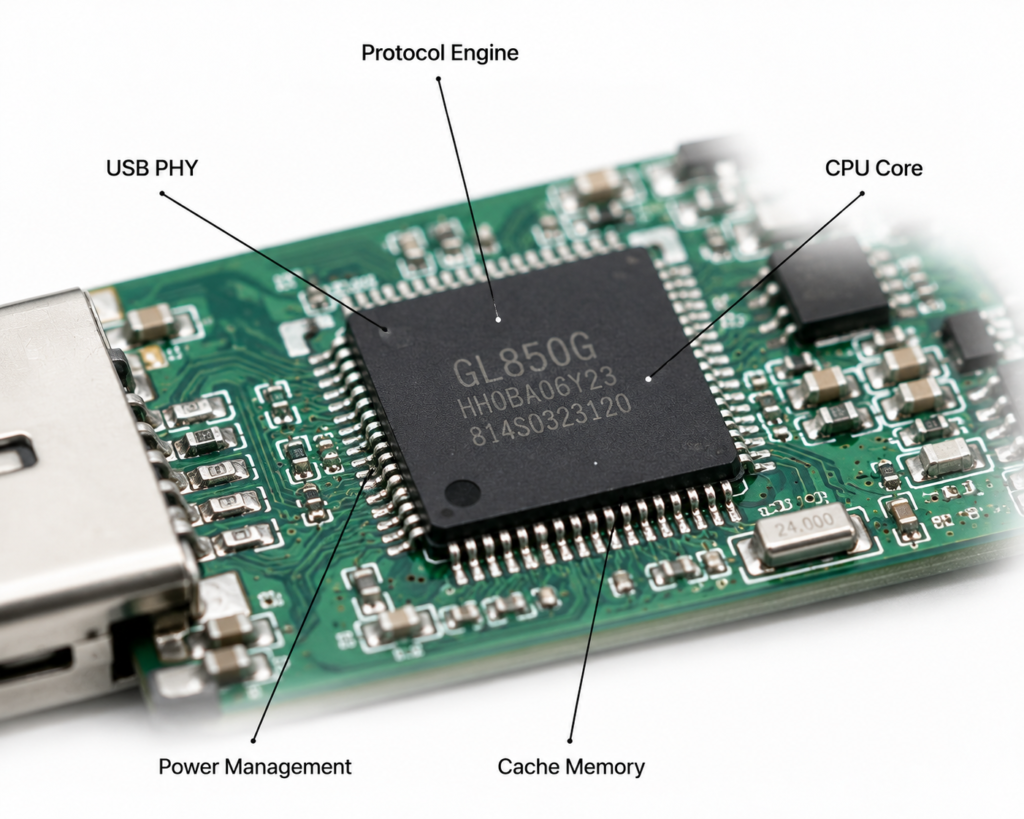
Key Building Blocks of a Controller Chip
While controllers vary widely in function, they share the same core modules: a physical layer unit for sending and receiving signals, a protocol engine for interpreting rules, a processing core for executing commands, a cache module for temporary data storage, and a power management unit. Each has its own job, and together they complete the full communication process.
Plug-In to Recognition: The Full Device Enumeration Process
In the few seconds after you plug in a USB device, the controller chip already completes a full onboarding process called device enumeration:
- The host detects a connected device and sends a recognition signal
- The controller chip returns basic information about the device’s type and capabilities
- The host assigns a unique address to the device and loads the corresponding driver
- Recognition is complete, and the device is ready to use
How Data Transfer Works
During normal data transfer, the controller chip acts as both a transfer station and a traffic controller. Data from the host is first stored in the cache. The controller parses the protocol, then forwards it to the internal hardware modules of the device. Data going the other way is first packaged by the controller into USB-compliant format before being sent to the host.
Power Negotiation in Type-C Devices
On fast-charging Type-C devices, the controller negotiates with the other device through the CC pin after plug-in. Both sides share the voltage and current levels they support, agree on a mutually compatible power plan, and only then begin charging. This prevents damage to the device.
Common Types of USB Controller Chips
USB devices serve very different purposes, so they use very different controller chips. They fall into four main categories.
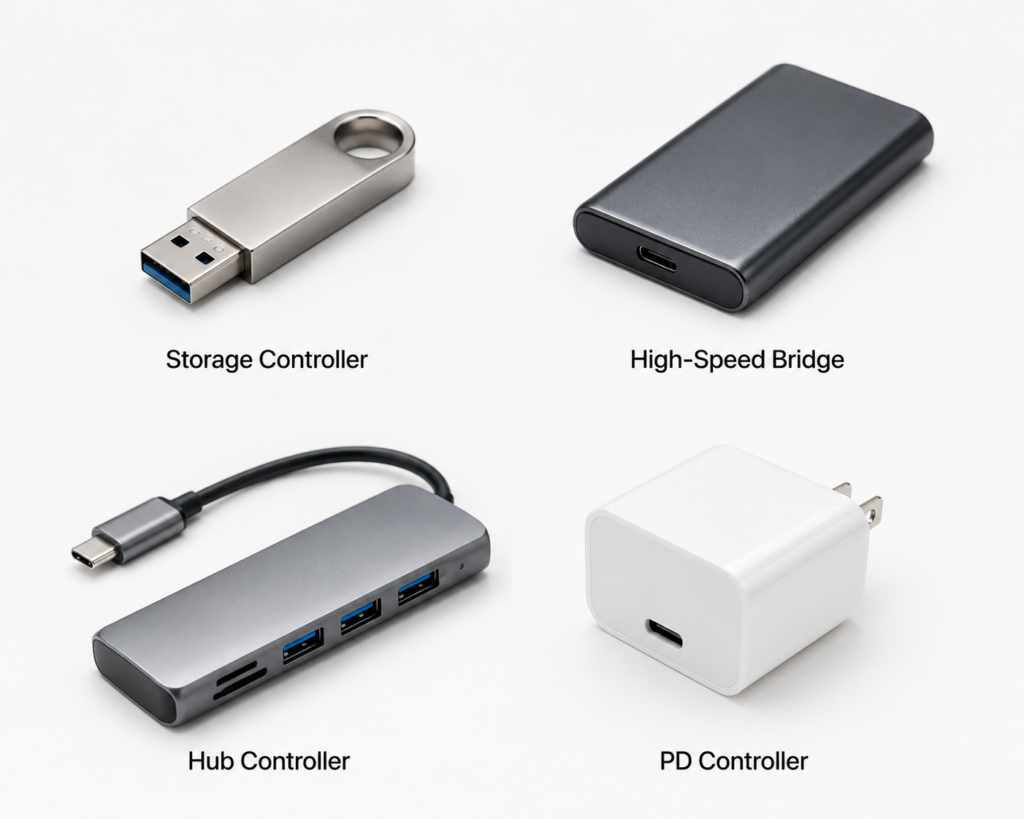
Storage Controllers: The Manager for Flash Drives and Portable SSDs
This is the type most people encounter, found exclusively in USB flash drives and portable solid-state drives. Beyond handling USB data transfer, it manages the flash memory: it performs error correction, evenly distributes read/write cycles across the memory cells, and manages bad blocks. It is essentially the caretaker of the flash storage, directly determining both speed and lifespan.
Hub Controllers: The Dispatcher for Docks and USB Hubs
Hub controllers inside USB hubs and docking stations have one main job: turn one USB port into many, and manage data transfer for multiple connected devices at once. It distributes bandwidth intelligently to prevent interference and slowdowns when multiple devices are working at the same time.
Type-C/PD Controllers: The Steward for Fast Charging and Multi-Function Ports
These controllers specialize in power and feature control for Type-C ports. They support USB PD fast charging, can switch power direction, and manage alternate modes like video output and data transfer. You’ll find them in chargers, power banks, and the Type-C ports on laptops.
High-Speed Bridge & USB4 Controllers: The Performance Foundation for Premium Gear
High-performance devices like premium portable SSDs, Thunderbolt docks, and external GPU enclosures use high-speed bridge or USB4 controllers. They convert between USB and other protocols like NVMe, PCIe, and DisplayPort, and support ultra-high bandwidths of tens of gigabits per second. They are the backbone of high-end USB devices.
Major Global Manufacturers and Solutions
Leading International Brands and Classic Products
Today’s global USB controller market is served by manufacturers specializing in different niches. ASMedia holds a strong position in high-speed USB bridge and hub controllers, commonly found in premium SSD enclosures and docks. Realtek and Genesys Logic make widely used hub and card reader controllers. Infineon (formerly Cypress) offers programmable USB controllers popular in industrial and professional peripherals. Texas Instruments and NXP excel in PD control and automotive applications.
Domestic Manufacturers and Local Alternatives
In recent years, domestic Chinese USB controller chips have advanced rapidly. WCH (Qinheng Microelectronics) is known for its cost-effective adapter chips and embedded USB controllers, used widely in all kinds of peripherals and industrial equipment. Many other local manufacturers continue to make breakthroughs in storage and hub controllers, with performance catching up to global mainstream solutions and accelerating domestic substitution.
How Controller Chips Shape Your Everyday Experience
Many people think a USB device’s performance depends only on its port specification, but the controller chip is the real driving force behind the scenes.
It Sets the Upper Limit for Transfer Speed
The protocol version and processing power of the controller chip directly determine a device’s maximum transfer speed. Even with the best flash memory and the best cable, if the controller is weak, transfer speeds will never reach their potential.
It Determines Stability and Reliability
A good controller has robust error handling and retransmission mechanisms, so it rarely drops connection or slows down during long, large file transfers. A low-quality controller is far more likely to cause failed transfers or sudden device disconnections.
It Affects Cross-Device Compatibility
Different brands of computers and phones implement USB protocols in slightly different ways. The better optimized a controller’s firmware is, the more devices it will work with, and the less often you’ll run into “works on my laptop but not my desktop” problems.
It Impacts Heat and Power Consumption
A high-performance controller with poor power management will run very hot under sustained load, and may even slow down to avoid overheating. A well-designed controller balances performance and efficiency, runs cool under normal use, and saves power.
Common Real-World Applications
Consumer Electronics: Storage, Peripherals, and Charging Accessories
This is the category most people interact with daily. Your USB flash drive, portable SSD, keyboard and mouse receiver, webcam, capture card, fast charger, power bank, and laptop dock all rely on their own USB controller chips to work.
Industrial and Automotive: High-Reliability Connectivity
In industrial settings, machine vision cameras, data acquisition equipment, and automation peripherals all use specialized industrial-grade USB controllers. In cars, in-car USB ports and infotainment systems use automotive-grade controllers. These have much stricter requirements for stability, temperature tolerance, and interference resistance than consumer-grade products.
Common Misconceptions Cleared Up
Myth 1: USB Protocol Version Equals Real-World Speed
Many people assume USB 3.2 is automatically much faster than USB 2.0, but real speed is ultimately determined by the controller chip. Some budget products advertise a USB 3.2 port but use a low-end controller, delivering real-world speeds barely better than USB 2.0.
Myth 2: Devices With the Same Port Spec Perform the Same
Two portable SSDs with the same USB 3.2 specification can have wildly different sustained read/write speeds, stability, and heat levels, depending on whether they use a high-end or low-end controller. The port spec is only the upper limit — real performance depends entirely on the controller.
Myth 3: Compatibility Issues Are Always the Host’s Fault
When a flash drive isn’t recognized on your computer, many people immediately blame the computer. In reality, many compatibility issues stem from poor firmware optimization on the USB device’s controller, and incomplete protocol support across different hosts.
Industry Trends and Future Outlook
Ever-Higher Bandwidth: On the Way to 80 Gbps USB4 v2
USB standards keep getting faster. USB4 v2 already supports up to 80 Gbps of bandwidth. Corresponding controller chips will further improve their high-speed signal processing, enabling faster file transfers and higher-resolution video output.
Greater Integration: All Protocols on a Single Chip
Future USB controllers will become increasingly integrated, combining data transfer, PD power delivery, video output, and protocol conversion all on one chip. This will let devices be smaller, cheaper, and more reliable.
Smarter Features: Better Power and Security Management
Controller chips will gain more intelligent features: dynamically adjusting performance and power based on workload to improve efficiency, and adding security authentication to prevent malicious devices from attacking the host through the USB port, making usage safer.
Growing Opportunities for Domestic Controllers
As China’s electronics industry matures, domestic USB controller chips will replace imported solutions in more and more fields. Especially in consumer electronics, industrial control, and automotive applications, domestic controllers will offer clear advantages in cost and supply chain reliability.
Conclusion
The USB port is just the outer shell we see. What truly determines a USB device’s speed, stability, and compatibility is the controller chip hidden inside. From 12 Mbps low-speed links to 80 Gbps all-in-one connectivity, from simple data transfer to integrated charging, video, and networking, the USB controller chip has always been the core brain of the entire USB ecosystem.
Looking ahead, as USB4, high-power fast charging, and multi-protocol integration continue to advance, this “invisible brain” will grow more powerful and more intelligent, continuing to power our everyday digital lives.