
If you use both a MacBook and an iPhone, you’ve most likely had this confusion: there’s a MagSafe charging cable magnetically attached to your computer, a MagSafe wireless charger next to your phone, and several USB-C cables in your bag — all of them can charge, but why do they look different? Are they interchangeable? Which one is faster? Many people compare USB-C and MagSafe as “two types of charging ports”, but they are not the same category of product at all. Choosing the wrong one will not only waste money, but also lead to frustrating usage experiences.
First, Understand: They Are Not the Same Type of Product at All
Before comparing, we need to clarify the two concepts first, otherwise the comparison will only get more confusing. Many people fall into traps starting from “treating USB-C as synonymous with fast charging” or “calling all magnetic chargers MagSafe”.
What is USB-C
USB-C, also called USB Type-C, is that small, oval-shaped, reversible interface form factor — note that it is only a “form factor”, and does not inherently equal fast charging, high-speed transmission, or video output.
This is like a water pipe interface: the same interface shape does not mean the same water flow rate. What USB-C can do depends on three things: the interface specifications of the device itself, the specifications of the cable, and the protocols supported by the charger or expansion device. Even with the same USB-C port, some phones’ USB-C ports may only support USB 2.0-level data transfer and the wired charging power specified for that model; while the Thunderbolt/USB4 ports on some MacBooks can connect external displays, transmit 40Gbps high-speed data, and provide hundreds of watts of power to the computer. They look exactly the same in appearance, but their capabilities are vastly different.
Its common capabilities include charging, data transfer, video output, connecting to docking stations, connecting hard drives or displays, but the specific supported capabilities must be checked against the parameters of the device and accessories. You cannot assume “all-around capability” just by seeing a USB-C port.
What is MagSafe
MagSafe is Apple’s magnetic connection/charging solution, with core experiences of automatic adsorption, alignment, and pull resistance. When discussing the nominal power and experience of Apple MagSafe below, we will take Apple original or officially certified products as the standard; Qi2 and ordinary compatible magnetic wireless chargers will be explained separately, and cannot be directly regarded as representatives of official MagSafe.
It should be noted that MagSafe is not a single product. Currently, there are two main mainstream categories, which must not be confused:
- MacBook MagSafe 3: It is a wired magnetic charging interface on MacBook, only responsible for charging, not for data and video;
- iPhone MagSafe: It is a magnetic wireless charging + magnetic accessory ecosystem on the back of iPhone. In addition to wireless charging, it can also be used with magnetic accessories such as stands, car mounts, card holders, and power banks.
As for the older MagSafe 1/2, they are old models from many years ago, not within the current mainstream purchasing range, so there is no need to dwell on them. In addition, although Qi2 magnetic wireless chargers from other brands have an experience close to iPhone MagSafe, strictly speaking, they are not Apple’s official MagSafe, but just magnetic wireless charging of a universal standard.
Comparison Scope of This Article
To make the comparison fair, we first clarify the scope of the comparison:
- USB-C: refers to the mainstream USB-C wired charging, data interface and its cable, charger ecosystem, not specifically referring to a certain brand or specification.
- MagSafe: discusses MacBook’s MagSafe 3 wired magnetic charging and iPhone’s MagSafe wireless magnetic charging separately, and will not confuse the two.
- All MagSafe experience descriptions are based on Apple original or officially certified products, and unbranded uncertified magnetic chargers are not used as representatives.
One-Sentence Conclusion First
If you pursue versatility, data transfer, external display support, and cost-effectiveness, USB-C is stronger; if you pursue magnetic convenience, trip resistance, and fixed-position charging experience on Apple devices, MagSafe is more comfortable. For most Apple users, the optimal solution is not choosing one over the other, but using both together.
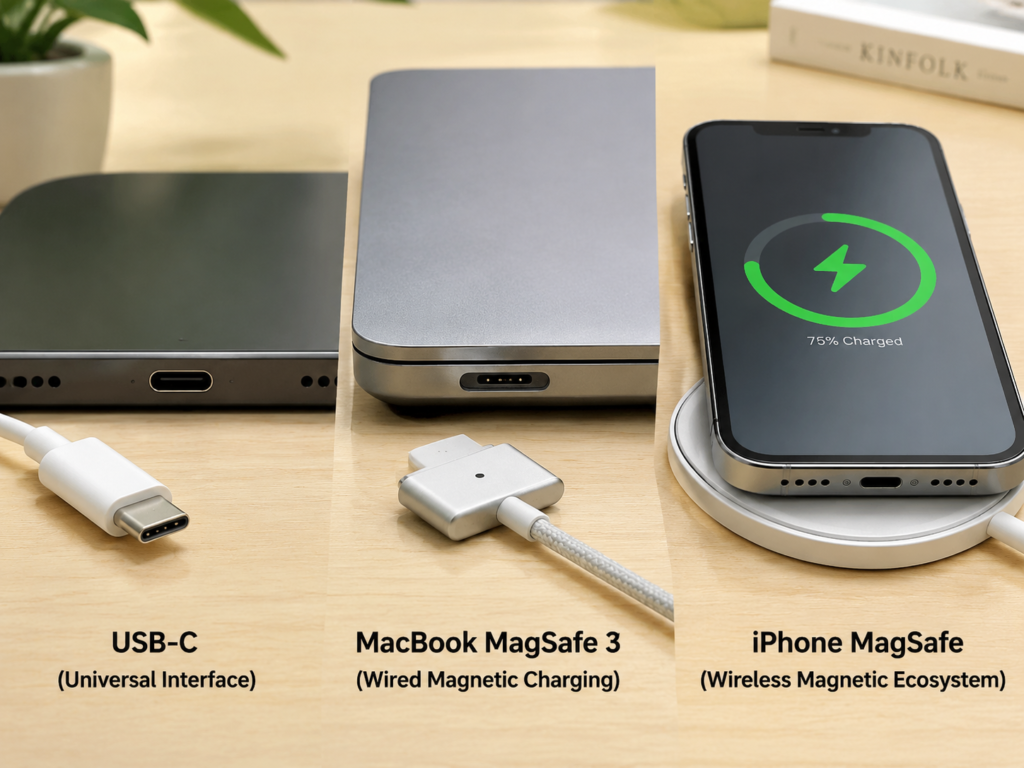
Core Difference Overview Table
To let you understand the differences at a glance, we have organized the most core comparison items into a table:
| Comparison Item | USB-C | MacBook MagSafe 3 | iPhone MagSafe |
|---|---|---|---|
| Core Positioning | Universal interface form factor | Apple Mac-exclusive wired magnetic charging | Magnetic wireless charging and accessory ecosystem mainly for iPhone |
| Common Uses | Charging, data transfer, video output, peripheral expansion | Only charges MacBook | Wireless charging for iPhone, works with magnetic accessories |
| Data Transfer | May be supported, ranging from USB 2.0 to USB4/Thunderbolt; must check device and cable specifications | Not supported at all | Does not support high-speed data transfer |
| Video Output | Supported on some devices; requires matching device, cable, and dock/display | Not supported at all | Not supported at all |
| Maximum Charging Capacity | Up to 240W with USB PD protocol, actual depends on device | Up to 140W on supported models | Commonly up to 15W; iPhone 16 series with new MagSafe can reach up to 25W |
| Pull Resistance | Average, tripping over the cable may knock over the device | Strong, automatically detaches when pulled | Moderate, magnetic attachment can detach but may also shift and stop charging |
| Versatility | Very strong, universal across brands and devices | Only for supported MacBook models | Mainly for iPhone; works with official MagSafe, Made for MagSafe, Qi2, or compatible magnetic accessories, but power and experience depend on certification and device support |
| Cost | Wide range of options, broad price range | Official cables are relatively expensive | Official/certified accessories are relatively expensive |
Charging Capacity Comparison: Speed, Power, and Heat
Charging is the most concerning point for everyone, but “which is faster” cannot be generalized, it must be discussed by device and scenario.
MacBook: USB-C Wired Charging vs MagSafe 3 Wired Magnetic Charging
First, a fact that many people don’t know: the other end of the MacBook’s MagSafe 3 charging cable is actually a USB-C interface, which needs to be plugged into a USB-C power adapter. Both essentially rely on USB Power Delivery (the universal USB fast charging standard, referred to as USB PD), only the interface connected to the computer is different.
In terms of maximum power, the USB-C PD 3.1 protocol theoretically supports up to 240W, but how much power a specific MacBook can “absorb” is entirely determined by the model. For example, supported models such as the 16-inch MacBook Pro, paired with a 140W USB-C power adapter and MagSafe 3 cable, can achieve a maximum fast charge of about 140W; under the premise that the device’s USB-C/Thunderbolt port, cable, and charger all support the same PD power, the charging speeds of USB-C and MagSafe 3 are usually similar; however, the maximum fast charging power or implementation method of some MacBook models may be limited to specific interface/cable combinations. For example, some models can reach the nominal maximum fast charging power with a USB-C port, while some models rely more on a specific power adapter, MagSafe 3 cable, or PD 3.1-supported cable to reach full maximum power; MacBooks of different sizes and chip generations may have different fast charging specifications, and the specifics should be subject to Apple’s official technical specifications.
Many people think MagSafe 3 charges more stably or faster, but that’s not the case. Under the conditions of the same power, same charger, and same device, there is almost no difference in charging speed between the two. The real advantage of MagSafe 3 is in experience: it snaps on as soon as the magnet is close, making plugging in more convenient; when the cable is tripped, it will automatically detach, so it won’t pull the computer off the desk; and it doesn’t occupy the USB-C/Thunderbolt port, so you can leave the precious ports for displays, hard drives, and docking stations.
In short: if the MacBook is used fixed on a desk, MagSafe 3 is more recommended; when traveling frequently, sharing chargers with multiple devices, or needing to connect many external devices, USB-C is more flexible.
iPhone: USB-C Wired Charging vs MagSafe Wireless Charging
The wired charging port of iPhone depends on the model: iPhone 15/16 series use USB-C interface, iPhone 12-14 series use Lightning interface, but all can be used with a USB-C power adapter and corresponding adapter cable.
The speed of wired charging for recent iPhones has a peak of about 20W-30W, and the specific value depends on the model, remaining battery level, temperature, system strategy, and charger. But in any case, wired charging is usually faster, more power-efficient, and generates less heat than wireless MagSafe — after all, wired charging conducts electricity through direct contact, while wireless charging requires electromagnetic conversion, which inherently has losses.
The speed of MagSafe wireless charging is divided into two cases: iPhone 12-15 series using official or certified MagSafe chargers usually have a maximum of 15W; iPhone 16 series paired with a new version of MagSafe charger and a 30W or higher power adapter can reach a maximum of 25W. As for ordinary Qi2 magnetic wireless chargers, the common maximum is also 15W, but it is not equal to Apple’s official MagSafe, just magnetic wireless charging of a universal standard.
MagSafe’s charging speed is particularly susceptible to external factors: too high phone temperature will slow it down, too thick or wrong material phone case will slow it down, misaligned magnet ring will slow it down, uncertified chargers may not reach full power, insufficient power adapter power will also not work, and if you charge while playing games, navigating, or shooting videos, the speed will be even slower.
So the conclusion is clear: for fast power top-up, choose USB-C wired — for iPhone 12-14, the so-called USB-C wired fast charging refers to a USB-C power adapter paired with a USB-C to Lightning cable, and only iPhone 15/16 have a USB-C port on the phone end; for drop-and-charge at the bedside, desk, or in the car, choose MagSafe; when charging while using, or the device is already obviously hot, wired is more stable.
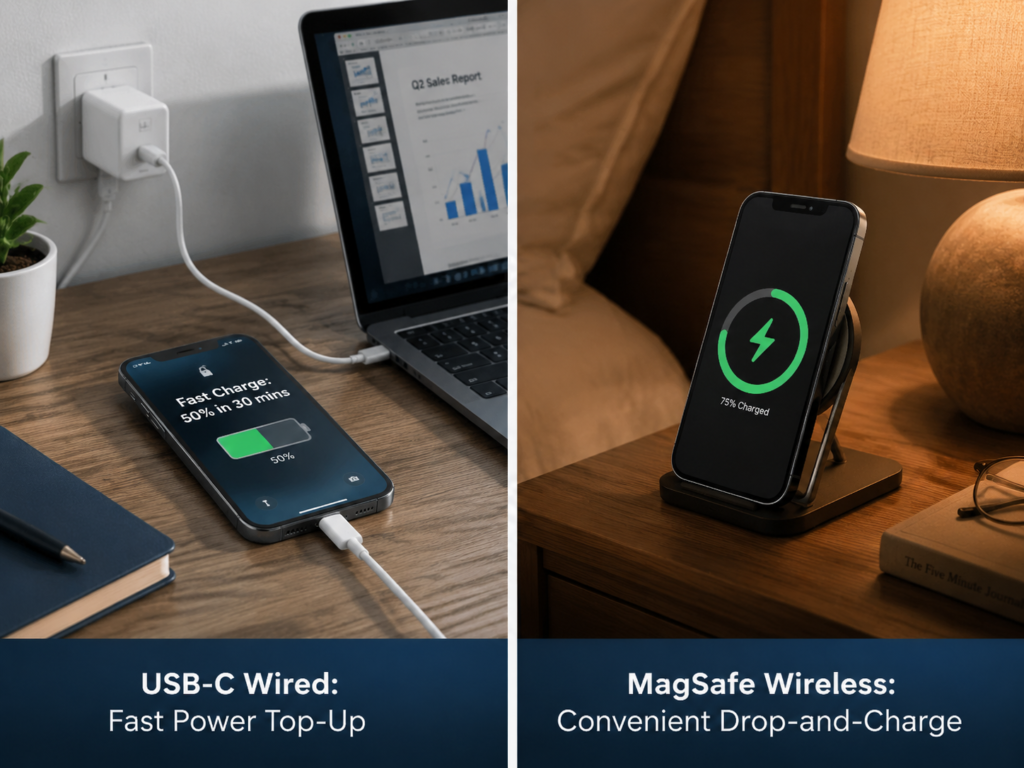
Don’t Just Focus on Peak Power
When many people choose chargers and cables, they only look at “how many W maximum”, thinking the bigger the number, the better, but this is a misunderstanding. Charging power changes dynamically and will not always remain at peak: generally, the speed is fastest when the remaining battery is 0-50%, and it will obviously slow down after approaching 80% to protect the battery; if the temperature is too high, the system will automatically reduce the power, or even directly pause charging.
Compared with peak power, more practical judgment indicators are: how much power can be replenished in 30 minutes, how long it takes to fully charge, and whether there will be serious heat during use. After all, you rarely use up all the power before charging, most of the time it’s just top-up, and the actual experience is not that closely related to peak parameters.
Feature Expandability Comparison: USB-C is an All-Round Interface, MagSafe Focuses on Charging Experience
If charging capacity can still be compared between the two, then functional expandability is not at the same level at all — USB-C is an all-round player, and MagSafe has only been responsible for “charging experience” since its design.
How Versatile is USB-C
The core advantages of USB-C are “universal” and “all-round”. In addition to charging, it can do many things:
- Data transfer: Specifications range from the slowest USB 2.0 (theoretical maximum 480Mbps, very slow for transferring large files), to USB 3.x, USB4, and then to the fastest Thunderbolt 3/4/5 (Thunderbolt interface, also in USB-C form factor), with speed differences of dozens or even hundreds of times.
- Video output: Only when the device-side USB-C port supports video capabilities such as DisplayPort Alt Mode, USB4/Thunderbolt, and the specifications of the cable, display or adapter match, can you connect a display via USB-C; otherwise, even if the interface shape is the same, it may only be able to charge or transfer data.
- Docking station: One USB-C cable connected to the computer can simultaneously connect power, display, Ethernet, hard drive, keyboard and mouse, leaving only one cable on the desk, which is very tidy.
- Cross-device universal: More and more new phones, tablets, laptops, earbuds, game consoles, external hard drives and displays are adopting USB-C, but there are still some wearable devices, camera accessories, low-end small accessories or old devices that use proprietary interfaces. Overall, the cross-device versatility of USB-C is still much higher than other interfaces, and a set of qualified chargers and cables can cover most commonly used devices.
MagSafe’s Functional Boundaries
MagSafe has the advantage of good experience, but its functional boundaries are very clear:
- MacBook MagSafe 3 can only be used for charging, and does not support data transfer, external display or docking station at all, even if you buy an adapter it won’t work — there are no data transmission pins inside it, and adapters can’t create functions out of nothing.
- iPhone MagSafe is mainly for wireless charging and magnetic accessories, such as attaching a card holder, stand, or power bank, and is not suitable for transferring files or connecting professional devices.
In short, MagSafe is an “experience bonus”, not a “functional necessity”.
Most Common Misconceptions
Here we specifically mention a few points that many people get wrong, to avoid you buying the wrong accessories:
- Misconception: MagSafe 3 can be converted to USB-C for data transfer
Truth: MagSafe 3 only has a charging function, and adapters cannot achieve data transfer. Don’t waste money on so-called “MagSafe to USB-C data adapters”. - Misconception: Any USB-C port can connect to a display
Truth: The device-side USB-C port must support video output. Some entry-level tablets and cheap laptops have USB-C ports that can only charge and cannot connect to displays, and the cables and docking stations must also match the specifications. - Misconception: All USB-C cables look the same, so they have the same functions
Truth: Cheap USB-C cables that cost a few dollars may only be able to charge, not even support basic USB 2.0 data transfer, let alone connect to displays. You must check the parameters when buying, not just look at the interface shape.
Connection Experience Comparison: Convenience, Drop Resistance, and Stability
In addition to function and speed, whether it is smooth to use in daily life is also very important, which is also where MagSafe is most competitive.
Plugging and Unplugging Convenience
Although USB-C is already reversible, you still need to align the interface to plug it in — when you get up drowsily to charge in the middle of the night, or operate with one hand, you still have to fumble for a long time to find the port.
MagSafe is different: as long as it is close to the corresponding position, the magnet will automatically adsorb and align, no need to specially find the interface. For example, take the iPhone MagSafe charging pad or stand as an example: when charging at the bedside at night, just bring the phone close to the magnetic area and it will automatically align; for MacBook MagSafe 3, the cable head is easier to snap into place when close to the interface, no need to repeatedly find the front and back sides and interface position. In scenarios where you frequently pick up and put down, such as desktop and car use, the experience advantage of magnetism is particularly obvious.
Pull Resistance
USB-C is plugged in relatively tightly and won’t fall off under normal use, but if the cable is tripped by a cat or child at home, or caught while walking, it may directly knock the device over, and the loss from a fall will be great.
MacBook’s MagSafe 3 has the greatest advantage in this regard: as long as it receives a lateral pull, the magnetic head will automatically detach, and will not pull the computer off the desk. For people with small desk spaces or homes with pets and children, this is a very practical function.
iPhone’s MagSafe has moderate pull resistance: it can also detach when subjected to force, and will not fling the phone away, but if it is slightly bumped and shifted, it may stop charging, not as stable as wired as long as it is plugged in.
Mobility Stability
If charging while moving, such as charging in your pocket while walking, charging with a power bank in a backpack, or using it while shaking on a high-speed rail, then USB-C is much more stable — once plugged in tightly, it basically won’t disconnect.
MagSafe is more suitable for fixed-position use. If it shakes a lot or the angle is off, it is easy to shift and stop charging, and it is basically impossible to charge stably when using while walking.
To sum up: for fixed use on desktop, bedside, or in car, MagSafe has a better experience; when moving, charging while using, or needing a stable connection, USB-C is more reliable.
Durability and Maintenance Cost Comparison
Many people care about “which is more durable”, but in fact this is closely related to your usage habits, and the wear points of the two are completely different.
Common Wear Points of USB-C
There are several places where USB-C is most prone to problems:
- The port gets dusty and lint, especially for phones that are often put in pockets. Over time, the port will be blocked, resulting in loose plugging or failure to charge;
- Frequent plugging and unplugging will cause loose ports or contact wear, but under normal use, this process is very slow;
- The connector of the cable is repeatedly bent, and over time the outer sheath will be damaged, or even the internal wire will be broken;
- Poor-quality cables may have problems such as overheating, false power rating, and protocol incompatibility, which not only have a short service life, but may also damage the device.
Common Wear Points of MagSafe
The wear points of MagSafe are mainly in the magnetic and contact parts:
- The magnetic surface is stained with dust, iron filings or other foreign objects, which will affect the adsorption force and charging efficiency, especially chargers that are often placed on the desk are easy to attract small iron filings;
- Dirty or oxidized contacts may cause poor contact, failure to charge or intermittent charging;
- The performance of iPhone MagSafe is greatly affected by the phone case, magnet ring position, and temperature, and a wrong case may make it directly unusable.
Here we want to correct a common misconception: many people worry that magnets will demagnetize after a long time of use, but under normal use, significant magnetic attenuation is not a common failure of MagSafe, so there is no need to worry too much about this problem.
Which is More Durable?
If your desk cables are often pulled, or you have children and pets at home that easily trip over wires, then the durability experience of MacBook MagSafe 3 will be much better — because it detaches when subjected to force, it will not transmit the pulling force to the computer’s port, and the port is not easy to break.
If the cables are usually fixed and rarely plugged and unplugged frequently, the durability difference between USB-C and MagSafe will not be particularly large. The lifespan of the cable depends more on the materials, bending angle, storage method, and whether you buy a qualified product. For example, braided cables are more bend-resistant than ordinary soft rubber cables, and if you don’t fold them into tight knots when storing, they can be used longer.
Cost and Versatility Comparison
When buying accessories, money is also an important consideration, and the cost and versatility of the two are very different.
Cost Characteristics of USB-C
USB-C has a very wide range of options, from basic charging cables that cost a few dollars to high-end Thunderbolt cables that cost hundreds of dollars, available at all price points. Under the same charging power, USB-C cables and chargers are usually cheaper than MagSafe, and because it is a universal standard, multi-device users can use one set of charger and cable for mobile phones, tablets, computers, and earbuds, without buying a bunch of different accessories, and the overall cost is lower.
Cost Characteristics of MagSafe
Apple’s original or officially certified MagSafe accessories are usually more expensive, and have poor versatility:
- The MacBook’s MagSafe 3 cable can only be used for supported MacBooks, and cannot be used as a wireless charger for iPhones;
- The iPhone’s MagSafe charger is mainly used for iPhones and some devices that support wireless charging, and cannot be used as a MagSafe 3 charging cable for MacBooks.
The two are completely incompatible. If you want to use both, you have to buy each separately, and the cost will naturally go up.
Purchase Cost Conclusion
If you have multiple brands and multiple devices, the cost-effectiveness of USB-C is significantly higher, and one set of accessories can handle all devices. Deep Apple ecosystem users can buy MagSafe for the experience of fixed scenarios, but this is an “extra experience cost”, not a necessity. The most cost-effective solution is: first buy qualified USB-C PD chargers and cables to meet basic needs, and then supplement the required MagSafe accessories according to your own usage scenarios.
Choose by Usage Scenario: USB-C or MagSafe
Don’t纠结 about “which is better”, the key depends on what device you use and in what scenario. We have sorted out the most common situations, you can directly match them.
MacBook Users
Recommended to choose MagSafe 3 if:
- Most of the time you work at a fixed desk;
- You have children or pets at home who easily trip over cables;
- You often accidentally catch the power cord;
- You want to leave all USB-C/Thunderbolt ports for displays, hard drives or docking stations, and don’t want the charging cable to take up a port.
Recommended to choose USB-C if:
- You travel frequently and want to carry fewer cables and chargers;
- Multiple devices share one high-power GaN charger;
- You need to frequently connect external displays, docking stations or high-speed hard drives;
- You have a limited budget and don’t want to buy an extra expensive MagSafe cable.
For MacBook users, the optimal combination is actually having both: keep a MagSafe 3 cable on the desk for charging, and leave the USB-C/Thunderbolt ports for peripherals; when going out, bring a high-power USB-C charger and a USB-C cable, no need to bring the MagSafe charger, which saves space and is flexible.
iPhone Users
Recommended to choose MagSafe if:
- You like drop-and-charge at the bedside and don’t want to fumble for the port in the dark;
- You frequently pick up and put down your phone on the office desk and don’t want to plug and unplug the cable repeatedly;
- You use it for car navigation, it can charge when snapped on and also serve as a mount;
- You like accessories such as magnetic card holders, stands, and power banks.
Recommended to choose USB-C wired if:
- You are in a hurry to go out and need a fast power top-up;
- You charge while playing games, shooting videos, or navigating;
- You want to carry fewer accessories when traveling, one cable handles everything;
- You have a limited budget and don’t want to buy a dedicated MagSafe charger.
It should be noted that too thick phone cases, metal cases, and cases with misaligned magnet rings will affect the adsorption force and charging efficiency of MagSafe. It is best to use MagSafe-certified magnetic cases, or magnetic cases from reliable brands, otherwise you won’t be able to use the MagSafe charger well even if you buy it.
Mixed Multi-Brand Devices
If you have Android phones, Windows laptops, iPads, earbuds, game consoles and other devices at the same time, then the priority of USB-C must be the highest — almost all new devices use USB-C, and one set of charger and cable can be used universally, which is very convenient. MagSafe can be used as a fixed-position supplement for Apple devices, but don’t treat it as the only solution for the entire ecosystem.
Office and External Display Scenarios
When you need to transfer data, connect displays, use docking stations, plug in Ethernet, or connect hard drives, you can only rely on interfaces such as USB-C/Thunderbolt, and MagSafe cannot replace them at all. For example, displays like the Apple Studio Display use Thunderbolt/USB-C form cables to transmit video and data while powering the Mac, not MagSafe, don’t confuse them.
Travel and Outings
Prioritize USB-C when traveling: a high-power multi-port GaN charger can charge computers, mobile phones, and tablets at the same time, no need to bring a bunch of chargers, which saves space and is convenient. If the accommodation place is fixed and you particularly value the bedside drop-and-charge experience, you can bring an extra iPhone MagSafe charger, otherwise wired is actually enough.
Homes with Kids, Pets, or Narrow Aisles
If you have children or pets at home, or your desk is next to an aisle where people often pass by and easily trip over cables, then MacBook must prioritize MagSafe 3, which can greatly reduce the risk of the computer being pulled off the desk. Usually you can also use short cables and cable clips to fix the wires under the desk to reduce the probability of tripping.
Buying Guide to Avoid Pitfalls
There are many pitfalls when buying accessories, here are a few of the most common ones to help you spend less wrong money.
Don’t Treat All Magnetic Wireless Chargers as Official MagSafe
There are many wireless chargers with magnets on the market now, not all of them can be called MagSafe, you have to distinguish clearly:
- Apple original MagSafe: The most stable compatibility and temperature control, the best experience, but the price is relatively high;
- Made for MagSafe certified: Officially certified by Apple, usually can reach the MagSafe power and experience specified by Apple, slightly cheaper than the original;
- MagSafe compatible/magnetic wireless charger: May just have a magnet added, common power is 7.5W, 10W or 15W, and the suction strength varies; some products claim 15W, but may only be the peak claimed by Qi/Qi2 or the manufacturer, the actual charging power, temperature control and stability for iPhone still depend on certification, device and adapter, and the experience varies greatly;
- Qi2 magnetic wireless charger: Based on the universal Qi2 standard, commonly up to 15W, suitable for users who pursue versatility, but not equal to Apple’s official MagSafe.
Those uncertified magnetic wireless chargers that cost more than ten dollars most likely have problems such as false power ratings, high heat generation, frequent disconnection, weak magnetism, abnormal noise, and insufficient protection. Don’t buy them cheaply, as they may damage the phone battery instead.
Don’t Buy the Wrong USB-C Cable
USB-C cables look the same, but their functions are very different. You must check the parameters when buying, don’t buy blindly:
- Only for charging: Check the rated power, such as 60W, 100W, 140W, 240W. Only when the power is sufficient can the corresponding device be fast charged;
- Charging laptops with 100W or lower power: When charging laptops with 65W and 100W tiers, confirm that the rated power of the cable is sufficient. If you want the laptop to run at full 100W (20V/5A tier), you usually need a cable that supports 5A and has E-Marker — this kind of cable has a small chip inside that can actively tell the charger and device the power it supports, otherwise it may not reach full fast charge; there is no need to blindly pursue the highest specification for ordinary mobile phones, tablets or charging within 60W.
- Charging 140W/240W ultra-high power devices: If you want to run 140W or 240W ultra-high power, in addition to the cable’s rated power meeting the standard, you must also confirm that the cable, charger and device all support the USB PD 3.1 EPR standard, none can be missing.
- For transferring files: Check the transfer speed, such as USB 2.0 (theoretical maximum 480Mbps, very slow for transferring large files), 5Gbps, 10Gbps, 20Gbps, 40Gbps, the faster the speed, the more expensive;
- For connecting displays/docking stations: Confirm that the cable supports video output, or is a USB4 or Thunderbolt specification cable, otherwise it may not work. At the same time, confirm that the USB-C port of the computer/mobile phone/tablet itself supports video output, USB4 or Thunderbolt, and the input specifications of the display and docking station must also match; just replacing a high-speed cable will not allow a USB-C port that does not support video output to connect to a display.
In a word: Don’t just look at the interface shape, you must check the parameter markings on the packaging, otherwise you will find that you bought the wrong one when you get home and can’t use it.
Charger Must Also Match
You can’t just buy a high-power charger to charge at full speed, it has to match the device and cable:
- For MacBook high-power fast charging, you need to buy a USB-C PD charger with sufficient power, such as 140W and above, which usually needs to support the USB PD 3.1 EPR standard;
- For iPhone MagSafe to reach the nominal power, you need a USB-C power adapter with appropriate power and a certified MagSafe charger. For example, a 15W MagSafe requires at least a 20W PD head, and a 25W new version of MagSafe requires a 30W+ head;
- Multi-port chargers should pay attention to power distribution: when multiple devices are plugged in, the power of a single port will drop. For example, a 65W dual-port charger, when two devices are plugged in, each port may only have about 30W. You should read the instructions carefully when buying.
Battery Health Misconceptions
Many people worry that “wireless charging damages the battery” and “fast charging damages the battery”, but the charging method itself is not the only determinant of battery wear. What really affects battery life more is: high temperature, cycle count, long-term full charge in a high-temperature environment, and charging while under high load such as gaming/navigation/shooting. Occasional low-battery charging is not a big problem, but long-term overheating or frequent deep discharge of the device will increase battery stress.
Qualified MagSafe and USB-C fast charging usually reduce risks through temperature control and power management, and will not directly cause abnormal wear due to the charging method itself; but wireless charging and charging while under high load are more likely to cause high temperature, and if it is obviously hot for a long time, it may still accelerate battery aging. Poor-quality chargers have poor heat control, which will indeed further increase the risk of battery wear. If the device is obviously hot while charging, it is much better to prioritize removing the thick case, stopping high-load applications, or switching to wired charging.
Common Troubleshooting and Maintenance
If you encounter small problems during use, don’t rush to send it for repair, you can troubleshoot it yourself first, most problems are small problems.
USB-C Not Charging
Check in this order first:
- Check if the power of the charger is sufficient and whether it can support the fast charging of the device;
- Check whether the cable supports the corresponding power and whether there is damage;
- Check whether there is dust, lint or foreign objects in the port, especially the port of the mobile phone, which is easily blocked;
- Cross-test with another cable, another charger, and another port to see which link has the problem.
When cleaning the port, use a soft brush or air blower, don’t poke hard with a metal pin, which is easy to damage the internal contacts.
USB-C Slow Transfer or Unable to Connect External Display
If you encounter slow file transfer or no response when connecting to a display, you can check like this:
- First confirm that you are not using a charge-only cable, and whether it has data transfer or video output functions;
- Confirm that the device’s USB-C port supports video output or high-speed data transfer, for example, some devices’ USB-C ports can only charge;
- Confirm that the specifications of the docking station, display and cable match, for example, if you use a USB 2.0 cable to connect a 4K 60Hz display, it definitely won’t work;
- Check the system settings, the input source of the display, and whether the device has firmware updates to install.
MagSafe Won’t Stay Attached or Falls Off Easily
When MagSafe won’t stay attached, check these points first:
- Check if there is dust, iron filings or other foreign objects on the magnetic surface, wipe it clean and try again;
- Check if the phone case is too thick, or the position of the magnet ring is off, try a magnetic case;
- Confirm that you bought an official, certified or reliable brand product, unbranded ones have inherently weak magnetism;
- When used in a car with large vibration, if it is easy to fall off, you can choose a certified mount with stronger magnetism.
MagSafe Charges Slowly or Intermittently
If MagSafe charges slowly or disconnects frequently, you can troubleshoot like this:
- First check if the power of the power adapter is sufficient and whether it meets the requirements;
- Touch the phone to see if it is too hot, the system will automatically slow down if the temperature is too high;
- Check if the phone is correctly aligned with the magnet ring, misalignment will also affect efficiency;
- Check whether the cable and charger are damaged, try another set;
- If charging with a thick case is slow, try removing the case before charging.
Daily Maintenance Tips
Whether it is USB-C or MagSafe, good daily maintenance can make them last longer:
- Do not twist or bend the connector of the cable forcefully, try to leave a curve when bending, don’t fold it into a tight knot;
- The magnetic surface of MagSafe should not randomly attract things like iron filings, and should be cleaned in time if stained;
- Cables with obvious overheating, broken skin or poor contact should not be used anymore, as they are prone to problems;
- Try to fix the cables on the desk to reduce the probability of pulling and tripping.
Quick Decision: Which One to Choose
After reading this, you may still be a little confused. It doesn’t matter, use this three-step judgment method, and you will soon know what is suitable for you.
Three-Step Judgment Method
Step 1: Look at the devices. Do you mainly use MacBook, iPhone, or mix multiple brands of devices?
Step 2: Look at the needs. Do you just need charging, or do you also need to transfer data, connect displays, and use docking stations?
Step 3: Look at the scenarios. Do you mostly use it at a fixed desk/bedside, or do you travel frequently, use it on the go, and charge while using?
People Suitable for USB-C
- Have Android, Windows, iPad, MacBook and other devices, need universal accessories;
- Value cost-effectiveness, want to carry fewer cables and spend less;
- Need high-speed data transfer, external display, docking station or hard drive;
- Travel frequently, hope one charger solves all devices.
People Suitable for MagSafe
- Use MacBook, mostly charge at a fixed desk, worry about tripping over the cable and dropping the computer;
- Use iPhone, especially value the drop-and-charge experience at the bedside, in the car, and at the office desk;
- Like the magnetic accessory ecosystem such as stands, card holders, and power banks;
- Willing to pay higher accessory costs for the convenience of the Apple ecosystem.
Most Recommended Combination Solution
In fact, for most people, there is no need to choose one over the other, using them together is the optimal solution:
- MacBook users: Use MagSafe 3 for charging at the desk, leave USB-C/Thunderbolt ports for peripherals; carry a high-power USB-C charger and a USB-C cable when going out, which is flexible and convenient.
- iPhone users: Use MagSafe at home or in the car, comfortable drop-and-charge; use USB-C wired for fast top-up and travel, which is fast and saves accessories.
- Multi-device users: USB-C as the main force, universal for all devices; MagSafe is only used as an experience supplement for Apple devices in fixed scenarios, with the highest cost-effectiveness.
Frequently Asked Questions Short Answers
Finally, we have sorted out a few of the most commonly asked questions, and give direct answers.
Which charges faster, USB-C or MagSafe?
On MacBook, under the conditions of the same power, same charger, and same device, the difference between the two is usually small. On iPhone, in most cases USB-C wired is faster than MagSafe wireless; iPhone 16 series paired with the new MagSafe charger can reach up to 25W, but it will still be affected by temperature and usage scenarios.
Can MagSafe transfer data?
MacBook’s MagSafe 3 cannot transfer data at all, and iPhone’s MagSafe also does not support high-speed data transfer. To transfer data, connect displays, or use docking stations, you still need to use USB-C or Thunderbolt interfaces.
Do all USB-C cables support fast charging?
No. Whether fast charging is possible depends on the rated power of the cable, whether the charger supports PD or the protocol required by the device, and the acceptable power of the device itself; in high-power scenarios such as 100W/240W, it is also necessary to confirm whether the cable has E-Marker and supports the corresponding PD tier.
Does MagSafe damage the battery more?
Qualified MagSafe has temperature control protection, and the charging method itself is not the only determinant of battery wear. What really needs attention is high temperature, charging while under high load, and the heat problem caused by poor-quality chargers.
Do I still need USB-C if I have MagSafe?
Yes. MagSafe mainly solves the problem of charging convenience, while USB-C also undertakes the tasks of data transfer, video output, peripheral expansion, and cross-device universality. The two have different functions and cannot completely replace each other.
Summary
After all, USB-C and MagSafe are not competitors at all, but two things with completely different positioning:
USB-C is a universal all-round interface, with the advantages of full functions, high cost-effectiveness, and many compatible devices, which can handle almost all needs of charging, data, video, and expansion;
MagSafe is Apple’s official magnetic charging experience, with the advantages of convenience, pull resistance, and suitability for fixed-position use, which can improve the happiness of daily use, but has a single function, higher price, and poor versatility.
For MacBook users, using MagSafe 3 for charging at the desk, USB-C for peripherals, and a USB-C charger when going out is the most comfortable combination; for iPhone users, using MagSafe for drop-and-charge in fixed scenarios, and USB-C wired for urgent top-up and travel is the most practical combination. There is no need to force a choice, using them together according to your own devices and scenarios is the optimal solution.