
Have you ever had this experience: when picking a charger at a local electronics store or on a cross-border e-commerce platform, the packaging is printed with a bunch of letters like PD, PPS, QC, UFCS, and marked with 65W, 100W or even 240W next to them, and you don’t know which one is suitable for your phone, tablet and laptop? If you buy an expensive one, you’re afraid of wasting money; if you buy a cheap one, you’re afraid it won’t charge fast, or even worry about damaging your device?
Actually, you don’t have to be confused by these letters. As long as you understand a few core logics, you can quickly choose a suitable charger and avoid most common pitfalls. If you’re in a hurry, we’ll give you the conclusion directly first; if you want to understand the principle and learn to judge by yourself, you can continue reading below.
First, the Conclusion: How to Choose Among the Three Fast Charging Protocols
Quick One-Sentence Judgment
If you don’t want to study the details, just match your device directly:
- USB PD / PD PPS: The first choice for overseas users and mixed use of multiple devices, almost compatible with all iPhones, iPads, MacBooks, Windows thin-and-light laptops, Android phones, handheld game consoles, tablets and power banks.
- QC / Quick Charge: Mainly used as compatibility supplement for older Qualcomm Android phones, old USB-A car chargers, and old power banks. You don’t need to specifically only look at QC when buying new devices.
- UFCS / Fused Fast Charging: More suitable for domestic Chinese Android phones brought from China and cross-border accessories of Chinese brands; there is less support for local overseas devices.
- Brand proprietary fast charging: If you pursue the highest power fast charging for domestic Chinese phones such as OPPO, Xiaomi, vivo, and Huawei, you usually still need to use original or officially certified chargers and cables.
Most Practical Buying Advice
- If you only buy one charger: Prioritize those that support USB PD + PPS, and choose the power according to your device with the highest demand. For example, if you need to charge a laptop, choose one above 65W; if you only charge a phone, 30W is enough.
- Shared use by phone + tablet + laptop: Prioritize PD chargers, focus on the maximum single-port output power, whether there are PPS gears, and the specifications of the matching cable.
- If you have old Qualcomm devices or need old car chargers: Choose a multi-protocol charger with PD + PPS + QC, which can be used with both old and new devices.
- If you bring a domestic Chinese Android phone for use overseas: Choose a multi-protocol charger with PD + PPS + UFCS; if you want full-speed fast charging, refer to the aforementioned proprietary fast charging requirements.
- If you just want peace of mind without overthinking: A 65W PD PPS charger can cover most phones, tablets and thin-and-light laptops; a 100W PD PPS multi-port charger is suitable for travel with multiple devices; domestic Chinese Android users can add UFCS support.
Comparison Scope and Premises of This Article
What we are talking about today are all consumer-grade mass-produced fast charging protocols, including the mass production ecosystem of USB PD 3.0/3.1, PD PPS, QC 2.0/3.0/4+/5, and UFCS 1.0/2.0, covering common consumer electronics such as mobile phones, tablets, laptops, handheld game consoles, power banks, chargers, car chargers, and portable monitors. We will not involve industrial power supply, automotive-grade power supply, or peak solutions in laboratories, nor will we dig deep into the underlying technology of each brand’s proprietary fast charging.
In addition, remember a core premise first: for fast charging to work, the device, charger, and cable all need to support the same protocol and corresponding power gear, and also meet safety conditions; if any one is missing, it may only be able to charge slowly.
Fast Charging Basics: First Distinguish Protocols, Interfaces, Power, and Cables
Before specifically understanding each protocol, first mastering a few basic concepts can help you avoid more than half of the buying mistakes.
What is a Fast Charging Protocol
In plain terms, a fast charging protocol is the rule for “negotiating voltage, current, and power” between a charger and a device. The core logic is that the device actively requests power, not that the charger forcibly “pours” high power into the device. The protocol determines whether charging can go from the basic 5V slow charging to high-power states such as 9V, 12V, 15V, 20V or dynamic voltage regulation.
How is Fast Charging Negotiated
The “negotiation” process between the charger and the device is fast charging negotiation, which usually follows four steps:
- After connection, the device first identifies the power supply capacity of the charger;
- The charger feeds back all protocols, voltage, current and power gears it supports;
- The device selects the highest gear that both parties support and that conforms to its own temperature control and battery safety strategies;
- During charging, the device will dynamically adjust the power at any time according to the battery level, temperature, and usage load.
The negotiation paths of different protocols are slightly different:
- USB PD: Negotiates mainly through the CC channel of the USB-C interface. The fixed voltage gear is called PDO, and fine-step dynamic voltage regulation can be achieved when PPS is supported;
- QC 2.0/3.0: Mostly identifies and regulates voltage through the signal pins of USB data cables, and is common in old accessories with USB-A interfaces;
- QC 4+/QC 5: Has shifted to a negotiation path compatible with USB PD/PPS, adapting to the modern USB-C ecosystem;
- UFCS: Emphasizes unified identification and gear matching with mutual recognition among multiple brands. The actual effect depends on whether both parties have passed the corresponding certification and whether the gears overlap.
Type-C Interface Does Not Equal PD Fast Charging
Type-C is the shape of the physical interface, and USB PD is the power supply protocol; the two are not the same thing. A Type-C port may only support 5V basic charging, or it may support PD, PPS, QC, UFCS or brand proprietary protocols. To judge fast charging capability, you can’t just look at the interface; you must refer to official website parameters, charger inscriptions, output gears, and certification marks.
Wattage Does Not Equal Charging Speed
The wattage marked on the charger is the maximum upper limit it can output, not the actual charging speed. The phone will only draw power according to the protocol and power it supports; a high-power charger will not “overcharge” a phone that does not support high power. The main value of high-power chargers is to leave margin when powering laptops, sharing among multiple devices, or outputting from multiple ports at the same time.
Why Does Charging Power Fluctuate
Fast charging does not maintain peak power throughout the process, but is a dynamically changing curve. The speed is mainly affected by five layers of factors:
- Protocol layer: Whether the device and charger can negotiate a high-power gear;
- Interface and cable layer: Whether the cable can carry the corresponding current, and whether the interface has poor contact;
- Battery management layer: The duration of the device’s peak power, temperature control strategy, and battery health;
- Usage environment layer: Ambient temperature, whether the screen is on for use/gaming, and current battery level — usually it is closer to the peak when the battery is low, at room temperature, with the screen off, and with single-port exclusive use; after the battery reaches 80%, the speed generally decreases to protect the battery;
- Accessory layer: Power distribution rules of multi-port chargers, and input/output limits of power banks.
How to Choose Cable Specifications: 3A, 5A E-Marker, EPR
The core function of a cable is to carry current and power. It usually does not provide fast charging protocols such as PD/QC/UFCS itself (except for dedicated cables for some brand proprietary fast charging); protocol matching is mainly determined by the device and charger.
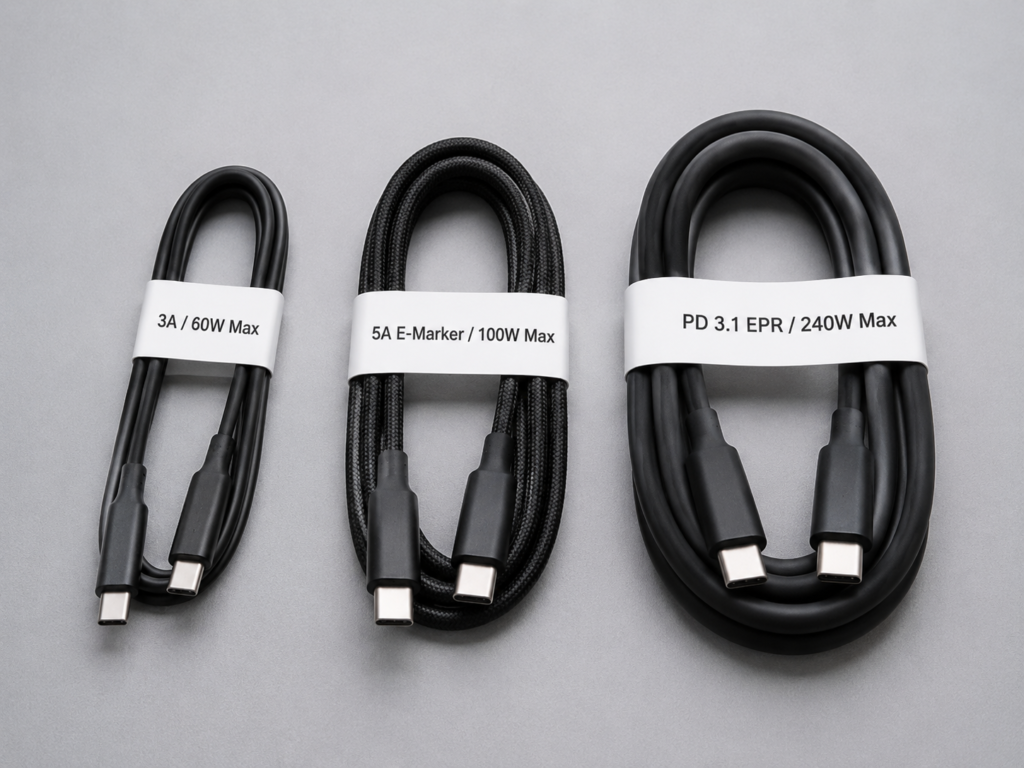
According to power carrying capacity, common USB-C cables are divided into three grades:
- Within 60W: Most qualified 3A USB-C cables can meet the requirement, corresponding to the output specification of 20V⎓3A;
- 60W~100W: Usually requires a 5A USB-C cable with an E-Marker chip, which is used to declare its current carrying capacity to the device;
- 140W and above: Requires a dedicated cable that supports PD 3.1 EPR, and both the device and charger must support EPR at the same time to trigger high power.
Correct Understanding of Safety Guarantees
When protocols do not match, formal and compliant devices usually fall back to 5V basic power supply or lower power gears, but “will downshift” does not equal absolute safety. Inferior chargers, falsely marked cables, damaged interfaces, and products without local safety certification may still cause overheating, charging interruption, device damage, or even safety risks.
Beginner’s Memory Mnemonic
For beginners, you can first remember a four-sentence mnemonic: For overseas multi-device use, prioritize PD/PPS; for old Qualcomm Android devices, additionally check QC; for domestic Chinese Android/cross-border accessories, additionally check UFCS; for full-speed fast charging of domestic Chinese phones, you mostly need original/official certified kits.
Core Identities and Characteristics of the Three Major Protocols
Now that we understand the basic concepts, let’s talk separately about what these three protocols are, their respective characteristics, and what scenarios they are suitable for.
USB PD: The Most Globally Universal Fast Charging Standard
The full name of USB PD is USB Power Delivery, which is an open power supply standard promoted by the USB-IF (the organization responsible for formulating USB standards). Its core positioning is cross-brand, cross-category, and globally universal.
Most consumer electronics you can think of, such as iPhones, iPads, MacBooks, Android phones, Windows thin-and-light laptops, Switch, Steam Deck, portable monitors, and power banks, basically support USB PD. It is also the fast charging standard with the most accessories and the most mature certification system in the world at present. Coupled with the trend of the European Union unifying the Type-C interface, its compatibility will only become stronger in the future.
Its common power range is roughly as follows:
- Mobile phones: generally 20W to 45W, depending on the device
- Tablets/handheld game consoles: 30W to 65W
- Thin-and-light laptops: commonly 45W to 100W
- High-power laptops or monitors: may require 100W, 140W or even higher
Regarding versions and power boundaries, you just need to remember:
- USB PD 3.0 / PD 3.1 SPR: the most common, up to 100W, which is 20V⎓5A
- USB PD 3.1 EPR: is an extended high-power gear, supporting higher voltages such as 28V, 36V, 48V, with a theoretical maximum of 240W, but requires the device, charger, and cable to all support EPR
When you see a product marked PD 3.1, you should also continue to look at the output table: those that only list 5V/9V/15V/20V gears generally still belong to the SPR range. Only when EPR gears such as 28V/36V/48V appear and are paired with EPR cables can they support high-power scenarios above 140W.
USB PD mainly negotiates through USB-C to USB-C cables. Its advantages are global universality and the best multi-category coverage, but pay attention to a common misunderstanding: being marked with PD does not mean it must have PPS, nor does it mean it must support 100W, 140W or 240W; it depends on the output gears specifically.
PD PPS: Key Function for Android High-Power Fast Charging
Many people think PPS is an independent protocol, but it is not. The full name of PPS is Programmable Power Supply, which is an important optional function after USB PD 3.0.
Its function is to allow the charger to adjust voltage and current in very fine steps, which is more in line with the real-time needs of mobile phone batteries. This can reduce the loss and heat generation of secondary conversion on the device side, and improve the fast charging efficiency of some Android devices.
For example, Samsung’s Super Fast Charging and Google Pixel’s high-power fast charging both rely on PPS to achieve the nominal high power. But pay attention to several boundaries:
- Not all PD chargers support PPS. When buying, you should specifically check whether there is a PPS mark
- iPhone’s fast charging mainly relies on standard USB PD. It can fast charge normally even without PPS, so you don’t need to buy a charger with PPS specifically for iPhone
- Some Samsung models not only require PPS, but also have requirements for current gears. For example, they need the PPS 5A gear to achieve the maximum 45W fast charging, and ordinary 3A PPS can only reach 25W
How to identify PPS? Look at the output table on the charger. If there are variable voltage gears similar to PPS 3.3-11V⎓5A, PPS 3.3-21V⎓3A, it supports PPS.
QC: Qualcomm Quick Charge, Large Stock in Old Ecosystem
The full name of QC is Qualcomm Quick Charge, which is a licensed fast charging technology launched by Qualcomm. In the early years, it was the mainstream fast charging solution for Android devices on the Qualcomm platform. Now its main value is to provide compatibility supplements for old devices and old accessories.
Its different versions are quite different:
- QC 2.0/QC 3.0: Most commonly found in USB-A port chargers, car chargers, and old power banks. Typical power is mostly 18W level, and some devices and accessories may be higher. They mainly identify and regulate voltage through the signals of USB data cables, adapting to the early USB-A ecosystem.
- QC 4+/QC 5: Has gradually shifted to the compatible route of USB-C, USB PD and PPS. The official positioning supports higher power, but requires complete support from the device, charger, and cable. The actual mass-produced ecosystem is not as wide as PD.
Typical devices for QC are old Qualcomm Android phones, old car chargers, old power banks, and some third-party multi-protocol chargers. Its core advantage is wide coverage of the old ecosystem and high compatibility value for old devices, but its limitations are also obvious: new Android devices are more shifting to PD/PPS or brand proprietary protocols. Supporting QC does not mean it can definitely trigger full-speed PD/PPS, so you don’t have to only focus on QC when buying new accessories.
UFCS: Fused Fast Charging Standard for China’s Android Ecosystem
The full name of UFCS is Universal Fast Charging Specification, commonly called “Fused Fast Charging” in Chinese. Its core positioning is to promote cross-brand fast charging compatibility between Chinese mobile phone brands and accessories.
Its launch background is that in the early years, domestic Chinese mobile phones had relatively high barriers to proprietary fast charging: between chargers and mobile phones of different brands, often only low-power charging was possible. UFCS’s goal is to improve this cross-brand universal fast charging experience.
UFCS is jointly promoted by the China Academy of Information and Communications Technology (CAICT), terminal fast charging related industry organizations, and multiple industry chain manufacturers. Certification rules, version iterations, and power gears are subject to official releases and actual product markings. At present, the common power of mass-produced UFCS devices is mostly from tens of watts to within 100 watts. There are obvious differences between different versions, brands, and certification gears. You can’t just look at “supports UFCS” and assume full speed.
Its typical devices are some domestic Chinese Android phones in recent years, domestic multi-protocol chargers, power banks, car chargers, and cross-border accessories. Its core advantage is a better universal fast charging experience among Chinese Android brands. But for overseas users, its limitations are also obvious: there is less support for local overseas devices, and the visibility and certification recognition in offline channels are not as good as USB PD.
Also pay special attention: Overseas versions and domestic Chinese versions of the same series of mobile phones may have differences in UFCS support, PD/PPS power, and proprietary fast charging configurations. Before purchasing, please refer to the official specifications of the corresponding regional version.
Don’t Confuse Brand Proprietary Fast Charging with the Three Universal Protocols
In addition to these three universal protocols, you may have heard of OPPO SuperVOOC, Xiaomi Surge Fast Charging, Huawei SuperCharge, vivo FlashCharge, etc. These are all proprietary fast charging solutions of each brand, and are not the same as the three universal protocols above.
The high power of proprietary fast charging often relies on dedicated chargers, dedicated cables, special battery architectures, identification chips, and official certification. Most mobile phones can support both proprietary protocols and universal protocols at the same time, but the power of universal protocols is usually lower than the full-speed power of proprietary protocols.
Simply put: for cross-device universal use, prioritize PD/PPS; for the fastest charging of a single domestic Chinese phone, choose original or officially certified proprietary fast charging; multi-protocol chargers can only increase the probability of compatibility, and do not guarantee that all brands of phones can achieve full-speed fast charging.
Core Dimension Comparison and Parameter Reference
To let you see the differences between the three more intuitively, we have compiled a core parameter comparison table, and will supplement how to read the parameters and practical examples later.
Core Parameter Comparison Table
| Comparison Item | USB PD / PD PPS | QC / Quick Charge | UFCS / Fused Fast Charging |
|---|---|---|---|
| Promoting Party | USB-IF; PD PPS is an optional function of PD | Qualcomm | Jointly promoted by CAICT and industry chain manufacturers |
| Core Positioning | Global universal power supply standard | Old Qualcomm Android ecosystem and compatibility supplement | Cross-brand fused fast charging for China’s Android |
| Overseas Popularity | Highest | Large stock, declining proportion in new devices | Relatively low |
| China Market Popularity | High | Medium, many old accessories | Continuously improving |
| Typical Devices | iPhone, iPad, MacBook, Android, thin-and-light laptops, handheld game consoles | Old Qualcomm Android phones, old car chargers, old power banks | Some domestic Chinese Android phones, domestic chargers, power banks |
| Common Interfaces | USB-C to USB-C | Old versions mostly use USB-A, new versions lean towards USB-C | Mainly USB-C |
| High-Power Capability | PD 3.1 EPR up to 240W, requires full set support | QC 5 can support high power, but ecosystem is limited | Subject to certification version and device gears |
| Fine Adjustment Capability | PPS supports dynamic voltage regulation | QC 3.0 supports certain voltage regulation, new versions lean towards PD/PPS | Emphasizes cross-brand gear matching and compatibility |
| Biggest Advantage | Global universality, multi-category coverage | Good compatibility with old devices | Better cross-brand experience for domestic Chinese Android |
| Biggest Limitation | Marked PD does not mean PPS/EPR is included | No longer the preferred standard for new devices | Low overseas popularity and visibility |
| Suitable For | Overseas users, multi-device users, laptop users | Old Android/old car charger users | Domestic Chinese Android phone and cross-border accessory users |
| Biggest Misconception | PD = guaranteed full speed | QC = necessary for new Android | UFCS = full speed for all domestic Chinese phones |
How to Read Charger Inscriptions
Understanding the parameter inscriptions on the charger shell is a core skill when buying. Focus on these types of information:
- Fixed voltage gears: Common notations such as 5V⎓3A, 9V⎓3A, 15V⎓3A, 20V⎓5A are the fixed specifications that the charger can output stably;
- PD-related marks: PDO refers to the fixed output gears of PD, PPS refers to programmable variable voltage gears, and EPR refers to the high-power extended gears of PD 3.1;
- Other protocol marks: Such as certification or compatibility marks for QC3.0, QC4+, UFCS/Fused Fast Charging, etc.
Special reminder: Don’t just look at “max 100W” on the packaging. You need to confirm whether it is single-port or multi-port total power, which interface supports it, whether it has the PPS/UFCS/QC protocol you need, and whether a matching high-specification cable is required.
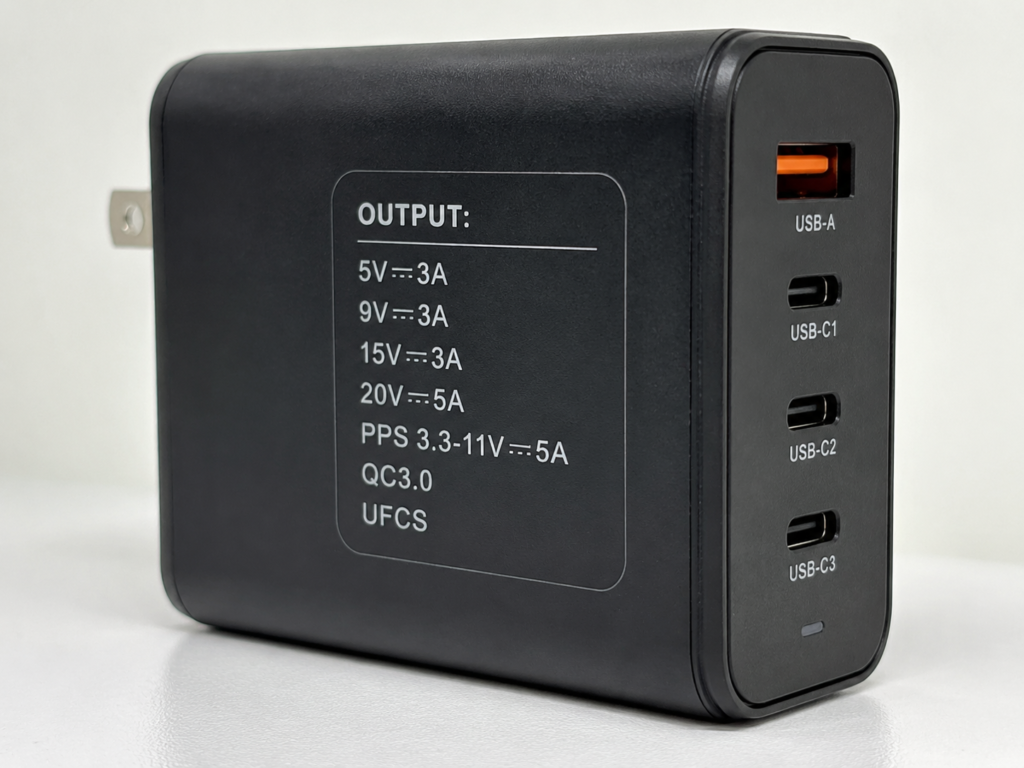
Practical Nameplate Examples
We use three common chargers as examples to help you quickly judge compatibility:
- 65W PD PPS single-port charger: Output gears are 5V⎓3A, 9V⎓3A, 15V⎓3A, 20V⎓3.25A, PPS 3.3-11V⎓5A. Suitable for iPhone, iPad, Samsung/Pixel phones, Switch, Steam Deck and thin-and-light laptops within 65W; if it is a multi-port model, the power will decrease when multiple devices are used at the same time.
- 100W multi-port GaN charger: Focus on the individual output power and protocols of C1, C2, and A ports. A total power of 100W does not mean each port can run at 100W. Usually, single port is the highest, and when multiple ports are used at the same time, power will be distributed according to rules.
- USB-A car charger with only QC3.0: Only suitable for old Qualcomm Android devices, and cannot provide high-speed power supply for PD devices such as MacBook, iPad Pro, and Steam Deck.
Key Comparison Points
The core information is already listed in the table. Here are a few more easily overlooked points:
Compatibility: Whether Fast Charging Can Be Triggered
USB PD has the strongest global compatibility and covers the most device categories; PD PPS is especially critical for high-power fast charging of some Android phones; the value of QC is mainly in old Qualcomm Android and old USB-A accessories; the compatibility value of UFCS is mainly in China’s Android ecosystem, with little support for local overseas devices. The premise of fast charging triggering is the same as before: the device, charger, and cable must all match.
Device Type Coverage
For mobile phones, all three are covered. For overseas phones, prioritize PD/PPS; for domestic Chinese Android phones, you can additionally check UFCS. For devices such as tablets, laptops, handheld game consoles, and portable monitors, PD support is the most stable, and coverage of QC and UFCS is very limited. There is a large stock of QC in car chargers and old power banks, but for new purchases, it is still recommended to choose multi-protocol models with PD+QC. For domestic Chinese Android flagships, as mentioned earlier, proprietary fast charging is usually the fastest, and PD/PPS/UFCS are more for universal compatibility.
Power Capability: Standard Upper Limit Does Not Equal Actual Speed
The upper limit of the protocol is only a possibility. The actual charging speed mainly depends on the charging curve, temperature control, and compatible gears on the device side. It’s not that if the protocol supports 100W, the phone can run at 100W. For example, USB PD 3.1 EPR has a theoretical maximum of 240W, but very few actual consumer electronics use such high power; QC 5 officially says it supports 100W+, but there are not many actual mass-produced devices and accessories; the mass-produced power range of UFCS, as mentioned earlier, varies greatly between different products.
Speed Differences at the Same Power
For the same device, same effective input power, and same environment, the protocol itself is usually not the only source of speed differences. The differences mainly come from battery design, charging management chip, temperature control strategy, battery health, whether there is fine voltage regulation capability, cable loss, etc. The fine voltage regulation capabilities of PPS and UFCS may reduce heat generation and improve efficiency, but it does not mean that any device will be faster.
Popularity and Purchase Cost
In overseas markets, PD accessories have the most choices and the most mature certification, there are many old QC accessories, and UFCS can mostly only be bought through cross-border channels; in the Chinese market, UFCS has higher visibility, and there are more choices of multi-protocol chargers. When buying, don’t just compare total wattage. Look at single-port power, protocol combination, PPS gears, whether there is UFCS/QC support, certification status, cable cost, and brand reliability.
Safety and Certification
When buying formal products, prioritize checking the corresponding certifications: for USB PD, check USB-IF certification, clear PDO/PPS/EPR output tables, and local safety certification; for QC, check Qualcomm Quick Charge certification and version marks; for UFCS, check Fused Fast Charging/UFCS certification marks. Certification can increase the probability of compatibility and safety, but does not guarantee full speed for all devices.
Scenario-Based Buying Guide: Choose According to Device and Demand
After talking about the comparison, we will give you more specific buying suggestions according to different usage scenarios. You can directly match your situation.
Quick Buying Priority Matrix
First, here is a quick judgment framework for you:
- iPhone / iPad / Mac / handheld game console users: prioritize PD
- Overseas Android users such as Samsung / Google Pixel: prioritize PD + PPS
- Old Qualcomm Android / old car charger / old power bank users: choose PD + PPS + QC multi-protocol
- Users of domestic Chinese Android phones going overseas: choose PD + PPS + UFCS multi-protocol
- Multi-device mixed use users: prioritize PD multi-port GaN chargers, add QC/UFCS as needed
- Pursuing the fastest charging for a single domestic Chinese phone: look for original or officially certified proprietary fast charging
If You Can Only Buy One Charger
- Ordinary mobile phone users: 30W~45W PD/PPS is sufficient
- Phone + tablet users: 45W~65W PD/PPS is more reliable
- Phone + thin-and-light laptop users: start with 65W PD/PPS
- Multi-device travel users: 100W PD/PPS multi-port GaN is more practical
- Domestic Chinese Android users: additionally check UFCS on the basis of PD/PPS
iPhone / iPad Users
Just prioritize choosing a USB PD charger. 20W~30W is sufficient for daily iPhone use, and 30W~45W can be chosen for iPad. There is no need to specifically buy a charger with QC or UFCS for iPhone, as it will not bring additional fast charging benefits. If you also need to charge a MacBook, just choose a 65W or 100W PD multi-port charger directly.
MacBook / Windows Thin-and-Light Laptop Users
Prioritize checking the single-port output power of USB PD. Thin-and-light laptops commonly use 45W~65W, and some high-performance laptops may require 100W, 140W or original adapters. For 100W, a 5A E-Marker cable is usually required; for PD EPR above 140W, the device, charger, and cable all need to support it.
If you buy a multi-port charger, be sure to check the maximum single-port power and multi-port distribution table, don’t just look at the total power.
Overseas Android Users Such as Samsung / Google Pixel
Prioritize choosing a charger with USB PD + PPS. A charger only marked with PD but not PPS may not trigger the nominal high power. For some Samsung models, you also need to confirm the current gear of PPS, such as whether it supports 5A PPS, otherwise it may only reach 25W, not 45W. QC and UFCS are not priorities, unless the official parameters of the device clearly state support.
Old Qualcomm Android Users
Old phones, old car chargers, and old power banks are more compatible with QC 2.0/QC 3.0, but for new accessories, it is recommended to choose multi-protocol models with PD + PPS + QC. It is not recommended to buy only QC-supported ones, as they will be useless when you change to new devices in the future. In addition, old phones have battery aging and conservative temperature control, which themselves limit speed, so the effect of changing the charger may be limited.
Users of Domestic Chinese Android Phones Going Overseas
First check the official parameters of the phone to see what the PD power is, whether it supports PPS, whether it has UFCS, and whether proprietary fast charging is needed for full speed. For general travel, a multi-protocol charger with PD + PPS + UFCS is sufficient; if you pursue full-speed fast charging, you still need an original or officially certified proprietary fast charging kit. Be sure to note that the protocol support of overseas versions and domestic Chinese versions of the same series of phones may be different, don’t confuse them.
Power Bank Users
Prioritize choosing power banks that support PD input and PD output. Android users can additionally check PPS, and domestic Chinese Android users can additionally check UFCS.
In addition, pay attention to two common sense points related to power banks:
First, air carry restrictions are determined by the Wh (watt-hour) of the battery capacity, and have nothing to do with the fast charging protocol:
- Within 100Wh: usually can be carried on board
- 100Wh~160Wh: usually requires prior approval from the airline
- Over 160Wh: usually cannot be carried
Specific rules are subject to airline and local regulatory requirements.
Second, for large-capacity power banks, you should also pay attention to the input power. If the input power is too low, recharging the power bank itself will be very slow.
Multi-Port GaN Charger Users
When buying a multi-port GaN charger, don’t just look at the total power, pay attention to these points:
- Total power: is the combined output of all interfaces, not the maximum single-port power
- Single-port power: The maximum output and supported protocols of each USB-C/USB-A port may be different. Generally, the first C port has the highest power
- Multi-port distribution: When multiple devices are plugged in at the same time, the single-port power usually decreases. For example, a 100W dual-port charger may have 100W for single port, and 65W+30W for dual ports
- Travel adaptation: Formal products generally support 100-240V wide voltage, which can be used in most parts of the world. Prioritize models that meet the plug specifications of the destination or have replaceable plugs
Fast Charging Troubleshooting and Power Testing Methods
After buying a charger, sometimes you may encounter situations where it doesn’t charge fast, or even doesn’t trigger fast charging. Don’t rush to return it. Troubleshoot according to the following methods, and most problems can be solved.
Three Steps to Confirm Protocols Supported by Devices
First you need to confirm what your device, charger, and cable actually support:
- Check official website parameters: Go to the official website of the device to find technical specifications, search for keywords such as “USB PD”, “PPS”, “Quick Charge”, “UFCS/Fused Fast Charging”, “Super Fast Charging”, and you can see the official support status.
- Check charger inscriptions: Look at the output gears and protocol marks printed on the charger shell. The parameters of each interface may be different.
- Check cable specifications: Confirm whether the cable is 3A, 5A E-Marker or EPR cable. It is usually printed on the cable packaging or the cable body.
If you are not sure, it is safest to test with an officially recommended charger or a multi-protocol charger from a reliable brand.
Correct Method to Test Charging Power
If you want to test the actual charging power, pay attention to these points:
- Test prerequisites: Device battery level below 30%, screen off, room temperature environment, single-port exclusive use, use a qualified cable. Only then will the measured power be close to the peak.
- Test tools: A USB power meter can observe the dynamic changes of voltage, current, and power, but ordinary power meters can only display the current voltage and current, and cannot directly determine which protocol it is. To identify the protocol, you need a tester that supports protocol decoding.
- Note: As mentioned earlier, fast charging power is dynamically changing. The currently displayed power is not equal to the device’s maximum fast charging capability, and will be affected by many factors such as battery level, temperature, screen on, and multi-port distribution.
- Risk warning: Inferior power meters or adapters may affect fast charging negotiation, and it is not recommended to connect them in series in the charging circuit for a long time.
Troubleshooting Order for Fast Charging Not Triggering / Low Power
When encountering fast charging not triggering or low power, troubleshoot step by step in this order:
- First confirm whether the device, charger, and cable all support the same protocol and corresponding power. This is the most common cause.
- Confirm whether the interface is plugged in correctly. Multi-port chargers generally only have specific interfaces that support the highest power, such as the C1 port.
- Check whether the cable meets the standard. 100W usually requires a 5A E-Marker cable, and EPR requires a dedicated EPR cable.
- Rule out active speed reduction scenarios, such as the battery level is already very high (especially above 80%), the temperature is too high, using the phone with the screen on, or high load in the background.
- Rule out the impact of multi-port distribution. Unplug other devices and test with a single port.
- If it still doesn’t work, test with a set of qualified accessories to rule out problems of false marking, damage, or poor contact.
Abnormal Situations Requiring Immediate Discontinuation
If you encounter the following situations, stop using it immediately to avoid danger:
- The charger or cable is abnormally hot, deformed, has a strange smell, or smokes
- There is buzzing sound, sparks, or frequent charging interruption during charging
- Loose interface, damaged cable insulation, severe plug oxidation
- The product has no clear output parameters, no brand information, and only writes vague marketing words such as “super fast charging” and “extreme fast charging”
Avoiding Common Misconceptions
Finally, let’s sort out the most common misconceptions to help you avoid most common buying misjudgments.
Misconceptions About Power and Speed
- Misconception: The higher the wattage of the charger, the faster the phone charges
Truth: The phone will only draw power according to the maximum power it supports. The main value of high-power chargers is multi-device reuse and powering laptops. - Misconception: If the power meter shows low, the charger is broken; if it shows high, it’s full-speed fast charging
Truth: The power meter shows the power in the current state, which is affected by many factors such as battery level, temperature, screen on, and multi-port distribution. The power level alone cannot prove whether the protocol is correctly triggered.
Misconceptions About Interfaces and Protocols
- Misconception: Type-C interface equals PD fast charging
Truth: Type-C is the shape of the physical interface. Protocols and output gears depend on official parameters and charger inscriptions. Some Type-C ports only support 5V slow charging. - Misconception: If it says PD, it must have PPS or EPR
Truth: PPS and EPR are both capabilities that need to be confirmed separately. Not all PD chargers support them. Android users should especially check whether there is a PPS mark. - Misconception: If it says PD 3.1, it must reach 240W
Truth: PD 3.1 includes two ranges: SPR and EPR. SPR still has a maximum of 100W. Only when EPR is supported and all accessories match can high power above 140W be achieved. - Misconception: QC is completely useless now
Truth: QC still has practical value for old Qualcomm Android phones, old car chargers, and USB-A accessories, but it is not suitable as the only standard for new accessories.
UFCS-Related Misconceptions
- Misconception: UFCS is domestic Chinese proprietary fast charging
Truth: UFCS is a cross-brand fused fast charging standard, while proprietary fast charging is each brand’s own high-power solution. The two have different positioning. - Misconception: Supporting UFCS can make all domestic Chinese phones charge at full speed
Truth: UFCS only improves the cross-brand universal fast charging experience. The maximum power of most phones still relies on proprietary protocols and original accessories.
Misconceptions About Cables and Multi-Port
- Misconception: High-power cables support all fast charging protocols
Truth: Cables mainly determine the current and power carrying capacity. Protocol matching mainly depends on the device and charger. Some proprietary fast charging also requires dedicated cables. - Misconception: The total power of a multi-port charger equals the maximum single-port power
Truth: Total power is the combined output of all interfaces. When multiple devices are used at the same time, the single-port power usually decreases. - Misconception: A multi-protocol charger equals all devices can charge at full speed
Truth: Multi-protocol only increases the probability of compatibility. It cannot bypass the limitations of brand proprietary protocols, and does not mean all devices can charge at full speed.
You May Also Want to Ask
Which is more universal, UFCS or PD?
PD is much more globally universal, covering almost all categories of consumer electronics, and the overseas market is basically dominated by PD; UFCS is mainly popular in China’s Android ecosystem, with little support for local overseas devices, and its universality is far less than PD.
Are QC and PD compatible?
New versions of QC 4+/QC 5 are themselves based on PD/PPS and are compatible with PD; old versions of QC 2.0/QC 3.0 and PD are different protocols, requiring the charger to support both protocols to be compatible. Many third-party multi-protocol chargers support both PD and QC.
Does iPhone support UFCS or QC?
iPhone’s official fast charging mainly relies on USB PD; UFCS and QC are not protocols required for iPhone to achieve fast charging. Buying a charger with QC or UFCS usually does not bring additional fast charging speed to iPhone. The key still depends on the USB PD output gears and cable.
What to do if an Android phone doesn’t charge fast with a PD charger?
First confirm whether the charger has PPS. Many Android phones require PPS to trigger high-power fast charging; then confirm whether the cable meets the standard and whether it is plugged into the correct interface; also check if there are active speed reduction situations such as high battery level, high temperature, or charging while using. If it’s a Samsung phone, also confirm whether PPS supports the 5A gear.
What is the difference between PD PPS and ordinary PD?
Ordinary PD has several fixed voltage gears, such as 5V, 9V, 15V, 20V; PPS is programmable dynamic voltage regulation, which can adjust voltage in very fine steps, more in line with the real-time needs of the battery, reducing heat generation and loss. Many Android phones rely on PPS for high-power fast charging.
Does PD 3.1 necessarily have 240W?
No. PD 3.1 includes two ranges: SPR and EPR. SPR still has a maximum of 100W. Only EPR supports higher power, up to 240W, and requires the device, charger, and cable to all support EPR.
Why can a 100W charger only charge at 20W?
The most common reason is that your phone only supports 20W PD, and the phone will only draw power according to its own capability; it may also be that the charger does not have PPS, so the Android phone cannot trigger high power; it may also be that the cable is not up to standard, the interface is plugged wrong, multiple ports are used at the same time, the battery level is too high, or the temperature is too high.
What is the difference between 5A cable, E-Marker cable, and EPR cable?
3A cable supports up to 60W PD; 5A cable usually has an E-Marker chip and supports up to 100W PD (20V⎓5A); EPR cable is a dedicated cable that supports PD 3.1 EPR, can support higher voltages up to 240W, and requires the device and charger to also support EPR to work.
What charger should I buy for a domestic Chinese phone when going overseas?
Prioritize choosing a multi-protocol charger with PD + PPS + UFCS, which has the best universal compatibility; if you pursue full-speed fast charging, it is still recommended to bring an original or officially certified proprietary fast charging kit. Before buying, check the official parameters of your phone to confirm the supported protocols.
Can a multi-protocol charger make domestic Chinese phones charge at full speed?
Mostly no, because the highest power fast charging of domestic Chinese phones is generally a proprietary protocol, requiring dedicated chargers and cables. Multi-protocol chargers can only improve the compatibility of universal fast charging, and cannot bypass the limitations of proprietary protocols.
Is it necessary to have UFCS when buying a charger overseas?
If you use a domestic Chinese Android phone and often use domestic accessories of different brands, then having UFCS will be more convenient; if you use an overseas version phone, Apple device, or laptop, then UFCS is basically useless, and you don’t need to specifically buy a charger with UFCS.
What are the common reasons for slow fast charging?
It is mainly related to protocol mismatch, substandard cables, wrong interface plugging, active speed reduction scenarios such as high battery level/high temperature/screen on, and multi-port power distribution. You can confirm one by one according to the troubleshooting steps above.
How to check which fast charging protocols a charger supports?
Prioritize checking the inscription parameters on the charger shell, including fixed voltage gears, PPS/PDO/EPR marks, and protocol marks such as QC/UFCS; you can also check the detailed specification page on the product’s official website.
Summary
By reading this far, you have mastered the core skills of fast charging buying and troubleshooting: you can distinguish the positioning differences between UFCS, USB PD, PD PPS, QC and brand proprietary fast charging, can read charger inscriptions and cable specifications, can choose suitable accessories according to your device combination, and can troubleshoot common problems of slow fast charging according to the logic of “protocol – interface – cable – environment – accessory distribution”.
In the future, when facing chargers with letters all over the packaging, you don’t have to struggle anymore. You can judge which one is most suitable for your usage scenario by yourself, and avoid most common buying misjudgments.