
1.Introduction: The Unsung Hero Behind Fast Charging
Every day, we charge our phones and laptops with Type-C cables, delivering tens or even hundreds of watts that can refill most of a battery in just over ten minutes. Older USB-A ports, by contrast, usually only reach around 10W. Why can Type-C deliver such fast charging when older USB interfaces cannot?
The answer lies in a tiny, unassuming metal contact inside the connector: the CC pin, the “command and control center” of the entire PD fast charging system. This article uses no complex formulas or jargon, so total beginners can understand the basic logic behind Type-C fast charging.
2.Basic Concepts: Two Key Terms to Know First
2.1 What is USB PD?
Many people have heard of “PD fast charging” but don’t know what it actually is. Simply put, USB Power Delivery (USB PD) is a global, universal fast charging protocol standard — think of it as the “official shared language” for all charging devices.
Before universal standards existed, fast charging technologies from different brands were incompatible. A charger from one brand would often only charge another brand’s phone at slow speeds. With USB PD, any device that supports the standard can automatically negotiate the maximum power both sides can handle, breaking down brand barriers and making universal fast charging a reality.
2.2 What is a CC Pin?
If USB PD is the “shared language” of charging devices, the CC pin is the “dedicated phone line” that carries this language.
CC stands for Configuration Channel. It is a dedicated pin built into the USB-C connector, whose core job is to handle PD protocol communication. All fast charging negotiations and device identification run through this pin. It does not transfer data and does not carry large electrical currents — it only handles “command and scheduling.”
3.The Hardware of CC Pins: Big Power in a Small Package
3.1 Physical Location of CC Pins

If you look at a Type-C connector, you’ll see a row of tiny metal contacts. A full USB-C connector has 24 pins, arranged symmetrically in two top and bottom rows. Among them are two CC pins, called CC1 and CC2, placed in mirrored positions on each row.
This symmetrical design is one of the key reasons Type-C can be inserted either way up.
3.2 Why Are There Two CC Pins?
You might wonder: if one pin can handle communication, why include two? There are two core reasons:
First, to support reversible insertion. When you plug the cable in right-side up, the device uses the CC1 channel. When you plug it upside down, the system automatically switches to CC2. No matter which way you insert the cable, one CC pin will always make a proper connection, with no interruption from flipping the connector.
Second, for redundancy and reliability. The two pins act as backups for each other. If one pin wears out, oxidizes, or makes poor contact, the other can still keep communication working, improving overall connection stability.
3.3 Three Core Hardware Functions of CC Pins
Despite their small size, CC pins serve three key basic functions, acting as the “outpost” for every Type-C connection:
- Insertion and removal detection: Your device instantly knows a cable has been plugged in or pulled out thanks to voltage changes on the CC pin. This detection is faster and more accurate than detection via power pins alone.
- Role identification: As soon as a cable is plugged in, the CC pin immediately determines which end is the power provider (charger, power bank) and which is the power receiver (phone, tablet), preventing power conflicts.
- Dedicated communication channel: This is the most important function. All PD fast charging negotiation commands travel exclusively through the CC pin. They do not use data pins and never mix with power signals.
4.The Core Principle of PD Communication: “Power Negotiation” on the CC Line
4.1 The Essence of PD Communication
Many people assume fast charging means “the charger just sends high voltage straight to the phone.” That is not how it works. Before fast charging begins, the charger and phone hold a complete “business negotiation” — and the dedicated line for this negotiation is the CC pin.
The process works like two companies closing a deal: the power provider (charger) lists all the power levels it can supply, and the power receiver (phone) picks the most suitable one based on its needs. Only after both sides confirm the terms does power delivery officially begin.
All signals travel only over the CC pin. They never touch data pins or carry large currents — the line is purely for “sending signals and negotiating terms.”
4.2 The Physical Logic of Signal Transmission
How can a tiny pin carry complex power information? The principle is actually quite straightforward.
First, the entire communication process runs on the default 5V base voltage. Even for 100W fast charging, the initial output is always a safe 5V. The whole negotiation happens at this low voltage, and voltage only rises after an agreement is reached — making the process very safe.
Second, signals are transmitted via small fluctuations in voltage, using a method called BMC encoding. You can think of it as using “the rhythm of voltage ups and downs” to represent digital 0s and 1s, much like how Morse code uses long and short beeps to send messages. Different rhythms represent different commands.
Additionally, CC pin communication uses a “half-duplex” mode, just like a walkie-talkie: only one side can transmit at a time. While one device sends a signal, the other listens. They take turns to avoid signal confusion.
4.3 Basic Rules of Communication
This “power negotiation” follows clear rules — it is not a free-for-all:
- Master-slave logic: The power provider (charger) sets the pace of communication, acting as the host of the negotiation. It initiates the process and confirms the final result.
- Data packet structure: Every command is like a properly formatted letter, containing “command content + specific parameters + checksum.” The checksum verifies that the signal was transmitted correctly, preventing errors from interference — for example, accidentally requesting 20V when 9V was intended, which would create a safety risk.
5.Full Process Breakdown: All Steps of a Fast Charging Negotiation
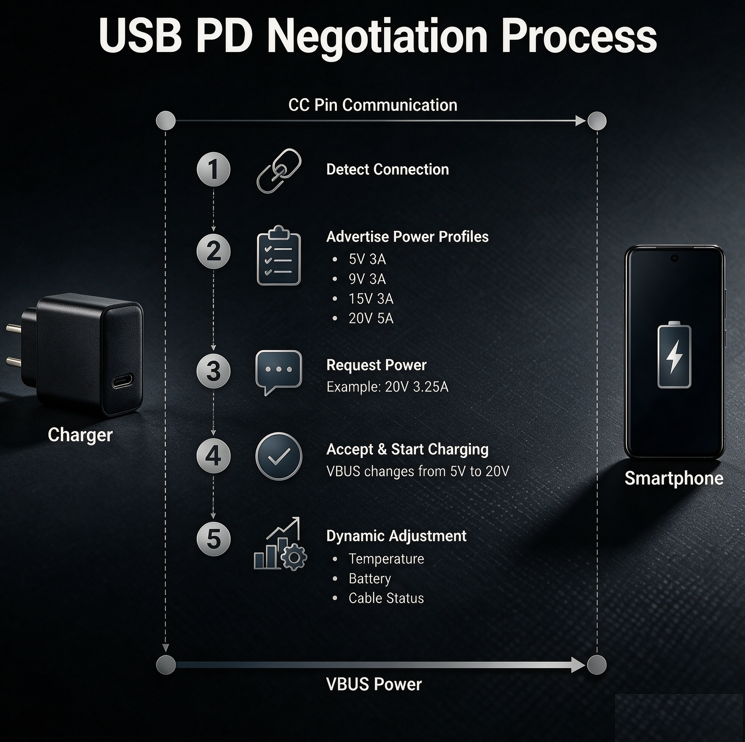
Fast charging triggers in less than a second when you plug in a cable. But behind that instant, there are 5 complete steps, all coordinated by the CC pin.
5.1 Stage 1: Connection Detection
The moment you plug the Type-C cable into both the charger and phone, the voltage on the CC pin changes. Both devices immediately detect that a device has been connected, confirm the physical link is working, and prepare for the next steps.
5.2 Stage 2: Role Declaration and Capability Announcement
After confirming the connection, the devices first use voltage differences on the CC pin to tell which end is the power provider and which is the receiver.
Then the power provider (charger) sends a full list of all supported power levels over the CC pin — for example, 5V3A, 9V3A, 12V2.5A, 20V5A. It is like handing over a “capability list” that tells the phone, “I can supply these power levels, take your pick.”
5.3 Stage 3: Power Request and Negotiation
When the phone receives the charger’s capability list, it selects the most appropriate level based on its current battery level, temperature, and maximum supported power.
For example, if a phone supports 65W fast charging, it will select the 20V3.25A level. It then sends a “power request” back to the charger via the CC pin, essentially saying, “I want this power level, please supply it.”
5.4 Stage 4: Fast Charging Officially Begins
When the charger receives the request, it first checks whether the request falls within its capabilities. After confirming the request is valid and compliant, it adjusts the output voltage and current on its power supply pins (VBUS), raising it from the default 5V to the agreed value.
Once the adjustment is complete, it sends a “confirmation” signal back to the phone via the CC pin. Both sides shake hands successfully, and fast charging officially starts.
5.5 Stage 5: Dynamic Adjustment During Charging
Fast charging is not set in stone. Throughout the entire charging process, the CC pin maintains constant communication.
For example, when the phone’s battery is nearly full, it will actively request lower power. If the phone gets too hot, it will ask to slow down charging to cool down. If the cable connection becomes unstable, power levels are adjusted in real time. All dynamic scheduling during charging relies on real-time communication over the CC pin.
6.Common Questions: What People Most Want to Know About CC Pins
6.1 Why Can’t Cheap Type-C Cables Trigger Fast Charging?
Many people have bought inexpensive Type-C cables only to find they charge very slowly. The core reason is simple: those cheap cables have no CC wire inside at all.
Genuine fast charging cables include a dedicated CC wire inside, in addition to power and data wires, to carry negotiation signals. Cheap cables cut costs by leaving out the CC wire entirely, keeping only the positive and negative power wires. Without a CC wire, the charger and phone cannot negotiate through the CC pin. They fall back to the default 5V slow charging speed, and fast charging never activates.
6.2 Why Doesn’t Reversing the Plug Affect Fast Charging?
This is the job of the dual CC pins. The USB-C connector has one CC pin on each of its top and bottom rows, and the cable has matching CC wiring.
When you plug the cable in right-side up, CC1 connects and does the work. When you flip it upside down, the system automatically switches to CC2. The device automatically detects which CC pin has a signal and switches to the working channel. That is why you can plug it in either way and still get full fast charging speed, with no difference in performance.
6.3 What Happens When a CC Pin Is Damaged?
If the CC pin on your phone or charger becomes worn, oxidized, or damaged, the most common symptoms are:
- The cable only charges at 5V slow speed, and no charger can trigger fast charging.
- Fast charging works sometimes but not always, requiring repeated plugging and unplugging or adjusting the angle to trigger.
- In severe cases, the device does not recognize any external accessory at all — computers won’t connect via cable, and charging does not respond. If you notice these issues, first check if the CC pin inside the port is dirty or oxidized. A quick cleaning usually fixes the problem.
6.4 Clarifying a Common Misconception
Many people think CC pins carry large currents. This is completely incorrect.
CC pins only “give orders” and carry control signals — the current running through them is very small. The pins that actually carry the high current to power your device are the VBUS power pins in the connector. Put simply: the CC pin decides “how much power to deliver,” and the VBUS pins actually “deliver the electricity.” They have completely separate jobs.
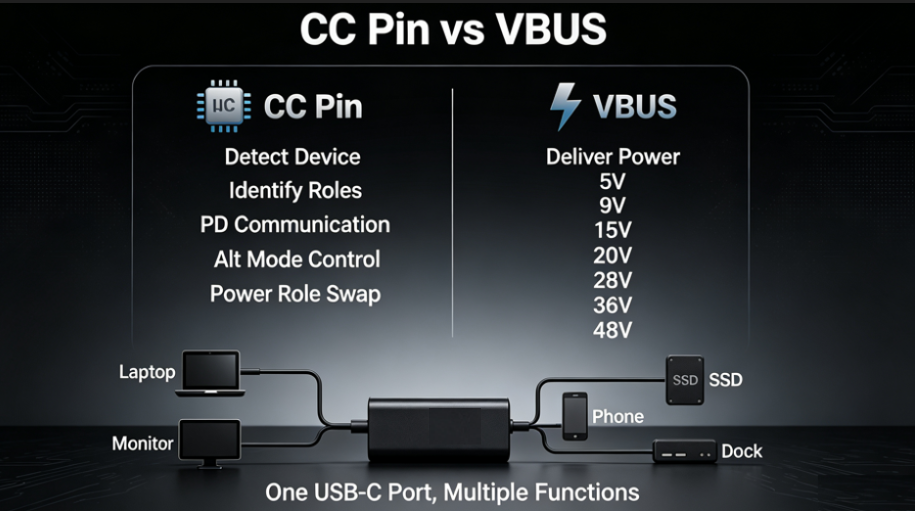
7.Beyond Fast Charging: Other Uses for CC Pins
Many people think CC pins only handle fast charging, but they do much more — they are the reason the Type-C connector is so versatile.
7.1 Other Functions of CC Pins
- Alternate Mode (Alt Mode): Type-C can output video, connect to monitors, and transmit audio directly — and the CC pin triggers this switch. When you plug in a docking station, the CC pin first negotiates and reassigns some pins to act as video or audio channels, making one cable do many jobs.
- Bidirectional power role switching: Many Type-C devices can both receive power and supply power to other devices (like a phone reverse-charging earbuds). This role switching is also identified and coordinated by the CC pin.
7.2 The Logic Behind Type-C’s Universal Design
In the past, charging, data, and video all used separate cables, leaving desks cluttered with wires. The reason Type-C can do everything with one port is the CC pin, the “master scheduler.”
It first identifies what kind of device is plugged in, then assigns the port’s functions: if it is for charging, it runs fast charging negotiation; if it is for data, it activates the data channel; if it is for video, it switches to Alternate Mode. One cable, one port, for every need — that is the fundamental change brought by the CC pin.
8.Conclusion
The tiny CC pin is the soul of the Type-C fast charging system.
It is the dedicated communication line between charging devices. Every step of the fast charging process — from connection detection and identity recognition to power negotiation and dynamic adjustment — depends on its coordination.
The core logic of PD communication can be summed up in four steps: detect connection → announce capabilities → negotiate power → start charging. The entire process runs safely at low voltage, delivering an efficient and stable fast charging experience.
Once you understand the CC pin, you will understand why Type-C has become today’s universal connector standard.