
1. Introduction: Understand Samsung Super Fast Charging
Development and Generations of Samsung Fast Charging Technology
Samsung’s fast charging technology has evolved through multiple iterations, from basic early charging to today’s high-speed solutions. It can be divided into three core generations: the original 15W Adaptive Fast Charging, the widely used 25W Super Fast Charging, and the 45W Super Fast Charging 2.0 for flagship devices. Each generation improves charging speed, heat management and compatibility to fit different device tiers.
Key Differences Between Adaptive Fast Charging, Super Fast Charging and Super Fast Charging 2.0
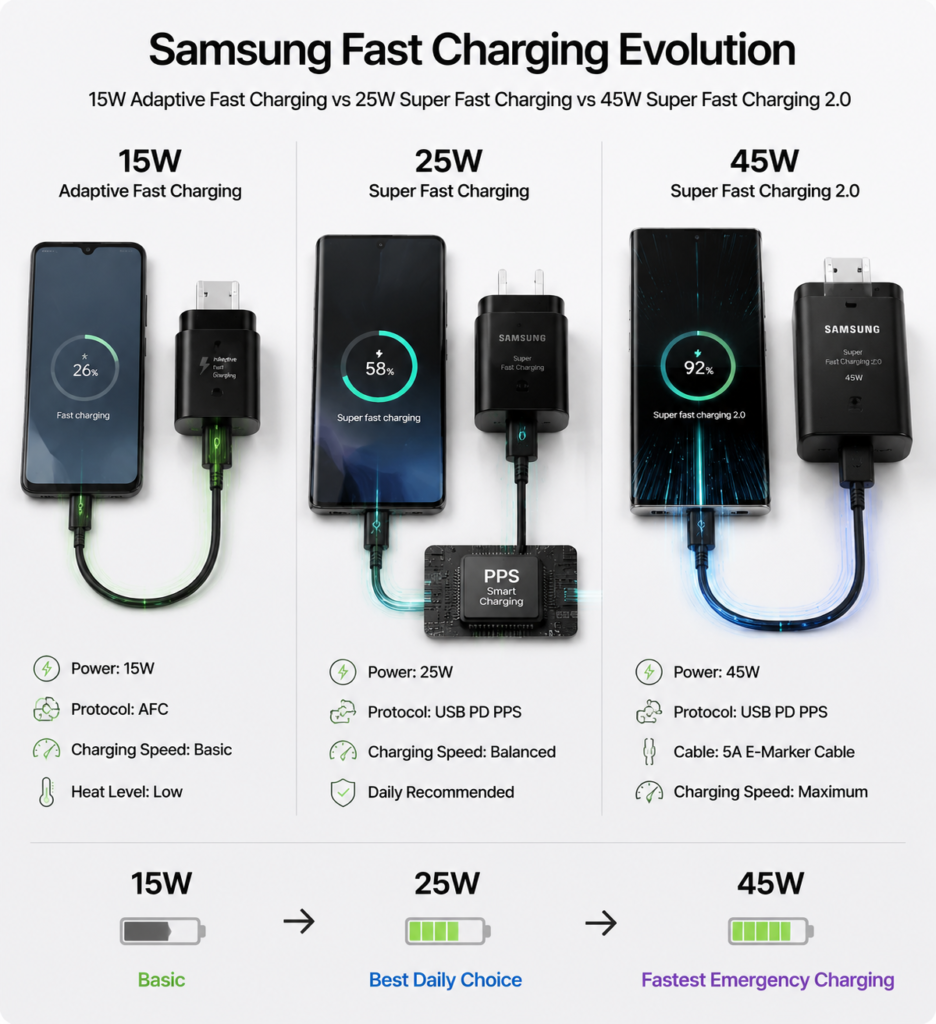
The most obvious difference lies in power and speed. 15W Adaptive Fast Charging is the entry-level standard, usually taking around 2 hours to fully charge a large battery. 25W Super Fast Charging is the current mainstream standard, nearly doubling the speed of 15W charging. 45W Super Fast Charging 2.0 is Samsung’s highest wired fast charging specification, with the most noticeable advantage in the first 30 minutes of charging, ideal for emergency top-ups.
2. Full List of Supported Devices
Devices Compatible with 45W Super Fast Charging 2.0
- Galaxy S Flagship Series: Galaxy S22 Ultra, S23 Ultra, S24 Ultra and subsequent flagship models
- Galaxy Z Foldable Series: Galaxy Z Fold3 and later foldable models, Z Flip3 and later flip foldable models
- Galaxy Note Series: Galaxy Note10+, Note20 Ultra
Devices Compatible with 25W Super Fast Charging
This specification covers most mainstream flagship and mid-range Samsung devices, including the entire Galaxy S21 series, base models of Galaxy S22/S23/S24, and mid-to-high end Galaxy A series devices. It is the most widely available fast charging standard for Samsung phones.
Devices with 15W Basic Adaptive Fast Charging
This mainly includes older flagship models released earlier, as well as entry-level Galaxy A series and some Galaxy M series devices, serving as a basic fast charging configuration.
Maximum Charging Power for Popular Models
| Device Series | Representative Model | Max Wired Charging Power | Charging Standard |
|---|---|---|---|
| S Series Flagship | Galaxy S24 Ultra | 45W | Super Fast Charging 2.0 |
| S Series Base Model | Galaxy S24 | 25W | Super Fast Charging |
| Foldable Series | Galaxy Z Fold5 | 45W | Super Fast Charging 2.0 |
| Note Series | Galaxy Note20 Ultra | 25W | Super Fast Charging |
| Mid-range A Series | Galaxy A54 | 25W | Super Fast Charging |
| Entry-level Model | Galaxy A15 | 15W | Adaptive Fast Charging |
3. Fast Charging Basics: Core Protocols and Principles
Relationship Between Samsung AFC Protocol and Super Fast Charging
AFC, short for Adaptive Fast Charging, is Samsung’s proprietary fast charging protocol from the early days, mainly used for 15W Adaptive Fast Charging. In the Super Fast Charging era, Samsung moved away from relying solely on its own protocol and adopted universal standards, with AFC retained mostly for compatibility with older devices.
Key Role of USB PD/PPS Protocol
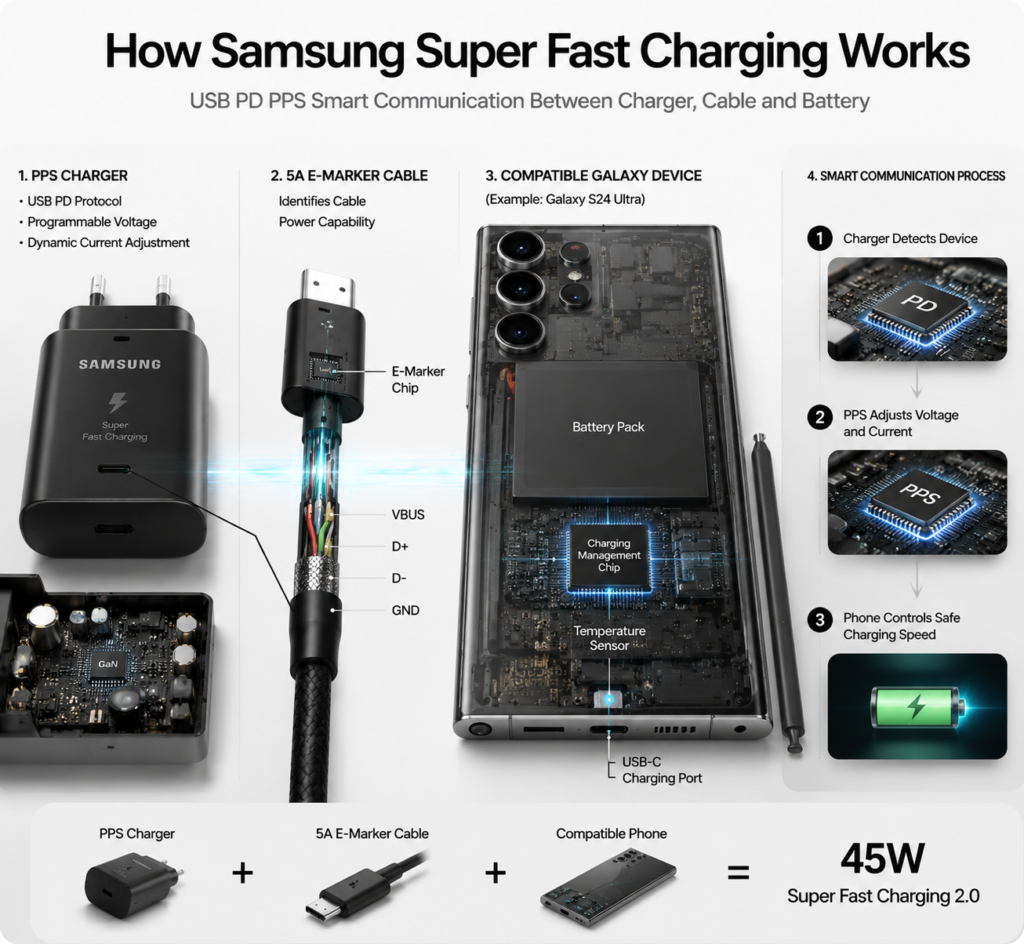
Today, both 25W and 45W Samsung Super Fast Charging are built on the PPS (Programmable Power Supply) specification within the universal USB PD protocol. Simply put, PPS acts as a “universal translator” between the charger and the phone, dynamically adjusting voltage and current based on the phone’s real-time battery level and temperature. This balances charging speed and heat control, which is the core reason Samsung fast charging delivers both speed and safety.
Charging Characteristics of Different Power Tiers
- 15W Adaptive Fast Charging: Gentle speed, very low heat, suitable for overnight charging
- 25W Super Fast Charging: Balanced speed and heat, best value for daily home and office use
- 45W Super Fast Charging 2.0: Fast charging in the early stage, ideal for emergency top-ups, and automatically slows down at high battery levels to protect the battery
4. Accessory Buying Guide: Choose the Right Gear for Full Speed
Charger Buying Tips
Official Charger Models and Corresponding Power
Samsung official chargers have clear model numbers for fixed power levels: the 25W charger is model EP-TA800, the 45W charger is model EP-TA845. There is also a 65W three-port charger that can charge phones, tablets and other devices at the same time. Official chargers offer the most stable compatibility with no protocol mismatch issues.
Core Standards for Third-Party Chargers
When buying third-party chargers, the key is to check for USB PD PPS protocol support with matching power levels. To trigger 25W charging, the charger needs to support 3.3-11V 2.25A PPS; for 45W, it needs 3.3-16V 2.8A PPS. Prioritize products with 3C certification and reliable brand reputation, and avoid unbranded low-quality chargers.
Power Distribution Notes for Multi-Port Chargers
When a multi-port charger charges multiple devices simultaneously, its total power is split across ports. For example, a 65W dual-port charger can deliver full 45W to a phone when used alone; when charging a laptop and phone at the same time, the phone’s charging power will drop and cannot reach full Super Fast Charging speed.
Charging Cable Buying Tips
Performance Difference Between 3A and 5A Cables
Standard 3A Type-C cables can only carry around 25W of charging power at maximum, and cannot reach full 45W Super Fast Charging 2.0 speed. 5A cables can carry higher current and are required to trigger full 45W fast charging. 25W Super Fast Charging works normally with a qualified 3A cable.
Role and Necessity of E-Marker Chip
The E-Marker chip is like the “electronic ID” of a cable, built into the cable connector. It actively tells the charger how much current the cable can handle. 45W fast charging requires a 5A cable with an E-Marker chip; without it, the charger will assume the cable only supports 3A and automatically reduce charging power.
Scenario-Based Accessories
Car Chargers and Fast Charging Power Banks
Car chargers and power banks follow the same buying logic as wall chargers — the core requirement is PD PPS protocol support. Prioritize products labeled “compatible with Samsung Super Fast Charging” to avoid models that only deliver basic 15W charging.
Wireless Super Fast Charging Accessories and Compatibility
Samsung’s highest wireless charging specification is 15W Fast Wireless Charging 2.0, compatible with official charging pads such as model EP-P2400. Wireless charging is slower than wired charging and generates slightly more heat, making it suitable for casual top-ups rather than reaching wired Super Fast Charging speeds.
5. Proper Usage: Confirm Full Speed + Speed-Up Tips
How to Confirm Super Fast Charging is Active
Fast Charging Switch in System Settings
Samsung phones have fast charging enabled by default. To confirm, open Settings, go to “Battery and device care” → “Battery” → “More battery settings”, and make sure the “Super fast charging” toggle is turned on. Some devices show separate toggles for “Fast charging” and “Super fast charging”.
Identification on Charging Screen and Status Bar
After plugging in the charger, the lock screen shows the charging status and animation: standard charging shows a green animation, Adaptive Fast Charging shows a light green animation, Super Fast Charging shows a teal animation, and Super Fast Charging 2.0 shows a dark blue animation. The lock screen text will also label “Super fast charging” or “Super fast charging 2.0” accordingly, with a matching fast charging icon in the status bar.
Real-World Charging Speed Reference
Typical Full Charge Time for 25W and 45W
For a flagship phone with a 5000mAh battery:
- 25W Super Fast Charging: Approximately 70–80 minutes for 0–100% charge
- 45W Super Fast Charging 2.0: Approximately 50–60 minutes for 0–100% charge
30-Minute Emergency Charging Reference
- 25W Super Fast Charging: Charges to roughly 50% in 30 minutes with the screen off
- 45W Super Fast Charging 2.0: Charges to roughly 65%–70% in 30 minutes with the screen off
Key Factors Affecting Actual Charging Speed
Phone temperature, ambient temperature, screen-on usage and remaining battery level all affect actual speed. Temperature has the biggest impact: when the phone gets too warm, the system automatically reduces charging power to protect the battery. Charging also automatically switches to slow trickle charging once the battery passes 80%.
Practical Tips for Faster Daily Charging
Charge with the screen off and avoid playing graphics-heavy games while charging. Remove thick phone cases to help the phone dissipate heat. Charge at room temperature, away from direct sunlight or hot car interiors. Closing power-hungry background apps before charging can also improve charging efficiency.
6. Common Misconceptions and Troubleshooting
Common Misconceptions
Higher charger power = faster charging
This is the most widespread misconception. A phone’s maximum charging power is determined by its own hardware. A 45W phone will only charge at 45W even with a 100W charger — it will not charge faster. Buying an overly powerful charger wastes money; matching the correct power tier is enough.
Third-party fast chargers always damage the battery
Genuine, protocol-matching third-party chargers are just as safe as official chargers. Samsung phones have comprehensive battery protection mechanisms. As long as the charger meets PPS protocol standards and has official safety certification, it will not damage the battery. It is low-quality unbranded chargers that harm batteries.
Any Type-C cable works for Super Fast Charging
Type-C only describes the connector shape, not charging capability. Standard 3A cables cannot trigger 45W Super Fast Charging, and some low-quality cables cannot even reliably trigger 25W. Fast charging requires cables of matching specifications — the same connector shape does not guarantee compatibility.
Common Troubleshooting
Steps to Fix Super Fast Charging Not Triggering
First, confirm the fast charging toggle is enabled in settings. Second, check that the charger supports USB PD PPS protocol. Third, verify the cable meets the required specification (5A with E-Marker for 45W). Fourth, clean dust and debris from the charging port and make sure the cable is plugged in firmly.
Why charging is slow even when Super Fast Charging is shown
This is almost always caused by temperature: when the phone or surrounding environment is warm, the system automatically reduces speed. Additionally, using the screen, running heavy apps, or having a battery level above 80% will all slow down charging — this is a normal protection mechanism.
Is it normal for charging to slow down after 80%?
Yes, completely normal. This is a standard protection strategy for lithium-ion batteries. At high charge levels, the phone switches to low-current trickle charging to prevent overcharging and reduce full-charge wear, extending battery lifespan. It is not a fault with the phone or charger.
Why charging feels slower after a system update
System updates sometimes refine charging strategies, adjusting the power curve slightly to prioritize battery health and heat management. This is normal version optimization, not a malfunction.
7. Battery Care and Safety Advice
Samsung’s Built-in Battery Protection Mechanisms
Samsung phones include multiple layers of protection: real-time temperature monitoring with automatic power reduction when overheating, overcharge protection that cuts power when full, trickle charging at high battery levels, plus short-circuit and voltage protection — all ensuring charging safety at the hardware level.
Using “Protect battery” and Smart Charging Features
Samsung phones include a “Protect battery” feature that limits charging to 85% capacity. It is ideal for scenarios where the phone stays plugged in for long periods (such as office use), as it significantly reduces battery wear. It is not recommended for daily commuting use, as it reduces available battery life.
The Smart charging / Adaptive charging feature learns your daily routine. When charging overnight, it holds the battery at 80% and finishes charging just before you wake up, reducing the time the battery spends at 100% and extending its lifespan.
Daily Charging Safety and Care Tips
Avoid charging in hot, direct sunlight — for example, inside a closed car in summer. Do not use damaged or swollen chargers and cables. Avoid running high-load games while charging to prevent excessive heat buildup. Clean dust from the charging port regularly to maintain a good connection.
The Truth About Fast Charging and Battery Lifespan
Under normal use, genuine Super Fast Charging has very little impact on battery lifespan. Lithium-ion batteries are consumable by nature, and will naturally lose capacity after 2–3 years of normal use. Compared to worrying about charging power, long-term high-temperature charging and keeping the battery at 100% for extended periods cause far more battery wear.
8. Summary: Build Your Ideal Fast Charging Setup
Recommended Charging Kits for Different Needs
- Daily home / office use: A 25W official or certified third-party kit offers the best value and meets daily charging needs
- Frequent travel / emergency top-ups: Choose a 45W charging kit for noticeable speed gains in the first 30 minutes, perfect for short charging breaks
- Multi-device users: Choose a 65W multi-port PPS charger to charge your phone, tablet and laptop with one cable for easier travel
Device-Power-Accessory Matching Reference
| Charging Tier | Recommended Charger Spec | Recommended Cable Spec | Compatible Devices |
|---|---|---|---|
| 15W Adaptive Fast Charging | 18W+ charger with AFC/PD support | Standard 3A Type-C cable | Older flagships, entry-level A series |
| 25W Super Fast Charging | Charger with 25W PPS support | Qualified 3A Type-C cable | Mainstream flagships, mid-range models |
| 45W Super Fast Charging 2.0 | Charger with 45W PPS support | 5A Type-C cable with E-Marker | Flagship S series, premium foldables |
Balancing Charging Speed and Battery Lifespan
There is no need to chase the highest possible charging power — choose based on your actual usage. For daily use, prioritize genuine, certified accessories and develop good charging habits; there is no need to overstress about battery wear. For long plugged-in use, enable the battery protection feature, and you will find the best balance between charging speed and battery longevity.