
Many Samsung users often find themselves confused: why doesn’t my high-power charger speed up charging as expected? What’s the real difference between “Super Fast Charging” and “Super Fast Charging 2.0”? In fact, all high-power fast charging on modern Samsung devices relies on PPS technology. You can only unlock its full performance with the right accessories and correct usage. This plain-language guide covers everything you need to know about Samsung PPS charging for the best experience.
1. Get to Know Samsung PPS Fast Charging
What is PPS Fast Charging
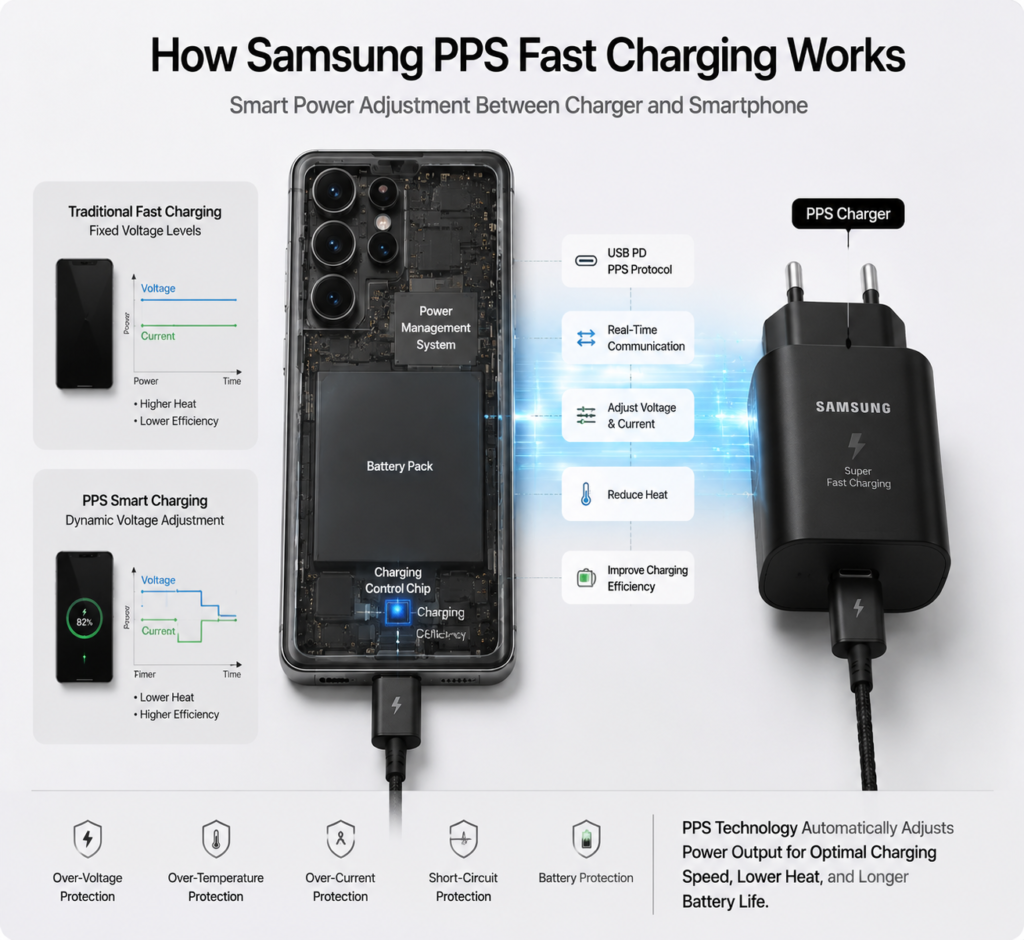
Short for Programmable Power Supply, PPS is an advanced feature within the USB PD fast charging standard. In simple terms, traditional fast charging only has a few fixed voltage levels and switches between them rigidly. PPS allows real-time communication between the charger and your phone, adjusting voltage and current continuously based on the battery’s current status — like customizing charging power for your battery.
The Evolution of Samsung Fast Charging
Samsung’s fast charging technology has gone through three generations. It started with 15W Adaptive Fast Charging (AFC), Samsung’s own proprietary protocol. Later, it adopted the universal USB PD standard and launched 25W Super Fast Charging based on PPS. The technology was further upgraded to 45W Super Fast Charging 2.0, which also uses PPS to deliver higher power while maintaining solid temperature control and compatibility.
Core Advantages of PPS Fast Charging
Compared to traditional fixed-voltage fast charging, PPS has three key benefits: higher charging conversion efficiency with less wasted energy, lower heat generation during long high-power charging, and gentler impact on battery health thanks to precise power adjustment.
2. Samsung Devices That Support PPS Fast Charging
Not all Samsung devices support PPS fast charging, and maximum charging power varies by model. The table below lists mainstream PPS-compatible Samsung devices for your reference.
| Charging Level | Device Type | Representative Models |
|---|---|---|
| 25W PPS Super Fast Charging | Smartphones | Galaxy S20/S21/S22/S23/S24 base models, Z Fold2/Z Fold3/Z Fold4, all Z Flip series, Note10/Note20 base models |
| 45W PPS Super Fast Charging 2.0 | Smartphones | Galaxy S22 Ultra/S23 Ultra/S24 Ultra/S25 Ultra, Note10+/Note20 Ultra, Z Fold5/Z Fold6 |
| 25W/45W PPS Charging | Tablets | Galaxy Tab S7/S8/S9/S10 full series, Tab A9+ and other new tablets |
Models With 25W PPS Super Fast Charging
Most mid-to-high-end Samsung phones released in the past five years support 25W PPS fast charging, making it Samsung’s most widespread charging specification.
Models With 45W PPS Super Fast Charging 2.0
45W fast charging is mainly available on top-tier Ultra flagships and high-end large-screen foldables, delivering noticeably faster charging than 25W.
Galaxy Tablets With PPS Charging
Most mid-to-high-end Samsung tablets released in recent years support PPS fast charging, mostly at 25W, with some high-end models supporting 45W.
3. PPS Charging Accessory Buying Guide
To unlock full-speed PPS charging, both your charger and charging cable must meet the required specifications — neither can be overlooked.
Charger Buying Tips
Official Charger Models and Specifications
Samsung has two main official PPS chargers: the 25W model EP-TA800 and the 45W model EP-TA845. Official chargers offer the best compatibility with no protocol matching issues.
Standards for Third-Party Chargers
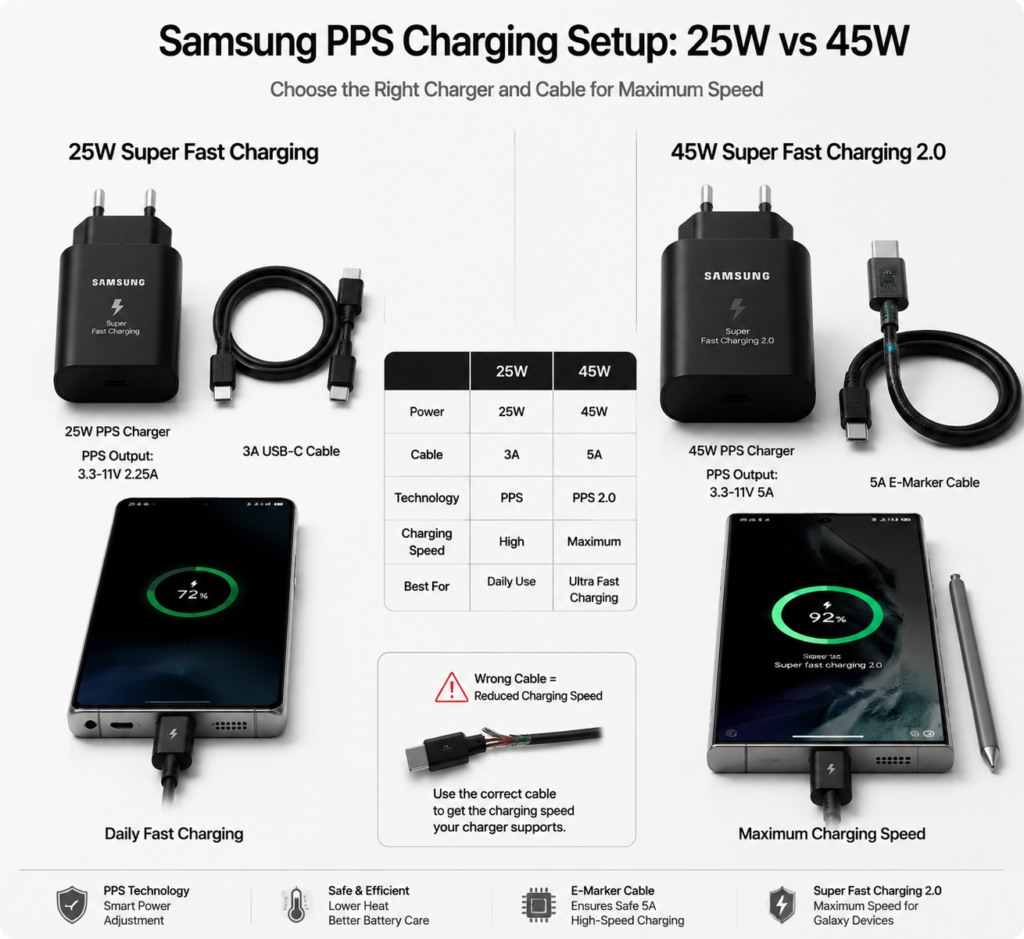
Third-party chargers can also trigger Samsung PPS fast charging. The key is to check the parameter label for a “PPS” rating: 25W charging requires PPS output of 3.3-11V 2.25A, while 45W charging requires 3.3-11V 5A. A charger that only says “PD compatible” may not deliver full-speed Samsung fast charging.
Notes for Multi-Port / Car Chargers
When buying a multi-port charger, pay attention to the independent output power per port. Many multi-port chargers list their total power; full-speed PPS only works when a single port is in use, and power is split when multiple ports charge simultaneously. The same rule applies to car chargers — they must clearly list the corresponding PPS rating to trigger Samsung Super Fast Charging.
Charging Cable Requirements
Cable Differences Between 25W and 45W Charging
25W PPS fast charging only works with a standard 3A USB-C cable. 45W charging carries higher current and requires a 5A-rated USB-C cable. Using a regular 3A cable with a 45W charger will cap your charging speed at 25W.
What E-Marker Chips Do and How to Identify Them
5A cables usually have a built-in E-Marker chip, acting as the cable’s “ID card” that tells the charger how much current it can handle. Genuine 5A cables will mark “5A” or “E-Marker” on the packaging or cable body, so look for this label when shopping.
How to Avoid Low-Quality Cables
Avoid cheap, no-name unbranded data cables. These cables often cut corners on materials. Not only will they fail to trigger full-speed fast charging, but they may also overheat or make poor contact under high current, creating safety risks.
The table below summarizes the full accessory requirements for 25W and 45W charging for easy reference:
| Charging Spec | Required Charger PPS Rating | Cable Requirement | Best For |
|---|---|---|---|
| 25W Super Fast Charging | 3.3-11V 2.25A PPS supported | 3A+ USB-C cable | Daily commuting, light use |
| 45W Super Fast Charging 2.0 | 3.3-11V 5A PPS supported | 5A USB-C cable with E-Marker | Quick top-ups, heavy users |
4. How to Use Samsung PPS Fast Charging Properly
Requirements for Full-Speed PPS Charging
Three conditions must be met for full-speed PPS charging: the charger supports the corresponding PPS rating, the cable meets the current requirement, and the phone battery temperature is within the normal range (roughly 10°C to 45°C).
How to Turn On Fast Charging in System Settings
Fast charging is enabled by default on Samsung phones. If you notice slow charging, check your settings: go to Settings > Battery and device care > Battery > More battery settings and make sure Fast charging is turned on. The path may vary slightly across One UI versions — you can also search “Fast charging” to find it quickly.
Charging Performance in Different Scenarios
- Screen off / idle: Charging power is at its highest, reaching the full rated speed.
- Light screen use (video streaming, etc.): Power is moderately reduced to prevent overheating.
- High-load scenarios (gaming, video recording): Power drops noticeably to control temperature, slowing down charging.
Key Factors That Affect Charging Speed
Beyond accessory specifications, battery temperature, remaining charge level, and background apps all affect charging speed. For example, speed naturally slows down once the battery passes 80% as it enters trickle charging. When the phone gets too warm, the system also reduces charging power automatically to protect the battery.
5. Common Misconceptions and Troubleshooting
Common Misconceptions Clarified
Only official accessories can trigger PPS fast charging
This is the most widespread myth. Any third-party charger and cable that meet PPS standards will work with Samsung Super Fast Charging — official accessories are not the only option. Stick to reputable brands with safety certifications for reliable third-party choices.
Higher charger wattage means faster charging
A phone’s maximum charging speed is limited by its own hardware. For example, a 25W phone will never charge faster than 25W even with a 65W or 100W PPS charger. Higher-wattage chargers just have more headroom, they don’t speed up charging beyond the phone’s limit.
“Super Fast Charging” on screen means full-speed charging
The on-screen “Super Fast Charging” prompt only means the PPS protocol was successfully triggered — it does not mean maximum power is reached. For example, charging a 45W-capable phone with a 25W charger will still show “Super Fast Charging”, but only deliver 25W speeds.
PPS fast charging seriously damages battery life
Proper PPS fast charging does not seriously damage battery health. Samsung phones include multiple layers of battery protection that automatically adjust power based on temperature and charge level. Under normal use, fast charging has a very minimal impact on long-term battery lifespan.
Common Troubleshooting
No fast charging / slow charging
First, check that fast charging is enabled in settings. Then test with a different charger and cable to confirm your accessories meet specifications. You can also clean dust out of your phone’s charging port — poor contact is a common cause of slow charging.
45W charger only shows 25W fast charging
First, confirm that your phone actually supports 45W fast charging. Next, check if your cable is a 5A E-Marker cable. Finally, verify that your charger supports 3.3-11V 5A PPS; some chargers have limited PPS ranges and can only trigger 25W.
Charging overheats, cuts out, or disconnects randomly
Mild warmth during charging is normal. If it gets very hot, close high-power background apps and remove the phone case to help dissipate heat. Frequent disconnections or power drops are usually caused by a faulty cable or poor port contact. Try a different cable and clean debris from the charging port.
Third-party accessories are not compatible
First, confirm the accessories explicitly state support for Samsung PPS fast charging. Some lesser-known brands have poor protocol compatibility and may fail to reach full speed. Stick to well-known, reputable brands for more reliable performance.
6. Battery Care and Safety Tips
Samsung’s Built-In Battery Protection
Samsung phones come with a complete battery protection system. It monitors voltage, current, and temperature in real time during charging, lowering power when overheating. It switches to trickle charging when the battery is nearly full, and includes overcharge, over-discharge, and short-circuit protection to reduce charging risks at the hardware level.
Daily Battery Care Habits With PPS Charging
- Avoid fast charging in high-temperature environments, such as inside a car parked in direct summer sun.
- Keeping your battery between 20% and 80% charge is best for long-term health; you don’t need to charge to 100% every time.
- You can turn on the system’s “Protect battery” feature to limit charging to 85%, ideal for devices that stay plugged in long-term.
Safe Charging Precautions
- Always choose chargers and cables with official safety certifications — avoid unbranded, no-certification products.
- Replace cables immediately if they show damage or bulging; do not keep using them.
- Do not cover your phone while charging; keep it well-ventilated for heat dissipation.
7. Summary and Buying Recommendations
Key Takeaways About Samsung PPS Fast Charging
Samsung PPS fast charging is an intelligent charging technology built on the USB PD standard, with 25W and 45W as the current mainstream specifications. Full-speed charging requires a charger with the correct PPS rating paired with a cable that meets the current requirement. Charging speed varies by temperature, usage scenario, and charge level — it does not stay at maximum power the entire time.
Accessory Recommendations for Different Users
- Casual daily users: A certified 25W PPS charger + standard 3A cable is the most cost-effective choice and meets daily needs.
- Heavy users / frequent quick top-ups: Pair a 45W PPS charger with a 5A E-Marker cable for the fastest charging speeds.
- Multi-device users: Choose a multi-port GaN charger with the correct PPS ratings to charge your phone, tablet, and other devices with one setup.