
Chapter 1 Introduction: Laptop Charging Enters the USB-C Era
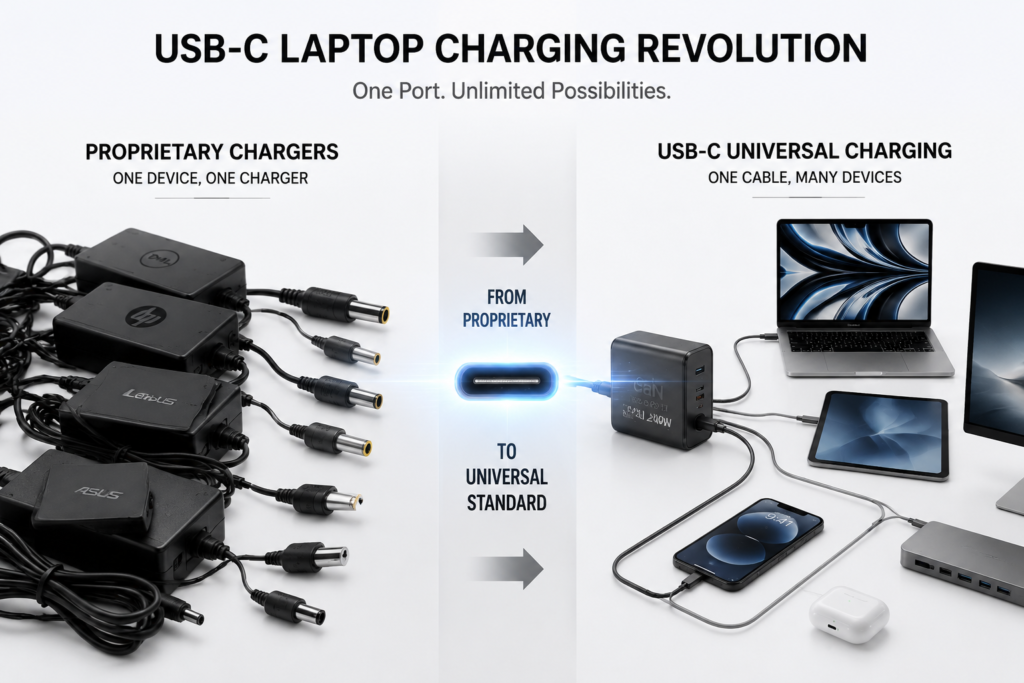
If you’ve bought a new laptop recently, you may have noticed a clear change: the charging port looks different. Those round or square proprietary charging ports of the past are being replaced by a small oval-shaped USB-C port. This isn’t just a random design change by manufacturers—it’s part of a years-long revolution in charging interfaces.
For decades, laptop charging ports were anything but standard—round, square, magnetic—each brand and even each model had its own “exclusive design.” This created a very real problem: if you carry a Lenovo laptop out and about, you can’t borrow a Dell charger; if you use an HP adapter, it won’t fit an Asus laptop. On a business trip, you’d have to pack several different chargers in your bag—heavy and space-consuming. And every time you replaced your computer, the old charger became electronic waste.
USB-C changed all that. Unlike older ports that could only charge, USB-C is a multi-talented all-in-one solution—reversible plug orientation, data transfer, video output, monitor connection, and device charging all in one. USB-C started with smartphones, then expanded to tablets, then to thin-and-light laptops, and now even high-performance gaming laptops and workstations have joined the USB-C charging club. You could say USB-C is becoming the “universal language” of laptops.
Chapter 2 Policy and Industry Drivers: USB-C Becomes the Standard
Beyond its technical merits, USB-C’s rapid adoption has been driven by another powerful force: policy and regulation.
In 2022, the European Union passed the Universal Charger Directive. The regulation rolled out in two phases: Phase 1 took effect on December 28, 2024, requiring 12 categories of small devices—including smartphones, tablets, and earphones—to adopt USB-C charging. Phase 2 took effect on April 28, 2026, bringing laptops into the mandatory scope.
Starting April 28, 2026, all new laptops sold in the EU market must be equipped with a USB-C charging port that supports the USB-PD (Power Delivery) protocol. Older models with only proprietary ports and no USB-C charging capability can no longer be sold. The regulation not only mandates a unified port but also requires manufacturers to offer the option of selling devices without a bundled charger—if you already have a USB-C charger, you don’t need to buy another one, saving you money and reducing electronic waste.
According to estimates, this policy saves EU consumers approximately €250 million annually in unnecessary charger purchases. More importantly, it drives industry-wide standardization—you no longer need to buy a separate charger for each device.
Meanwhile, Microsoft has been pushing in a similar direction. In May 2025, Microsoft updated its Windows Hardware Compatibility Program (WHCP) certification requirements, mandating that all Windows 11-certified laptops must support data transfer, charging, and display output on every USB-C port. In simple terms: no matter which USB-C port you plug into, it will work for charging, data, and video—no more guessing what each port can do.
Chapter 3 USB-C Interface Technical Basics
Most people are familiar with what a USB-C port looks like—that flat, symmetrical little port. But you may not know that this tiny port contains 24 metal pins.
These pins have distinct roles: some handle power delivery (VBUS and GND), some handle communication and negotiation (CC pins), and others handle high-speed data transfer (TX/RX). It’s precisely because of these many pins that USB-C can do so many things at once.
In short, one USB-C port does four things: charging—up to 240W via the USB PD protocol; data transfer—supporting USB 3.x and even USB4 at blazing speeds; video output—supporting DisplayPort Alt Mode for direct monitor connection; device expansion—connecting to docks, external drives, and monitors. One small port replaces several.
Chapter 4 USB Power Delivery Drives Laptop Charging Upgrades
The USB-C port is the “hardware,” but it needs “software” to manage how charging works. That software is the USB Power Delivery protocol, or USB PD.
USB PD 2.0 (2014) : The first PD version to support USB-C charging, with a maximum power of 100W. It was sufficient for thin-and-light and business laptops at the time, but gaming laptops and workstations needed more power.
USB PD 3.0 (2015) : Built on the 100W foundation with the addition of PPS (Programmable Power Supply). In plain terms, it enables finer voltage adjustment for more efficient charging with less heat.
USB PD 3.1 (2021) : The biggest upgrade yet. USB PD 3.1 splits power into two ranges—Standard Power Range (SPR) remains at 100W, while the new Extended Power Range (EPR) pushes the ceiling to 240W. What does 240W mean? 48V multiplied by 5A. That’s enough power to fuel high-performance gaming laptops and mobile workstations. From this point on, USB-C is no longer just for thin-and-light laptops—it covers every type of laptop.
USB PD 3.2 (2024) : Introduces finer voltage adjustment within the standard power range, allowing precise tuning between 9V and 20V in 0.1V steps for more accurate and efficient charging.
| Protocol Version | Release Year | Max Power | Core Feature |
|---|---|---|---|
| USB PD 2.0 | 2014 | 100 W | First universal standard for USB-C laptop charging |
| USB PD 3.0 | 2015 | 100 W | Added PPS for finer voltage adjustment & lower heat |
| USB PD 3.1 | 2021 | 240 W (EPR) | Covers gaming laptops and high-end workstations |
| USB PD 3.2 | 2024 | 240 W | 0.1V precise tuning for safer, more efficient charging |
Chapter 5 USB-C Laptop Charging Power Upgrade Roadmap
Different laptops have different power needs, and USB-C charging has evolved in stages to match them.
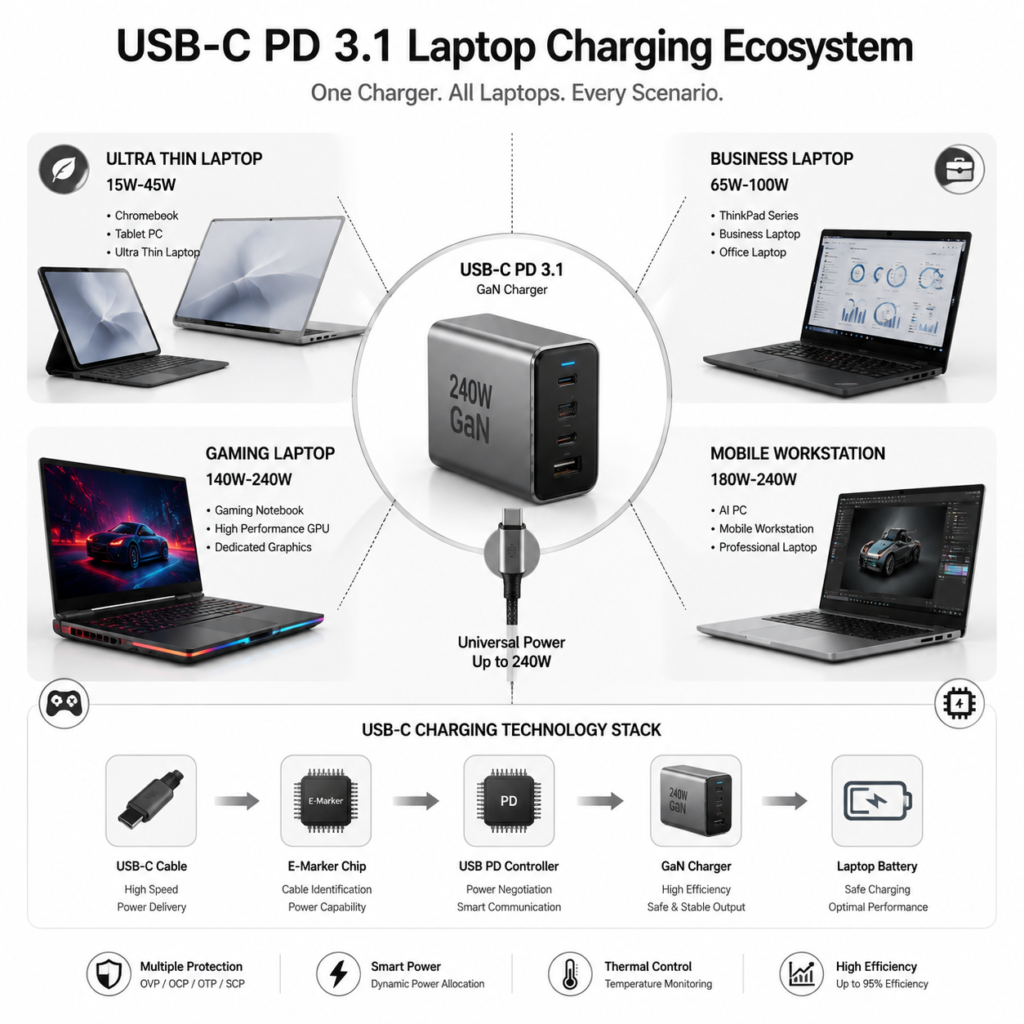
Low-power devices (15W–45W) : Chromebooks, tablets, and ultra-thin laptops. These low-power devices work fine with basic USB-C chargers.
Mainstream office laptops (65W–100W) : The most common range today. Most business laptops, ThinkPad series, and MacBook Air fall into this category. A 65W or 100W charger meets most daily office needs.
High-performance laptops (140W–240W) : Gaming laptops, mobile workstations, and AI PCs require more power. They need USB PD 3.1 EPR-compatible high-power chargers paired with high-spec cables featuring E-Marker认证 chips.
Chapter 6 Key Hardware Upgrades in USB-C Charging Systems
Protocols alone aren’t enough—hardware has to keep up too. Charging-related hardware has advanced rapidly in recent years.
Gallium Nitride (GaN) chargers: Older chargers used silicon, which made them bulky, heavy, and prone to heat. GaN is a new semiconductor material that enables chargers to operate at higher frequencies with better efficiency, less heat, and significantly smaller size. Today, 65W, 100W, and even 240W GaN chargers are common, often half the size of traditional chargers or even smaller.
USB-C cable upgrades: Not every USB-C cable can charge a laptop. Standard cables typically support only around 60W. To deliver 100W or 240W to a laptop, the cable must contain an E-Marker chip. This chip tells the charger and device: “Here’s how much power I can handle—don’t exceed it.” 240W charging requires high-spec EPR-supported cables.
PD controller chips: Both chargers and laptops contain dedicated PD controller chips that manage the entire charging negotiation process. Infineon’s EZ-PD series and Texas Instruments’ TPS series are among the current mainstream choices.
Chapter 7 Current USB-C Charging Ecosystem for Mainstream Laptops
Where do the major laptop brands stand today?
Apple MacBook: Apple was one of the earliest adopters of USB-C. Starting in 2015, MacBooks fully transitioned to USB-C charging. Today, MacBooks support both MagSafe magnetic charging and USB-C charging, giving users a choice. MacBooks sold in the EU no longer include a charger in the box.
Windows ecosystem: Major manufacturers like Lenovo, Dell, HP, and Asus have long since fully USB-C-ified their business laptops. High-end models are beginning to support PD 3.1, enabling 140W or even higher USB-C charging. And with a dock, a single USB-C cable can simultaneously connect a monitor, keyboard, mouse, and Ethernet—while charging the laptop. Truly “one cable for everything”.
Chapter 8 Practical User Guide
| Laptop Category | Typical Power Demand | Recommended Charger | Cable Requirement |
|---|---|---|---|
| Ultra-thin & Chromebooks | 15–45 W | 45–65 W PD charger | Standard 60W USB-C cable |
| Business & mainstream laptops | 65–100 W | 65–100 W PD charger | 100W E-Marker cable |
| Gaming & workstations | 140–240 W | 140W+ PD 3.1 EPR charger | 240W EPR high-power cable |
After all this, the question most people care about is: how do I actually use it?
How to choose a charger? Thin-and-light laptops need 45W to 65W; business laptops are best served by 65W to 100W; high-performance gaming laptops and workstations should use 140W or above. PD is backward-compatible—a 100W charger charging a 65W laptop will automatically output 65W, with no risk of damaging the device.
What to look for in a cable? Check the packaging for the wattage rating. A 60W cable will only charge thin-and-light laptops; to charge a high-performance laptop, you need a cable rated for 100W or 240W. Reputable cables will have E-Marker chip certification—look for that mark and you’re generally safe.
Common issues: Slow charging? Likely due to insufficient charger wattage or a cable that doesn’t support high power. Power drain under heavy load? When gaming laptops run demanding titles, total system power consumption may exceed charger input—it’s normal to lose battery while plugged in. No response when plugged in? Make sure your laptop supports USB PD charging—some older models require enabling the option in the BIOS.
Chapter 9 USB-C Charging Safety Systems
Many people worry: with such high power, is it safe?
USB-C charging has a comprehensive safety mechanism. Every time you plug in a charger, the device and charger have a “conversation”—the charger tells the device what power it can provide, the device tells the charger what it needs, and only after they agree does power start flowing. It’s like two people agreeing before taking action—no forced output.
In addition, chargers and laptops have multiple layers of protection: Over-Voltage Protection (cuts off if voltage is too high), Over-Current Protection (cuts off if current is too high), Over-Temperature Protection (reduces power if it gets too hot), and Short-Circuit Protection (shuts down if something goes wrong). As long as you’re using a reputable brand with proper safety certifications, safety is assured.
Chapter 10 Future Trends in USB-C Laptop Charging
USB-C charging continues to evolve.
240W is going mainstream: With the rollout of PD 3.1 EPR, 240W USB-C chargers will become increasingly common. Soon, gaming laptops, AI PCs, and workstations will all charge via USB-C—no more need for those bulky “brick” adapters.
USB-C is becoming more integrated: The USB-C port of the future will be the charging port, data port, video port, and expansion port all in one. One port does it all.
From “one device, one charger” to “one cable, many devices”: In the future, you’ll need just one USB-C charger and a few cables to power your laptop, phone, tablet, earphones, and everything else. No more packing a bag full of chargers for business trips.
Chapter 11 Conclusion
The USB-C charging update for laptops is far more than just a port swap. Behind it lies the leap in charging protocols from 100W to 240W, the application of new materials like gallium nitride, and the powerful push from EU regulations and industry standards.
For ordinary users, the benefits are real and tangible: one charger for all devices, less to carry when traveling, and no more frustration searching for the right charger. USB-C is redefining how laptops are powered—moving from “everyone does their own thing” to “universal compatibility,” from “one device, one charger” to “one cable, many uses”.
The era of USB-C laptop charging has fully arrived.