
Chapter 1 Introduction: Apple’s Charging Ecosystem Enters a New Era
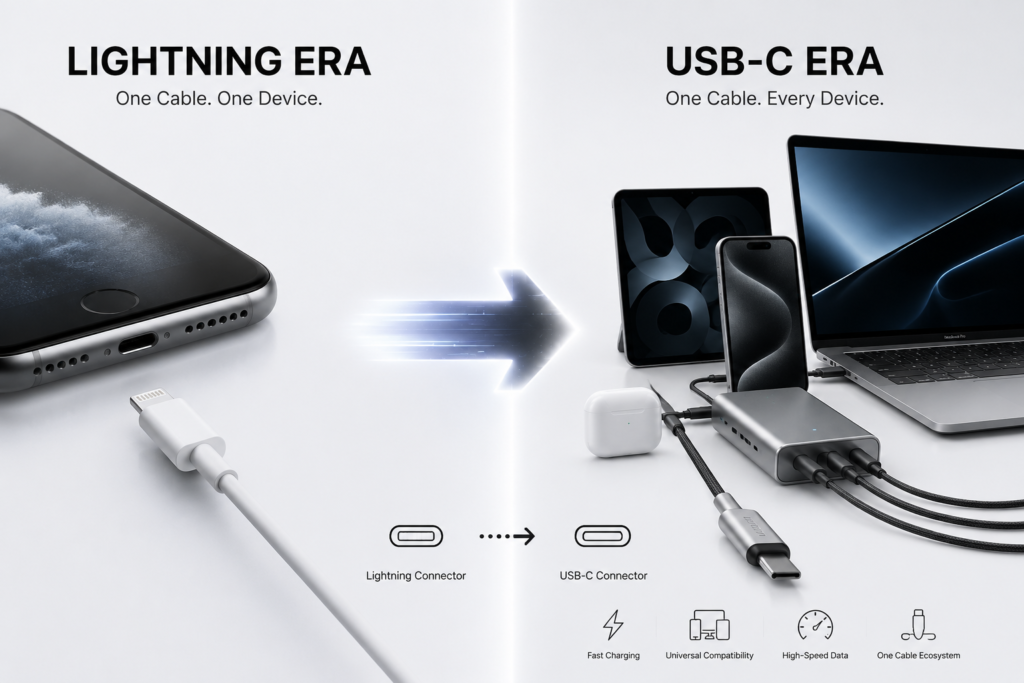
If you‘ve used several generations of Apple products, you’ve probably experienced this frustration: carrying multiple cables when you go out — a Lightning cable for your iPhone, a USB-C cable for your iPad, a MagSafe cable for your MacBook, and none of them are interchangeable. Those days of “cable chaos” are becoming history.
In 2023, Apple made a major decision with the iPhone 15 series — abandoning the Lightning connector that had been used for 11 years and switching entirely to USB-C. This change may look like just a different connector shape, but it signals Apple‘s charging ecosystem moving from “private and closed” to “open standards.”
This transformation wasn’t something Apple actively wanted to do — it was pushed by external pressure. In 2022, the EU passed a regulation requiring that by the end of 2024, all phones, tablets, cameras, and other devices sold in the EU must be equipped with a USB-C charging port. Faced with this mandatory requirement, Apple didn’t make a special version just for Europe — it simply switched all new iPhones globally to USB-C.
Beyond regulatory pressure, three other factors are driving this change: global charging standards are becoming more open, users are owning more Apple devices (iPhone, iPad, Mac, AirPods, Apple Watch) and want more convenient charging, and Apple itself has environmental goals to reduce electronic waste and carbon emissions from accessory production.
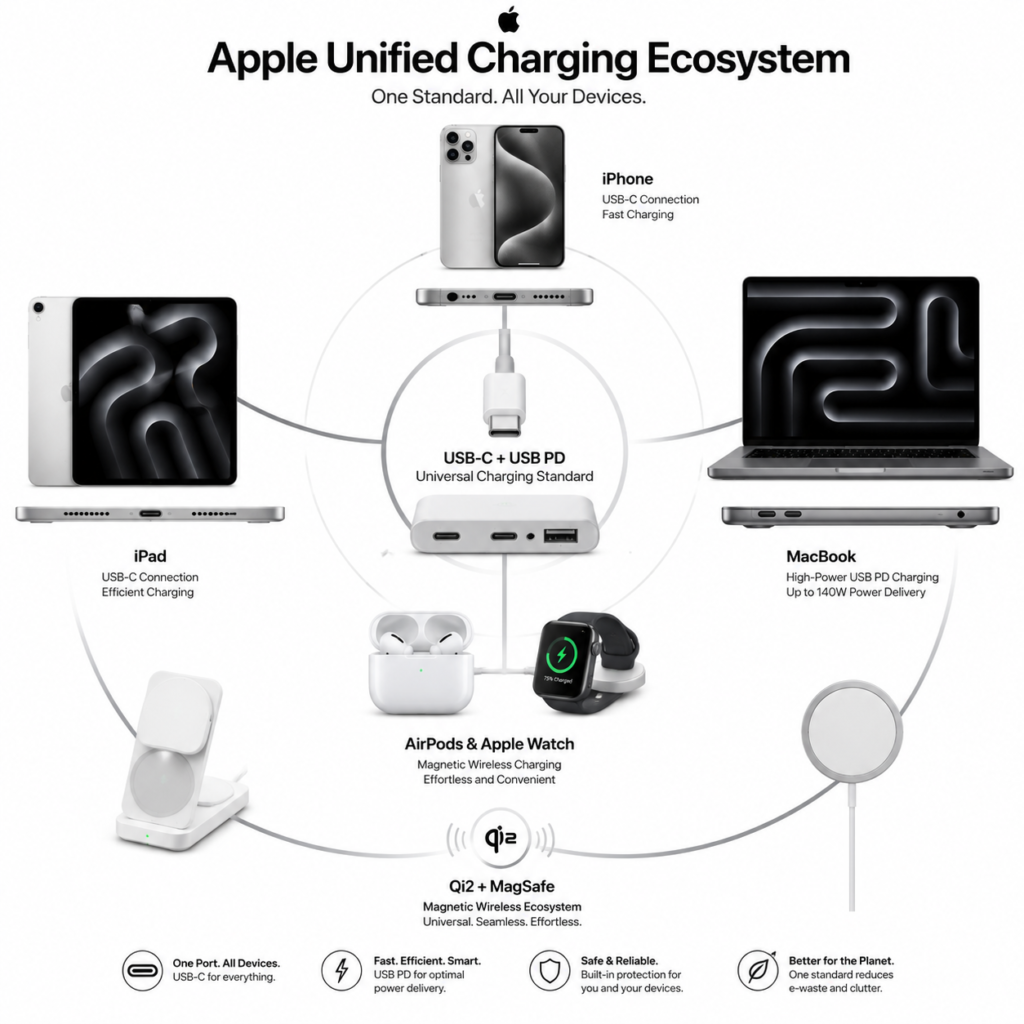
This charging ecosystem update can be summarized in three directions: wired charging is fully standardized (from Lightning to USB-C), wireless charging is opening up (from MagSafe exclusivity to Qi2 compatibility), and software and hardware are working together (iOS managing charging more intelligently). Let‘s walk through these three directions to see exactly what’s changing in Apple‘s charging ecosystem.
Chapter 2 The Evolution of Apple’s Charging Ecosystem
To understand how big this update is, we need to look at how Apple‘s charging connectors have evolved.
The 30-Pin Era (2003–2012) . The earliest iPods and the original iPhone used a wide, flat 30-pin connector. It was simple — just charging and data transfer, and not very fast. But for its time, it was quite advanced.
The Lightning Era (2012–2024) . In 2012, Apple introduced the Lightning connector with the iPhone 5. This small 8-pin connector was much smaller than the 30-pin, could be plugged in either way, and was very convenient. More importantly, Apple built a certification system called MFi (Made for iPhone/iPad) around Lightning — third-party manufacturers had to pass Apple‘s certification and pay fees to produce Lightning accessories. This system made Apple a lot of money, but it also made Lightning accessories much more expensive than regular cables. Lightning lasted 11 years, making it the longest-lived connector in Apple’s history.
The USB-C Transition (2023–present) . Apple wasn‘t new to USB-C. As early as 2015, the MacBook switched to USB-C; later, iPads followed. But the iPhone was the last holdout, finally making the switch in 2023.
The Evolution of MagSafe. Beyond wired connectors, Apple also had its own approach to wireless charging. MacBooks once had a magnetic charging port (MagSafe) that would detach if pulled, preventing the computer from being knocked over. In 2020, Apple brought the MagSafe concept to the iPhone — adding a ring of magnets on the back of the phone so wireless chargers would snap into place automatically. This design later became an important foundation for the global wireless charging standard Qi2.
| Interface Era | Time Span | Core Features | Representative Products |
|---|---|---|---|
| 30-Pin | 2003–2012 | Basic charging + data transfer; large form factor | Early iPod, iPhone 4S and earlier models |
| Lightning | 2012–2024 | Reversible plug; MFi certification system; limited to USB 2.0 speed | iPhone 5 to iPhone 14 series |
| USB-C | 2023–present | Universal open standard; high-speed data + high-power charging; cross-brand compatible | iPhone 15/16/17 series, iPad, full MacBook line |
Chapter 3 USB-C Becomes Apple‘s Universal Connector
Why Lightning Was Retired
Although Lightning was convenient, its technology couldn’t keep up. In terms of data bandwidth, Lightning stayed at USB 2.0 speeds — a maximum of 480Mbps. USB-C can reach 10Gbps or even faster — more than 20 times as fast. In terms of power, Lightning‘s power delivery capacity was limited, making it hard to support increasingly fast charging. Add to that the EU regulations, and Lightning’s retirement was inevitable.
Which Apple Products Have Switched to USB-C
So far, almost all of Apple‘s major products have switched or are switching to USB-C:
- iPhone: Starting with the iPhone 15 series, all models use USB-C
- iPad: Already fully switched to USB-C
- MacBook: The earliest Apple product to embrace USB-C
- AirPods: Charging cases updated to USB-C
- Apple Pencil, Magic Keyboard, Magic Mouse, Magic Trackpad, Siri Remote, and other accessories are following suit
However, while the connector is the same, the speed is not. The USB-C ports on standard iPhones (15/16/17) are only USB 2.0 (480Mbps) — just as slow as the old Lightning. Only the Pro models‘ USB-C ports support USB 3.0 (10Gbps) high-speed transfer.
What USB-C Brings
The most obvious benefit is that one cable charges all devices — iPhone, iPad, Mac, AirPods — all with the same USB-C cable. Chargers can also be shared, so you don‘t need a separate charger for each device. USB-C also supports high-speed data transfer, video output (connecting to displays), peripheral expansion (connecting USB drives, hard drives, etc.), and cross-brand compatibility — an Android phone charger can also charge your iPhone.
Chapter 4 Apple’s USB PD Fast Charging System Upgrade
Why USB Power Delivery
Apple didn‘t create its own proprietary fast-charging protocol — it chose the industry-standard USB Power Delivery (USB PD) , an international standard set by the USB-IF organization. The benefits are that it‘s open, cross-brand compatible, and future-proof — any brand’s charger that supports USB PD can fast-charge Apple devices.
Charging Power by Product
Different Apple devices support different charging power:
iPhone: Starting from 20W and gradually increasing. The iPhone 17 series supports up to 40W wired fast charging. With a 40W charger, it can reach 50% in just 20 minutes. In real-world use, the standard model typically runs at 26-27W, while the Pro models can go higher. The iPhone 17 Air, due to its thin design, maxes out at 20W.
iPad: Supports 20W to 45W depending on the model.
MacBook Air: Supports 30W, 35W, or 70W.
MacBook Pro: 13/14-inch supports 67W, 16-inch supports 140W (USB PD 3.1 EPR).
| Device Category | Max Wired Charging Power | Key Notes |
|---|---|---|
| Standard iPhone | 27–40 W | 50% charge in ~20 minutes with 40W charger; USB 2.0 data speed |
| iPhone Pro series | 30–40 W | Supports USB 3.0 (10Gbps) high-speed data transfer via USB-C |
| iPad series | 20–45 W | Power varies by model; all models adopt USB-C port |
| MacBook Air | 30–70 W | Full compatibility with universal USB PD chargers |
| MacBook Pro 14″ | 67–96 W | Supports fast charging with original power adapter |
| MacBook Pro 16″ | 140 W | Adopts USB PD 3.1 EPR high-power standard |
| AirPods charging case | — | Supports USB-C wired, MagSafe and Qi wireless charging |
| Apple Watch | — | Magnetic fast charging; 50% charge in ~30 mins (Series 7 and later) |
How USB PD Works
Simply put, the charger and device have a “conversation”: the charger first tells the device “what voltages I can provide,” the device then tells the charger “which one I want,” and once they agree, stable charging begins. The process is: Connect → Charger reports capabilities → Device requests → Charger accepts → Power delivery begins.
This involves a few technical terms: PDO (fixed voltage options the charger can provide), PPS (Programmable Power Supply, which Apple supports to a limited extent), and the E-Marker chip (the cable‘s “ID card” that tells the device how much power the cable can handle).
Chapter 5 Apple’s Wireless Charging Ecosystem Upgrade
The Development of Qi Wireless Charging
Wireless charging started with a standard called Qi (pronounced “chee”), which was very slow — only 5W or 7.5W. It later upgraded to Qi 1.3, then Qi2 — the biggest change in this version was incorporating Apple‘s MagSafe magnetic design. Then came Qi2.2 (also called “Qi2 25W”), which increased power from 15W to 25W.
MagSafe’s Technical Architecture
MagSafe looks like a simple round charger, but there‘s a lot inside: a ring of magnets for automatic alignment, a wireless charging coil for power transfer, an NFC chip for device identification, plus power control and temperature management systems for safe charging, and software communication so the phone and charger can “talk” to each other.
The Benefits of MagSafe
Anyone who‘s used MagSafe knows its biggest advantage is that it snaps into place automatically — no fiddling to get the alignment right. This precise alignment reduces energy loss and improves charging stability. The magnetic design has also spawned a whole ecosystem of accessories — car mounts, desk stands, power banks — all much more convenient to use.
What Qi2 Means for Apple‘s Ecosystem
Apple contributed its MagSafe technology to the Qi2 standard, which means Android phones can now use magnetic charging similar to MagSafe. In turn, Apple devices can use any Qi2-certified third-party charger for full-speed wireless charging. This is good for users — more choices and lower prices.
Chapter 6 Apple Watch and AirPods Charging Ecosystem
Apple Watch Magnetic Charging
The Apple Watch has always used magnetic charging — bring the charger near the back of the watch, and the magnets snap it into place. Starting with the Series 7, Apple Watch supports fast charging — with the USB-C Magnetic Fast Charging Cable, it can reach 50% in about 30 minutes. Apple Watch Series 7 and later, as well as Apple Watch Ultra, support fast charging.
AirPods Charging System Upgrade
AirPods now support multiple charging methods. Current AirPods charging cases can charge via USB-C wired connection, or with MagSafe or Qi wireless charging pads. Some models can even charge with an Apple Watch charger. In other words, whatever charger you have handy, chances are it can power up your AirPods.
Find My and Smart Charging Cases
AirPods cases that support Find My have location tracking — if you lose them, you can find them with your phone. Some models also have a speaker that can play a sound, and models with UWB precision finding can even tell you exactly how many meters away the case is.
Chapter 7 Apple‘s Official Chargers and Cables
Official USB-C Power Adapters
Apple’s current lineup of USB-C chargers includes:
- 20W: For iPhones and basic iPads
- 35W Dual USB-C: Charges two devices at once
- 70W: For MacBook Air and some MacBook Pro models
- 96W: For 14-inch MacBook Pro
- 140W: For 16-inch MacBook Pro
In addition, Apple launched a 40W Dynamic Power Adapter (up to 60W) in 2025, priced at 329 RMB. It dynamically adjusts power output based on the device‘s needs, and with the iPhone 17 it can reach 50% in 20 minutes. This charger also supports the latest USB PD 3.2 AVS protocol, making it Apple’s first charger to support this protocol.
The Rise of GaN Technology
More and more chargers are using GaN (gallium nitride) technology. Compared to traditional silicon-based chargers, GaN chargers are smaller, more efficient, and generate less heat. Many third-party GaN chargers are much more compact than Apple‘s original “white brick” chargers, making them easier to carry.
USB-C Cable Types
USB-C cables come in several varieties:
- USB 2.0: Charging and slow data transfer only (480Mbps)
- USB 5Gbps / 10Gbps: High-speed data transfer
- USB4 / Thunderbolt: Ultra-high-speed transfer up to 40Gbps, plus video output
The E-Marker Chip
Good USB-C cables contain an E-Marker chip — the cable’s “ID card.” It tells the charger and device: how much power this cable can handle (60W, 100W, or 240W) and what data speeds it supports. Without this chip, both charging power and data speeds are limited.
Chapter 8 Apple‘s Intelligent Charging Management
Optimized Battery Charging
The iPhone has an “Optimized Battery Charging” feature that learns your charging habits. For example, if you usually charge overnight and unplug in the morning, the phone will charge to 80% and then pause, only finishing the charge to 100% just before you wake up. This reduces the time the battery spends at 100%, slowing battery aging.
Battery Health Management
In the iPhone’s “Battery” settings, you can see Maximum Capacity (how much health your battery has left) and Cycle Count (how many charge/discharge cycles it‘s been through). The system also performs peak performance management based on battery condition — as the battery ages, the phone may slightly reduce performance to prevent unexpected shutdowns. There’s also temperature protection — charging pauses if it gets too hot or too cold.
System-Level Charging Optimization
iOS does a lot of invisible work during charging: dynamic power management (adjusting charging speed based on temperature), thermal control (reducing power when overheated), fault protection (stopping charging if issues are detected), and charging status visibility (letting you see how much is charged and how long is left).
Chapter 9 Apple Charging Accessory Ecosystem
MagSafe Accessory Ecosystem
Around MagSafe, Apple and third-party manufacturers have developed a wide range of accessories: magnetic chargers, magnetic power banks, magnetic card holders (attached to the back of the phone as a wallet), desk charging stands, and car magnetic mounts — you just place your phone on the mount and it snaps into place and starts charging.
Third-Party Ecosystem Growth
The third-party accessories market is also growing rapidly. MFi-certified accessories ensure compatibility and safety; Qi2-certified wireless chargers can charge iPhones at full wireless speed; USB-IF certified cables and chargers ensure USB PD protocol works properly. GaN multi-port chargers are also becoming increasingly popular — one charger can power your phone, tablet, and laptop simultaneously.
How to Choose Charging Accessories
For regular users, here are a few things to look for: protocol (does it support USB PD?), power (is it enough for your device?), certification (does it have MFi, Qi2, or other certifications?), cable specification (does the cable support fast charging?), and brand reputation (stick with well-known brands).
Chapter 10 EU Regulations and Industry Standards
USB-C Unified Connector Regulation
In 2022, the EU passed the Common Charger Directive, amending the Radio Equipment Directive. Phase 1 (from December 28, 2024) : phones, tablets, cameras, headphones, and 13 other categories of devices must be equipped with USB-C. Phase 2 (from April 28, 2026) : laptops are also included.
For Apple, this means all iPhones, iPads, and Macs sold in the EU must have USB-C. MagSafe can remain, but it cannot be the only charging method — USB-C must also be able to charge.
Packaging and Sales Rules
The new rules also require that consumers have the option to buy new devices without a charger. 2026 MacBooks sold in EU countries no longer include a charger in the box.
Environmental Impact
The EU estimates that unifying the charging connector will reduce over 1,000 tons of electronic waste per year. Because chargers and cables can be reused, you don‘t need a new set every time you buy a new device. For consumers, it also saves money on repeated purchases.
Chapter 11 Industry Impact of Apple’s Charging Ecosystem
For Consumers
The most direct benefit is fewer cables — one USB-C cable for everything. Accessory costs are lower — you don‘t have to buy Apple original; third-party USB-C chargers are much cheaper. Chargers can be shared across devices — the high-power charger for your MacBook can also fast-charge your iPhone.
For Third-Party Manufacturers
USB-C is an open standard — any manufacturer can produce compatible accessories, so the market has expanded. Qi2 wireless charging also allows more manufacturers to enter the Apple wireless charging accessories market. Competition in GaN chargers is intensifying, giving consumers more choices.
For the Industry as a Whole
Apple’s shift has helped USB PD become the mainstream charging protocol and has promoted the adoption of the Qi2 wireless charging standard. A more open, more unified charging ecosystem is good for the entire consumer electronics industry.
Chapter 12 Future Trends in Apple‘s Charging Ecosystem
USB-C Ecosystem Will Further Improve
More Apple accessories will switch to USB-C in the future, compatibility will keep improving, and we’ll eventually achieve true “one cable for everything.”
Wireless Charging Will Continue to Upgrade
The Qi2 ecosystem will continue to expand, magnetic accessories will become more common, and wireless charging efficiency will keep improving.
Intelligent Energy Management
Future charging will be smarter — AI-powered charging strategies, intelligent power sharing between devices (e.g., once your MacBook is full, power is automatically redirected to your iPhone), and further battery life optimization.
Deeper Apple Ecosystem Integration
iPhone, iPad, Mac, Apple Watch, AirPods, Vision Pro, HomePod — all Apple devices will eventually form a unified energy management ecosystem — charging, power usage, and power saving all working together.
Chapter 13 Conclusion
Key Outcomes of This Update
Apple‘s charging ecosystem update can be summarized in four key outcomes:
First, USB-C unification is complete. The Lightning era is definitively over — all of Apple’s products now use the same connector.
Second, an open wired fast-charging system built on USB PD. At the same time, MagSafe remains as a differentiator — standard for wired, distinctive for wireless.
Third, the Qi2 magnetic wireless charging ecosystem has been advanced. Apple contributed its MagSafe technology to the industry standard, promoting cross-brand compatibility.
Fourth, hardware and software work together. Charging is faster, batteries are healthier, and the multi-device experience is better.
What This Means for Users and the Industry
For regular users, the most direct benefit is simpler charging — fewer cables, shared chargers, more choices. You no longer need a separate charging setup for each device.
For the industry, Apple moving from “closed and private” to “open standards” has helped USB-C, USB PD, and Qi2 become industry-wide standards. While maintaining its own ecosystem advantages, Apple is gradually integrating into global open standards, laying the foundation for the future development of charging technology.
From Lightning to USB-C, from MagSafe exclusivity to Qi2 openness — this transformation in Apple‘s charging ecosystem is making every user’s charging experience simpler and more convenient.