
You’re rushing out the door and glance at your phone: 10% battery left. Plug it into a fast charger for 15 minutes, and you’re back to 70% with enough juice to get through the day. On an EV road trip? Pull up to a fast charger, grab a coffee, and 20 minutes later you’re ready to hit the highway again. Fast charging has become a non-negotiable convenience in modern life—but a lot of people still have the same nagging worry: is fast charging actually safe? Will it ruin my battery? Can a high-wattage charger burn out my small gadgets?
In this guide, we break down fast charging safety across the devices you use every day, explain how charging protocols protect you, separate myth from fact, and give actionable tips to preserve battery life. By the end, you’ll be able to use fast charging with total confidence.
Short Answer: Yes, Compliant Fast Charging Is Generally Safe (With Caveats)
Let’s get the big worry out of the way first: as long as you use name-brand devices paired with certified chargers, cables, or charging stations, fast charging is safe for regular use. Most charging incidents do not stem from fast charging technology itself—they are caused by cheap knockoff accessories, overheating environments, worn-out batteries, or unsafe charging habits.
That said, not all fast charging is the same. A 25W phone charger and a 150kW EV DC fast charger operate on completely different scales, with different safety boundaries. The guidance in this article applies to common consumer use cases: phones, tablets, laptops, power banks, wireless earbuds, electric toothbrushes, and mass-market passenger EVs. It does not apply to modified batteries, unregulated “trick” cables, uncertified private charging stations, or repaired battery packs that have not passed safety testing. These carry far higher risk.
How Fast Charging Actually Works
A lot of fear around fast charging comes from not understanding how it works. Once you see the built-in safeguards, the safety logic becomes clear.
The basics: voltage, current, and power
Think of charging a battery like filling a bucket with water. To fill the bucket faster, you can either turn up the water flow (that’s current, measured in amps/A) or increase the water pressure (that’s voltage, measured in volts/V). Multiply the two, and you get power (measured in watts/W)—the higher the wattage, the faster the charge.
This applies to every fast-charging device: phones typically range from 20W to 120W, laptops from 45W to 140W, and EV DC fast chargers from 50kW to 350kW (1kW = 1,000W).
How charging protocols keep you safe
A fast charging protocol is the shared “language” between charger and device. Before any electricity flows, both sides negotiate a safe power level. This is not a one-way push from the charger—it is always controlled by the device.
USB PD (Power Delivery), the most universal standard, follows this exact sequence:
- The charger sends a Source Capability Message listing all available power output levels (called PDOs, or Power Delivery Objects).
- The device reviews the options and sends back a Request Message, selecting the voltage and current that match its maximum safe rating.
- The charger acknowledges the request and only outputs the negotiated power level.
Crucially: USB PD does not push power into a device. The device is always in control of how much power it draws, and the charger never forces extra energy. Proprietary protocols like Qualcomm Quick Charge, Samsung Super Fast Charging, and OnePlus Warp Charge follow the same core principle—they just support higher speeds with matching brand hardware.
4 layers of built-in safety protection
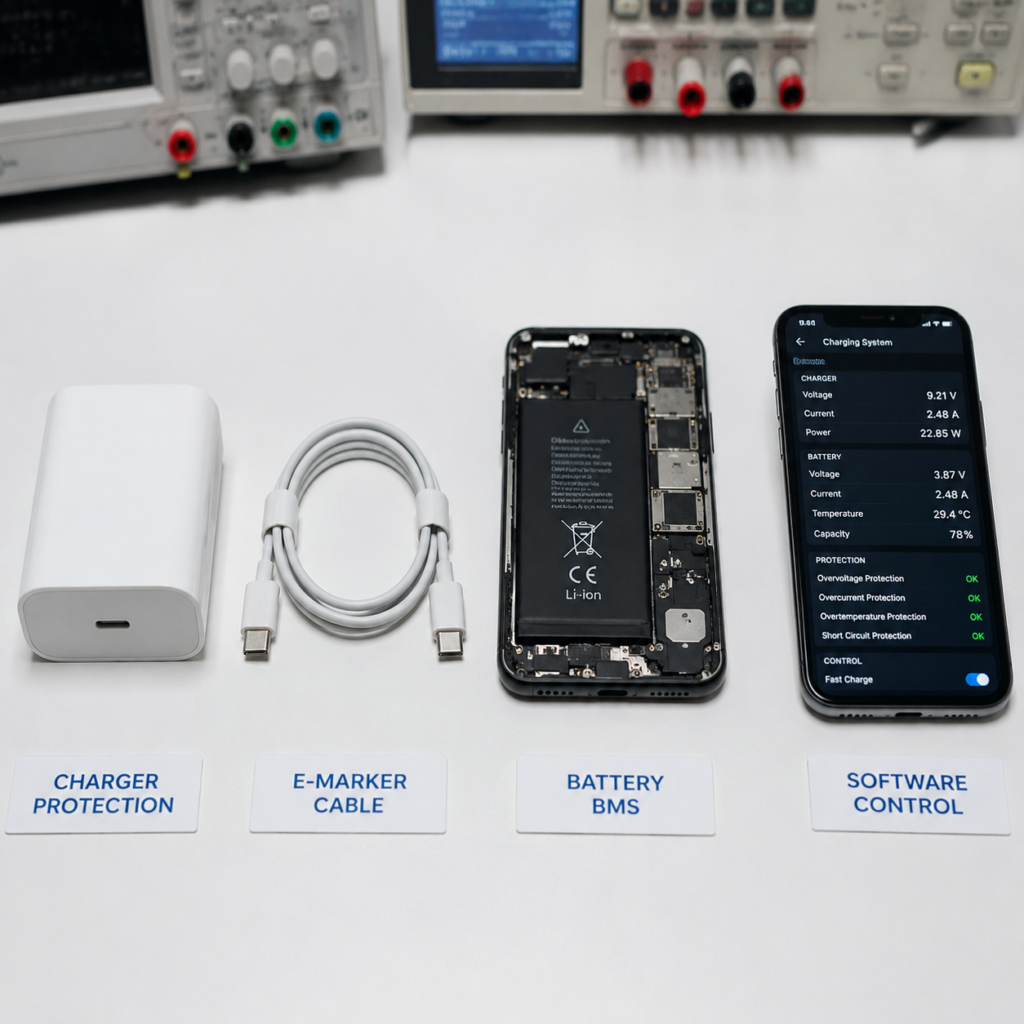
A properly designed fast charging system has four overlapping lines of defense:
- Charger-side protection: Certified chargers include over-voltage, over-current, short-circuit, and over-temperature protection. If anything goes wrong, they cut power immediately.
- Cable identification: High-power charging requires properly rated cables. USB-C cables default to 3A current (supporting up to 60W at 20V). For power levels above 60W (such as 100W at 20V/5A), an electronically marked (E-Marker) cable is required to confirm it can safely carry the higher current and prevent overheating.
- Battery Management System (BMS): Every phone, laptop, and EV has a BMS—the battery’s watchdog. It monitors voltage, current, temperature, and charge state 24/7, adjusting power input on the fly to stay within safe limits.
- Software safeguards: Most phones slow charging after 80%, use optimized overnight charging to finish right before you wake up, and let you set custom charge limits. All reduce long-term battery stress.
Does Fast Charging Damage Battery Life? It Depends on Temperature
After safety, the most common question is: will fast charging shorten my battery’s lifespan? The answer is: not meaningfully—when used correctly. Temperature, not charging speed, is the real deciding factor.
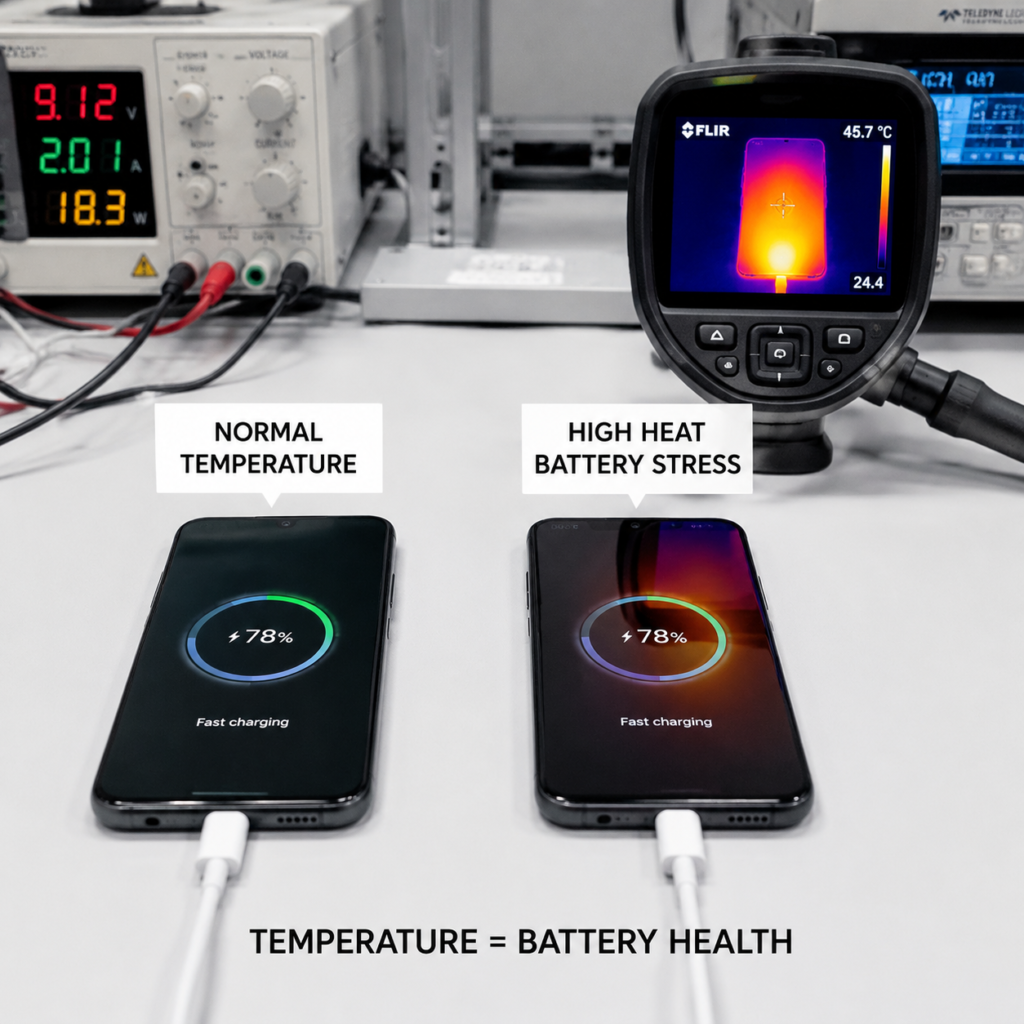
Fast charging uses higher power, so it naturally generates more heat. If a device has poor thermal management, sustained high heat will speed up degradation of the battery’s internal materials. But compliant fast charging systems use power throttling, staged charging, and temporary pauses to keep temperatures in a safe range. Under these conditions, fast charging has a minimal impact on battery life.
Lithium-ion batteries naturally degrade over time from charge cycles, sustained high temperatures, and calendar aging. Most modern smartphone batteries are engineered to retain approximately 80% of their original capacity after 300–500 full charge cycles, which typically translates to 2–3 years of regular use.
In fact, many daily habits are far worse for your battery than fast charging:
- Fast charging in temperatures above 104°F (40°C) or below 32°F (0°C). Cold temps reduce chemical activity and can cause damaging lithium plating; high heat accelerates internal wear.
- Running heavy apps (3D games, 4K editing) while fast charging. Processing heat plus charging heat stack up, doubling battery stress.
- Leaving your device plugged in at 100% 24/7, regularly draining the battery to near zero, or storing it dead for weeks. All accelerate wear.
- Continuing to use a swollen, leaking, or rapidly draining battery with fast charging. This is not just bad for lifespan—it is a safety hazard.
How to use fast charging while preserving battery life
Batteries are consumable parts—some degradation over time is normal. To extend lifespan as much as possible:
- Turn on the 80% or 90% charge limit for daily use. Only charge to 100% when you need extra runtime for travel.
- Avoid fast charging during extreme heat or while running high-power apps.
- For EVs used for daily commutes, set the charge limit to 80–90%, and top up to 100% before long drives. Follow your manufacturer’s guidance on occasional slow charging to balance battery cells.
The 5 Biggest Factors Affecting Charging Safety
With so much information available, it can be hard to know what matters most. Ranked by impact, these are the factors that actually determine how safe your charging setup is:
- Battery and ambient temperature – The single biggest risk factor. Excess heat damages both battery health and safety.
- Charger build quality and certification – Uncertified cheap chargers skip safety circuits and are the leading cause of charging incidents.
- Battery condition and age – Old, swollen, or damaged batteries have higher internal resistance and generate more heat during fast charging.
- Cable power rating and integrity – A frayed or underrated cable can overheat, even with a good charger.
- Charging speed itself – Higher power adds mild stress, but only when combined with the factors above. On its own, compliant fast charging is low risk.
Common Fast Charging Standards Explained
You will see names like PD, PPS, QC, and SuperVOOC on chargers and boxes. Here is what the most common standards actually mean:
| Protocol | Maximum Power | Primary Use Cases |
|---|---|---|
| USB PD 3.0/3.1 | Up to 240W | Universal standard for phones, laptops, tablets, and accessories |
| PPS (Programmable Power Supply) | Up to 100W | Fine-tuned voltage for Samsung, Google, and modern Android devices |
| Qualcomm Quick Charge 5 | Up to 100W | Wide compatibility across Android smartphones |
| OPPO SuperVOOC / OnePlus Warp Charge | Up to 150W | Brand-exclusive ultra-fast charging for select Android phones |
| Qi2 / MagSafe | Up to 25W | Standardized wireless charging for phones and small accessories |
All mainstream standards follow the same negotiation rule: the device requests power, the charger delivers only what is agreed. Mixing compliant gear will only slow down charging, never damage your device.
4 Common Fast Charging Safety Mistakes to Avoid
If compliant fast charging is safe, why do charging accidents happen? Almost always, one of these four mistakes is involved.
1. Using uncertified, cheap accessories (the #1 risk)
No-name $5 chargers and $2 cables are the single biggest cause of charging incidents. They often skip safety circuits, use fake certification logos, and exaggerate their power ratings.
How to check compliance:
- Phone/laptop chargers: Look for USB-IF PD certification, UL listing, IEC 62368-1 compliance, plus regional marks (FCC for the US, CE for the EU/UK).
- Power banks: Look for IEC 62133, UL 2054 certification, and a clear watt-hour (Wh) rating. Avoid products that only list mAh without voltage or Wh.
- EV chargers: Look for UL 2202, IEC 61851 certification. For public charging, stick to established, reputable operators.
2. Charging a damaged or worn-out battery
As batteries age, internal resistance rises, meaning they generate more heat during fast charging. Stop using fast charging and get your battery inspected immediately if you notice:
- A swollen battery (bulging back panel, wobbling laptop base)
- Leaking fluid or a sharp chemical smell
- Rapid capacity loss
- Excessive heat during charging (too hot to hold comfortably)
3. Bad charging environments and habits
Where you charge has a huge impact on safety. Never charge devices:
- In a hot car in direct sun, on a summer windowsill, or other high-heat areas
- Under blankets, couch cushions, pillows, or enclosed spaces that trap heat
- Near paper, clothes, curtains, or other flammable materials
- In steamy bathrooms or near sinks (risk of short circuit)
If your charging port is wet, dusty, loose, discolored, or sparks when you plug in, stop charging immediately and clean or repair it before use.
4. Mismatched cables and protocols
A 100W charger will not deliver 100W through an old 2A cable—you will get slow charging, and the cable could overheat from being pushed past its limit. For high-power fast charging, always use a cable rated for at least the power level you need.
Mixing proprietary protocols from different brands is safe, it just slows charging down. Never use uncertified “voltage trick” adapters or modified cables that force higher power output—these are extremely dangerous.
GaN Chargers and the Future of Safe Fast Charging
Gallium Nitride (GaN) has become the standard for modern high-power chargers, and for good reason: it improves both efficiency and safety at high wattages.
Why GaN chargers are safer at high power
Traditional chargers use silicon MOSFETs as their main switching components. Silicon has higher switching losses at high frequencies, which means more wasted energy and more heat. GaN is a wide-bandgap semiconductor that switches much faster, with lower conduction and switching losses.
| Metric | Traditional Silicon Charger | GaN (Gallium Nitride) Charger |
|---|---|---|
| Typical Efficiency | 90–93% | 93–96% |
| Physical Size | Larger, bulkier case | 30–50% smaller and lighter |
| Heat Generation | Higher switching losses → more heat | Lower switching losses → cooler operation |
| High-Power Suitability | Less ideal for compact high-wattage designs | Excellent for high-power, small-form-factor chargers |
This does not mean every GaN charger is automatically safe. Build quality, circuit design, and certifications still matter most. A cheap no-name GaN charger can be just as dangerous as a cheap silicon charger. But when designed properly, GaN technology delivers more power in a smaller package with less heat—an improvement for both convenience and safety.
Other advancing fast charging technologies
- 800V EV platforms: Higher voltage means lower current at the same power level, which reduces heat loss in cables and battery packs. Paired with liquid-cooled connectors and advanced thermal management, 800V systems charge faster and run cooler than older 400V designs. Passenger EV charging power varies widely depending on battery voltage, temperature, state of charge, and vehicle limits.
- Smart charging and pre-conditioning: Features like optimized overnight charging, custom charge limits, and battery pre-heating/pre-cooling before fast charging use software to reduce thermal stress and extend battery life.
7 Common Fast Charging Myths, Debunked
Misinformation about fast charging is everywhere. Let’s bust the most persistent myths.
- Myth: Fast charging will drastically shorten your battery life.Fact: Not when used correctly. Fast charging only impacts battery life via excess heat. If your device has good thermal management and you avoid charging in extreme temperatures, the effect is minimal—far smaller than the damage from constant 100% charge or sustained high heat.
- Myth: A 100W charger will fry a 20W phone.Fact: No—for compliant chargers. Certified USB PD, QC, or official standard chargers negotiate power first. If your phone only supports 20W, the charger will only output up to 20W. It will never force extra power into the device.Important caveat: This only applies to fully compliant, certified chargers. Counterfeit or uncertified chargers may skip negotiation and output unsafe voltage, posing a real risk of damage.
- Myth: You can’t mix fast chargers from different brands.Fact: You absolutely can. All compliant chargers support basic universal protocols. At worst, you will not get the fastest possible speed, but there is no safety risk.
- Myth: If your device gets warm during fast charging, it’s dangerous.Fact: Mild warmth is totally normal—higher power naturally generates more heat. If it is just lukewarm with no unusual smells or sounds, there is nothing to worry about. If it is too hot to hold, smells like burning, smokes, or has a swollen battery, unplug immediately.
- Myth: Charging overnight causes overcharging and fire.Fact: No. Compliant phones and laptops have built-in overcharge protection and stop charging once they hit 100%. That said, leaving them plugged in at 100% long-term, especially in hot enclosed spaces, will speed up battery degradation.
- Myth: Fast charging all the time will ruin your EV battery.Fact: No. EVs are designed to handle regular fast charging as part of normal use. Using reputable chargers will not cause excessive damage. Frequent fast charging in extreme heat, charging to 100% every time, and extremely high usage frequency can add minor extra wear over time.
- Myth: If a product has a certification logo, it’s definitely safe.Fact: Not always. Some sellers print fake certification logos on cheap products. Always buy from reputable retailers, and verify certification numbers on the issuing body’s official website when in doubt.
Device-Specific Fast Charging Guide
Different devices have different needs. Find yours below for tailored advice.
Phones and Tablets
- Use OEM or certified third-party PD chargers. You do not need a higher-wattage charger than your phone supports—it will not charge faster, and it wastes money.
- Avoid fast charging while gaming, editing video, or in very hot weather.
- Turn on optimized charging or 80% charge limit if available—this is the easiest way to extend battery life.
Laptops
- For USB-C laptops, use a PD charger and cable that matches or exceeds your laptop’s power rating (e.g., a 65W laptop needs a 65W+ PD charger).
- A higher-wattage charger will not damage your laptop—it still negotiates to the correct power level. A lower-wattage charger may not keep up with heavy use, and your battery could drain while you work.
Power Banks and Small Accessories
- Power banks must be carried in carry-on luggage, never checked bags. Most airlines allow up to 100Wh without pre-approval; 100–160Wh requires prior airline approval.
- Earbuds, electric toothbrushes, and other low-power devices will only draw standard charging power even from a fast charger. They will not trigger fast charging, so there is no added risk.
- If a power bank is swollen, cracked, or gets extremely hot, stop using it immediately and take it to a battery recycling center.
EVs
- For daily commuting, set the charge limit to 80–90%, and only charge to 100% before long trips.
- Pre-condition the battery to optimal temperature before fast charging in very cold or very hot weather.
- Avoid leaving your EV parked at 100% in hot weather for extended periods.
Fast Charging Safety Checklist
Save this simple checklist for reference whenever you buy new charging gear or troubleshoot a setup.
Buying Guide
- Chargers: Stick to OEM or well-known third-party brands. Look for USB-IF PD, UL, IEC 62368-1, and regional safety marks.
- Cables: Check the current and power rating. For 60W+ USB-C charging, use clearly labeled E-Marker cables.
- Power banks: Look for UL 2054, IEC 62133 certification, and a clear Wh rating.
- EV chargers: Use public chargers from established operators. For home installation, hire a licensed electrician.
Strict Do Nots
- Do not charge in extreme heat/cold, enclosed spaces, damp areas, or near flammable materials.
- Do not use frayed cables, water-damaged chargers, loose outlets, or discolored charging ports.
- Do not fast charge a swollen, smelly, or rapidly draining battery.
- Do not use modified cables or voltage trick adapters to force faster charging.
10-Second Safety Check (every fast charge)
- Normal: Device and charger are lukewarm, no unusual smells or sounds, port is clean and undamaged, charging slows as battery fills.
- Abnormal: Too hot to hold, burning smell, smoke, sparking, blackened port, swollen device. Unplug immediately.
Emergency Response
- Small devices: Unplug first, move to a non-flammable surface with airflow, then contact official support. In case of fire or heavy smoke, evacuate, call emergency services, and do not use water.
- EVs: Press the charger emergency stop, move at least 30 feet away, and contact the charging operator, roadside assistance, or emergency services. Do not forcefully remove the plug or disassemble the battery.
Fast Charging FAQ
- Is it safe to use third-party PD fast chargers with iPhones? Yes, as long as they are certified USB PD products from reputable brands, paired with good quality cables. For data and accessory compatibility, use USB-IF certified USB-C cables.
- Will a 100W fast charger damage a 20W phone? No, if the charger is fully compliant with official standards. The phone only draws the power it supports. Uncertified counterfeit chargers are the real risk.
- Can I use a fast charger for wireless earbuds or electric toothbrushes? Compliant fast chargers will automatically drop to standard charging power, so it is usually safe. We do not recommend uncertified no-name chargers for low-power devices.
- Can I mix fast charging cables with regular cables? For low-power charging, yes. For high-power fast charging, you need a cable with a matching power/current rating, otherwise you will get slow charging or potential overheating.
- Will fast charging my EV void the warranty? Normal fast charging with reputable facilities is part of an EV’s designed use case, so it usually will not void the warranty. Always check your manufacturer’s warranty terms to be sure.
- Can I bring a fast charging power bank on a plane? Power banks under 100Wh are generally allowed in carry-on luggage; 100–160Wh requires prior airline approval. They are never allowed in checked bags. Confirm with your airline before travel.
- Is wireless fast charging safer than wired? Certified wireless fast charging has the same full set of safety protections. Because wireless charging is less efficient, it can generate more heat. Always ensure good airflow around the device and charger.
- Is it safe to leave a charger plugged in all the time? Certified chargers have very low standby power and built-in protection, so short-term use is fine. For long periods of inactivity, especially during thunderstorms or in hot weather, it is better to unplug.
Final Thought: 5 Golden Rules for Safe Fast Charging
Fast charging is not a dangerous technology to fear. Safety does not depend on how fast the charge is—it depends on whether your gear is compliant and you are using it correctly. Remember these 5 rules, and you can charge fast with total peace of mind:
- Buy certified, reputable gear: Stick to name brands, trusted retailers, and products with verifiable certifications. Skip the no-name cheap options.
- Control the temperature: Avoid charging in extreme heat or cold, enclosed spaces, or near flammable materials. Do not fast charge while running heavy apps.
- Watch for warning signs: If your battery is swollen, smells unusual, drains extremely fast, or the port sparks, stop using it immediately and get it serviced.
- Match your gear: Use cables and chargers rated for the power you need. Do not force high-power charging through underrated cables.
- Never modify your gear: Do not use trick cables, modified batteries, or uncertified chargers to force faster charging. Speed is never worth risking your safety.
Fast charging is supposed to save you time and make life easier. Use it right, and it can be both fast and worry-free.