
1. What Is MagSafe: More Than Just Wireless Charging
Many people think MagSafe is just wireless charging, but it is a full magnetic ecosystem that covers both charging and accessory expansion.
1.1 The Evolution of MagSafe: From Mac Safety Port to iPhone Magnetic Ecosystem
MagSafe was first designed as a magnetic charging connector for MacBook. The cable attaches magnetically to the laptop, and if someone trips over the cord, it pulls away cleanly instead of dragging the computer off a surface.
In 2020, Apple brought MagSafe to the iPhone 12 lineup, adding a ring of magnets inside the back of the phone. This not only enabled self-aligning wireless charging, but also spawned a full range of accessories like magnetic card holders, stands, and battery packs.
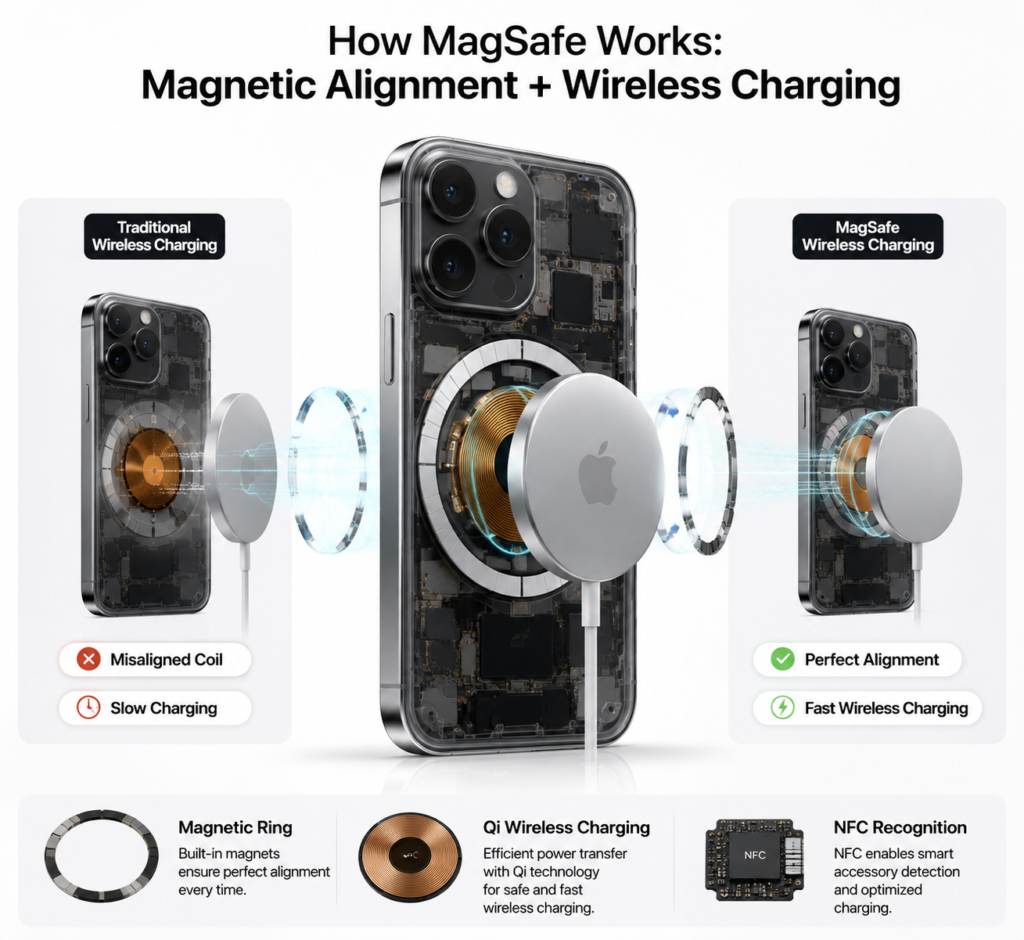
1.2 Core Technology: Magnetic Alignment + Wireless Charging
MagSafe works by combining magnetic positioning with standard wireless charging:
- A ring of precisely arranged magnets inside the iPhone matches the poles of magnets in MagSafe accessories. They snap together automatically when close, so you never have to line up the charging coil by hand.
- Charging works via the universal Qi wireless charging standard, which transfers power through electromagnetic induction. The magnetic alignment fixes the biggest pain point of regular wireless charging: slow charging from misaligned coils.
- Certified accessories also include NFC recognition. When attached, your iPhone shows a custom animation and status prompt.
1.3 MagSafe-Compatible iPhone Models
Not all iPhones support MagSafe. Only models released in 2020 and later have built-in magnetic arrays. The full list is below:
| iPhone Lineup | Specific Models |
|---|---|
| iPhone 12 Series | iPhone 12 mini, iPhone 12, iPhone 12 Pro, iPhone 12 Pro Max |
| iPhone 13 Series | iPhone 13 mini, iPhone 13, iPhone 13 Pro, iPhone 13 Pro Max |
| iPhone 14 Series | iPhone 14, iPhone 14 Plus, iPhone 14 Pro, iPhone 14 Pro Max |
| iPhone 15 Series | iPhone 15, iPhone 15 Plus, iPhone 15 Pro, iPhone 15 Pro Max |
| iPhone 16 Series | iPhone 16, iPhone 16 Plus, iPhone 16 Pro, iPhone 16 Pro Max |
Note: iPhone SE models do not support MagSafe magnetic charging, though they work with standard Qi wireless chargers.
2. Complete Guide to MagSafe Charging
MagSafe charging is simple to use, but there are a few details to know for fast, reliable performance.
2.1 Proper Attachment and Basic Steps
- Plug the USB-C end of your MagSafe charger into a compatible fast-charging adapter, then plug the adapter into a power outlet.
- Hold the charger near the center of the back of your iPhone. It will snap into place automatically when aligned.
- Charging starts as soon as it attaches. To remove, simply pull the phone gently away from the charger.
2.2 15W Fast Charging: Requirements and Power Specs
Many people assume all MagSafe charging hits 15W, but that is not the case. Peak 15W charging requires two things:
- An official Apple MagSafe Charger, or a third-party charger with official Made for MagSafe (MFM) certification.
- A 20W or higher USB-C Power Delivery (PD) fast-charging adapter. If your adapter is underpowered, your phone is too warm, or you are using a basic magnetic accessory, charging speed drops to 7.5W or lower — about the same as a regular wireless charger.
2.3 How to Check Charging Status: Animations and On-Screen Prompts
The official Apple MagSafe Charger has no built-in indicator light. You can check charging status directly on your iPhone:
- When you first attach the charger, a custom charging animation appears on screen showing your current battery level.
- The lock screen displays ongoing charging progress.
- The battery icon in the status bar turns green with a lightning bolt symbol.
2.4 Backward Compatibility: Charging Qi-Enabled Devices
MagSafe chargers work with all Qi-enabled devices, including older iPhones, Android phones, and AirPods.
However, non-MagSafe devices have no built-in magnets, so you have to align the coil manually. Charging speed tops out at 7.5W for Apple devices and 10W for most Android devices — 15W fast charging is not available.
2.5 Battery Health: Optimized Battery Charging With MagSafe
iOS has a built-in Optimized Battery Charging feature that works seamlessly with MagSafe. The system learns your daily charging routine. For example, during overnight charging, it holds the battery at 80% and finishes charging the last 20% right before you usually wake up. This reduces the time the battery spends at 100% charge, slowing long-term battery wear.
3. Official Apple MagSafe Accessories Explained
Apple sells a range of official MagSafe accessories for different needs. The key differences are summarized in the table below:
| Accessory Name | Core Function | Best For |
|---|---|---|
| MagSafe Charger | 15W magnetic fast charging for a single device | Everyday home and desk charging |
| MagSafe Battery Pack | Snap-on portable power bank, charges on contact | On-the-go charging and short trips |
| MagSafe Duo Charger | Foldable design, charges iPhone + Apple Watch at once | Travel and users with multiple Apple devices |
| MagSafe Wallet | Magnetic card holder with Find My support | Carrying essential cards light and hands-free |
| MagSafe Case | Built-in magnets for strong, reliable attachment | Protecting your phone without losing magnetic performance |
3.1 MagSafe Charger
The entry-level official charging accessory. It is compact, delivers 15W peak fast charging, and is the simplest way to experience MagSafe at home or at your desk.
3.2 MagSafe Battery Pack
A slim, snap-on battery pack that charges your iPhone directly — no cables needed. When your iPhone is plugged into a wired charger, it also charges the battery pack reversely. You can check its battery level via iOS widgets, and it works with the Find My network for location tracking.
3.3 MagSafe Duo Charger
A foldable dual charger. One side charges your iPhone, the other charges your Apple Watch, and it also works with AirPods. It folds flat for easy transport, ideal for frequent travelers who use both an iPhone and Apple Watch.
3.4 MagSafe Wallet
Attaches magnetically to the back of your iPhone and holds 2–3 cards like ID and bank cards. It includes Find My separation alerts, so you get a notification if you leave your wallet behind. The official wallet is designed to not demagnetize credit cards under normal use, but you should not leave cards sandwiched between your phone and charger while charging.
3.5 MagSafe Case
Official Apple cases — silicone, clear, and leather styles — all have built-in magnetic arrays. They do not reduce magnetic strength, trigger custom attachment animations, and protect your phone from scratches and drops.
4. Third-Party MagSafe Accessories: Buying Guide
There are many third-party MagSafe accessories available at a wide range of prices. It is important to tell the difference between reliable and low-quality options.
4.1 Common Types of Third-Party Accessories
The most popular third-party MagSafe accessories fall into a few categories:
- Car accessories: air vent magnetic mounts, dashboard magnetic charging mounts
- Desktop accessories: stand-up magnetic charging docks, multi-device charging stations
- Portable accessories: magnetic power banks, magnetic ring grips, magnetic card holders
4.2 Certification: Made for MagSafe vs. Basic Magnetic Accessories
There are two main types of third-party accessories, with very different performance:
- Made for MagSafe (MFM) certified: Tested and approved by Apple. Supports 15W fast charging, shows attachment animations, and meets Apple’s standards for magnet strength and safety.
- Basic magnetic accessories: Only have a ring of magnets, no official certification. Charging speed stays at standard Qi levels (max 7.5W), magnet strength varies, and many run hot. Always check the product listing for official “Made for MagSafe” certification when shopping.
4.3 What to Avoid: Signs of Low-Quality Accessories
Cheap, low-quality magnetic accessories offer a poor experience and can be unsafe. Steer clear of products that:
- Claim “15W fast charging” but have no MFM certification — this is almost always false advertising.
- Have rough magnetic surfaces and sparse magnets with weak holding force.
- Have no brand name, no safety certifications, and cost far less than mainstream options.
4.4 Recommendations by Use Case
- Daily car commute: Choose an MFM-certified magnetic car charging mount.
- Desk work: Pick a stand-up magnetic charging dock for easy viewing while charging.
- Frequent travel: Go for a foldable all-in-one magnetic charging station that works with phone, watch, and earbuds.
5. Practical Tips for Different Scenarios
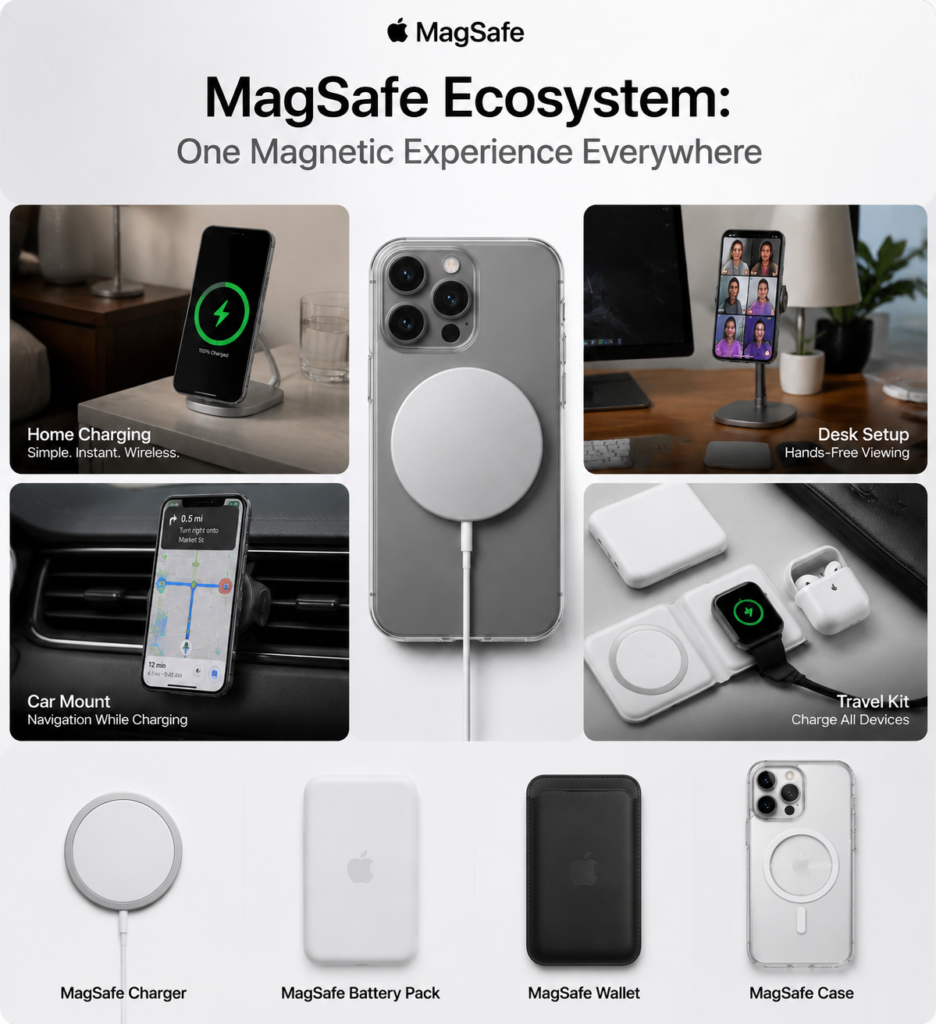
MagSafe works great in different daily situations. These tips will improve your experience.
5.1 At Home
Place your MagSafe charger on your nightstand or entry table. Set your phone down when you get home and it starts charging instantly — no fumbling for cables in the dark. Pair it with Optimized Battery Charging overnight to protect your battery health.
5.2 At Your Desk
Pair your charger with a standing MagSafe dock. You can check notifications in portrait mode, or watch videos and take video calls in landscape mode. It keeps your hands free and cuts down on cable clutter.
5.3 Car Commute
Install a magnetic car mount. When you get in the car, snap your phone on for navigation without taking your eyes off the road. Charging models top up your battery while you drive, no plugging in required.
5.4 Travel and Business Trips
Pack a MagSafe Battery Pack and a Duo Charger for trips. You will have fewer cables to carry, and can charge your phone, watch, and earbuds. The battery pack is slim and light, so you do not need a bulky power bank for short outings.
6. Safety and Maintenance
Proper use and care keep you safe and make your accessories last longer.
6.1 Magnetic Interference: What to Know About Cards
Do not sandwich credit cards, key cards, transit cards, or other chip/stripe cards between your iPhone and MagSafe charger while charging. The combination of heat and magnetic fields can damage the cards over time.
If you use a magnetic wallet, remove it before charging, or use an official MagSafe Wallet designed for safe use.
6.2 Medical Device Safety
MagSafe accessories produce magnetic fields. If you have a pacemaker, implantable cardioverter defibrillator (ICD), or other implanted medical device:
- Keep MagSafe accessories at least 15 centimeters away from your medical device.
- Do not wear your phone or charger against your chest while charging, to avoid interfering with the device.
6.3 Heat and Operating Environment
Wireless charging naturally produces a small amount of heat. Avoid these situations:
- Do not cover your phone with blankets, pillows, or sealed enclosures while charging.
- Do not use MagSafe charging in hot cars under direct sun, or in other high-temperature environments.
- If your iPhone displays a “temperature too high” warning, charging will pause automatically. It will resume once the phone cools down.
6.4 Cleaning and Care
- Clean the magnetic surface and charging coil with a dry, soft cloth. Do not use alcohol, cleaning sprays, or abrasive liquids.
- Keep accessories dry, and avoid dropping or crushing them — this can damage the internal coil.
- For long-term storage, keep them in a cool, dry place away from direct sunlight.
7. Common Issues and Troubleshooting
Most common problems can be fixed with simple checks.
7.1 Why is my charging speed slower than 15W?
- Your charging adapter is under 20W, or does not support PD fast charging.
- Your case is too thick, or has metal accents that block the magnet and charging coil.
- Your phone is warm, so the system automatically reduces charging speed.
- Your charger is not MFM certified, so it cannot deliver 15W.
7.2 Why does my phone slip off or feel weak?
- Check if your case is MagSafe-certified. Regular thick cases greatly reduce magnetic strength.
- Wipe dust, oil, and stickers off the back of your phone and the magnetic surface of the accessory.
- Remove ring holders, cooling pads, or other attachments on the back of your phone that prevent full contact.
7.3 How does a regular phone case affect MagSafe?
- Thin plastic or silicone cases have very little effect, and MagSafe will still work normally.
- Thick cases, metal cases, and cases with built-in stands or card pockets noticeably reduce magnet strength, and can prevent charging entirely.
- Metal cases also cause extra heat during charging, which can damage your battery over time.
7.4 Does MagSafe interfere with phone signal or the compass?
Official Apple and MFM-certified accessories go through strict electromagnetic compatibility testing. They do not interfere with cellular signal, Wi-Fi, Bluetooth, or the compass. Low-quality, uncertified accessories may cause interference.
7.5 Is a faint buzzing/humming sound normal during charging?
A very faint, quiet hum or buzz from the charging coil is normal. It is the sound of the wireless charging components working. As long as there is no excessive heat, strange smells, or loud noises, it is safe to use. If the sound is loud and paired with unusual heat, stop using the charger and inspect it.
8. Summary and Accessory Recommendations
8.1 MagSafe Pros and Best Use Cases
The biggest advantage of MagSafe is convenience: no plugging and unplugging cables, just set your phone down and it charges. With a wide range of accessories, it fits into home, work, and travel routines. It is great for anyone who hates cable clutter, uses their phone often, or owns multiple Apple devices. If you want the absolute fastest charging speed, wired fast charging is still the better choice.
8.2 Accessory Kits for Different Habits
- Daily commuter: Basic MagSafe Charger + magnetic car mount — easy charging at home and on the road.
- Frequent traveler: MagSafe Duo Charger + MagSafe Battery Pack — fewer cables, charging for all your devices on the go.
- Home office user: Standing MagSafe desk dock + official MagSafe case — charge while you work, and keep your desk tidy.