
1. What Is Thunderbolt Technology
Thunderbolt is a high-end high-speed connection standard jointly developed by Intel and Apple, one of the most powerful universal interface technologies for consumer electronics. Unlike ordinary USB ports, Thunderbolt integrates data transmission, video output and power supply into a single cable, simplifying multi-device connection greatly.
Starting from Thunderbolt 3 in 2015, all Thunderbolt devices adopt the universal USB Type-C port. It looks exactly the same as a regular Type-C interface, but delivers far better performance, compatibility and stability. It has become a standard feature for high-end laptops, creative devices and professional docking equipment.
Thunderbolt has five core advantages over ordinary interfaces: continuously upgraded transmission speed, multi-protocol compatibility, daisy-chain connection for up to 6 devices, powerful hardware expansion capability, and mandatory official certification to ensure stable and consistent user experience without performance degradation or compatibility failures.
2. Complete Development History of Thunderbolt
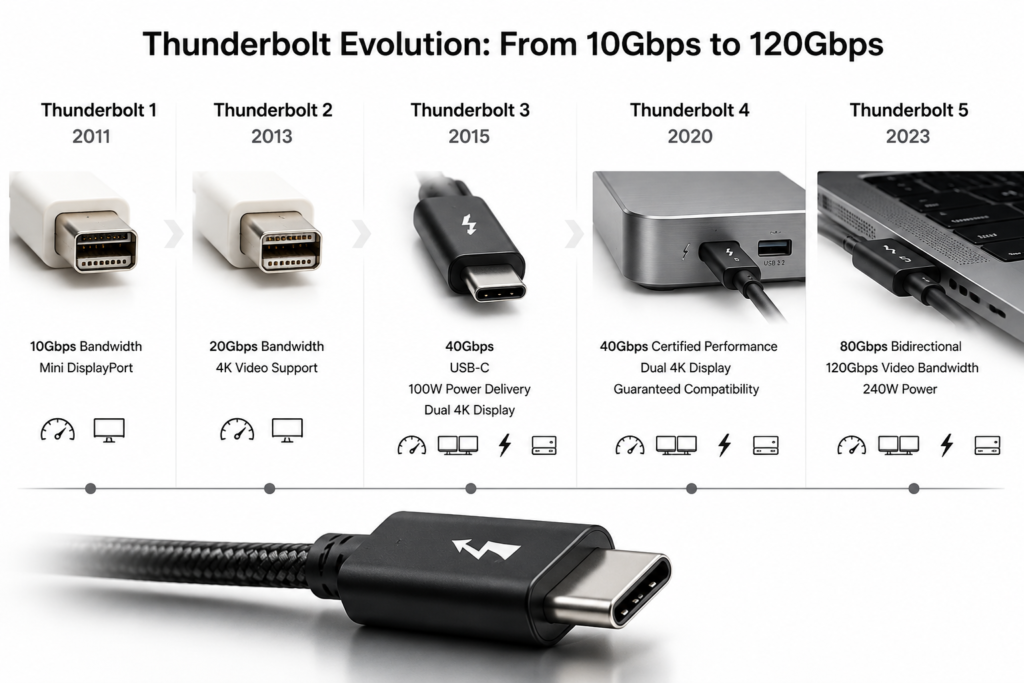
2.1 Thunderbolt 1 (2011): The First Generation High-Speed Interface
The original Thunderbolt adopted a exclusive Mini DP port with a maximum speed of 10Gbps, combining video and data transmission for the first time. However, its special port design and high cost limited its application to only a few professional devices, with very low market popularity among ordinary users.
2.2 Thunderbolt 2 (2013): Doubled Bandwidth for Professional Video Work
Equipped with dual-channel aggregation technology, Thunderbolt 2 doubled the bandwidth to 20Gbps. It smoothly supported 4K video transmission for the first time, catering to video editing and professional production scenarios. Still using the niche Mini DP port, it failed to gain popularity in consumer devices.
2.3 Thunderbolt 3 (2015): Revolutionary Upgrade With Universal Type-C
Thunderbolt 3 marked the most critical transformation in Thunderbolt history. It abandoned exclusive ports and fully adopted universal USB Type-C, boosting the bandwidth to 40Gbps. It added USB PD fast charging, supporting up to 100W power supply for laptops.
It supported dual 4K monitors or single 8K display output, with high-speed PCIe channels for external high-speed storage and hardware expansion. Since then, high-end laptops have widely adopted Thunderbolt Type-C ports, kicking off the era of unified interface standards.
2.4 Thunderbolt 4 (2020): Unified and Reliable User Experience
Thunderbolt 4 retained the 40Gbps bandwidth but focused on unifying minimum performance standards. Unlike Thunderbolt 3 with uneven high and low configurations, all Thunderbolt 4 certified devices strictly support dual 4K display, high-speed hardware expansion, device wake-up and security protection, with at least one charging port guaranteed.
Simply put, Thunderbolt 3 had variable performance, while all Thunderbolt 4 devices deliver consistent, fully upgraded compatibility, safety and stability without low-spec downgraded versions.
2.5 Thunderbolt 5 (2023): Generational Leap Forward
Thunderbolt 5 achieved a landmark upgrade, doubling the bidirectional base bandwidth to 80Gbps, with a maximum one-way bandwidth of 120Gbps for video transmission, perfectly adapting to multi-screen, high-refresh and ultra-high-definition display needs. The PCIe expansion speed doubled to 64Gbps, greatly improving the performance of external high-speed SSDs and professional peripherals.
It supports 3 monitors of 4K@144Hz or 2 monitors of 8K@60Hz simultaneously. The power supply capacity is greatly enhanced, supporting 140W by default and up to 240W via USB PD EPR, enough to power high-performance gaming laptops without bulky original adapters.
| Version | Release Year | Interface | Max Bandwidth | Max Power | Key Upgrade |
|---|---|---|---|---|---|
| Thunderbolt 1 | 2011 | Mini DP | 10 Gbps | 15 W | First integrated data + video transmission |
| Thunderbolt 2 | 2013 | Mini DP | 20 Gbps | 15 W | Supported 4K video for professional creation |
| Thunderbolt 3 | 2015 | USB Type-C | 40 Gbps | 100 W | Switched to universal Type-C; added PD fast charging |
| Thunderbolt 4 | 2020 | USB Type-C | 40 Gbps | 100–140 W | Unified minimum standards; more stable and compatible |
| Thunderbolt 5 | 2023 | USB Type-C | 80 Gbps (bidirectional)120 Gbps (video) | 240 W | Doubled speed; supports multi-screen high refresh & high-power laptops |
3. Full Thunderbolt Version Parameter Comparison
Release & Port: Thunderbolt 1/2 (2011/2013) used exclusive Mini DP ports; Thunderbolt 3/4/5 (2015/2020/2023) adopt universal USB-C ports with compatible daily cables.
Transmission Speed: 10Gbps (TB1) → 20Gbps (TB2) → 40Gbps (TB3/TB4) → 80Gbps/120Gbps (TB5), enabling faster large file and ultra HD video transmission.
Video Support: TB1 for 1080P; TB2 for 4K; TB3 for dual 4K/single 8K; TB4 for stable dual 4K high refresh; TB5 for triple 4K high refresh and dual 8K ultra HD, suitable for gaming and professional creation.
Hardware Expansion: New Thunderbolt generations continuously upgrade high-speed channels, and TB5 delivers twice the expansion speed of TB4 for stronger external device performance.
Power Supply: Early TB1/TB2 only supported 15W low power; TB3 upgraded to 100W; TB4 supports 100-140W; TB5 reaches a maximum of 240W, covering all devices from thin-and-light laptops to high-performance gaming notebooks.
4. Differences and Connections Between Thunderbolt, USB and USB4
They look identical visually, distinguishable only by thelightning logo next to the port. Ordinary USB-C has no strict official certification with uneven performance, while Thunderbolt requires mandatory Intel certification for guaranteed performance, compatibility and security.
4.1 Thunderbolt vs Ordinary USB-C
Backward compatibility is supported: ordinary USB devices work normally on Thunderbolt ports with downgraded functions; Thunderbolt professional devices cannot exert full high-speed, multi-screen and high-power performance on ordinary USB-C ports.
4.2 Thunderbolt 4 vs USB4
They share similar basic specifications including 40Gbps bandwidth, Type-C port, video and hardware expansion support. The core difference lies in standard strictness: USB4 is flexible and allows downgraded 20Gbps low-spec devices with inconsistent performance; Thunderbolt 4 enforces strict unified standards, ensuring full functions and stable compatibility for all certified devices.
4.3 Thunderbolt 5 vs USB4 Version 2.0
The two technologies share the same core foundation, supporting 80Gbps bandwidth and DP2.1 ultra HD video protocol. However, Thunderbolt 5 has stricter certification, faster hardware expansion speed and superior enterprise-level stability and multi-device compatibility, making it more suitable for professional creation, high-end office and high-performance devices.
| Technology | Typical Bandwidth | Mandatory Certification | Core Positioning |
|---|---|---|---|
| Ordinary USB-C | 5–20 Gbps | No | Daily basic charging and data transmission |
| USB4 | 20–40 Gbps | Flexible standard | Mid-range universal multi-function interface |
| Thunderbolt 4 | 40 Gbps (fixed full spec) | Strict Intel certification | High-end stable office & creation |
| Thunderbolt 5 | 80–120 Gbps | Strict Intel certification | Top-tier professional & high-performance scenario |
5. Core Upgrade Highlights of Thunderbolt
Thunderbolt iteration is not merely speed improvement, but all-round experience upgrade. The bandwidth has increased from 10Gbps to a maximum of 120Gbps. Adopting advanced encoding technology, it transmits more data per unit time, completing large file transmission in seconds.
Video experience has been fully upgraded from basic 1080P to 8K ultra HD and 144Hz high refresh rate, balancing professional image quality and gaming fluency. The hardware expansion capability is doubled, enabling external SSD read-write speed up to 7000MB/s, supporting large file processing and local AI model operation.
The power supply capability has achieved a qualitative leap from weak basic power supply to 240W high-power output, enabling high-performance gaming laptops to run at full speed with a single thin cable and eliminate bulky original chargers. The continuously updated DP protocol perfectly matches all ultra HD and high-refresh display devices.
6. Daily & Professional Application Scenarios
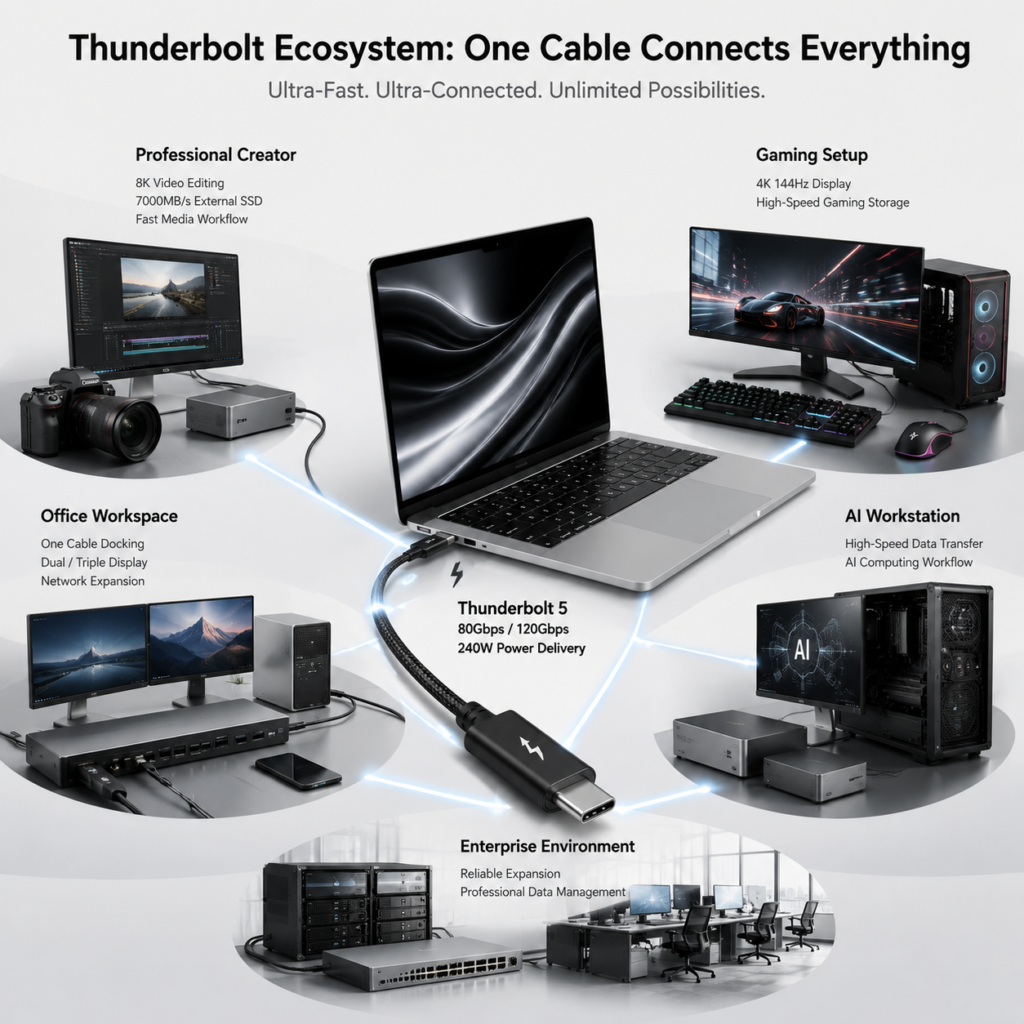
6.1 Content Creators
Thunderbolt supports smooth 8K video editing, fast transmission of massive photos and video materials, and high-speed access to external storage devices. It connects multiple professional monitors to build efficient working workflows, solving problems of slow large file transmission and multi-screen stuttering.
6.2 Game Players
It supports 2K/4K 144Hz+ high-refresh gaming monitors for smooth and lag-free visuals. Users can connect external high-speed SSDs to store large games with faster loading speeds. A single Thunderbolt docking station connects monitors, network cables and peripherals for a tidy desktop. Note that external GPU (eGPU) function is basically unsupported on new Apple Silicon Macs and gradually phased out on Windows platforms, serving only as a legacy feature for old devices.
6.3 Office Users
One Thunderbolt cable connects the docking station to access monitors, keyboards, mice, network cables and USB drives, realizing one-cable integrated office. It supports dual-screen and triple-screen multi-task work, as well as high-speed direct file transmission between computers, greatly improving office efficiency.
6.4 Enterprise Professional Scenarios
Enterprises use high-performance Thunderbolt docking stations to realize 10Gbps high-speed network, large-capacity data backup and multi-device unified expansion. It features high stability and low failure rate, suitable for long-term high-intensity office and professional data processing.
7. Future Development Trends of Thunderbolt
Thunderbolt will achieve in-depth integration with USB4 in the future, sharing core technologies while maintaining high-end, stable and high-performance differentiated advantages through strict official certification. With the popularity of AI PCs, Thunderbolt’s high-speed transmission capability will support local AI model deployment and high-speed data computing, becoming a core supporting technology for AI workstations.
8K ultra HD and high-refresh displays will become mainstream, and Thunderbolt 5’s multi-screen output capability will be widely popularized. The continuous upgrade of high-speed SSDs, 10Gbps network adapters and professional acquisition cards will further release Thunderbolt’s performance potential. A large number of Thunderbolt 5 devices will be launched intensively from 2025 to 2026, with market penetration rising rapidly in the next few years.
8. Conclusion
After more than a decade of iteration, Thunderbolt has evolved from a niche professional interface to a mainstream high-end universal interface, with transmission bandwidth breaking through from 10Gbps to 120Gbps. Its upgrades cover five key dimensions: transmission speed, video image quality, hardware expansion, security certification and power supply capacity.
Within the unified USB-C ecosystem, Thunderbolt stands as a high-end benchmark with strict certification standards and stable performance. Whether for daily office work, audio-visual entertainment, professional creation or high-performance computing, the lightning-marked Thunderbolt interface delivers more efficient, stable and tidy device connection experience for all users.