
Before rushing out the door in the morning, do you fumble through a mess of charging cables to find the right port and plug it in, or just place your phone on the bedside base and leave? These two most common daily charging methods are often compared: which is faster? Which is worse for the battery? Which is more worth buying? In fact, the answer is never black and white; the key depends on what scenario you use it in and what needs you care more about.
Before the formal comparison, let’s clarify the boundaries to avoid talking past each other: what we are discussing today are all regular civilian products in consumer electronics, focusing on daily charging of mobile phones, earphones, smart watches, tablets, and thin-and-light laptops, referencing the performance of mainstream commercially available products in recent years under normal temperature and normal use. Special scenarios such as industrial wireless power supply, medical implantable devices, electric vehicle wireless charging, and long-distance power transmission, as well as obviously inferior unbranded products with no certification, are not within the scope of today’s comparison. All mentioned power, efficiency, and prices are reference ranges; differences will be caused by different brands, protocols, temperatures, and device battery levels.
First, Understand What We Are Comparing
Many people actually have misunderstandings about the definitions of “wired” and “wireless”. For example, they regard a magnetic contact watch desktop charger as wireless charging, but it does not count. Let’s first clarify the basic concepts of the two types of charging.
Wired Charging: The “Traditional School” That Transmits Power Directly Through Wires
Wired charging is a charging method where the charger and the device are connected by physical wires, and current flows directly along the wire into the device. The USB-C cable you usually plug into your phone, the Lightning cable for old Apple devices, and the Micro-USB cable for old Bluetooth earphones all belong to wired charging. Now USB-C is becoming the mainstream interface for mobile phones, tablets, thin-and-light laptops, and earphone cases. Devices such as power banks and handheld game consoles also mostly rely on wired charging, which has the widest range of applications.
It is worth mentioning here: although some smart watches or old desktop chargers have magnetic attraction, they rely on direct conduction through metal contacts, which is essentially a variant of wired charging, not the “wireless charging” we are talking about today.
Wireless Charging: The “Plug-Free School” That Transmits Power Through Magnetic Fields
The core of wireless charging is: there are no directly conductive metal contacts between the device and the charging base, and electrical energy is transmitted to the coil inside the device through short-distance electromagnetic induction. Common forms include Qi charging pads placed flat on the desktop, standing wireless chargers, magnetic wireless chargers, car magnetic wireless mounts, multi-device charging pads that can charge mobile phones + earphones + watches at the same time, and dedicated wireless bases for watches.
One of the most common mistakes beginners make is thinking that wireless charging requires no cables at all — in fact, only the step of plugging the cable into the phone is saved; the charging base itself still needs to be plugged into a power source. In addition, currently wireless charging is mainly used on mobile phones, earphone cases, and smart watches. Most thin-and-light laptops still rely on wired charging via USB-C or dedicated power supplies, and laptop wireless charging is not yet a mainstream consumer solution.
Conclusion in One Sentence First
You don’t have to wait until you finish all the comparisons; you can first remember this general direction:
- Wired charging has higher peak power, higher efficiency, lower cost, and is more flexible to use while holding, suitable for fast charging, business trips, gaming, and high-load scenarios.
- Wireless charging eliminates plugging and unplugging, keeps the desktop tidier, and is convenient for topping up power at fixed positions, suitable for bedside, office desks, cars, and use by the elderly.
- For most people, the optimal solution is not choosing one over the other, but “wired charging is responsible for fast power replenishment, and wireless charging is responsible for slow topping up at fixed positions”.
To help you quickly build an overall judgment framework, we first present a core comparison table, and then elaborate on the details item by item later:
| Comparison Dimension | Wired Charging | Wireless Charging |
|---|---|---|
| Charging Speed | Usually faster, high peak power, suitable for fast power replenishment | Ordinary models are relatively slow; high-power magnetic models are close to medium-low power wired charging under ideal conditions |
| Energy Efficiency | 80%-90%+, low loss | Ordinary Qi is about 50%-70%, well-aligned magnetic ones are about 60%-75%, higher loss |
| Heat Generation | Heat sources are distributed in the charger, cable, interface, and device power management/battery areas, usually less dependent on back alignment heat dissipation than wireless charging | Heat sources are close to the battery area on the back of the device, more sensitive to heat dissipation |
| Impact on Battery | Does not damage the battery itself; only high temperature + high load will accelerate aging | Does not damage the battery itself; only accelerates aging when long-term poor heat dissipation leads to high temperature |
| Convenience | Suitable for use while charging and outdoor use, requires plugging and unplugging cables | Easy to place and pick up at fixed positions, tidy desktop, inconvenient to use while charging |
| Compatibility | USB-C has high cross-device penetration; full speed requires protocol matching | Basic slow charging is universal among Qi-enabled devices; full speed requires certification and protocol matching |
| Cost | Cheaper at the same speed, low maintenance cost | Pay for convenience; high-power/magnetic/multi-device solutions have higher costs |
How Does Electricity Get Into the Battery? Plain-Language Principles and Must-Know Terms
You don’t need to memorize physics formulas; understanding a few core logics will allow you to judge for yourself why charging is sometimes slow and why it sometimes heats up.
Working Logic of Wired Charging
The path of wired charging is very direct: the alternating current from the socket first enters the charger, which converts the alternating current into direct current that the device can use, then sends it to the device through the cable and interface, and finally is controlled by the device’s battery management system to store electricity in the battery.
The charging speed you feel is not determined by a single component, but requires the charger, cable, and device to “match the code” — all three must support the same power and rules to achieve full speed. For example, if your phone supports 30W fast charging but uses an old 5V/1A charger from years ago, it can only charge slowly in practice; if a laptop supports 100W charging but the cable you use only supports 60W, it won’t reach full speed either.
Working Logic of Wireless Charging
Wireless charging is a bit more roundabout: the transmitting coil in the charging base generates an alternating magnetic field. When the receiving coil in the mobile phone or earphone case is close, it induces an electric current, which is then converted by the internal circuit of the device, and finally charges the battery.
Precisely because power is transmitted through magnetic fields, many factors affect the charging effect: whether the coils are aligned, whether the phone case is thick, whether there are metal accessories on the back, whether the base has sufficient power supply, whether heat dissipation is good, and what wireless protocol the device supports. You may have encountered “it shows charging when placed on, but the speed is extremely slow and it heats up” — most likely one of the above factors is the problem. Also remember: wireless charging is short-distance charging, not “long-distance power transmission” that can charge across half a room; don’t be misled by sci-fi propaganda.
Several Key Terms Beginners Must Know
You often see these terms when buying charging accessories; you don’t need to memorize them by rote, just understand their meanings:
- Watt (W): Indicates power, which you can understand as the upper limit of charging speed, just like the maximum speed of a car — you can’t drive at this speed the whole time. Nominal power is not equal to the average speed you actually feel.
- Peak Power: The highest power that can be achieved in a short period of time, usually only appearing when the battery level is low (e.g., below 20%), the temperature is appropriate, and the accessory protocols are fully matched, and the duration is generally not long.
- Average Power: The comprehensive power during the process of charging from 20% to 80%. This is closer to your daily real charging experience than peak power, because after 80%, the battery will enter the trickle slow charging stage, and the speed will naturally decrease.
- Fast Charging Protocol: The “rules” for negotiating voltage and current between the charger, cable, and device, such as USB PD, QC, and each brand’s own proprietary protocols. Just like different countries have different plug standards, they can only work normally when matched.
- Qi Standard: The mainstream wireless charging standard launched by the Wireless Power Consortium (WPC), equivalent to the “common language” in the wireless charging industry. Most wireless charging-enabled mobile phones, earphone cases, and bases support basic Qi slow charging.
- Qi2: A new standard upgraded on the basis of Qi, with added magnetic alignment design, which can improve the problem of misalignment, but requires both the device and accessories to support Qi2 to achieve full effect.
- MagSafe: Apple’s ecosystem magnetic wireless charging solution, which is related to but not completely equivalent to Qi/Qi2. Whether it can reach full speed depends on whether your device, system, and accessories have passed certification.
- FOD Foreign Object Detection: A safety function of wireless charging that can detect non-charging metal objects such as keys, coins, and metal sheets, then stop or limit output to avoid abnormal heating.
- Charging Efficiency: The proportion of electricity taken from the socket that finally actually enters the battery. The higher the efficiency, the less electricity is wasted, and usually the less heat is generated.
Item-by-Item Comparison of Core Dimensions: Looking at Differences with Unified Standards
Below we compare the two charging methods under the same caliber, as fairly as possible: by default, they are both regular brand accessories at the same price, room temperature around 25°C, and the device is charged from 20% to 80%. This way, we can avoid the interference of 0-20% preheating and trickle charging after 80%, and also exclude the extreme cases of inferior products.
Charging Speed: Wired is Usually Faster, But Not Absolute
First the conclusion: in mainstream cases, wired charging has a clear speed advantage, especially when fast power replenishment is needed in a short time.
The common speed range of wired charging is very wide: mobile phones are generally between 15W and 120W; charging from 20% to 80% takes as little as 25 minutes for fast ones, and 1.5 hours for slow ones, depending on the brand’s fast charging strategy; earphone cases and smart watches generally have 1W to 5W due to small batteries, and the speed difference is not obvious in perception; tablets commonly have 18W to 45W, some models are higher; thin-and-light laptops commonly have 45W to 100W, a few devices supporting USB PD 3.1 EPR can reach 140W, 180W or even higher, but not all thin-and-light laptops support it.
The speed of wireless charging is generally slow: ordinary Qi bases commonly have 5W to 15W, and charging a mobile phone from 20% to 80% takes about 1.5 to 3 hours; solutions like magnetic wireless charging, Qi2, and MagSafe are generally around 15W, and full speed requires matching between the device and certified accessories; some Android brands’ proprietary high-power wireless charging can reach 30W, 50W or even higher, but usually requires original or designated bases, designated chargers, and good heat dissipation conditions to reach full speed.
Of course, this conclusion is not absolute: if you use an old 5W wired charger, it may be slower than a well-matched 20W wireless solution; high-power wireless charging, under the conditions of perfect alignment, active heat dissipation, and full matching of original protocols, can have an experience close to medium-low power wired charging. In addition, when the temperature is high, using while charging, or there is high background load, both charging methods will slow down, but wireless charging will slow down more obviously because the heat is more concentrated on the back of the device.
Energy Efficiency: Wired is Inherently Higher, Wireless Has Greater Loss
The comparison caliber of efficiency is: the proportion of electricity input from the socket that is finally actually stored in the battery. The higher this value, the less electricity is wasted, and the less heat is generated.
The efficiency of wired charging is usually relatively high, commonly 80%-90% or even higher in consumer-level scenarios. The loss mainly comes from the AC-DC conversion of the charger, the resistance of the cable, and the internal circuit conversion of the device.
The efficiency of wireless charging is generally lower than wired: ordinary Qi bases are about 50%-70%, and Qi2 and MagSafe-like solutions with better magnetic alignment are about 60%-75%. The actual difference is greatly affected by alignment, case thickness, and heat dissipation. Why is wireless efficiency low? Because the coils are not in direct contact for conduction, there will be magnetic field leakage, loss in coil conversion, and additional waste of electricity from misalignment. Most of these losses will eventually turn into heat.
For individual users, if it is just low-power slow charging at night, the difference in electricity bills caused by efficiency differences is actually very small, almost imperceptible. But if it is multi-device, high-frequency, long-term use of wireless charging, the efficiency difference will accumulate into more heat and energy consumption. In addition, overly thick phone cases, long-term coil misalignment, and poor heat dissipation of the charging base will further reduce the efficiency of wireless charging.
Heat Generation and Battery Health: The Core is Not “Wired or Wireless”, But Temperature
This is the issue everyone cares about most: does wireless charging damage the battery more? First, a clear answer: wireless charging is not inherently more harmful to the battery; the core factors that really affect battery aging are high temperature, number of full charge-discharge cycles, long-term storage at full charge, long-term deep discharge at low battery, and use under high load while charging. “Wired” or “wireless” is just the name of the charging method, and does not directly damage the battery itself. Only when wireless charging causes the device to be in a high temperature state for a long time will it accelerate aging.
The heat sources of the two charging methods are different: the heat of wired charging mainly comes from the charger, cable resistance, interface contact, battery, and the power management module inside the device, and the heat is relatively dispersed; the heat of wireless charging is more concentrated in the coil on the back of the device and the coil of the charging base, which is closer to the battery area, so it is more sensitive to heat dissipation conditions.
Whether wired or wireless, as long as they are regular products and used normally, they will not significantly damage the battery. The real high-risk scenarios are these:
- Using inferior wireless chargers without FOD foreign object detection and unqualified temperature control;
- Overly thick phone cases, metal sheets pasted on the back, and long-term coil misalignment, causing the wireless charger to keep heating up;
- Using wireless fast charging in bed, under quilts, or in cars exposed to direct sunlight, where heat cannot dissipate;
- Charging while performing high-load operations such as playing games, using navigation, or turning on hotspots, where heat accumulates.
Wired charging can also damage the battery: if you use high-power fast charging for a long time while playing games or using navigation, and the phone is always hot to the touch, it will also accelerate battery aging.
Usage Convenience: Each Has Its Own Applicable Scenarios
The convenience of wired and wireless charging is actually the difference between “mobile use” and “fixed scenarios”.
The advantages of wired charging are very practical: stable connection, you can hold it and walk around while charging, it can be connected to a power bank, it can be used wherever there is a USB-C port in public places, and the cable can also be used for data transmission, screen casting, and device debugging. But the disadvantages are also obvious: you need to find the cable, align the interface to plug and unplug, too many cables on the desktop are easy to mess up, and dust in the interface or damaged cables will affect the experience.
The advantage of wireless charging is “seamless”: charge when you put it down, leave when you pick it up, no need to repeatedly plug and unplug the interface. It is especially convenient to place in fixed positions such as bedside, office desk, entryway, and car, and the desktop is tidier. But the disadvantages are: ordinary bases stop charging when you pick up the device, making it very inconvenient to use while charging; if the position is not aligned, it may charge slowly or even stop charging; thick cases, metal mounts, and magnetic card holders will all affect charging.
Magnetic wireless charging can be regarded as a compromise solution: it is easier to align than ordinary wireless charging, and you can hold the phone and use it within the length of the charging cable, but it is still limited by heat and protocols, and its speed and efficiency are still worse than wired charging of the same power.
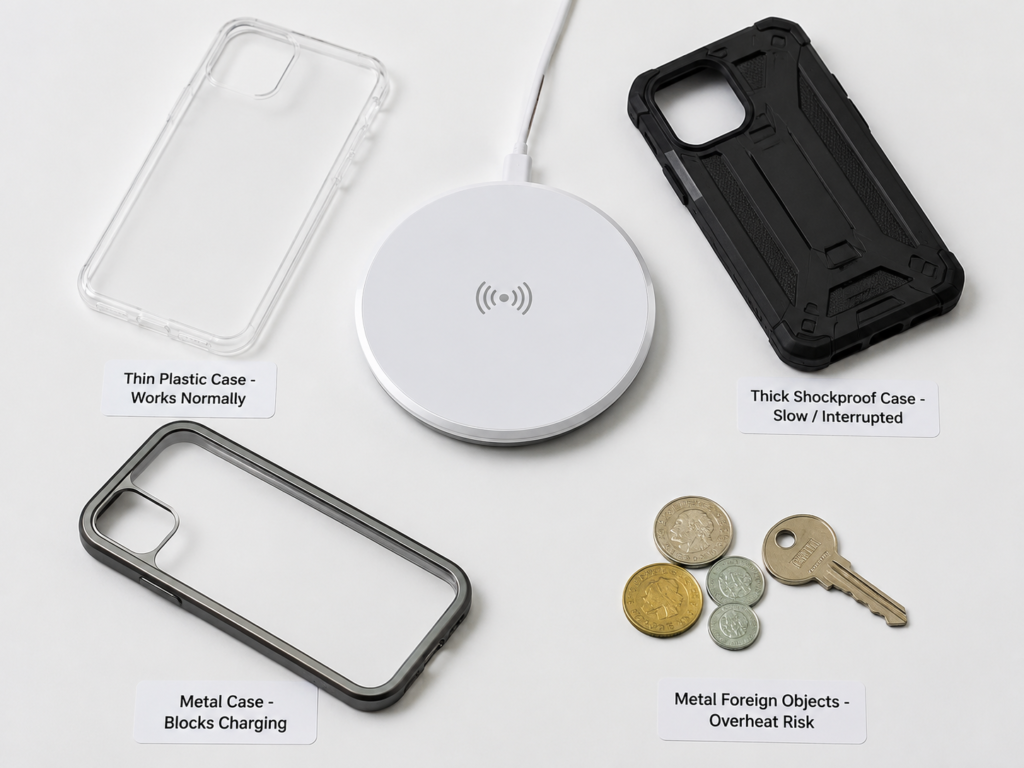
Impact of Phone Cases, Magnetic Accessories, and Metal Foreign Objects
This is the most common problem area for wireless charging, so we will discuss it separately.
- Ordinary thin plastic cases and silicone cases with a thickness within 3mm can usually be charged wirelessly normally. Of course, the tolerance of different bases and devices will vary.
- Thick and heavy shockproof cases will increase the distance between the two coils, leading to decreased efficiency, increased heat, slower speed, or even direct charging interruption.
- Metal accessories such as metal cases, metal mounts, car iron sheets, and magnetic card holders will significantly interfere with wireless charging. In severe cases, they will trigger foreign object detection and even cause local abnormal heating.
- Special MagSafe/Qi2 magnetic cases also need to pay attention to whether the magnetic ring position is accurate. Some inferior magnetic cases seem to be firmly attracted, but the coils are not aligned, so they will still be slow and heat up.
If your wireless charger is slow, intermittent, or heating up, the first step is to take off the phone case and all accessories on the back, realign the coils and try again — many problems will be solved.
Compatibility: Distinguish Between “Can Charge” and “Full Speed Charge”
Many people think “same interface means full speed” or “Qi support means full speed”, but that’s actually wrong. Compatibility should be viewed at two levels: basic “can charge” and high-level “full speed charge”.
First look at the compatibility of wired charging:
- Interface level: USB-C is becoming mainstream, Lightning is mainly used on older Apple devices, and Micro-USB is mostly used on old devices and low-cost small devices.
- Protocol level: USB PD, QC, and various brands’ proprietary protocols coexist. The same interface does not mean full speed. For example, some mobile phones support their own 100W proprietary fast charging, but may only reach 25W with an ordinary PD charger.
- Cable level: Cables also limit power. For charging within 60W, a 3A cable is generally sufficient; if it exceeds 60W, such as high power of 100W, 140W, 240W, you must confirm that the cable is a 5A cable with an E-marker chip, otherwise it won’t reach full speed.
Then look at the compatibility of wireless charging:
- First, there is a major premise: your device must have a built-in wireless charging coil. Not all mobile phones and tablets support wireless charging; without a coil, ordinary bases cannot charge.
- Basic level: As long as both the device and the base support the Qi standard, basic slow charging can generally be achieved, and this universality is quite good.
- Full speed level: High-power wireless charging above 15W is usually limited by brand, certification, and system. Original or certified accessories are more likely to reach full speed.
- For Qi2, both the device and accessories must support Qi2 to enjoy the full benefits of magnetic alignment; otherwise, it is still the experience of ordinary Qi.
To sum up: across categories and devices, USB-C wired charging has higher penetration; among devices that already support Qi, the basic slow charging of wireless is also quite universal; but if you pursue full speed, whether wired or wireless, it depends on whether the protocol and accessories match.
Safety and Durability: Regular Products Are Safe, Inferior Products Are the Risk Source
Whether wired or wireless, as long as they are qualified products from regular brands, they are safe under normal use. The real risk comes from inferior products and improper use.
The main risks of wired charging are: inferior chargers may overheat, leak electricity, and have insufficient protection circuits; damaged cables may short circuit; dust, water, or poor contact in the interface will cause charging interruption and local heating. In terms of durability, the interface has a plug-in life, but normal use is generally enough for several years; cables are consumables, but the replacement cost is very low, and the most common cause of damage is frequent bending of the cable head position.
The main risks of wireless charging are: regular products have no exposed charging contacts, but if a metal foreign object is sandwiched between the phone and the base, it may heat up abnormally; inferior wireless chargers have unqualified temperature control and foreign object detection functions, and the risk is much higher. In terms of durability, wireless charging has no wear from interface plugging and unplugging, and the life of the base mainly depends on the heat dissipation design, circuit quality, coil material, and shell material.
When purchasing, you can look for compliance marks, such as CE, UKCA, FCC, UL, Qi certification, etc. Certifications in different regions have different meanings, but you can’t just look at the marks printed on the shell. It is more reliable to prioritize products from regular brands and regular channels.
Usage Cost: Wired Has Higher Cost-Effectiveness, Wireless Pays for Convenience
Comparing costs can’t just look at a single cable or a single base; you have to compare the price of the entire set of accessories that achieve similar speed and stability.
The overall cost of wired charging is lower: 18W-30W mobile phone PD fast charging sets are usually very cheap; if you already have a charger, the cost of just changing the cable is lower; 65W-100W gallium nitride (GaN) chargers plus good cables will cost a bit more, but one charger can charge mobile phones, tablets, and thin-and-light laptops at the same time, which is more cost-effective; cables can be replaced separately if broken, and maintenance costs are very low.
The cost of wireless charging is much higher: ordinary 15W Qi charging pads are moderately priced, but many do not include high-power chargers, which you have to buy yourself; magnetic wireless chargers, standing mounts, multi-device foldable wireless chargers, and high-power wireless bases with active heat dissipation will be more expensive; if it is a magnetic solution, you may need to buy additional magnetic phone cases, dedicated chargers, or original certified accessories, adding another layer of cost.
So the conclusion is clear: at the same speed and stability, wired charging is usually cheaper; the value of wireless charging is mainly in convenience and scenario experience, not cost-effectiveness.
Choose by Scenario: Which Charging Method Do You Really Need
Don’t纠结 about “which is better”; it depends on where you use it. We have sorted out the 7 most common scenarios, and you can directly match them to your situation.
Home/Elderly Use Scenario
The core need is simple operation, no need to fumble for the interface in the dark, and the speed requirement is usually not high. In fixed positions such as bedside, entryway, and living room, you can place standing or lying wireless chargers, which are especially convenient for the elderly. When choosing, prioritize products with clear charging indicators, good anti-slip design, and high alignment tolerance. Don’t choose bases that are too small, too light, and slip at the slightest touch.
If the elderly person’s device at home does not support wireless charging, or the elderly person is used to holding the phone and using it while charging, then wired charging is more suitable.
Office Top-Up Scenario
If you often have meetings and walk around with your phone, wired charging is more stable, and plugging it in for a short time can replenish a lot of power. If your phone is on the desktop most of the time, wireless charging is more convenient — just place it down when you come back from a meeting to top up.
For multiple devices, a solution with a multi-port USB-C charger plus several cables has better efficiency and speed, while a multi-device wireless charging pad keeps the desktop tidier — it depends on what you care more about. The most practical combination is: a wireless base permanently on the desktop, and a fast charging cable in the drawer for emergencies.

Car Charging Scenario
The core need when driving is less operation, stable device fixation, and uninterrupted navigation power. Magnetic wireless car mounts are especially suitable for short commutes and people who get in and out of the car frequently. Just place the phone on it, which both fixes and charges it, no need to plug in the cable with one hand, which is safer.
But note: when navigating for a long time, the car is exposed to the sun in summer, or the air outlet blows hot air, wireless charging is easy to slow down due to overheating. For long-distance driving or high-load navigation, it is best to have a wired cable for emergencies. In addition, ordinary flat-placed wireless car chargers are easy to misalign and stop charging on bumpy roads, and their stability is not as good as magnetic or clamping structures.
Business Trip/Travel Scenario
If you pursue light travel, prioritize wired charging: a multi-port USB-C charger plus several cables can cover mobile phones, tablets, earphones, and computers, with small size and universal use. If you stay in a hotel for a long time and want a better desktop experience, you can also bring a foldable multi-device wireless charger, but you need to confirm in advance whether the size, weight, and protocol match your device.
When traveling overseas, whether wired or wireless, you must confirm that the charger supports 100-240V wide voltage, and prepare a local plug adapter. In addition, wireless charging pads in public places often have low power, poor alignment, and hygiene and safety are not necessarily guaranteed, so don’t use them as the only charging solution.
Gaming/High-Load Use While Charging Scenario
If you often play games, shoot videos, turn on hotspots, or use navigation while charging, prioritize wired charging. Because the heat of wireless charging is originally concentrated on the back of the device, and the device itself will heat up under high load, the combination of the two can easily trigger temperature control and speed reduction, which instead affects performance.
If using wired, you can choose elbow cables of appropriate length to avoid bending the interface while playing. If the device is obviously hot, it is best to reduce the load or pause charging, and wait until the temperature drops before continuing.
Small Device Scenario Such As Earphones/Smart Watches
Small devices such as earphones and watches have small batteries, and the difference in charging speed is barely perceptible, so convenience is more important. If your earphone case and watch support wireless charging, prioritize using a wireless base or multi-device charging pad — just place it on, no need to find the small interface to plug in.
It should be noted that many smart watches have dedicated magnetic bases or brand proprietary protocols, and may not be able to charge at full speed or even normally with ordinary mobile phone Qi bases. Confirm clearly before buying. For small battery devices, sacrificing a little efficiency for convenience is completely worth it, but for large battery devices such as mobile phones and computers, speed and heat should be considered more.
Limited Budget/Student Scenario
If the budget is limited, prioritize buying a reliable USB-C wired fast charging set, which has the most balanced speed, efficiency, and price, and the highest cost-effectiveness. When the budget is sufficient, just add an ordinary Qi/Qi2 base for the bedside or desktop.
Never buy low-priced charging products without certification, brand, or obvious heating just for the sake of cheapness. Whether wired or wireless, inferior products have high safety risks, which is not worth the loss.
Common Misconceptions and Troubleshooting
Many rumors about charging have been circulating for years. We will clarify them all at once, and then teach you how to troubleshoot common charging problems.
6 Most Common Cognitive Misconceptions
- “Wireless charging has radiation and must be harmful to the body”: Regular Qi/Qi2 wireless chargers meet corresponding electromagnetic compatibility and safety requirements, and the risk of use at normal distances is very low. What really needs to be avoided are inferior products, abnormal heating, and situations where metal foreign objects are sandwiched in between.
- “Wireless charging must be more harmful to the battery”: The core factors affecting battery health are temperature, cycle count, and long-term full charge state. As long as heat dissipation is good and power is appropriate, wireless charging is not more harmful to the battery than wired charging.
- “Nominal power equals actual charging speed”: Nominal power is only the maximum upper limit, and the actual speed is affected by many factors such as protocol, battery level stage, temperature, cable, alignment, and phone case.
- “Wired charging must be faster than wireless”: This is the case in mainstream situations, but an old 5W wired charger may be slower than a well-matched 15W or 20W wireless charger.
- “You can’t wireless charge with a phone case”: Thin plastic cases and silicone cases are generally usable; thick cases, metal cases, and cases with metal accessories are prone to problems.
- “Plugging in wired and placing on wireless at the same time can add up power and charge faster”: Devices usually only choose one charging path, and will not simply add up power. Instead, it may increase heat or even trigger protection.
Troubleshooting Steps for Slow/Intermittent Wired Charging
If you encounter the problem of slow or frequent intermittent wired charging, you can troubleshoot step by step in this order, and you can find the cause in most cases:
- First confirm whether the power and protocol of the charger match your device, for example, whether the phone supports PD, PPS, or the corresponding brand’s proprietary fast charging.
- Try a reliable cable. Especially for high-power devices, confirm that the cable supports the corresponding current and E-marker requirements.
- Check whether the device’s interface has dust, looseness, or water ingress prompts. Poor contact can also cause intermittent and slow charging.
- Touch the device to see if it is very hot. When overheated, the system will actively limit the charging speed.
- Check whether optimized charging, battery protection, or night slow charging mode in the system settings is turned on. These functions will actively limit the speed.
- Rule out the problem of insufficient power distribution from power banks, sockets, power strips, or multi-port chargers. For example, when a multi-port charger charges multiple devices at the same time, the power of a single port will decrease.
Troubleshooting Steps for Slow/Intermittent Wireless Charging
The probability of problems with wireless charging is higher than with wired, but most are minor problems. Just check in this order:
- First take off the phone case, magnetic card holder, and metal mount, place the phone back in the center of the base, align with the coil position and try.
- Check whether there are foreign objects such as coins, keys, or metal sheets sandwiched between the phone and the base. Even a very small metal sheet may affect it.
- Confirm whether the input power of the base is sufficient. Many wireless bases need to be paired with a higher-power PD/QC charger to output nominal power; using an old 5W charger definitely won’t work.
- Confirm the wireless standard and maximum power supported by your device. Don’t take the nominal power of the base as the actual power the phone can get.
- Touch the phone and base to see if they are obviously hot. Overheating will trigger speed reduction or even charging interruption. Move to a ventilated and cool place and try.
- Try a different charger, cable, or location to rule out the problem of insufficient base power supply or cable aging.
Purchase and Use Checklist
When buying charging accessories, you can choose against this checklist to avoid pitfalls.
Wired Charging Set Purchase Checklist
- First confirm the interface type of the device: is it USB-C, Lightning, or Micro-USB.
- Confirm the maximum wired charging power and supported protocols of the device: for example, USB PD, PPS, QC, or brand proprietary protocol.
- Look at the output levels of the charger, don’t just look at the total wattage, check if there is the voltage and current combination your device needs.
- Confirm the cable specification: for within 60W, a 3A cable is generally sufficient; for over 60W or requiring high power of 100W/140W/240W, prioritize choosing a 5A USB-C cable with E-marker.
- Multi-device users can choose multi-port USB-C chargers, but must clearly see the power distribution rules when multiple ports are used at the same time.
- Safety bottom line: choose products from regular brands, regular channels, with solid shell workmanship, and basic safety certification.
Wireless Charger Purchase Checklist
- First confirm that your device supports wireless charging; devices without built-in coils cannot be charged directly by ordinary bases.
- Confirm the wireless standard: is it Qi, Qi2, MagSafe, or brand proprietary wireless fast charging.
- Figure out the actual available power: device, base, charger, cable, and certification status will all limit full speed. Don’t just look at the nominal power of the base.
- Prioritize products with Qi certification, FOD foreign object detection, and temperature control protection.
- For high-power wireless chargers, confirm whether there is active heat dissipation, whether it needs to be paired with an original charger, and whether you can accept the fan noise.
- Choose by scenario: bedside is suitable for horizontal models or models with low indicator brightness; office desks are suitable for standing models; cars choose magnetic or stably clamped models; travel choose foldable multi-device models.
- If buying a magnetic model, confirm that the magnetic ring position of the phone or phone case is accurate, to avoid only being able to attract but the coils are not aligned.
General Usage Precautions
Whether using wired or wireless, these habits can help you extend the life of your battery and accessories:
- Do not charge for a long time in environments with poor heat dissipation or high temperature, such as under quilts, pillows, sofa cracks, or in cars exposed to direct sunlight.
- Do not use damaged cables, swollen batteries, or abnormally hot chargers or wireless bases.
- When using wireless charging, do not sandwich metal sheets, bank cards, access cards, or coins between the phone and the base.
- When the phone is obviously hot, reduce high-load operations such as using while charging, navigation, turning on hotspots, and recording videos.
- For long-term night charging, turn on the optimized charging or battery protection function in the system.
- If you are particularly concerned about battery health, try to avoid long-term storage at full charge and high temperature. Maintaining a moderate battery level daily is more friendly to the battery.
Summary: 1-Minute Quick Judgment Method
First, let’s talk about the development direction of the two charging methods: on the wired side, USB-C will continue to spread, and protocols such as USB PD and PPS will make cross-brand fast charging more and more unified. High-power laptops and multi-device charging will still rely on wired for a long time in the future; on the wireless side, Qi2 and magnetic alignment will improve the pain point of misalignment, and multi-device wireless charging will appear more in bedside, desktop, and car scenarios. In the long run, the two will not replace each other, but each has its own role: wired is responsible for high efficiency and high power, and wireless is responsible for convenience and fixed-scenario power topping.
You can use this 1-minute judgment method to choose quickly:
- Prioritize Wired: Pursue the fastest speed, limited budget, often use while charging, business trips/travel, need to charge computers, high-load use such as gaming/navigation.
- Prioritize Wireless: Value the convenience of placing and picking up at will, fixed-position power topping, car fixation, use by the elderly, want to reduce interface plugging and unplugging, make the desktop tidier.
- Recommended Combination: Place a wireless base at home or in the office, and keep a reliable wired fast charging set in your bag or by the desk, balancing speed and convenience.
Before the final choice, you can also remember these five core conclusions for quick review:
- Speed and Efficiency: Wired usually wins
- Convenience and Desktop Experience: Wireless usually wins
- Battery Health: Mainly depends on temperature, cycle count, and usage habits, not on the name of the charging method
- Compatibility: USB-C wired is more widespread across devices, Qi wireless basic slow charging is more convenient among devices that support wireless charging
- Cost: Wired is more cost-effective at the same speed and stability, wireless pays for convenience
In the final analysis, there is no absolute good or bad between wired and wireless, only whether it suits your needs. Understanding the logic behind it, you don’t have to be led by various promotional slogans, and can choose the charging solution that best suits you.