
If you’ve ever bought a GaN fast charger, you’ve most likely had this experience: after charging a laptop with the tiny charger for half an hour, it feels so hot you can barely hold it, and the charging speed even slows down over time. Some people say GaN inherently doesn’t heat up, so if it gets hot, it’s poor quality; others say the cooler it is, the better the heat dissipation, and hot ones are all cut corners. Who is right? What temperature is considered normal? Is speed drop a malfunction? In this article, we’ll thoroughly explain the heat dissipation of GaN chargers, from heating principles and internal structure to purchasing judgment and abnormal troubleshooting. Ordinary users can understand it and learn sufficiently practical judgment skills.
1. First, Understand: Why Do GaN Chargers Heat Up
Before talking about heat dissipation, let’s clarify the scope of our discussion to avoid mismatched expectations. This article covers the most common 30W to 240W GaN products in daily use — whether they are wall-plug single-port/multi-port fast chargers, desktop multi-port chargers, travel adapter models, or power adapters for laptops, all are within the scope. We only talk about content that ordinary users can perceive and use: shell temperature, basic logic of internal heat dissipation, whether continuous output will cause speed drops, how to choose when buying, and how to troubleshoot when it gets hot. As for overly professional content such as the physical principles of GaN materials, simulation calculations of switching power supplies, the complete certification process of safety laboratories, and factory engineering acceptance standards, we will not elaborate, after all, they are not needed for daily use.
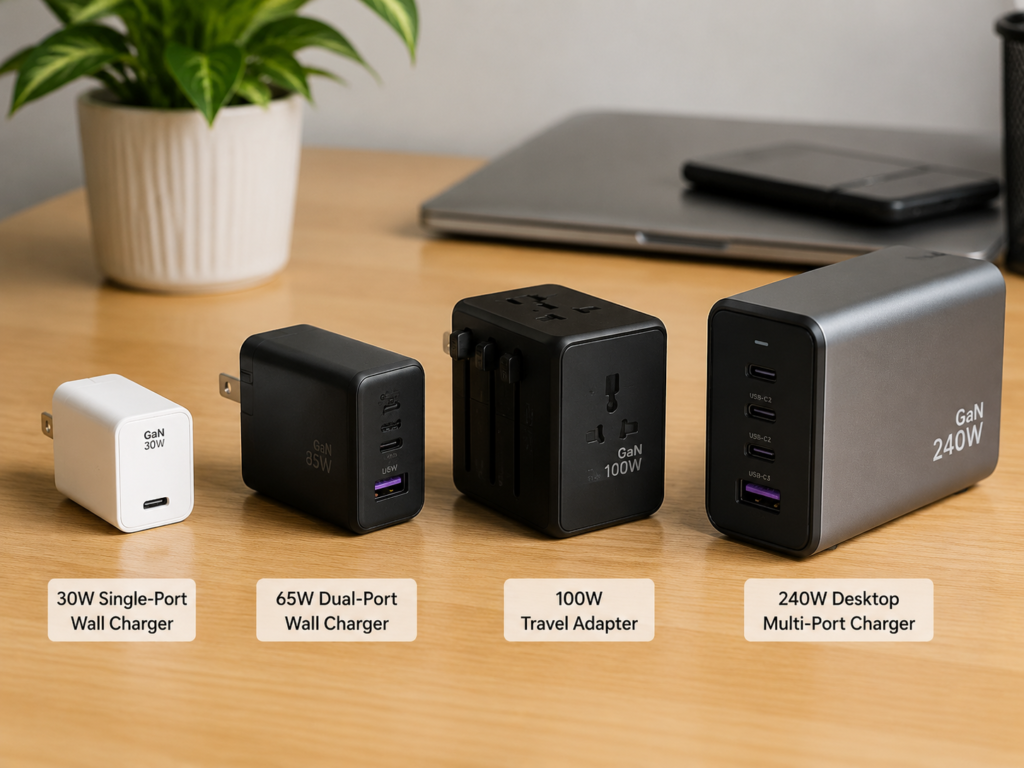
The content of this article is suitable for scenarios such as overseas users’ purchasing reference, daily use judgment, cross-border travel electricity use, long-term laptop power supply, and simultaneous fast charging of multiple devices. It should be noted in advance that the methods given in this article are consumer-level judgment methods, and cannot replace professional disassembly, thermal imager testing, thermocouple testing, or formal conclusions from safety laboratories. If you encounter uncertain safety issues, prioritize stopping use to prevent risks.
What Is the Thermal Design of a GaN Charger
Put simply, thermal design is to find a safe “outlet” for the waste heat generated inside the charger: through thermally conductive materials, internal structural layout, and the shell, the heat is steadily transferred to the air, so it doesn’t get trapped inside and cause problems. Its core goal is not to make the charger completely cool, but to control the temperature of the hottest internal components, the accessible temperature of the shell, and the temperature rise during long-term use within a reasonable range, to avoid power reduction, charging interruption, premature aging of components, and even safety risks.
Many people buy GaN for its “small size, high power”, which is indeed an advantage of GaN technology: compared with traditional silicon-based chargers, GaN power devices have lower switching losses, can support higher operating frequencies, and components such as transformers and inductors can be made smaller, resulting in higher overall power density (that is, the power that can be processed per unit volume). But this also leads to a counterintuitive conclusion: GaN does not fail to generate heat; instead, because it handles higher power in a smaller volume, thermal design is even more critical than traditional silicon-based chargers of the same power. This conclusion is the foundation of the entire article, so be sure to remember it first.
Why Heat Dissipation Is a Core Indicator of GaN Chargers
The quality of heat dissipation directly affects every aspect of your use of the charger. First is safety: when overheating, legitimate products will trigger over-temperature protection, either reducing power or interrupting charging; but inferior products may cause shell deformation, aging of insulating materials, blackened prongs, and even more serious safety hazards due to high temperatures.
Second is charging speed: when the internal temperature is too high, both the charger itself and the phone or laptop being charged will actively reduce power, which is commonly referred to as “heat-induced speed drop”. It’s clearly rated at 65W, but drops to 30W or even lower while charging — that’s the reason.
Third is service life: long-term high temperatures will accelerate the aging of heat-sensitive components such as electrolytic capacitors, plastic shells, adhesives, solder joints, and insulating materials for magnetic components. There is a common empirical estimate in the industry: for every 10°C increase in temperature, the lifespan of temperature-sensitive components like electrolytic capacitors is roughly halved — but note that this is only an empirical value for some components, not applicable to all components, nor is it a rigid standard. You don’t have to think it will break immediately just because the temperature is a little high.
Finally, there is user experience and stability: if the shell is too hot, you always feel unsafe when holding it, and it’s awkward to place it on the bedside, desk, or travel bag; especially when charging multiple ports simultaneously, charging a laptop while using it, or in high-temperature environments in summer, the problem of insufficient heat dissipation margin will be exposed immediately, either causing speed drops or charging interruptions, which greatly affects use.
The Most Common Beginner Misconception: GaN Doesn’t Heat Up, So No Heat Dissipation Is Needed
This is the biggest misconception many people have when they first encounter GaN. In fact, the switching loss of GaN power devices themselves is indeed lower than that of silicon-based devices, but it’s not only the power transistors that work in a charger — transformers, inductors, synchronous rectifiers, capacitors, USB interfaces, prongs, and even the circuit board itself generate heat. At the same power, the total loss of a GaN charger may be lower than that of a silicon-based one, but because the volume is much smaller, the heat per unit volume is more concentrated, and the heat dissipation pressure is actually greater.
So it should be clear: heat dissipation is not about completely eliminating heat, but doing a good job at three levels: minimizing waste heat generation, smoothly conducting the generated heat out, and controlling the temperature within a safe and reasonable range, ultimately protecting product lifespan and usage safety.
2. Plain-Language Principles: Where Heat Comes From and How It Dissipates into the Air
To judge whether heat dissipation is good, you must first know how heat is generated and how it dissipates, otherwise it’s easy to be misled by surface phenomena.
The Root Cause of Heating: Energy Conversion Inevitably Involves Losses
The electricity coming out of your wall socket is alternating current (AC), while phones, tablets, and laptops use direct current (DC). In the process of converting AC to DC, 100% conversion is impossible, and the lost electrical energy turns into heat. This lost energy is professionally called Power Loss — the greater the loss, the more heat is generated.
Today’s high-quality GaN chargers generally have an efficiency of over 90% under typical loads, meaning 90% of the electrical energy is used for charging, and less than 10% turns into heat. We can do a simple calculation: if the output is 100W and the efficiency is 90%, the input power is about 111W, with 11W turning into heat; if the efficiency can reach 95%, the input only needs 105W, and the loss is only 5W — more than double the difference.
However, note that efficiency is not a fixed number: whether the input voltage is 110V or 220V, whether the output is 5V or 20V, whether the load is 10% or 100%, whether the ambient temperature is high, and what circuit structure (commonly referred to as the topology scheme) is used, all affect efficiency. The “peak efficiency of 95%” advertised by manufacturers is often a value under specific loads and specific conditions, and does not mean it is so efficient in all scenarios.
Which Components Inside the Charger Generate Heat
The heating of a GaN charger does not come from a single point, but is the result of multiple components. Understanding these will help you locate problems faster when troubleshooting later:
- Primary-side GaN power transistor: Also commonly known as the GaN switch transistor, it is responsible for high-frequency switching to convert electrical energy, and is one of the most core heat sources.
- Synchronous rectifier: Responsible for rectifying high-frequency AC into DC on the output side. Heating is particularly obvious during high-current output, especially in low-voltage high-current fast charging scenarios for mobile phones, where this part of the heating is more prominent.
- High-frequency transformer and inductor: They undertake the functions of energy conversion and filtering. As chargers are getting smaller and smaller, these magnetic components are also shrinking, making the heating of the magnetic core and windings more concentrated.
- Capacitors and sampling resistors: Whether it is electrolytic capacitors or solid-state capacitors, ripple current and their own equivalent series resistance will generate heat. Among them, electrolytic capacitors are the most sensitive to high temperatures and are key components affecting lifespan; sampling resistors also generate a certain amount of heat because they need to detect current.
- USB-C interface, prongs, power strip contact points: If these positions have poor contact, small contact area, or relatively large current, local heating will occur. In many cases, heating at the prongs is not a problem with the charger itself, but with the socket or adapter.
- Main control and protocol chips: Responsible for controlling the operation of the entire charger and fast charging protocol identification. They themselves do not generate much heat, but in particularly compact designs, too high ambient temperature will also affect their normal operation.
Heat Transfer Path: From Internal Hot Spots to the Shell and Then to the Air
Heat does not disappear out of thin air; it must be transferred step by step from the hottest place to the air. The typical transfer path of a small portable charger is: heat sources such as chips, transformers, and inductors → circuit board copper foil and thermally conductive materials → heat spreader or inner wall of the shell → shell surface → air.
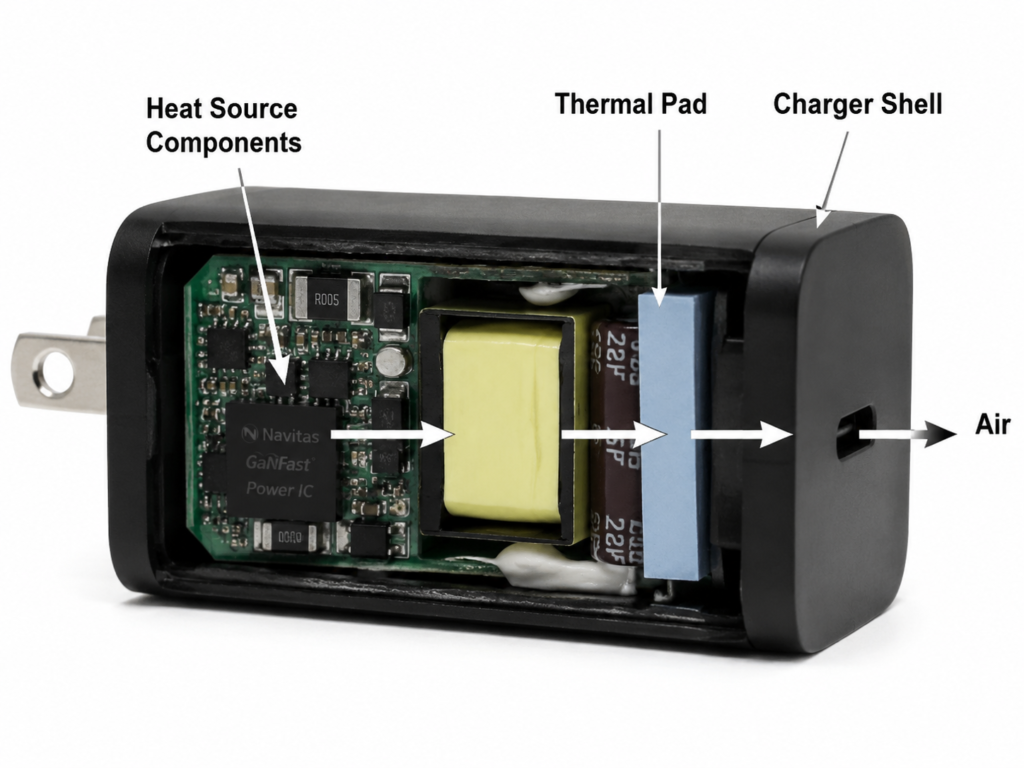
Here we can introduce a very easy-to-understand concept: thermal resistance. You can think of it as the “resistance” on the path of heat transfer. The greater the thermal resistance, the higher the temperature rises under the same heat generation. Simplified: temperature rise ≈ loss power × thermal resistance. The lower the loss and the smaller the thermal resistance, the easier it is to control the temperature.
There is a counterintuitive key point that must be remembered: the internal space of small chargers is very compact and basically sealed. Heat must first be conducted to the shell before it can be dissipated into the air through the shell. Therefore, a moderately warm shell is not necessarily a bad thing; instead, it may indicate that the internal heat is effectively conducted out. If the shell feels cool but the charging speed drops during use, it may instead be that heat is trapped inside and cannot be conducted out, and the internal components are already very hot, triggering over-temperature protection.
The Roles of Three Heat Dissipation Methods in Chargers
We all learned about three heat dissipation methods in middle school physics: heat conduction, heat convection, and heat radiation. In chargers, their roles vary greatly:
- Heat conduction: Transfers heat through solid materials, such as circuit board copper foil, metal sheets, thermal pads, and thermal adhesive, spreading the heat from hot spots and conducting it to the shell. This is the most core heat dissipation method inside small portable chargers, after all, there is no space for a fan inside.
- Heat convection: Takes away heat from the shell surface through air flow. Ordinary portable chargers rely on natural convection, that is, air flowing on its own to dissipate heat; high-power desktop chargers or special models will be equipped with fans to use forced convection to improve heat dissipation capacity.
- Heat radiation: The shell radiates heat outward through infrared rays. Its proportion is usually much smaller than conduction and convection. Shell color and surface treatment have a slight impact, but they are not key factors determining the quality of heat dissipation, so there’s no need to worry too much about them.
3. Common Thermal Design Methods: Understand the Structure from Inside to Outside
Now that we know how heat is generated and how it dissipates, let’s look at what methods manufacturers use to achieve good heat dissipation. In the future, when you look at teardown diagrams or product introductions, you’ll be able to understand the ins and outs and won’t be fooled by a bunch of parameters.
Reducing Heat at the Source: Generating Less Heat First Is More Important Than Dissipating It Later
The best heat dissipation is actually to reduce heat generation first. The higher the efficiency, the less energy turns into heat, and the smaller the heat dissipation pressure. Manufacturers’ designs in this regard include: using higher-efficiency circuit topologies, lower-loss GaN devices, synchronous rectification technology, optimizing transformer and inductor designs, reducing contact resistance, choosing more reasonable switching frequencies, and so on.
How can ordinary users perceive whether these designs are good? Simply put: it is not prone to frequent speed drops under full load, it can output stably despite its small size, and its efficiency and temperature rise performance under different loads in third-party reviews are relatively stable. But note that efficiency improvement cannot completely replace thermal design, especially for ultra-small volume, high-power density products. Even if the efficiency is very high, the heat is too concentrated, and a good heat conduction path is still needed to carry the heat out.
Internal Heat Conduction and Spreading: Conducting Heat Away from Hot Spots
After heat is generated, the first step is to conduct the heat from hot spots evenly to avoid excessive local temperatures. Common methods include the following:
- Thermal Pad: These are soft, elastic thermally conductive sheets that fill the gaps between heating components and the shell/metal sheet. They have good fault tolerance during assembly and are the most common thermal conduction solution.
- Thermal grease / thermal gel: Have better fitting ability than thermal pads, suitable for tiny gaps or hot spots with particularly concentrated heat. But it is necessary to consider whether they will age after long-term use, whether they will be squeezed out (commonly referred to as “pump-out”), and whether consistency can be guaranteed during mass production.
- Thermally conductive potting adhesive: Seals part or all of the circuit board with thermally conductive adhesive. It has good heat spreading effect and shock resistance, but cannot be repaired if broken. It has high requirements for material selection and process, and the cost is also high.
- Metal heat sink / heat spreader: Spreads the heat from local hot spots to a larger area and then transfers it to the shell, which can effectively reduce local high-temperature points and prevent a single component from being particularly hot.
- PCB copper foil and thermal vias: By thickening the copper foil of the circuit board, laying large-area copper, and using dense via arrays, the heat at the bottom of components is spread to the other side of the circuit board, which is equivalent to using the circuit board itself as a heat sink.
Here we want to remind of a common misconception: for thermally conductive materials, it’s not enough to just look at the “thermal conductivity” parameter. You also need to check whether the insulation withstand voltage is sufficient, whether the flame retardant grade meets the standard, whether the thickness and compression ratio are appropriate, whether it will age after long-term use, whether the temperature resistance range is sufficient, and whether tight fitting can be ensured during assembly. These factors all affect the actual thermal conduction effect; it’s not that the higher the parameter, the better.
Shell Heat Dissipation Design: Dissipating Heat into the Air
After heat is conducted to the shell, it relies on the shell to dissipate into the air. The design of the shell directly affects the heat dissipation effect and feel:
- Shell material: The most common is flame-retardant PC plastic. Its advantages are good insulation, controllable cost, and easy molding, while its disadvantage is limited thermal conductivity. Some products use metal shells, which have better thermal conduction and heat spreading effects, but internal insulation isolation must be done well, controlling leakage risk and creepage distance (that is, the shortest safe distance along the surface of insulating materials between live parts and accessible surfaces, to prevent electric leakage), and also controlling the accessible temperature of the shell to avoid it being too hot.
- Surface area design: Many chargers have grooves, textures, or are made into long strips on the shell. The essence is to increase the contact area between the shell and the air, which can not only improve natural convection heat dissipation, but also make the heat more uniform and feel less hot to the touch.
- Opening design: Some high-power desktop chargers or power adapters have heat dissipation holes to improve heat dissipation capacity through air convection. But openings are not made randomly; they must take into account electric shock prevention, foreign object entry prevention, flame retardancy, safety spacing, structural strength, and also meet the safety certification requirements of the target market.
- Volume trade-off: The smaller the shell, the more convenient it is to carry, but the more limited the heat dissipation area, and the higher the difficulty of thermal design. Desktop chargers generally have a larger volume, more sufficient heat dissipation area and internal space, and are usually more suitable for long-term full-load use with multiple devices.
Structural Layout for Heat Dissipation: Placing Components Correctly to Avoid Heat Accumulation
In addition to materials, how internal components are arranged is also very important. A good layout can greatly reduce heat dissipation pressure:
- Heat source dispersion: Reasonably distribute high-heat components such as GaN power transistors, transformers, synchronous rectifiers, and inductors, don’t crowd them in a small area to form a “heat island”, so that heat can be dispersed.
- Hot and cold zone isolation: Place relatively heat-sensitive components such as electrolytic capacitors, protocol chips, and plastic structural parts away from high-temperature heat sources to extend their lifespan.
- High and low voltage safety distance: The design of heat sinks, thermally conductive materials, and shells must not damage the insulation isolation and creepage distance requirements between high and low voltages, otherwise there will be safety hazards.
- Interface layout: USB-C interfaces should not be too close together, otherwise when multiple cables are plugged in, they will block the heat dissipation of the shell, and the heat from the interfaces themselves will easily accumulate.
- Prong area: Especially at the positions of foldable prongs and conversion plugs, special attention should be paid to contact resistance and structural firmness. Poor contact will generate additional heat and even cause safety problems.
Active Heat Dissipation: Mainly Used for High-Power Desktop Chargers and Special Models
When the power is too high and natural convection is not enough, some products use active heat dissipation, that is, a built-in fan, which reduces the temperature of the shell and internal hot spots through forced air flow. This design is common in higher-power desktop chargers, multi-port chargers above 200W, or products with limited space but high continuous load, but this is not an absolute dividing line, it mainly depends on the manufacturer’s design trade-offs.
The benefits of active heat dissipation are obvious: better continuous full-load capacity, lower temperature, and later power derating; but there are also disadvantages: fan noise, dust accumulation, the fan itself has a lifespan limit, the air inlet cannot be blocked, and you have to be careful of foreign objects entering and blocking the fan when traveling. When choosing a product with a fan, you can focus on the fan’s start-stop logic (for example, at what temperature it starts to rotate), noise ratings, whether the positions of the air inlet and outlet are reasonable, and whether there is over-temperature protection and dust-proof design.
Lightweight Understanding of Core Thermal Design Indicators (Semi-Proficient Introduction)
If you want to understand more deeply, you can know a few basic concepts of thermal design. You don’t need to know how to calculate, just be able to understand reviews and design logic:
- Heat source estimation: Before design, engineers first calculate the power loss of each component under different loads, predict how much total heat there is and where the hottest spots are, and then carry out targeted design.
- Thermal resistance path: The heat transfer path from the chip to the air is split into several segments, such as chip → thermal pad → shell → air. Each segment has its own thermal resistance. Prioritizing optimization of the segment with the largest thermal resistance will have the most obvious effect on improving heat dissipation.
- Temperature rise margin: That is the difference between the actual temperature of internal hot spots and the maximum temperature that components can withstand. The larger the margin, the less likely it is to break during long-term use, and the less likely it is to experience speed drops due to high temperature.
- Derating strategy: Legitimate products will set temperature thresholds in advance, and actively reduce output power when the temperature reaches the threshold. This is not cutting corners, but a routine operation to protect components and safety. On the contrary, it is more reliable than products that force output without reducing power.
- Engineering verification: After the design is completed, manufacturers use thermal imagers, thermocouples, full-load aging tests, abnormal operating condition tests, and tests with different input voltages and different ambient temperatures to verify whether the thermal design has sufficient margin to ensure reliability after mass production.
4. What Temperature Is Normal? Temperature Judgment and Safety Standards
The question everyone is most concerned about must be: my charger is this hot, is it normal? Is there any danger? To answer this question, we must first clarify several temperature concepts, and then give you a consumer-level reference range.
Shell Temperature, Internal Temperature, and Temperature Rise Are Not the Same Thing
Many people judge temperature only by touching the shell with their hands, but in fact, the three different temperature concepts have completely different meanings:
- Shell temperature: That is the surface temperature of the shell that you touch or measure with a temperature gun, and it is the easiest data for ordinary users to obtain.
- Internal hot spot temperature: That is the highest temperature of components such as GaN devices, transformers, and capacitors inside the charger. It is usually much higher than the shell temperature and is the key to determining lifespan and safety.
- Temperature rise: That is the product’s temperature minus the ambient temperature at the time. This indicator is more referential than looking at absolute temperature alone. For example, with the same shell temperature of 55°C, in an air-conditioned room at 25°C, the temperature rise is 30°C; in a summer room at 35°C, the temperature rise is only 20°C, which means the latter actually has better heat dissipation, just that the ambient temperature is inherently higher.
So when judging, be sure to combine the ambient temperature at the time, and don’t just look at an absolute temperature number.
Consumer-Level Temperature Reference Range
Here is a consumer-level reference range for everyone. Note that the premise is: room temperature around 25°C, placed on a ventilated desktop, the maximum shell temperature after more than 30 minutes of continuous full-load output. This is only a preliminary screening reference for ordinary users, not a laboratory qualification standard.
| Shell Temperature Range | Feel and Sensation | Reference Judgment | Precautions |
|---|---|---|---|
| Below 40°C | Most people feel warm, no discomfort even after touching for a long time | Normal, common in low-power or light-load scenarios | Don’t worry, use with confidence |
| 40°C – 55°C | Obviously warm, but can be held continuously | Common during full-load fast charging, usually within acceptable range | Judge in combination with continuous output stability and environmental conditions; as long as there is no frequent speed drop or peculiar smell, it’s fine |
| 55°C – 65°C | Obviously hot to the touch, must let go after a few seconds, cannot be held for a long time | Need comprehensive judgment combined with scenarios | Depends on room temperature, load duration, measurement point position, and whether there is speed drop; if it’s summer, multi-port full load, or charging a laptop while using it, it may be normal; if it’s this hot under light load and normal temperature, pay attention |
| Above 65°C | Very hot, unbearable to even touch | Need to be vigilant | If accompanied by burnt smell, shell deformation, charging interruption, frequent speed drops, blackened prongs, or heating when no load is connected, stop using immediately |
It should be specially noted that the specific accessible temperature limit is related to the applicable safety standards, shell material, contact duration, and test method. You cannot take any of the above numbers as an absolute qualification line; they are only for your daily judgment reference.
How to Understand Temperature Limits in Safety Standards
Many people say “certified products are fine”, so what exactly are the temperature requirements in certification? Currently, the most common safety standard for power adapters, information technology, and audio-visual power products is IEC/UL 62368-1. Different countries and regions have corresponding localized versions, and which one applies specifically depends on the requirements of the target market.
The temperature limits in the standard are not a single number, but distinguish between different materials, different accessible surfaces, long or short contact time, normal or abnormal operating conditions, and ambient temperature — the conditions are very detailed. So it should be clear: a product having certification does not mean the shell is necessarily cool, it only means that it meets safety requirements under the test conditions specified in the corresponding standard. Certification manages the safety bottom line, not the upper limit of user experience — this must be clearly understood. The ranges of 40°C, 55°C, and 65°C given in this article are only consumer-level preliminary screening references, not laboratory qualification lines.
How to Read Certifications and Marks (For Overseas Users)
There are many certification marks in overseas markets, and many merchants confuse concepts. Let’s briefly talk about a few common ones:
- UL/ETL/TUV/CB: These are marks focused on safety testing and certification endorsement, focusing on safety items such as electric shock, temperature rise, flame retardancy, and abnormal operating conditions, with relatively higher credibility. UL is from the United States, ETL is also common in the US, TUV is from Germany, and CB is the mutual recognition system of the International Electrotechnical Commission.
- CE/UKCA: CE is a conformity mark for the EU market, and UKCA is for the UK. They are not mandatory third-party certifications, but are self-declarations by manufacturers that their products meet the requirements of relevant directives. The specific credibility depends on the manufacturer’s qualifications and whether there are corresponding test reports and declarations of conformity. You can’t just take a mark printed on the packaging as real.
- FCC: The US Federal Communications Commission certification, which mainly focuses on electromagnetic compatibility and radio interference. It is not an electrical safety certification. Don’t be fooled by merchants who say “it’s safe because it has FCC certification”.
- PSE/KC/RCM: Corresponding to the market access requirements of Japan, South Korea, and Australia/New Zealand respectively, each with different safety test items.
When verifying certifications, don’t just look at the logo on the packaging. It’s best to confirm that the model, input and output parameters, and manufacturer name on the certificate or report are consistent with the actual product, to avoid buying products with counterfeit certifications.
Over-Temperature Protection and Derating Strategy
Legitimate GaN chargers all have over-temperature protection (OTP). When the internal temperature exceeds the set threshold, it will reduce output power or directly stop output, and resume after the temperature drops. This active power reduction operation is called power derating. It occurs during high temperatures, simultaneous multi-port output, and long-term full load, and is part of a legitimate thermal management strategy. It is not a quality problem, nor is it a false power rating.
So how do you judge whether it’s normal derating or insufficient heat dissipation? If the power only drops a little for a short time in extreme scenarios (such as 35°C room temperature in summer, multi-port full load, and being blocked), it’s normal; but if under normal room temperature, good ventilation, and single-port rated load, the speed drops repeatedly after more than ten minutes of charging, then it may be insufficient heat dissipation margin. On the contrary, note that products with no clear protection instructions that force output even at abnormally high temperatures have higher risks, because they may have no over-temperature protection at all.
5. What Factors Affect Heat Dissipation Performance
Many people see reviews saying the temperature is not high when buying, but find it very hot when using it themselves. This is often not because the product has a false power rating, but because the usage scenarios are different. There are many factors that affect heat dissipation performance, let’s talk about them one by one.
Output Power and Charging Phase
The most direct factor is output power: the higher the power, the higher the loss usually is, and the greater the heat dissipation pressure. A 30W charger is basically only warm, a 65W/100W one will obviously heat up at full load, and 140W/240W high-power models test thermal design even more.
In addition, the charging phase also affects temperature: when phones, tablets, and laptops are low on battery, they request higher power, which generates more heat; when the battery reaches 70%-90%, the device will actively reduce charging power, and the temperature will drop accordingly. This is a normal phenomenon, not a problem with the charger.
There are two other scenarios where heating is more obvious: one is charging a laptop while using it, especially when running large software, editing videos, or playing games. The device itself has high power consumption, and the charger may be close to full load for a long time, which is much hotter than just charging on standby; the other is low-voltage high-current fast charging scenarios, such as 5V/9V high-current output, where the heating of the interface, cables, and synchronous rectifiers on the output side will be more prominent.
Power Density: The Ratio of Volume to Power Determines the Difficulty of Heat Dissipation
We mentioned power density earlier. In plain terms, it is “how many watts of power are processed per unit volume”. The higher this value, the more difficult the thermal design. For two 65W chargers, the one with half the volume of a traditional one has a smaller heat dissipation area and more concentrated internal heat, so naturally it gets hotter than the larger one, unless it uses better materials and structural design to compensate.
But you can’t go to the extreme and think “small ones must be bad, big ones must be good”. Small size is a technical advantage of GaN. Many excellent small-volume products can meet heat dissipation standards through reasonable design; while some large-volume products may have poor internal design and worse heat dissipation. When judging, you should combine continuous full-load tests, temperature rise performance, derating conditions, and the brand’s design ability, not just look at the volume.
Practical advice is: if you are powering a laptop or multiple devices at full load for a long time, prioritize models with larger heat dissipation margins (usually slightly larger in volume); if it’s just for short trips or fast charging small devices like phones, prioritizing portability is also fine.
Superposition Heating Effect of Multi-Port Output
When a multi-port charger is used simultaneously, the total output power is higher, there are more internal heat sources, the heat dissipation pressure will increase significantly, and the temperature will definitely be higher than when using a single port. Moreover, multi-port chargers generally have power distribution rules. For example, C1 single port is 100W, and when C1+C2 are used simultaneously, it becomes 65W+30W — not both ports can run at full 100W at the same time.
Many people think this is a false power rating, but it’s not: legitimate multi-port chargers control temperature through power distribution, current limiting, and derating to ensure product safety and lifespan. On the contrary, for small-volume products that claim a very high total power and don’t reduce power when multiple ports are used simultaneously, you should be more careful whether they have over-temperature protection. When buying a multi-port charger, don’t just look at the total wattage on the front of the packaging; be sure to read the specification table for single-port, dual-port, and triple-port simultaneous output carefully.
Environmental and Placement Conditions
Many people ignore the impact of the environment on heat dissipation. First is ambient temperature: the higher the room temperature, the higher the base temperature of the charger. In a 35°C room in summer, the shell temperature of the charger will definitely be about 10°C higher than in a 25°C air-conditioned room, which is normal.
Then there is ventilation: placing it on an open hard surface such as a desk, tile, or metal desktop has good heat dissipation effect; if placed on a quilt, sofa, pillow, or in a bag, the heat cannot dissipate, the temperature will be much higher, and it may even trigger over-temperature protection.
There is also shielding: covering the charger with tissues, books, clothes, or plugging it into a crowded power strip surrounded by cables will block air flow, affect natural convection heat dissipation, and the temperature will rise significantly. In addition, avoid using it in high-temperature environments such as direct sunlight, next to heaters, or in cars in summer.
Special Factors for Overseas Travel and Cross-Border Electricity Use
For users who frequently travel across borders or live in different regions, there are several easily overlooked factors that affect heating:
- Input voltage difference: Most GaN chargers have 100-240V wide input and are globally compatible, but in 100-120V regions (such as the US, Japan, Canada) and 220-240V regions (such as Europe, Australia, China), there may be slight differences in efficiency, input current, and temperature rise. Generally, the current is larger during low-voltage input, and heating may be slightly higher.
- Travel adapter: Many people use conversion plugs when going abroad, but if the adapter’s rated power is insufficient, the socket is loose, or the contact area is small, additional heat will be generated at the contact position between the prongs and the adapter. At this time, the adapter is hot, not the charger itself, which is easy to misjudge.
- Wall socket and power strip quality: Aged and loose wall sockets, inferior power strips, and prongs not fully inserted into the socket will increase contact resistance, leading to local heating, even higher than the temperature of the charger itself.
- Cable impact: USB-C cables that do not support the corresponding power, inferior cables, oxidized or loose connectors may cause local heating of the interface, speed drops, or even charging interruption. Especially in high-power scenarios above 100W, the impact of cables is greater.
A special reminder here: 100-240V wide input does not mean it is safe to use any conversion plug. Adapters and power strips must also meet the corresponding current and power requirements and local safety standards, otherwise problems are very likely to occur.
6. How to Judge Whether a GaN Charger Has Good Heat Dissipation
After talking about so many principles, what everyone is most concerned about is: how do I know if this charger has good heat dissipation when I buy it? Below we will talk about three levels: before buying, reading reviews, and testing at home by yourself — all of which ordinary users can do.
Before Buying: Look at Parameters, Certifications, and Design Trade-Offs
You don’t need to tear down the device; you can roughly judge 80-90% by looking at the information on the product page:
- Look at target market certifications: For overseas use, prioritize products with compliance information for the corresponding market. For example, choose UL/ETL for the US, products with reliable CE declarations for the EU, UKCA for the UK, PSE for Japan, KC for South Korea, and RCM for Australia/New Zealand. Don’t buy products that only have an FCC mark and claim to be safe.
- Look at power density: For the same power, products with slightly larger volume usually have more margin in heat dissipation area and heat capacity, and are more suitable for long-term full-load use; if you pursue portability, you have to accept that its temperature may be slightly higher at full load, and prioritize products from legitimate brands.
- Look at output specifications: Products that clearly label single-port and multi-port combined output power usually have more transparent thermal management logic; for those that only label total power and do not write combined output specifications, be careful that they may have false power ratings or poor thermal design.
- Look at protection instructions: Legitimate products will label basic protection functions such as over-temperature protection (OTP), over-current protection (OCP), over-voltage protection (OVP), and short-circuit protection (SCP). Try not to buy those that don’t even mention protection functions.
- Look at usage scenarios: If you often power a laptop at full load or charge multiple devices together for a long time, prioritize heat dissipation margin; if you mainly charge phones, earphones, and tablets, portability can have a higher weight.
Refer to Third-Party Reviews: Reading Data Correctly Is Useful
Now many bloggers do teardowns and tests of chargers, but not all reviews have reference value. You have to learn to read the data, not just look at the conclusion:
- Check whether test conditions are unified: Prioritize looking at shell temperature, temperature rise, and output power curves after 30 minutes to 1 hour of continuous full-power output at around 25°C room temperature. If even the room temperature, load, cables, and test duration are not mentioned, the data has weak comparability and little reference value.
- Check measurement point positions: Don’t just look at the temperature of one point; pay attention to the highest point in the thermal image, near the USB port, near the prongs, and the center of the shell. Some products have a low center shell temperature but are particularly hot near the interface, which is also problematic.
- Check continuous output capability: Being able to maintain the rated power after full load indicates that the heat dissipation margin is relatively good; if the power drops significantly after a few minutes of charging, you need to distinguish whether it is a normal derating strategy of the design or a forced speed drop caused by insufficient heat dissipation.
- Check efficiency curve: Efficiency varies greatly under different loads. The peak efficiency advertised by manufacturers is often around 50% load, which does not mean it is also efficient at 100% full load. Be sure to look at efficiency and temperature rise under full load.
- Check recovery performance: After derating, how long it takes to recover full power after cooling and whether there will be repeated charging interruptions can also reflect the rationality of heat dissipation margin and protection strategy. Products with good heat dissipation recover quickly after cooling and do not frequently interrupt charging.
Home Self-Test: Judgments That Ordinary Users Can Make
If you already bought it, you can do simple tests and judgments at home by yourself, no professional equipment needed:
- Test preparation: Use devices that support the corresponding power and qualified cables, place the charger on a ventilated desktop, charge continuously for more than 30 minutes, and judge after the temperature stabilizes. Don’t say it’s hot after only 5 minutes of charging.
- Preliminary screening by feel: If you can touch it continuously and it’s just obviously warm, it’s generally normal; if you have to let go immediately after touching, it means the temperature is high and you need further troubleshooting combined with the scenario.
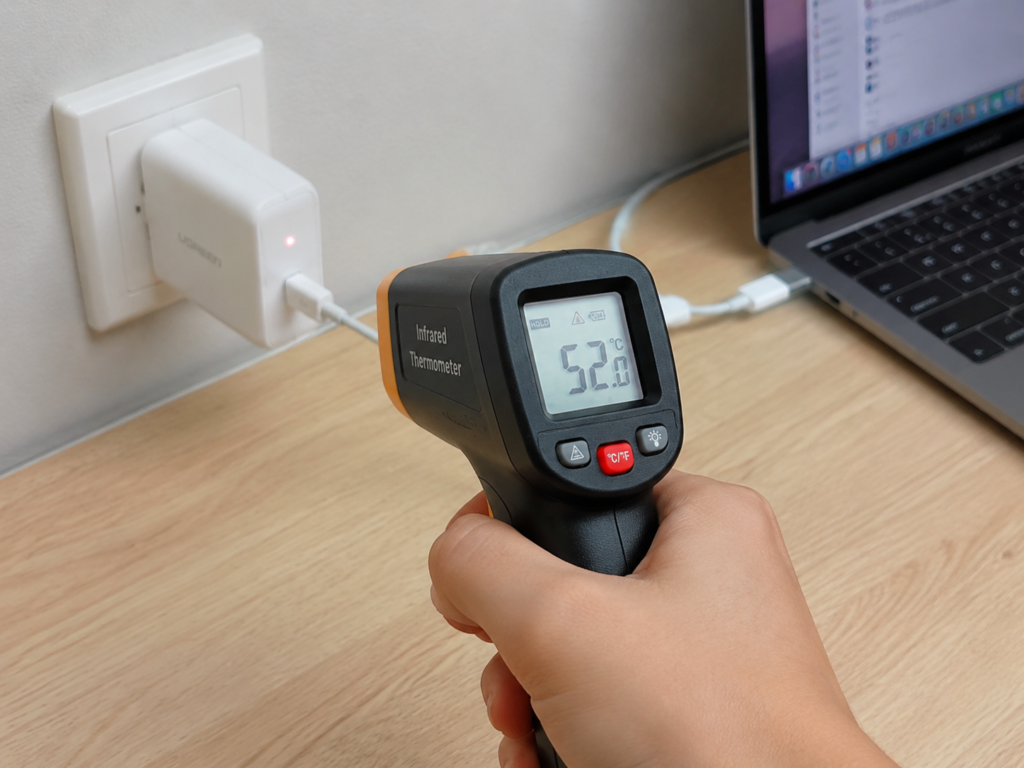
- Temperature measurement with tools: If you have an infrared temperature gun, note that glossy plastic shells will reflect light, resulting in inaccurate temperature measurements. You can stick a small piece of matte black tape and then measure, at a fixed distance, measure multiple points and take the highest value. A thermal imager is more intuitive, but you also need to pay attention to emissivity settings and reflection errors.
- Speed drop verification: If you think the charging has slowed down, you can unplug the charger and let it cool for 10-15 minutes. If the speed recovers when you charge again, then it’s most likely that thermal protection was triggered, or it could be the battery temperature control of the charged device itself intervening.
- Control verification: Try replacing cables, sockets, and devices. If the temperature drops after replacement, it means it’s not a problem with the charger itself, but with the cable, socket, or device.
Abnormal Heating Identification: Be Alert to These Situations
Not all heating is normal. When these high-risk signals appear, stop using immediately and don’t continue testing:
- Burnt smell, smoke, abnormal noise;
- Shell deformation, discoloration, cracking;
- Blackened prongs, severe oxidation;
- Obviously hot when no load is connected (no device plugged in, only plugged into the socket);
- Frequent charging interruptions, and getting worse.
If only the USB-C interface is particularly hot locally, first check whether the cable supports the corresponding power, whether the connector is loose, whether the interface is dirty or damaged, and whether there is a problem with the device’s port; if it’s hot at the prongs or power strip, focus on checking whether the wall socket is loose, whether the power strip is aged, whether the travel adapter’s rated power is sufficient, and whether the prongs are fully inserted.
In addition, when a new product is first used, there may be a slight plastic or adhesive smell, which is normal and will disappear after a few uses; but if there is a pungent burnt smell, smoke smell, or the smell gets stronger, it’s not normal and you should stop using it immediately.
7. Common Heat Dissipation Misconceptions: Don’t Be Misled by Intuition
Many people judge heat dissipation by intuition, which is easy to fall into pitfalls. We have compiled several of the most common misconceptions to help you avoid them.
Misconception 1: A GaN Charger That Heats Up Has Poor Quality
This is the most common misconception. All chargers heat up during high-power output, and GaN is no exception. It just can achieve higher power in a smaller volume, not that it doesn’t heat up at all. To judge whether the quality is good or not, it’s not about whether it heats up, but whether the temperature is within a reasonable range, whether it can output stably continuously, whether there is abnormal smell/deformation/charging interruption, and whether high temperature only occurs in extreme environments. For example, it’s normal for a 100W charger to be obviously warm when charging a laptop while using it, but it’s definitely a problem if it’s hot to the touch even when no load is connected.
Misconception 2: The Cooler the Shell Feels, the Better the Heat Dissipation
Many people touch the charger first when buying, thinking that a cool one has good heat dissipation, but this is actually wrong. A low shell temperature may be because the load is low and there isn’t much heat to begin with, or it may be that internal heat cannot be conducted out and is trapped inside — the shell is cool but the inside is already very hot. A good thermal design will conduct internal heat evenly to the shell and then dissipate it into the air, so a uniformly warm shell is actually more reasonable than local extreme heat or cool outside and hot inside. When judging, be sure to combine continuous output capability and speed drop performance, not just rely on feel.
Misconception 3: GaN Chargers of the Same Power Have Similar Heat Dissipation Levels
Even for 65W or 100W GaN chargers, the heat dissipation performance can vary greatly. Volume size, circuit topology used, choice of thermally conductive materials, PCB layout, shell design, and whether there is a heat spreader — all of these affect the final heat dissipation effect. Therefore, users who use full load for a long time should not only choose based on power, but must look more at temperature rise and derating tests; if it’s just for daily phone charging and pursuing portability, choosing a small-volume model from a legitimate brand is fine.
Misconception 4: Total Multi-Port Power Equals Full Power for Each Port
Many people buy multi-port chargers thinking that a total power of 200W means all four ports can deliver 50W simultaneously, or even each port can run at full 100W — this is completely wrong. Multi-port chargers usually have power distribution rules, and when used simultaneously, the single-port power will be reduced. This is directly related to heat dissipation — if multiple ports are fully loaded at the same time, the total heat generation is too large. Legitimate products control temperature through power distribution to ensure safety and lifespan, which is not a false power rating. Before buying, be sure to read the specification table for multi-port combined output carefully, don’t just look at the total wattage on the front of the packaging.
Misconception 5: The Smaller the Charger, the More Advanced It Is, and the Worse the Heat Dissipation Must Be
Miniaturization is one of the core advantages of GaN technology, it just increases the difficulty of thermal design, and does not mean that small-volume products must have poor heat dissipation. Many excellent small-volume products can meet heat dissipation standards by optimizing the structure and using good thermally conductive materials. The key is to see whether it can output stably, whether it derates excessively, and whether there is abnormal high temperature. For long-term high-load use, choose one with sufficient heat dissipation margin; for short trips, choose a portable one — whatever suits your needs is fine.
Misconception 6: A Product with Certification Marks Will Definitely Not Heat Up
Certification manages the safety bottom line and compliance requirements, it does not mean the shell must be cool, nor does it mean low temperature in all usage scenarios. Even a UL-certified product may have a very hot shell under high temperature in summer, multi-port full load, or being blocked. As long as it is within the range allowed by the standard, it is qualified. When judging, you should combine certification, brand, reviews, usage environment, and cable quality, don’t just look at a certification mark and feel reassured.
8. Purchasing and Usage Guide: Choose According to Needs to Reduce Heating and Speed Drops
After talking about so many judgment methods, finally we will give you some practical purchasing and usage suggestions to help you choose the product that suits you, and minimize heating and speed drops during use.
Choose Appropriate Heat Dissipation Margin by Power Range
The core principle of choosing a charger is: choose according to your needs, don’t blindly pursue high power. For long-term high-load use (such as charging a laptop while using it, or multiple devices at full load for a long time), prioritize models with sufficient heat dissipation margin; for short trips or light-load use (such as daily fast charging of mobile phones), you can prioritize portable small-volume models. We provide references for you according to common power ranges:
- Below 30W: Suitable for small devices such as mobile phones, earphones, and watches. The heat dissipation pressure is very small, just focus on volume, target market certification, and interface quality.
- 45W – 65W: Suitable for charging phone + tablet, and thin and light laptops. For dual-port products, be sure to check the combined output specifications and full-load temperature rise performance.
- 100W: Suitable for most USB-C laptops and multi-device fast charging. It is recommended to prioritize referring to third-party temperature rise and output tests of 30 minutes to 1 hour under full load to ensure long-term stable use.
- 140W: Suitable for high-power devices that support USB PD 3.1 EPR 28V level. Note that cables, devices, and chargers must all support the corresponding capabilities, otherwise 140W cannot be fully achieved.
- 200W – 240W desktop charger: Suitable for fixed desktop use with multiple devices. Prioritize models with larger volume, better ventilation, and clear power distribution rules; for 240W scenarios, specially confirm the compatibility of EPR cables and devices.
Heat Dissipation-Related Decision Checklist When Purchasing
When buying, you can follow these five steps, and you basically won’t fall into pitfalls:
- Choose power according to your real needs, don’t blindly pursue the maximum wattage. The higher the power, the greater the heating, and it’s a waste of money if you can’t use it.
- Check the single-port and multi-port combined output specifications, confirm that they can meet your device combination, don’t just look at total power.
- Check target market certifications, manufacturer information, protection functions, and manuals to ensure compliance and reliability.
- Refer to third-party reviews, focusing on full-load temperature, temperature rise, efficiency, and continuous output curves.
- Make trade-offs based on your own usage scenarios: choose one with sufficient heat dissipation margin for long-term full load, and choose a small-volume model from a legitimate brand for travel portability.
Several Characteristics of Inferior Products to Avoid
Try not to buy products with these characteristics, there is a high probability that they are cut corners:
- The price is significantly lower than the normal market level. For example, if a 65W GaN charger is sold for a long time at a price lower than the reasonable cost, it must have cut corners on materials or design.
- “Three-no” products: no brand, no model, no complete input and output parameters, no target market compliance marks.
- Only promote ultra-small, ultra-fast, ultra-low temperature, but do not provide power distribution, protection functions, and certification information.
- A large number of problems such as charging interruption, peculiar smell, shell deformation, hot prongs, and false power rating appear in user reviews.
- Packaging or detail pages confuse certification concepts, promoting FCC electromagnetic compatibility certification as a safety certification.
Daily Usage Heat Dissipation Optimization Tips
You don’t need to change the charger; just adjust your usage habits, and you can significantly improve heating and speed drops:
- Placement: Place it on an open hard surface such as a desk, tile, or metal desktop. Do not use it on a quilt, sofa, pillow, clothing, or in a bag, otherwise the heat cannot dissipate.
- Maintain ventilation: Do not cover the charger with tissues, books, or clothes, do not bury it in a pile of cables, and do not plug it into a crowded power strip. Leave some space for it to dissipate heat.
- Cable matching: Use legitimate USB-C cables that support the corresponding power. For high-power scenarios of 100W/140W/240W, especially confirm whether the cable has an E-marker chip and whether it supports the corresponding EPR power level. Inferior cables not only heat up, but may also cause speed drops.
- High-temperature environment: When charging a laptop for a long time in summer or tropical regions, try to place it in a ventilated place, and use a small fan to assist heat dissipation if necessary.
- Nighttime bedside charging: Avoid the charger being covered by pillows or quilts; for nighttime phone charging, you can use a low-power charger, or turn on the optimized charging function built into the device to reduce long-term high-power heating at night.
Recommended Strategies for Different Scenarios
For different usage scenarios, the focus is completely different:
- Daily fast charging for mobile phones: 30W-45W is usually sufficient, prioritize those with complete safety certifications and small size.
- Thin and light laptop office use: 65W-100W is more practical. If used plugged in for a long time, it is recommended to choose a model with slightly larger volume and good temperature rise performance, which is more stable and durable.
- Multi-device desktop use: Choose a 100W-240W desktop charger with clear power distribution rules, and try to avoid all devices being fully loaded at the same time for a long time.
- Cross-border travel: Confirm that it has 100-240V wide input, the plug specification corresponds to local standards, the rated power of the travel adapter is sufficient, and it is best to have certification for the target market.
- Gaming laptops or high-load laptops: USB-C charging may not completely replace the original power supply. For long-term high-load use, it depends on the actual power demand of the device and whether the continuous output capability of the charger is sufficient.
9. Troubleshooting Abnormal Heat Dissipation: Locate Problems by Location and Scenario
If you encounter a charger that is hot or has speed drops, don’t rush to conclude it’s a quality problem. You can troubleshoot step by step according to the following steps, and you can find the cause most of the time.
Step 1: First Distinguish the Location of Heating
Heating in different locations has completely different causes:
- Overall heating of the charger: Mostly related to high-power output, high ambient temperature, and blocked heat dissipation path. It may be normal, or it may be insufficient heat dissipation margin.
- Local heating of the USB-C connector: First check whether the rated power of the cable is sufficient, whether the connector is loose, whether the interface is dirty or damaged, and whether there is a problem with the device’s port.
- Heating at the socket/prongs: Focus on checking whether the wall socket, power strip, or travel adapter is loose, aged, or has insufficient rated power.
- Heating of the charged device: It may be that the device itself has a high operating load, battery temperature control, or background tasks, not necessarily a problem with the charger.
Step 2: See If the Abnormality Only Occurs in Specific Scenarios
If it only heats up under specific conditions, it’s most likely not a problem with the charger itself:
- Only heats up when multiple ports are used simultaneously: it may be caused by excessive total load or power distribution. Try reducing the number of devices first.
- Only heats up when using a certain cable: replace with a compliant cable and test, it’s most likely a problem with the cable.
- Only heats up when plugged into a certain socket: try a different wall socket or power strip, be alert to poor socket contact.
- Only heats up in summer, under direct sunlight, or when blocked: judge after improving ventilation and environment, it is usually caused by the environment.
- Only heats up when charging a certain device: it may be that the device requests high power, or the device’s own battery temperature control strategy is different.
Step 3: Judge Whether to Stop Using or Replace
After troubleshooting, handle according to the situation:
- Stop using immediately: If there is burnt smell, smoke, abnormal noise, shell deformation, blackened prongs, obvious heating when no load is connected, or repeated charging interruptions that get worse, stop using immediately. Do not continue testing, safety first.
- Recommended replacement: If after replacing cables, sockets, and devices, there are still repeated high-temperature