
When buying a charger, do you often see a bunch of terms like “PD fast charging”, “QC fast charging”, “Super Fast Charging” and get overwhelmed by choices? I once had a friend who just switched to iPhone 15, spent a lot of money on a charger that only highlighted 120W proprietary/QC fast charging but did not clearly mark the USB PD output levels on the spec sheet. As a result, when plugged in, it could not trigger PD fast charging and only charged at a lower power. He came to complain to me — to put it bluntly, he did not understand fast charging protocols and wasted his money. Later, after switching to a USB-C charger clearly marked with PD 20W/30W levels, the iPhone’s fast charging was triggered normally.
Clearly you bought a 65W fast charging head, but it charges very slowly when plugged into your phone? You have both an iPhone and an Android, and do not know which type of head to buy to trigger fast charging for both? This article will thoroughly explain the two most common fast charging protocols, USB PD and Qualcomm QC, from basic understanding to buying pitfalls. After reading it, you will never be fooled by promotional words.
First, the Conclusion: How to Choose Between PD and QC
If you are in a hurry, remember these core conclusions first, and then read the details slowly later:
- For mixed use of multiple devices, Apple devices, tablets, laptops, power banks, car charging: Prioritize USB PD, preferably with PPS function, which has the strongest versatility.
- Older Qualcomm Android phones, old USB-A port car chargers/chargers: QC2.0/QC3.0 still have practical value, no need to rush to eliminate existing accessories.
- Newly bought chargers: Prioritize PD/PPS support, then check whether it is additionally compatible with QC; do not just look at vague promotional terms like “fast charging” and “super fast charging”.
- Charging speed is not determined solely by the protocol name. The device’s upper limit, charger output, cable capability, ambient temperature and current battery level will all affect the actual charging speed.
3 Practical Benefits of Distinguishing PD and QC
Understanding the difference between these two protocols is not just about knowing two more terms, it has three very real benefits for your actual use of the device:
The first is not wasting money. Many people place an order when they see “100W fast charging”, but their phone only supports up to 20W, and all the extra money is wasted. Understanding protocols can avoid such pitfalls.
The second is being able to quickly solve the problem of “charging slowly even with a fast charging head”. When this happens, you do not have to guess blindly, you can troubleshoot step by step whether it is a problem with the charger, the cable, or the phone itself.
The third is reducing redundant accessories. Users with multiple devices can choose the most versatile charger, so they do not have to pile up a bunch of charging heads on the desk, and can travel light on business trips.
Comparison Scope and Unified Caliber of This Article
First, let’s clarify the boundaries of the discussion to avoid understanding deviations:
We are comparing mainstream consumer-grade regular products on the market, focusing on common versions such as USB PD 3.0/3.1, PPS, QC3.0, QC4+, and QC5, covering scenarios of mobile phones, tablets, laptops, power banks, and car chargers. We do not discuss industrial power supply, modified devices, and inferior products with no brand, no certification, and no parameters. The comparison benchmark is products of the same price range, same power segment, regular brands, and clear parameter markings.
There is another very important boundary: the proprietary fast charging of some mobile phone brands will change the results. For example, the 120W and 100W fast charging of some high-wattage Android models rely on the manufacturer’s own protocol, and general PD/QC may not be able to reach the nominal power. We will explain this situation separately.
The First Cognition That Novices Need to Correct
Before the formal comparison, there is a most common misunderstanding that must be corrected first, otherwise no matter how many parameters you read, it will be useless:
Many people think that “fast charging protocol determines charging speed”, but that is not the case. Power (that is, voltage × current, simply put, the size of the power supply capacity) is an important basis for charging speed. The protocol is just the “common language” for the charger and the device to communicate — if the two sides do not speak the same language, no matter how powerful the charger is, it cannot work effectively.
The actual charging power follows the barrel effect: the lowest limit among the device, charger, cable, interface, and temperature control determines the final charging speed. For example: a phone only supports up to 20W PD, even if you use a 100W PD charger, it usually can only charge at the 20W power allowed by the phone, and will not be faster.
Basic Cognition: What Are USB PD and Qualcomm QC Respectively
In the most popular terms, these two fast charging protocols: one is the cross-brand “common Mandarin”, and the other is the “dialect” in the Qualcomm ecosystem.
USB PD: A Universal Fast Charging Standard Across Brands and Categories
Let’s talk about the most universal one first: it is a unified power supply/fast charging standard launched by the official organization responsible for formulating the world’s USB standards (called USB-IF), which is equivalent to the common charging language in the USB-C ecosystem. Many new USB-C devices such as mobile phones, tablets, laptops, and power banks support PD, but note: USB-C is just the interface form, low-power accessories or some cheap devices may only have 5V input, and do not necessarily support PD fast charging. Its official name is USB PD, and the full name is USB Power Delivery.
As an open industry standard, it has strong ecological versatility, but note: the standard itself is open, but if a product wants to use the USB-IF certification mark and do official compliance certification, it will involve testing and membership costs, and cannot be simply understood as all links are completely free.
Its typical applications are very wide: recent iPhones, iPads, Macs, Samsung/Google Pixel Android phones, USB-C laptops, Switch, power banks, monitors, and car chargers basically support PD. Among them, Switch can use a compliant USB-C PD power supply, but the dock mode and some third-party accessories are more sensitive to output levels, cables and compatibility, so it is best to refer to the specifications of official or reliable reviews.
In terms of common power, mobile phones are generally 18W-45W, thin and light laptops are 45W-100W, high-performance laptops, monitors and other devices may use the high-power capability of PD3.1 EPR — PD3.1 EPR adds high-voltage levels such as 28V, 36V, 48V, up to 240W; common promotional power on the market includes 140W and 240W, and power like 180W depends on the combination of specific devices, adapters and cables.
Here we first mention an extended function that mobile phone users need to focus on: it allows the charger to adjust voltage and current in finer steps, instead of being fixed at only a few levels, which can reduce the conversion loss and heat inside the mobile phone, making charging more stable. This function is called PPS (Programmable Power Supply), and Samsung’s Super Fast Charging and the high-power fast charging of some Pixel models rely on it.
Qualcomm QC: Fast Charging Technology Solution in the Qualcomm Ecosystem
Another common fast charging is the fast charging technology specially made by Qualcomm for its Snapdragon processor platform, which is equivalent to the “dialect” of the Qualcomm Android circle. In the early days, it was mainly used on Android phones equipped with Qualcomm platforms, and is also supported by a large number of USB-A chargers, car chargers, and power banks. Its name is QC, and the full name is Quick Charge.
There is a very easy to misunderstand point here: not all mobile phones equipped with Qualcomm Snapdragon processors support full QC fast charging. Whether it supports QC and which version it supports depends on the mobile phone manufacturer’s choice, processor/power chip solution, battery design and certification authorization, not that having a Snapdragon chip will definitely have QC. The same is true on the charger side: marking QC only means that it can provide QC output, and the device side must also support the corresponding version to trigger fast charging.
Its typical applications are concentrated in older Android phones, some new Qualcomm platform phones, USB-A port car chargers, older power banks and some multi-protocol chargers. In terms of power, QC2.0/QC3.0 are commonly 18W-27W; although QC4+/QC5 can reach higher power, the number of supported devices and chargers on the market is far less than that of the PD ecosystem.
The Most Intuitive Positioning Difference Between the Two
If we compare fast charging to speaking, USB PD is like common Mandarin. Whether it is Apple, Android, tablets or laptops, as long as it is a USB-C ecosystem device, it can basically understand it, and the coverage is extremely wide.
Qualcomm QC is more like a dialect of the Qualcomm Android circle, especially suitable for older Qualcomm Android phones and old fast charging scenarios with USB-A ports. Its versatility is not as good as PD, but it is also very useful in its ecosystem.
The new trend in recent years is: QC4+ and QC5 have clearly moved closer to the USB-C, USB PD, and PPS systems, and are no longer completely independent like the old QC. Therefore, when buying new accessories, the importance of PD/PPS is usually higher than the separate QC logo.
Protocol, Interface, Power, and Cable Are Not the Same Thing
Many people confuse these concepts, so let’s clarify them all at once, so you will not be confused when looking at parameters in the future:
- Protocol: such as PD, QC, PPS, is the rule for the device and charger to negotiate power supply, equivalent to “communication language”.
- Interface: such as USB-A, USB-C, Lightning, is the shape of the physical socket, equivalent to “the appearance of the plug”.
- Power: such as 20W, 45W, 65W, 100W, is the actual power supply capacity, equivalent to “how much weight can be carried”.
- Cable: determines the amount of current that can be carried and whether high power can be identified, equivalent to “the thickness of the pipe for transmitting electricity”.
Common confusion points for example: USB-C port does not mean that it must support PD; 100W charger does not mean that it can charge any device at 100W; a charger marked QC cannot trigger PD fast charging for iPhone.
Plain Language Principle: How Does Fast Charging Work
You may be curious, why can some chargers fast charge when plugged in, while others cannot? Will fast charging burn the phone? In fact, the principle is very simple, the core is “negotiate first, then supply power”.
The Core Premise of Fast Charging: Handshake Negotiation First, Then Increase Power
After plugging the charger into the device, the device will not blindly increase the power immediately, but will first “say hello” to the charger to confirm the protocols and power levels supported by both parties. This process is called “handshake negotiation”.
If the negotiation is successful, both parties will enter the agreed fast charging modes such as PD, PPS, QC, etc., and start high-power charging. If the negotiation fails, it will usually return to the most basic 5V normal charging. Regular products will not burn the device due to protocol incompatibility — the real risks are inferior chargers with no brand, no certification, no parameters, falsely marked cables, products without protection circuits, or interface short circuits and severe poor contact.
USB PD Negotiation Logic
USB PD negotiation relies on a special communication pin in the USB-C interface — called the CC channel, which is equivalent to a dedicated telephone line between the charger and the device, and the negotiation is fast and stable.
When charging, the charger will first report all the voltage and current combinations it can provide, which is equivalent to handing the device a menu. The English abbreviation of this menu is PDO, you do not need to remember it, just know that it is the “charger’s capability list”. For example, common 5V, 9V, 15V, 20V fixed levels, or PPS adjustable voltage range, are all listed on this “menu”. The device will select the most suitable level from the menu according to its own needs, tell the charger, the charger will output according to this level, and the device side will then perform battery charging management.
There is a boundary to remember: standard USB PD is mainly based on the USB-C interface. There are almost no standard PD with USB-A port in consumer products on the market. The fast charging of A port is basically QC or manufacturer’s proprietary protocol.
What Is PPS, Why Should Mobile Phone Users Care
I mentioned the PPS function in PD just now, and the fast charging of many Android phones is inseparable from it. What exactly is it?
For example: ordinary fixed-level PD is like a fixed set meal in a restaurant, you can only choose fixed options such as 5V, 9V, 15V, 20V; while PPS is like an a la carte menu, which can finely adjust voltage and current within a certain range, giving as much as the device needs.
The benefit of this is to reduce the secondary conversion pressure inside the mobile phone — the voltage of the mobile phone battery changes dynamically. If the charger can only output fixed high voltage, the inside of the mobile phone must reduce the voltage to the value required by the battery. This process will generate heat and lose power. PPS allows the charger to directly output a voltage close to what the battery needs, reducing heat on the mobile phone side and improving fast charging efficiency.
Typically, for example, some Samsung models must have PD PPS to trigger Super Fast Charging, and some Pixel models also rely on PD/PPS to obtain higher charging power. So if you use an Android flagship or mid-to-high-end models in recent years, it is right to prioritize chargers with “PD 3.0 + PPS”.
Qualcomm QC Negotiation Logic
Different versions of QC have quite different negotiation logic:
QC2.0/QC3.0 are commonly found in USB-A ports, and negotiate voltage levels through the signal pins of the USB data cable. QC3.0 has finer voltage regulation than QC2.0, better efficiency and compatibility, and is also the most common version in older accessories.
QC4+ and QC5, on the other hand, turn to the USB-C interface, emphasizing compatibility with the USB PD and PPS ecosystem, and many implementations will also mark PD/PPS output; but they still belong to the Qualcomm Quick Charge system. Which fast charging mode is actually triggered depends on the mobile phone, charger, cable and certification support.
No matter which version, it requires the mobile phone, charger, cable, and system strategy to all support it to enter the corresponding QC fast charging mode, and one link missing will not work.
Common Reasons for Negotiation Failure
Knowing the logic of negotiation, it is easy to understand why sometimes fast charging is not triggered even though it is plugged in. The common reasons are nothing more than these categories:
The first category is “language barrier”: the device and the charger do not have a commonly supported fast charging protocol, so naturally they cannot enter the fast charging mode.
The second category is “the pipe is not thick enough”: the cable does not support the required current, or the quality is too poor, especially in PD scenarios exceeding 60W, if the cable’s carrying capacity is not enough, the charger will actively reduce the power to avoid problems.
The third category is “power is diverted”: if you use a multi-port charger, after plugging in multiple devices, the power of a single port will be redistributed, and it may not reach the minimum power required for fast charging.
The fourth category is “the phone does not want to charge fast itself”: the phone’s battery level is too high, the temperature is too high, or you are playing games or turning on navigation, the system will actively limit the charging power to protect the battery and ensure the user experience, which is a normal protection strategy.
The fifth category is “poor contact”: dust or oxidation in the interface, or loose cable ends, will lead to unstable communication or power supply, and naturally cannot trigger fast charging.
Core Dimensions Compared Item by Item
After talking about the basic principles, we compare PD and QC together from several dimensions that everyone cares about most, to help you more intuitively judge which one is more suitable for you.
Overview Comparison Table
To let you understand the core difference between the two at a glance, I have compiled a comparison table:
| Comparison Dimension | USB PD | Qualcomm QC |
|---|---|---|
| Formulator | USB-IF organization (responsible for global USB standard formulation) | Qualcomm Inc. |
| Ecological Positioning | Universal standard across brands and categories | Fast charging technology/licensing solution for Qualcomm ecosystem |
| Typical Interface | Mainly USB-C | QC2.0/3.0 commonly use USB-A, QC4+/5 mostly use USB-C |
| Applicable Devices | Almost all mainstream USB-C devices such as mobile phones, tablets, laptops, power banks, monitors, Switch, etc. | Mainly Android phones that support QC, old USB-A fast charging accessories |
| Power Coverage | From basic 5V/low power supply, to 18W-45W common for mobile phones, 45W-100W for laptops, up to PD3.1 EPR maximum 240W, complete ecosystem | QC2/3 commonly 18W-27W, higher versions have higher power but fewer products |
| Compatibility | Friendly to new devices, backward compatible with 5V, pure PD does not support old QC | Old QC is friendly to old Qualcomm Android, does not support Apple PD fast charging, new QC is compatible with PD |
| Buying Suggestion | Prioritize PD/PPS for new purchases, first choice for multiple devices | Old Qualcomm Android and old A-port accessories can continue to be used, multi-protocol models can be chosen for new purchases |
Comparison of Applicable Device Scope
USB PD has a very wide range of applications: recent iPhones, iPads, Macs, USB-C Android phones, tablets, USB-C laptops, Switch, power banks, and monitors basically support PD, and it is currently the fast charging standard with the most complete coverage of categories.
The scope of application of Qualcomm QC is relatively concentrated: mainly Qualcomm Android phones that support QC, as well as a large number of old USB-A port car chargers, chargers, and power banks. QC is almost never used in laptop scenarios, and the mainstream power supply solution for USB-C laptops is PD.
The conclusion is also very clear: if you only have an old Qualcomm Android phone, QC is completely sufficient; if you have Apple devices, tablets, laptops or a mix of multiple devices in the family, PD has much better stability and versatility.
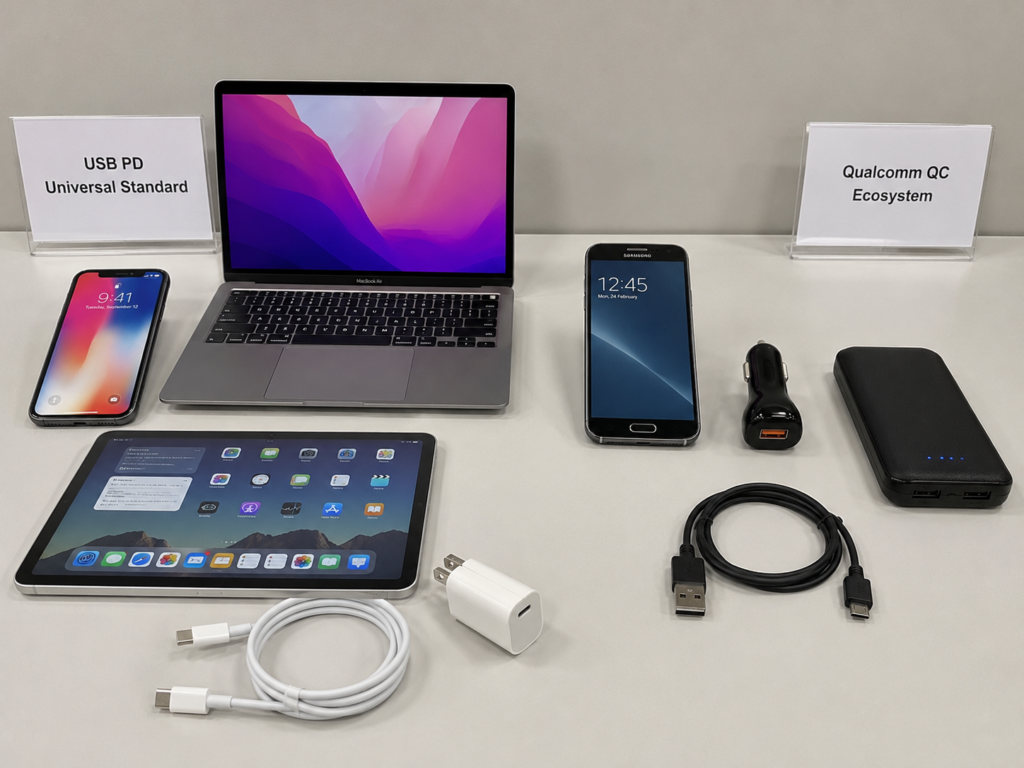
Comparison of Compatibility Performance
The compatibility feature of USB PD is “backward compatible, upward universal”: regular and compliant PD chargers usually provide basic 5V output, so even if fast charging cannot be triggered, it can mostly charge normally; the fast charging performance for PD-supported devices is stable, but pure PD chargers usually cannot trigger QC fast charging for old phones that only support QC2.0/QC3.0, and can only use 5V slow charging.
The compatibility of QC2.0/QC3.0 is biased towards old devices: it is very friendly to old Qualcomm Android, but cannot trigger PD fast charging for iPhone, iPad, Mac, and usually can only charge at USB-A normal charging or lower power; devices with high power supply requirements such as MacBook are not recommended to use QC heads as the main power source.
Because QC4+/QC5 has been integrated into the PD system, it has good compatibility with USB PD/PPS, but the specific supported levels still depend on the parameter marking of the charger.
If you want the most stable compatibility, prioritize regular chargers that clearly mark PD, PPS, QC multi-protocol, and write down the specific output levels.
Comparison of Power Coverage and Product Selection
USB PD has a very complete power coverage: from 20W mobile phone chargers, 30W tablet/thin and light device chargers, 65W/100W laptop chargers, to PD3.1 140W/240W high-power products, there are a large number of choices in each level.
Especially the gallium nitride (GaN) chargers that have been popular in recent years — let’s briefly explain here, gallium nitride is a new type of semiconductor material. Under reasonable design, chargers made with it can be smaller, lighter, and have the opportunity to improve conversion efficiency; but the actual heat generation performance also depends on the materials used, heat dissipation design, power density and ambient temperature, you cannot just judge by the word GaN that it must be better — in the 65W and 100W multi-port gallium nitride charger market, there are obviously more PD-based products to choose from.
Qualcomm QC products are concentrated in the medium and low power segments: QC3.0 products are commonly 18W-27W. Although QC4+/QC5 theoretically support higher power, the number of supported devices and chargers on the market is far less than that of the PD ecosystem.
When you actually buy, you will find that for scenarios above 100W or laptop power supply, prioritize PD; for low-power scenarios such as old car chargers and old Android, QC accessories usually have a certain cost advantage.
Comparison of Interface and Cable Requirements
Many people easily ignore the impact of cables and interfaces, but they are also a key part of whether fast charging can be fully utilized.
The interface and cable requirements of PD are very clear: standard PD mainly uses USB-C to C cables; for Lightning interface iPhones to fast charge, you need to use a USB-C to Lightning cable with a PD charger.
In terms of power, different levels have different requirements for cables. I have compiled a comparison table, you can save it directly:
| Power Range | Cable Type | Core Requirement | Applicable Scenarios |
|---|---|---|---|
| 60W and below | USB-C to C ordinary cable | Support 3A current, compliant is enough | Mobile phones, tablets, low-power devices |
| 60W-100W | USB-C to C high-power cable | Support 5A current, with E-Marker smart chip | Thin and light laptops, high-power mobile phones |
| 100W-240W | USB-C to C PD3.1 high-power cable | Support EPR high-power mode, marked 140W/240W | High-performance laptops, monitors |
| Old QC/normal charging | USB-A to C/Micro-USB | Low resistance, complete data cable | Old Android, normal charging |
| iPhone fast charging | USB-C to Lightning | Support PD fast charging protocol | iPhone, Lightning interface iPad |
Let’s explain the E-Marker chip mentioned just now: PD fast charging from over 60W to 100W has higher requirements for cables. A cable with an E-Marker chip is equivalent to having an “ID card”, which will actively tell the charger the amount of current it can carry. Without it, the charger dare not output too high power. For PD3.1 devices above 100W, what is needed is a cable that supports EPR high-power mode — EPR is the high-power standard in PD3.1, which can support higher voltage and supply power to high-power devices.
The interface and cable requirements of QC are relatively simple: QC2.0/QC3.0 commonly use USB-A to C or USB-A to Micro-USB cables, and QC4+/QC5 mostly use USB-C interfaces. Old A-port QC has low requirements for cable protocol identification, but still requires compliant, low-resistance, and complete data cables. Inferior cables will cause speed reduction or disconnection.
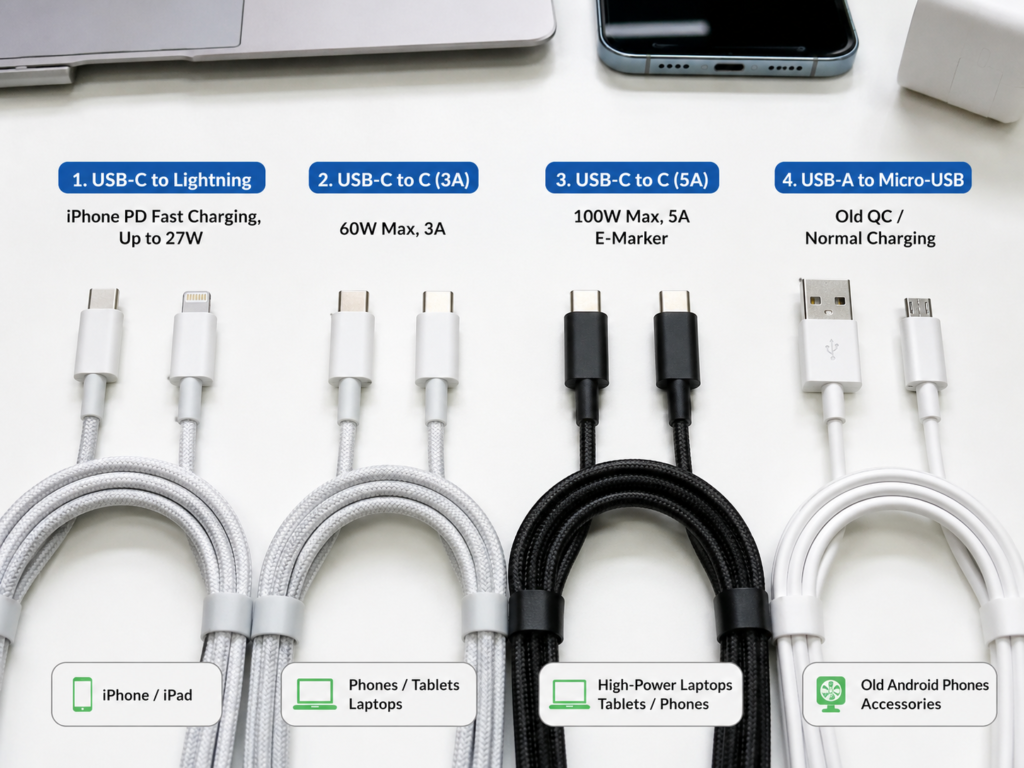
Comparison of Charging Speed at the Same Power
Many people will ask “which is faster, PD or QC”. In fact, under the premise of the same power, same device, same ambient temperature, same battery level range, and same cable quality, the speed difference between the two is usually not large. What really determines the charging speed is the charging power allowed by the device itself and the charging curve strategy, not the protocol name.
Let’s talk about the common fast charging curve: when the mobile phone battery is 20%-60%, it can usually run to the highest peak power and charge the fastest; after 60%, it will gradually slow down; after 80%, it will slow down significantly. This is a normal battery protection strategy, not that the fast charging is broken.
Of course, there are exceptions: mobile phones that support PPS may have less heat and maintain peak power longer on corresponding chargers due to low conversion loss; some high-wattage mobile phones that rely on proprietary protocols may be significantly faster than general PD/QC charging when paired with original or clearly compatible chargers and cables, and in low battery and suitable temperature ranges; but ordinary general chargers may not be able to trigger these proprietary high-power levels.
We also need to avoid a common misjudgment: charging a 20W mobile phone with a 100W charger will not be much faster than a 20W compliant charger, because the maximum input upper limit of the mobile phone is there, and the extra power cannot be used.
Comparison of Heat Generation and Battery Impact
Many people worry that fast charging will damage the battery. In fact, regular brand PD and QC fast charging are within the charging management range of the device, and the protocol itself is not the core cause of “battery damage”.
In terms of heat generation, the high-voltage solution of early QC2.0 may bring slightly more heat because the mobile phone needs more voltage conversion; while PD PPS and new QC solutions can reduce conversion loss by fine-tuning voltage, and heat generation is better controlled. But as long as it is a regular product, the heat generation will be within the safe range.
The real factors affecting battery life are: high temperature, charging while playing, long-term full charge storage at high temperature, inferior chargers/cables, and poor heat dissipation environment.
The standard for judging whether it is normal is very simple: slight warmth during charging is normal; if it is hot to the touch, has peculiar smell, abnormal sound or repeated disconnection and charging, you should stop using it immediately and replace the accessory combination.
Comparison of Purchase Cost
The price difference between PD and QC products in different power segments is different:
Entry-level 18W-30W: the price gap between PD and QC is usually not large, regular brands can be bought for tens of yuan, and there are many choices.
Mid-range 45W-70W: PD, especially 65W gallium nitride products, have a lot of choices, with high cost performance, and there are much fewer QC products at the same price.
High-end 100W and above: PD products are more abundant. Although PD3.1 high-power products are more expensive, they can cover high-power devices such as laptops and monitors; there are very few products that separately emphasize QC high power.
When buying a multi-port charger, do not just look at the total power, be sure to look at the individual output capacity of each USB-C/USB-A port, and the power distribution rules when multiple ports are used at the same time, otherwise it is easy to step into pitfalls.
Detailed Explanation of Version Differences: Don’t Just Look at the Three Letters PD or QC
When buying a charger, you may see a bunch of version numbers such as PD2.0, PD3.1, QC3.0, QC5. Don’t panic, we will explain the core differences of each version clearly, and you will know how to choose.
Core Differences Between USB PD Versions
- PD2.0: Supports basic fixed voltage levels, and can already cover many 18W-100W scenarios. Because it is a relatively old version, it is rarely promoted separately as a selling point now.
- PD3.0: On the basis of PD2.0, it adds and improves capabilities such as extended messages and status feedback. PPS programmable power supply is also often appeared together with PD3.0, so the marking of PD3.0+PPS is more common in current mobile phone, tablet, and laptop chargers; as for whether actual charging is faster and safer, it still depends on the specific product design and the support of the device side.
- PD3.0 PPS: It is an optional extended function of PD3.0, and it is also the one that mobile phone users need to pay most attention to. Especially for Samsung, Pixel and some Android models, without PPS, the highest level of fast charging may not be triggered.
- PD3.1: Adds EPR high-power levels, typical voltages include 28V, 36V, 48V, up to 240W, mainly for high-power devices such as high-performance laptops, monitors, and docking stations.
Buying tip: Ordinary mobile phone users do not have to force PD3.1; mobile phone and thin and light laptop users should prioritize PD3.0+PPS and sufficient power.
Core Differences Between Qualcomm QC Versions
- QC2.0: Fixed high-voltage levels, such as 5V, 9V, 12V, commonly 18W, mostly found in old Android phones and USB-A port chargers, is a relatively early version.
- QC3.0: Supports finer voltage regulation, better efficiency and compatibility than QC2.0, commonly 18W-27W, very common in old car chargers and power banks.
- QC4+: Turns to USB-C/USB PD system, emphasizes compatibility with PD and better thermal management, the actual experience still depends on the support of the device side.
- QC5: Supports higher power, optimized based on PD PPS and other capabilities, but there are relatively few supported devices and chargers on the market. It should be noted that QC5 does not mean that you can use full-speed fast charging universally when you see the logo. The device side, charger side, cable, battery solution and manufacturer’s open strategy must all match; many domestic mobile phones that promote 80W/100W/120W actually rely on brand proprietary protocols, which is not equivalent to QC5 universal fast charging.
Buying tip: Do not assume that all phones can be faster when you see QC5. If your phone does not support the corresponding protocol, it will only charge according to the protocol supported by both parties or the normal level.
The Relationship Between New QC and PD
Many people will ask what is the difference between QC4+, QC5 and PD. The core conclusion is: versions after QC4+ are very closely related to USB PD/PPS, and are no longer completely independent USB-A port high-voltage fast charging logic like QC2.0/QC3.0.
In actual performance, chargers that support QC4+/QC5 usually also mark PD/PPS capabilities, but the specific supported levels and power still need to check the parameter label of the charger, you cannot take it for granted.
It is also easy to judge when buying: if you only use it for Apple, iPad, Mac or USB-C laptops, you do not have to pay extra for the QC logo at all; if you also need to take into account old Android phones, it will be more practical to choose a multi-protocol charger with PD+PPS+QC.
Real Scenario Selection Guide
After talking about so many parameters, you may still do not know what to buy. We will directly give you the buying direction according to the most common usage scenarios.
Single Device Scenario
- Only iPhone: Just choose a 20W or above USB PD charger. For new iPhones, choosing a PD head of about 30W can leave a little margin, and QC is not a necessary condition.
- Only iPad: Choose a PD charger of about 30W-45W according to the model. For USB-C interface iPads, prioritize matching with USB-C to C cables.
- Only MacBook or USB-C laptop: Must look at PD power. Thin and light laptops commonly use 45W/65W, and high-performance models may require 100W, 140W or higher PD3.1 chargers.
- Only new Samsung Android: Prioritize PD 3.0 + PPS chargers, choose 25W or 45W levels according to the model.
- Only Pixel and other new Android: Prioritize PD/PPS chargers, confirm the officially recommended power.
- Only old Qualcomm Android phone and clearly supports QC2.0/QC3.0: QC chargers or PD+QC dual-protocol chargers are both acceptable.
- Only some Android brand proprietary high-wattage fast charging models (such as some flagships of Xiaomi, OPPO, vivo and other brands): First check whether it relies on proprietary protocols, general PD/QC may not reach the 120W, 100W, 80W power advertised by the original factory.
Multi-Device Mixed Use Scenario
- iPhone + Android phone: Prioritize multi-protocol chargers with PD+PPS+QC, taking into account Apple’s PD and Android’s PPS/QC.
- Mobile phone + tablet: A single-port PD of 30W-45W can meet most light needs; if you want to charge at the same time, it is recommended to choose a dual-port or multi-port charger.
- Mobile phone + laptop: Choose 45W/65W/100W PD based on the power demand of the laptop, then confirm whether the mobile phone supports PD/PPS.
- Multiple devices for the whole family: Choose a multi-port PD+PPS+QC gallium nitride charger, plug high-power devices into the main USB-C port, and low-power devices into the secondary port.
Note that you must look at the power distribution rules: a multi-port charger with a nominal 100W may be 65W+30W, 45W+45W or other combinations when used with dual ports, not every port can run full 100W.
Car and Power Bank Scenarios
- Only charging old Qualcomm Android: USB-A car chargers that support QC are still very practical and low cost.
- Mixed use for iPhone, new Android phones, tablets: Prioritize car chargers or power banks with USB-C PD/PPS.
- Emergency charging for laptops: Both power banks and car chargers must check whether the USB-C PD output reaches 45W/65W/100W, not just look at the capacity or total power.
Also note for car scenarios: the maximum output of the vehicle’s cigarette lighter interface, the heat dissipation capacity of the car charger, and the ambient temperature will all affect the continuous output power, and the car charger may reduce power after being exposed to the sun in summer.
Old Accessory Reuse Scenario
- Already have an old USB-A QC charger: Can continue to be used for old Android that supports QC; for iPhone or PD devices, it can usually only charge normally or at low power, no need to waste money buying a new one, it can also be used for emergency.
- Already have an old PD charger: Can be used for devices that support PD, but if there is no PPS, some Samsung/Android models may not trigger the highest level of fast charging.
- Already have an ordinary 5V charger: Cannot trigger PD/QC fast charging, only suitable for charging headphones, watches, low-power devices, or charging slowly when not in a hurry.
- Already have a USB-A to C cable: Can be used for old QC or normal charging, but cannot be used for high-power scenarios of standard C-C PD.
Travel and Business Trip Scenario
For travel and business trips, prioritize chargers that are light and versatile:
- Recommended direction: Dual USB-C or 2C1A PD+PPS+QC gallium nitride charger, taking into account laptops, mobile phones, headphones and old devices, one can replace several.
- Power selection: Only bring a mobile phone, choose about 30W; mobile phone + tablet, choose 45W-65W; mobile phone + thin and light laptop, choose 65W; high-performance laptop, choose 100W/140W or higher according to the original adapter power.
- Cable configuration: Bring at least one high-quality USB-C to C cable; if the laptop needs more than 60W, bring a 5A E-Marker cable; iPhone Lightning models need to bring a USB-C to Lightning cable.
- Risk warning: The socket environment of airports and hotels is complex, try to use regular brand chargers, and avoid using inferior adapters without certification and parameter marking.
Parameter Identification and Protocol Query Methods
Before buying, you have to know what protocols your device supports, and you also have to be able to read the parameter label of the charger, otherwise it is easy to be fooled by clickbait.
How to Check What Protocols Your Device Supports
There are several simple methods:
- Check the parameter page of the brand’s official website, focus on keywords such as “charging power”, “USB Power Delivery”, “PPS”, “Quick Charge”, official information is the most accurate.
- Check the manual, packaging box, official after-sales page or certification information, which usually also marks the supported fast charging protocols.
- Check the parameters of the original charger, but it can only be used as a reference, and cannot fully represent all the protocols supported by the device — for example, some mobile phones support higher power PD, but the original head may only be equipped with 25W.
- Search for the measured protocol table in authoritative reviews, pay attention to distinguish between domestic/overseas versions, different generations and different system versions, and the support status of some models in different regions may be different.
If you want to study more deeply, you can buy a fast charging detector, which directly reads the current negotiated protocol, voltage, current, power and PDO/PPS levels. This is an effective method to verify the actual negotiation result of the current charging combination, suitable for users who like to tinker; but when testing, pay attention to the battery level range, device temperature, system load, cable and the compatibility of the detector itself, otherwise the reading may not represent the peak capability of the device or all supported protocols.
How to Read the Charger Parameter Label
Do not just look at the title when buying a charger, be sure to turn to the detail page or the parameter label on the product body, and look at it in four steps:
The first step is to look at the protocol logo: with “USB Power Delivery” or “PD” words, it means supporting PD; with “PPS”, it means supporting programmable power supply; with “Quick Charge” or “QC”, it means supporting Qualcomm QC.
The second step is to look at the output levels: for example, “5V⎓3A, 9V⎓2.22A, 15V⎓3A, 20V⎓5A”, multiply voltage × current to calculate the power of each level, for example, 9V×2.22A≈20W, 20V×5A=100W.
The third step is to look at the PPS range: for example, “3.3-11V⎓3A”, which means that PPS can be dynamically adjusted between 3.3V and 11V, with a maximum current of 3A. This parameter is very important for Android phones.
The fourth step is to look at the single-port and multi-port rules: 100W for a single port does not mean 100W for dual ports at the same time. The parameters of multi-port simultaneous output are usually marked with another set of small print, be sure to see clearly.
Pit avoidance tip: If the title says “65W fast charging” but there are no specific PD/PPS/QC levels in the parameters, or only the total power is written without single-port power, be cautious, it is likely to be falsely marked or only has proprietary protocols.
How to Judge Whether the Charging Cable Supports Fast Charging
Different scenarios have different requirements for cables, just remember these standards:
- USB-C to C 60W cable: usually supports 3A current, suitable for mobile phones, tablets, thin and light devices and some thin and light laptops, is the most commonly used cable.
- USB-C to C 100W cable: should support 5A current and have E-Marker chip, suitable for laptops within 100W and high-power chargers.
- USB-C to C 140W/240W cable: should be clearly marked PD3.1, EPR, 140W or 240W, suitable for PD3.1 devices over 100W.
- USB-A cable: can be used for old QC or normal charging, but not suitable for high-power scenarios of standard USB-C PD.
- Lightning cable: For iPhone to fast charge, you must use a USB-C to Lightning cable with a PD charger, ordinary USB-A to Lightning cable can only charge slowly.
There is a simple verification method: under the same charger and device, if the power changes significantly after changing a cable, it usually means that the capability or quality of the cable is the limiting factor.
Pit Avoidance and Troubleshooting
Finally, we have sorted out the most common fast charging misunderstandings and troubleshooting methods. If you encounter problems, follow them, and basically you can solve them.
The Most Common Fast Charging Misunderstandings
- Misunderstanding 1: Marked “fast charging” will definitely fast charge my device. Correct answer: The device and the charger must have a commonly supported protocol and appropriate power level, otherwise it can only charge slowly.
- Misunderstanding 2: The higher the power, the faster the charging. Correct answer: The device has a maximum input upper limit, and the power exceeding the upper limit cannot be used. For example, a 20W mobile phone uses a 100W head, and can only run 20W.
- Misunderstanding 3: USB-C port must be PD. Correct answer: USB-C is just the interface shape, whether there is PD depends on the parameters, some C ports only support 5V normal charging.
- Misunderstanding 4: QC can fast charge all Android phones. Correct answer: Only when the device side supports the corresponding version of QC, models with non-Qualcomm platforms or manufacturers that do not open QC cannot use it.
- Misunderstanding 5: Fast charging will definitely damage the battery. Correct answer: Regular PD/QC have perfect temperature control and charging management, what really damages the battery is high temperature, charging while playing, and inferior accessories.
- Misunderstanding 6: Protocol incompatibility will burn the device. Correct answer: After the negotiation fails, regular devices will return to 5V normal charging and will not burn; burning devices are basically caused by inferior chargers with no brand, no certification, no parameters, and falsely marked cables.
- Misunderstanding 7: A port can also run standard PD. Correct answer: Standard PD is mainly based on USB-C, and the fast charging of A port is basically QC or manufacturer’s proprietary protocol.
- Misunderstanding 8: Original cable must support all power. Correct answer: Many original cables only meet the power of the original device. For example, the cable given with the mobile phone may only support 3A, and it cannot run full when plugged into a 100W head.
- Misunderstanding 9: The total power of a multi-port charger is equal to each port can run full. Correct answer: When multiple ports are used at the same time, the power will be redistributed. For example, 100W dual ports may be 65W+30W, not 100W each.
Troubleshooting Sequence for Fast Charging Not Triggered
If you encounter the situation that fast charging is not triggered, troubleshoot in order from easy to difficult, and most problems can find the cause:
- First confirm what protocols your device supports and what the maximum charging power is, do not just look at the power of the charger.
- Check whether the single-port output of the charger has the PD/PPS/QC level required by the device.
- Replace a known qualified fast charging cable. The cable is one of the most common reasons, especially in scenarios above 60W.
- Confirm whether the current battery level is in the range where fast charging is easy. It is best to test between 20%-60%, this range is the easiest to run full peak.
- Lower the device temperature, stop high-load operations such as games, navigation, and hotspot sharing before testing. If the temperature is high, the system will actively limit power.
- If it is a multi-port charger, unplug other devices and test a single port separately to see if the power is diverted.
- Clean the dust from the interface, check whether the cable end is loose or oxidized, poor contact will also cause fast charging not to trigger.
If it still does not work, you can contact official customer service to confirm the specifications, or use a fast charging detector to check the actual negotiated protocol and power.
Common Causes of Slow Charging, Heat Generation, and Disconnection
First distinguish whether it is a normal situation or an abnormal situation:
- Normal slow: Active speed reduction after the battery level exceeds 80% is a battery protection strategy and is normal.
- Normal heat: Slight heat generation in the first half of fast charging is very common, especially when charging while using, as long as it is not hot to the touch, there is no problem.
- Abnormal slow: Large internal resistance of the cable, falsely marked power, no E-Marker chip, poor interface contact, will all lead to slow charging.
- Abnormal heat: Poor heat dissipation of the charger, too high ambient temperature, too thick phone case, charging while playing, inferior accessories, may all lead to excessive heat generation.
- Abnormal disconnection: Loose interface, damaged cable, power switching of multi-port charger, low power reduction of power bank, may all lead to repeated disconnection.
Handling suggestion: If there is hot to the touch, peculiar smell, abnormal sound, repeated disconnection and charging, stop using the accessory combination immediately to avoid danger.
Choose Directly by Crowd: Buying List Without Remembering Parameters
If you still think there is too much information, it does not matter, just choose according to your own usage scenario, you do not need to remember so many parameters:
iPhone Users
- No need to force: QC logo, high power above 100W
- Recommendation: For a single iPhone, a 20W-30W PD charger is enough; for shared use with multiple devices, you can choose a 65W PD multi-port charger
Samsung/Pixel and Other Android Users
- Not recommended: Only buy old QC3.0 USB-A chargers as the main one
- Recommendation: Prioritize PD+PPS chargers, additional compatibility with QC will be more practical
Old Qualcomm Android Users
- Recommendation: Existing QC chargers can continue to be used; new purchases can choose PD+QC dual-protocol models, taking into account the needs of changing devices in the future
Laptop Users
- Cable note: For within 60W, use a compliant USB-C to C 3A cable; for over 60W, choose a 5A cable with E-Marker chip; for PD3.1 devices over 100W, choose a dedicated high-power cable that supports EPR
- Not recommended: Use QC chargers as the main power supply for laptops
Family Multi-Device Users
- Recommendation: Choose a 65W or 100W multi-port PD+PPS+QC charger, and select the main port output capability according to the needs of the highest power device
- Note: Be sure to see clearly the power distribution rules when using dual ports/three ports at the same time, do not just look at the total power
Summary: 5 Judgments You Should Master After Reading
Finally, we condense the core content of the full text into 5 judgments. Remember these, and you will not step into pitfalls when choosing fast charging accessories in the future.
The first is device adaptation judgment: Apple, tablets, laptops, new USB-C devices prioritize PD; old Qualcomm Android can use QC; new Android prioritizes PD/PPS and official instructions.
The second is parameter identification judgment: Know how to read protocol logos, output levels, PPS range, single-port/multi-port power, do not just look at “fast charging” and “super fast charging” in the title.
The third is cable matching judgment: For within 60W, choose a compliant USB-C to C 3A cable; for 100W, choose a 5A cable with E-Marker; for 140W/240W, choose PD3.1 EPR cable.
The fourth is scenario selection judgment: Do not blindly buy high power for a single mobile phone; for mobile phone + laptop, choose PD according to the needs of the laptop; for family multiple devices, choose a multi-protocol multi-port charger with PD+PPS+QC.
The fifth is fault troubleshooting judgment: When fast charging is not triggered, troubleshoot in the order of device protocol, charger level, cable, temperature, battery level, multi-port power distribution, interface status, and most problems can find the cause.