
You’re scrolling your phone outside on a sweltering summer day, and suddenly a pop-up blares: “Temperature too high. Cool down before use.” The screen dims to its lowest setting, and your game lags so badly it’s basically a slideshow. Or your hair dryer cuts out mid-blowout, only to work perfectly again after sitting for half an hour. Maybe you’ve forgotten to add water to your rice cooker, and it shuts off on its own before you even smell burning.
These tiny, annoying (or lifesaving) moments all have one thing in common: over-temperature protection.
Most people have never heard the term, but it’s built into nearly every electrical device you own – from wireless earbuds and power banks to air conditioners and electric cars, even heavy industrial machinery. It’s the quiet “temperature safety brake” that keeps your devices from breaking, and keeps you safe from fires or burns.
In this guide, we’ll break down everything you need to know about over-temperature protection: what it is, how it works, how to tell if a device has reliable protection when you shop, and how to troubleshoot common issues when it acts up.
How Over-Temperature Protection Works: 4 Core Steps
It might sound complicated, but over-temperature protection follows the same basic 4-step logic as you pulling your hand away from a hot mug: sense, judge, act, reset.
Step 1: Sense – Find the Hot Spots and Measure Temperature
You can’t control temperature if you can’t measure it accurately. There are two common temperature-sensing methods:
The first is contact sensing, where a temperature sensor is mounted directly to the surface of the part that generates heat. For example, the thermistor on the back of a phone battery, or the thermostat under a rice cooker’s heating plate, both measure temperature via direct contact. It’s accurate, low-cost, and the most common method in consumer electronics, home appliances, and battery packs.
The second is non-contact sensing, most commonly infrared temperature sensing. It doesn’t touch the hot part – it measures surface temperature from a distance. It’s mostly used in industrial high-temperature settings or places where contact isn’t practical, and rarely used in consumer electronics because it’s expensive and easily affected by environmental conditions.
Step 2: Judge – Compare Real-Time Temperature to Safety Thresholds
Once the temperature is measured, a control circuit or chip compares the current reading to a pre-set safety threshold to decide if it needs to act, and how aggressively.
There’s a key design detail here called hysteresis – think of it as a temperature buffer zone. If a device is set to shut off at 50°C (122°F), you don’t want it to shut off at 50°, turn back on at 49.9°, shut off again at 50°, and cycle on/off nonstop. So manufacturers build in a gap: for example, it might shut off at 50°C, and only turn back on once it cools to 40°C (104°F). This prevents constant cycling right at the threshold, protecting the device and avoiding annoying interruptions.
Step 3: Act – 5 Levels of Progressive Protection
Overtemp protection doesn’t just cut power immediately. It works in stages, ramping up action based on how high the temperature is, to keep things cool without disrupting use more than necessary.
The mildest level is alert: your phone pops up a temperature warning, a space heater lights up a fault indicator, or a device beeps twice to let you know something’s off.
Next is derating – lowering power or current to reduce heat generation. Your phone dims its screen, lowers game frame rates, or slows down charging. A space heater drops from 2000W to 1000W. All of these cut heat output to bring temperatures down.
If that’s not enough, active cooling kicks in: the system works harder to move heat out of the device. Your laptop’s fan spins up to full speed, or an EV turns on its liquid cooling pump to pull heat away from the battery.
If temperatures still won’t drop, the system moves to cutoff: it shuts down power, stops operation, or halts charging/discharging entirely. That’s what happens when your hair dryer stops mid-use, or your phone shuts itself off when too hot.
The final, most severe level is fusing: a thermal fuse burns out permanently, cutting power for good. This is the absolute last line of defense, and only triggers if all other protection fails. It “sacrifices itself” to stop a fire.
Step 4: Reset – How Devices Recover After Protection Triggers
Once temperatures drop back to safe levels, how does the device get back to normal? There are three types of reset:
The most common is automatic reset: most phones, laptops, and hair dryers will go back to normal operation on their own once they cool down, no action needed from you.
The second is manual reset: you have to press a reset button to turn the device back on. This is common on high-power heating devices and industrial equipment – it’s designed to make sure you fix the cause of the overheating before restarting, to avoid repeated triggers or danger.
The third is one-time fuse blow: if the thermal fuse burns out, it will never reset on its own. You have to replace it with an identical thermal fuse (same rating, same temperature, same current/voltage) to fix the device. Never bypass or short out a thermal fuse – that removes the last line of safety protection entirely.
Key Components That Make Over-Temperature Protection Work
Overtemp protection isn’t handled by a single part. Different devices and protection levels use different components, broadly split into mechanical, electronic, and full system-level thermal management.
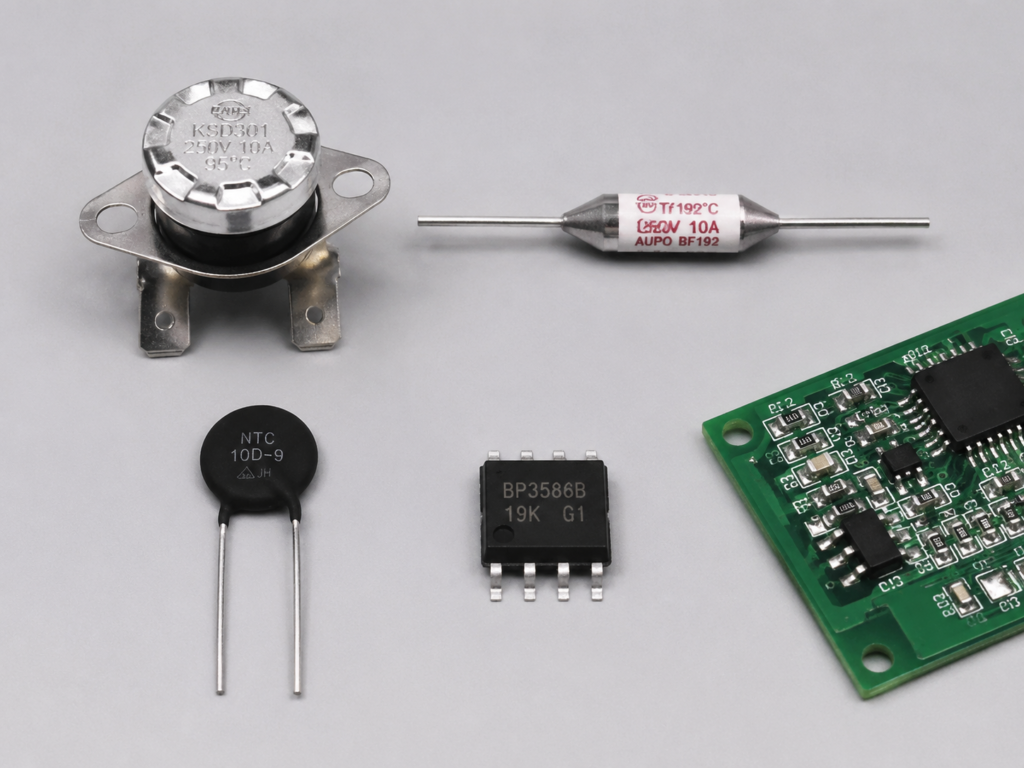
Mechanical Protection Devices: Reliable, Low-Cost, Physics-Driven
Mechanical protection devices work without needing power – they use physical deformation or melting of materials to cut the circuit. They’re simple, cheap, and highly reliable, so they’re often used in high-power applications where high precision isn’t required.
Bimetallic Thermostats/Temperature Switches
This is the most common mechanical temperature control part. It works on a simple principle: two different metals, bonded together, expand at different rates when heated. As temperatures rise, the metal that expands faster bends the entire strip. Once it bends far enough, it pushes open the circuit contacts, cutting power. When it cools down, the strip bends back, and the circuit closes again.
You’ll find these in rice cookers, hair dryers, space heaters, and water heaters. They’re cheap, reusable, and can handle high current – but their precision is only so-so. A thermostat rated to trigger at 100°C (212°F) might trigger at 95°C (203°F) or 105°C (221°F), which is fine for low-precision use cases.
Thermal Fuses (Thermal Cutoffs)
Thermal fuses are one-time use protection parts, and they’re the last line of defense in overtemp protection. They’re filled with a special alloy or organic material that melts at a specific rated temperature, permanently cutting the circuit so it can never be reconnected.
Almost every charger, transformer, small appliance, and heating device has a thermal fuse to stop temperatures from rising indefinitely if the main thermostat fails. Critical safety note: Never replace a thermal fuse with a regular electrical fuse, and never short it out. Regular fuses only blow when current is too high – for situations like dry firing a rice cooker, where temperature is high but current is normal, a regular fuse will never blow, and you could end up with a fire.
Thermal Relays/Motor Thermal Protectors
These are designed specifically for motors, like air conditioner compressors, fridge compressors, fans, pumps, and industrial motors. They either use the heat from electrical current to bend a bimetallic strip, or are mounted directly to motor windings to measure temperature. If the motor overheats from overload, stalling, or poor cooling, they cut the control circuit to shut the motor down before it burns out.
Electronic Protection Devices: High Precision, Smart Logic
Electronic protection devices use electronic circuits to measure temperature and control responses. They’re far more precise, and can handle complex protection logic, making them ideal for temperature-sensitive devices that need fine-tuned control.
NTC/PTC Thermistors
A thermistor is a type of resistor whose resistance changes with temperature. There are two types:
- NTC (Negative Temperature Coefficient): Resistance drops as temperature rises. These are used to measure temperature – the NTC on your phone’s battery lets the main chip calculate current temperature by reading the resistance value.
- PTC (Positive Temperature Coefficient): Resistance rises as temperature rises. These are used for current limiting and self-regulating heating. For example, some hand warmers use PTC heating elements: as they get hotter, resistance goes up, current drops, and they regulate their own temperature without ever getting too hot.
Both types are tiny and cheap, so they’re everywhere – in phones, battery packs, chargers, and computer motherboards.
Analog/Digital Temperature Sensors
These sensors are more precise than thermistors, and output a direct voltage, current, or digital temperature reading that the main chip can read without doing extra math. They can also be networked to monitor temperature at multiple points at once.
You’ll find them in smart home devices, medical refrigeration, servers, and electric vehicles. For example, an EV battery pack usually has dozens of temperature sensors placed across the battery modules and key areas to catch any abnormal hot spots.
Integrated Protection ICs
An integrated protection IC is a tiny chip that combines temperature sensing, threshold comparison, current limiting, and power cutoff all in one package. It needs very few external parts, saves space, and is highly reliable. They’re used in fast chargers, battery protection boards, smart home devices, and power adapters – one chip can handle overtemp, overcurrent, overvoltage, and short-circuit protection all at once, making them very cost-effective.
System-Level Thermal Management: From Single Parts to Full Systems
Modern complex devices – like laptops, servers, electric cars, and energy storage systems – don’t rely on single protection parts. They use a full thermal management system that works together to balance performance and safety.
Passive cooling is the foundation: heat sinks, graphite sheets, thermal paste, and metal casings all move heat away from hot parts and spread it across the device surface without using any power.
Active cooling is the backup: fans, liquid cooling loops, pumps, and even compressor cooling use power to actively pull heat out of the device, for high-heat, temperature-sensitive applications.
The most important part is the control strategy – the software algorithm. A phone’s power management chip, a laptop’s embedded controller (EC), or an EV’s Battery Management System (BMS) – the “brain” of the battery that handles charging, discharging, temperature, and safety – collect temperature data from every sensor, combine it with current power draw and load, and dynamically adjust cooling and power output. If temperatures rise, they lower power or crank up the fan, and only trigger full protection if absolutely necessary, to find the best balance between performance and safety.
Real-World Examples: Where You’ll Find Overtemp Protection Every Day
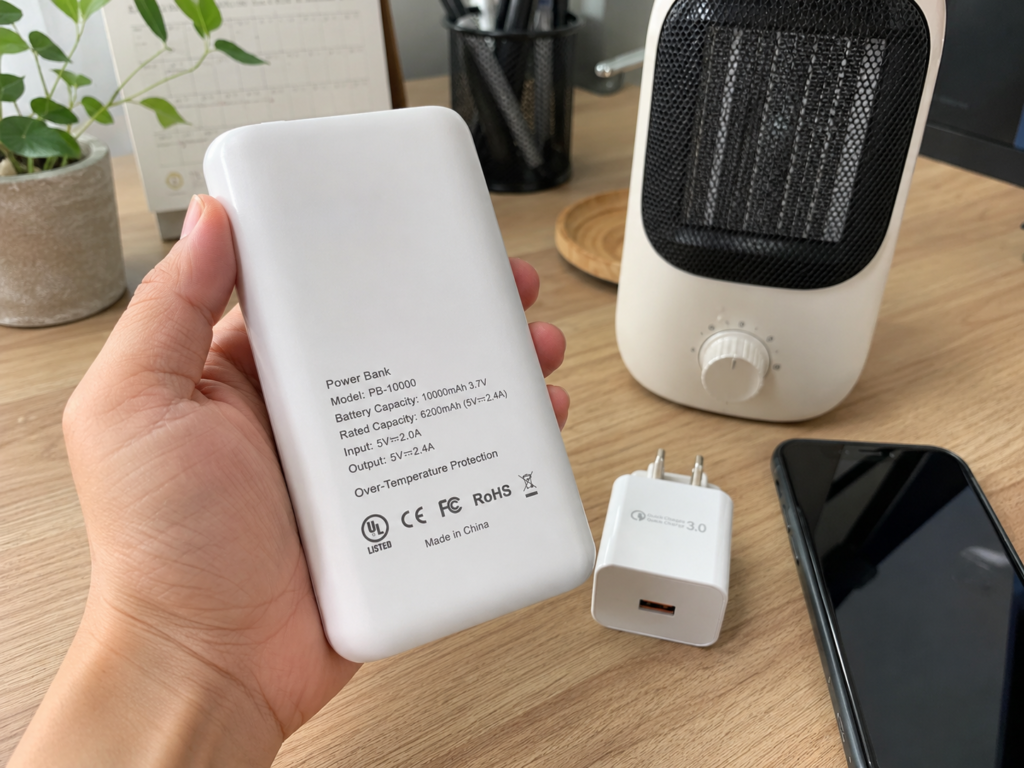
Overtemp protection isn’t some fancy industrial technology – it’s built into almost every device you use daily, you just don’t notice it.
Phones, Tablets, Laptops, and Power Banks
Phones usually have multiple temperature sensors near the battery, motherboard, and processor. When overheating, the system first dims the screen and lowers performance to reduce heat. If temperatures keep rising, it pauses charging. If it gets bad enough, it shuts off entirely to protect the battery and chip from damage.
Laptops follow the same logic: when CPU or GPU temperatures rise, the fan first spins faster to increase cooling. If that’s not enough, the chip throttles (slows down) to generate less heat. Only in extreme cases will it shut down to avoid burning out the chip.
Power bank overtemp protection uses a thermistor on the protection board. If battery temperature exceeds safe limits, the protection board limits or cuts charging/discharging output to prevent battery swelling or fire.
Home Appliances
Heating appliances like rice cookers, air fryers, and electric pressure cookers almost always use a “dual safety” design: a resettable thermostat handles regular temperature control (like shutting off to keep warm when rice is done), plus a one-time thermal fuse. If the thermostat fails and temperatures keep rising, the thermal fuse blows to cut power entirely and prevent fires from dry firing.
Hair dryers and space heaters rely on airflow to cool their internal parts – so their biggest risk is blocked intake or exhaust vents. If a hair dryer sucks up hair, or a space heater is covered by a blanket, air can’t flow, internal temperatures spike fast, and the thermostat shuts the device down. Always keep vents clear on these devices.
Air conditioner and fridge compressors also have dedicated overheat/overload protection. If cooling is poor or the compressor stalls, it will shut off automatically once temperatures hit the threshold to avoid burning out the compressor.
Electric Vehicles and Charging Stations
EV battery packs have some of the most complex thermal management systems of any consumer product. The BMS monitors dozens or even hundreds of temperature points, combined with voltage, current, and State of Charge (SOC) – the battery percentage you see on your dashboard – to adjust the thermal management system in real time. It heats the battery when it’s too cold, cools it when it’s too hot, and keeps the battery in its ideal temperature range for best performance and lifespan. If temperatures rise abnormally, the BMS first limits power, disables fast charging, and cranks up cooling to maximum. If that still doesn’t work, it cuts the high-voltage circuit entirely to prevent thermal runaway.
Charging stations and charging cables also have overtemp protection: most reputable chargers monitor temperature at the plug, cable, and internal parts. If a loose connection causes heat buildup, they lower charging current or stop charging entirely to prevent the plug from burning out.
Home Medical and Health Devices
Home medical devices have stricter overtemp protection requirements, since they directly affect personal safety. For example, heating pads and infrared therapy lamps don’t run at extremely high temperatures, but long contact with skin can cause low-temperature burns. Their overtemp protection doesn’t just stop high heat – it also limits local temperature and total use time to prevent burns.
Devices like insulin coolers and medication refrigerators need two-way temperature protection: they have to prevent temperatures from getting too high and too low. They monitor both high and low thresholds, and alert you if temperatures go out of range to keep medication safe.
Practical Tips: Buy, Use, and Maintain Devices Safely
Understanding how overtemp protection works helps you use your devices more safely and avoid unnecessary headaches. These tips work for shopping, daily use, and repairs.
3-Step Check for Shoppers
When buying a device with a battery or heating element, how do you tell if its overtemp protection is reliable? You don’t need an engineering degree – just follow these three steps:
First, check for safety certifications: Products sold in China that fall under the mandatory certification list need a CCC mark. For products sold in North America, look for UL certification (a widely recognized third-party safety standard). For the EU, look for the CE mark, which indicates compliance with EU safety, health, and environmental regulations. Products with legitimate certification have been designed and tested to meet relevant safety standards (exact coverage of overtemp protection depends on the product category and test standard), and are far safer than unbranded, uncertified products with no compliance marks.
Second, check the product documentation: Reputable brands will clearly list features like “over-temperature protection,” “overheat shutoff,” “dry-fire protection,” or “BMS smart protection” on the packaging, manual, or product page. If it’s listed, the feature is almost always included.
Third, match protection to your use case: For battery-powered devices (power banks, EV batteries), high-power heating devices (space heaters, air fryers), or devices you use unattended (rice cookers, slow cookers), always choose reputable brands with multiple layers of protection. Don’t buy cheap unbranded products to save a few dollars – the risk of fire isn’t worth it.
How to Avoid False Triggers and Dangerous Overheating
A lot of overtemp protection false triggers are caused by bad use habits. Follow these tips to cut down on annoying shutdowns and stay safe:
First, never block cooling vents: Don’t use your laptop directly on a blanket or comforter – prop it up on a hard surface. Keep space heaters away from curtains and couches. Clean the intake vent on your hair dryer regularly to remove hair and dust. Blocked vents trap heat inside, which triggers protection (and can be dangerous).
Second, avoid using devices in extreme environments: Don’t leave your phone or power bank in a hot car in the sun. If your EV has been sitting in direct sun all afternoon, don’t plug in a fast charger right away – move it to shade first and let the battery cool down. If you don’t, you might trigger protection and slow down charging, or worse, speed up battery aging.
Third, watch for warning signs: If an appliance smells like burning, smokes, has a warped casing, or shuts off repeatedly, stop using it immediately and unplug it. Don’t keep testing it to see if it works.
Repair and Replacement Safety Rules
If your device’s overtemp protection is having issues, keep these rules in mind for repairs and part replacement:
First, if a thermal fuse blows, always replace it with an identical model with the same rated temperature, current, and voltage. Never use a regular fuse, and never short it out – that removes the last line of safety protection.
Second, temperature sensors need to be mounted as close to the actual hot spot as possible, with proper thermal contact and insulation. If the sensor is loose or poorly mounted, it will read incorrect temperatures, leading to missed protection or false triggers.
Third, most users should not try to repair battery packs, chargers, high-voltage appliances, or medical devices on their own. These carry risks of electric shock or battery fire if handled incorrectly. Always hire a professional repair technician.
Typical Overtemp Threshold Reference Table
To help you get a sense of how protection works across different devices, here are common industry typical threshold ranges. These are for educational reference only – they are not a universal standard, and you should always follow manufacturer manuals, specifications, and official guidance for your specific device.
| Device/Scenario | Typical Alert/Derating Range | Severe Protection Action |
|---|---|---|
| Phone/tablet (casing or battery area) | ~40–50°C (104–122°F) | May pause charging, throttle performance, or shut down |
| Laptop CPU/GPU | ~80–95°C (176–203°F) (throttling starts) | Shuts down when approaching manufacturer’s maximum limit |
| Hair dryer/space heater (internal) | ~100–150°C (212–302°F) (thermostat triggers) | Thermal fuse blows at higher abnormal temperatures |
| Lithium-ion battery pack | ~45–60°C (113–140°F) (charging/discharging limited) | Cuts power entirely in severe abnormal cases |
| Rice cooker/heating plate | Varies by temperature control mode | Thermostat/thermal fuse triggers during abnormal dry firing |
| Industrial motor windings | Varies by insulation class and sensor location | Alarm, shutdown, or circuit trip when limit is exceeded |
Troubleshooting Common Overtemp Protection Issues
There are three common overtemp protection faults: frequent false triggers, no protection when it should trigger, and no reset after triggering. You can troubleshoot most minor issues on your own, starting with the easiest fixes.
Frequent False Triggers: Device Shuts Off Too Soon
If your device triggers protection and shuts off after only a short time, then works again after cooling down, start with the easiest causes: environment and use habits.
First, check the environment: Is the room too hot? Is the device in direct sunlight? Are the cooling vents blocked by dust, hair, or debris? For example, if you’ve had a laptop for 2-3 years and never cleaned it, the cooling fins are probably clogged with dust, so air can’t flow through – it will trigger protection constantly.
Next, check how you’re using it: Are you running it at maximum power? Is it running continuously for too long? Is it covered while running? For example, if you run a space heater on high with clothes draped over it to dry, it will overheat very quickly.
If environment and use habits aren’t the problem, it might be a component issue: the thermostat might be aging and drifting to a lower trigger temperature, or a sensor might have fallen off or have poor thermal contact, leading to incorrect temperature readings and false triggers. As a regular user, you can clean dust, remove obstructions, lower the power load, and let the device cool down. If that doesn’t fix it, get it checked by a professional.
No Protection When It Should Trigger: The Most Dangerous Scenario
If your device’s casing is extremely hot, smells like burning, smokes, or has warped plastic – and it still hasn’t shut off automatically – this is the most dangerous situation. It means over-temperature protection has failed.
If this happens, unplug the device immediately, move it to a clear area away from flammable materials, and never use it again. Never try to fix it by bypassing the protector, raising the protection threshold, or replacing parts with non-matching components – that completely disables safety protection and creates a major fire risk.
Protection Won’t Reset After Triggering
If overtemp protection triggers and the device won’t go back to normal, first figure out what type of protection it uses.
If it’s an automatic reset type – like a phone or laptop that shut down from overheating – wait longer. It might not have cooled down below the hysteresis threshold yet. Give it time to fully cool, and try a forced restart if needed.
If it’s a manual reset type – like some space heaters or water heaters – find the reset button in the manual and press it to restart. Don’t take the device apart yourself.
If it’s a one-time fuse blow (the thermal fuse burned out), it will never reset on its own. You’ll need to replace the thermal fuse with an identical matching part, or take it to a repair shop.
Safety Certifications and Future Trends
Common Safety Compliance Marks to Look For
When you buy electronics, you’ll see various certification marks on the packaging. These are important indicators of safety compliance, and over-temperature protection is usually a key part of the testing for these standards.
- CCC: China Compulsory Certification. Products on China’s mandatory certification list must have this mark to be sold legally in China, and it provides a baseline level of safety.
- UL: Underwriters Laboratories, a widely recognized third-party safety certification system common in North America. Most legitimate electronics sold in the US and Canada have UL certification, which has strict safety requirements.
- CE: Conformité Européenne, the EU market compliance mark. It indicates that a product meets EU safety, health, and environmental regulations.
- IEC/GB: The International Electrotechnical Commission develops global standards for electrical and electronic products, and many national standards (including China’s GB national standards) are based on or adapted from IEC standards. These are the core source for requirements around safety, temperature rise, insulation, and protection for all types of electronics.
For medical devices, look for NMPA (National Medical Products Administration) registration/filing for devices sold in China, or FDA (US Food and Drug Administration) compliance for devices sold in the US.
Future Trends in Overtemp Protection
Overtemperature protection technology is constantly improving, with four key trends focused on making protection more accurate, proactive, and reliable:
First, multi-point temperature sensing: Older devices only measured temperature at one or two spots. Now, more and more devices monitor temperature across multiple areas – phones have 4-5 sensors, EV battery packs have dozens – so they can catch hot spots anywhere and never miss a problem.
Second, predictive thermal management: Instead of waiting for temperatures to rise before cooling, algorithms can predict heat buildup ahead of time. For example, if you’re about to open a graphics-heavy game, your phone can crank up cooling and slightly adjust power in advance to stop temperatures from spiking at all. No sudden lag, no protection triggers, and a smoother user experience.
Third, integrated multi-protection systems: Overtemp, overcurrent, overvoltage, short-circuit, and undervoltage protection are all being integrated into a single chip or system, so they can work together to diagnose faults. For example, overcurrent causes overheating, which makes overcurrent worse – integrated systems can identify faults more accurately, reduce false triggers, and never miss a real problem.
Fourth, EV thermal runaway early warning: Older battery protection only triggered when temperatures were already very high. Now, systems can combine data from temperature, voltage, internal battery gas, and pressure sensors to spot abnormal behavior in the very early stages of thermal runaway, alerting users early enough to get to safety.
Frequently Asked Questions
My phone says “Temperature too high, cool down before use” – is that normal?
Yes, that’s the alert stage of your phone’s over-temperature protection. It means temperatures are getting close to the safe threshold, and the system is already dimming the screen, lowering performance, or pausing charging to protect the battery and internal components. Move your phone to a cool spot, stop using it, and it will go back to normal once it cools down. If your phone gets so hot you can barely hold it and there’s no warning at all, that’s a sign protection might have failed.
What’s the difference between overtemp, overcurrent, and overvoltage protection?
Put simply, they monitor different problems: overtemp protection handles “too much heat,” overcurrent handles “too much electrical current,” and overvoltage handles “too much electrical voltage.”
Too much current or voltage usually causes heat, but heat can come from other sources too – like leaving your phone in direct sunlight, where temperatures rise but current draw is low. In that case, overcurrent and overvoltage protection won’t trigger, only overtemp protection will.
They work together, and overtemp protection is often the last line of defense – but it can’t replace other protections. For example, if a charger outputs too much voltage, overvoltage protection will cut power immediately, instead of waiting for temperatures to rise to trigger overtemp protection.
Can I replace a blown thermal fuse with a regular fuse?
Absolutely not. Regular fuses are overcurrent protection – they only blow when current exceeds their rating. Thermal fuses are over-temperature protection – they blow when temperature hits their rating, no matter how much current is flowing. For example, if you dry-fire a rice cooker, the current is normal but the temperature is very high – a regular fuse will never blow, and you could start a fire. Never short out a thermal fuse either – that removes the last line of safety protection entirely.
Can I charge my EV right after it’s been sitting in the sun all summer?
Fast charging right away is not recommended. After sitting in the sun, the battery is already hot. Fast charging generates even more heat, which pushes temperatures even higher. At best, this will trigger overtemp protection and slow down or stop charging. At worst, it speeds up battery aging and creates safety risks.
It’s best to move the car to shade and let the battery cool down before charging. For EVs with liquid cooling or active thermal management, the BMS may automatically lower charging current, start pre-cooling, or even delay charging briefly – follow the on-screen prompts, charger status, and your vehicle’s manual. If your car displays a high temperature warning, actively limits charging, or the battery area feels abnormally hot, never force it to charge.
Is my laptop’s fan spinning at full speed a sign of overtemp protection?
Not necessarily. Full fan speed is part of active cooling, which is part of normal thermal management. It means internal temperatures are rising, and the system is working to cool things down – it hasn’t reached the “protection” stage yet. If the fan is maxed out and your computer starts lagging, throttling, or shuts off on its own, that’s when overtemp protection has triggered.
Occasional full fan speed is normal, like when you’re gaming or editing video. If the fan is always running at full speed even when you’re not doing anything heavy, it might be a sign of blocked vents, too much dust, or background apps using up resources.
Is the dry-fire protection on my air fryer a type of overtemp protection?
Yes, dry-fire protection is a type of over-temperature protection. When an air fryer runs with no food inside, internal temperatures rise very quickly. Once they hit the set threshold, the thermostat or thermal fuse triggers to cut power and prevent fire. Most air fryers use a dual-safety design: first a resettable thermostat triggers, and you can use it again once it cools. If the thermostat fails, a one-time thermal fuse acts as the last line of defense.
How long does it take for overtemp protection to reset?
It depends on the device and the level of protection that triggered. If it’s just an alert or derating, it will reset quickly once temperatures drop a little – for example, your phone’s screen brightness will go back to normal after a few minutes of cooling. If it’s an automatic reset power cutoff, like a hair dryer that shut off from overheating, it might take 10-30 minutes of cooling before it works again. Manual reset devices need you to press the reset button first. If the thermal fuse blew, it will never reset on its own – you have to replace the fuse.
How do I tell if a power bank has overtemp protection?
First, check the packaging, manual, or product page for mentions of “over-temperature protection,” “overheat protection,” or “BMS smart protection” – reputable brands will always list these features clearly. Second, check for safety certification marks: CCC for China, UL for North America, CE for the EU. Products that meet relevant safety standards almost always include overtemp protection as required. Stick to reputable brands, and avoid ultra-cheap, fake-capacity unbranded power banks – most of them don’t have proper protection circuits.
My hair dryer stops after a few minutes, then works again after cooling – is it broken?
Most likely not – it’s just triggering over-temperature protection. The most common cause is a blocked intake vent covered in hair and dust, or a blocked exhaust vent that stops air from flowing. When air can’t move, internal temperatures spike fast, and the thermostat cuts power. Take off the back intake vent cover, clean out all the hair and dust, and make sure nothing is blocking the exhaust while you use it – that will usually fix the frequent shutdowns. If it still triggers after cleaning, the thermostat might be aging, and you should get it repaired or replaced.
How are overtemp thresholds set for industrial motors?
Industrial motor overtemp thresholds aren’t set randomly – they’re mostly based on the motor’s insulation class, which is the maximum temperature the internal insulation materials can handle. Different insulation materials have different maximum temperatures: Class A is 105°C (221°F), Class B is 130°C (266°F), Class F is 155°C (311°F), Class H is 180°C (356°F). Thresholds are always set a little below the insulation class maximum to leave a safety buffer.
Thresholds also depend on where the sensor is mounted – whether it’s measuring the windings, bearings, or outer casing, since temperatures vary a lot across different parts. Finally, thresholds have to meet relevant industrial standards and manufacturer design requirements – never adjust them on your own.
Final Safety Reminder: Stop Using These Devices Immediately
Over-temperature protection is a critical safety feature, but it’s not foolproof. If you notice any of these issues, stop using the device immediately – don’t take chances:
- You smell burning, see smoke, or notice sparks
- The device casing is warped, swollen, or leaking fluid
- Protection triggers frequently with no clear cause
- The thermal fuse has blown
- Battery-powered devices get abnormally hot for no obvious reason
Over-temperature protection might be invisible, but it’s everywhere in your daily life, working quietly to keep you safe. Understanding how it works, how to choose devices with reliable protection, and how to troubleshoot small issues will help you avoid annoying headaches – and keep you and your family safe.