
If you’ve ever shopped for a power bank on Amazon, Walmart, or your local e-commerce site, you’ve probably fallen for a common marketing trick: a “20000mAh ultra-high capacity” model that only charges your iPhone twice, or gets confiscated at airport security because its energy label is blurry or missing. Online reviews are all over the place, too — two creators can test the exact same power bank and get wildly different capacity and speed results, leaving you with no idea who to trust.
This standardized review template solves all those problems. Whether you’re a regular shopper wanting to test a new purchase at home, a cross-border product sourcer verifying market compliance, a tech reviewer building consistent, credible content, or an entry-level lab technician setting up a power bank testing framework, you’ll find tiered methods to fit your skill level. You’ll be able to filter out fake-spec and unsafe products with minimal cost, and get reliable, repeatable results.
First, let’s bust three of the most common myths that trip people up:
- A bigger mAh number does not equal more charges for your phone — the real metric to watch is Wh (watt-hours).
- “Fast charging” is not universal. Your power bank and device have to speak the same “fast charge language” to actually speed up charging.
- Airline eligibility is based on rated Wh, not mAh. Products with unclear or missing labels almost always get rejected at security.
4 Golden Rules of Trustworthy Power Bank Reviews
Whether you’re testing with a phone at home or running formal lab analysis, every credible power bank review follows these four rules. Skip them, and your results are meaningless.
1. Reproducibility
If you run the test again with the same environment, same gear, same cable, and same load, you should get roughly the same result. For home testing, ~5% variance is normal; if results differ by 20% or more, something is wrong. For lab testing, always note instrument precision and known error sources to keep data transparent.
2. Single Variable
When comparing two power banks, keep every other condition identical: same charger, same cable, same load device, same starting charge level, same room temperature. If you test Model A with a 65W charger and Model B with a 20W charger, of course A will charge faster — that doesn’t mean it’s a better product.
3. Safety First
Never encourage regular viewers to do dangerous “extreme tests” like short circuits, disassembly, or leaving a power bank in a hot car. All destructive testing must be left to certified, properly equipped labs. Reviews exist to help people stay safe, not put them at risk for views.
4. Data Traceability
A trustworthy review clearly states what test equipment was used, what conditions were tested, what the raw data was, whether any anomalies occurred, and how many times tests were repeated. If a review only has subjective takes like “it feels fast” or “nice build quality” with no numbers to back it up, take it with a grain of salt.
10-Minute Pre-Screen: Skip Obvious Duds Without Any Tools
You can filter out most bad power banks right out of the box, no tools required. Every regular user can do this in 10 minutes.
Build Quality, Portability, and Design
Most people only look at capacity when buying, then realize their new power bank is so thick and heavy it’s a pain to carry every day.
- First, weigh it with a kitchen scale and measure dimensions with a ruler, then match it to your use case: A 10000mAh daily carry model usually weighs 180–250g (about the same as a standard smartphone), which fits easily in a pocket or small bag. A 20000mAh model is usually 300g or more, better for backpacks or travel.
- Check build quality: Look for obvious gaps in the casing, creaks when you press it, loose ports, strong chemical plastic smells, or any swelling/warping. Flame-retardant materials (like a UL94 V-0 rating) are a safety plus, but they’re rarely printed on the outside of the casing, so don’t stress if it’s not listed.
- Check ports and accessories: Count the port types (USB-A, USB-C, Lightning, built-in cables) and make sure they match your devices. If you only use Type-C gear, you don’t need to pay extra for a Lightning port. Confirm the USB-C port is bidirectional (can charge the power bank and charge other devices) — most new models are, but cheap or older ones may only support output. For built-in cables, check if the connector feels sturdy, and if the cable or label lists its power rating. A built-in cable that only does 5W slow charging is basically useless.
- Check user interface: Is the battery level shown with LED dots or a digital percentage screen? Digital screens are far more accurate; 4 LED dots can’t tell you if you’re at 51% or 75%. Look for a fast charge indicator (a different colored light when fast charging is active) and low-current mode (for earbuds, smartwatches, and other small devices — some power banks shut off automatically with tiny loads, so this mode fixes that issue).
Read the Label First — Don’t Get Tricked by mAh Numbers
This is the most important step: Check the label on the power bank itself, plus compliance info on the box and manual. Most people only look at mAh and assume bigger is better, but you need to understand four core parameters:
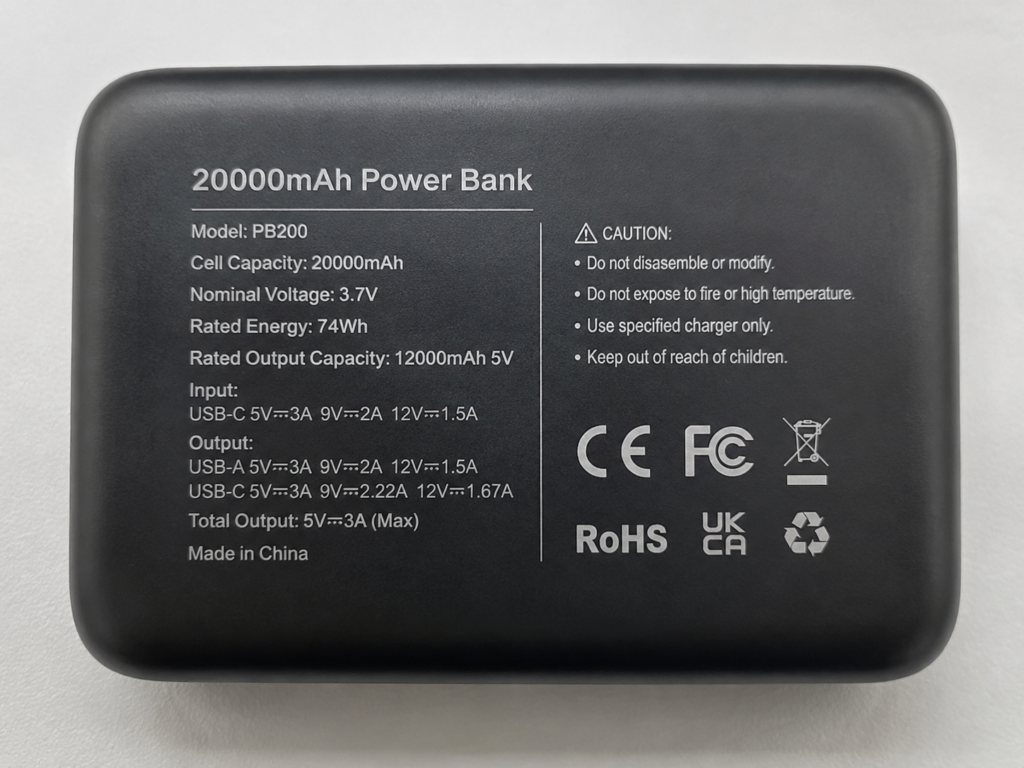
- Cell Capacity: The raw capacity of the internal battery, measured at the battery’s nominal voltage (usually 3.6V or 3.7V). The “20000mAh” you see on marketing almost always refers to cell capacity at 3.7V. This is the battery’s raw, unadjusted capacity — not the amount of charge you’ll actually get to use.
- Rated Energy (Wh): The most accurate measure of total stored energy, and the exact number airport security uses. The formula is simple:
Wh = (mAh × nominal voltage) / 1000. For example, a 20000mAh 3.7V power bank has 20000 × 3.7 ÷ 1000 = 74Wh of rated energy. Why is Wh more reliable than mAh? Because mAh is tied to voltage — comparing mAh across different voltages is like comparing the weight of 1 liter of water vs. 1 liter of oil. Wh is the true “total energy” metric. - Rated Output Capacity: The actual capacity you can use to charge your devices, almost always measured at 5V output. A 20000mAh power bank might have a rated output of 12000mAh at 5V — this is the number to use when estimating how many times you can charge your phone. Why is it lower than cell capacity? The power bank’s circuit board has to step up the battery’s 3.7V to the 5V, 9V, or even 20V your device needs. That voltage conversion creates heat and wastes energy, plus there are cable losses. Some drop is completely normal.
- Conversion Efficiency: The percentage of the battery’s total energy that actually makes it to your device. Formula:
(Output Wh ÷ Cell Rated Wh) × 100%. Good power banks have 80–90% efficiency, though the exact number depends on output voltage, current, and temperature. Efficiency is highest at medium power levels, and lower at very low or very high power.
For quick reference, here’s a side-by-side breakdown:
| Parameter | Plain English Definition | Common Unit | What It’s Used For |
|---|---|---|---|
| Cell Capacity | Raw capacity of the internal battery, measured at the battery’s own voltage | mAh (milliamp-hours) | Manufacturer marketing; does not directly reflect usable charge |
| Rated Energy | Total stored energy in the power bank, independent of voltage — the most accurate energy measure | Wh (watt-hours) | Airport security eligibility, comparing total energy across products |
| Rated Output Capacity | Actual capacity you can use to charge devices, after conversion losses | mAh (almost always rated at 5V) | Estimating how many full charges you’ll get for your phone |
| Conversion Efficiency | How much of the battery’s energy actually reaches your device; higher = less waste | % | Judging how well the power bank’s internal circuit is designed |
Compliance Requirements by Market
This is especially critical for international shoppers and cross-border sellers:
- United States: FCC certification is mandatory (covers electromagnetic compatibility and radio frequency interference, so the power bank doesn’t disrupt other electronics). For safety, UL 2056 (power bank safety standard) and UL 62368-1 (IT equipment safety) are widely required. They’re not legally mandated, but major retailers like Amazon, Best Buy, and Walmart almost always require them to list products.
- European Union: The CE mark is a manufacturer’s self-declaration of compliance with EU directives, not a third-party certification. You also need to verify compliance with RoHS (restriction of hazardous substances), REACH (chemical regulation), EMC (electromagnetic compatibility), and LVD (low voltage directive). Non-compliant products can be seized at customs.
- Other regions: Japan requires PSE certification, Australia requires RCM, and many Southeast Asian countries have local approval rules. Always verify requirements for your target market.
- China: Mandatory CCC (3C) certification, clear labeling, manufacturer info, and compliance with standards like GB/T 35590, GB 31241, and GB 4943.1.
- Wireless charging models: Look for Qi or Qi2 certification from the Wireless Power Consortium. Certified products have better compatibility, less overheating, and fewer “won’t charge” issues.
- Apple device users: If the power bank has a built-in Lightning cable or Lightning port, look for MFi (Made for iPhone/iPad) certification. Certified products won’t throw compatibility pop-ups or damage your device. For USB-C iPhones (iPhone 15 and later), MFi isn’t a concern — focus on USB PD fast charge support and cable power rating instead.
Air Travel Compliance
Per IATA (International Air Transport Association) standard rules:
- ≤100Wh: Can be carried in carry-on luggage, no prior airline approval needed.
- 100Wh to 160Wh: Requires prior approval from the airline.
- >160Wh: Prohibited on planes entirely.
Two critical notes:
- Power banks must be in carry-on luggage only. Never put them in checked bags — cargo hold temperature and pressure changes can trigger safety hazards.
- If the Wh rating on the label is blurry, or there’s no capacity label at all, airport security can refuse to let you bring it. Always pick a power bank with a clear, legible label.
Rules can vary slightly by airline or country (some US carriers limit the number of power banks you can bring), so double-check your airline’s policy before flying.
Verify Packaging, Manual, and Warranty
Finally, confirm that core specs (capacity, power, energy) match across the product label, box, and user manual. If the box says 20000mAh but the power bank itself says 15000mAh, that’s an immediate red flag.
The box and manual should also list the manufacturer or importer info, applicable standards, safety warnings, and warranty policy. If you’re buying in a foreign country, make sure there’s a manual in your local language and that local warranty support is available — otherwise, returns or repairs will be a huge hassle.
Core Performance Testing: How to Measure Capacity, Fast Charging, and Multi-Port Output
Once you pass the pre-screen, you can move on to performance testing. This section is split into home low-risk tests (for regular users) and lab professional tests (for reviewers, sourcers, and lab staff).
Home Low-Risk Tests (Safe, No Special Gear)
All of these tests use household items and carry no risk of damage or injury.
- Self-Charge Speed Test: Time how long it takes to fully charge the power bank itself. Use a charger and cable that support the power bank’s advertised input wattage (e.g., if it says 65W PD input, use a 65W PD charger and a 65W+ Type-C cable — otherwise slow charging is the cable/charger’s fault, not the power bank’s). Record total time from low battery (1 LED or auto-shutdown) to 100%, peak input power, and how long the last 20% trickle charge takes. Note: It’s totally normal for charging to slow down in the last 20% — batteries reduce current when nearly full to protect cells and extend lifespan. This is not a defect or fake spec.
- Output Fast Charge Test: Check if the power bank can trigger fast charging on your devices, and how fast it is. For single-port use: plug in your phone, tablet, or laptop, and look for a fast charge indicator (e.g., “Fast Charging” on iPhones, “Super Fast Charging” on Samsung devices). If you have a USB power meter, check if the actual power matches the advertised rating. If you don’t have a meter, just note how much charge you get in 30 minutes (e.g., iPhone 15 from 20% to X%) for a real-world sense. For multi-port use: plug in 2–3 devices at once, and see if each port’s power drops, how much, and if there’s frequent disconnection. It’s normal for a 65W single port to split into two ~30W ports when two devices are plugged in, but if adding a second device makes the first one stop charging entirely, or drops to slow-charge only, that’s a problem.
- Simple Capacity Estimate: The big question — is the capacity fake? You can estimate it without fancy gear. Grab a phone with a known battery size, drain it to low power (20% or less), then use the fully charged power bank to charge it to 100%, and count how many full charges you get. The actual charge going into the phone is roughly
phone battery capacity × percentage charged. For example: a 5000mAh phone charged from 20% to 100% = 80% = 4000mAh. For a 20000mAh power bank, 2.5 to 3 full charges is normal. Never do the math of “advertised mAh ÷ phone mAh” (e.g., 20000 ÷ 5000 = 4 charges) — that’s completely wrong, because of voltage conversion losses and the phone using power while charging (screen on, background apps). For a more accurate comparison between power banks, use Wh instead: multiply the power bank’s rated Wh by its conversion efficiency, then divide by your phone’s battery Wh. - Wireless Power Bank Exclusive Tests: First, check what wireless standard it supports — Qi, Qi2, MagSafe, or a brand-specific proprietary fast charge. Test alignment tolerance: can you shift it a little and it still charges, or does it disconnect if you nudge it? Check for stable charging (no random disconnections) and heat — after 30 minutes, feel the back to see if it’s excessively hot. Also test FOD (foreign object detection): set a coin on the charging pad for a few seconds to see if it automatically shuts off to prevent overheating. Do not leave metal objects on the pad for long periods, even to test.
Lab Performance Tests (Precise Professional Data)
This section is for professionals needing accurate, formal data. Regular users can skip to the next chapter.
- Rated Capacity and Energy Test: Use a programmable DC electronic load to discharge the power bank under conditions listed on the label or relevant standards (e.g., 5V/2A constant current discharge). Record output voltage, current, and time, then calculate total output capacity and total Wh. To judge if it meets advertised specs, compare against the rated output capacity and applicable test conditions — you can’t just say “anything below 90% is fake” because efficiency (and thus measured capacity) changes with output voltage (e.g., 20V discharge vs. 5V discharge will give different results).
- Conversion Efficiency Test: Formula:
Conversion Efficiency = (Actual Output Wh ÷ Cell Rated Wh) × 100%. Note that efficiency varies by output voltage and current, so test at least common levels: 5V, 9V, 12V, 20V, at multiple current levels, to get a full picture of performance. - Output Stability and Ripple Test: Use an oscilloscope to measure output ripple, transient response, and drop-out under different loads. Ripple is the small fluctuation in output voltage; too much can damage charged devices. Ripple limits should be compared against USB specifications, the manufacturer’s product specs, or the test protocol you’re using — don’t make blanket statements that “high ripple = bad” without context.
- Fast Charge Protocol Compatibility Test: First use a fast charge protocol analyzer to list supported protocols: PD 3.0, PD 3.1, PPS, QC 3.0, QC 5, AFC, FCP, SCP, Apple 2.4A, etc. But a protocol list isn’t enough — test with real popular devices: iPhones, Samsung Galaxy, Google Pixel, iPads, MacBooks, Nintendo Switch, plus regional popular brands if relevant. Record 30-minute charge gain, peak power, sustained power, and heat. Sometimes a power bank lists a protocol but has poor compatibility and never reaches the advertised power with real devices — only real-world testing catches that.
- Multi-Port Output Strategy Test: Test single-port, dual-port, triple-port (or more) full load conditions. Record total output power, how power is split across ports, if devices disconnect when you plug/unplug another device, and how fast power reallocates. For users charging laptops, pay special attention to whether a single USB-C port can deliver the advertised 65W/100W/140W steadily — some power banks advertise 100W total power, but the single C port maxes out at 45W, which can’t fast charge a laptop. That’s a super common pitfall.
Safety & Reliability Testing: What You Can Test At Home, What Needs A Lab
Performance matters, but safety matters more. This section draws a clear line between safe home checks and lab-only tests — never attempt destructive testing at home.
Home Safety Checks (No Disassembly, No Risk)
All of these are non-invasive and require no special tools.
- Abnormal Phenomenon Check: While charging or discharging, watch for weird smells (burnt plastic, chemical electrolyte), strange noises (buzzing, popping), swelling of the casing, blackened/burnt ports, or warped plastic. If you see any of these, stop using immediately and move it to a safe, non-flammable area.
- Temperature Observation: Test during the highest-heat scenarios: full-power self-charge, full-power output, multi-port simultaneous output. Feel the casing, or use an infrared thermometer to get the highest surface temperature. Home rule of thumb: if it’s too hot to hold comfortably for more than a few seconds, or the temperature keeps rising without leveling off, that’s a safety risk — stop using it. Normal full-power surface temperature is 40–50°C (104–122°F) — warm, but holdable. Use a thermometer if you can, because everyone’s heat sensitivity is different.
- Non-Destructive Protection Feature Observation: You can check basic protection without creating dangerous conditions. For example: does the power bank stop charging or reduce power when it’s fully full, instead of keep charging at full speed? Does it shut off output automatically when it’s nearly empty, to avoid draining the cells completely? Important reminder: Never intentionally short the power bank, or use an over-rated device to create an overload, to test protection features. It’s extremely dangerous — you could destroy the power bank, or cause a fire.
Lab Safety & Reliability Tests
These require professional equipment and safety gear. Regular users don’t need to perform them, but you can ask suppliers for test reports when sourcing products.
- Electrical Safety Tests: Short circuit protection, over-current protection, over-voltage protection, over-temperature protection, plus insulation resistance, dielectric withstand (hipot) test, and ESD (electrostatic discharge) resistance. These confirm the product won’t shock you, won’t break from static, and won’t cause safety issues if a fault occurs.
- Environmental Adaptability Tests: Test performance at different temperatures and humidity: high/low temperature charge/discharge, temperature cycling, constant humidity test. For example: how much capacity drops at -20°C (-4°F) outdoors, or if it fails at 60°C (140°F) in a hot car. Compare results against the manufacturer’s stated operating temperature range, not arbitrary standards.
- Mechanical Reliability Tests: Drop test (simulates dropping on the floor), vibration test (simulates shipping), crush test (simulates being under heavy objects). For outdoor power banks, also verify IP dust and water resistance ratings (IP54, IP65, IP67 — higher numbers = better protection).
- Cycle Life Test: Repeatedly charge and discharge the power bank to see how many cycles it takes for capacity to drop below a certain threshold. A common industry benchmark is 300–500 full cycles before capacity drops to 80% of original, which is considered good. Cycle life depends heavily on test conditions (charge/discharge current, cut-off voltage, temperature), so always check the test conditions when comparing cycle life numbers.
How to Pick a Power Bank For Your Use Case
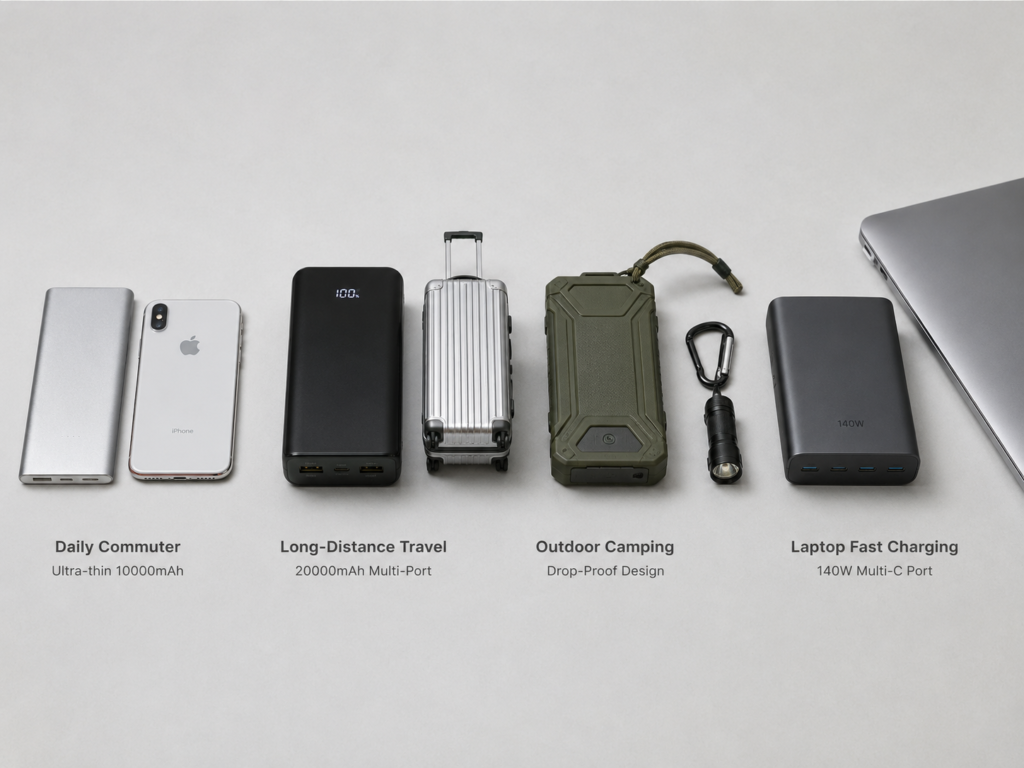
There’s no universal “best” power bank — only the best one for your specific needs. Use this table to match your use case:
| Use Case | Core Priority | Recommended Specs | Pitfall to Avoid |
|---|---|---|---|
| Daily Commute | Lightweight, pocketable, fast charge for your phone | ~10000mAh, ~200g, supports your phone’s fast charge protocol | Don’t buy oversized high-capacity models — you’ll never carry a heavy power bank every day |
| Long Travel / Flying | Enough capacity, airline-approved, multi-port | ≤100Wh (usually ~20000mAh / 74Wh), multiple ports, pass-through charging | Don’t buy models with blurry labels or >100Wh — they’ll get confiscated at security |
| Outdoor Camping / Hiking | Durable, rugged, good low-temperature performance | 20000mAh+, IP dust/water resistance, drop-resistant | Don’t buy cheap plastic high-capacity models — they’ll break if dropped and die in cold weather |
| Multi-Device / Laptop Users | High power, enough ports, smart power allocation | Single C port ≥65W, PD 3.1 support, multiple C ports | Don’t just look at total power — check the single-port max output, or you won’t be able to fast charge your laptop |
| Apple / iPhone Users | Stable Apple compatibility, no pop-ups | USB-C models: PD 20W+; Lightning models: MFi certified; wireless: MagSafe/Qi2 | For wireless models, don’t ignore magnetic hold strength and heat buildup |
For more detail on each use case:
- Daily Commute: Prioritize light weight and portability. 10000mAh is enough for most people, ~200g fits easily in a pocket. Look for a bidirectional USB-C port that supports your phone’s fast charge (PD for iPhones, SCP for Huawei, etc.). Built-in cables are a nice bonus if you hate carrying extra cords. Pitfall: Don’t buy a 20000mAh model “just in case” for daily carry — the extra weight will make you leave it at home more often than not.
- Long Travel / Frequent Flying: Prioritize enough capacity, airline approval, and multi-device charging. Go for a 20000mAh / ~74Wh model — it’s under the 100Wh limit, so you don’t need airline approval. Look for 2+ ports and pass-through charging (so you can charge the power bank and your phone/earbuds from one hotel wall outlet). Always pick one with a clear label. Pitfall: Unlabeled or over-100Wh models will get taken at security, wasting your money.
- Outdoor Camping / Hiking: Prioritize durability, reliability, and high capacity. Go for 20000mAh+, and pay attention to IP rating, drop resistance, and low-temperature discharge performance (cold weather kills regular power bank capacity fast). Bonus features like a lanyard or built-in flashlight are useful. Pitfall: Cheap plastic high-capacity models look good on paper, but they break easily, die in the cold, and fail when you need them most.
- Multi-Device / Laptop Charging: Prioritize high single-port power, multiple ports, and smart power allocation. For thin-and-light laptops, get at least 65W on a single C port; for gaming laptops or 16-inch MacBook Pros, go for 100W or 140W with PD 3.1 support. Multiple C ports are a plus, as long as power allocation is logical. Pitfall: Some power banks advertise 100W total power, but the single C port only does 45W — that’s fine for phones, but useless for laptop fast charging.
- Apple / iPhone Users: Pick based on your phone’s port:
- USB-C iPhones (15 and later): Any power bank with USB PD 20W+ output will work fine, no MFi needed. Just use a good quality Type-C to Type-C cable.
- Lightning iPhones (14 and older): If you’re buying a power bank with a built-in Lightning cable, make sure it’s MFi certified to avoid pop-ups and battery damage.
- MagSafe / Qi2 Wireless Users: Pay attention to magnetic hold strength, wireless charging speed, heat, and any bonus features like a built-in stand.
100-Point Review Scoring Sheet: Quickly Judge If A Power Bank Is Worth Buying
Use this scoring system to rate any power bank, with a mix of hard performance metrics and real-world experience factors.
Automatic Disqualifiers
If any of these are true, the power bank is not recommended — no matter how good other features are:
- Missing required compliance labels, or blurry/missing key specs like capacity or energy on the product label.
- Signs of safety issues: swelling, strange smells, excessive heat, burnt ports.
- Advertised capacity/power is clearly different from what’s printed on the product label.
- For travel use: no Wh rating or blurry capacity label, so you can’t get through airport security.
Scoring Breakdown (100 Total Points)
- Core Performance (40 points, highest weight): Capacity accuracy, output energy, conversion efficiency, fast charge compatibility, multi-port allocation strategy, output stability. This is where the real performance lives.
- Safety & Reliability (30 points): Compliance documentation, protection features, temperature control, cycle life, environmental and mechanical reliability. This determines how safe it is and how long it will last.
- Portability & Design (15 points): Weight and size for the capacity, port layout usability, battery display accuracy, built-in cables, build quality and feel. This affects daily use experience.
- Value & After-Sales (15 points): Fair price for the specs, warranty length, brand customer support, how it stacks up against competitors at the same price. This determines if it’s a good deal.
Rating Tiers
- 90+ points (Excellent): True-to-spec performance, safe and compliant, great fast charge compatibility, no major flaws. A safe buy for almost anyone.
- 75–89 points (Good): Solid choice for most users, has minor downsides but nothing that ruins the core experience.
- 60–74 points (Acceptable): Works, but has noticeable flaws — heavy, slow charging, limited protocols. Only for users on a very tight budget.
- Below 60 points (Not Recommended): Either fake specs, safety risks, missing compliance, or terrible user experience. You’ll probably regret buying it.
Appendix: Standards, FAQ, and Test Log Sheet
Common Reference Standards & Rules
Always check the latest regulations for your target market, as rules change over time:
- International: IATA Dangerous Goods Regulations (for air travel), IEC 62368-1 (international IT equipment safety standard), Qi/Qi2 wireless charging standards and certification
- United States: FCC Part 15, UL 2056, UL 62368-1
- European Union: CE applicable directives, RoHS, REACH
- Other regions: Japan PSE, Australia RCM, etc. — verify per target market
- China: GB/T 35590, GB 31241, GB 4943.1, CCC mandatory certification
Frequently Asked Questions
- How do you convert mAh to Wh for a power bank?
Multiply the mAh rating by the battery’s nominal voltage (usually 3.6V or 3.7V), then divide by 1000. Example: 10000mAh × 3.7V / 1000 = 37Wh. - Why can’t a 20000mAh power bank charge a 5000mAh phone 4 times?
Because the internal battery runs at 3.7V, and your phone needs 5V, 9V, or higher to charge. The voltage conversion process creates heat and wastes energy, plus cable losses and the phone using power while charging (screen on, background apps). 2.5 to 3 full charges is normal for a 20000mAh power bank — the simple division math is wrong. - What’s the difference between cell capacity and rated output capacity?
Cell capacity is the raw capacity of the internal battery, measured at its nominal 3.6V/3.7V voltage. Rated output capacity is the actual capacity you can get out of the power bank, measured at 5V output after conversion losses. Rated output is always lower than cell capacity — that’s not a fake spec, that’s just physics. - Can I bring a power bank on a plane, subway, train, or bus?
For planes: Per IATA rules, ≤100Wh can go in carry-on without approval; 100–160Wh needs prior airline approval; >160Wh is banned. Power banks are never allowed in checked bags. For subways, trains, and buses: Most places don’t have strict capacity limits, as long as the product doesn’t have obvious safety hazards. Check local transit rules for specifics. - What’s the difference between PD, PPS, QC, and SCP/FCP?
PD (Power Delivery) is the universal fast charge standard from USB-IF, supported by almost all new devices — it has the best cross-brand compatibility. PPS (Programmable Power Supply) is an optional feature of PD 3.0 that lets voltage adjust gradually, which is great for Android fast charging (higher efficiency, less heat). QC (Quick Charge) is Qualcomm’s older fast charge protocol, common on older Android phones. FCP and SCP are Huawei’s proprietary fast charge protocols — they only work with Huawei devices and power banks that support the protocol. Think of protocols like languages: the power bank and your phone have to speak the same one to trigger fast charging. - How hot is too hot for a power bank?
For home use, you don’t need to stress about exact numbers. If it’s too hot to hold comfortably for more than a few seconds, or the temperature keeps rising without leveling off, that’s abnormal — stop using it. If you have a thermometer, surface temperatures over 55°C (131°F) are a warning sign. Normal full-power temperature is 40–50°C (104–122°F). - Can I use pass-through charging (charge the power bank while it charges other devices)? Does it shorten lifespan?
Most reputable power banks support pass-through charging. It has a small impact on lifespan because it generates slightly more heat, but it’s negligible unless you use it every single day long-term. - Do wireless power banks damage your battery faster?
No. Reputable wireless power banks meet Qi or other safety standards, and their charging power is similar to wired charging — they don’t damage batteries any more than wired charging does. The only difference is slightly lower efficiency and a bit more heat, but all certified products stay within safe limits. - How should I store a power bank if I’m not using it for a long time?
Charge it to 50–70% first (don’t store it fully charged or fully empty), keep it in a cool, dry place away from heat and moisture. Every 2–3 months, top it up a little to replace the charge lost to self-discharge, so the battery doesn’t get damaged by being fully drained. - How often should I replace my power bank?
With normal use, 2–3 years is typical. Replace it if you notice a big drop in capacity (e.g., it used to charge your phone 3 times, now only 1 time), or if it swells, smells weird, overheats, or has loose ports.
At the end of the day, power bank reviews boil down to three core things: true-to-spec performance, safety, and fit for your needs. Regular users don’t need fancy lab gear — just follow this template with stuff you already have at home, and you can avoid 90% of common scams. Reviewers and product sourcers will get more trustworthy, consistent results by using a standardized process, so you don’t get conflicting data from different test conditions. Whether you’re buying for personal use, sourcing products to sell, or making review content, always put safety first. Never cut corners on compliance, and never buy products without clear, legitimate labeling.