
Many USB misunderstandings start with one sentence: “It has USB-C, so it must be fast, right?”
Not necessarily.
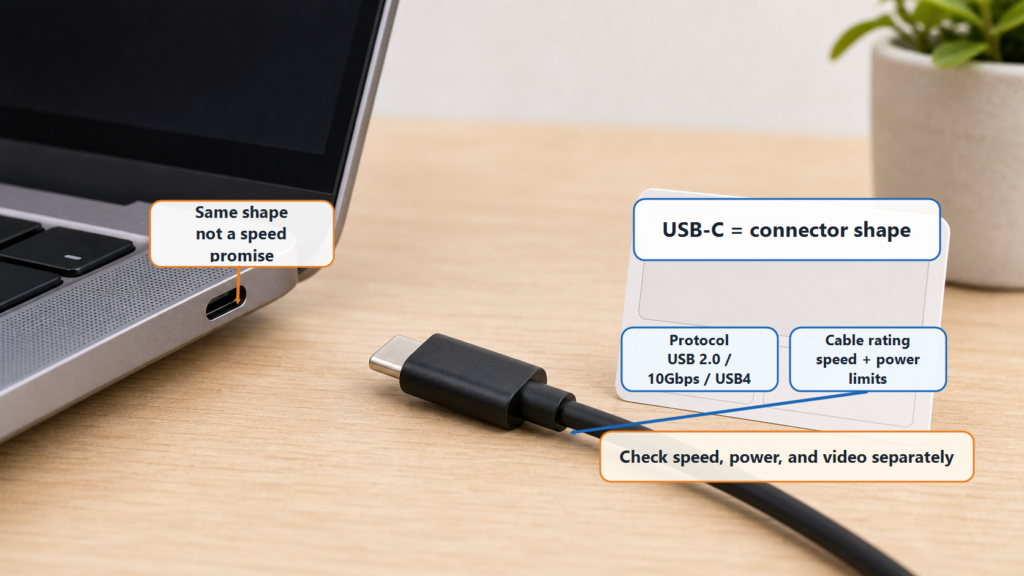
USB-C is the connector shape. The USB version or protocol controls data capability. The cable decides whether that capability can travel across the connection. Mix these up, and you can buy the wrong cable, choose the wrong dock, or think your computer is broken.
Use this picture:
USB-C is the door shape. The USB version is the traffic rule inside. The cable is the road between both sides.
A door can open without making the road wider.
Separate the Three Ideas First
| Idea | Question it answers | Common examples |
|---|---|---|
| USB version or protocol | How data moves and how fast it can go | USB 2.0, USB 3.2, USB4 |
| USB-C connector | What the plug and port look like | Small reversible oval connector |
| USB-C cable | What this cable actually supports | Charge-only, USB 2.0, 10Gbps, 20Gbps, USB4, 60W, 240W |
This is why the words “USB-C” are not enough.
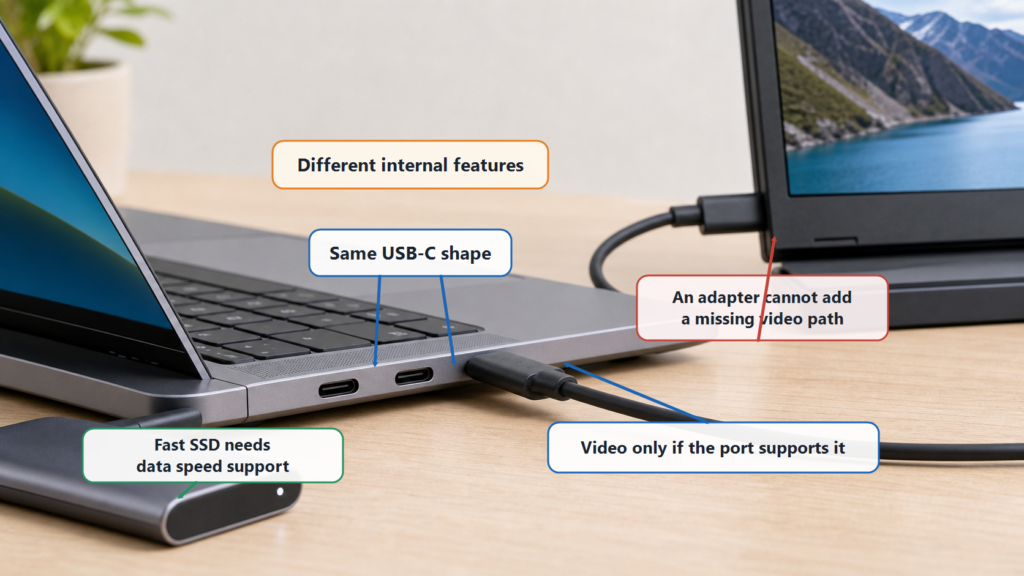
A phone can have a USB-C port but only support USB 2.0 data. A laptop can have two USB-C ports, where one supports display output and the other does not. Two USB-C cables can look almost the same, while one is a simple charging cable and the other is built for a fast external SSD.
USB Version: The Connection Rule
The USB version describes the data protocol and capability range.
| Version or common marking | Common data capability | Beginner meaning |
|---|---|---|
| USB 2.0 | 480Mbps | Fine for mice, keyboards, printers, and small files |
| USB 5Gbps | 5Gbps class of USB 3.x | Common high-speed devices |
| USB 10Gbps | 10Gbps class of USB 3.x | Common for external SSDs |
| USB 20Gbps | USB 3.2 Gen 2×2 | Needs two-lane support |
| USB 40Gbps / 80Gbps | High-performance USB4-related markings | Docks, displays, and storage that need more bandwidth |
The version name alone does not tell you the connector shape. USB 2.0 can appear on USB-A, Micro-USB, and USB-C. USB 3.x can also appear on different connector shapes.
The version is like a language rule. The connector is the mouth shape. The same mouth shape does not mean the same language.
USB-C: First, It Is a Connector Shape
USB-C, also called USB Type-C, is a physical connector. It is small, reversible, and able to carry several kinds of features.
“Able to carry” does not mean every product enables every feature.
A USB-C port may support:
- USB 2.0 data
- USB 5Gbps, 10Gbps, or 20Gbps data
- USB4
- USB Power Delivery charging
- DisplayPort Alternate Mode video output
- Thunderbolt or other capabilities that use the USB-C shape
It may also support only some of these.
Think of a wall plate with many possible wires behind it. The outside plate may look the same, but the wiring behind it can be different.
Cables: Same Shape, Different Inside
USB-C cables are easy to underestimate.
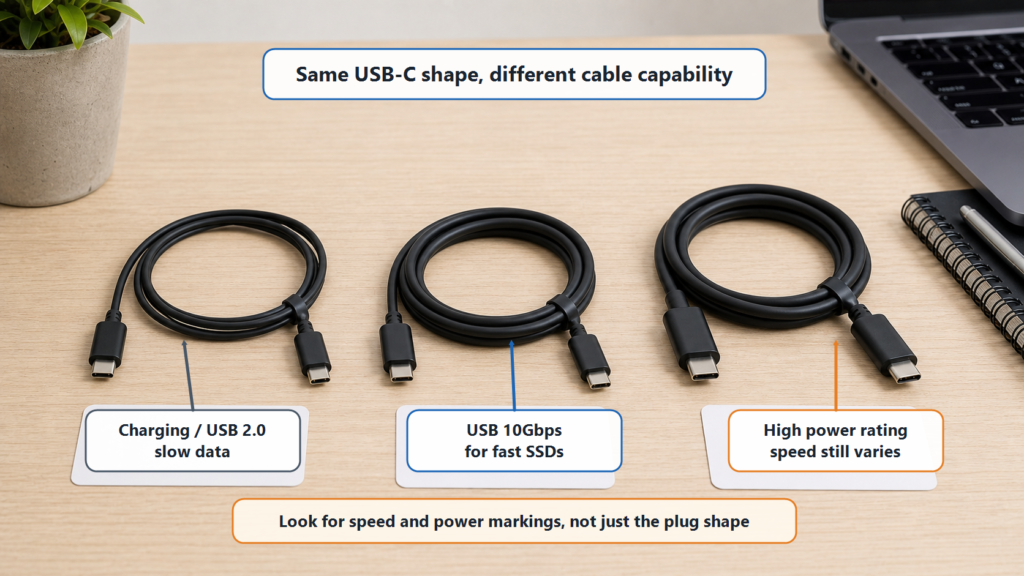
One USB-C cable may be good enough for charging earbuds. Another may run 10Gbps. Another may support USB4 and 240W charging. On a desk, most people cannot tell by looking.
| Cable marking | What it may mean | What to check next |
|---|---|---|
| USB-C charging cable | May be mainly for charging | Whether it supports data, and how fast |
| USB 2.0 USB-C cable | Transfers data, but slowly | Whether that is enough for your external drive |
| USB 10Gbps cable | Supports 10Gbps data | Whether it supports the power you need |
| USB 20Gbps cable | Supports faster USB 3.2 data | Whether the host and device also support it |
| 240W cable | High charging power rating | Data speed may still be low |
A cable is like a pipe. If the pipe is narrow, the flow stays limited even when both ends are strong.
USB-C Does Not Automatically Mean Fast Charging
USB-C can support USB Power Delivery, or USB PD. USB PD uses negotiation to choose voltage, current, and power. A compliant 100W or 240W charger does not force full power into a phone.
But that does not mean every USB-C cable and charger can fast charge.
High-power charging usually needs:
- A charger that supports the right USB PD power level
- A device that can request that power level
- A cable rated for the required current and power
- A system built to the relevant safety and USB requirements
If a phone only accepts lower power, it requests lower power. A high-wattage charger is more like a menu than a pressure hose.
USB-C Does Not Automatically Mean Video Output
Another common misunderstanding is that every USB-C port can connect to a monitor.
It cannot.
USB-C can carry video, but the computer port must support a video path such as DisplayPort Alternate Mode, USB4, or Thunderbolt. The cable and dock must support it too. Otherwise, a USB-C to HDMI adapter may show nothing.
| Scenario | Possible reason |
|---|---|
| Phone USB-C to HDMI shows no picture | The phone may not support video output |
| One laptop USB-C port works with a monitor, another does not | The two ports may have different internal capabilities |
| Dock works only at a lower resolution | Bandwidth, cable, or display mode may be limited |
When buying a dock or display cable, do not stop at “USB-C to HDMI.” Check whether your computer port supports video output.
How to Read a USB-C Product Correctly
Ask these questions:
- What data speed does the USB-C port support: 480Mbps, 5Gbps, 10Gbps, 20Gbps, 40Gbps, or higher?
- Does it support USB PD? What is the maximum power?
- Does it support video output? Which mode?
- Does the cable support both the data speed and power level you need?
- Is there clear certification, a specification page, or reliable documentation?
A product page that only says “USB-C” is not telling you enough. A page that says “USB 10Gbps + 100W charging + DisplayPort Alt Mode” gives you something you can actually check.
Summary
USB-C is a shape. It is not a speed promise, a fast-charging promise, or a video-output promise.
The USB version controls the data rules. USB-C controls the connector shape. The cable controls whether the connection can carry the promised capability. Once you separate those three, USB becomes much easier to read.
When buying a USB-C product, do not only ask, “Is it USB-C?” Ask: “What speed? What charging power? Can it output video? Do my computer, cable, and device all support the same thing?”