
USB is one of the most successful interface technologies in modern computing. From keyboards and mice to smartphones, external storage, cameras, docking stations, chargers, and industrial devices, USB has become a common language for data, power, and device connectivity.
Behind this ecosystem is the USB Implementers Forum, commonly known as USB-IF. USB-IF is the industry organization responsible for supporting the development, adoption, compliance testing, and branding of USB technologies.
Understanding USB-IF is useful because USB is not just a connector or a cable. It is a family of specifications, certification programs, logos, compliance rules, and ecosystem agreements that allow products from different companies to work together.
1. What Is USB-IF?
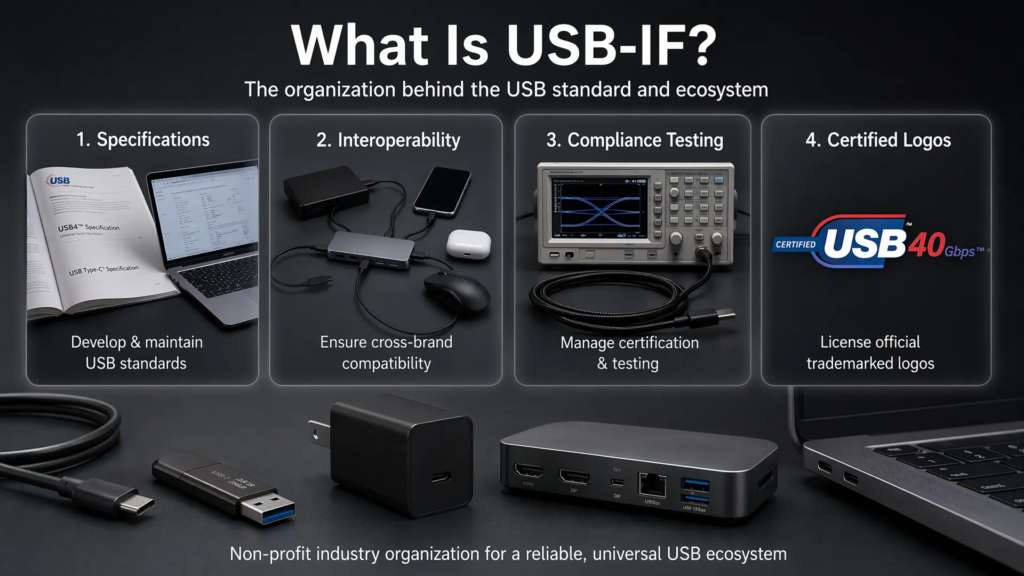
USB-IF stands for USB Implementers Forum. According to USB-IF, it is a non-profit corporation founded by the group of companies that developed the Universal Serial Bus specification. Its purpose is to provide a support organization and forum for the advancement and adoption of USB technology.
USB-IF helps coordinate the development of compatible USB products and promotes products that have passed USB-IF compliance testing. In practice, this means USB-IF is not only involved in writing specifications, but also in helping the industry test, certify, and communicate USB technologies consistently.
1.1 Core Mission
The work of USB-IF can be understood through four major responsibilities:
- Developing, maintaining, and evolving USB specifications
- Promoting interoperability among USB products from different manufacturers
- Managing compliance testing and certification programs
- Protecting and licensing official USB logos for certified products
This mission is important because USB products are made by thousands of companies across many industries. Without shared specifications and compliance programs, users would face far more compatibility issues between hosts, devices, cables, chargers, and hubs.
2. Organizational Structure
USB-IF operates through a board of directors, working groups, compliance programs, and member participation. The organization combines technical standardization with testing, certification, marketing guidance, and ecosystem coordination.
2.1 Board of Directors
The USB-IF Board of Directors is composed of companies and their designated representatives. The current board listed by USB-IF includes:
| Company | Role in USB-IF |
|---|---|
| Apple | Board member company |
| HP Inc. | Board member company |
| Intel Corporation | Board member company |
| Microsoft Corporation | Board member company |
| Renesas Electronics | Board member company |
| STMicroelectronics | Board member company |
| Texas Instruments | Board member company |
These companies represent different parts of the technology ecosystem, including operating systems, processors, semiconductor platforms, consumer devices, and embedded hardware.
2.2 Working Groups and Committees
USB-IF supports multiple technical and compliance-related activities. Its official materials mention areas such as compliance workshops, compliance test development, developer conferences, marketing programs, and working committees.
One important example is the Device Working Group, which is listed by USB-IF as part of its working committee structure. In addition, USB technology development involves specialized areas such as USB Type-C, USB Power Delivery, USB4, compliance testing, and logo usage.
These working groups and programs allow USB-IF to coordinate both the technical side and the market-facing side of USB adoption.
3. Major USB-IF Specifications and Technologies
USB-IF is associated with a wide range of USB technologies. Some focus on data transfer, some focus on connectors, and others focus on power delivery or certification.
3.1 USB Type-C
USB Type-C is the modern USB connector ecosystem designed to support thinner devices, reversible plug orientation, scalable power, and higher performance. USB-IF describes USB Type-C as a connector designed to meet newer platform requirements while retaining the functional benefits of USB.
The most visible advantage of USB Type-C is usability. Unlike older USB connectors, USB Type-C supports reversible plug orientation, which makes it easier for users to connect devices without checking which side is up.
However, Type-C is not just a physical connector. It is also the foundation for many modern USB use cases, including high-speed data transfer, USB Power Delivery, display tunneling, docking stations, and USB4 systems.
3.2 USB 2.0 and USB 3.x
USB 2.0 remains one of the most widely deployed USB standards. It introduced High-Speed USB at up to 480 Mbps and became the foundation for a large number of peripherals, embedded devices, storage products, and human interface devices.
USB 3.x expanded the performance range of USB and introduced SuperSpeed signaling. In consumer-facing branding, USB-IF increasingly recommends using performance-based names such as USB 5Gbps, USB 10Gbps, USB 20Gbps, USB 40Gbps, or USB 80Gbps instead of relying only on specification names.
This shift matters because older names such as USB 3.0, USB 3.1, and USB 3.2 caused confusion for many consumers. A speed-based naming system is easier to understand because it tells users what level of data performance to expect.
3.3 USB4
USB4 is a major update to the USB architecture. USB-IF states that USB4 builds on USB 3.2 and USB 2.0 and is based on the Thunderbolt protocol specification contributed by Intel.
USB4 enables multiple data and display protocols to share a high-speed link efficiently. It also supports backward compatibility with previous USB generations, allowing a USB4 connection to scale to the best mutual capability of the connected devices.
Current USB-IF USB4 information describes operation up to 80 Gbps over certified 80 Gbps USB Type-C cables. This makes USB4 important for high-performance docking stations, external displays, storage devices, and professional workflows.
3.4 USB Power Delivery
USB Power Delivery, or USB PD, extends USB from a data interface into a flexible power delivery system. USB-IF describes USB PD as a specification that enables more flexible power delivery along with data over a single cable.
Before USB PD Revision 3.1, USB PD was limited to 100W using 20V over USB Type-C cables rated at 5A. USB PD Revision 3.1 introduced Extended Power Range support, enabling power delivery up to 240W over full-featured USB Type-C cables and connectors.
This expansion makes USB PD suitable for more demanding products, including laptops, monitors, docking stations, high-power accessories, and other devices that previously required separate power adapters.
4. Compliance Testing and Certified USB Logos
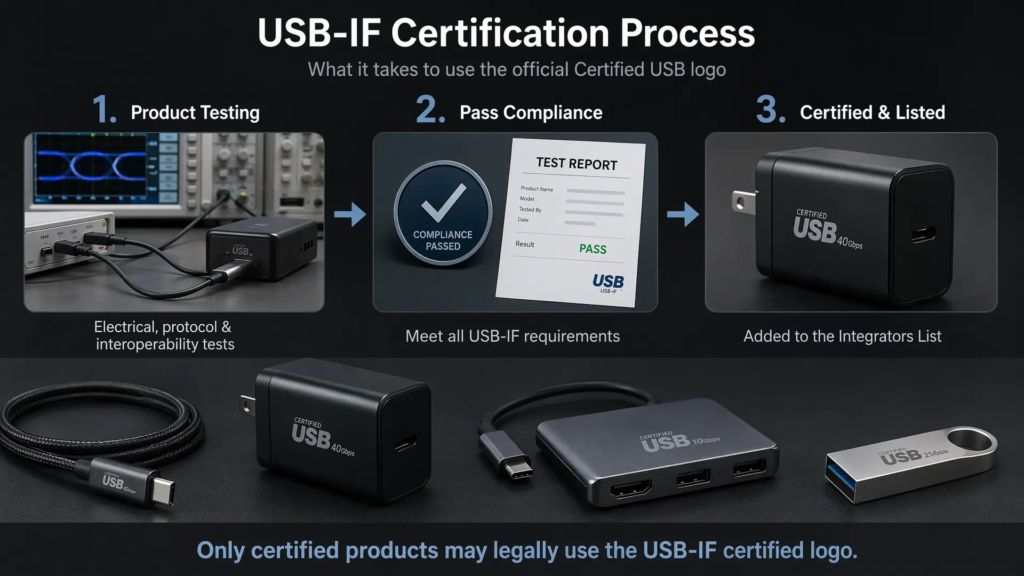
USB-IF is not only a specification organization. It also manages compliance testing and certification programs that help determine whether products meet USB-IF requirements.
The USB-IF Compliance Program uses multiple test specifications and assigns a Test ID, or TID, to track and define the test criteria used to evaluate a product. Products that pass the required testing can be considered USB-IF certified and added to the Integrators List.
4.1 What Compliance Testing Covers
USB compliance testing can include several dimensions depending on the product type:
- Electrical behavior
- Protocol compliance
- Connector and cable requirements
- Power delivery behavior
- Interoperability with hosts, devices, hubs, and chargers
- Correct use of USB-IF branding and product naming
USB-IF also requires products seeking USB-IF certification to use USB-IF certified connectors. This helps reduce compatibility and quality problems caused by non-compliant hardware.
4.2 Certified USB Logos
USB-IF logos are trademark-protected. A product cannot simply use a Certified USB logo because it supports a USB connector. According to USB-IF, certified USB logos may be used only with products that have passed USB-IF compliance testing and are currently on the Integrators List.
Companies that want to use USB-IF logos also need a valid USB-IF Trademark License Agreement. This is important because the logo is meant to signal that a product has gone through the USB-IF certification process, not merely that it looks like a USB product.
4.3 Product Search and Integrators List
USB-IF provides product search and Integrators List resources for certified products. The public product search displays products certified to bear the USB-IF logo, including cables, chargers, hubs, silicon, connectors, and other USB-related products.
This certification system gives buyers, manufacturers, and developers a way to check whether a product has passed USB-IF compliance testing.
5. Industry Impact
The impact of USB-IF is visible across the entire electronics industry. USB has helped unify peripheral connectivity, simplify charging, and reduce the number of proprietary connectors required for everyday devices.
5.1 Consumer Electronics
USB is now common across keyboards, mice, storage devices, cameras, smartphones, tablets, docking stations, monitors, and chargers. Its success comes from a combination of technical flexibility and ecosystem coordination.
For users, USB reduces complexity. For manufacturers, it provides a shared platform for product development. For operating systems, it creates a standardized model for detecting, configuring, and communicating with devices.
5.2 Power and Charging Ecosystem
USB Power Delivery has made USB Type-C a major charging interface for modern electronics. With USB PD 3.1 supporting up to 240W, USB is no longer limited to small mobile devices. It can now serve laptops, monitors, docking stations, and higher-power accessories.
This shift makes USB one of the most important power and data interfaces in the current electronics market.
5.3 Industrial, Automotive, and Embedded Use
USB is also used beyond consumer electronics. Industrial equipment, automotive systems, development boards, test instruments, embedded devices, and medical or professional hardware may all use USB for data, power, debugging, firmware updates, or user interface connectivity.
In these fields, certification and interoperability become even more important because reliability and long-term compatibility matter more than simple convenience.
6. Challenges Facing USB-IF
USB has become extremely successful, but that success also creates challenges. The ecosystem is large, old standards must remain compatible, and consumer-facing naming has not always been easy to understand.
6.1 Naming Confusion
One of the biggest challenges is naming. Terms such as USB 3.0, USB 3.1, USB 3.2, Gen 1, Gen 2, and Gen 2×2 have confused many users. USB-IF now encourages clearer performance-based language for consumer products, such as USB 5Gbps, USB 10Gbps, USB 20Gbps, USB 40Gbps, and USB 80Gbps.
This naming approach is more practical because users usually care about performance, charging capability, and compatibility rather than the internal specification revision number.
6.2 Non-Certified Products
Many USB products in the market may not be USB-IF certified. A cable or charger may physically fit a USB-C port but still fail to meet electrical, power, or protocol expectations.
This can lead to slow charging, unstable data transfer, display issues, or even safety risks in poor-quality power products. USB-IF certification and logo licensing help address this problem, but users still need to pay attention to whether a product is actually certified.
6.3 Backward Compatibility
USB must support a long history of devices, cables, hubs, and host controllers. Backward compatibility is one of USB’s strengths, but it also increases engineering complexity.
For example, a modern USB-C port may need to work with USB 2.0 devices, USB 3.x devices, USB4 devices, USB PD chargers, display protocols, and legacy adapters. Supporting all of this requires careful specification design and compliance testing.
7. Future Direction
USB-IF’s future work will likely continue in three major directions: higher performance, stronger certification, and wider ecosystem adoption.
7.1 Higher Bandwidth and Better Protocol Integration
USB4 already supports high-speed data and display protocol sharing over USB Type-C. With USB4 supporting up to 80 Gbps, USB is moving further into high-performance use cases such as external displays, professional docks, fast storage, and workstation accessories.
7.2 Stronger Certification and Product Identification
As USB-C cables and chargers become more powerful, certification becomes more important. USB PD, E-Marker behavior, certified cables, and correct logo usage all help users identify products that meet expected safety and performance requirements.
Better product identification can reduce confusion and improve trust in the USB ecosystem.
7.3 Expansion Into New Application Areas
USB is likely to continue expanding into automotive systems, industrial equipment, AR/VR devices, embedded platforms, and professional media workflows. These scenarios require not only higher bandwidth and power, but also better reliability, lower latency, and clearer certification.
Summary
USB-IF is the organization behind the USB ecosystem. It supports the development of USB specifications, promotes interoperability, manages compliance testing, protects certified USB logos, and helps the industry communicate USB capabilities more clearly.
Its influence can be seen in USB Type-C, USB Power Delivery, USB4, certified USB logos, compliance testing, and product naming guidelines. As USB continues to evolve toward higher bandwidth, higher power, and broader industry adoption, USB-IF remains central to keeping the ecosystem compatible, reliable, and understandable.