
Ever stared at a crowded power strip, juggling three chargers for your phone, earbuds, and laptop? Or stuffed your travel bag with bulky charging bricks only to realize you forgot one? If this sounds familiar, a dual-port charger might be the simple solution you’ve been missing.
This guide breaks down everything you need to know — from how they split power to how to pick one that actually works with your devices. No engineering degree required.
Why Dual-Port Chargers Are Everywhere Right Now
We live in a multi-device world. The average person carries a smartphone, wireless earbuds, and a smartwatch; many add a tablet or laptop to the mix. Charging them one by one is slow, and carrying a separate charger for each is impractical.
A dual-port charger solves this by replacing two single-port chargers with one compact unit. It’s the sweet spot between single-port simplicity and multi-port charging stations — small enough to toss in a bag, powerful enough to handle your daily essentials.
By the end of this article, you’ll understand how they work, which specs matter, and how to avoid the marketing traps that leave you with a slow-charging dud.
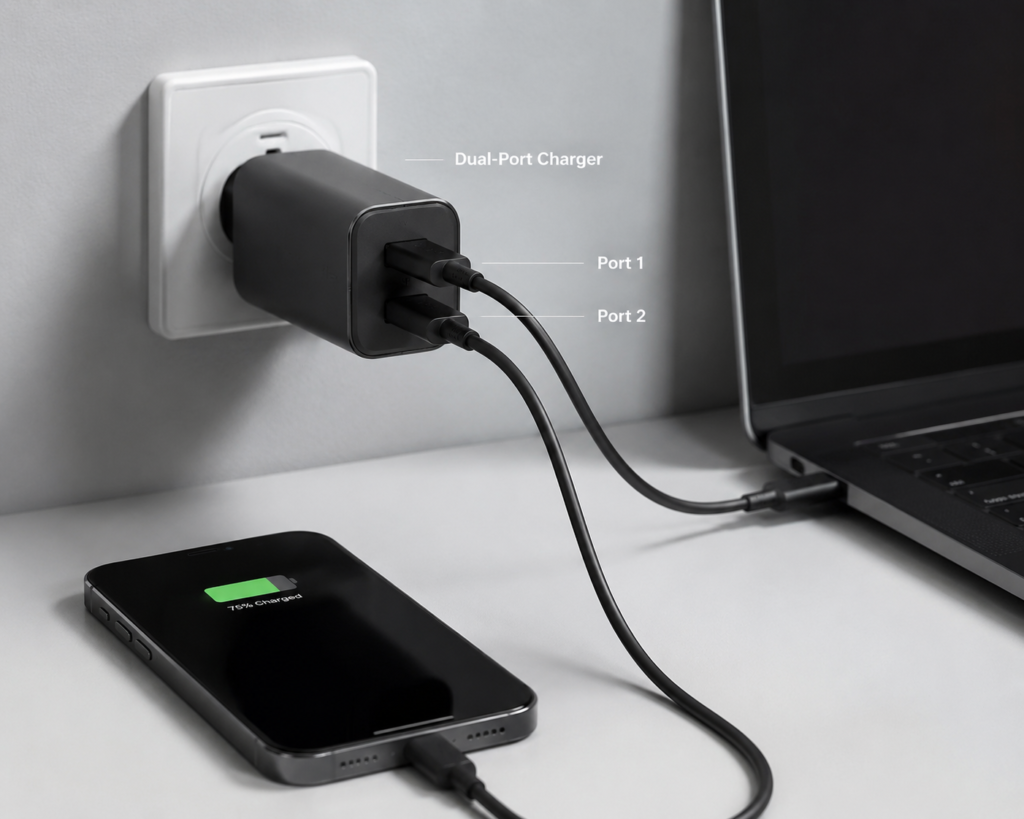
What Exactly Is a Dual-Port Charger?
In consumer electronics, a dual-port charger typically refers to a single wall adapter with two USB output ports that can power two USB-compatible devices simultaneously. Inside, it shares a fixed “power budget” across both ports — think of it like a single water tank feeding two faucets.
The 3 Common Port Configurations
Not all dual-port chargers are built the same. The port type determines what devices you can charge and how fast:
| Port Combination | Best For | Key Notes |
|---|---|---|
| Dual USB-A | Older devices, basic charging | Older connector standard. Actual power and fast-charging speed depend on supported protocols. Common in basic car chargers and budget models. |
| USB-A + USB-C (1A1C) | Mixed old/new devices | The most popular all-around choice. USB-C handles fast charging for phones/laptops; USB-A works with earbuds, older phones, and accessories. |
| Dual USB-C (2C) | Modern all-USB-C setups | Quality dual USB-C chargers typically support USB PD fast charging on both ports, making them suitable for laptops and phones. Always verify specifications before purchasing. |
Important Myth Bust: A USB-C shape does not guarantee fast charging. The port is just the physical connector — speed depends on the internal chip and supported charging protocols. Always check the specs, not just the port shape.
The #1 Rule: Two Ports ≠ Double the Power
This is the single biggest misconception shoppers have.
For most dual-port chargers, the advertised wattage represents the maximum total combined output, not per-port power. When two devices are connected, they draw from this shared power budget. Exact power split ratios vary by model — always check the manufacturer’s output specification table for dual-port performance. On some high-end chargers, the single-port maximum may be higher than the per-port limit when both are in use.
How It Stacks Up to Other Options
| Dual-Port Charger | Two Single-Port Chargers | 3+ Port Charging Station | |
|---|---|---|---|
| Outlets used | 1 | 2 | 1 |
| Devices charged | 2 | 2 | 3+ |
| Portability | Excellent | Poor | Average |
| Best for | Daily carry, travel | Fixed desks with extra outlets | Home or office shared setups |
How a Dual-Port Charger Actually Works
You don’t need to know circuit design, but understanding the basics will help you spot a quality product.
The Basic Charging Journey
Electricity from your wall socket travels through four simple stages:
- AC input: Alternating current flows in from the wall.
- Conversion: Internal circuits turn high-voltage AC into low-voltage DC that your devices can use.
- Smart control: A controller chip communicates with your devices and decides how much power each one gets.
- Dual output: Power is sent to each port according to what the connected devices need.
Power Allocation: Fixed vs. Dynamic
This is the feature that separates budget chargers from good ones. There are two main ways power is split:
1. Fixed Power Allocation (Budget Models)
The power split is locked in from the factory — for example, 45W for port 1 and 20W for port 2. No matter what you plug in, the ratio never changes.
- Pros: Simple, low cost.
- Cons: Wastes power if your first device doesn’t need all 45W; unplugging one device won’t boost the other’s charging speed.
2. Dynamic Power Allocation (Mid-Range & Premium)
The charger acts like a smart water valve. When only one device is plugged in, it gets 100% of the available power. When you plug in a second device, many modern chargers renegotiate and redistribute power automatically, though some devices may briefly pause charging during the power transition.
- Pros: Efficient, flexible, better user experience.
- Cons: Slightly more expensive.
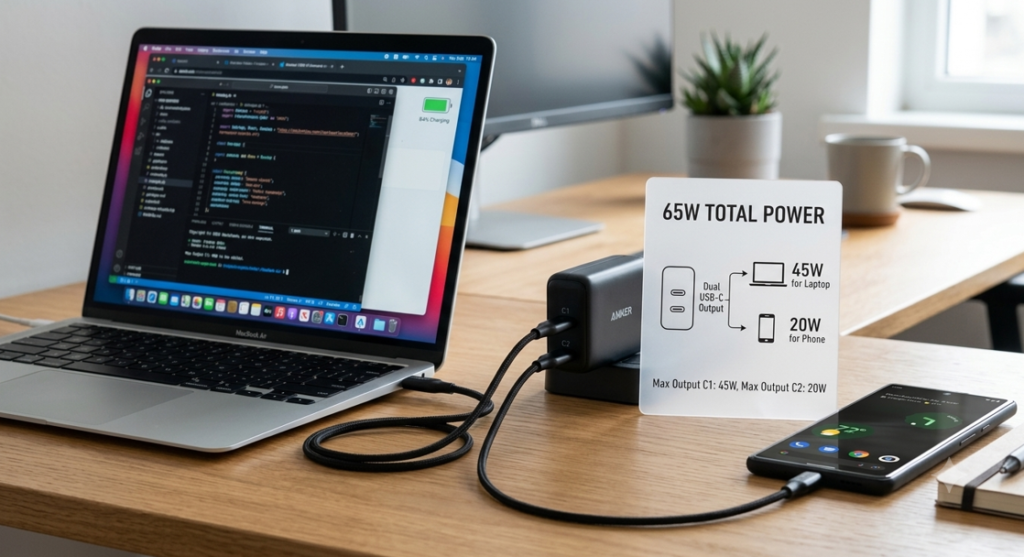
Example Power Split (65W Dual USB-C Charger)
One common configuration is:
- Single device plugged in: Port 1 = full 65W
- Two devices plugged in: Port 1 = 45W (laptop), Port 2 = 20W (phone)
Exact splits vary by manufacturer — always confirm the dual-output spec sheet for the model you’re considering.
Fast Charging Protocols: The “Language” of Speed
For fast charging to work, the charger and your device must speak the same “language” — these are called charging protocols.
Universal Standards (Most Common)
- USB Power Delivery (USB PD): The global universal standard. Used by iPhones, most Android phones, iPads, and nearly all USB-C laptops. The current PD 3.0 Standard Power Range (SPR) tops out at 100W. The newer PD 3.1 Extended Power Range (EPR) introduces higher voltage tiers — 28V, 36V, and 48V — supporting up to 140W, 180W, and 240W respectively for high-performance laptops and workstations.
- PPS (Programmable Power Supply): An optional feature of USB PD 3.0 that adjusts output voltage in fine 20mV increments. By matching output voltage more closely to what the device’s battery requires, PPS can reduce internal step-down conversion losses in compatible devices and help lower charging heat, particularly for handsets like Samsung Galaxy and Google Pixel models.
Proprietary Protocols (Brand-Specific)
These include Qualcomm Quick Charge (QC), Samsung AFC, and others. They work with specific Android devices but are gradually being replaced by universal USB PD.
Dual-Port Tip: Some cheap chargers only support fast charging on one port. The second port might only deliver slow 5V charging. Always check that both ports support the protocols your devices need.
Built-In Safety Features
A reliable dual-port charger includes four core protections:
- Over-Current Protection (OCP): Shuts down if current exceeds safe limits.
- Over-Voltage Protection (OVP): Prevents voltage spikes from damaging your device’s battery.
- Over-Temperature Protection (OTP): Reduces power if the charger gets too hot.
- Short-Circuit Protection (SCP): Cuts power instantly if a short circuit is detected.
Well-designed dual-port chargers may include output isolation, so a fault on one port is less likely to disrupt operation on the other.
GaN Technology: Why Chargers Keep Getting Smaller
If you’ve shopped for chargers recently, you’ve seen the term “GaN” everywhere. Here’s what it actually means.
What Is GaN?
Gallium Nitride (GaN) is a semiconductor material that replaces traditional silicon inside the charger’s switching components. It can switch on and off much faster than silicon, which means the internal transformer and capacitors can be much smaller.
GaN components enable higher switching frequencies and lower switching losses, which allows for smaller magnetics and higher power density. Real-world efficiency and thermal performance still depend on the full circuit design, component quality, and thermal engineering — not just the GaN semiconductor itself.
GaN vs. Silicon: What’s the Real Difference?
| Traditional Silicon | GaN Technology | |
|---|---|---|
| Efficiency | Varies widely by design | Often enables higher-efficiency designs when properly engineered |
| Size (same wattage) | Standard baseline | Typically 30–50% smaller in well-built models |
| Heat output | Higher baseline | Often runs cooler in quality designs |
| Price | Lower | Slightly higher (costs continue to fall year over year) |
The efficiency gap matters more than you think. Even a modest efficiency gain on a daily-use 65W charger adds up over months of use — and it means far less heat building up on your desk or in your bag.
Should You Pay Extra for GaN?
Yes, if:
- You travel frequently and want the smallest possible charger
- You’re buying 65W or higher (the size difference is dramatic)
- Heat buildup bothers you
No, if:
- The charger will live permanently on a desk
- You’re on a tight budget and only need 30W or less
Types of Dual-Port Chargers: Find Your Category
By Power Level
- Entry Level (20W–35W)
- Handles: Phone + earbuds / smartwatch
- Best for: Bedside tables, casual carry
- Mainstream (45W–65W)
- Handles: Phone + tablet, or lightweight laptop + phone
- Best for: Most users, office desks, general travel
- High Performance (100W+)
- Handles: Full-size laptop + phone/tablet at full speed
- Best for: Power users, frequent business travelers
By Physical Form
- Wall plug: Directly inserts into the outlet. Most portable; many have foldable prongs for travel.
- Desktop charger: Sits on your desk with an extension cord. Easier to reach and often higher power.
- Car charger: Plugs into a cigarette lighter socket. Perfect for navigation phones and passenger devices.
USB-C Dual Port Charger Device Compatibility Guide
Wondering if a dual-port charger works with your specific gear? Below is a quick reference for common devices and the minimum recommended power per port:
表格
| Device | Recommended Per-Port Power | Notes |
|---|---|---|
| iPhone (all modern models) | 20W+ | Charges via USB PD; works with any PD-enabled USB-C port |
| iPad / iPad Air | 30W+ | Higher wattage charges faster, but 20W will still work |
| MacBook Air | 30W–45W | Can charge from a 45W+ USB-C PD port |
| 13″–16″ MacBook Pro | 60W–140W | Match wattage to your model for full-speed charging |
| Android flagship phone | 25W–45W | Look for PPS support for fastest, coolest charging |
| Windows thin & light laptop | 45W–65W | Most modern USB-C laptops charge via PD |
You can charge two devices at once as long as the charger’s total output covers both devices’ power needs.
How to Choose a Dual-Port Charger (4-Step Method)
Don’t get dazzled by marketing buzzwords. Follow this simple framework.
Step 1: Calculate Your Real Power Needs
First, list the devices you’ll charge at the same time. Look up each device’s maximum charging wattage, add them up, and add 15–20% headroom. That’s your minimum total power.
Quick Reference Guide:
| Device Combination | Recommended Total Power | Preferred Port Type |
|---|---|---|
| Phone + wireless earbuds / watch | 25W–35W | 1A1C or dual C |
| Phone + tablet | 45W–65W | Dual C or 1A1C |
| Thin & light laptop + phone | 65W–100W | Dual USB-C |
| Two laptops | 100W+ | Dual USB-C |
Step 2: Check These 4 Critical Specs
- Total output wattage: The maximum power the charger can deliver overall.
- Dual simultaneous output: The wattage each port delivers when both are in use. This is the most important spec on the page.
- Supported protocols: Confirm USB PD (and PPS if you have a Samsung/Google phone).
- Allocation type: Prefer dynamic allocation over fixed allocation for a better experience.
Step 3: Verify Safety Certifications
Certifications aren’t just stickers — they mean the product passed independent safety tests. For global shoppers, look for region-appropriate certifications:
- United States: UL safety certification + FCC electromagnetic compliance
- European Economic Area: CE compliance + RoHS hazardous substance restrictions
- United Kingdom: UKCA marking
Uncertified cheap chargers may skip safety circuits, overheat, or even damage your devices.
Step 4: Avoid These 3 Common Traps
- The “max wattage only” trick: Advertising screams “65W!” but hides that dual output drops to 30W total. Always find the “dual output” specs.
- Fake protocol claims: The listing says “fast charge” but only one port actually supports PD.
- Suspiciously low prices: If a 100W GaN dual charger costs $8, it’s almost certainly using cut-rate components and faking the specs.
Cable Matters: Why Your Cable Can Kill Fast Charging
Even the best charger won’t charge fast with a bad cable. This is the #1 overlooked factor.
What Is an E-Marker Chip?
Per USB-IF standards, standard USB-C cables are rated for up to 3A of current, which supports up to 60W at 20V. Cables designed to carry 5A of current are required for full 100W USB PD charging at 20V, and they must include a built-in E-Marker chip. This small integrated circuit communicates the cable’s current and voltage capabilities to the charger, enabling safe full-power delivery.
For 140W–240W PD 3.1 EPR charging, you need an even higher-rated EPR-certified cable.
Quick Rule:
- ≤60W: Any standard 3A USB-C cable works
- 61W–100W: Requires a 5A-rated cable with an E-Marker chip
- Above 100W (PD 3.1 EPR): Requires an EPR-certified cable
If you plug a 100W charger into a laptop with a cheap 3A cable, you’ll be stuck at 60W max — and you’ll probably wonder why your “fast charger” is so slow.
Best Use Cases: What Works Where
Office Desk
Pick: 65W–100W 1A1C or dual-C desktop charger
Keep your laptop plugged into the C port full-time, and drop your phone on the other port whenever you sit down. A desktop model with a short extension cord keeps your wall outlet free and the ports within easy reach.
Travel / Business Trips
Pick: 65W+ GaN dual-C charger with foldable prongs
One GaN brick replaces your laptop charger + phone charger + earbuds charger. The size and weight savings in your bag are noticeable.
Bedside / Nightstand
Pick: 20W–30W low-heat model
You don’t need blazing speed overnight. Prioritize low heat and reliability over maximum wattage.
In the Car
Pick: 30W–45W dual-port car charger (1A1C)
Power your navigation phone on the C port and let a passenger charge their device on the A port.
Usage Tips & Common Myths Debunked
Pro Tips for Best Performance
- Plug high-power devices (laptops, tablets) into the USB-C port; use USB-A for low-power accessories.
- Keep the charger in open air — don’t tuck it under a pillow, blanket, or pile of papers. Heat is the #1 enemy of electronics longevity.
- Hold the plug body when unplugging, don’t yank the cable. This prevents loose ports and broken wires.
Myth vs. Fact
| Myth | Fact |
|---|---|
| “Charging two devices always cuts speed in half.” | Only if the total power is exactly double what one device needs. If total power exceeds both devices’ max draw, both charge at full speed. |
| “A high-wattage charger will break my phone.” | No. Chargers and devices negotiate power first. Your phone only draws what it can safely handle. |
| “Leaving it plugged in wastes tons of electricity.” | Quality chargers have standby power under 0.1W — it’s negligible on your electric bill. |
| “All GaN chargers are good.” | No. Real-world performance depends on full circuit design and build quality. A low-quality GaN charger can still run hot or fail early. |
How Long Do They Last?
A well-built dual-port charger will last 3–5 years with normal use. The main failure points are physical wear on the ports and slow degradation of internal capacitors over time.
Dual-Port vs. Alternatives: Quick Comparison
| Dual-Port Charger | Two Single-Port Chargers | 3+ Port Station | |
|---|---|---|---|
| Portability | ★★★★☆ | ★★☆☆☆ | ★★★☆☆ |
| Outlet footprint | 1 socket | 2 sockets | 1 socket |
| Simultaneous devices | 2 | 2 | 3+ |
| Power per device | Higher (fewer ports sharing) | Highest (dedicated) | Lower (more division) |
| Value | Best balance | Most expensive | Mid-range cost |
Bottom line: If you regularly charge exactly two devices, a dual-port charger is the most efficient choice in size, cost, and convenience. If you have 3+ devices to charge every night, step up to a multi-port station.
Frequently Asked Questions
1. Will charging two devices at once make them slower?
It depends. If the charger’s total wattage is greater than the sum of both devices’ maximum charging speed, both will charge at full speed. If the total exceeds the charger’s limit, power is split proportionally.
2. Does an empty port waste electricity?
No. Modern chargers have idle power modes. A certified charger draws less than 0.1W when nothing is plugged in — you’d barely notice it on your yearly energy bill.
3. Can I charge a laptop with a dual-port charger?
Yes, as long as:
- The port uses USB-C
- It supports USB PD
- The port delivers enough wattage for your laptop (at least 45W for most thin-and-lights)
4. Why is my second port charging so slowly?
Common causes:
- The second port has a lower fixed power limit
- Total power is being redistributed when both ports are in use
- Your cable can’t carry enough current
- The device doesn’t support the available fast-charging protocol
5. Is GaN worth the extra money?
For travelers and anyone who values small size and low heat — absolutely. For a stationary desk charger that never moves, you can save money with a quality silicon model.
6. Can two different brand devices fast charge at the same time?
Yes, as long as each port independently supports the protocol each device uses. The two ports negotiate power separately.
7. Will using a cheap cable really limit speed?
Definitely. For anything above 60W, a cable without an E-Marker chip will cap your charging speed, no matter how powerful the charger is.
Final Thoughts & What’s Next
A dual-port charger isn’t just “a charger with an extra hole.” It’s a carefully balanced power system that intelligently splits energy between your devices while saving space and reducing clutter.
Your buying checklist, simplified:
- Add up your simultaneous device wattage + 20% buffer
- Find the “dual output” spec — don’t just look at the big headline number
- Confirm both ports support your needed protocols (USB PD + PPS)
- Check for region-appropriate safety certifications
- Go GaN if portability matters; go silicon for budget desk use
Looking ahead, dual-port chargers will continue to shrink in size and grow smarter. Higher-wattage USB PD 3.1 EPR chargers will gradually become more available to meet the needs of high-performance laptops and professional gear. GaN technology will also become standard across more mid-range and budget models, improving power density at every price point. The future is fewer chargers — but better ones.