
Have you ever noticed strange buzzing sounds from your speakers when your phone sits nearby? Or random screen flicker, static, and wavy lines on your monitor? Maybe your Bluetooth headphones cut out in certain rooms, your Wi-Fi speed drops unexpectedly, or file transfers to a USB drive fail for no obvious reason.
These common annoyances usually share the same hidden cause: electromagnetic interference, better known as EMI and RFI.
Invisible to the naked eye, electromagnetic interference degrades the performance of nearly every electronic device we use. Cable assemblies, often overlooked, are both the primary entry point for outside interference and the main path for internal signals to leak out.
In this guide, we break down EMI and RFI in plain language, explain how cable shielding works, and share practical tips for choosing the right cables and avoiding common mistakes.
1. Quick Overview: Electromagnetic Interference in Daily Life
Common EMI/RFI Symptoms You’ve Probably Seen
Electromagnetic interference isn’t just an industrial engineering problem—it happens in every home and office:
- Buzzing, humming, or static from speakers and headphones when a phone is placed nearby
- Wavy lines, screen flicker, or snow-like noise on displays and TVs
- Dropouts on Bluetooth headphones, wireless mice, or keyboards, plus inconsistent Wi-Fi speeds
- Interrupted file transfers, data corruption, or connection drops on USB storage devices
What Cable Shielding Actually Does
Cables are designed to carry power and data signals, but they also interact with electromagnetic fields in the air. Cable shielding acts like a protective barrier around the wires inside, working in two directions:
- It blocks outside electromagnetic noise from getting in and disrupting the signal
- It contains the signal inside the cable so it doesn’t radiate outward and interfere with other devices
Why This Matters for Everyday Users
You don’t need to be an engineer to benefit from understanding EMI/RFI protection:
- It directly impacts your audio, video, and networking experience
- It’s one of the most reliable ways to judge cable quality when shopping
- It helps you troubleshoot glitches faster, so you don’t waste money replacing perfectly good devices
2. Basic Definitions: What Are EMI and RFI?
EMI and RFI are often mentioned together, but they are not separate, equal categories—one is a subset of the other.
What Is EMI?
EMI stands for Electromagnetic Interference. It is the broad, umbrella term for any unwanted electromagnetic energy that disrupts electronic equipment or signal transmission.
EMI travels in two main ways:
- Conducted interference: Travels along wires, cables, and metal conductors—for example, electrical noise from the power grid entering your charger through the wall outlet
- Radiated interference: Travels through the air as electromagnetic waves—for example, your phone’s signal interfering with a nearby speaker
EMI covers an extremely wide frequency range, from low-frequency power line hum all the way up to ultra-high-frequency radio signals.
What Is RFI?
RFI stands for Radio Frequency Interference. It refers specifically to electromagnetic interference that occurs within the radio frequency spectrum, generally defined as 3 kHz to 300 GHz.
Put simply: RFI is one important category of EMI. It covers the frequencies used by wireless communication, broadcasting, and similar technologies.
How EMI and RFI Relate to Each Other
- Hierarchy: All RFI is EMI, but not all EMI is RFI. For example, low-frequency noise from an electric motor is EMI but not RFI.
- Why they’re discussed together: In consumer electronics, radio-frequency interference is the most noticeable and common type people encounter. Most practical shielding solutions address both broad EMI and specific RFI issues.
3. EMI vs. RFI: Key Differences at a Glance
The table below summarizes the most important distinctions:
| Category | EMI (Electromagnetic Interference) | RFI (Radio Frequency Interference) |
|---|---|---|
| Definition | The general term for all types of electromagnetic disruption | A specific subset of EMI that occurs in the radio frequency band |
| Frequency Range | Covers DC, power line frequencies, and all radio frequencies | 3 kHz – 300 GHz (radio spectrum only) |
| Typical Sources | Switching power supplies, electric motors, lightning, electrostatic discharge | Wi‑Fi routers, cell towers, Bluetooth devices, broadcast radio |
| Propagation | Both conducted and radiated | Primarily radiated through air; can also couple into cables |
| What It Affects | Power supplies, low‑frequency signals, and high‑frequency signals alike | Wireless communications, high‑speed digital signals, radio circuits |
| Cable Shielding Focus | Shield structure, grounding, conducted noise filtering | High‑frequency shielding performance, impedance matching, common‑mode suppression |
4. Where Do EMI and RFI Come From?
Interference comes from many sources. They fall into four main groups, covering nearly every environment.
Natural Sources
Nature itself generates electromagnetic interference, often with strong effects:
- Lightning: A lightning strike produces an intense electromagnetic pulse that can enter devices through power lines and signal cables, and in severe cases cause damage.
- Electrostatic Discharge (ESD): A quick static spark when you touch a connector, common in dry environments, can disrupt sensitive electronic circuits.
- Solar activity: Solar flares and geomagnetic events can degrade long‑range wireless and satellite signals.
Electrical Equipment (Typical EMI Sources)
These are the most common sources of lower‑frequency EMI in homes and workplaces:
- Switching power adapters, phone chargers, and LED drivers
- Electric motors, variable‑frequency drives, inverters, and relays
- High‑voltage power lines and large household appliances
Wireless Devices (Typical RFI Sources)
These are the classic sources of radio‑frequency interference, present everywhere:
- Wi‑Fi routers, Bluetooth headphones, wireless mice, and keyboards
- 4G/5G cell towers, smartphones, and two‑way radios
- Broadcast transmitters and microwave ovens
High‑Speed Digital Devices
Interference doesn’t always come from outside—your own devices can generate it internally:
- CPUs, GPUs, RAM, and PCIe buses emit high‑frequency radiation when operating at high speeds.
- High‑bandwidth interfaces like USB4, Thunderbolt, and HDMI 2.1 radiate more interference as signal speeds increase.
5. Why Cables Are the Weak Point for EMI/RFI
Electronic devices have internal shields and filter circuits, but cables remain the most vulnerable part of the system.
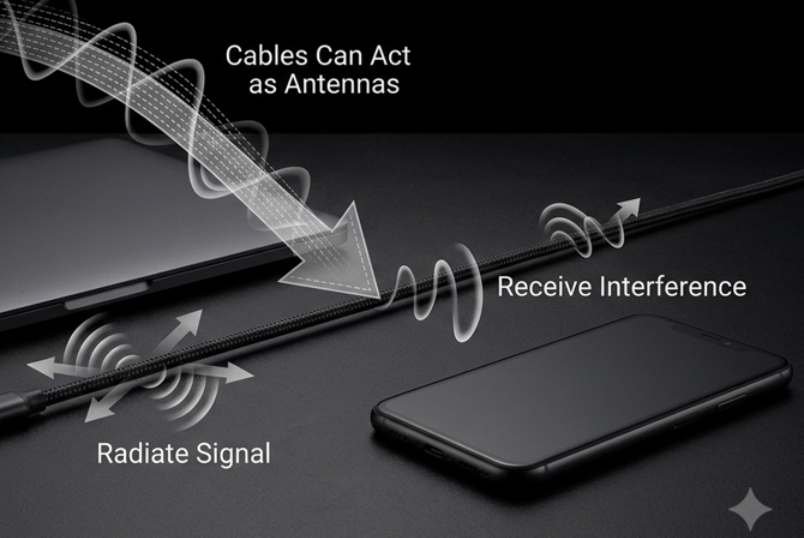
Cables Act Like Antennas
Any length of wire behaves like an antenna:
- Receiving: It picks up electromagnetic waves from the air and injects noise into the signal inside the cable
- Transmitting: The signal traveling inside the cable can radiate outward and become a source of interference for other devices
Cables Carry Conducted Interference
For conducted noise, cables are the only path:
- Power cables carry grid noise and surges into phones, computers, and other devices
- Signal cables carry interference directly into sensitive chips and ports, causing data errors and signal distortion
Longer Cables = More Interference Risk
In general, longer cables are more susceptible to interference:
- More length means more exposure to ambient electromagnetic fields
- When a cable’s length approaches roughly 1/4 of the interference signal’s wavelength, it becomes a much more efficient antenna, and interference effects grow stronger
Connectors Are the Weakest Link
The shielding performance of an entire cable is only as good as its weakest point:
- Connector and junction points are where shielding breaks most often, letting interference sneak in
- Different cable types have different sensitivities:
- Low‑level analog audio cables are very sensitive to outside noise
- Power cables and high‑speed data cables tend to radiate more interference outward
6. Core EMI/RFI Protection Technologies in Cables
Cable manufacturers use several techniques to fight interference, with shielding as the foundation.
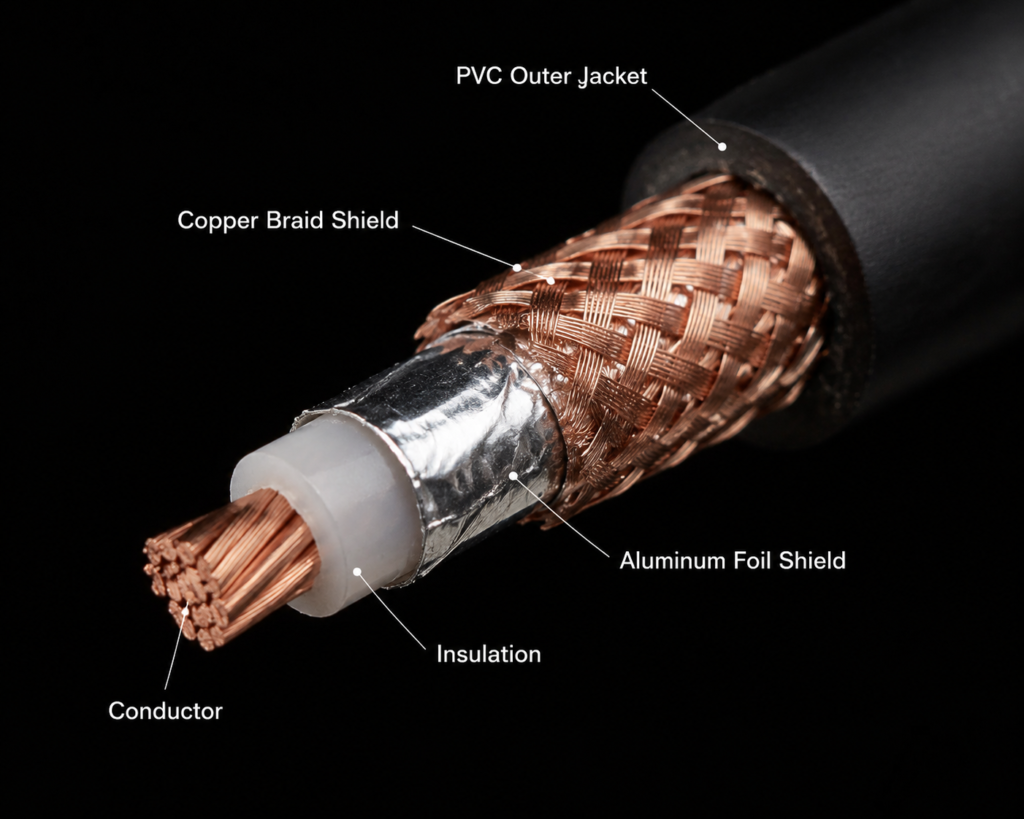
Shielding Layers: The Primary Defense
A metallic shield wraps around the internal conductors, blocking electromagnetic fields through the Faraday cage effect. The four most common types are:
- Foil shielding: A thin aluminum foil wraps around the wires. Low in cost, it performs very well against high‑frequency RFI and is almost always used with a drain wire for reliable grounding.
- Braided shielding: Fine copper wires are woven into a mesh. Flexible and durable, it offers balanced performance across mid and low frequencies and is the most common structure in data and video cables.
- Copper tape shielding: Copper tape is spirally wrapped for very high coverage and excellent shielding effectiveness. Less flexible, it is used mostly in permanent installations and industrial cabling.
- Combination / dual shielding: Foil plus braid together deliver the highest overall shielding performance for harsh, high‑noise environments.
Grounding: Why Shields Don’t Work Without It
A shield only works properly when it is grounded correctly.
- Purpose: The shield collects unwanted interference energy and sends it safely to ground, away from the signal wires.
- Risk of bad grounding: If energy can’t escape, the shield itself can act as an antenna and make interference worse.
- Common approaches: Single‑end grounding is typical in consumer setups; double‑end grounding is used for longer industrial runs. Each has specific use cases.
Twisted Pair / Differential Signaling
Besides shielding, twisting wires together is one of the oldest and most effective anti‑noise methods:
- How it works: Two signal wires twisted tightly together pick up nearly identical amounts of external noise. At the receiving end, the noise on one wire cancels the noise on the other.
- Where you’ll find it: Ethernet cables are the classic example. USB cables and HDMI also use twisted differential pairs for their high‑speed signals.
Ferrite Cores: High‑Frequency Noise Suppression
Many data cables have a small cylindrical bump near each connector—that’s a ferrite core.
- What it does: It absorbs high‑frequency common‑mode noise and converts the electromagnetic energy into tiny amounts of heat.
- Typical placement: Near the cable connectors on both ends.
- Best for: High‑speed data cables and audio cables in environments with strong high‑frequency RFI.
Connector Shielding Design
Even the best cable shield is useless if the connector breaks the shield path. Quality cables include:
- Metal‑bodied shielded connectors
- Internal shielding rings or spring contacts that mate firmly with the cable shield
- 360° circumferential contact to close the shield completely, with no gaps for interference to pass through
7. How to Choose the Right Cable Shielding for Your Use Case
You don’t always need the highest‑grade shielded cable. Choosing based on your actual environment gives the best balance of cost and performance.
Home and Everyday Use
- Ethernet cables: For short runs in typical homes, unshielded (UTP) cables work fine. If your cable runs near power lines or you have many wireless devices nearby, foil‑shielded (FTP) cables are a sensible upgrade.
- HDMI / DisplayPort cables: For 4K, 8K, and high‑refresh‑rate displays, look for cables with proper braided shielding to avoid flicker and screen artifacts.
- Analog audio cables: Because they carry very low‑level signals, shielded audio cables are strongly recommended to reduce hum and buzz.
- Charging cables: Basic charging doesn’t require heavy shielding. For cables that handle both fast charging and data transfer, choose a shielded model.
Office and Data Center Environments
- In dense wiring closets and server rooms, cables can interfere with each other, so shielded Ethernet and data cables are preferred.
- High‑speed cables like USB‑C and Thunderbolt require full shielding to maintain reliable performance and avoid radiating interference.
- Follow good cabling practices: keep power and signal cables separated, especially around switches and servers.
Industrial and Automotive Environments
- Industrial control cables: Factories have motors, drives, and high electrical noise—use high‑shielding industrial‑grade cables for dependable control signals.
- Automotive cables: Vehicles have vibration, temperature extremes, and a noisy electrical environment. Shielding must be durable and meet automotive reliability standards.
Medical and Precision Test Equipment
- Medical devices and precision test instruments demand extremely high reliability, because interference can cause measurement errors or unsafe operation.
- These applications follow strict EMC standards, with very specific requirements for both cable shielding and grounding.
8. Common Myths About EMI/RFI and Cable Shielding
There’s a lot of misinformation about cable shielding. Here are five facts to keep in mind.
Myth 1: A shielded cable is always immune to interference
Reality: Shielding performance depends on structure, material, grounding, and environment. With poor grounding or broken shield contact at the connectors, a shielded cable may offer little benefit—and can even make things worse.
Myth 2: Thicker shielding always works better
Reality: Conductivity, coverage, and continuity matter far more than raw thickness. A thin foil with 100% coverage can outperform a thick braid with gaps, especially at high frequencies.
Myth 3: A ferrite core fixes every interference problem
Reality: Ferrite cores only help with certain types of high‑frequency common‑mode noise. They do almost nothing for low‑frequency conducted noise or differential noise. They are a useful add‑on, not a replacement for proper shielding and good cabling practices.
Myth 4: The highest‑shielding cable is always the best choice
Reality: Top‑tier shielded cables are stiffer, bulkier, and more expensive. They are overkill for most home use. In addition, improperly grounded shielded cables can introduce ground‑loop noise and create new problems.
Myth 5: As long as the cable is shielded, the connector doesn’t matter
Reality: Shielding follows the “weakest link” rule. If the connector has no shielding or makes poor contact, it creates a gap in the shield that drastically reduces overall protection.
9. Final Thoughts: Practical EMI/RFI Protection for Everyone
Key Takeaway
RFI is a subset of EMI. In real‑world environments, both usually exist together, and good cable protection addresses both.
The Three Pillars of Cable Protection
Effective EMI/RFI defense relies on three things working together: a well‑built shield, proper grounding, and thoughtful cable routing. None of the three works as well alone.
Buying Advice for Regular Users
You don’t need the most expensive, highest‑spec cable. Choose based on your actual needs, and stick to reputable brands that follow industry standards. Avoid no‑name bargain cables with unclear specifications.
Troubleshooting Tip
When you run into audio static, screen flicker, or unreliable connections, don’t immediately blame the device. Check three things: the condition and quality of your cable, whether it runs near strong interference sources, and whether the connectors are seated properly. More often than not, a cable swap or a quick reroute is all you need to fix the problem.