
1. Introduction: Why Are There So Many Different Charging Ports?
Most people have run into compatibility frustrations with their gadgets: carrying multiple charging cables when leaving home, borrowing a charger that doesn’t fit your phone, or trying to transfer files only to find the ports don’t match. All these headaches come down to differences in device connectors.
Many people think ports are only for charging, but they also handle data transfer, audio output, and peripheral connections. Understanding how they work helps you avoid bad purchases and get more out of your devices.
This guide breaks down the four most common connector types in plain language, covering their features, differences, and how to choose the right accessories — no technical background required.
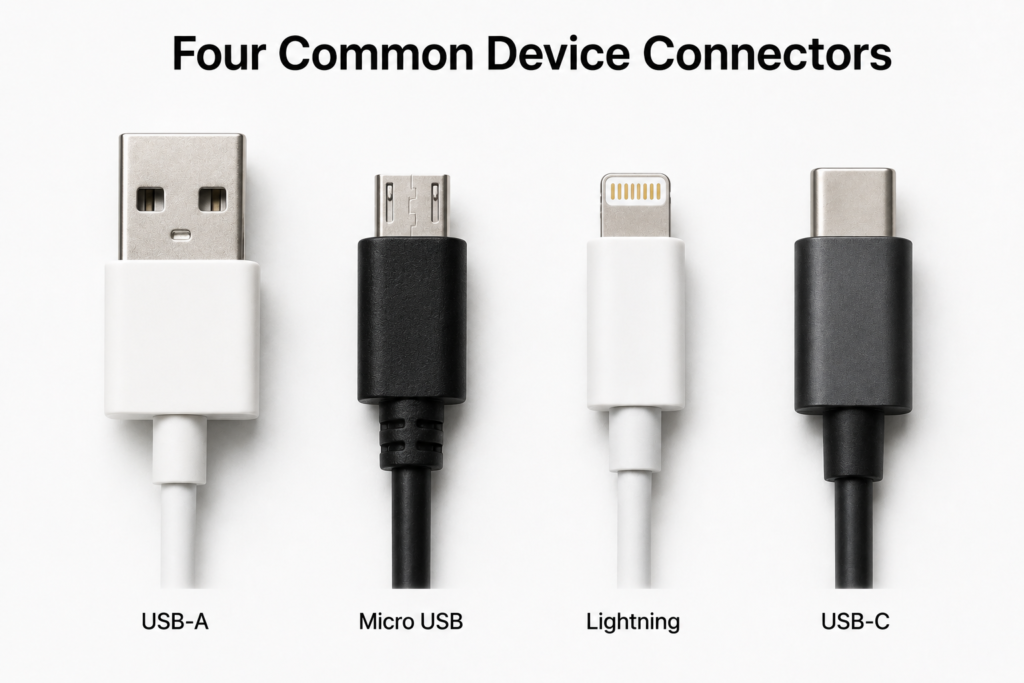
2. A Brief History: From Unification to Fragmentation and Back Again
The USB standard was originally created to unify computer peripheral connections. It was meant to let mice, keyboards, flash drives and more all work with one single port type, ending the chaos of every device using its own proprietary connector.
As mobile devices evolved, four connector types emerged, each built for its era: USB-A dominated the desktop and laptop age, Micro USB became the standard for early Android phones, Lightning was Apple’s closed-ecosystem solution, and USB-C was designed as a versatile, all-in-one standard for every use case.
In recent years, global regulations have sped up industry consolidation. Most notably, the EU Common Charger Directive mandates USB-C for smartphones, tablets and other portable devices, pushing the market back toward a single universal standard.
3. USB-A: The Long-Standing Classic Connector
Appearance and Design
USB-A is the familiar rectangular port most people know best. It has a plastic tongue inside with metal contacts, and only inserts one way. Forcing it in upside down can damage the port or cable.
Data and Charging Performance
USB-A works with multiple generations of USB technology. Black plastic inserts usually mean USB 2.0 (slower file transfers), while blue inserts usually indicate USB 3.0 (much faster speeds). For power, it defaults to low-voltage 5V output, though some ports support higher-wattage proprietary fast-charging protocols.
Common Use Cases
It remains widespread on desktop PCs, laptops, wall chargers, USB flash drives, wired mice and keyboards — making it the most abundant connector type in terms of existing devices.
Key Advantages and Limitations
Its biggest strengths are near-universal compatibility, low cost and a very durable physical design. On the downside, it is relatively large, cannot be inserted blind, and does not natively support high-power charging or video output, so its expandability is limited.
4. Micro USB: The Transitional Mobile Connector
Appearance and Design
Micro USB is a small, trapezoid-shaped port that is narrower on one side. Like USB-A, it only inserts one way. Its compact size was designed specifically for small portable electronics.
Data, Charging and OTG Support
Nearly all Micro USB ports run at USB 2.0 speeds, with typical charging power around 10W — enough for basic small-device charging. It also supports USB On-The-Go (OTG), letting you connect flash drives, game controllers and other accessories with an adapter.
Common Use Cases
Once the standard for Android smartphones, it is now mostly found on older phones, power banks, Bluetooth earbuds, dash cams and other small digital accessories.
Why It Is Being Phased Out
Micro USB’s small locking clips wear out easily, leading to loose connections and short lifespans. Its one-way design is inconvenient, and its charging speed and data performance can no longer keep up with modern smartphones, so it has been replaced by newer standards.
5. Lightning: Apple’s Proprietary Ecosystem Connector
Background and Appearance
Introduced by Apple in 2012 to replace the older 30-pin connector, Lightning is a compact, symmetrical 8-pin port that can be inserted either way up — a very advanced design for its time.
Data, Charging and Expansion
Most Lightning devices transfer data at USB 2.0 speeds, with only a few professional models supporting higher performance. For charging, it supports USB Power Delivery fast charging at roughly 20–27W peak. It can also output video and connect to cameras via adapters.
MFi Certification and Accessory Ecosystem
Apple runs the MFi (Made for iPhone/iPad) certification program. Only officially approved accessories work reliably with Apple devices. Uncertified cables may trigger compatibility warnings, stop working after system updates, or even damage the device — which is why official Apple accessories tend to cost more.
Phase-Out Background and Current Status
Driven by global charging regulations and industry trends, Apple has switched new iPhones and iPads to USB-C. Lightning now only remains in use with older existing devices, and is gradually exiting the consumer electronics market.
6. USB-C: The New All-In-One Universal Standard
Appearance and Reversible Design
USB-C has a small, oval, fully symmetrical shape. There is no wrong way to plug it in — it works in either orientation, making it very convenient to use.
Data, Charging and Video Capabilities
USB-C is the most versatile connector available. It supports everything from basic USB 2.0 all the way up to USB4 and Thunderbolt speeds for fast file transfers. It also handles USB Power Delivery charging up to 240W — enough for phones, tablets and even laptops — and supports Alternate Mode for direct video output to monitors and TVs.
Wide-Ranging Real-World Use
Today almost every new digital device uses USB-C, including smartphones, tablets, laptops, handheld game consoles, wireless earbuds, power banks and cameras. It works across the entire consumer electronics landscape.
Why It Became the Industry Standard
It combines a small form factor, reversible convenience, all-in-one functionality and strong expandability. It works for both tiny accessories and full-size computers, and with global regulatory support it has become the agreed-upon universal connector for the industry.
7. Side-by-Side Comparison of All Four Connectors
The table below summarizes the key differences at a glance:
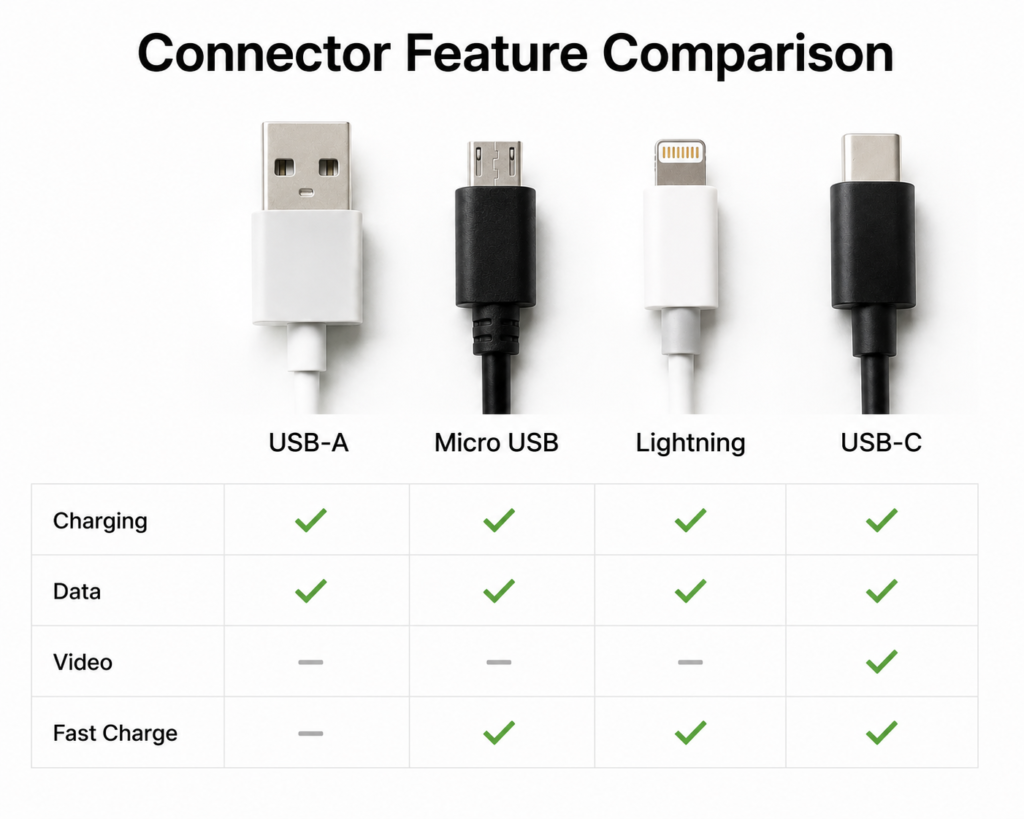
| Connector Type | Reversible | Typical Transfer Speed | Typical Max Charging Power | Native Video Output | Common Devices |
|---|---|---|---|---|---|
| USB-A | No | 480Mbps (USB 2.0) / 5Gbps (USB 3.0) | ~10W standard, higher with proprietary protocols | No | Computers, chargers, flash drives, keyboards |
| Micro USB | No | 480Mbps (USB 2.0) | ~10W | No | Older Android phones, power banks, Bluetooth earbuds |
| Lightning | Yes | 480Mbps (mostly USB 2.0) | 20–27W | Via adapter | Older iPhones, iPads, Apple accessories |
| USB-C | Yes | 480Mbps to 40Gbps+ (wide range) | 100W–240W | Yes | New phones, tablets, laptops, handheld consoles |
In everyday use: USB-A is the largest physically, while the other three are much more compact. USB-C and Lightning offer the best plug-in experience thanks to their reversible design. USB-C has by far the highest ceiling for speed, charging and expansion. For durability, USB-A is the most robust, Micro USB wears out the fastest, and the other two fall in between.
8. Common Misconceptions About Connectors
The port shape does not equal transfer speed
Many people assume “USB-C means fast transfer,” but some USB-C ports and cables only run at USB 2.0 speeds — no faster than older connectors. The physical shape is just the shell; the internal protocol is what determines performance.
USB-C does not automatically mean fast charging or fast data
Many low-cost USB-C cables only handle basic charging. They do not support high-speed data transfer or USB PD fast charging. You cannot assume a cable has full functionality just because it has a USB-C plug.
Fast charging depends on the port, protocol and cable working together
To get fast charging, your phone, charger and cable must all support the same fast-charging protocol. Missing any one of the three means you will charge at normal speeds.
Risks of unbranded or counterfeit accessories
Cheap, low-quality cables and chargers may have unstable voltage or poor insulation. At best they charge slowly or stop working; at worst they can damage your battery or even create a fire risk. For Lightning accessories in particular, uncertified products often stop working after iOS updates.
9. How to Choose the Right Cables and Accessories
Match the connector to your device
First check what port your device has, then buy the corresponding cable. For example, older iPhones use Lightning, while newer phones and laptops use USB-C.
Pick based on charging power needs
For phone charging alone, a 20–30W rated cable is usually enough. For charging a laptop, you will need a cable rated for 65W or higher with PD support.
Pick based on data and video needs
If you only need to charge your device, you do not need an expensive high-speed cable. If you regularly transfer large files or connect to monitors and docks, choose a cable rated for high-speed data and video output.
Practical buying tips
Stick to reputable brands and certified products. You do not need the most expensive top-tier cable — buy what matches your actual needs. For Lightning accessories, always look for MFi certification for reliable compatibility.
10. The Future of Device Connectors
USB-C will continue to take over
The consumer electronics industry has already aligned around USB-C. Nearly all new phones, tablets and laptops ship with it, and it will become the undisputed mainstream standard over the next few years.
Older connectors will fade gradually
USB-A will stick around for quite some time on chargers, desktops and legacy peripherals due to its huge installed base. Micro USB and Lightning will decline as older devices are replaced, remaining only in some industrial and niche applications.
What comes next
Future connector technology will push for even faster data speeds and higher power delivery. Wireless charging and wireless data transfer will also keep improving. Even so, USB-C will remain the dominant universal standard for the foreseeable future.
11. Summary
What each connector is really for
USB-A is the long-serving classic, valued for its ubiquity and toughness. Micro USB was the transitional mobile connector that brought USB to small devices, and is now being retired. Lightning was Apple’s premium proprietary port that led on design, but is now entering its legacy phase. USB-C is the modern all-in-one standard, and the direction the whole industry is moving.
Key advice for everyday users
You do not need to chase the newest connector for its own sake — start with what works with your current devices. Buy cables and accessories from reliable brands, and pick the power and features you actually need. When shopping for new gadgets, choosing USB-C models will give you the best accessory compatibility going forward.