
When you want to charge your phone while driving, you fumble around for a charging cable for ages, and plugging it in can easily distract you and affect driving — this is a small hassle many people have encountered. The emergence of in-car wireless charging is designed to solve this pain point: just place your phone on the charging pad, and it will charge automatically, no need to plug or unplug cables.
However, many people’s understanding of it is still limited to “no need for cables”, they easily confuse it with whole-vehicle wireless charging for electric vehicles, and don’t know how to choose or use it reliably. This article starts with the most basic definition, taking you through all the practical knowledge of in-car wireless charging: from determining whether you need it, to purchasing, using, and troubleshooting, you’ll be able to use it right after reading.
First, Understand: What In-Car Wireless Charging Is and Is Not
Plain-Language Definition and Boundaries
Simply put, in-car wireless charging is a function where the in-car charging pad transmits power to portable devices such as mobile phones and earphone cases through the air, without the need for a charging cable. The core benefit is that you can charge just by placing the device down, reducing cable clutter in the car, and avoiding the risk of distraction from looking down to find the port while driving.
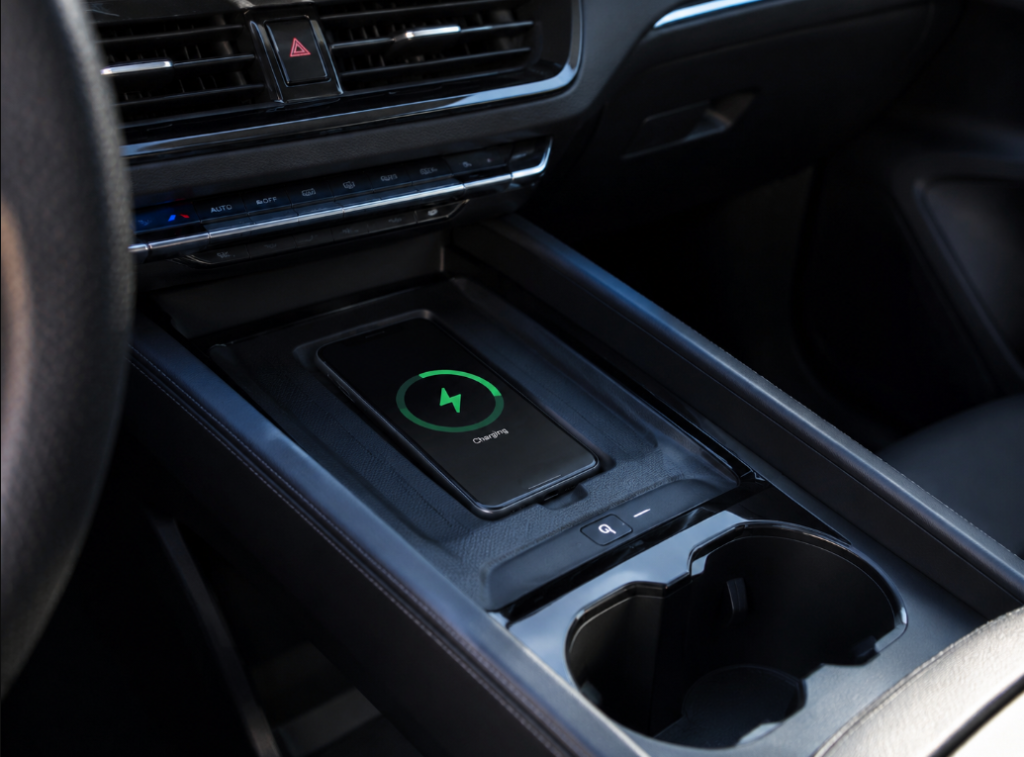
Let’s clarify an important boundary first: the in-car wireless charging mentioned in this article specifically refers to the function of charging consumer electronic devices such as mobile phones and earphones, not whole-vehicle wireless charging for electric vehicle power batteries — the latter is a large-scale device that supplies energy to the car itself, which is completely different from what we use daily, so don’t confuse them.
Clarify 3 Groups of Easily Confused Concepts at Once
Many people confuse in-car wireless charging with several common functions, but the differences are actually obvious:
- Compared with wired car chargers: wireless charging does not require plugging and unplugging, which is more convenient, but the charging speed is slightly slower at the same power, because wireless transmission has energy loss.
- Compared with home wireless charging pads: in-car models need to adapt to the environment of in-car bumps, high temperatures in summer and low temperatures in winter, and also adapt to the vehicle’s power supply logic. Using a home pad directly in the car is prone to problems due to displacement from bumps or excessive temperature.
- Compared with CarPlay/Android Auto: the latter is a data interconnection function between mobile phones and car infotainment systems, used for projecting navigation and playing music, and itself does not necessarily handle charging — even wireless CarPlay transmits data via WiFi, and charging still relies on separate wireless or wired charging.
2 Common Product Forms and Installation Positions
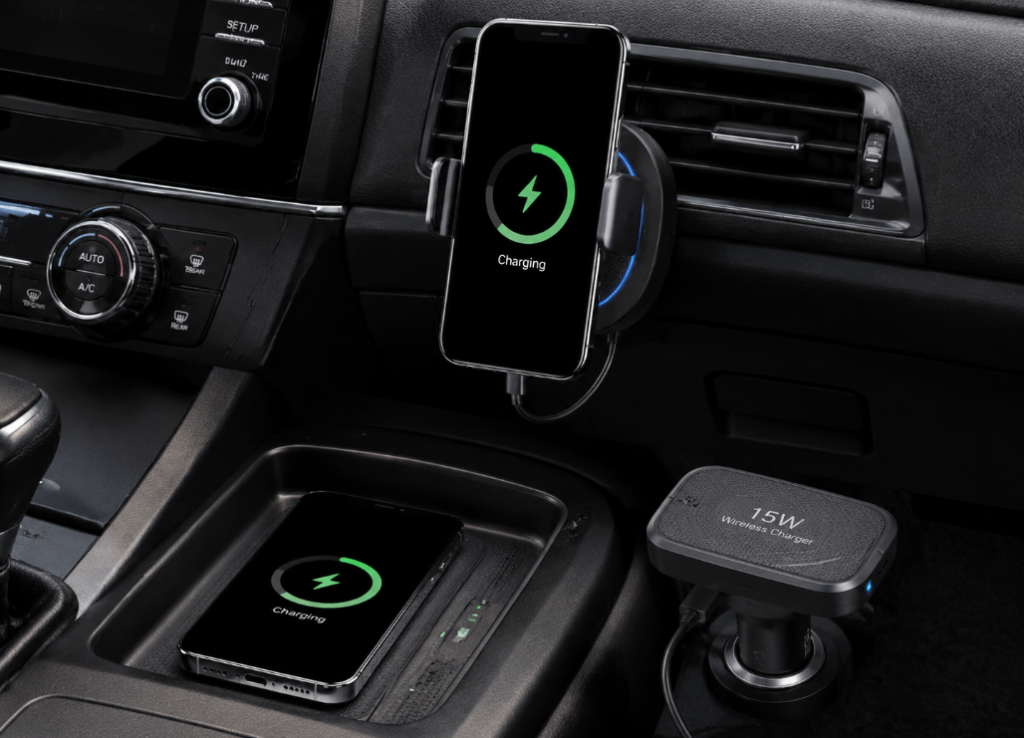
Currently, in-car wireless charging mainly comes in two forms, with very different installation positions and user experiences:
- Factory-built-in models: directly integrated into the vehicle’s interior, common positions are the center console storage slot, armrest box, next to the cup holder, or the rear armrest. They are integrated with the interior, have a neat appearance with no exposed cables, and look more premium.
- Aftermarket add-on models: purchased and installed by yourself, they are divided into three common types: air vent mount models clip onto the air conditioning vent, most have magnetic attraction, suitable for use during navigation; center console pad/adhesive models are placed directly on or stuck to the center console, relatively concealed; cigarette lighter expansion models plug into the cigarette lighter, come with a charging pad and may have extra USB ports, suitable for older cars with few ports.
Which Devices Can Use It and Which Cannot
Not all devices can use in-car wireless charging, specifically they can be divided into four categories:
- Directly usable: mobile phones and earphone charging cases that support the Qi standard (the currently globally accepted consumer-level wireless charging specification, equivalent to the “universal plug” of the wireless charging world). Most new mobile phones and earphones with wireless charging cases support it.
- Partially applicable: devices with magnetic wireless charging (such as Apple MagSafe) can be charged with ordinary wireless chargers, but to use the magnetic alignment function, you need a corresponding magnetic charging pad.
- Modifiable: for older devices without wireless charging function, you can buy an external receiver case and plug it into the charging port to use wireless charging, but the device will become thicker and the charging speed will be reduced.
- Cannot use: devices with thick metal cases, metal ring holders/magnetic sheets attached to the back, and you are unwilling to remove them — metal will block the magnetic field, so charging is impossible at all.
Value Judgment: Do You Really Need In-Car Wireless Charging?
Whether to install in-car wireless charging doesn’t depend on whether others install it; the key is whether it can solve your pain points and adapt to your usage scenarios.
It Can Solve These 3 Core Problems
The core value of in-car wireless charging has never been “faster charging”, but “more convenient and worry-free”:
First, no need to look for cables or plug/unplug ports, you can charge just by placing the device down, no need to look down for the port while driving, reducing distraction and making it safer.
Second, there won’t be a pile of tangled charging cables in the car, making it look neater, and reducing wear on the phone’s charging port from repeated plugging and unplugging.
Third, when multiple people ride in the car and switch devices, whether it’s Apple or Android, as long as it supports Qi, it can be charged, no need to change charging cables with different ports.
4 Most Suitable Usage Scenarios
If your usage scenarios match the following, in-car wireless charging will be very practical:
- Short-time charging during daily commute: under ideal conditions, a 30-minute commute can charge about 20%-30% of the battery, which is enough for daily use during the day.
- Frequent use of mobile phone navigation: choose an air vent mount model, which can both hold the phone for navigation and charge it at the same time, killing two birds with one stone.
- Emergency charging for short trips or when you forget your charging cable: no need to specially look for a cable, just place it on to get some charge, enough for emergencies.
- Pursuing a neat car interior and don’t want to see exposed charging cables: factory-built-in models are fully integrated with the interior, no cables are visible, maximum neatness.
These Situations Really Don’t Require Installation
If you fall into the following situations, spending money on it may be a waste:
- Long-term use of wired CarPlay/Android Auto: wired connections can both transmit data and charge, so installing wireless charging is completely redundant.
- Your phone doesn’t support wireless charging and you don’t want to add an external receiver case: you can’t just change your phone just to use wireless charging.
- Pursuing extreme charging speed: at the same power, wired is still faster. For example, if you need to charge to more than 50% in half an hour, wired is more reliable.
- Frequent long-distance high-load phone use: for example, driving long distances while using navigation, turning on hotspot, and recording videos, the phone consumes power very fast, and the power of wireless charging may not be enough.
Plain-Language Working Principle: Understand It Without Knowing Circuits
Many people think wireless charging is mysterious, but the principle is actually very simple, you can figure it out without knowing circuits.
The Core Is Two Coils + Control Circuits
The core components of wireless charging are a coil and a control circuit at each end:
- The transmitting end on the car side: has a transmitting coil used to generate a changing magnetic field, and a control board responsible for adjusting power and triggering various protection functions.
- The receiving end on the device side: the receiving coil in the mobile phone or earphone case, used to induce the magnetic field to generate current, and a charging management chip that adjusts the current to a specification suitable for the battery.
To use a common analogy: it’s like splitting a transformer into two halves, one half in the car and the other half in the phone, separated by air and the phone’s back cover, transmitting energy through the magnetic field without direct contact.
3-Step Simple Working Process
The entire charging process actually only has three steps, no complicated operations:
- Place the device within the effective range of the charging pad, so that the two coils are close to each other;
- Alternating current is passed through the transmitting coil, generating an alternating magnetic field;
- The receiving coil senses the magnetic field, generates current, and charges the device’s battery after rectification and adjustment.
Why “Position Alignment” Is So Important
Anyone who has used wireless charging knows that if you place it crookedly, it may not charge. This is because: only when the centers of the two coils are aligned is the energy transmission efficiency highest; if the offset exceeds 1-2 cm, the efficiency will drop significantly, or even stop charging directly.
The car is already bumpy, and the phone can easily slide crookedly, so in-car wireless charging pays more attention to positioning design than home models — whether it’s a non-slip pad, limit slot, or magnet, the essence is to align the coils as much as possible and reduce the offset problem caused by bumps.
Key Standard: Qi Is the “Universal Plug” for Wireless Charging
Why can mobile phones and charging pads of different brands be used interchangeably? It relies on unified standards:
- Qi standard: the most common consumer-level wireless charging standard currently. As long as it supports Qi, no matter what brand of device and charging pad, basic charging compatibility can be achieved, equivalent to the universal USB interface in the wireless charging world.
- Qi2 standard: the upgraded version of Qi, focusing on magnetic alignment function, more accurate placement, more stable efficiency, and more and more newly released devices and charging pads in recent years support it.
- Proprietary high-power protocols: such as Apple MagSafe and super wireless charging from various Android brands. These are the brand’s own exclusive protocols. Both the device and the charging pad must support the same protocol to reach the maximum power, otherwise only the general Qi basic power can be used.
How to Read Key Parameters: Learn to Judge Speed and Safety
When buying in-car wireless charging, you don’t need to look at a bunch of flashy promotions. As long as you understand these core parameters, you can judge whether the product is good and suitable for you.
Charging Power: Not Bigger Means Faster, Matching Is What Matters
Many people only look at the power number when buying a charging pad, thinking that the bigger the faster, but that’s not the case at all. The actual charging power is the lowest value supported by the transmitting end (charging pad) and the receiving end (mobile phone) — for example, if your phone supports a maximum of 15W wireless charging, even if you buy a 50W charging pad, the actual power will only be 15W, and the extra money spent is a waste.
Common power levels are as follows: 5W is basic slow charging, suitable for emergency use; 10W and 15W are the current mainstream fast charging, supported by most mobile phones; above 50W is super fast charging, mostly available in high-end factory models of Android brands. When choosing, just select according to the maximum wireless charging power of your phone, no need to blindly pursue high power.
Charging Efficiency: The Proportion Actually Charged into the Battery
Charging efficiency refers to how much of the 10W output from the car-side charging pad is actually charged into the phone’s battery. Under ideal laboratory conditions, the efficiency of wireless charging is about 70%-85%, but in actual use in the car, due to bumps, high temperatures, and not necessarily perfect alignment, the efficiency is generally around 60%-75%.
If the efficiency is too low, the most intuitive manifestation is that the charging pad is very hot, and the charging speed is much slower than the nominal value — at this time, don’t just blame the phone, it may be that the charging pad itself has poor efficiency.
Foreign Object Detection (FOD): An Essential Safety Feature
Foreign Object Detection, or FOD for short, is a bottom-line function that must not be omitted. Its function is to detect whether there are metal foreign objects between the charging pad and the device, such as coins or keys. If there are, it will immediately stop charging to prevent the metal from heating up and causing burns or even fire.
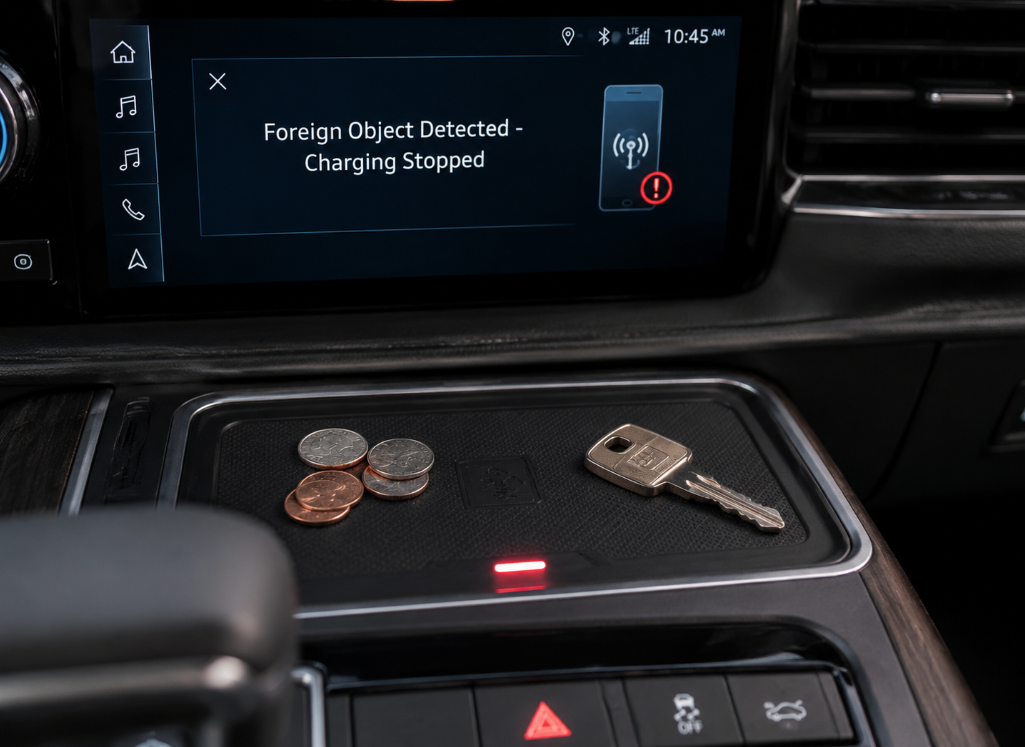
How to test if this function is reliable? Place a coin on the charging pad. If the charging pad stops working immediately and has a light or prompt sound reminder, it is normal; if it continues to charge, this product must not be used. Sometimes it can also be triggered by mistake, for example, a phone case with a metal stand, a metal patch on the back, or an extra-thick case will be treated as a foreign object, resulting in failure to charge.
Heat Dissipation Design: Determines Whether Charging Is Stable at High Temperatures
In summer, the car gets hot from the sun, and whether wireless charging can work stably depends entirely on the heat dissipation design. There are two main types of heat dissipation:
- Passive heat dissipation: dissipates heat through metal heat-conducting plates and ventilation holes, low cost, no noise, suitable for low-power products.
- Active heat dissipation: built-in small fan, mostly found in high-power factory models or high-end aftermarket models, better stability at high temperatures, but may have a little slight noise.
It’s easy to judge whether the heat dissipation is good: after the car is exposed to the sun for an hour or two in summer, charge continuously for 1 hour. If it frequently slows down or stops charging, it means the heat dissipation is not good.
Magnetic Positioning: An Upgraded Design to Solve Bump Offset
In recent years, magnetic wireless charging has become more and more popular. The principle is that magnets automatically align the transmitting and receiving coils, so you don’t have to specially find the position. The advantage is that it is not easy to shift on bumpy roads, the charging efficiency is more stable, and you don’t have to reach out to adjust the phone position after driving for a while.
But note: the magnetic function requires the phone itself to support magnetism (such as MagSafe on iPhone 12 and above), or a magnetic case to use. Ordinary phones cannot be attracted when placed on it, and can only be used as ordinary wireless charging.
Selection Decision: Factory vs Aftermarket, How to Choose the Right One for You
When choosing in-car wireless charging, you first need to determine whether to choose factory-built-in or aftermarket add-on. The applicable scenarios, advantages and disadvantages of the two are very different.
Factory-Built-in vs Aftermarket Add-on: Core Difference Comparison
For your convenience in comparison, I have organized the core differences into a table:
| Comparison Dimension | Factory-Built-in Models | Aftermarket Add-on Models |
|---|---|---|
| Integration | Integrated with the interior, neat appearance, no exposed cables | Flexible installation, but may have exposed cables, slightly less aesthetically pleasing |
| Power Supply Logic | Linked to vehicle power management, standardized power-off strategy when engine is off, no battery drain | Mostly connected to USB/cigarette lighter, need to confirm if it powers on with vehicle ignition |
| Maintenance Cost | Handled by automaker’s after-sales, higher maintenance and replacement cost | Can be replaced by yourself, low cost, ranging from tens to hundreds of yuan |
| Power Compatibility | Fixed power, need to check in advance if it matches your phone | Wide range of optional power, can choose corresponding specifications according to your phone |
Key Points for Judging Factory Optional Installation
If you can choose factory wireless charging when buying a new car, pay attention to these points to avoid pitfalls:
First, the power only needs to match the wireless charging power of your commonly used phone, no need to pay extra for the highest one, it’s a waste if you can’t use it.
Second, prioritize configurations with FOD foreign object detection, over-temperature protection, and active heat dissipation. Safety and stability are much more important than power.
Third, look at the installation position and choose according to your usage frequency: the center console surface/next to the air vent is the most convenient, no need to look down to pick up and put down; next is the armrest box, suitable for situations where you just need to charge and don’t need to pick up the phone; for rear seats, it depends on how often rear passengers use it.
Fourth, pay attention to the limit design of the charging slot. If the slot is too shallow, the phone can easily slide out when bumpy, affecting charging.
Core Logic for Aftermarket Purchase
If you buy an aftermarket model yourself, choosing in this order will not go wrong:
First, choose the installation method first: if you often use your phone for navigation, choose an air vent mount model, which is convenient to pick up and has a good line of sight; if you like a concealed type, choose a center console pad or adhesive model, which is inconspicuous when placed on the center console.
Second, for power supply, prioritize wire-free USB models or cigarette lighter models, no need to modify the vehicle’s wiring, safe and convenient, just remove it when you sell the car.
Third, the power only needs to match the wireless charging power of your phone, no need to buy higher specifications, extra money is useless.
Fourth, it must have FOD foreign object detection function, this is the safety bottom line, cheap products without FOD must not be bought.
Fifth, prioritize models with non-slip design or magnetic positioning, so the phone is not easy to shift when bumpy, and charging is more stable.
When Is It Worth Spending Money to Install/Choose
In summary, if you meet any of the following situations, in-car wireless charging is worth installing:
- Frequent need for charging during daily commute, find plugging in cables troublesome;
- Multiple people use the car, frequently switch phones with different ports;
- Frequent use of mobile phone navigation, need a mount that charges at the same time;
- Often forget charging cables, need emergency charging.
Correct Usage Tips: Actionable Methods to Make Charging Stable and Fast
Choosing the right product also requires using the right method to make charging stable and fast.
3-Step Check for First Use
When using it for the first time, spend 30 seconds doing a check to avoid placing it for a long time without charging:
- Confirm the device supports wireless charging (or has a receiver case), remove metal back stickers, thick metal cases, and magnetic card holders from the back;
- Place it aligned with the marked position on the charging pad, magnetic models just need to be attached directly;
- After seeing the charging prompt on the phone or car infotainment system, use the car normally, to avoid placing it crookedly and wasting the whole trip.
4 Adjustable Factors Affecting Charging Speed
Slow charging doesn’t necessarily mean the product is broken, many times you can adjust it yourself:
- Phone case thickness: if the thickness of ordinary plastic or silicone cases is ≤3mm, it basically does not affect charging; metal cases and extra-thick shockproof cases will significantly slow down charging, or even prevent charging.
- Alignment degree: the more the coil is offset, the slower the speed, or even charging stops. Try to place it aligned with the marked position on the charging pad as much as possible.
- Ambient temperature: when the temperature inside the car reaches above 40℃ in summer, both the phone and the charging pad will trigger over-temperature protection and automatically reduce power, this is normal.
- Device load: if you use high-power-consuming functions such as navigation, hotspot, and video recording at the same time, the phone consumes power faster than it charges, and you will feel that charging is very slow, or even the battery decreases while charging.
Usage Notes for Different Seasons
Temperature differences vary greatly in different seasons, pay attention to these details when using:
- Summer: after the car is exposed to the sun, turn on the air conditioner to lower the temperature inside the car before using wireless charging. Don’t charge at full power as soon as you get in the car, it’s easy to trigger over-temperature protection.
- Winter: when the temperature is below -10℃, the phone will trigger low-temperature protection. Slow charging is a normal phenomenon, not a fault, and will recover when the temperature rises.
- Air vent mount models: when using cold air in summer, don’t let the cold air blow directly on the charging pad and phone, otherwise condensation is easy to form, and water ingress will damage the device.
3 Must-Follow Rules for Safe Use
Safety is always the first priority, these three rules must be followed:
- Do not place coins, keys, or bank cards on the charging pad — metal foreign objects will heat up, and the magnetic stripe of bank cards may also be demagnetized.
- Do not use cheap products without FOD function. Without foreign object detection, a coin falling in may cause safety problems.
- The installation position must not block the driving line of sight, nor block the operation of gears and pedals, to avoid affecting driving safety.
Common Troubleshooting: 80% of Problems Can Be Solved by Yourself
When encountering problems such as failure to charge or intermittent charging, don’t rush to find maintenance. Troubleshoot according to the following methods, and most can be solved by yourself.
Completely Unable to Charge: Troubleshoot in Order
If it is completely unable to charge, check step by step in this order, and you will find the cause soon:
- Check vehicle power supply: see if the vehicle is in ACC or ON gear. Some models cut power to USB/cigarette lighter after the engine is off, then try other ports to see if they have power.
- Check the device: confirm the phone supports wireless charging, whether it is placed with the back facing down, and whether it is placed upside down.
- Check for obstructions: try removing the phone case, and see if there are metal foreign objects such as coins or keys on the charging pad.
- Check settings: see if the wireless charging function in the car infotainment system has been accidentally turned off.
If it is an aftermarket model, you also need to additionally check whether the power plug is loose and whether the cigarette lighter fuse is burned out.
Intermittent Charging: Common Causes and Solutions
Charging disconnects and connects repeatedly, mostly due to these reasons:
- Bump displacement: if the non-slip pad fails, the phone will slide crookedly while driving, resulting in intermittent charging. Just replace it with a magnetic model or a product with better limit.
- Over-temperature protection: protection is triggered when the temperature is too high, and it will automatically recover after cooling down. This is a normal protection mechanism, don’t panic.
- Poor contact: for aftermarket models, check whether the power plug is loose and whether the mount is firmly fixed.
Very Slow Charging or Even Battery Decrease While Charging: Judgment Logic
If you feel that charging is very slow, or even the battery decreases while charging, troubleshoot in this order:
- First check the load: whether you are using high-power-consuming functions such as navigation, hotspot, and video recording at the same time. If power consumption is faster than charging, naturally the battery will decrease while charging.
- Then check the environment: whether the temperature inside the car is too high, triggering over-temperature speed reduction.
- Then check matching: whether the power protocol of the charging pad and the phone does not match. For example, if the phone only supports 5W basic Qi, it definitely won’t be fast.
- Finally check alignment: whether the coil is offset too much, resulting in too low transmission efficiency.
Abnormal Heating: Judgment of Normal vs Abnormal
Wireless charging heating is normal, but you need to distinguish the difference between normal and abnormal:
- Normal: slightly warm, does not affect holding, charging status is stable, this is normal heating caused by energy loss.
- Abnormal: hot to the touch, phone pops up overheating prompt, charging pauses frequently, this belongs to abnormal heating.
When encountering abnormal heating, suspend use first, turn off high-power-consuming apps, move the phone and charging pad to a cool place, remove the thick case, and use it after the temperature drops.
These Situations Require Immediate Stop of Use
If the following situations occur, don’t make do with it, stop using it immediately:
- The charging pad has a burnt smell, deformed shell, or smokes;
- The phone frequently prompts that the temperature is too high and cannot cool down;
- Abnormal noise or electric shock sensation occurs during charging.
These may be product faults, continued use has safety risks, replace or repair them quickly.
Common Misconceptions and Real Limitations: Avoid 90% of the Pitfalls
Regarding in-car wireless charging, there are many widely circulated misconceptions, and many people have too high expectations for it. Let’s clarify them all at once today.
4 Most Common Cognitive Misconceptions
- Misconception 1: Wireless charging is more harmful to batteries than wired charging — regular products have overcharge and over-temperature protection, and their impact on batteries is similar to regular wired chargers, so there’s no need to worry too much.
- Misconception 2: The higher the power, the faster the charging — the actual power is the lowest value supported by the transmitting end and the receiving end. If the phone only supports 10W, a 50W charging pad can only run at 10W, which is a complete waste of money.
- Misconception 3: Wireless charging has high radiation and is harmful to health — products that meet the Qi standard have radiation values far lower than the radiation of a mobile phone during a call, meet international safety requirements, and are completely fine for normal use.
- Misconception 4: All wireless chargers are universally compatible — basic Qi function can be used for slow charging universally, but high-power proprietary protocols require both the device and the charging pad to support them to achieve full-speed charging, you can’t just buy any one and use it.
Real Limitations of In-Car Wireless Charging
Don’t have too high expectations for in-car wireless charging, it has these inherent limitations:
- At the same power, the charging speed is 20%-30% slower than wired, because wireless transmission has energy loss, which is a physical law that cannot be avoided.
- Non-magnetic models must be placed in the correct position, you can’t just throw them on the charging pad and ignore them, if they are offset, they won’t charge.
- If it is a factory model installed in the armrest box, you can’t charge while using the phone when you take it out for navigation.
- Both low temperature (below -10℃) and high temperature (above 45℃) will trigger protection, and full-speed charging is not possible. This is a protection mechanism, not a quality problem.
2 Easily Overlooked Boundaries
There are two other boundaries that are rarely mentioned but very important:
- Wireless charging only transmits energy, not data, so there’s no need to worry about leaking privacy in the phone, it’s completely safe.
- The factory wireless charging of most models will stop supplying power after the engine is off, and will not drain the battery; only when the constant power circuit is privately modified during aftermarket installation may there be a battery drain problem.
Core Summary
After reading this article, you should be able to master these practical abilities:
First, you can accurately judge whether you need in-car wireless charging, and which type is suitable for you, factory or aftermarket, without following the trend to buy randomly.
Second, you can understand the core parameters, avoid unsafe products, and not waste money — no need to pursue high power, as long as it matches your phone and has FOD function, it’s enough.
Third, when encountering common faults such as failure to charge, intermittent charging, and slow charging, you can troubleshoot and solve them by yourself, no need to find maintenance.
Fourth, you can flexibly choose according to different scenarios: wireless charging is more convenient for daily commute charging and navigation, and wired charging is better for long-distance high-load use and pursuing speed, choose whatever is suitable.