
If you’ve ever grabbed a random USB-C cable to transfer photos to your laptop, only to get no connection at all — or tried to connect a monitor and got a blank screen — you’ve probably run into a charge-only cable. Many people assume every USB-C cable does everything, but that is rarely the case. USB-C is just the shape of the plug; what the cable can actually do depends entirely on what’s inside.
Think of a charge-only cable like a basic power cord: it only carries electricity. A data cable is like a power cord combined with a high-speed network cable: it delivers power and carries information at the same time, all through the same connector. This guide breaks down the real differences, how to tell them apart, and which type you actually need.
1. Core Definitions & Key Differences
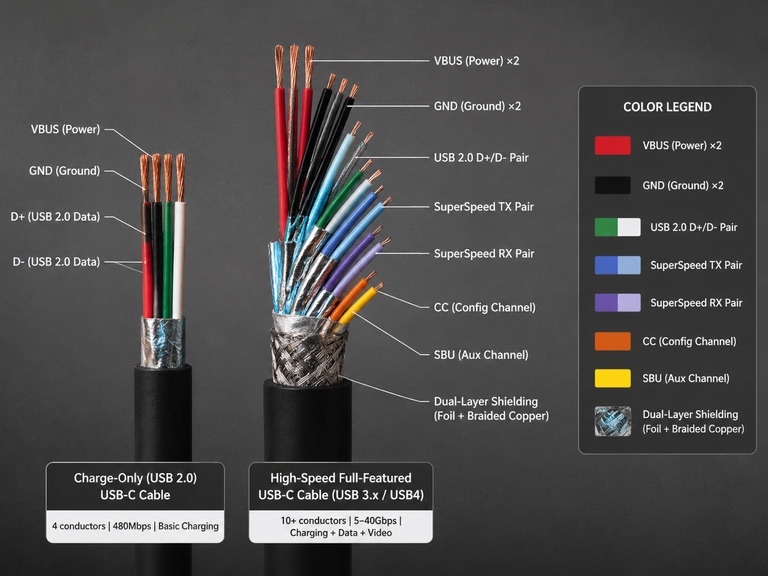
1.1 Charge-Only Cables
- Their primary purpose is to deliver electrical power to devices. They typically include only the power conductors: VBUS and GND.
- Many budget charging cables still retain a USB 2.0 data path, but they do not support USB 3.x, USB4, or other high-speed data standards.
- They cannot perform full high-speed data communication, and often lack the dedicated channels required for advanced protocol negotiation.
- They have no native support for high-speed file transfer, video output, or high-speed peripheral connection.
1.2 Data Cables
- They include both a complete power path and the corresponding data transmission conductors.
- They can handle charging, file sync, device debugging, peripheral connection, video output and more, all in one cable.
- Every compliant data cable can also be used for charging. Its actual charging capability depends on its own power rating and negotiation channel configuration.
1.3 The Essential Difference
- Internal conductor configuration: Charge-only cables omit high-speed data and some auxiliary conductors. Data cables retain the complete set of signal paths.
- Functional scope: Charge-only cables are built primarily for power delivery, and may only support basic low-speed data. Data cables cover power + full-speed data + protocol negotiation use cases.
1.4 Common Misconception
Most “charging cables” sold on the market are not completely data-free. Many still support USB 2.0 (480Mbps) low-speed transfer.
The reliable way to judge a cable’s capabilities is by its stated data speed and feature specifications — not the marketing name on the package.
2. Appearance, Connectors & Labeling
2.1 Connector Shape Doesn’t Tell You Anything
- Both cable types are available in all common formats: USB-A, USB-C, Micro-USB, Lightning and more.
- The external shape of the connector can never reliably tell you what internal functions the cable supports.
2.2 How to Tell From Product Labeling
- Reputable data cables clearly list both data speed (such as 10Gbps, 40Gbps) and power rating.
- Charge-only cables usually only list current or power specifications. Some products are explicitly labeled “Charge Only.”
- For USB-IF certified USB-C to USB-C cables, official rules require power labeling as either 60W or 240W. All cables except USB 2.0 cables must also show their data speed rating using a combined power + speed logo.
2.3 Full Pin Count ≠ Full Functionality
- You cannot reliably tell the two types apart just by looking at the connector pins. Some charge-only cables are built with a full set of contact pins on the plug.
- The functional difference comes down to whether those pins are actually connected to internal wires inside the cable — not how many pins are visible from the outside.
3. Technical Specification Comparison
3.1 Charging Performance
- Both types of cable can carry basic charging current. Whether fast charging triggers depends on whether the required negotiation channels are present and whether the cable meets the rated current specification.
- Different fast charging protocols use different channels:
- USB PD fast charging relies on the CC channel for negotiation.
- QC fast charging relies on the D+/D- channel for negotiation.
- Proprietary protocols have their own dedicated negotiation methods.
- If a charge-only cable is missing the negotiation channel for a given protocol, it cannot trigger that fast charging mode, and will only operate at the basic charging level.
3.2 Data Transfer Capability
- Data cables follow official USB standards, with speeds ranging from 480Mbps (USB 2.0) up to 80Gbps (USB4 Version 2.0).
- Charge-only cables have no high-speed data path. They cannot support USB 3.x and above speeds, video output, or high-speed peripheral connection.
3.3 Safety & Compatibility
- Poor-quality high-power USB-C cables may lack the required E-Marker electronic identification and fail to follow specification design, which hurts compatibility and safety.
- 3A / 60W and lower rated cables do not require an E-Marker by official specification. This is a fully compliant design, not a quality flaw.
- Compliant data cables have complete protocol negotiation mechanisms, and generally offer better device compatibility and more stable operation.
4. Quick Ways to Tell Them Apart
4.1 Clear Signs It Supports Data
- Packaging explicitly lists a data speed rating, such as USB 10Gbps / 20Gbps / 40Gbps
- Carries USB4 or Thunderbolt branding
- Explicitly states DisplayPort Alt Mode or video output support
4.2 Signs It Probably Does NOT Support High-Speed Data
- Only lists power ratings such as 60W / 100W / 240W, with no mention of data speed
- Product is explicitly labeled “Charge Only”
- Packaging shows no data speed rating at all, and only advertises charging power
5. Use Cases & Practical Notes
5.1 When a Charge-Only Cable Is Fine
- Everyday slow charging for low-power devices, spare charging cables, or fixed-location charging where only power is needed.
- If the cable meets the required power rating and retains the corresponding negotiation channel, it can still support its rated fast charging speed normally.
5.2 When You Definitely Need a Data Cable
- All high-speed data and video use cases: backing up photos, fast file transfer, firmware flashing / debugging, connecting USB drives, docks, or external monitors.
- For scenarios that require full-protocol fast charging and intelligent power negotiation, a cable with complete negotiation channels is recommended.
5.3 Important Risks to Know
- Poor-quality uncertified high-power cables may suffer from missing protocols or undersized wires, leading to slow charging, overheating, and even device damage.
- Passive high-speed data cables generally maintain better signal integrity at shorter lengths. For longer high-speed connections, an active cable is usually required.
6. Buying Recommendations
6.1 Pick Based on Your Actual Needs
- For casual spare or backup charging, a good-value compliant charge-only cable is perfectly sufficient.
- If you need data transfer, full-protocol fast charging, or peripheral connection, buy a data cable rated for your required speed.
6.2 Prioritize Certified, Reputable Brands
- For USB-C cables, choose products with official USB-IF certification first. For Apple devices, choose MFi-certified products.
- Always use a cable that meets your required power and protocol needs, and prefer certified or well-known reputable brands.
6.3 Length & Material
- Passive high-speed cables maintain better signal integrity at shorter lengths. For long-distance high-speed use, choose an active cable.
- A braided outer jacket improves abrasion and bending resistance, and generally extends the cable’s service life.
Final Summary
- The difference between a charge-only cable and a data cable is internal conductor configuration, not the shape of the connector. Two cables with identical plugs can have completely different capabilities.
- All data cables can charge devices, but not all charging cables can transfer data or support video.
- Fast charging support depends not only on current rating, but also on whether the cable has the negotiation channels required by the charging protocol.
- When buying, always check the stated data speed and power rating, not just the marketing name. For highest reliability, choose USB-IF certified products from reputable brands.