
You plug a USB-C cable between your laptop and monitor, and get nothing but a black screen. Or you buy a cable labeled “USB-C” only to find it transfers files at glacial USB 2.0 speeds. The problem is almost never the port — it’s the cable.
USB-C is just the shape of the plug. A true full-featured USB-C cable carries charging, high-speed data, and video all at once through the same connector, but most USB-C cables on the market do not.
Think of a basic USB-C cable as a narrow country road that only handles slow local traffic. A full-featured USB-C cable is a multi-lane highway: it carries power, data, and video traffic simultaneously, all through the same physical connector. This guide breaks down exactly what a full-featured cable includes, how it works, and how to pick the right one.
Quick Overview (30-Second Breakdown)
Core Definition
A full-featured USB-C cable supports charging, high-speed data transfer, and video output all through a single Type-C connection. USB Type-C describes only the physical connector shape — it does not guarantee all capabilities are present.
Three Independent Capabilities
- Charging: The power rating determines how fast your device will charge.
- Data: The speed rating determines file transfer and peripheral performance.
- Video: Determines whether you can connect external monitors and use wired display output.
The Appearance Myth
Two USB-C cables can look identical on the outside but have completely different internal capabilities. A basic USB 2.0 Type-C cable only supports charging and low-speed data, with no video or high-speed transfer support at all.
1. Physical Construction
1.1 Connector Design
- Uses a 24-pin symmetrical layout, with fully reversible plug orientation and cable direction for true blind insertion.
- Includes a metal shielding shell to improve interference resistance. Per USB-IF standards, the connector is rated for a minimum of 10,000 insertion cycles.
- Important note: USB Type-C is a connector specification. It is not the same as USB 3.2, USB4, or USB Power Delivery protocols.
1.2 Internal Wire Configuration
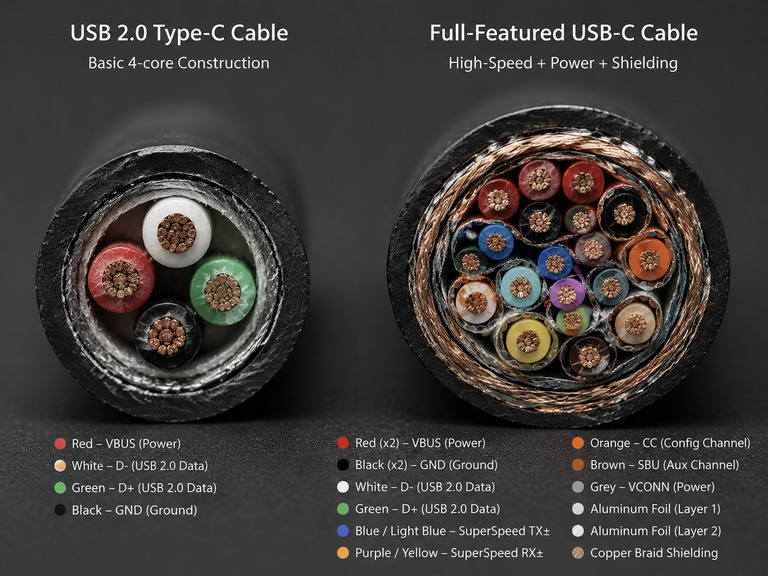
A full-featured cable includes a complete set of internal conductors:
- VBUS power lines and GND ground lines for power delivery
- USB 2.0 D+/D- pair for basic USB 2.0 backward compatibility
- SuperSpeed high-speed differential pairs for high-bandwidth data and video
- CC configuration channel for plug detection and USB PD communication
- SBU auxiliary channel, used for Alternate Mode functions and sideband signals
Additional structural layers:
- Internal shielding layers reduce electromagnetic interference and minimize high-speed signal attenuation.
- The outer jacket, often braided or reinforced, improves abrasion resistance, bending durability, and overall lifespan.
Key difference from basic cables: USB 2.0 Type-C cables omit the high-speed differential pairs and SBU channel entirely. This is why they cannot support high-speed data or video output.
2. Protocols & Capabilities
2.1 Data Transfer
- Common speed tiers for full-featured cables: 10Gbps, 20Gbps, 40Gbps. USB4 Version 2.0 supports up to 80Gbps.
- USB4 was built on the Thunderbolt protocol specification contributed by Intel. It offers backward compatibility with Thunderbolt 3 and interoperates with Thunderbolt 4 devices.
- Final transfer speed is always negotiated to the lowest common specification among the host, the peripheral device, and the cable.
2.2 Charging Capability
- Supports USB PD 3.0 Standard Power Range (SPR) up to 100W, and USB PD 3.1 Extended Power Range (EPR) up to 240W (48V × 5A).
- Fast charging protocols (PD, PPS, QC, etc.) are negotiated directly between the charger and the device. The cable only needs to safely carry the rated current.
- Cables with an E-Marker chip declare their current and power capacity to connected devices on both ends.
- Supports reverse charging and bidirectional power delivery.
2.3 Audio & Video Output
- Most modern video output works via DisplayPort Alt Mode, which carries uncompressed audio and video streams. HDMI Alt Mode is largely obsolete in modern consumer products.
- Supports multi-channel high-definition audio, compatible with monitors, TVs and other display devices.
- Actual maximum resolution and refresh rate depend on four factors together: the host, the display, the DisplayPort version, and the cable specification.
3. Compatibility & Certification
3.1 The E-Marker Chip
- 5A high-current and high-speed full-featured cables almost always include an E-Marker electronic identification chip.
- It stores parameters such as current rating, speed grade, cable length, and feature set, which devices read during negotiation.
- Important clarification: an E-Marker does not make a cable full-featured. The chip can report only charging capability with no data or video support at all.
3.2 Official Certification Markings
- Per the USB-IF certification program, certified USB-C to USB-C cables are required to be labeled with a power rating of either 60W or 240W.
- All cables except USB 2.0 cables must also show their data speed rating, using a combined power + speed logo.
- Compliant products may carry official USB-IF logos, Thunderbolt lightning icons, or other certification marks.
3.3 Device Compatibility Rules
- Fully backward compatible with USB 2.0 / 3.0 Type-C devices. Final performance is always the highest specification supported by all three components.
- When a USB 3.2 / USB4 device is paired with a basic USB 2.0 Type-C cable, it will only operate at USB 2.0 speeds.
- Some older devices may require an adapter to enable full functionality such as video output.
4. Buying Guide & Common Pitfalls
4.1 How to Choose the Right Cable
- Match your actual needs: For everyday phone and accessory charging, a standard 3A cable is sufficient. For high-power laptop fast charging, choose a 5A cable. For high-speed data transfer, choose a certified cable rated for your required speed.
- Passive high-speed cables maintain better signal integrity at shorter lengths. For high-speed use over roughly 2 meters, an active cable is generally recommended.
4.2 Common Mistakes to Avoid
- Not every USB-C cable supports video output. Always look for explicit DisplayPort or Alt Mode support in the product specifications.
- A USB-C port on your device does not guarantee video output — the port itself must support the feature.
- Poor-quality cables with falsely advertised power or speed ratings cause slow charging, dropped connections, and can even damage equipment.
- Do not confuse a “full-featured port” with a “full-featured cable.” The capabilities of the port do not mean the cable supports all of them.
Final Summary
- A full-featured USB-C cable combines charging, high-speed data, and video output in one connector. Most USB-C cables are not full-featured, even though they use the same Type-C plug shape.
- Internally, full-featured cables include additional high-speed differential pairs and auxiliary channels that basic USB 2.0 cables lack.
- Real-world performance is always determined by the weakest link: the host, the cable, and the connected device all matter.
- When shopping, check the explicit power rating, data speed, and video support — do not assume “USB-C” means full functionality. USB-IF certified products offer the most reliable and consistent performance.