
1. Why DisplayPort Is Moving Into the UHBR Era
1.1 Evolution Background: From DP 1.4 to DP 2.1
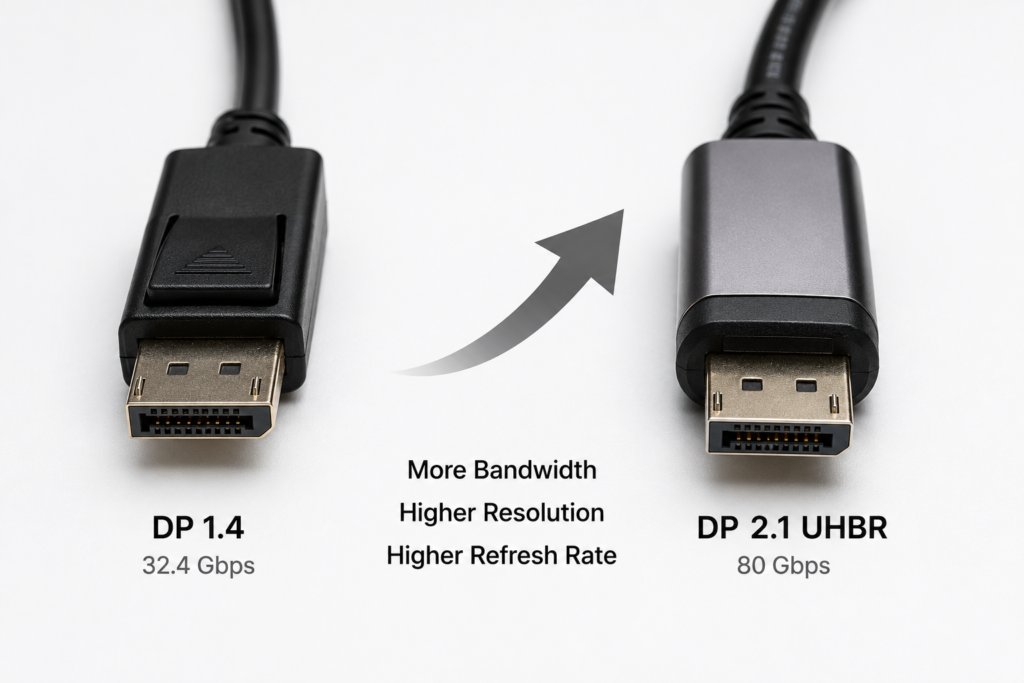
For a long time, DP 1.4 served as the mainstream display interface standard, supporting the popularity of 4K ultra-high-definition and high-refresh-rate gaming monitors. However, as display technology advances rapidly — with 8K resolution, 4K 240Hz ultra-high refresh rates, and professional-grade HDR becoming more accessible — the bandwidth limit of DP 1.4 can no longer keep up. To match the pace of display hardware upgrades, VESA introduced a new generation of DisplayPort standards. Among them, DP 2.1 is the most mature commercial version, centered around UHBR (Ultra-High Bit Rate) link technology.
1.2 The Bandwidth Demand for High Resolution, High Refresh Rate and HDR
The clarity and smoothness of a display essentially depend on how much image data is transmitted per second. Higher resolution, faster refresh rates and richer colors all require more data. For example, an 8K image has 4 times as many pixels as 4K; a 240Hz display sends 4 times as many frames per second as a 60Hz display. Combined with the extra data from HDR high dynamic range and 10-bit/12-bit color depth, older interfaces quickly run out of bandwidth, leading to stuttering or underutilized display specs. This pressure is what drives the upgrade of display interfaces.
1.3 Relationship and Improvements: DP 2.1 vs. DP 2.0
Simply put, DP 2.0 was the first standard to introduce UHBR ultra-high-speed links, laying the technical foundation for higher bandwidth. DP 2.1 is an optimized iteration built on DP 2.0. It focuses on improving cross-device compatibility, long-distance transmission stability, and adds specifications for long-reach active cables. It turns UHBR from a lab technology into a mass-production-ready standard, and is the version widely adopted in consumer devices today.
2. Basic Understanding of UHBR Ultra-High-Speed Links
2.1 Definition and Generation Position of UHBR
UHBR stands for Ultra-High Bit Rate. It is the exclusive high-speed transmission standard for the DP 2.x generation, replacing the older HBR (High Bit Rate) series. It has brought a leap in single-lane transmission speed for DisplayPort, making it one of the most important upgrades in display interface technology since DP 1.4, and the core transmission foundation for next-generation high-definition displays.
2.2 Basic DP Link Architecture: Lanes and Rate Logic
We can think of a DP transmission link as a highway. A single DP cable contains 4 independent “lanes”, officially called Lanes, each of which carries data independently. The total capacity of the link equals the speed of one lane multiplied by the number of lanes. The faster each lane runs, the more image data the cable can carry, and the higher resolution and refresh rate it can support.
2.3 Three Speed Tiers: UHBR10 / UHBR13.5 / UHBR20
UHBR is not a single speed — it is divided into three tiers, where the number indicates the transmission speed per lane in Gbps:
- UHBR10: 10Gbps per lane, the entry-level UHBR specification
- UHBR13.5: 13.5Gbps per lane, the mid-range performance tier
- UHBR20: 20Gbps per lane, the highest-performance DP specification available today
When all 4 lanes are fully utilized, the total nominal bandwidth for the three tiers is 40Gbps, 54Gbps and 80Gbps respectively.
2.4 Difference Between Nominal Total Bandwidth and Effective Data Rate
Many people mistake nominal total bandwidth for actual usable speed, but they are not the same. Nominal total bandwidth is the theoretical maximum transmission speed of the link, like the maximum load rating of a truck. Effective data rate is the speed actually used to carry image content, because transmission also includes check information, control commands and other “management data” that take up a small portion of bandwidth. Thanks to its more efficient encoding, UHBR has a very high ratio of effective data rate to nominal bandwidth.
3. 128b/132b Encoding: The Core Technology Behind the Bandwidth Boost
3.1 Encoding Evolution: From 8b/10b to 128b/132b
Encoding technology determines how efficiently bandwidth is used — simply put, it is the “packaging rule” for data before transmission. DP 1.4 and earlier standards used 8b/10b encoding, while DP 2.1 UHBR has fully upgraded to 128b/132b encoding. This is the key reason for the improved bandwidth efficiency.
3.2 Encoding Overhead Comparison: 3% vs. 20% Efficiency Gap
We can understand encoding overhead using the analogy of packing packages:
- 8b/10b encoding: For every 8 pieces of actual cargo, 2 shipping labels are added, resulting in 20% overhead, leaving only 80% of space for actual content.
- 128b/132b encoding: For every 128 pieces of actual cargo, only 4 shipping labels are added, resulting in only ~3% overhead, with almost all space used for effective data.
The table below shows a direct comparison of the two encoding methods:
| Encoding Method | Effective Data | Total Transmission | Overhead Ratio | Encoding Efficiency |
|---|---|---|---|---|
| 8b/10b | 8bit | 10bit | 20% | 80% |
| 128b/132b | 128bit | 132bit | ~3% | ~97% |
3.3 Real-World Bandwidth Gain From Encoding Upgrade
Higher encoding efficiency means more actual image data can be transmitted without changing the physical line speed. Combined with the increase in per-lane speed itself, the effective bandwidth of UHBR20 is more than double that of DP 1.4’s HBR3. This is the core reason it can support 8K and other high-spec displays.
4. Foundation of High-Speed Transmission: Link Mechanisms and Signal Optimization
4.1 Link Training: The Speed Negotiation Process Between Devices
When a graphics card and monitor are connected via DP cable, they do not immediately transmit at top speed. Instead, they first run a “link training” process. This is like both sides scouting the route in advance: the graphics card sends test signals, and the monitor reports the reception quality. Finally, they negotiate the highest speed that both can run stably, ensuring fast and reliable image transmission without dropouts or screen artifacts.
4.2 Signal Equalization Technology: Fighting High-Frequency Attenuation
The higher the signal frequency, the more easily it attenuates and distorts along the cable — just like sound becoming muffled over distance. To solve this, UHBR links use pre-emphasis on the transmitter side to boost high-frequency signals in advance, and equalization on the receiver side to filter out interference and restore distorted signals. This ensures clear and stable images even over longer cables.
4.3 Forward Error Correction and Link Reliability Design
During high-speed transmission, minor signal errors are unavoidable. UHBR links include forward error correction: extra error-correction code is sent along with the data, and the receiver can fix small errors directly without asking for a retransmission. This design improves both transmission efficiency and stability, greatly reducing the chance of visual glitches and stuttering.
4.4 LTTPR Repeaters: Signal Boost for Long-Distance Transmission
When transmission distances are long, or signals pass through docks and adapters, signal strength drops significantly, making it hard to reach maximum speed. LTTPR, short for Link Training Tunable PHY Repeater, acts like a signal booster station along the route. It receives weakened signals, cleans them up, amplifies them, and forwards them onward, enabling stable UHBR high-speed transmission even over long distances and through multiple adapters.
5. Getting Full UHBR Performance: Cable and Interface Guide
5.1 DP40 and DP80 Certified Cables: Tier and Speed Mapping
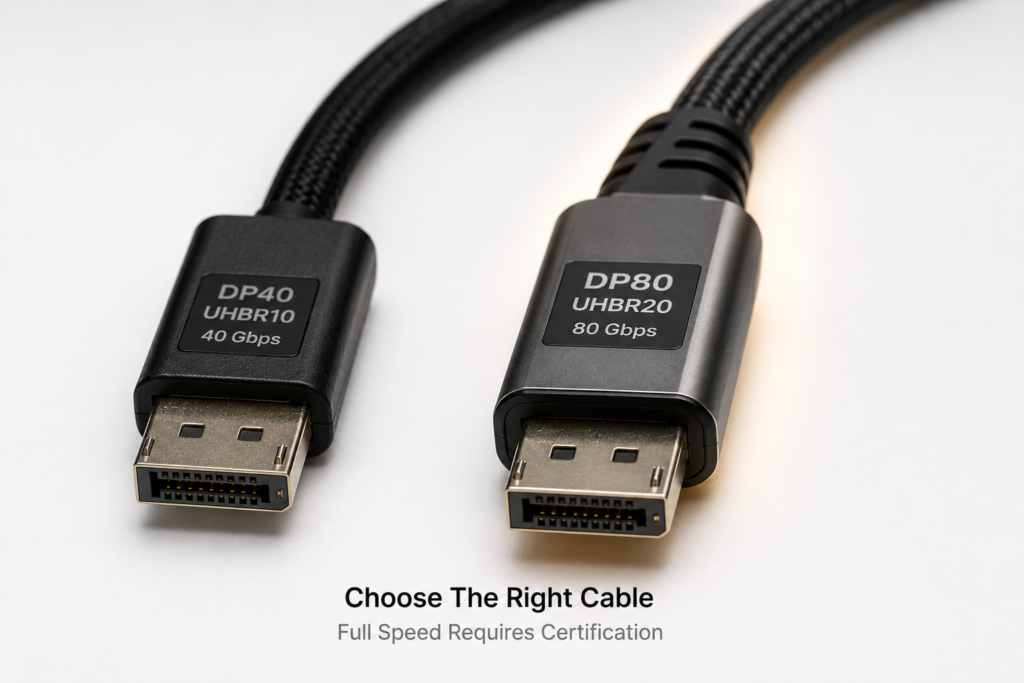
Not all DP cables can run at full UHBR speed. VESA has launched a dedicated cable certification system for UHBR, with different ratings for different speed limits. Consumers can choose cables simply by looking for the certification label:
| Cable Certification | Maximum UHBR Support | Total 4-Lane Bandwidth | Typical Use Case |
|---|---|---|---|
| DP40 | UHBR10 | 40Gbps | Mainstream high-end displays |
| DP80 | UHBR20 | 80Gbps | Flagship 8K and high-refresh displays |
In short, to reach the full 80Gbps of UHBR20, you must use a DP80-certified cable.
5.2 Passive vs. Active Cables: Differences and Use Cases
DP cables come in two types: passive and active.
- Passive cables: Have no extra processing chips inside, and rely solely on copper wires to carry signals. They are affordable but have limited reach — usually stable at full speed only within 2 meters, ideal for short desktop setups.
- Active cables: Have built-in signal amplification and equalization chips that boost and clean up the signal. They maintain full speed over much longer distances, making them suitable for conference rooms and long cable runs, but they cost more.
5.3 Common Connector Types: Full-Size DP, Mini DP and USB-C
UHBR technology is not limited to one connector shape. Today there are three common physical formats:
- Full-size DP: The large connector most commonly found on desktop graphics cards and monitors, with the highest adoption rate.
- Mini DP: A smaller form factor, commonly used on laptops and compact devices.
- USB-C: Also known as Type-C, it outputs video via DP Alt Mode, and is the mainstream choice for thin-and-light laptops and portable devices.
5.4 DP80LL Long-Reach Active Cable Specification
DP80LL is a long-reach active cable specification added in the DP 2.1 standard, optimized specifically for long-distance scenarios. Compared with standard DP80 active cables, it can maintain stable UHBR20 80Gbps bandwidth over greater distances, meeting the needs of commercial installations and large conference rooms.
6. What Display Experience Does UHBR Deliver?
6.1 Maximum Resolution and Refresh Rate in Uncompressed Mode
Uncompressed transmission delivers the most lossless image quality, with no degradation to the picture. With the 80Gbps bandwidth of UHBR20, uncompressed mode can easily support 8K 60Hz and 4K 144Hz. For professional creators who demand perfect original image quality, uncompressed transmission preserves the maximum amount of detail.
6.2 Expanded Capabilities With DSC Visually Lossless Compression
For even higher resolution and refresh rates, you can enable DSC (Display Stream Compression). DSC is a visually lossless compression standard developed by VESA — the difference is nearly invisible to the human eye, yet it greatly reduces bandwidth usage. With DSC enabled, UHBR20 can support 8K 120Hz, 4K 240Hz and even higher specs, balancing great image quality with smooth performance.
6.3 Typical Scenarios: High-Refresh Gaming, 8K Ultra-HD and Multi-Screen Productivity
The high bandwidth of UHBR covers most user scenarios:
- High-refresh e-sports: Supports 4K 240Hz and beyond, delivering smoother gameplay and lower input lag for a competitive edge.
- 8K ultra-HD: Enables smooth playback and editing of 8K video with richer detail, ideal for video production and photography enthusiasts.
- Multi-screen productivity: High bandwidth supports MST multi-stream transport, driving multiple monitors from a single cable without extra adapters, for a cleaner desk setup.
6.4 Simultaneous Support for High Color Depth and HDR
What many people overlook is that high color depth and HDR also consume significant bandwidth. With its generous headroom, UHBR can deliver high resolution and high refresh rates while simultaneously supporting 10-bit/12-bit color depth and HDR formats. This results in smoother color gradients, richer light and shadow detail, and a more immersive, realistic picture.
7. UHBR Over USB-C
7.1 Lane Allocation in DP Alt Mode
USB-C connectors can output DP video thanks to DP Alt Mode. In this mode, all 4 high-speed lanes inside the USB-C port can be dedicated to video transmission, delivering the full UHBR bandwidth and the same display performance as a full-size DP connector.
7.2 Bandwidth Trade-Offs for Simultaneous Video and Data
If you need both video and USB data at the same time, the 4 lanes are split: 2 lanes for DP video, and 2 lanes for USB data. In this configuration, video bandwidth is halved and cannot reach full UHBR20 speed, but you get video and data over a single cable — perfect for single-cable docking setups with thin-and-light laptops.
7.3 Coexistence With USB4 and Thunderbolt
USB4 and Thunderbolt interfaces work seamlessly with DP 2.1 UHBR. They use tunneling technology to wrap DP video streams inside data channels, and can dynamically allocate bandwidth — giving more to video when needed, and more to data when transferring files. When used with a docking station, a single cable handles charging, high-speed data and high-definition video, making it ideal for mobile office setups.
8. Side-by-Side Comparison With Mainstream Display Standards
8.1 Performance Gain Over DP 1.4
DP 1.4 tops out at HBR3, with 32.4Gbps total nominal bandwidth and ~25.92Gbps effective bandwidth. DP 2.1 UHBR20 reaches 80Gbps nominal and ~77.37Gbps effective — nearly 3 times the effective bandwidth. In practical terms, DP 1.4 can only do uncompressed 4K 120Hz, while UHBR20 can do uncompressed 8K 60Hz. The performance improvement is very significant.
8.2 Technical Differences and Use Cases vs. HDMI 2.1
HDMI 2.1 is the mainstream interface for TVs and game consoles, with a maximum bandwidth of 48Gbps. DP 2.1 UHBR20 reaches 80Gbps, giving it a clear bandwidth advantage. They also serve different purposes: HDMI 2.1 focuses on home theater and console gaming, optimized for TVs. DP 2.1 is focused on PCs, gaming monitors and professional creation, with advantages in high refresh rates and multi-display support.
8.3 Backward Compatibility and Legacy Device Support
Many people worry that new interfaces won’t work with old equipment, but DP 2.1 has full backward compatibility. When a new graphics card or monitor is connected to an older DP device, it automatically negotiates and falls back to the matching speed standard — for example, running at HBR3 when connected to a DP 1.4 monitor. No extra setup is needed, and there are no compatibility issues.
9. Ecosystem Status and Future Development
9.1 Current Adoption in GPUs, Monitors and Accessories
The consumer ecosystem is already maturing. New graphics cards and integrated GPUs from AMD, NVIDIA and Intel all support DP 2.1 UHBR. High-end gaming monitors and professional design displays are also starting to ship with DP 2.1 ports. DP40 and DP80 certified cables and docks are becoming more common and more affordable, so regular users can easily experience the benefits of UHBR.
9.2 Demand in Professional Creation, VR/AR and Other Emerging Scenarios
Beyond everyday use, UHBR’s high bandwidth is even more important in emerging fields. Professional video production involves editing 8K or even 16K raw footage, which demands extremely high bandwidth. VR/AR headsets require dual high-resolution displays with high refresh rates and low latency. All of these use cases depend on UHBR ultra-high-speed links, and will be major drivers of the technology going forward.
9.3 Future Direction of DisplayPort Standards
Display technology will keep evolving, and so will future DP specifications. On one hand, per-lane transmission speeds will continue to increase, pushing total bandwidth even higher. On the other hand, dynamic bandwidth management will improve, making video, data and power delivery work together more efficiently. Integration with USB interfaces will also deepen, making single-cable connectivity for everything the norm.
10. Conclusion: The Value and Significance of UHBR for Display Connectivity
The UHBR ultra-high-speed link is a critical milestone in the history of DisplayPort. With higher physical speeds and more efficient encoding, it has shattered the bandwidth ceiling of display interfaces. For everyday users, it brings smoother high-refresh gaming, sharper ultra-HD pictures and cleaner multi-screen setups. For the industry, it lays a solid transmission foundation for 8K adoption, VR/AR growth and professional creation upgrades. As the ecosystem continues to mature, UHBR will gradually become the mainstream display interface standard, and the backbone of next-generation high-definition display experiences.