
From smartphones to tablets and handheld gaming consoles, USB-C has become the universal charging port for most of our gadgets. It is also quickly replacing older USB-A ports in cars—but if you have ever plugged your phone into a car USB-C port and noticed it charges way slower than at home, you are not alone. This plain-English guide breaks down everything you need to know about car USB-C charging, so you can pick the right gear and avoid common pitfalls.
1. The Basics: Getting Started with Car USB-C Charging
Why USB-C Is Becoming the Standard for In-Car Charging
Older car USB-A ports usually only deliver slow 5V charging, often under 10W. They do not support modern fast charging protocols, and cannot keep up with today’s large-screen phones or multiple devices charging at once.
USB-C fixes all that: it is reversible, handles much higher power, and works with the universal USB Power Delivery (PD) standard. It can charge everything from phones to tablets and even laptops, making it the natural upgrade for cars.
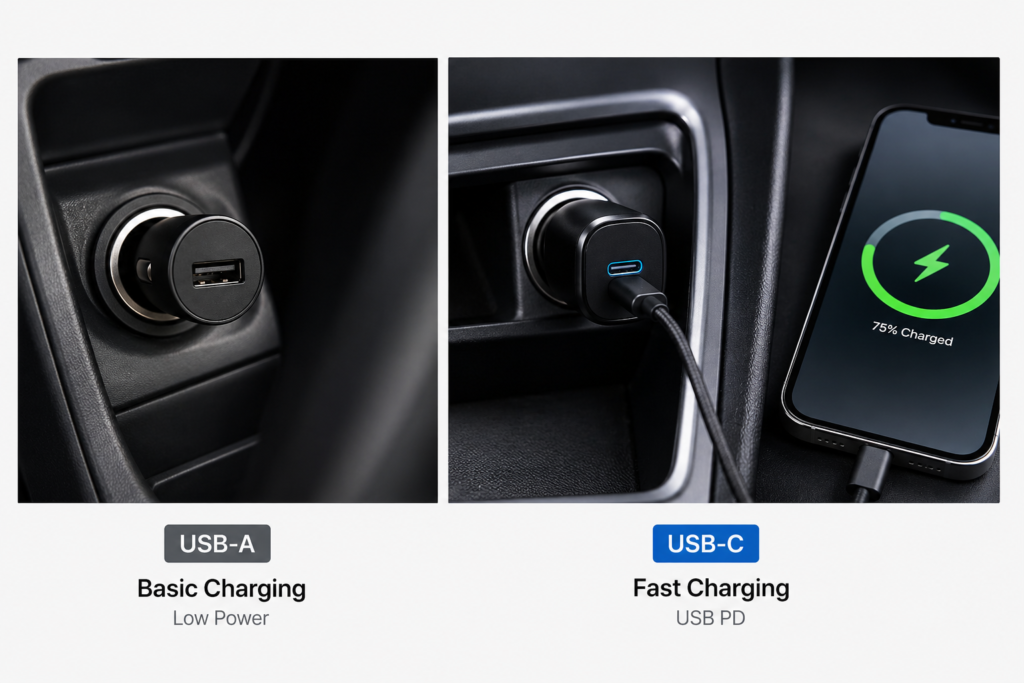
Two Types of Car USB-C Power: Factory Ports vs. Aftermarket Adapters
USB-C charging in your car comes in two main forms:
- Factory-built USB-C ports: Pre-installed in the dashboard, center console, or rear of the car. These are tied to the car’s infotainment system and handle charging, data transfer, and phone connectivity like CarPlay or Android Auto.
- Aftermarket car chargers: Plugs into your car’s cigarette lighter socket. These are add-on devices built primarily for charging, with a wide range of power options.
Key Differences Between Car Charging and Home Charging
Why does your phone charge slower in the car than at home, even with the same cable? The power environments are very different:
- Power source: Home chargers run on 120/240V AC wall power. Cars run on 12V (or 24V for trucks) DC battery power, which the car adapter has to convert.
- Voltage stability: Car voltage fluctuates when you start the engine or idle, unlike steady wall power.
- Heat conditions: Cars get extremely hot in direct sun, and the enclosed space has worse airflow. High heat triggers slow-down protections in both phones and chargers.
2. Types of Car USB-C Ports and Their Real-World Performance
Factory USB-C Ports: Capabilities and Limitations
Factory USB-C ports look convenient, but their charging power is often limited. On most cars, these ports are designed first for data and phone connectivity, not fast charging. Most deliver only 10W to 18W—enough for basic top-ups, but far from full-speed fast charging. Only a handful of newer, higher-trim vehicles include high-power factory fast charging ports.
Cigarette Lighter USB-C Chargers: Benefits and Advantages
A plug-in car charger is the easiest way to get real fast charging in your car. It converts your car’s 12V cigarette lighter power into USB-C fast charging output, and offers big advantages:
- Wide power range, from 20W to over 100W, supporting phones and laptops alike
- Plug-and-play, no wiring modifications needed, and easy to replace
- Broad protocol support, working with almost every brand of device
Rear Seat USB-C Ports: Common Configurations
Many SUVs and MPVs now include USB-C ports on the back of the center console or rear air vents, for second-row passengers. These usually match the specs of the front factory ports—great for basic phone charging, with some higher-end models offering faster rear charging.
| Port Type | Typical Power Range | Core Functions | Best For |
|---|---|---|---|
| Factory USB-C (front) | 10W – 18W | Charging + data + phone connectivity | Light daily top-ups, using CarPlay/Android Auto |
| Cigarette lighter USB-C charger | 20W – 100W+ | Dedicated fast charging | Quick top-ups, multiple devices, high-power gadgets |
| Factory rear USB-C | 10W – 25W | Passenger charging | Back-seat phone top-ups |
3. Fast Charging Protocols and Power Levels Explained
Common Fast Charging Protocols (In Simple Terms)
You do not need to memorize technical jargon—here is what matters:
- USB PD: The universal fast charging standard. Works with iPhones, Android phones, tablets, and laptops. It is the foundation of any good car charger.
- PPS (Programmable Power Supply): An upgraded version of USB PD. It powers super-fast charging on Samsung Galaxy, Google Pixel, and other flagship Android phones. It runs cooler and maintains steady speed better than standard PD.
- Qualcomm Quick Charge (QC): An older fast charging standard for Android phones. Newer devices mostly use PD now, but most car chargers still include QC for backward compatibility.
- iPhone fast charging: iPhones use standard USB PD for fast charging. Any PD-enabled charger will work with an iPhone.
Common Power Levels and What They Work With
More watts does not always mean better—match the power to your devices. Here is a quick reference:
| Power Level | Best For | Real-World Performance |
|---|---|---|
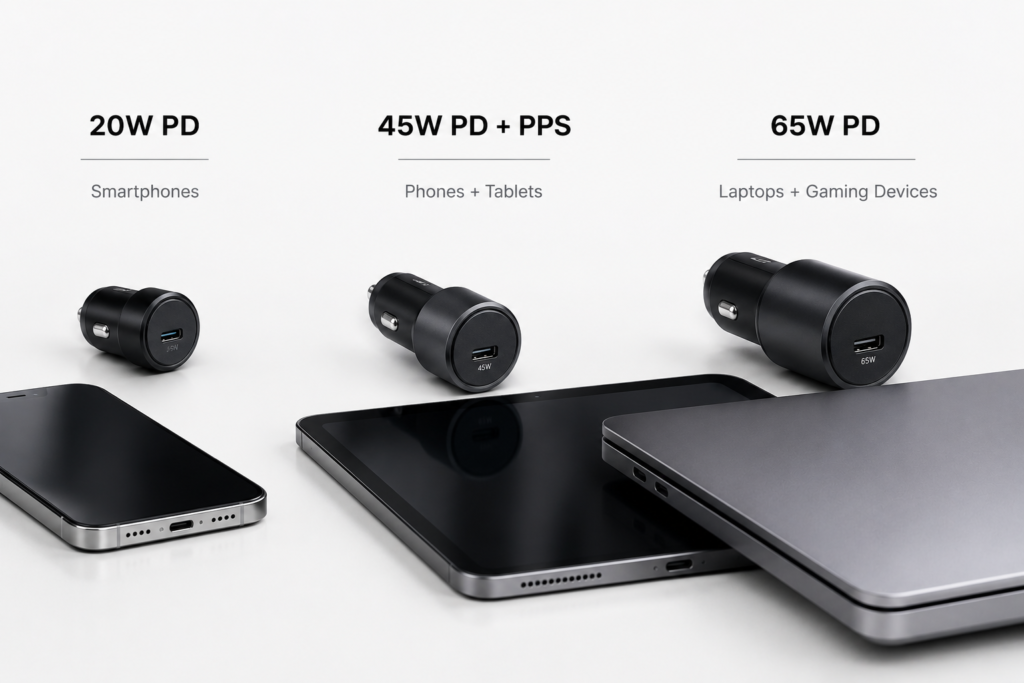
| 20W | All iPhones, basic Android phones | Solid standard fast charging, adds plenty of battery on a commute |
| 30W | iPhone Pro models, flagship Android phones, basic tablets | Faster charging, can charge most phones to 50%+ in 30 minutes |
| 45W | High-power Android phones, iPad Pro, handheld gaming consoles | Supports super-fast charging, works great for larger devices |
| 65W+ | Thin & light laptops, Switch docks, multi-device charging | Can power a laptop and fast charge multiple devices at once |
What Happens When Protocols Don’t Match
Fast charging only works when the charger, cable, and device all support the same protocol. If they do not match, the device falls back to basic 5V slow charging—no matter how powerful the charger is. For example, an old QC-only car charger will only charge an iPhone at slow speeds.
4. How to Choose the Right USB-C Car Charging Gear
Key Specs to Look For in a Car Charger
Skip the fancy marketing—focus on these three things:
- Power output: Make sure the single-port max power covers your main device. For multi-port chargers, check the total simultaneous output so you do not get slowdowns when plugging in more devices.
- Protocol support: Prioritize chargers with both USB PD and PPS. They work with almost every phone and offer the best compatibility.
- Power distribution: For multi-port chargers, look for models with independent power allocation, so charging a second device does not slow down the first one.
How to Pick the Right USB-C Cable
Even the best charger will not work right with a bad cable:
- For 20W–30W charging: Almost any standard USB-C to USB-C cable will work.
- For 45W and higher: Look for cables with an E-Marker chip, which can carry higher current and unlock full power.
- For car use: Pick a short, braided cable. It is more durable and keeps your car tidier.
Power Recommendations by Device
- Phone only: 20W–30W is more than enough.
- Phone + tablet: Go for a 45W dual-port charger.
- Laptop or handheld gaming PC: Pick at least a 65W PD charger.
Quality and Safety Checks
Safety matters in a car. Stick to these rules:
- Choose products with official safety certifications (CE, FCC, etc.) and avoid no-name generic brands.
- Look for basic protection features: over-current, over-voltage, over-temperature, and short-circuit protection.
- GaN (Gallium Nitride) chargers are a great pick for cars. They are smaller, run cooler, and handle high heat better.
5. Daily Use Tips and Common Pitfalls to Avoid
Basic Charging Etiquette and Safety Tips
- Unplug high-power chargers before starting your car, to avoid voltage spikes from the starter that can damage your gear.
- Pull plugs by the housing, not the cable, to avoid loose connections and broken wires.
- Secure cables so they do not interfere with the gear shift, parking brake, or your view while driving.
How Multi-Device Charging Affects Power
Most multi-port chargers share total power across all ports. For example, a 65W dual-port charger will deliver full 65W on one port alone, but split the power when both ports are in use. Always check the product specs to see how it handles simultaneous charging.
Charging With the Engine Off: Battery Safety
When your car is off, the cigarette lighter and some factory ports may still draw power from the car battery. Short charging sessions are fine, but never leave high-power devices charging for hours with the engine off. It can drain your battery completely and leave you stranded.
Charging in Hot Weather
On hot sunny days, the inside of your car can get extremely hot. Let the car cool down a bit before fast charging. High heat makes both your phone and charger slow down to protect the battery. Forcing fast charging in extreme heat will not speed things up—it will just wear out your battery faster.
6. Troubleshooting Common Issues and Clearing Up Myths
Why Is My Car USB-C Charging So Slow?
If charging feels slow, check these things in order:
- Check how much power your port or charger actually delivers—it might just be a slow port.
- Make sure the fast charging protocol matches, and you are using the right cable.
- See if multiple devices are charging at once and splitting the power.
- Check if it is hot inside the car—overheat protection will slow things down.
Fixing Intermittent Charging and Overheating
- Charging keeps cutting out: Try a different cable first—loose or worn cables are the #1 cause. If it still happens, check if the cigarette lighter socket is loose or dusty.
- Excessive heat: Warmth is normal, but if it is too hot to touch, unplug immediately. Check for mismatched power, a bad cable, or extreme cabin heat.
Common Myths Debunked
- Myth: A higher-watt charger will damage your phone. Fact: With proper PD charging, your phone asks for only the power it needs. A more powerful charger will not harm your device.
- Myth: Factory USB-C ports are always faster. Fact: Most factory ports are built for connectivity, not speed. Many are slower than an affordable aftermarket car charger.
- Myth: A USB-A to USB-C cable works for fast charging. Fact: These cables almost always only support basic slow charging. For full PD fast charging, you need a proper USB-C to USB-C cable.
7. Final Recommendations for Different Users
If You Only Charge One Phone
For daily single-phone charging, a 20W–30W single-port PD car charger is perfect. It is small, affordable, and more than enough for your commute.
For Families and Multi-Device Users
If you charge 2–3 devices on family trips, get a 45W–65W dual or triple-port charger with PD + PPS. Pick one with solid power distribution for the best all-around speed and compatibility.
For Laptop and Handheld Gaming Users
If you regularly charge a thin laptop, Steam Deck, or similar device, go straight for a 65W+ high-power PD car charger. Pair it with an E-Marker cable for full speed and reliable power delivery.