
Today, USB-C ports are found on nearly all smartphones, tablets, and laptops, and fast charging has become one of the top considerations when buying devices and cables. From the widely used 100W charging standard to the growing 240W tier, many people have heard the term E-Marker but don’t fully understand what it is or how it relates to charging power.
This guide breaks down the real differences between 100W and 240W fast charging in plain language, explains the true role of E-Marker, and shares practical tips for choosing the right USB-C cable.
1. What’s the Real Difference Between 100W and 240W Fast Charging?
First, it’s important to note that neither 100W nor 240W is a proprietary fast charging technology from a single brand. Both follow the USB Power Delivery (USB PD) specification created by the USB Implementers Forum (USB-IF), a universal industry standard.
1.1 Core Specification Differences
The key distinction between the two lies in their power tier and maximum voltage. The table below summarizes their core parameters:
| Power Rating | Standard Category | Max Voltage | Max Current | Peak Power |
|---|---|---|---|---|
| 100W | Standard Power Range (SPR) | 20V | 5A | 100W |
| 240W | Extended Power Range (EPR) | 48V | 5A | 240W |
Put simply, 100W is the standard power tier of USB PD with a maximum output of 20 volts. The 240W tier is an extended high-power mode that raises the voltage to 48V, increasing total power delivery by 140%.
1.2 Typical Use Cases
The two standards target devices with different power demands, serving distinct use cases:
- Common 100W devices: Ultrabooks and lightweight laptops, tablets, flagship smartphones, and standard USB-C docks. This tier covers the power needs of most everyday consumer electronics.
- Common 240W devices: High-performance gaming laptops, mobile workstations, professional design displays, and high-power docks. This tier is built for professional devices with much higher power consumption.
1.3 Cable Requirements
Standard USB-C cables typically only support up to 3A of current, capping out at roughly 60W — not enough for 100W, let alone 240W.
- To achieve 100W fast charging, a cable must reliably carry 5A of current.
- To achieve 240W fast charging, a cable needs 5A current capability plus higher voltage tolerance to handle 48V, and must meet the stricter specifications for EPR cables.
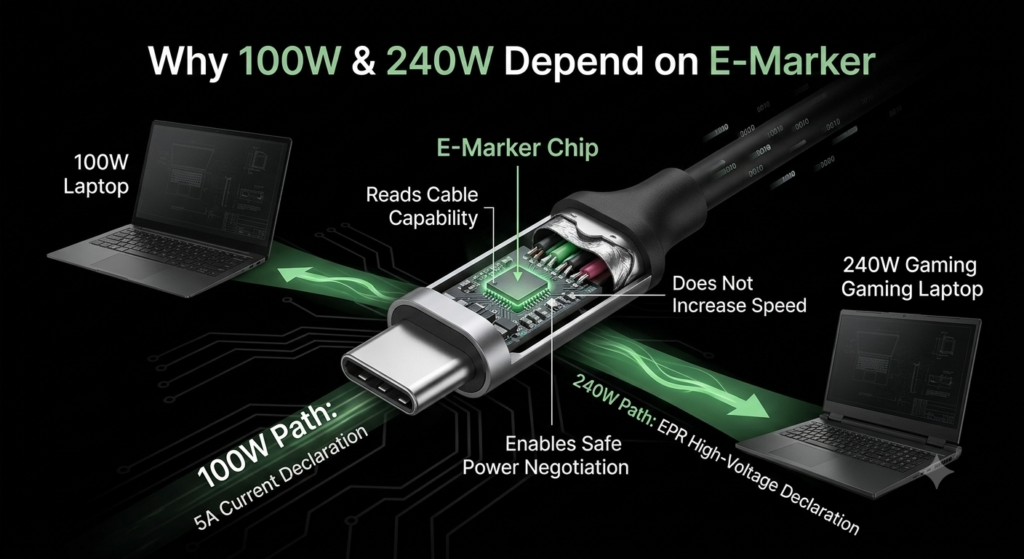
Both rely on an E-Marker chip to communicate their capabilities to connected devices, with 240W cables requiring more advanced E-Marker functionality.
2. E-Marker: The “Electronic ID” Inside Your USB-C Cable
2.1 What Exactly Is E-Marker?
E-Marker is a tiny electronic chip built into the connector of select USB-C cables, acting as the cable’s electronic ID card. The chip stores all of the cable’s specifications, including its maximum current capacity, voltage limit, high-speed data support, video output capability, and more.
2.2 Why Do USB-C Cables Need This Chip?
Modern USB-C ports do it all: charging, file transfer, video output, and connecting high-speed peripherals. When a device connects to a cable, it must first know the cable’s capability limits before selecting an operating mode. Without this step, compatibility issues and safety risks would be common.
2.3 The Biggest Myth: E-Marker Does Not Speed Up Charging
Many people mistakenly think E-Marker is a “fast charging acceleration chip” — this is entirely incorrect.
It does not actively increase charging power or speed up charging. Its only core function is to honestly declare the cable’s capability limits to the device, and help the charger and device negotiate power levels safely.
3. Why Both 100W and 240W Charging Depend on E-Marker
3.1 100W Charging: A Mandatory Requirement for 5A Current
Per official USB specifications, standard USB-C cables without E-Marker default to a maximum 3A current, supporting roughly 60W of charging power.
Any cable rated for 5A current (required for 100W power) must include an E-Marker chip. Without it, devices will treat the cable as a standard 3A model and limit the current, never reaching full 100W speed.
3.2 240W Charging: A Safety Gate for High-Voltage Mode
240W is a high-voltage, high-power mode. At 48V, the voltage is more than double that of 100W charging, meaning greater energy transfer and higher safety risks in the event of overload.
For this reason, the E-Marker in 240W EPR cables must explicitly state the cable’s maximum voltage, EPR support status, and full specifications. If the system cannot confirm EPR support from the cable, it will never activate 48V high-voltage power, preventing hazards at the source.
3.3 Key Safety Benefits of E-Marker
- Prevents cable overloading and overheating: Stops underrated cables from carrying more current than they can safely handle, reducing the risk of overheating, degradation, or fire.
- Blocks unsupported high-voltage modes: Ensures standard cables are never exposed to dangerous voltage levels that could damage hardware.
- Improves cross-brand compatibility: Lets chargers, cables, and devices from different brands recognize and work with each other under a unified standard.
- Provides reliable data for PD negotiation: Makes the USB PD power negotiation process accurate and secure.
4. The Full Fast Charging Process (With E-Marker Explained)
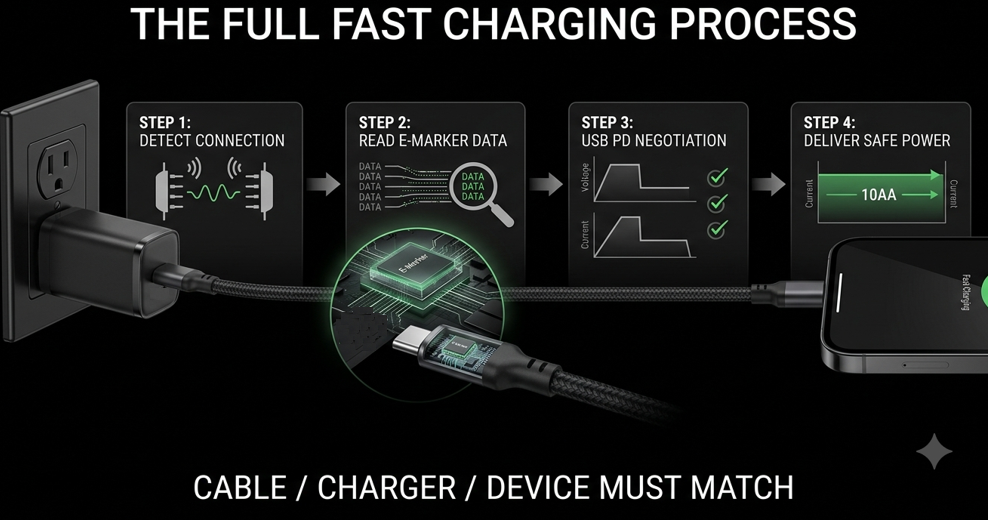
Many people assume charging starts immediately when you plug in the cable. In reality, there are four careful steps, and E-Marker plays a critical role in the process.
Step 1: Physical Connection
When you plug the USB-C cable into the charger and device, both sides detect the connection through the CC pins inside the port and complete an initial handshake.
Step 2: Cable Capability Detection
If the cable has an E-Marker, the device powers the chip and reads all stored capability data, including maximum current, maximum voltage, EPR support, high-speed data support, and more.
If the cable has no E-Marker, the system assumes standard 3A capability.
Step 3: Three-Way PD Negotiation
The charger, cable, and device all confirm their respective voltage and current specifications, and finally settle on the highest power level supported by all three.
Step 4: Power Delivery Begins
- Standard 3A cable: Up to approximately 60W
- 5A cable with E-Marker: Up to 100W when all three components support it
- EPR-rated 240W cable: Up to 240W when all three components support it
There is one core principle here: the bucket effect. The final charging power is always limited by the weakest link among the charger, cable, and device. Even with a 240W charger and 240W cable, a 65W phone will only charge at 65W.
5. Practical Guide to Buying USB-C Cables
5.1 Don’t Judge a Cable By Its Connector Shape
A common misconception is that all USB-C cables are the same. Identical connector shape does not mean identical power capability, data speed, or video support. Two visually identical USB-C cables can have drastically different performance.
5.2 Look for These Key Labels
When shopping, check the cable jacket, packaging, or product listing for these key markings to avoid mistakes:
- Power rating: 100W, 240W
- Current rating: 5A
- Protocol labels: USB PD, EPR (marked on 240W cables)
- Certification: USB-IF certified — the official industry certification for guaranteed compliance
5.3 Choose Based on Your Devices
You don’t need to chase the highest power rating for every use case. Pick what fits your needs for the best value:
- Smartphones and tablets: 60W is sufficient for most, but 100W cables offer better compatibility for future devices.
- Lightweight laptops and standard docks: We recommend 100W USB-C cables with E-Marker for full daily usability.
- Gaming laptops, professional displays, and high-power docks: Opt for 240W USB-C cables that meet EPR specifications.
One quick note: Using a 240W cable with a low-power device will not damage it or make it charge faster. The benefit is that the cable will work with higher-power devices you may own in the future, making it a future-proof choice.
5.4 Quick Ways to Verify a Cable’s Specs
- Check the specifications printed on the cable jacket or product packaging.
- Confirm the product description explicitly states 5A, 100W, 240W, or EPR support.
- Some smartphones and laptops display real-time charging power in system settings, so you can verify if you’re getting the expected speed.
6. Common Myths Answered
6.1 Does E-Marker guarantee 240W charging?
No. Full 240W charging requires the charger, device, and cable all to support USB PD 3.1 EPR. E-Marker is just the cable’s ID chip — its presence alone does not mean the cable supports 240W.
6.2 Do all 100W cables have an E-Marker?
Per official USB-IF rules, every 5A/100W USB-C cable must include an E-Marker. However, some off-brand cables falsely advertise 100W support without the chip, and will not reach full speed. Stick to reputable brands.
6.3 Why did my charging speed jump when I switched cables?
Most likely, your old cable only supported 3A current, and your new cable is a 5A model with E-Marker that meets your device’s fast charging requirements.
6.4 Will a 240W charger damage my low-power phone?
No. The USB PD protocol follows a “negotiate first, deliver power second” logic. It will only output the voltage and current your device supports, and will never force 240W into a device that cannot handle it. All legitimate PD chargers include this safety mechanism.
6.5 Do all original charging cables have E-Marker?
Not necessarily. If the included cable only supports 3A current (around 60W max), it does not require an E-Marker per official specifications. Many phones ship with lower-power cables that do not include the chip.
7. Summary
7.1 The Core Truth
E-Marker is not some fancy fast charging acceleration chip. It is simply the electronic ID of a USB-C cable, responsible for declaring the cable’s specifications and enabling safe, accurate power negotiation.
7.2 The Logic Behind Higher Power Ratings
The jump from 100W to 240W is fundamentally an upgrade in USB PD power delivery capability. Correspondingly, E-Marker has evolved from only declaring 5A current support to also declaring EPR high-voltage capability and full cable specifications.
7.3 Final Advice for Everyday Users
There is no need to blindly chase the highest power rating. Choose a compliant USB-C cable that matches your device’s needs. Fast charging never depends on just the charger or just the cable — only when the charger, cable, and device all match in specification will you get a safe, stable, and efficient fast charging experience.