
Introduction
1.1 Why You Can’t Use Any Charger With Your ROG Handheld
As high-performance Windows gaming handhelds, ROG devices pack powerful processors and high-refresh-rate displays, so their power draw during use is much higher than a typical smartphone. They charge via USB-C, but have specific requirements for charger wattage and protocols. Using a random phone charger will often result in slow charging, or even battery drain while gaming. Standard-compliant chargers will not damage your device, but the wrong accessories will significantly hurt your user experience.
1.2 What This Guide Covers
This guide breaks down ROG handheld charging in plain language, answering the most common questions: What fast charging standards do ROG handhelds support? How many watts do you really need? Can you use a phone charger or power bank? How do you preserve battery health? And how do you troubleshoot common charging issues?
Basic Charging Specifications At a Glance
2.1 Charging Port and Supported Fast Charging Standards
All ROG handhelds use a USB-C port, which handles charging, data transfer, and external display / docking connectivity. For charging, the core standard is USB Power Delivery (USB PD), the universal fast charging protocol used by most modern laptops and smartphones.
2.2 ROG Ally vs. ROG Ally X: Charging Specs Comparison
The two main models have different battery sizes and power requirements. Key specs are listed in the table below:
| Handheld Model | Battery Capacity | Included Charger | Fast Charging Standard | Minimum Wattage for Full Speed |
|---|---|---|---|---|
| ROG Ally | 40Wh | 65W USB-C PD | USB PD 3.0 | 65W |
| ROG Ally X | 50Wh | 100W USB-C PD | USB PD 3.0 | 100W |
2.3 Official OEM Charger Performance
The included official charger is tuned specifically for your ROG handheld. It delivers consistent full power, reliably enables high-performance Turbo mode, and offers the most stable charging experience. At room temperature, the OEM charger will fully charge the device from low battery in roughly 1.5 to 2 hours.
Complete Charger Buying Guide
3.1 Benefits and Use Cases for the Official Charger
The biggest advantage of the official charger is guaranteed compatibility. It delivers full power right out of the box, supports Turbo mode without issues, and eliminates any risk of protocol handshake failures. It is the best choice for users who want a hassle-free, set-it-and-forget-it solution for daily use.
3.2 Key Criteria for Third-Party Chargers
When shopping for a third-party charger, stick to these core rules:
- It must explicitly support USB PD fast charging — this is non-negotiable.
- Its single-port output must meet or exceed your handheld’s full-speed requirement (65W for Ally, 100W for Ally X).
- Always choose reputable brands over no-name generic products.
3.3 Gallium Nitride (GaN) Chargers: Compatibility Notes
Gallium Nitride (GaN) is modern charger technology that produces smaller, lighter, and more efficient chargers with less heat than traditional silicon chargers. Any reputable GaN charger that meets USB PD standards will work perfectly with ROG handhelds, and is the top pick for travel and portability.
3.4 How to Choose Wattage: 45W vs. 65W vs. 100W
More watts do not always mean faster charging — your handheld has a fixed power limit and will only draw what it needs. The table below explains real-world performance for each common wattage:
| Charger Wattage | ROG Ally Performance | ROG Ally X Performance | Best Use Case |
|---|---|---|---|
| 45W | Charges at idle; may drain during gaming | Slow charge only; will drain under heavy load | Emergency backup, light standby charging |
| 65W | Full speed; no battery drain while gaming | Charges normally; may drain under heavy load | Daily driver for ROG Ally, gaming while charging |
| 100W | Full speed with extra headroom | Full speed; no battery drain while gaming | Daily driver for ROG Ally X, or multi-device users |
3.5 Notes for Multi-Port Chargers
Multi-port chargers let you charge multiple devices at once, but keep this in mind: when you plug devices into multiple ports, the total power splits between them. For example, a 100W dual-port charger may only deliver 45–50W per port when both are in use, which is not enough for full-speed handheld charging. For best results, let your handheld use a dedicated port.
3.6 Common Buying Mistakes to Avoid
- Do not just look at “total wattage” — focus on single-port PD output.
- Do not buy chargers that only support QC quick charge with no USB PD.
- Avoid ultra-cheap no-name chargers; they often lie about wattage and can be unsafe.
Charging Cable Selection Guide
4.1 Why Your Charging Cable Matters
Many people focus only on the charger and ignore the cable. Think of the cable as a water pipe for power — a cheap, low-quality cable cannot carry high current, so even a powerful charger will not be able to deliver full speed to your handheld.
4.2 Cable Requirements for Full-Speed Charging
- For 65W and below: A standard 3A USB-C to USB-C cable is sufficient.
- For 100W: You will need a 5A-rated USB-C to USB-C cable to carry full power.
4.3 What Is an E-Marker Chip, and Do You Need One?
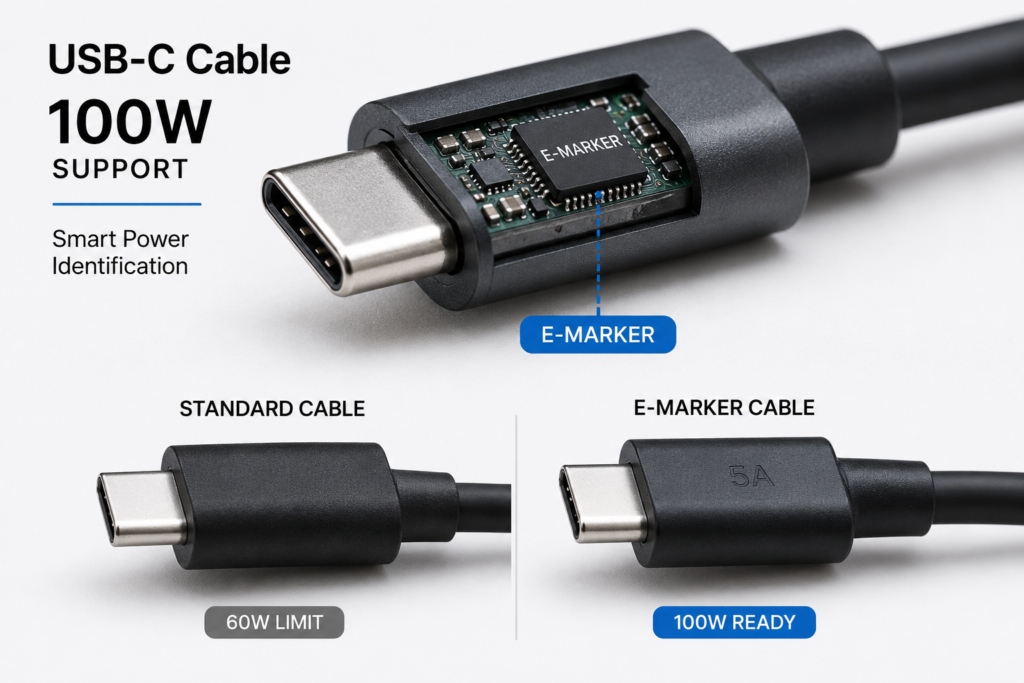
An E-Marker chip is like an “electronic ID” built into the cable. It tells the charger and your handheld how much power the cable can safely handle. Cables rated for 100W or higher must have an E-Marker chip. Without one, the cable will cap out at roughly 60W and will not deliver full 100W speed.
4.4 Common Cable Myths Debunked
- Myth: Thicker cables are always better. Cheap cables may look thick on the outside but use thin, low-quality copper inside.
- Myth: Longer cables work just as well. Power loss increases with cable length; anything over 2 meters will usually have noticeable power drop-off.
- Myth: Only official cables work for fast charging. Any reputable, spec-compliant cable will perform identically to the official one.
Charging Solutions for Every Scenario
5.1 Desktop Gaming and Docking Station Charging
If you use a dock or hub to connect an external monitor and accessories, choose one with PD Passthrough charging. Docks consume power themselves, so the passthrough wattage should be higher than your handheld’s needs: 65W+ passthrough for the Ally, and 100W+ for the Ally X. This ensures stable charging even with a monitor and peripherals connected.
5.2 On the Go: Power Banks and Car Charging
- Power banks: Must support USB PD output. For the Ally, get at least 45W output; for gaming while charging, go for 65W+. For the Ally X, 65W is the minimum, and 100W PD output is recommended.
- Car charging: Do not use basic USB car adapters. Get a USB PD car charger rated for at least 65W to maintain reasonable charging speeds.
5.3 Travel Charging Setup
For business trips or travel, you do not need to carry multiple chargers. We recommend one 65W or 100W multi-port GaN charger plus one high-quality 5A USB-C cable — this will charge your handheld, phone, wireless earbuds, and more, cutting down on bulk.
5.4 Gaming While Charging: Performance, Heat, and Power Delivery
- Plugging in automatically boosts performance. To unlock the highest Turbo mode, you need a wattage-compliant charger and cable.
- ROG handhelds use bypass charging: when plugged in, the system runs directly off the charger, and the battery only tops up — it does not repeatedly charge and discharge.
- Some heat is normal during gaming while charging. Keep your handheld on a well-ventilated surface, not on a blanket or cushion. Good heat management prevents unnecessary wear.
Battery Health and Maintenance
6.1 Best Daily Charging Habits
ROG handhelds use lithium-ion batteries, which have no “memory effect.” You do not need to drain the battery completely before charging. It is fine to top up whenever you want, and keeping your battery between 20% and 80% will help it last longer.
6.2 Using the Built-In Battery Protection Feature
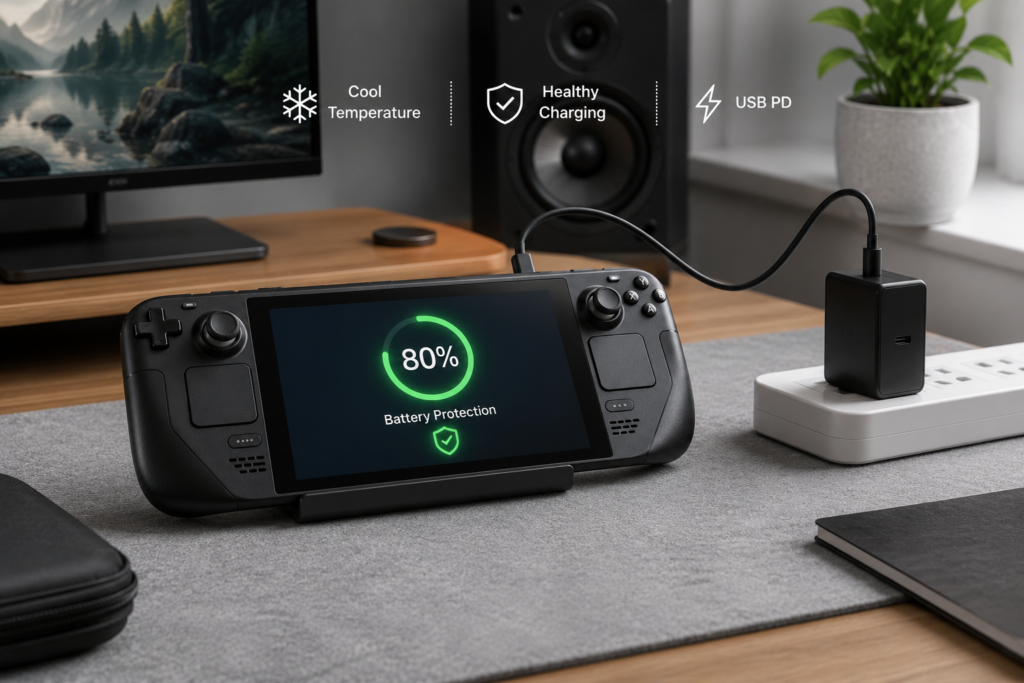
In Armoury Crate, there is a Battery Health Charging mode. When enabled, it stops charging at 80%. If you often use your handheld plugged in for long sessions, turn this on to reduce the time the battery spends at 100% and slow down aging.
6.3 Long-Term Storage Guidelines
If you will not use your handheld for two weeks or more, do not store it fully charged or fully dead. Charge it to around 50%, turn it off, and keep it in a cool, dry place. Plug it in briefly every 1–2 months to prevent the battery from draining completely.
6.4 Charging in Extreme Temperatures
Lithium-ion batteries are sensitive to temperature. Do not charge your handheld in a hot car left in direct sun — high heat speeds up battery aging. In very cold weather, charging will slow down; this is a normal safety feature, and speeds will return to normal at room temperature.
Common Myths and Troubleshooting
7.1 Common Charging Myths Debunked
- Myth: A higher-watt charger charges faster. Your handheld has a fixed charging limit. A 100W charger will not charge an Ally faster than a 65W one — it just has extra headroom.
- Myth: Third-party chargers will damage your device. Any reputable, USB-IF compliant PD charger is safe. The handheld and charger automatically negotiate a safe power level.
- Myth: You must drain the battery fully before charging. Lithium-ion batteries have no memory effect. Deep discharging actually harms the battery. Top-ups are fine.
- Myth: Gaming while charging permanently damages the battery. With proper charging, the system uses bypass power so the battery is under minimal load. As long as you keep heat under control, the impact is negligible.
7.2 Frequently Asked Questions
- Q: Can I charge my ROG Ally with a phone charger? A: If the phone charger supports USB PD, yes — but most are low wattage, so charging will be slow and you may lose battery while gaming. It is fine for emergencies.
- Q: Will a 100W charger break my handheld? A: No. The device only draws the power it needs. Higher-watt chargers are perfectly safe.
- Q: Why is my battery going down even while plugged in? A: Most often, your charger is not powerful enough, your cable is not up to spec, or a multi-port charger is splitting power between devices.
7.3 Simple Troubleshooting Steps
If your handheld will not charge or charges slowly, try these steps in order:
- Test with a known-good PD charger and cable to rule out bad accessories.
- Check the USB-C port for dust or debris, and gently clean it if needed.
- Restart your handheld, and install any available system or Armoury Crate updates.
- If none of these work, contact official support for service.
Summary and Recommended Setups
8.1 Recommendations by Use Case
- Budget / Emergency Setup: 45W PD charger, for casual users who do not game while charging.
- Recommended Daily Setup: 65W GaN charger for ROG Ally, 100W GaN charger for ROG Ally X — covers all daily use and gaming while charging.
- All-in-One Multi-Device Setup: 100W+ multi-port GaN charger, to charge your handheld, phone, tablet, earbuds and more with one accessory.
8.2 Key Takeaways
For ROG handheld charging, remember three basics: stick to USB PD, match the wattage to your model, and use a spec-compliant cable with E-Marker for 100W. Charge as you go, do not stress about battery wear, and keep things cool — you will get great performance and long battery life.