
If you’ve ever reached for a spare charger only to find your earbuds trickle charge at a snail’s pace, or set your smartwatch on a wireless pad and watched nothing happen, you’re far from alone. Charging for earbuds and smartwatches follows very different rules than charging a phone or laptop — and most common frustrations come down to misunderstood standards, not broken hardware.
Whether you use AirPods, Galaxy Buds, an Apple Watch, or another wearable device, knowing how USB-C, Qi wireless, and proprietary magnetic charging work will help you avoid slow speeds, compatibility headaches, and unnecessary wear on your battery. This guide breaks it all down in plain language: how to pick safe chargers, how to extend your battery life, and how to fix the most common charging problems.

Key Takeaways: 5 Things You Need to Know First
- Earbuds and smartwatches are low-power devices (most use 1–15W). A high-wattage phone or laptop charger is safe to use, but it will not speed up charging.
- USB-C is now the standard wired port for new earbuds, but most smartwatches still use brand-specific magnetic or contact charging due to size and waterproofing needs.
- Wireless charging is not universally compatible. Qi, Apple’s proprietary magnetic system, and brand-specific contact chargers do not all work interchangeably.
- Proper charging causes minimal battery wear. Heat, long-term full charge, deep discharge, and cheap uncertified accessories damage batteries far faster than charging speed itself.
- You do not always need official chargers. Certified third-party accessories are usually safe for USB-C and Qi devices, but proprietary smartwatch charging systems may still require compatible accessories.
1. Why Wearable Charging Is Different From Your Phone
Wireless earbuds and smartwatches are built first and foremost for portability, comfort, and daily wear. Those design priorities change how charging works compared to larger devices.
1.1 The Design Limits That Shape Charging
- Tiny internal space: Most earbuds and smartwatches have room for only miniature batteries and simple charging circuits. There is no space for high-power charging hardware.
- Waterproofing needs: Open ports like USB-C make it harder to reach IP68 or 5ATM water resistance ratings. Magnetic and wireless designs work better for sealed, swim-ready devices.
- Wearable safety standards: Devices worn against the skin have stricter rules for heat and electrical safety. Manufacturers use conservative, low-heat charging strategies as a result.
- Low power requirements: Small batteries paired with energy-efficient chips simply do not need fast, high-wattage charging.
1.2 The 4 Main Charging Types for Wearables
| Charging Type | Common Uses | Key Traits |
|---|---|---|
| USB-C wired | Earbud charging cases, over-ear headphones, a small number of outdoor smartwatches | Widely compatible and easy to replace, fast and consistent, low cost |
| Qi standard wireless | Mid-range and premium earbud cases, some Android smartwatches | Drop-and-charge convenience, moderate cross-brand compatibility |
| Brand-specific magnetic/contact | Almost all smartwatches | Precise alignment, great for waterproofing, very low cross-brand compatibility |
| Charging case relay | True wireless earbuds (TWS) | The case stores power and charges the earbuds themselves |
1.3 Power Basics: Small Devices Don’t Need Big Watts
Think of a charger like a water pipe and your device like a faucet. A wider pipe does not force more water through a closed or partially open faucet — the faucet controls how much flows through.
Most wearable devices charge between 1W and 15W because their batteries are much smaller than phones and laptops. Here are typical real-world ranges:
- Earbud charging case: 300–600mAh battery, 2.5–15W input, full charge in 1–2 hours
- Over-ear headphones: 500–1200mAh battery, 5–15W input, full charge in 2–3 hours
- Smartwatch: 200–550mAh battery, 2.5–5W typical charge with higher peaks for fast-charge models, full charge in 1–2.5 hours
The device always controls how much power it takes. A 65W laptop charger will not “push” extra power into a 5W earbud case.
Real-World Scenario: You have a 65W MacBook charger lying around. Can you use it to charge your AirPods?
Yes, completely safely. The AirPods only draw the small amount of power they need — the charger will not force extra wattage into the device.
2. How Earbuds, Headphones and Smartwatches Actually Charge
2.1 True Wireless Earbuds: The Two-Stage Charging System
True wireless earbuds (such as AirPods, Galaxy Buds, and other TWS earbuds) do not charge directly from the wall most of the time. They use a two-stage system:
- The charging case fills its own internal battery via USB-C, wireless pad, or magnetic charger.
- When you put the earbuds inside, small spring-loaded metal contacts (called pogo pins) touch the earbuds and top them up.
The charging case does more than just hold power. It manages the charging process, protects the earbuds, and acts as a portable power bank you can carry with you.
Most premium earbud cases also support quick top-ups — often advertised as “5 minutes in the case for 1 hour of listening.” This works by optimizing the charging curve for low battery levels, not by using high-voltage fast charging like phones do.
For emergency use, some Android phones support reverse wireless charging to top up a Qi-compatible earbud case. It is slow, but helpful in a pinch when you have no other charger available.
2.2 Other Headphone Types
- Over-ear headphones: Almost all new models use USB-C. Many support short fast-charge bursts, and most last 20–60 hours on a full charge, so you rarely need to charge them.
- Open-ear headphones: Most use a USB-C charging case, similar to standard true wireless earbuds.
- Bone conduction headphones: Most often use magnetic contact charging to support high waterproof ratings for sports and swimming.
2.3 USB-C vs. Wireless Charging: Which Is Better?
| Category | USB-C Wired | Wireless Charging |
|---|---|---|
| Speed | Faster and more consistent | Slower, highly dependent on alignment |
| Convenience | Requires plugging in a cable | Set it down and it charges |
| Cost | Low — any basic USB-C cable works | Higher — requires a dedicated pad or dock |
| Travel friendliness | Excellent — one cable works for many devices | Fair — you have to carry an extra pad |
| Heat | Runs cooler | Runs warmer due to energy loss |
| Waterproofing | Requires an open port, harder to seal | No port needed, easier to make water-resistant |
2.4 Why Smartwatches Still Rarely Use USB-C
You might be wondering: if USB-C is the standard for earbuds, why don’t smartwatches use it too? There are four big reasons:
- Thickness limits: Most smartwatches are less than 15mm thick. A USB-C port would take up valuable space needed for the battery and health sensors. For many smartwatch designs, the space cost is not worth the benefit because the device already charges at low power.
- Waterproofing: A sealed, portless body makes it much easier to achieve 5ATM or IP68 swim-grade water resistance.
- Easier daily use: Magnetic chargers snap into place instantly. Fumbling to plug in a tiny cable every morning or night is far less convenient.
- Durability: Magnetic contacts do not wear out from repeated plugging and unplugging the way physical ports do.
2.5 The 3 Main Smartwatch Charging Systems
| System Type | Example Brands | Compatibility | Key Benefits |
|---|---|---|---|
| Apple Watch magnetic charging system | Apple Watch full lineup | Very limited — requires Made for Apple Watch certified accessories | Auto-alignment, seamless experience, closed ecosystem |
| Qi/WPC-based wireless | Select Samsung Galaxy Watch, Google Pixel Watch | Mixed — basic charging may work on generic Qi pads, but official docks give the best performance | Open standard, more third-party options |
| Dedicated magnetic contact pins | Garmin, Huawei, Xiaomi most models | Very limited — almost always requires brand-specific chargers | Reliable connection, low cost, easy to waterproof |
Real-World Scenario: You set your smartwatch down on a generic wireless charging pad, and nothing happens.
This is one of the most common user complaints. Most often, the issue is not a broken charger — it’s that your watch uses a proprietary charging system that does not work with standard Qi pads.
2.6 What to Know for Popular Smartwatch Brands
- Apple Watch: Uses Apple’s proprietary magnetic charging system. You need an Apple Watch charger or a Made for Apple Watch certified accessory. Standard Qi chargers usually cannot charge Apple Watch because Apple uses its own charging system. Some newer models support faster charging, but actual power adjusts dynamically based on temperature and battery state.
- Samsung Galaxy Watch: Many recent models use Qi/WPC-based wireless charging. Generic Qi pads may work for basic charging, but compatibility is inconsistent due to coil placement and protocol optimizations. For fastest and most reliable charging, use the official Samsung dock. Compatibility changes between Galaxy Watch generations, so always check your exact model before buying a charger.
- Garmin and other sport watches: Most use clip-on or magnetic contact chargers with very few third-party alternatives. Some outdoor-focused models do include USB-C direct charging for better reliability in remote environments.
3. Why Your Wearable Charges Slowly: The 4 Factors That Matter
If you’ve ever bought a “fast charger” and saw no speed improvement, this section explains why. Four main factors control real-world charging speed.
3.1 The Device Sets the Speed Limit
The battery size and internal charging chip define the maximum power a device can accept. This is a hard limit.
- A 5W earbud case will never charge faster than 5W, even if you plug it into a 100W charger.
- Small batteries do not benefit from high-power charging. Forcing more power would only create excess heat and wear out the battery faster.
3.2 Charging Protocols Have to Match
Think of charging protocols like spoken languages. If the charger and device speak the same language, they can work efficiently. If they don’t, they fall back to a slow, basic safety mode.
USB-C only describes the physical connector. The actual charging speed depends on USB power standards, device limits, and charging protocols.
Protocols fall into two groups:
- Universal industry standards: Used across many brands, such as standard USB charging and the Qi wireless standard.
- Brand-specific private protocols: Custom systems built by one company. This is why most third-party chargers do not work properly with certain smartwatches.
Real-world example: You buy a 30W USB-C charger for your smartwatch, but charging is still slow. The problem is not the charger’s wattage — it’s that the watch’s internal charging system has a low power limit, or the charging protocol does not fully match.
3.3 Accessory Quality Matters
Cheap, low-quality accessories can slow charging down even if everything else is correct.
- Wired side: Poor-quality cables and worn-out ports add electrical resistance, reducing the power that actually reaches the battery.
- Wireless side: Misaligned coils, thick protective cases, and too much distance between the pad and device all lower efficiency and create extra heat.
- Multi-port chargers: When charging multiple devices at once, power splits between ports, so each port delivers less than its maximum.
3.4 Temperature: The Hidden Speed Killer
Heat is the most common hidden cause of slow charging. Almost every wearable slows down charging if it gets too warm or too cold. This is a built-in safety feature to protect the battery.
- Wireless charging naturally loses more energy as heat than wired charging, so it slows down more easily in warm environments.
- Charging a smartwatch right after a workout, or under a pillow or blanket, will often trigger thermal slowdown.
Real-World Scenario: Your earbuds seem to charge much slower after a sweaty workout.
Sweat and residue on the charging contacts add electrical resistance, which slows down power transfer and can even cause intermittent charging. A quick wipe of the contacts usually fixes the problem.
4. How to Pick the Right Chargers and Cables
You do not need expensive, high-end accessories to charge wearables well. You just need the right ones.
4.1 Quick Buying Cheat Sheet
| User Type | Recommended Setup |
|---|---|
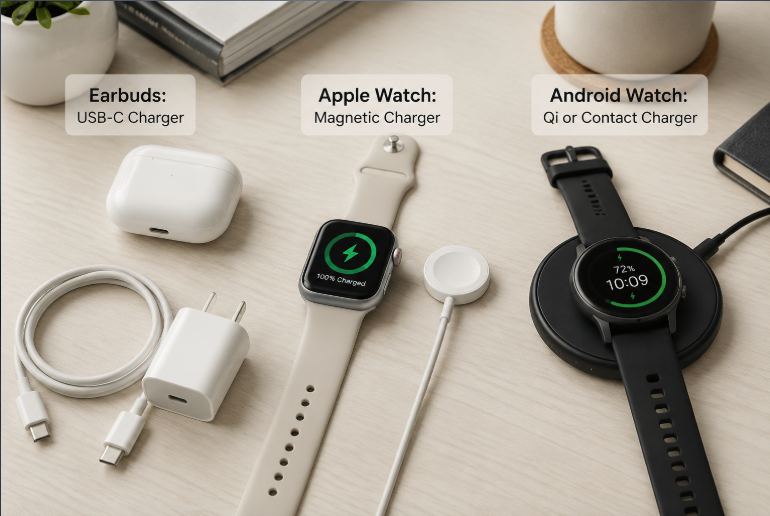
| AirPods / standard TWS user | A reputable 5–20W USB-C charger + basic USB-C cable |
| Apple Watch user | Official or Made for Apple Watch certified magnetic charging cable |
| Android multi-device user | Qi-certified multi-device charging station for phone, earbuds, and Qi-compatible watch |
| Outdoor / sport watch user | Original brand contact charger + portable power bank that supports low-current charging |
For most AirPods and earbud users, a reliable 5–20W USB-C charger is enough. You do not need to pay extra for high-wattage fast chargers.
4.2 Wired Accessory Buying Tips
- Charger wattage: 5–20W from a trusted brand is more than enough. You do not need 65W+ high-power chargers for wearables. If you use a multi-port charger, check the per-port maximum power.
- Cables: A basic USB-C cable is all you need for charging. You do not need expensive high-speed data cables unless you also plan to update firmware.
- What to avoid: No-name, unmarked cables and chargers with suspiciously low prices. They often fail safety standards and can damage your device.
4.3 Wireless Charger Buying Tips
- Generic Qi pads: Only work for devices that officially support Qi. Always look for the Qi certification mark.
- Smartwatch-specific chargers: For Apple Watch, always choose a Made for Apple Watch certified product to avoid “no charge” errors and random disconnections.
- Multi-device stations: Always verify that the watch charging module supports your exact watch model. Many 3-in-1 stations only work for Apple Watch, not Android watches.
- Pro tip: Look for chargers with foreign object detection. This feature shuts off charging if it detects metal between the pad and device, reducing overheating risk.
4.4 What Those Certifications Actually Mean
You will see lots of certification labels on chargers. Here is what actually matters:
- USB-IF certification: Verifies that a product follows official USB specifications. It lowers the risk of compatibility issues.
- Qi certification: Run by the Wireless Power Consortium, this confirms a wireless charger meets universal Qi standard requirements.
- Made for Apple Watch certification: Apple’s official program for accessories. It guarantees full compatibility and safety for Apple Watch.
- UL / CE certification: General electrical safety certifications that cover fire and shock protection.
4.5 Travel Charging Setup
A simple travel kit works for almost all wearables:
- One multi-port USB-C GaN charger
- One basic USB-C cable
- Your smartwatch’s dedicated charging cable
Nearly all modern chargers support 100–240V wide voltage, so you only need a plug adapter for international trips. You can also charge earbuds and most watches from a portable power bank — just make sure the power bank supports low-current charging for very low-power devices.
5. Battery Care Tips to Make Your Wearables Last Longer
Battery degradation is normal over time, but your habits can make a huge difference in how fast it happens.
5.1 Does Fast Charging Damage Batteries?
Modern wearable devices are designed to manage charging safely. In most cases, normal fast charging does not significantly reduce battery life. The absolute power levels are so low that the extra heat from fast charging is negligible. Temperature and usage patterns affect battery life far more than charging speed.
5.2 The 4 Biggest Causes of Early Battery Wear
- Sustained high heat: Direct sun exposure, charging in a hot car, or charging under covers are the fastest ways to wear out a small battery.
- Long-term full charge: Leaving a battery at 100% for weeks or months keeps it in a high-voltage state that speeds up chemical aging.
- Deep discharge followed by long storage: Letting a battery run completely dead and then leaving it unused for months can permanently damage it, sometimes to the point where it will no longer charge at all.
- Cheap uncertified chargers: Unstable voltage and poor heat control from no-name chargers wear out charging circuits and batteries faster.
5.3 Simple Habits That Extend Battery Life
- Charge little and often. Staying away from extremely low and extremely high charge levels is easier on the battery than draining to 0% and charging back to 100%. You do not need to obsess over exact percentages — just make it a general habit.
- Do not charge hot devices. Wipe sweat off a workout watch and let it cool down before plugging it in.
- Turn on optimized charging features if your device has them. These learn your schedule and slow down final charging to reduce time spent at 100%.
- Clean charging contacts regularly. Dirt, sweat, and oil cause poor contact and extra heat.
- For long-term storage, charge to about 50% and turn the device off. Top it up every 3 months.
5.4 Is It Safe to Charge Overnight?
Yes, for the most part. All modern wearables have built-in battery management and charging protection circuits that stop charging once full. There is no risk of “overcharging.”
That said, leaving a device at 100% every single night for years will cause slightly faster aging. If your device has an optimized charging feature, leaving it on overnight is the best of both worlds — convenient and gentle on the battery.
For earbuds, leaving them in a fully charged case is normal daily use and does not require special care.
5.5 Charging Rules for Waterproof Devices
- Higher waterproof ratings almost always mean magnetic or wireless charging, not USB-C ports.
- Always dry the device completely and make sure contacts or ports are fully dry before charging.
- Charging a wet device can corrode metal contacts or cause short circuits that permanently damage the hardware.
5.6 Why Earbud and Watch Batteries Wear Out Faster Than Phones
If you’ve noticed your earbuds or watch lose battery capacity faster than your phone, there are real reasons for it:
- The batteries are much smaller and higher-density, so they tolerate fewer charge cycles.
- Most people charge them daily, so cycles add up quickly.
- Most wearables are sealed designs with no user-replaceable battery.
- They spend most of their time against warm skin, raising the average battery temperature.
5.7 How to Safely Clean Charging Contacts
Dirty or oxidized contacts are one of the top causes of charging failures. Cleaning them is easy:
- Grab a clean cotton swab and a small amount of 70% isopropyl alcohol.
- Gently wipe the metal contacts to remove sweat, dust, and oil.
- Let everything dry completely before charging again.
Never use metal tools to scrape contacts. You will damage the protective plating and make the problem worse.
6. Common Charging Myths Debunked
- Myth: A high-wattage charger will burn out my earbuds or watch.
Fact: The device controls how much power it draws. A compliant charger only delivers what the device asks for. - Myth: Any wireless charging pad works with any smartwatch.
Fact: Many smartwatches use proprietary charging systems. Apple Watch, for example, will generally not charge on a standard Qi pad. - Myth: You have to drain the battery completely before charging to avoid memory effect.
Fact: Modern lithium-ion batteries have no memory effect. Deep discharge actually damages them. Topping up often is healthier. - Myth: USB-C means fast charging.
Fact: USB-C is just the shape of the port. Actual charging speed depends on the device, charging protocol, and charger.
7. Step-by-Step Charging Troubleshooting
Most charging problems are not caused by a broken battery. Try these steps first.
7.1 Earbuds / Charging Case Will Not Charge
- Check if the charging case itself has power by looking at its status light.
- Clean the metal contacts on both the earbuds and the inside of the case.
- Reposition the earbuds and make sure they seat properly on the contacts.
- Try a different cable and charger to rule out a broken accessory.
- Reset the earbuds or restart the charging case, then try again.
7.2 Smartwatch Will Not Charge
- Clean the back of the watch and the surface of the charger.
- Make sure the magnet aligns properly and the contacts sit flat.
- Try a different power source or charger to rule out an adapter failure.
- Force restart the watch to rule out a temporary software glitch.
- If you are using a third-party charger, verify protocol compatibility. Private-protocol watches will not work with generic chargers.
7.3 Charging Is Unusually Slow
- Make sure your charger has enough power. Old 0.5A chargers will be very slow.
- For wireless charging, reposition the device and remove thick cases to make sure coils align properly.
- Check if the environment is too hot or too cold. Thermal protection will intentionally slow charging.
- Turn off high-power background features on your watch, like continuous GPS tracking or constant heart rate monitoring.
- After several years of use, natural battery aging will also slow down charging and reduce total capacity.
7.4 Wireless Charging Gets Very Hot
- Slight warmth is normal. Wireless charging is less efficient than wired, so some energy turns into heat.
- If it is hot to the touch, keeps disconnecting, or smells strange, stop using it immediately.
- Common fixes: Remove thick protective cases, switch to a certified charger, and move it out of direct sun or warm spaces.
8. Global Rules and Future Charging Trends
8.1 Global USB-C Regulations
USB-C regulations in Europe are pushing more portable devices toward a common charging standard. However, many smartwatches remain exempt because of their size and waterproofing requirements. India and other regions are also moving toward similar policies, with the core goal of reducing electronic waste.
8.2 What’s Next for Wearable Charging?
- USB-C for more earbuds: USB-C will continue replacing older ports on all new headphone and earbud models.
- Qi2 for better wireless charging: Qi2 is the updated wireless standard that adds magnetic alignment for better efficiency and easier placement. It is growing quickly in the smartphone ecosystem and may expand to more wearables over time, though adoption on smartwatches remains limited today.
- Alternative power sources: Solar charging, kinetic energy harvesting, and other passive power methods will extend battery life, especially on sport and outdoor watches.
- Smarter charging management: AI-powered optimized charging will become standard on more devices, learning user habits to extend battery lifespan.
9. Frequently Asked Questions
- Can I use my phone charger for AirPods and smartwatches?
Yes, any reputable USB charger will work. The device will automatically adjust to the power it needs. It will not damage the device. - Can AirPods charge with any USB-C charger?
AirPods Pro 2 (USB-C) and other USB-C AirPods work with any standard USB-C charger. For best results, use a charger from a trusted brand. They also support Qi-certified wireless chargers and MagSafe systems. - Why won’t Apple Watch charge on a normal wireless pad?
Apple Watch uses a proprietary magnetic charging system, not the standard Qi protocol. You must use an Apple Watch charger or a Made for Apple Watch certified accessory. - Will a Galaxy Watch charge on any Qi pad?
Many recent Galaxy Watch models use Qi/WPC-based technology, but generic Qi pads have mixed compatibility due to coil placement and protocol optimizations. The official Samsung dock gives the most reliable and fastest charging. Always confirm support for your exact model. - Why is my smartwatch not charging?
The most common causes are dirty contacts, misaligned magnets, or an incompatible charger. Clean the contacts first, then try an official charger to rule out compatibility issues. - Does fast charging damage earbud or smartwatch batteries?
Modern wearables manage charging safely. Normal fast charging does not cause significant battery wear. Heat and long-term full charge are far bigger threats to battery health. - Which is better: USB-C or wireless charging?
USB-C is faster, cooler, and cheaper. Wireless charging is more convenient and better for waterproof designs. Choose based on what matters more to you. - Can a phone charge earbuds wirelessly?
Some Android phones support reverse wireless charging and can top up a Qi-compatible earbud case. It is slow and intended for emergencies, not daily use. - Can I charge a waterproof watch right after swimming?
No. Always dry the watch completely and make sure charging contacts are fully dry before plugging in. Water can corrode contacts and cause damage. - Is there a charger that works for both earbuds and smartwatches?
Yes, multi-device charging stations exist. Always confirm that the watch module supports your specific watch model before buying.
10. Final Action Plan
10.1 Simplest Setup for Every User
- Everyday earbud user: One reputable 5–20W USB-C charger + one basic USB-C cable. That is all you need.
- Apple ecosystem user: Standard USB-C charger for AirPods, plus a Made for Apple Watch certified magnetic charger for your watch.
- Android multi-device user: A Qi-certified multi-device charging stand for your phone, earbuds, and Qi-compatible watch.
- Outdoor / sport watch user: Keep your original contact charger and pair it with a low-current portable power bank for trips.
10.2 Core Charging & Care Rules
- Buy certified accessories — skip unbranded cheap options.
- Do not charge hot or wet devices.
- Keep charging contacts clean.
- Charge little and often; avoid draining completely.
- Store unused devices at about 50% charge and top up every few months.
10.3 What to Always Avoid
- Buying uncertified third-party chargers for private-protocol smartwatches.
- Charging in hot, humid, or wet conditions.
- Leaving devices completely dead for months at a time.
- Using cables with cracked insulation or exposed wires.