
1. Introduction: Why Do Identical USB-C Cables Charge at Such Different Speeds?
1.1 A Common Scenario Everyone Has Run Into
You’ve almost certainly been here before: two USB-C cables that look nearly identical, one charges your laptop at full speed while the other trickles power slowly. You buy a 100W fast charger, use the included cable, and find the charging speed falls far short of what was advertised. The “3A” and “5A” labels on packaging look familiar, but you have no idea what they actually mean.
If they all use the same USB-C connector, why is there such a huge difference in charging performance?
1.2 The Common Misconception: It’s Not Just About Thicker Wires
Many people assume the faster cable just has thicker copper inside. While wire gauge is a basic requirement, it’s not the real answer.
The key component that determines whether high-power fast charging will actually activate is a tiny E-Marker chip hidden inside the cable’s plug. What many people don’t realize is that a USB-C cable is no longer just a simple copper wire — it’s a complete power delivery system with built-in smart recognition. The cable itself “tells” your device exactly how much current it can safely handle.
2. Basic Concepts: The Real Difference Between 3A and 5A Cables
“3A” and “5A” refer to the maximum continuous current a cable can safely carry, measured in amperes. This standard is set by the USB Implementers Forum (USB-IF), the official governing body for USB technology.
2.1 What Is a 3A Cable?
A 3A cable is a USB-C cable rated for a maximum stable current of 3 amps, and it’s the basic industry standard.
Under the standard USB Power Delivery (PD) protocol, here’s the maximum power a 3A cable can support at common voltages:
- 5V/3A: 15W
- 9V/3A: 27W
- 15V/3A: 45W
- 20V/3A: 60W
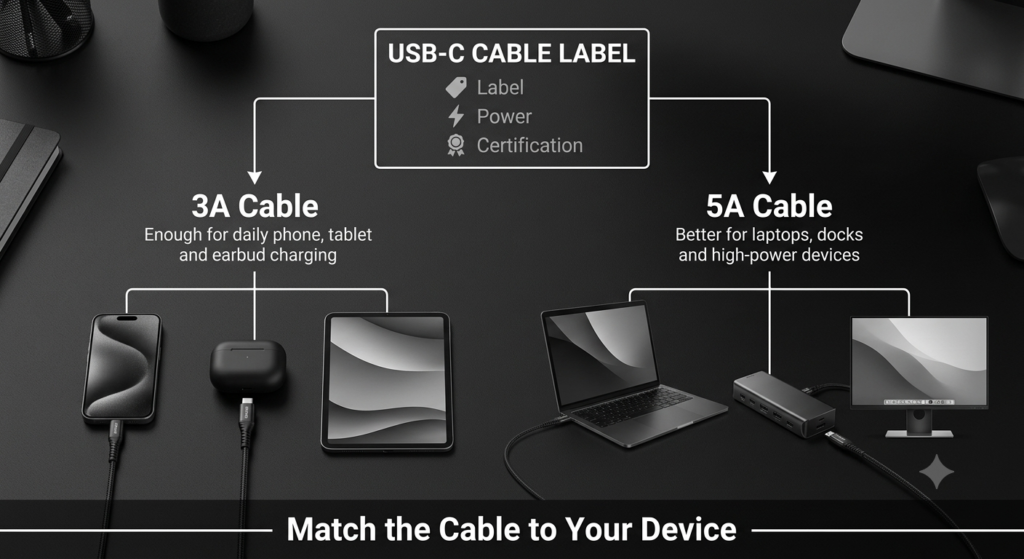
In short, a standard 3A cable tops out at 60W, covering the Standard Power Range. It’s more than enough for smartphones, tablets, handheld game consoles, wireless earbuds, and other small portable devices.
2.2 What Is a 5A Cable?
A 5A cable is rated for a maximum stable current of 5 amps. It requires thicker copper conductors, better insulation, and improved shielding, making it more expensive to manufacture.
Under USB PD standards, 5A cables support two power ranges:
- Standard Power Range: 20V/5A = 100W, matching the common USB PD 3.0 specification
- Extended Power Range: 28V/5A = 140W, 36V/5A = 180W, 48V/5A = 240W, matching the newer USB PD 3.1 specification
You’ll notice that higher power levels are achieved by increasing voltage, while the cable’s current limit stays at 5A. These cables are designed for high-power devices like ultrabooks, gaming laptops, mobile workstations, professional monitors, and docking stations.
3. Demystifying the E-Marker: The “Electronic ID” of USB-C Cables
3.1 What Exactly Is an E-Marker?
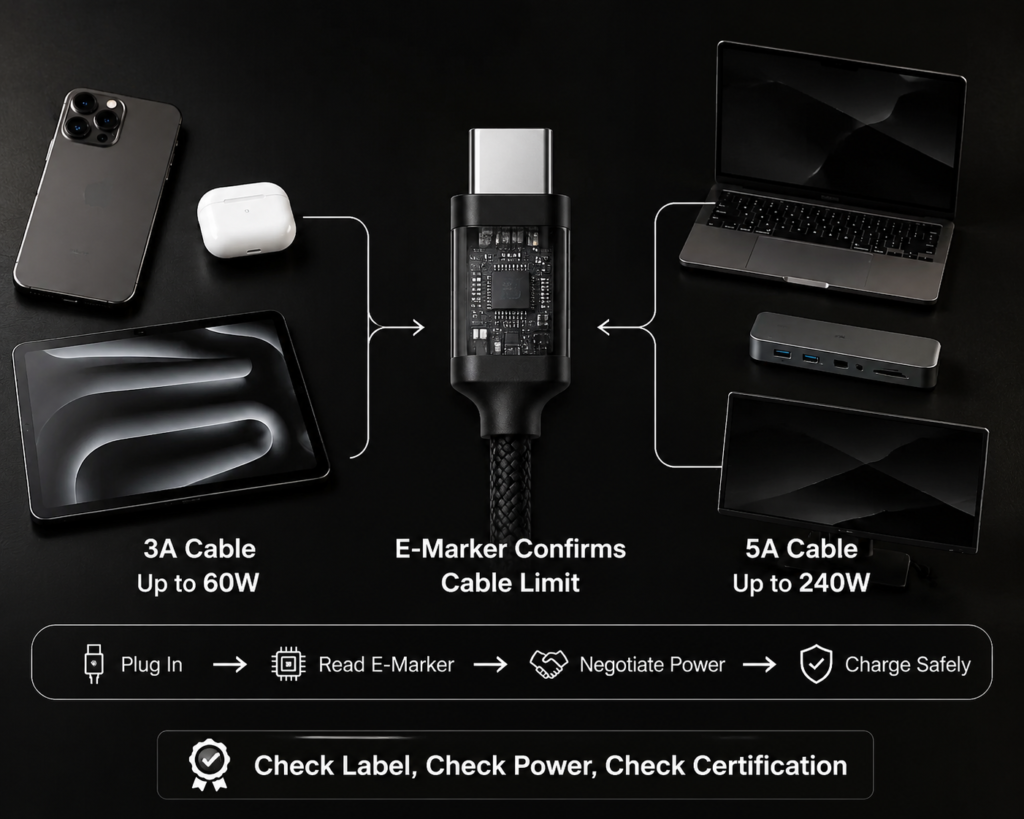
Short for Electronic Marker, an E-Marker is a tiny chip — about the size of a grain of rice — built inside each Type-C plug on the cable, completely invisible from the outside.
It is essentially a memory chip that stores all of the cable’s specifications. It does not generate power, and it does not actively speed up charging. Its sole job is to “report” the cable’s capabilities to the charger and device when plugged in, and it is the main reference devices use to decide how much power to deliver.
3.2 What Information Does an E-Marker Store?
For such a small chip, it holds a surprising amount of detail:
- Power capabilities: Maximum current and voltage the cable supports
- Data capabilities: Whether it supports only USB 2.0, or faster standards like USB 3.x or USB4
- Feature support: Whether it works with video output, Thunderbolt modes, or alternate modes
- Identification: Manufacturer info and whether the cable has official USB-IF certification
Think of it as the cable’s electronic ID card and capability summary, all in one tiny chip.
4. The Core Logic: How 3A/5A Ratings Relate to E-Marker Chips
Now that we’ve covered the basics, we can break down the core relationship between these three — the part that confuses most people.
4.1 Mandatory Rule: All 5A Cables Must Include an E-Marker
Per official USB-IF standards, every 5A-rated USB-C cable must have a built-in E-Marker chip. This is a non-negotiable safety requirement.
Why? Because a device can’t tell a cable’s real current capacity just from the physical connector. Without a recognition system, forcing 5A of current through a low-quality cable could cause it to overheat, melt, or even start a fire.
So the official default rule is simple: if no E-Marker is detected, the device will always assume the cable only supports 3A, preventing overload risks from the start. The E-Marker is the safety gatekeeper for high-power charging.
4.2 How the Power Negotiation Process Works
In the split second after you plug in a cable, a full smart negotiation process takes place:
- When the USB-C cable is plugged in, the charger sends a small amount of power through the CC pin in the connector to wake up the E-Marker chip inside the cable
- The charger reads the cable’s capability information stored in the E-Marker
- Only after confirming the cable supports 5A current will the charger negotiate a high-power charging mode with the device
- Once both sides agree, the charger delivers power at the agreed-upon wattage
This is why even a cable with extra-thick copper won’t hit full 5A speeds if it lacks an E-Marker — compliant devices simply won’t allow it.
4.3 3A Cables and E-Markers: Two Scenarios
Many people assume “3A cables never have E-Markers,” but that’s not true. There are two types of 3A cables:
Scenario 1: Basic charging / USB 2.0 3A cables → No E-Marker needed
The free cables that come with most phones, which only handle charging and slow USB 2.0 data transfer, fall into this category. These are the most common 3A cables, and they don’t require an E-Marker per official specs.
Scenario 2: High-speed / full-featured 3A cables → E-Marker required
If a 3A cable supports USB 3.x or faster data transfer, video output, or external display connectivity, it is required by official standards to include an E-Marker. The chip is there to declare its data and video capabilities, even though the cable’s current limit remains 3A.
4.4 What Happens When There’s No E-Marker?
- Normal, compliant setup: Legitimate chargers and devices will strictly limit output to 3A, capping power at 60W. The cable will still charge your device — it just won’t activate 5A high-power mode, so charging will be noticeably slower for high-power laptops.
- Risky, non-compliant setup: Some cheap, falsely advertised cables claim 5A support but have no proper E-Marker chip. When paired with a non-compliant charger that skips this safety check, they can be forced to carry excessive current. This leads to overheating, insulation breakdown, and in severe cases, fire hazards.
5. Common Myths Debunked
There are a lot of widely shared misconceptions about 3A/5A cables and E-Markers. Let’s clear them up once and for all.
5.1 Myth 1: Any cable with an E-Marker is a 5A cable
False. 3A full-featured cables that support high-speed data and video output also include E-Marker chips, while still being limited to 3A current. “Has an E-Marker” does not equal “high-power cable.”
5.2 Myth 2: A thicker cable is always a 5A cable with an E-Marker
False. You can’t judge a cable by its exterior thickness. Many cheap cables have a thick outer jacket but very thin copper inside, falsely claiming 5A support. On the flip side, some well-made, slim 3A full-featured cables do include E-Markers. Judging by look or feel alone is completely unreliable.
5.3 Myth 3: E-Markers are fast-charging chips that make charging faster
False. An E-Marker is just an information messenger — it only reports what the cable can handle. It doesn’t regulate power or make charging any faster on its own. Your maximum charging speed is always limited by the weakest link: your charger, your device, and your cable.
5.4 Myth 4: The higher the wattage rating, the better the cable
False. A cable only needs to match your device’s power requirements. If your phone maxes out at 27W charging, buying a 240W cable won’t make it charge any faster — you’ll just be wasting money. Choosing based on your actual needs is always the best value.
6. Practical Buying Guide for Everyday Users
With all that background, how do you quickly tell what you’re buying, and how do you pick the right cable for you?
6.1 How to Tell If a Cable Supports 5A and Has an E-Marker
You don’t need to take the plug apart. Just check the packaging and product details:
- Check power/current labels: Any cable labeled 5A, 100W, 140W, 240W, or PD EPR is required by specification to include an E-Marker chip.
- Check feature labels: Cables advertised as USB4, Thunderbolt 3/4/5, or full-featured Type-C always have built-in E-Markers.
- Check official certification: Cables with official USB-IF certification have verified, consistent specs and are much less likely to be mislabeled.
6.2 Which Cable Should You Choose?
- Stick with 3A if: You only need to charge smartphones, smartwatches, wireless earbuds, or basic tablets. 3A cables work perfectly here and offer the best value.
- Go with 5A if: You need to charge laptops, connect to docking stations, use external professional monitors, or want one cable that will work with future devices. A 5A cable is the more versatile, future-proof choice.
7. Key Takeaways
To wrap things up, here’s the simplest summary of how everything fits together:
- 3A is the basic current rating: basic charging cables don’t need an E-Marker, but high-speed full-featured 3A cables do.
- 5A is the high-current rating: per official standards, it always requires an E-Marker, and high-power mode only activates after the device confirms the chip is present.
- E-Markers are the cable’s capability guide: they exist for safety and identification, and they do not increase charging speed on their own.
Remember this simple buying rule: check the wattage, check the labels, check for certification, and buy what you need — no need to chase the highest number just for the sake of it.