
I. Introduction
When we use electronic devices in our daily lives, USB interfaces are everywhere. Have you ever wondered what kind of development process USB has gone through, from a simple interface that could only connect a mouse and keyboard to the amazing one that can now transfer data at high speed, connect various external devices, and support fast charging? Today, let’s take an in-depth look at the evolution of USB standards.
USB Generations At-a-Glance Comparison
| USB Version | Release Year | Theoretical Max Speed | Key Upgrade & Highlights | Common Use Cases |
|---|---|---|---|---|
| USB 1.0 | 1996 | 1.5Mbps (Low-speed) / 12Mbps (Full-speed) | First USB standard, hot-plug support | Old mice, keyboards, low-bandwidth peripherals |
| USB 1.1 | 1998 | 1.5Mbps / 12Mbps | Fixed connectivity & power stability issues, wide industry adoption | Mainstream PC peripherals in late 90s |
| USB 2.0 | 2000 | 480Mbps (High-speed) | 40x speed boost over 1.1, strong backward compatibility | USB flash drives, cameras, printers, early mobile hard drives |
| USB 3.0 (SuperSpeed) | 2008 | 5Gbps | 10x speed over 2.0, dual-bus design, blue plastic tab | External SSDs, high-speed storage |
| USB 3.1 | 2013 | 5Gbps / 10Gbps (Gen 2) | 10Gbps mode, first introduction of Type-C connector | Laptops, high-speed peripherals, video output |
| USB 3.2 | 2017 | Up to 20Gbps | Dual-lane transmission, requires full-featured Type-C cable | High-performance storage, multi-function docks |
| USB4 | 2019 | 40Gbps | Based on Thunderbolt 3, dynamic bandwidth allocation | External GPUs, 8K displays, single-cable docking |
| USB4 Version 2.0 | 2022 | 80Gbps | Double the bandwidth, optimized for professional video work | Professional video production, high-end docking stations |
Below we will break down each era in detail, so you can fully understand the iterative logic behind each upgrade.
II. The USB1.x Era: The Birth and Initial Development of USB
(1) USB1.0 (1996)
In 1996, USB1.0 made its debut. It was the first product of the USB standard. Its speed was divided into two levels:
- Slow-speed level: 1.5Mbps. This speed is like a small carriage running slowly. It can only handle some devices that do not require high-speed data transfer, such as old-fashioned mice and keyboards.
- Normal-speed level: 12Mbps. It is a bit faster than the slow-speed level, but still very slow by today’s standards.
💡 Key Innovation: USB 1.0 introduced hot-plugging for the first time. Unlike older ports that required a computer restart when connecting devices, USB let you plug and play immediately — a revolutionary convenience at the time.
But its capabilities were limited. It could only drive “minor players” like old mice and old-fashioned keyboards, and it was a bit overwhelmed with larger tasks.
(2) USB1.1 (1998)
In 1998, USB1.1 emerged. It was a repaired and upgraded version of 1.0. USB1.0 had some minor problems. For example, it was prone to disconnection, just like two people holding hands and occasionally letting go; and the power supply was unstable, like providing “food” for the device, sometimes not providing enough.
USB1.1 solved these problems, so at that time, all computers and peripherals were using it, and the accessories of the previous USB1.0 could also be used normally when plugged in. Its compatibility was very good.
III. The USB2.0 Era: The Glory of a Classic Version
(1) USB2.0 (2000)
In 2000, USB2.0 was born. This was a classic version that was used for more than ten years! Its biggest highlight was a significant increase in speed. A high-speed mode was added, and the speed was suddenly increased to 480Mbps. This was dozens of times faster than USB1.1, just like changing from riding a bicycle to driving a sports car!
Its compatibility was also extremely strong. Old USB flash drives, old mobile phones, printers and other devices could be plugged in and would automatically adapt to the corresponding speed. For devices such as cameras, scanners, and early mobile hard drives, the speed of transferring photos and songs became significantly faster when using USB2.0. People no longer had to wait impatiently.
(2) Practical Features of USB2.0
- Interface Expansion: It works with USB hubs, effectively “growing” many extra ports for your computer. One port can be split into multiple jacks to connect USB drives, mice, keyboards, mobile hard drives and more at the same time.
- Stable Power Supply: USB 2.0 delivered more reliable power. It greatly reduced issues like device disconnection or detection failures when multiple peripherals were connected at once.
- Long-distance Transmission: Supported cable lengths up to 5 meters without extra power, giving you more flexibility for device placement.
IV. The USB3.x Era: A New Era of High-speed Transmission
(1) USB3.0 (2008)
In 2008, USB3.0 arrived. It had a very cool name — SuperSpeed USB. Its speed reached 5Gbps, which was 10 times that of USB2.0. Copying a full-length movie became almost instant!
Its internal design was very clever. It had two sets of transmission lines, which meant that it could not only run at the high-speed of 3.0 but also be compatible with old-fashioned 2.0 devices. In addition, its charging speed was faster than that of 2.0, and the plastic inside the computer interface was generally blue, so we could distinguish it from other interfaces at a glance.
(2) USB3.1 (2013)
In 2013, USB3.1 came out. It was divided into two speed levels. The slow-speed level was the same as 3.0, which was 5Gbps, and the fast-speed level was upgraded to 10Gbps, taking the speed to a new level.
This version also brought a major change — the Type-C reversible port appeared for the first time. This interface was very easy to use: it could be plugged in regardless of the front or back. We no longer had to worry about damaging the interface by plugging it in the wrong way! Moreover, it could transmit images and achieve two-way charging. The charging power was also increased. Small and lightweight laptops could be charged through this interface.
(3) USB3.2 (2017)
In 2017, USB3.2 made its appearance. When its two transmission lines work simultaneously, the maximum speed can reach 20Gbps. The efficiency of copying dozens of gigabytes of files is directly doubled!
But to fully exert its strength, it must be equipped with a Type-C interface and a special full-function C-port cable. If an old-fashioned flat cable is used, it cannot reach the full speed. However, it is backward-compatible with all old USB devices. When an old device is plugged in, it will automatically reduce the speed and work normally.
V. The USB4 Era: The Pinnacle Experience of High-end and High-speed
(1) USB4 (2019)
USB4 in 2019 borrowed Thunderbolt 3 technology and was simply a “superhero”. Its maximum speed reached 40Gbps. It could not only quickly transfer extremely large files but also connect an 8K monitor at the same time, just like a person being able to do several big things at the same time.
Its bandwidth could also be automatically allocated. There would be no lag when transmitting data and projecting the screen at the same time, bringing us a smooth user experience. Moreover, it only supports the Type-C full-function port. Through this interface, external graphics cards and docking stations can also be connected. A laptop can complete operations such as charging and projecting the screen with just one cable. It is extremely convenient.
(2) USB4 2.0 (2022)
USB4 2.0 in 2022 is currently the top-level specification. Its maximum speed has been increased to 80Gbps, and the one-way speed is even faster. For professionals who edit 4K/8K videos, this is simply a blessing, which can greatly improve work efficiency.
It can also make charging, file transfer, and screen projection run simultaneously without slowing each other down, just like several little friends working together without interfering with each other. All Type-C devices are universal. Whether it is a mobile phone, laptop, or monitor, one cable can handle everything.
VI. Evolution of Interface and Charging Functions
(1) Changes in Interface Shape
USB Connector Types Comparison
| Connector Type | Reversible? | Typical Size | Common Devices | Era of Popularity |
|---|---|---|---|---|
| Type-A | ❌ No | Large, rectangular | Desktop/laptop ports, USB flash drives | 1996 – Present |
| Type-B | ❌ No | Large, squarish | Printers, scanners, old monitors | Late 90s – 2010s |
| Mini-USB | ❌ No | Small, trapezoidal | Old cameras, MP3 players | Early 2000s |
| Micro-USB | ❌ No | Tiny, slim | Old Android phones, power banks | 2010s |
| Type-C | ✅ Yes | Small, oval | Modern phones, laptops, tablets | 2015 – Present |
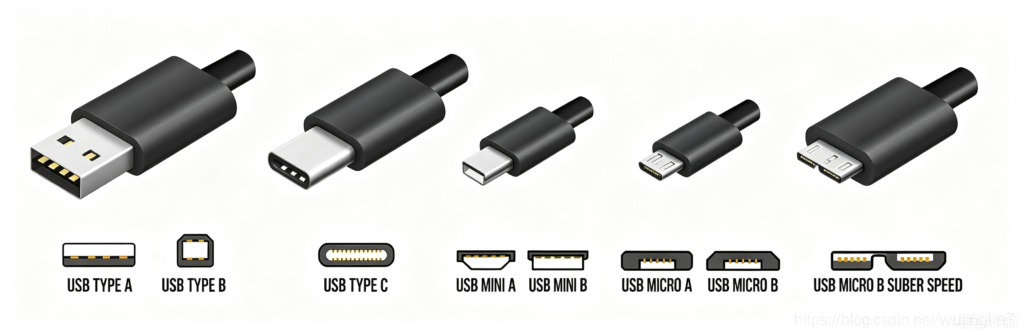
From the bulky early ports to today’s unified Type-C, the evolution of USB shape has always followed two goals: smaller size and easier use. The reversible design of Type-C has completely solved the “wrong plug” trouble that bothered people for more than 20 years.
(2) Upgrade of Charging Capability
The evolution of USB is not only about data speed, but also about charging power:
- Ordinary USB2.0: The charging power of ordinary USB2.0 is only 2.5W (5V 0.5A). With such a low power, it can only supply power to small devices such as mice and USB flash drives. Charging a mobile phone with it is as slow as a snail.
- USB PD fast-charging standard: Later, the USB PD fast-charging standard emerged. It is very powerful. It can reach a maximum of 240W high power and supports adjustable-voltage fast charging. Now, the fast charging of our mobile phones, lightweight laptops, and even high-power-consuming devices such as gaming laptops, monitors, and external graphics cards can rely on it for fast charging, which greatly saves our time.
VII. Conclusion
The evolution of USB standards is like a history of the growth of technology, from simple to complex, from low-speed to high-speed, and from single-function to multi-function integration. Every upgrade has brought more convenience to our lives and work.
I believe that with the continuous progress of technology, the USB standard will continue to develop and bring us more surprises. I hope that through this article, everyone has a clearer understanding of the evolution of USB standards. The next time you see different USB interfaces, you will know the “stories” behind them!