
Have you ever plugged in a fast charger and cable, only to see your phone show “standard charging” and charge at a snail’s pace? Or noticed your device keeps connecting and disconnecting mid-charge, switching between fast and slow speeds? More often than not, this is not a broken device — it is fast charging compatibility failure. In this guide, we will break down what this means, why it happens, and how you can troubleshoot it yourself, in plain, easy-to-understand language.
1. What Exactly Is Fast Charging Compatibility Failure?
1.1 What is fast charging compatibility?
Fast charging is not controlled by the charger alone. For high-power charging to work, the charger, charging cable, and device (phone, tablet, laptop, etc.) all need to “speak the same language” and agree on a set of fast charging rules. Even accessories from different brands can work together for fast charging, as long as they support the same charging standard.
1.2 What does compatibility failure look like?
The most obvious sign of compatibility failure is that your device charges normally, but cannot enter fast charging mode.
Common symptoms include:
- Your device only shows “standard charging” or “slow charging”, with no fast charging indicator
- Actual charging speed is noticeably slower than the rated fast charging speed, taking much longer to fully charge
- Charging speed fluctuates and feels inconsistent
- The charging connection keeps dropping and reconnecting repeatedly
1.3 Compatibility failure does not mean your device is broken
There is no need to panic right away. Most fast charging compatibility issues are not caused by hardware damage. They are usually built-in protection mechanisms at work. When the system detects that charging conditions do not meet fast charging requirements, it automatically lowers the power and switches to a safer standard charging mode. This generally does not harm your device or battery.
2. What Conditions Are Required for Fast Charging to Work?
2.1 The three key parts of fast charging
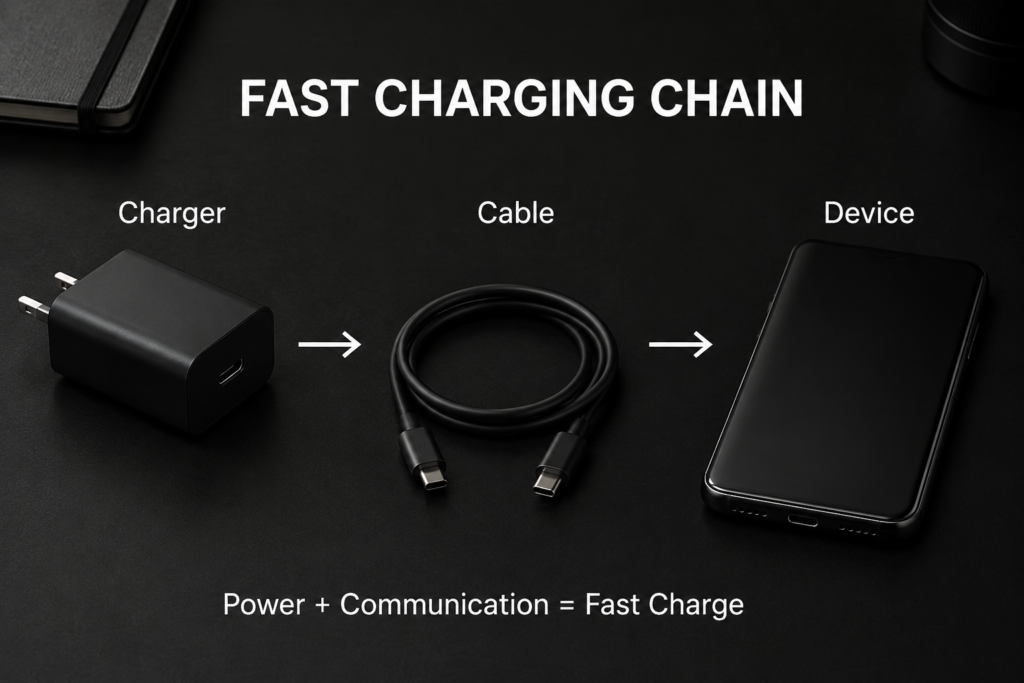
A complete fast charging setup relies on three components:
- Charger: The power source that supplies electricity
- Charging cable: The bridge that carries power and communication signals
- Device: The phone, tablet or laptop, etc.
2.2 How does fast charging start?
When you plug in your charger, fast charging does not start immediately. There is a short handshake process:
Power is connected → The device identifies the charger → Both sides check compatible charging standards → They agree on a voltage and current level → Once confirmed, fast charging officially begins
Think of it like a secret handshake — both sides have to match for fast charging to activate.
2.3 Any weak link breaks the whole chain
Since fast charging depends on all three parts working together, a problem with the charger, cable, device, or even the physical connection can cause the handshake to fail. When that happens, the system falls back to standard charging.
3. The 7 Most Common Causes of Compatibility Failure
Cause 1: Mismatched charging protocols
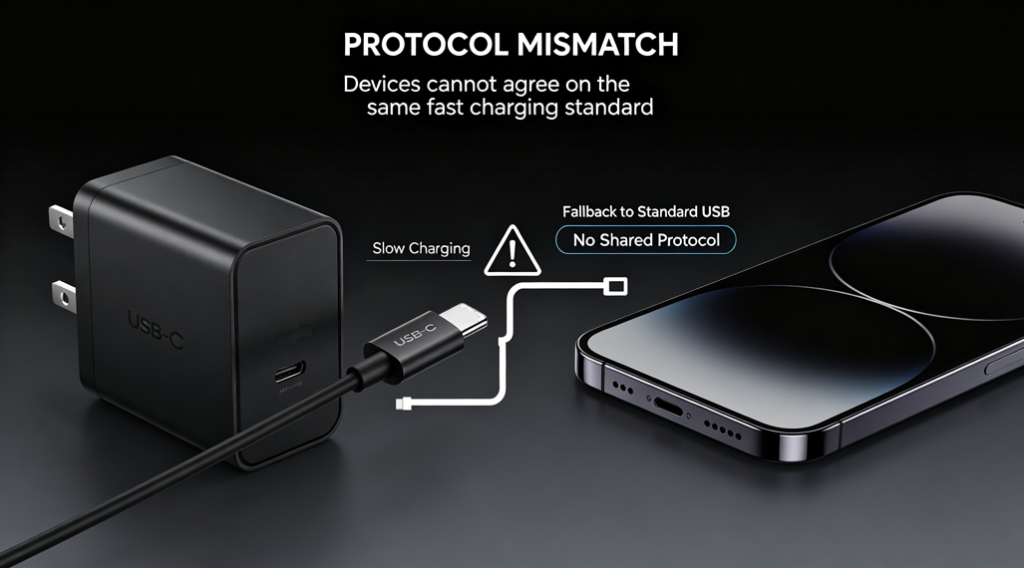
A charging protocol is like a shared language for charging. Fast charging only works when both the charger and device support the same protocol.
Common protocols include USB PD, PPS, QC, UFCS, plus proprietary standards from brands like Samsung, Apple, and Huawei.
If the charger and device have no overlapping protocols, they cannot communicate for fast charging, and will default to basic standard USB charging.
For example: An older charger that only supports QC will only charge at slow speeds on a newer tablet that only uses PD. A phone with UFCS fast charging will not activate fast charging on a basic USB charger.
Cause 2: The cable cannot handle the required power
Many people overlook the charging cable, but it is a critical part of the chain — not all USB-C cables are created equal.
Cables have a maximum current they can safely carry, just like a wider pipe can carry more water. If you use a thin 3A cable for a 5A high-power fast charge, the power will be limited.
Additionally, fast charging above 100W usually requires a cable with a built-in E-Marker smart identification chip. Cables without this chip will have their power limited by the system, and cannot activate high-power charging modes.
Beyond low specifications, old cables with internal wear or damaged wires can also cause low power and frequent disconnections.
Cause 3: The charger does not have enough output power
The maximum charging speed is always limited by the weaker of the two: the charger or the device.
If your phone supports 45W fast charging but your charger only outputs 20W, you will only ever charge at 20W — you will never reach full fast charging speed.
Two other common issues:
- Mismatched voltage levels: If the device needs a specific voltage level that the charger does not offer, it will charge at a lower, compatible setting.
- Power sharing on multi-port chargers: Most multi-port chargers share total power across all ports. When multiple devices are plugged in, the power available per port drops, and fast charging slows down.
Cause 4: The device itself limits charging speed
Often, slow charging is not an accessory problem — your device is intentionally slowing down charging as part of its normal protection strategy:
- Battery level: The higher the battery percentage, the slower fast charging becomes. Above 80%, speeds usually drop significantly to protect battery health.
- Temperature protection: If your device is hot from heavy use, or if the environment is too cold, the system will trigger temperature protection and lower charging power.
- Battery health: As batteries age and their health declines, the system will reduce fast charging power to extend the battery’s lifespan.
- System power-saving features: Features like overnight optimized charging and battery protection modes intentionally slow down charging speed.
Cause 5: Dirty or worn ports cause poor connection
Ports are an easy detail to miss. Over time, dust, lint, and small debris can build up inside USB-C ports on phones and chargers. The metal contacts on plugs can also oxidize and wear out from repeated plugging and unplugging.
A poor connection makes charging signals unstable. At best, it causes the fast charging handshake to fail and keeps power low. At worst, it causes constant disconnections and reconnections, making charging erratic.
Cause 6: Low-quality or damaged accessories
No-name, uncertified chargers and cables often have compatibility issues:
- Cut corners on protocol chips: They may claim to support fast charging, but have incomplete protocol support that many devices cannot recognize.
- Fake power ratings: A cable or charger labeled 100W may not actually deliver more than 30W.
- Internal damage: Broken wires inside cables, loose plugs, or worn-out components inside chargers all cause fast charging to fail.
- Overly sensitive protection: Cheap accessories often have faulty over-current or over-temperature protection that kicks in too early, cutting power at high speeds.
Cause 7: Software and firmware changes
Fast charging is not just about hardware — software plays a big role too:
- After a system update, manufacturers may adjust charging algorithms and improve battery management, which can change when and how fast charging activates.
- Older devices with outdated firmware may have worse compatibility with newer charging accessories.
- Occasional software bugs can also cause fast charging recognition failures. A simple device restart usually fixes this.
4. Why Do Different Brands Often Have Compatibility Issues?
4.1 Universal vs. proprietary protocols
There are two main types of charging protocols:
- Universal open standards: Like USB PD, which is used across the industry. Any brand that supports this standard can fast charge together.
- Brand proprietary protocols: Many manufacturers have their own exclusive fast charging standards. These are often faster, but only work with the brand’s own chargers and devices.
4.2 Why cross-brand charging is slower
When devices from different brands do not share a common fast charging protocol, they cannot negotiate high-power charging. They fall back to a basic charging mode that all devices support, which is naturally slower.
Common real-world examples:
- Apple iPhones and iPads primarily support USB PD fast charging, and work with any certified PD charger.
- Some Samsung models support USB PD PPS, and achieve higher speeds with chargers that include PPS support.
- Some Huawei models support UFCS and their own proprietary fast charging, with compatibility varying by model.
- Different Android brands support different combinations of protocols. Always check official specifications for exact details.
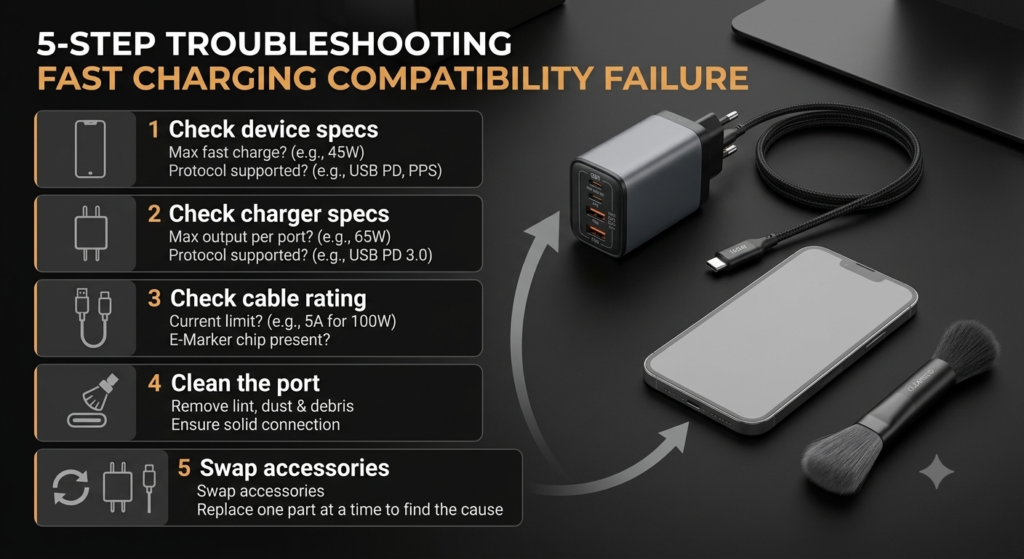
5. 5-Step Quick Troubleshooting Guide
When fast charging stops working, you do not need to buy new accessories right away. Follow these steps to find the cause:
Step 1: Confirm what your device supports
Check the official specifications of your phone or laptop to see which charging protocols it supports and its maximum fast charging power.
Step 2: Check your charger’s specifications
Look at the printed parameters on your charger to confirm which protocols it supports and its output power levels. Check for overlap with your device.
Step 3: Verify your cable meets requirements
Make sure your cable can handle the required power. For high-power charging (65W and above), confirm it has an E-Marker chip. If you are using an old or no-name cable, try swapping in a known-good cable first.
Step 4: Inspect your ports
Check for dust or debris inside the ports on your device and charger. Look for dark, oxidized contacts. You can gently clean ports with a dry, soft brush, then plug the cable back in firmly.
Step 5: Test with replacement accessories
If the above steps do not help, use the swap method to isolate the problem:
- Try a different charger that you know works properly
- Try a different charging cable that you know works properly
- Try your charger and cable on a different device This will help you tell if the issue is with the charger, cable, or your device itself.
6. How to Avoid Fast Charging Compatibility Issues
Follow these tips to reduce compatibility problems in daily use:
- Prioritize chargers with universal standards Choose chargers that support USB PD first. If your device supports PPS or UFCS, look for chargers with those as well. Universal protocols have the best compatibility and work across most devices.
- Use cables rated for your power needs Pick a cable that matches your device’s fast charging power. For high-power scenarios above 65W, always use a certified USB-C cable with an E-Marker chip. Do not rely on random free cables from other products.
- Avoid cheap, unbranded accessories Stick to reliable, certified products from reputable brands. Avoid cheap no-name items with vague or fake specifications — they cause compatibility issues and can be unsafe.
- Keep your ports clean Gently clean your device and charger ports regularly with a dry soft brush to prevent dust buildup. Keep ports dry and away from moisture to avoid corrosion and poor connections.
- Keep your device system updated Install system updates for your phone and laptop. Manufacturers often release updates that improve charging compatibility and fix known recognition bugs.
7. Frequently Asked Questions
7.1 Why does it say “fast charging” but still charge slowly?
Seeing the fast charging indicator only means the protocol handshake succeeded — it does not mean you are getting maximum power. If your battery is nearly full, your device is hot, or apps are using a lot of power in the background, the system will automatically lower the actual charging power.
7.2 Why does the same charger charge different phones at different speeds?
Every phone has different supported protocols and maximum power limits. The charger just provides available power levels. The actual charging speed is determined by the phone’s own charging specifications and battery management system.
7.3 Why did fast charging stop working after I changed cables?
Most likely, the new cable does not meet the required specifications. It may not carry enough current, or it may not have an E-Marker chip. When the system detects the cable is not capable, it limits power and disables fast charging.
7.4 Why does my 100W charger only charge my phone at around 20W?
There are two common reasons: First, your phone may only support around 20W fast charging to begin with — the device’s limit is always the ceiling. Second, your cable may not support high power, or the charger and phone do not share a high-power protocol, so they fall back to basic PD speeds.
7.5 Why does fast charging slow down when it is too hot or too cold?
Lithium-ion batteries are very sensitive to temperature. Extreme heat or cold affects battery performance and safety. When the system detects temperatures outside the ideal range, it reduces charging power. This is a normal battery protection feature.
7.6 Why does fast charging slow down when I plug more devices into my multi-port charger?
Nearly all multi-port chargers use a shared total power design. For example, a 100W dual-port charger delivers 100W on one port alone, but splits that power when both ports are in use. The per-port maximum drops, so fast charging slows down.
7.7 Will compatibility failure damage my phone or battery?
No. Compatibility failure is essentially the system recognizing that conditions are not ideal and switching to a safer standard charging mode. It is a protection mechanism, and under normal circumstances, it will not damage your phone or battery.
8. Summary
For fast charging to work properly, all of these must be true: the device and charger share a common fast charging protocol, the cable can handle the required power, the ports make a solid connection, and the battery temperature and system state allow fast charging.
Fast charging compatibility failure is rarely caused by one broken accessory. It is usually the result of a combination of factors: the charger, cable, device, ports, and environmental conditions. Most cases are normal protection or speed-limiting mechanisms, nothing to worry about. By following the troubleshooting steps above, you can almost always find the cause and restore normal fast charging.