
Introduction: Why Understanding Port Roles Is the First Step to Mastering Fast Charging
Most people have run into this common confusion: you use the exact same charging cable and charger, but get wildly different charging speeds with different devices. Sometimes you buy a higher-wattage charger, yet your phone charges no faster than before.
The answer to all these questions lies in the most fundamental concept of fast charging: port roles. At its core, fast charging is the directional transfer of electrical power combined with smart negotiation between devices. Once you understand the three port roles—power supply, power receiving, and dual-role—you will grasp the underlying logic of almost every charging scenario. You will be able to choose accessories wisely and avoid common pitfalls, making this the perfect first step into the world of fast charging.
The Basics: Why Fast Charging Ports Have “Roles”
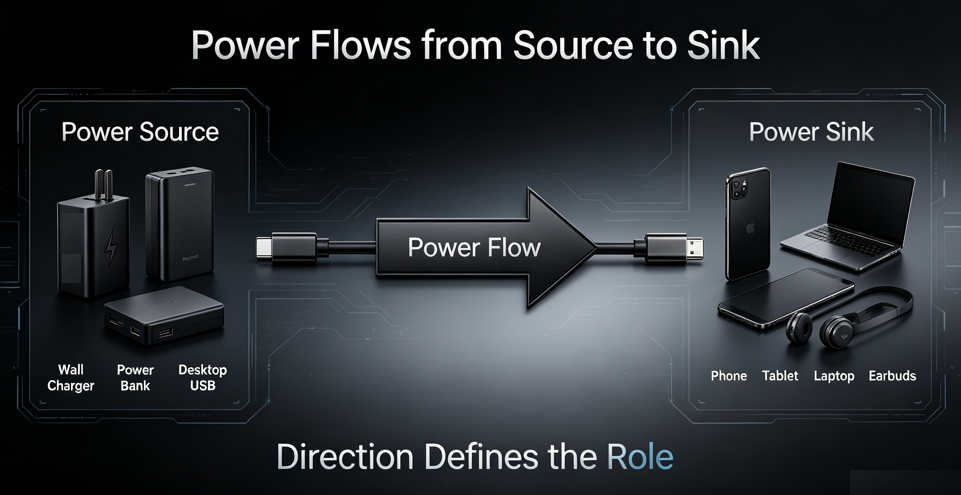
Port roles are defined by one simple rule: the direction of power flow. The port where electricity flows out is the power supplier; the port where electricity flows in is the power receiver. Just like shipping a package requires a sender and a receiver, power transfer needs two clearly defined ends to work properly and reliably.
You may have heard of “fast charging protocols”—how do they relate to port roles? Put simply, roles set the identity framework for both sides. Only after we confirm which side supplies power and which receives it can the devices use protocols as their shared “language” to negotiate charging power. Without defined roles, there would be no way to know which device initiates communication and which responds, making protocols useless.
Port roles have also evolved alongside connector designs. Older charging connectors had permanently fixed roles: USB-A ports were always built for power output, and Micro USB ports were always built for power input. Their identities were set the moment you plugged them in. It was not until the Type-C connector arrived that port roles became flexible. A single Type-C port can both supply and receive power, which is one of the key reasons it has become the universal standard today.
Power Supply Port (Source): The Provider of Electrical Power
A power supply port, often called a Source, is a port that actively delivers electrical energy. Think of it as the “provider” in the charging process.
You encounter power supply ports every day:
- The output port on wall chargers and GaN chargers
- The “output” ports on portable power banks
- Car chargers, and USB ports on desktop or laptop computers
- Built-in USB charging ports on power strips
In the fast charging process, power supply ports have three core responsibilities:
First, they show their full capabilities by offering multiple voltage and current levels, such as 5V/2A, 9V/2A, or 20V/3A.
Second, they respond to requests from the power receiving side, adjusting their output power in real time to match what the device needs, within their own limits.
Third, they provide basic safety protection, automatically cutting off power if overvoltage, overcurrent, or a short circuit occurs to prevent damage.
There is one common misconception to correct here: the power supply port only determines how much power can be delivered, not the actual final charging speed. Think of a gas station that offers multiple fuel grades—the station provides the options, but the driver decides which fuel to use and how much to pump.
Power Receiving Port (Sink): The Consumer of Electrical Power
On the opposite side is the power receiving port, also called a Sink. This is the port that takes in electricity to charge its own device—the “user” in the charging relationship.
Power receiving ports are everywhere in daily life:
- Charging ports on phones, tablets, and laptops
- Charging ports on small gadgets like wireless earbuds and smartwatches
- The “input” port on power banks, and charging ports on portable speakers, desk lamps, and other small accessories
In the fast charging flow, the power receiving port is actually the real decision-maker. It has three key jobs:
First, it identifies all the power levels the power supply port supports, to understand the full capabilities available.
Second, it requests the appropriate voltage and current based on its own battery status—it asks for fast charging when the battery is low, and slows down as the battery nears full charge.
Third, it controls the entire charging process to protect the built-in battery from damage caused by overcharging or overheating.
This leads to a very important fact: the final charging speed is always determined by the power receiving device. If your phone only supports 25W fast charging at most, even a 100W charger will not make it charge any faster than 25W.
Dual-Role Port (DRP): The All-in-One Port That Can Send and Receive Power
Unlike the two fixed-role ports above, a dual-role port (abbreviated as DRP) can dynamically switch between being a power supply and a power receiver. One port handles both functions.
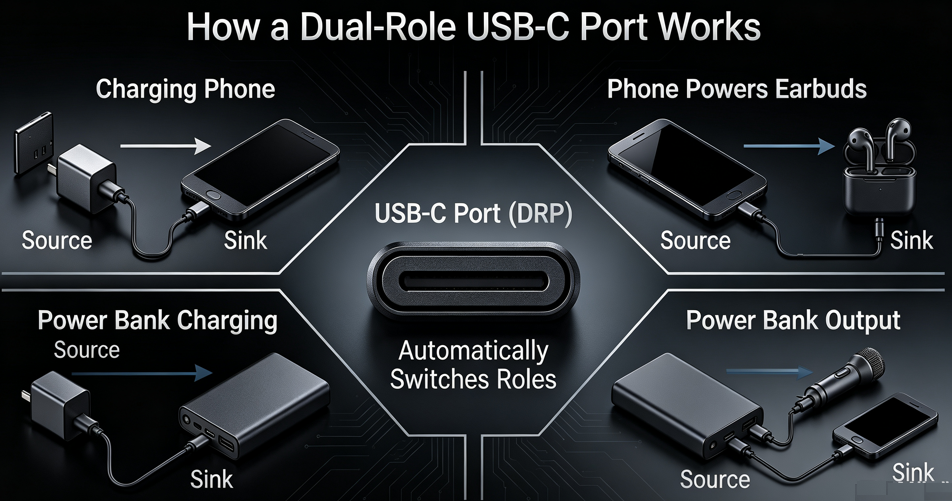
Nearly all dual-role ports today use the Type-C connector, and this is no accident—it is built into the hardware design.
Older connectors have inherent limitations: USB-A was designed from the start only for power output, and Micro USB only for power input. Neither has the hardware to switch roles. The Type-C connector, however, has dedicated CC pins that act as the core hardware for automatic role switching. When two Type-C devices connect, they first communicate through these pins and automatically set their respective identities.
Dual-role ports are extremely common in everyday use. Here are four typical scenarios:
- When a mobile phone is connected to a charger via a Type-C cable, the phone acts as the receiving end and the charger serves as the supplying end.
- When a mobile phone is connected to a USB drive or a wired headset via a Type-C cable, it automatically switches to the power supply mode, providing power to the external device, which is commonly known as OTG reverse power supply.
- When two phones are connected directly with a Type-C cable for mutual charging, the two devices negotiate. The phone with more battery takes the power supply role, and the lower-battery phone takes the receiving role.
- The Type-C port on a power bank handles both input and output. It acts as a receiver when recharging the bank itself, and as a supplier when charging a phone.
High-quality dual-role Type-C ports can do even more: they can deliver power, transfer data, and output video all at the same time. For example, a single Type-C cable connecting a laptop to a docking station can charge the laptop, transfer files, and connect to an external monitor—all through one port.
One common myth to clear up: not every Type-C port supports full dual-role functionality. Some budget devices only use Type-C for one-way charging and cannot supply power outward. Others only support charging and not data transfer, so it is worth checking specifications when shopping for devices or accessories.
How They Work Together: The Full Negotiation Process of a Fast Charge
Now that we know the three port roles, let us walk through how a complete fast charging session works. The whole process happens in milliseconds, far too fast for you to notice, but the logic is very straightforward.
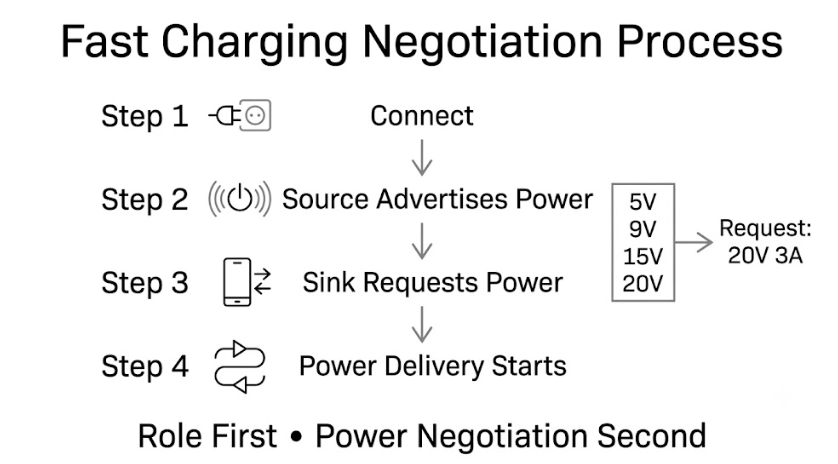
Step 1: Physical connection, role assignment first. The moment you plug in the cable, both sides confirm their identities and define the power supplier and receiver. If two dual-role devices are connected, they negotiate their roles first.
Step 2: The power supply broadcasts its capabilities. Once roles are set, the power supply port lists all the power levels it supports, telling the other device every charging option it can provide.
Step 3: The power receiver makes a request. The receiving device compares its own needs with the available power levels, picks the best match, and sends a charging request to the power supply.
Step 4: Both sides confirm, and fast charging begins. The power supply receives the request, confirms it can deliver, adjusts its output to the matching power level, and the two devices enter a stable fast charging state.
In short, the whole process follows the rule of “define identities first, negotiate power second”. Dual-role devices always finish role negotiation before moving on to power negotiation.
Common Questions: Practical Port Knowledge to Avoid Mistakes
1. Why can’t USB-A ports do reverse charging?
By design, the USB-A standard defines the port as a fixed power output. Its pin layout and hardware structure do not support receiving power, so it cannot act as a power receiver and therefore cannot do reverse charging. There are rare modified exceptions, but they are not intended for everyday use.
2. Why do bidirectional fast-charging power banks all prefer Type-C ports?
The simplest reasons are space savings and convenience. A single Type-C port can handle both input (recharging the bank) and output (charging your devices). There is no need for separate input and output ports, so the power bank can be smaller and lighter. Users also do not have to remember which port is which—it works either way, automatically.
3. Will using my phone to reverse-charge other devices damage its battery?
Normal, occasional use will not damage your battery. Reverse charging is designed to work within the battery’s safe operating range, with full protection circuits built in. However, frequent, long-duration high-power reverse charging will add to the battery’s charge-discharge cycles and slightly speed up normal battery aging—this is the same as regular daily use and charging. For everyday casual use, there is nothing to worry about.
4. If they are both Type-C ports, why can some charge laptops and others only charge phones?
There are two main reasons. First, power limits differ. Laptops typically need 65W or more to charge, while many phone Type-C ports only support much lower power levels that cannot meet a laptop’s needs. Second, protocol support differs. Most laptops use the PD fast charging protocol, and some budget device Type-C ports do not support this protocol, so they cannot charge laptops.
5. Can old Micro USB devices do reverse power supply?
Almost all of them cannot. Micro USB was designed as a power receiving port, with no pins or circuitry built in for reverse power output. A tiny number of specially modified devices can do it, but this is extremely uncommon and not something you should expect for daily use.
Summary
To wrap up, here are the core traits of the three port types in one sentence each: Power supply ports deliver energy and act as the provider. Power receiving ports take in energy and act as the decision-maker for speed. Dual-role ports can do both and are flexible all-around performers.
Once you understand port roles, you will no longer be confused by fancy technical specs when shopping for chargers, cables, or power banks. You will be able to tell which accessories work with your devices and avoid unnecessary purchases.