
If you’ve ever grabbed your laptop charger mid-use and yelped because the plug was burning hot, or touched an extension cord powering a space heater and found it warm to the touch, you’ve probably wondered: Is this normal? Did I buy a cheap, unsafe cable? Could this start a fire?
Cable overheating is extremely common, but the risks range from totally harmless to a potential fire hazard. This guide breaks down everything regular users, renters, and people living abroad need to know: why cables heat up, why low-quality cables run hotter, how to spot dangerous levels of heat, and what to do when you find a problem.
The Simple Science: Why Cables Heat Up When You Use Them
You don’t need to memorize physics formulas to understand cable heat. Here’s the plain-English version:
Think of electricity like water flowing through a pipe. The wire conductor is the pipe, and the friction of water rubbing against the pipe walls is like resistance—the force that opposes the flow of electricity. The higher the resistance, or the higher the current (the amount of electricity flowing), the more heat is generated.
One critical rule to remember: Heat is proportional to the square of the current. In simple terms, if you double the current, you get roughly 4x as much heat. That’s why even a small increase in power draw can make a cable heat up surprisingly fast. For reference, the formula for heat power is ( P = I^2R ) (I = current, R = resistance), but you only need to remember the “squared current” rule.
For context: Earbud cables carry almost no current, so you never feel them warm up. Space heaters, electric kettles, and induction cooktops draw very high current, so their power cords are far more likely to feel warm.
Five key factors determine how much a cable will heat up:
- Conductor material: Pure copper has excellent conductivity and low resistance. Aluminum, iron, and low-purity scrap copper have much higher resistance, so they generate far more heat at the same current.
- Conductor cross-sectional area: This is just the thickness of the wire inside the jacket. Thicker wire has lower resistance and can safely carry more current.
- Cable length: For two cables of the same material and thickness, the longer one has higher total resistance, leading to more voltage drop and more heat.
- Load current: Higher-power devices draw more current. For devices of the same power, lower voltage means higher current—this is why identical wattage appliances cause more cable heat in 120V regions (like North America) than in 230V regions (like Europe, the UK, or Australia).
- Contact resistance and cooling: Loose plugs, oxidized terminals, coiled cables, or cables covered by blankets all either add extra resistance (creating more heat) or trap heat so it can’t escape, raising the cable’s overall temperature.
Common myth: “Thicker cables are always safer”
Not true. Low-quality cables often use a thick, bulky outer jacket to hide extremely thin internal conductors. A cable that feels thick in your hand might have less than half the conductive copper of a slimmer, well-made cable.
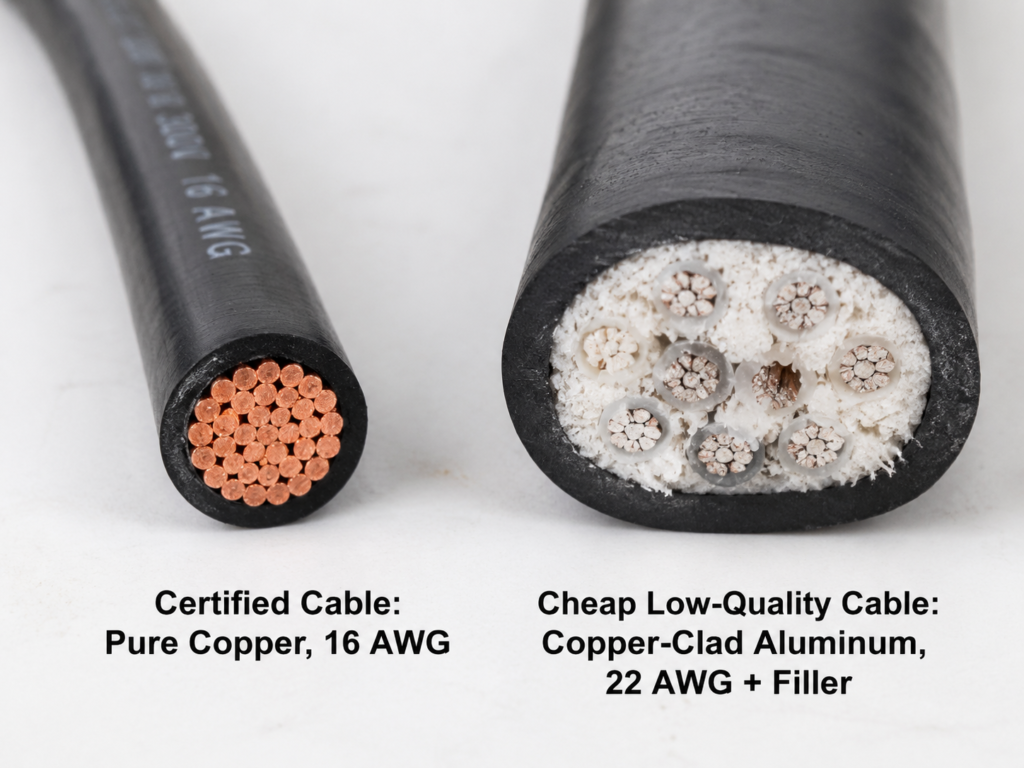
Even a thick copper conductor can overheat if the material is low-quality, the connectors are poorly made, or the insulation is substandard. Short cables aren’t immune either—while they have slightly lower total resistance, they can still overheat or cause a fire if overloaded, have poor connections, or use cheap insulation.
Finally, “it works fine” is not a safety test. Many devices and chargers detect low-quality cables and automatically reduce power output to avoid overheating, hiding the problem until you plug in a higher-power device and the risk spikes.
Core Reasons Low-Quality Cables Overheat Far More Often
Low-quality cables run hotter because almost every cost-cutting shortcut they take either increases resistance or reduces the cable’s ability to handle heat. Here’s how it works:
1. Fake conductor materials that raise resistance
Certified cables use standard-grade pure copper for conductors, which has consistent, low resistance. To cut costs, low-quality cables often use copper-clad aluminum, pure aluminum, scrap copper, or even iron wire instead. The worse the conductivity of the material, the higher the resistance, and the more heat it generates at the same current.
For reference: At room temperature (~20°C / 68°F), aluminum wire of the same length and thickness has roughly 1.6x the resistance of copper wire. Iron has far higher resistance than either, making it extremely dangerous for power use.
How to check (safely): Pure copper has a reddish-pink color. If you have an old, unplugged, discarded cable, scrape the surface of the conductor gently—silvery-colored metal inside almost always means copper-clad aluminum or pure aluminum. If the conductor sticks to a magnet, it contains iron or other magnetic materials and is not safe for power use.
Never strip a live cable. Never burn cables to test material (plastic fumes are toxic and flammable). Never tamper with in-wall or fixed wiring.
2. Undersized conductors (false gauge labeling)
Conductor cross-sectional area is the real thickness of the wire inside the jacket. It’s measured in square millimeters (mm²) in most of the world, or in AWG (American Wire Gauge) in North America—lower AWG numbers mean thicker wire.
Many low-quality cables lie about their specs: A cable labeled for 10A might only have wire thick enough for 6A. When you plug in a 10A device, the cable is effectively overloaded, and it will heat up quickly.
This is extremely common with cheap power strips labeled 0.75mm² that have far thinner internal conductors, “high-power” extension cords with tiny wire cores, and “100W fast charging” cables that can’t even handle 5A of current.
How to check: First, look for clear, permanent labeling of rated current, wire gauge, and power capacity on the cable jacket. Compare the cable’s thickness and weight to a known good cable of the same rated spec. For precise measurements, use a caliper or ask a professional to check. Note that for stranded wire, you can’t just count the number of copper strands—you have to check the thickness and material of each individual strand, since lots of very thin strands can still add up to too little total area. Also, printed labels on cheap cables are often fake, so don’t trust them alone.
3. Poor insulation and jacket materials that can’t handle heat
Many people assume thicker insulation is better, or thinner insulation cools faster. Both are wrong. The main job of insulation is to prevent electric shock, short circuits, and physical damage, while providing temperature resistance and flame retardancy. What matters is the grade of the material, not the thickness.
Low-quality cables use recycled plastic, low-grade PVC, and heavy filler materials, with uneven jacket thickness, low temperature ratings, and poor flame resistance. These cables can soften, deform, crack, or become sticky at relatively low temperatures, and they often release strong chemical fumes. As they age, they become far more likely to cause electric shock or short circuits.
Certified PVC cables typically have temperature ratings of 70°C, 90°C, or 105°C, while silicone, rubber, and TPE cables have different performance characteristics—always check the product label and applicable standards.
How to check: If a cable has a strong chemical smell, flaks or feels sticky when touched, or whitens/cracks after being bent gently, avoid using it—especially for high-power devices.
4. Bad plugs, connectors, and terminals that create local hot spots
If you’ve ever noticed a cable that feels cool along its length but is burning hot at the plug or port, that’s almost always caused by poor contact. Small contact area, weak plug grip, oxidized metal surfaces, and loose crimps or solder joints all increase contact resistance, concentrating heat right at the connection point.
Low-quality cables cut corners constantly here: Plug blades are thin and flimsy with weak spring tension, USB-C or Lightning contacts are poorly made and prone to dirt and wear, power strips use thin internal copper strips that don’t grip plugs tightly, and internal connectors are often poorly crimped and come loose over time.
This creates a dangerous cycle: Heat from the contact point burns and oxidizes the metal surface, which increases resistance further, creating even more heat. Eventually, the plug can burn completely black or melt.
How to tell if it’s the cable or the outlet: Swap in a known good cable, or try the cable in a different outlet. If every cable gets hot in the same outlet, the problem is almost certainly the outlet itself or the in-wall wiring, not the cable.
5. Poor internal construction or physical damage that raises local resistance
Most cables use stranded copper wire twisted together. If the stranding is poorly done, several strands are broken, there aren’t enough copper strands total, or non-conductive filler is used to pad out the cable, the effective conductive area drops, or hot spots form at weak points.
Physical damage is also extremely common: Repeated bending at the connector root, pinching by doors or furniture, or hard yanking on the cable can break internal copper strands even when the outer jacket looks completely intact. The broken section has higher resistance, and it will heat up locally during use.
Filler materials inside the cable don’t conduct electricity, but low-quality fillers make the cable structure loose, uneven, and less durable, while also reducing cooling performance. Note that shielding (used for signal interference protection in data cables) is almost never the main cause of power cable overheating—don’t blame signal issues on heat.
If one small section of your cable is unusually hot, the bend point runs warm, or the cable feels hard or bulging in one spot, stop using it immediately—it almost certainly has internal damage.
Bonus: Why fast-charging cables overheat so often
USB-C fast charging works differently from standard power cables. High-power charging cables depend on more than just thick wire: They also need support for the correct fast-charging protocol, an E-marker chip (a tiny built-in chip that tells your charger and device how much current the cable can safely handle), high-quality connector contacts, proper current ratings, and matching current-limiting logic from the charger and device.
Most standard USB-C cables are rated for 3A of current. 100W charging (typically 20V/5A) requires a 5A-rated cable with a compliant E-marker chip. 240W charging (part of the USB PD 3.1 EPR standard) requires the cable, connectors, charger, and device all to support the correct voltage and current levels to operate safely.
Cheap fast-charging cables often fake these ratings: A 3A cable labeled “100W” will either force your charger to reduce power (slowing charging) or run at high current, causing the cable or connectors to get dangerously hot.
You can diagnose the issue by where the heat is: If the entire cable runs warm, the problem is usually wire resistance, thickness, or material. If only the connector or port is hot, it’s usually dirty contacts, poor contact, or bad connector build quality. Don’t trust high wattage labels blindly—fake ratings trick you into using more power than the cable can handle, increasing risk.
Scenarios That Multiply Risk: Bad Cables + Bad Use = Danger
A low-quality cable might not fail immediately on its own, but when paired with high-risk use cases, the danger skyrockets. Watch out for these common combinations:
High-power devices: Current exceeds the cable’s real capacity
Space heaters, air conditioners, induction cooktops, electric kettles, ovens, electric water heaters, and hair dryers are all common high-power devices. Since heat scales with the square of current, even a small overload can cause temperatures to rise extremely fast.
A quick reminder for 120V region users: A 1500W device draws ~12.5A at 120V, but only ~6.5A at 230V. That means 120V users need far higher current capacity cables for the same wattage appliance, and should be extra careful with cable specs.
Safety tip: Plug high-power devices directly into wall outlets whenever possible. Avoid extension cords for high-power use, and never use travel plug adapters with high-power devices.
Poor cooling: Cables that are coiled, pinched, covered, or hidden
Many people coil excess extension cord into a neat bundle, tuck power strips under couches or cabinets, or run cables under rugs to keep things tidy. But the same amount of heat, if trapped without ventilation, will build up continuously and raise temperatures higher and higher.
There’s no simple way for regular users to calculate how much to reduce load for coiled cables—it depends on cable spec, number of coils, ambient temperature, and load size. The safest rule is to always fully uncoil extension cords and cord reels before use, especially for high-power loads. Most retractable cord reels have a lower power rating when not fully extended—always follow the label.
Poor contact and multiple adapters: Heat starts at the connection
Loose plugs, worn out outlets, power strip outlets that don’t grip plugs tightly, stacked travel adapters, or adapter cords plugged into power strips all add extra contact resistance. In many cases, the contact resistance at the plug is higher than the resistance of the entire cable itself, causing the connection point to heat first, sometimes even burning black.
If the plug or port is much hotter than the cable itself, suspect poor contact first. If the wall outlet plate itself feels hot, the problem is the outlet or in-wall wiring, not the cable.
Stop using loose outlets or burnt plugs immediately. Don’t try to “fix” them with tape or by bending the plug blades—this only makes the risk worse over time.
High heat, humidity, or outdoor use: Insulation ages faster
Cables left in hot cars, near stoves or ovens, on sunny balconies, out in the rain, or in damp basements age far faster than cables used indoors at room temperature.
High ambient temperatures reduce the cable’s available temperature margin—even a certified cable used at full load in a hot environment can overheat, and low-quality cables are far worse. They have lower temperature ratings, poor flame retardancy, and age quickly, so they soften, crack, and leak current much faster in hot conditions. Humidity and dust also increase the risk of electric shock, corrosion, and poor contact.
Always use cables rated for outdoor or damp-location use in those environments. Don’t use standard indoor cables outdoors long-term.
Multiple devices and long-term continuous full load
It’s common to stuff a single power strip full of devices: a space heater, electric kettle, laptop, and phone chargers all plugged in at once, or a gaming PC or high-performance laptop running for 8+ hours a day.
Total current through a power strip is the sum of the current of every device plugged into it. Over long continuous use, heat builds up slowly. Even if no single device exceeds the cable’s rating, the total load can easily exceed the power strip and cable’s limit, causing overheating.
Always calculate total power and current for all devices plugged into a power strip, not just the largest one. The power strip’s rating, the cable’s rating, and the wall outlet’s capacity all need to match. More outlets doesn’t mean more total power capacity—it just means you can plug in more low-power devices.
No Tools Needed: 3 Steps to Check Cable Safety
You don’t need special equipment to spot most dangerous cables. Follow these three simple steps:
Step 1: Check labels and build quality
First, look for clear, permanent labeling on the cable jacket: rated voltage, rated current, wire gauge (mm² or AWG), power capacity, and temperature rating. If a cable has no basic specs printed on it at all, it’s almost certainly low-quality.
Next, check safety certifications:
- North America: Look for UL, ETL, or CSA marks (third-party safety certifications).
- Europe: The CE mark is a manufacturer’s self-declaration, not a third-party safety certification. For independent testing, look for TÜV, VDE (Germany), BSI, or UKCA (UK) marks.
- Always confirm the certification matches the product type and your region—fake certification marks are extremely common.
Then inspect the jacket: Look for cracks, stickiness, flaking, hardening, strong chemical smells, or printed text that rubs off easily. Jackets made from recycled plastic usually have a strong odor, crack easily, and turn white when bent.
Finally, check the connectors: Plug blades should be straight, tight, and free of discoloration. The base of the connector should have strain relief to prevent bending damage. Wobbly plugs or thin blades that bend easily are a clear sign of a low-quality cable.
Only inspect internal conductors on old, unplugged, discarded portable cables. Never strip a cable that’s in use, and never tamper with in-wall wiring.
Step 2: Feel the temperature and locate hot spots
Always test safely: Keep your hands dry, don’t touch exposed metal, and don’t touch damaged insulation. Check the middle of the cable, the base of both connectors, the plastic near plug blades, the wall outlet plate, and the charger housing.
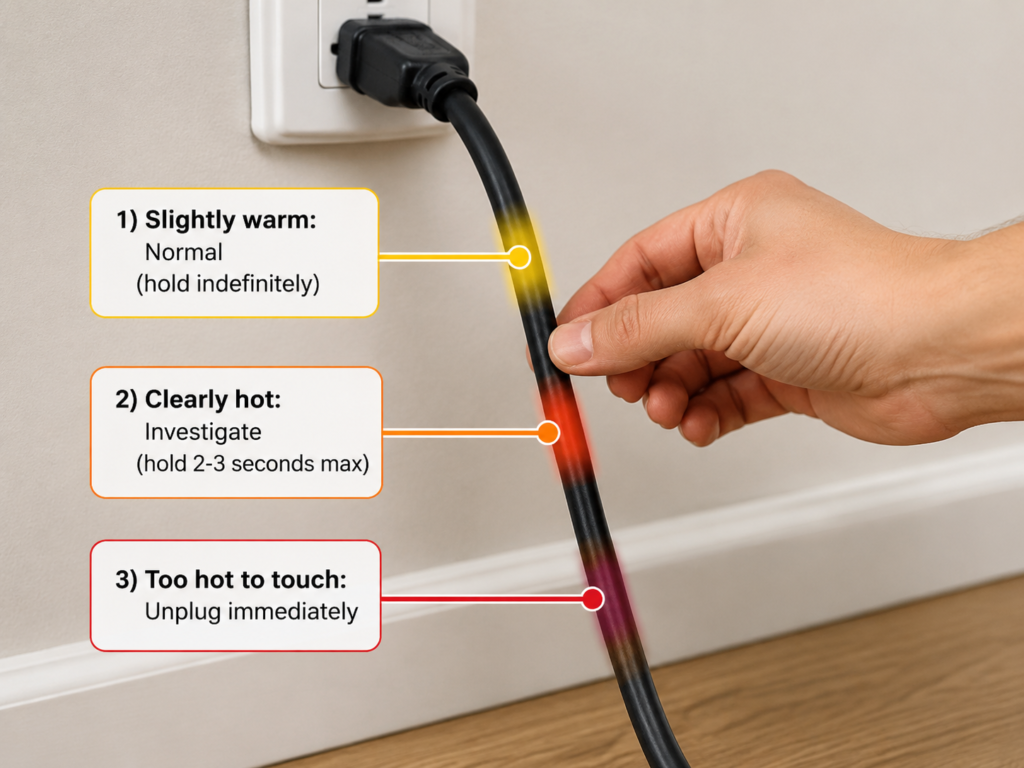
Use this simple touch test to gauge risk:
- Slightly warm, can hold indefinitely: Usually normal, monitor periodically.
- Clearly hot, can only hold for 2–3 seconds: Reduce load immediately and investigate the cause.
- Too hot to touch, or accompanied by burning smell, deformation, or smoke: Unplug immediately and stop using the cable.
The location of the heat tells you what’s wrong:
- Whole cable evenly warm/hot: Usually caused by overload, undersized wires, or low-quality conductor material.
- Only plug/port hot, cable cool: Usually poor contact.
- One small section hot, bulging, or hard: Usually internal broken strands or damage—stop using immediately.
- Wall outlet plate itself is hot: The problem is the outlet or in-wall wiring. Stop using the outlet and contact a licensed electrician.
Step 3: Check for stacked risk scenarios
Ask yourself these questions about how you’re using the cable:
- Is it powering a high-power device?
- Is the cable coiled, pinched under furniture, under a rug, or in an enclosed space?
- Are you using multiple adapters, travel converters, or daisy-chained power strips?
- Is it being used in a hot, humid, outdoor, or sunny location?
- Is it running continuously for long periods, especially unattended?
If the cable shows any signs of being low-quality and any of these scenarios apply, replace it with a certified cable as soon as possible—don’t gamble with safety.
Things you should NEVER do
- Never strip, cut, or disassemble plugs on live cables, even if you think the switch is off.
- Never burn cables to test material—plastic fumes are toxic and flammable.
- Never cut a hot cable shorter and keep using it—you haven’t fixed the root cause, and you’ll create new risks.
- Never wrap burnt, damaged, or deformed sections with tape and keep using them—tape only holds things together, it doesn’t fix insulation or overheating issues.
- Never disassemble in-wall wiring, fixed sockets, or electrical panels—always hire a licensed local electrician.
Advanced: How to Estimate Overheating Risk and Avoid Myths
Start with two numbers: Device current and cable rated current
Calculating your device’s current is simple:
Current (A) = Power (W) ÷ Voltage (V)
For example: A 1500W space heater draws 12.5A at 120V, or ~6.5A at 230V. That’s why 120V users need to pay extra attention to cable current ratings.
Certified cables will clearly list their rated current, wire gauge, and power capacity on the label. Low-quality cables often lie about these ratings, so don’t take the label at face value if the cable feels flimsy or uncertified.
For fast-charging cables, you also need to check protocol support, 3A/5A current rating, and the presence of a compliant E-marker chip. Even thick wires won’t work safely if the charging protocol doesn’t match.
Use the 80% safety margin rule for long-term use
For continuous, long-duration loads, it’s a good conservative practice to keep the device’s current under 80% of the cable’s rated current. This is a simple, easy-to-remember rule of thumb for regular users, not a replacement for local electrical codes or product instructions.
If you suspect a cable is falsely labeled, uncertified, or noticeably thinner than a known good cable of the same rating, never use it at its labeled full capacity—replace it with a proper cable. For example: A no-name 10A extension cord that feels light and thin should never be used with a 10A space heater. Use a certified higher-rated cord, or plug the heater directly into the wall.
4-Level Cable Overheating Risk Chart
| Risk Level | Common Signs | What to Do |
|---|---|---|
| Low Risk | Certified cable, load well below rated limit, good ventilation, plug fits tightly, cable only slightly warm | Use normally, inspect periodically |
| Medium Risk | Certified cable but load near max, high ambient temp, slightly coiled cable, cable feels warm | Monitor temperature, reduce continuous use time, improve ventilation |
| High Risk | Uncertified/fake-rated cable powering high-power devices, cable covered/tightly coiled, port slightly warm, no burning smell or deformation | Stop high-load use immediately, replace with a proper cable as soon as possible |
| Extreme Risk | Burning smell, burnt/discolored plugs or cable, deformation, smoke, sparks when plugging in, socket plate very hot | Unplug immediately, do not use, contact a licensed electrician if needed |
When overheating isn’t the cable’s fault
Not all overheating is caused by a bad cable. These issues can also cause heat:
- Worn outlets: Loose socket clips or loose in-wall wiring will make any plug run hot, no matter how good the cable is.
- Device faults: Internal short circuits, aging components, or abnormal power draw can push too much current through the cable.
- Bad chargers: Faulty output or excessive charger heat can make it look like the cable is the problem.
- Poor environment: High heat, enclosed spaces, or coiled cables will make even certified cables run warmer than usual.
To troubleshoot, swap in a known good cable, try a different outlet, and reduce the load one step at a time. If the cable still overheats after these checks, stop using it and consult a professional.
Common myths busted
- “Thicker cables are always safer”: False. A thick outer jacket doesn’t mean thick internal conductors. Even thick copper wires are unsafe if the material is low-quality, connectors are poorly made, or insulation is substandard.
- “Short cables don’t overheat”: False. Short cables have slightly lower resistance, but they can still overheat or short out if overloaded, have poor contacts, or use bad insulation.
- “If it works, it’s fine”: False. Overheating is often gradual—it starts with slightly elevated temps, then slowly burns connectors and ages insulation. By the time you see visible damage, it’s already dangerous. Many devices also throttle power to compensate for bad cables, hiding the issue.
- “More certification logos = safer”: False. Fake certifications, or certifications for the wrong product type (e.g., a data cable certification used on a power cable) are useless. What matters is that the certification is legitimate, matches the product, and is valid for your region.
- “Old cables are fine if they’re not broken”: False. Even if the jacket looks intact, insulation can be aged, plugs oxidized, or internal strands broken. Old cables need regular inspections.
- “Higher fast-charging wattage labels are better”: False. Fake high-wattage cables trick you into using more power than they can handle, causing overheating or device damage. Always buy fast-charge cables with clear specs and proper certifications.
What to Do If Your Cable Overheats (Plus Daily Prevention Tips)
Correct steps for handling abnormal overheating
- Cut power immediately, stop using the cable. Don’t pull the plug with wet hands, and don’t touch hot parts or exposed metal. If the plug or outlet is very hot, smoking, sparking, or smells burnt, turn off the corresponding circuit breaker first if you can’t safely reach the plug. Wait for everything to cool completely before handling. Never use metal objects or uninsulated tools to pull plugs.
- Locate the hot spot: Figure out if the heat is coming from the whole cable, the plug/port, the wall outlet plate, or the device/charger itself.
- Troubleshoot step by step: Swap in a known good cable, try a different outlet, reduce the load. Don’t return to full load until you’ve found and fixed the cause.
- Call a professional if needed: If the wall outlet plate is hot, sparking, smells burnt, or you can’t find the root cause, don’t disassemble anything—contact a licensed local electrician.
Cables you should throw away immediately (don’t try to fix)
- Jackets that are cracked, have exposed copper, are bulging, deformed, sticky, or severely hardened (insulation is compromised).
- Plugs that are burnt, discolored, loose, or have bent blades (contact issues are guaranteed).
- Cables that smell burnt, spark, or smoke during use (extreme risk, discard right away).
- Cables that were severely crushed, submerged in water, or exposed to long-term sun/extreme heat (internal damage is likely).
- Cables that repeatedly overheat during high-power use with no clear cause (don’t risk it, replace it).
Cable buying tips to avoid low-quality junk
- Choose cables by power/current rating, not just “does it fit.” A matching connector doesn’t mean the cable can handle the power.
- For high-power devices, use cables with matching current ratings, and avoid thin extension cords whenever possible.
- Prioritize products with clear specs, region-matching safety certifications, and reputable brands/sellers. Don’t buy high-power cables that are suspiciously cheap.
- Travel plug adapters only change plug shape—they don’t handle high power, and they don’t convert voltage. Always check specs before plugging in high-power devices.
- Avoid “no-name, no specs, no certification” high-power cables—the risk is far too high.
Daily prevention tips to reduce overheating risk
- Plug high-power devices directly into wall outlets whenever possible. Minimize use of extension cords and power strips for high-power loads.
- Fully uncoil extension cords, cord reels, and retractable cords before use, especially for high power.
- Never daisy-chain power strips, and never stack multiple travel adapters. More connections = more contact risk.
- Inspect regularly used cables periodically, especially connector bend points and plug blades. Replace at the first sign of damage.
- Never cover warm or hot cables with rugs, blankets, or furniture—keep them well-ventilated.
- Even certified cables can’t be safely overloaded. Replace damaged cables right away, don’t “make do.”
Final Takeaways: 5 Things You Should Know After Reading This
Cable overheating seems like a small issue, but the safety risks can be severe. By now, you should be able to:
- Explain why cables overheat: Electricity encounters resistance in conductors, generating heat. Low-quality cables run hotter because they use poor materials, undersized wires, and bad connectors, all of which increase resistance.
- Tell the difference between normal slight warmth, abnormal overheating, and danger signs that require immediate action.
- Do a basic risk check with no special tools: Inspect labels and build quality, feel temperature and locate hot spots, and review your use case for stacked risks.
- Identify risk-multiplying scenarios: High-power loads, coiled/covered cables, poor contact, hot/humid environments, and multiple adapters—and avoid combining low-quality cables with these scenarios.
- Handle abnormal overheating safely: Cut power first, troubleshoot step by step, replace damaged cables, or call a professional when needed, instead of risking continued use.
If a cable is abnormally hot, smells burnt, is deformed, or has localized hot spots, stop using it immediately and replace it with a certified product. For issues with fixed sockets, in-wall wiring, or electrical panels, always contact a licensed local electrician.