
Have you ever found an unclaimed USB flash drive in a corner of a cafe, on the floor of a parking lot, or on a bench in a company corridor? Have you ever had the thought: plug it into the computer and have a look, maybe you can find the owner, or… there’s something interesting inside?
Or when you are rushing to catch a flight on a business trip and your phone is almost out of power, do you casually plug it into the public USB charging port on the airport wall?
If you usually pay attention to tech security, you have most likely heard the name “USB Killer” — some say it can burn out the motherboard with a single plug, some say it’s just a clickbait gimmick. Today we will clarify this matter thoroughly: what exactly is a USB Killer, is its harm real, and how can ordinary users protect their devices?
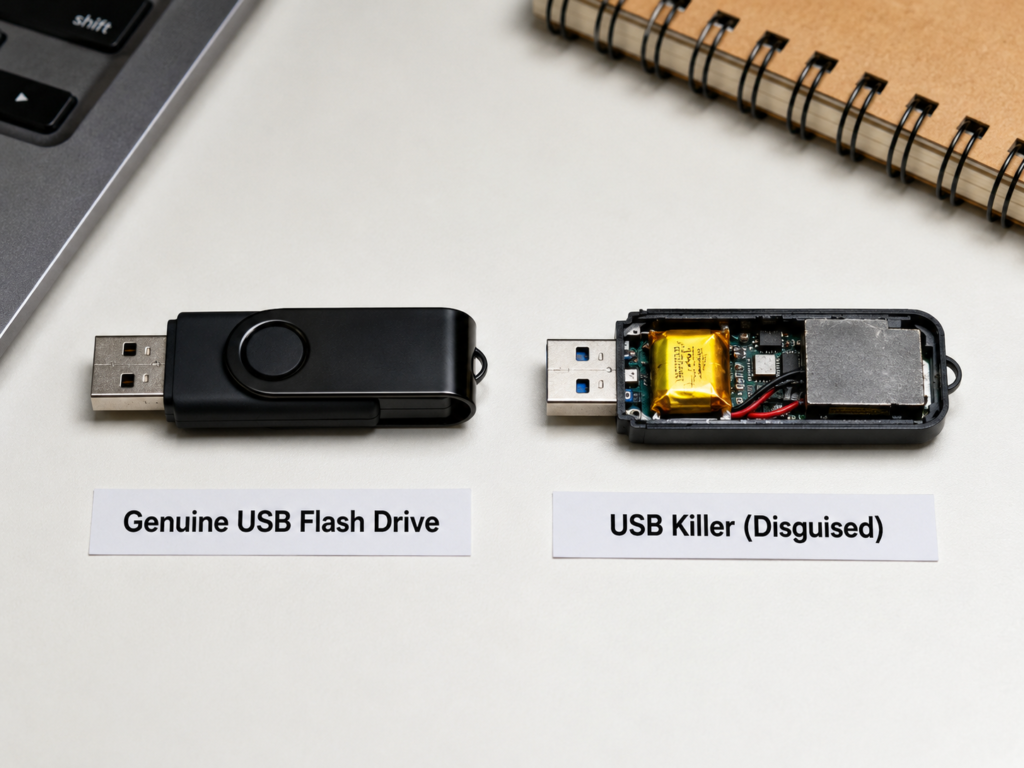
Basic Knowledge: What Exactly Is a USB Killer?
Plain Language Definition: A Hardware Destruction Tool Disguised as a USB Device
Simply put, a USB Killer is a type of hardware destruction device disguised as an ordinary USB peripheral. It may look exactly like the USB flash drives, card readers, or adapters you use every day, but instead of memory chips inside, it has components for storing, boosting, and discharging electricity — its purpose is not to store files or transfer data, but to reverse-release high-voltage pulses far beyond the normal range after being plugged into your device, directly burning out the hardware circuits.
This type of threat belongs to physical-level USB security risks. It does not require you to open any files, nor does it rely on system vulnerabilities. Antivirus software, firewalls, and system permission prompts usually cannot stop this hardware discharge behavior. Its common English names are USB Killer and USB Kill Device.
Basic Differences from Ordinary USB Flash Drives
Many people think “just plug it in and see if it can read files, then you’ll know if it’s a USB drive”, which is a very dangerous misconception. We can quickly understand the core differences between the two through a table:
| Comparison Dimension | Ordinary USB Flash Drive | USB Killer |
|---|---|---|
| Internal Core Components | Memory chips and control chips for storing data | Power storage, voltage boosting, and discharge components for releasing high voltage |
| Normal Behavior After Insertion | The system recognizes it as a storage device, showing a drive letter or file entry | Usually not normally recognized as a storage device, and may even cause damage before the system recognizes it |
| Risk Level | Mostly software risks at the file and system level (such as viruses) | Mostly hardware risks at the interface and circuit level |
| Common Verification Misconception | Risks can be judged by scanning files with antivirus software | Safety cannot be judged by “whether there is a drive letter” or “whether files can be read” |
Please remember: never verify an untrusted USB device by “plugging it in to check”, as this directly exposes your device to risk.
Common Disguised Forms: Not Just USB Flash Drives
Don’t think USB killers only look like USB flash drives; they have many disguised forms:
The most common are disguised as ordinary USB flash drives, USB card readers, and USB adapters, which are the forms that most easily let people lower their guard;
The next most common are disguised as Type-C adapters, small USB fans, small lights, charging cables, and low-cost gift peripherals — these are things people usually plug in casually, making them harder to guard against;
There are even more hidden forms: maliciously modified into public USB charging ports, public computer USB ports, and inside display device interfaces, with no abnormality visible from the outside;
High-imitation forms are even more deceptive, copying brand shells, indicator lights, and packaging, with almost no difference in appearance from genuine products.
The key point of judgment is always: directly reject those with suspicious appearances, but a normal appearance does not mean safety. Trusted source is the core judgment criterion.
Content Boundaries of This Article
Before we continue, let’s clarify the content boundaries of this article: we will only talk about the identification, protection, and emergency handling methods of USB killers, and will never provide production methods, circuit diagrams, component parameters, attack test steps, purchase channels, or usage suggestions. The only purpose of writing this article is to help everyone avoid risks and protect their devices and data, not to teach anyone to cause damage.
Plain Language Principle: How It Damages Devices with High Voltage
Many people feel overwhelmed when they hear “high-voltage pulses” and “circuit breakdown”, but you don’t need to know circuit knowledge — you can figure it out with examples from daily life.
Understanding the Destruction Logic Through Daily Analogies
You can think of the USB interface as a “low-voltage interface that can both transfer data and supply power”, just like the 5V low-voltage sockets at home for charging night lights and mobile phones — low voltage, only for low-power devices.
Normal USB devices are like qualified small appliances, which obtain limited power according to USB specifications and conduct normal data communication with the system.
A USB Killer is more like something with a built-in “energy storage rebound device”: it first steals a little power from the interface and stores it, and when it has enough, it suddenly sends a high voltage far beyond the design range back into the interface circuit. A circuit that can only withstand low voltage suddenly encounters such a high voltage, just like plugging a night light directly into a 220V socket — protection components and control chips will be broken down in an instant.
The most critical difference is: it damages the hardware circuit, not infects system files first like a virus, so software-level protection is basically useless.
Typical Destruction Process After Insertion (User’s Perspective)
From the moment you plug it into the USB port, the destruction process may be so fast that you can’t react:
Step 1: It first obtains a little power from your device to start its internal energy storage components;
Step 2: It releases abnormal high-voltage pulses in a very short time — many times, before your computer screen pops up the “new device found” prompt, the high voltage has already rushed in;
Step 3: The high voltage will spread along the USB lines to the inside of the device, first burning out the protection components at the interface, then possibly damaging the USB control chip, and in severe cases, directly breaking down key circuits on the motherboard.
The phenomena you can see are usually the device suddenly black screening, crashing, restarting automatically, then the USB interface failing, unable to charge, and even a faint burning smell can be smelled.
3 Common Levels of Damage Severity
Of course, not every plug-in of a USB Killer will directly burn out the entire device. The degree of damage is generally divided into three levels:
- Mild damage: Only a single USB interface fails, other functions of the device are basically normal, and the repair cost is low;
- Moderate damage: Multiple USB interfaces fail, the USB control module or local circuits on the motherboard are damaged, and it may be necessary to replace the small board or perform local repairs;
- Severe damage: Key circuits on the motherboard are damaged, the device cannot be turned on, and the repair cost is close to or even exceeds the residual value of the device itself.
Note that when the same USB Killer is plugged into different devices, the damage results may be completely different, and there is no absolute situation of “it will definitely break when plugged in”.
Further Understanding: What Factors Determine the Degree of Damage
If you want to understand more deeply why the degree of damage varies, it is mainly related to the following factors. Ordinary users only need to know about them, no need to memorize:
First is the device’s own protection: If the manufacturer has overvoltage protection, surge protection at the interface, or even interface isolation design, it can withstand much more impact; conversely, if the protection is cut corners, it is very easy to be burned out.
Second is interface type and motherboard design: Here we need to correct a misconception — USB-A, Micro-USB, and USB-C do not naturally determine safety or not. The key still depends on the protection design of the specific model, and the interface type itself does not represent safety.
Third is the strength of the attack device: Different USB Killers have different discharge energy and pulse times. The greater the strength, the larger the damage range naturally.
Fourth is insertion duration: Some USB Killers will discharge repeatedly, the longer you plug it in, the higher the risk, but even if you plug it in and pull it out immediately, it may have already caused damage — don’t gamble on your hand speed.
Finally is device status: Whether the device is turned on, has a battery, or is connected to other peripherals may affect the specific performance of the damage, but it must never be used as a guarantee that “it won’t break”.
Real Hazards and Risk Assessment: Do Ordinary Users Really Need to Be Afraid?
After explaining the principle, you may be a little panicked: will my mobile phone and computer break as soon as I plug something in? Actually, there’s no need to panic excessively. Let’s calculate the risk objectively.
Which Devices May Be Affected
As long as the device has an exposed USB or Type-C interface, it may theoretically be subject to such physical attacks, just with different levels of protection.
Among personal devices, desktops, laptops, mobile phones, tablets, game consoles, mobile hard disk enclosures, and docking stations may all be targeted;
Among public/commercial devices, self-service terminals, POS machines, advertising machines, projectors, conference room computers, public computers, and in-car entertainment systems are no exception;
Front desk machines, visitor machines, conference room equipment, display machines, test equipment, and production environment computers in enterprise scenarios are also possible targets.
Simply put: as long as the interface is exposed, there is a possibility of physical attack, just a difference in probability and protection strength.
Specific Manifestations of Actual Damage
After really being attacked, the loss is not as simple as “a broken interface”:
- Hardware level: Mild cases are USB port failure, inability to recognize peripherals, inability to charge; severe cases are frequent system restarts, motherboard damage, inability to turn on;
- Data level: USB Killers usually do not actively read data, but motherboard damage will make it difficult for ordinary users to access the hard disk or mobile phone storage; if the device has full-disk encryption, mobile phone security chip binding, or enterprise encryption policies enabled, data recovery will be much more difficult, or even impossible to retrieve at all;
- Cost level: Mild damage may only require repairing the interface or small board; severe damage may require replacing the motherboard or even the whole machine. The specific repair cost depends on the device model, region, warranty status, and repair channel. If important data recovery is involved, the cost may be high, and there is no unified guarantee of recovery success rate — whether the data can be retrieved in the end depends on whether the storage chip is intact, encryption status, device model, and repair capability.
Common Motives for the Emergence of USB Killers
Then why would someone make such a thing? There are several common motives:
The most common is prank or malicious retaliation, such as targeting classmates, colleagues, or former employers, deliberately plugging such devices into the other party’s computer to cause damage;
Second is commercial sabotage, such as targeting peers’ public display equipment and self-service terminals, maliciously damaging them to affect the other party’s business;
Another is legal security research demonstrations, used to remind everyone of the risks of USB physical security, but these are done in authorized laboratory environments and will not be casually used on public equipment;
The most hard to guard against is indiscriminate destruction, where someone throws disguised devices in public places, using people’s curiosity — whoever picks it up and plugs it in is out of luck — this is a typical social engineering attack, targeting your psychology of “wanting to see what’s inside”.
Real Risk Level for Ordinary Users (Objective Assessment)
For the vast majority of ordinary individual users, the probability of actually encountering a USB Killer is usually lower than common risks such as USB viruses, phishing links, and account leaks. There is no need to panic excessively.
But several groups of people have higher risks: people who often use public USB ports, enterprise IT/administrative staff, public equipment managers, and on-site staff of exhibitions/conferences.
Also, we need to remind everyone: the main target of typical USB Killers is hardware destruction, but a few compound malicious devices may combine ideas such as BadUSB (a threat that disguises itself as an input device through malicious firmware and lets the system perform malicious operations). You can’t default that a strange USB drive either only destroys hardware or only steals data — it may do both.
In the final analysis, whether the risk is high or not depends corely on your usage habits: whether you pick up a USB drive on the side of the road and plug it into your computer, whether you casually plug in accessories given by strangers, whether you lend your main device to others to test things, and whether you often use public USB ports. Good habits make the risk extremely low; bad habits mean you will encounter other USB security problems even if you don’t meet a USB Killer.
Core Distinction: Differences Between USB Killers and Other USB Threats
At this point, you may be a little dizzy: there are so many USB threats, how to distinguish them? In fact, you just need to grasp a core judgment standard: see whether the attack occurs at the hardware layer or the software layer.
General Judgment Criterion: Hardware Layer or Software Layer
Simply put, a hardware layer attack directly targets the circuit — your system and antivirus software haven’t reacted yet, and the hardware is already broken; a software layer attack relies on malicious files, system vulnerabilities, and induced clicks, either stealing your data or controlling your device.
For quick judgment: if the screen goes black instantly after plugging in, the interface breaks, and the device can’t turn on, with no file interaction throughout the process, it is most likely hardware damage; if after plugging in, strange windows pop up, programs run automatically, files increase or decrease, but the device can still be used normally, it is more inclined to software threats.
Of course, there may also be compound malicious devices in reality. If your device can still turn on after plugging in a strange USB, it’s best to check both hardware and software to avoid missing risks.
To make it easier for you to distinguish, we have organized common USB threats into a comparison table:
| Threat Type | Attack Layer | Core Goal | Typical Performance | Main Protection Idea |
|---|---|---|---|---|
| USB Killer | Hardware layer | Damage device hardware | Instant black screen after insertion, interface failure, unable to turn on | Do not plug in unknown devices, physical isolation, overvoltage protection |
| USB Virus/Trojan | Software layer | Steal data, spread malicious programs, destroy files | Pop-ups, automatic operation, file abnormalities, system slowdown | System updates, permission control, antivirus software, do not run suspicious files |
| BadUSB (malicious firmware device) | Firmware/system layer | Deceive the system to perform malicious operations | Automatic typing, automatic program installation, network abnormalities | Restrict unknown USB peripheral permissions, disable automatic operation |
| Inferior USB accessories/chargers | Accidental hardware risk | No subjective malice, damage due to quality problems | Abnormalities after long-term use, overheating, short circuit, charging failure | Buy products from formal channels, do not use inferior accessories |
| Public charging data theft | Data/software layer | Steal device data, induce authorization | Pop up “trust this device” prompt, data abnormalities | Use your own charging head, data blocker, do not casually click trust |
High-Risk Scenario Identification: Which Situations Are Most Likely to Encounter It
Since the best protection is “not plugging in”, we need to know which scenarios have the most dangerous USB devices, and avoid them if possible.
High-Risk Scenarios for Individual Users
For individual users, the most high-risk scenarios are these:
- Found items scenarios: Unclaimed USB devices found on the roadside, in parking lots, companies, schools, cafes, libraries — whether they are USB drives, adapters, or charging cables, don’t plug them into your own device — you think you picked up a bargain, but it might be a bait deliberately thrown by someone else.
- Gifting scenarios: Unbranded USB gifts given for free at unfamiliar exhibitions, street events, or small USB accessories in unknown express deliveries you receive — never use those with unknown origins.
- Public charging scenarios: Public USB charging ports in airports, shopping malls, hotels, internet cafes, and shared spaces — besides the common data theft risk, they may also have been modified, with the possibility of physical damage.
- Borrowing scenarios: A stranger comes to you and says “can I borrow your computer/phone to test my USB drive/adapter/keyboard” — don’t be embarrassed to refuse. If it really breaks, he won’t compensate you.
- Curiosity scenarios: Knowing it’s an untrusted USB drive, but still can’t help but want to plug it in to see what’s inside — this is the most typical high-risk behavior, bar none.
High Risks in Enterprise/Public Scenarios
For enterprises and public scenarios, the risk points are different:
- Hardware phishing: Attackers deliberately place “lost USB drives” on workstations, front desks, conference rooms, and parking lots of the target company, waiting for employees to pick them up and plug them into company computers, either to cause damage or steal intranet data.
- Open devices: Front desk computers, conference room computers, visitor machines, print shop computers, library computers, display machines — these devices that anyone can touch have exposed interfaces and are easy to be plugged with malicious devices.
- Self-service terminals: Ticket machines, self-service inquiry machines, advertising screens, POS-related equipment, industrial control display equipment — as long as they have exposed interfaces, they may be targeted.
- Visitor contact: Office equipment interfaces accessible to suppliers, outsourced personnel, and temporary visitors also have the possibility of being tampered with.
- Internal retaliation: Resignation disputes, malicious employees, outsourced personnel illegally accessing equipment, using internal permissions to cause damage — this is even harder to guard against.
Relatively Low-Risk Scenarios
Of course, not all USB devices are dangerous. The risks in these scenarios are very low:
Using USB devices that you have owned for a long time, have clear sources, and purchased from formal channels will basically have no problems;
Using USB devices uniformly purchased, registered, distributed and controlled by the company’s IT department has controllable sources and very low risk;
When charging in public, using your own charging head and power socket instead of directly connecting to the public USB port can significantly reduce the data communication and interface modification risks brought by public USB ports, but you should still use trusted charging heads and cables to avoid other problems caused by inferior power accessories;
Testing unknown devices in a controlled laboratory or under IT security procedures, instead of using personal main devices to trial and error, is also safe.
Further Judgment: Risk Level Changes with Scenarios
If you want to judge the risk more accurately, you can remember these dynamic principles, just understand them, no need to memorize:
First, the higher the value of the device and the more important the data, the less you should take unknown USB risks — for example, if your computer stores the graduation thesis you just finished writing or the company’s core project materials, let alone a picked-up USB drive, even if it’s given by a friend, it’s best to confirm it clearly before plugging it in.
Second, the more complex the personnel in public places and the more unattended the equipment, the higher the risk — for example, a public USB port in a remote corner definitely has higher risk than one with staff patrolling in the airport hall.
Third, old devices, thin and light devices, and devices with weak interface protection may have higher repair and recovery costs after damage, so more attention should be paid to protection.
Fourth, enterprise scenarios not only depend on the value of a single device, but also consider downtime, data recovery, evidence preservation and compliance costs — even an old front desk computer can cause big trouble if it gets attacked.
Finally, don’t judge the risk by “rare in news” or “popular on the internet”, judge by your own exposure scenarios and usage habits — if you never use public USB ports and never pick up strange USB drives, then USB Killers are far away from you; if you plug in strange devices every day, you will have an accident sooner or later.
Practical Identification and Protection Methods
After talking about so many risks, we finally come to the part that everyone cares about most: how to prevent it? Let’s talk one by one from entry to advanced, from free to low-cost.
Entry Level: 3 Quick Appearance Identification Tips
Let’s start with the most basic, how to quickly identify suspicious USB devices from their appearance, three small tips:
First look at the workmanship: If the seam of a USB drive or adapter is particularly rough, the shell is loose, the printed logo and parameters are blurry, and there is even no brand, then you should be vigilant.
Second weigh the weight: If it is much heavier than the same type of ordinary USB drive or adapter, there may be extra electronic components hidden inside, so be careful.
Third look at the markings: If there is no marked capacity, model, certification mark, production information, or the packaging is particularly shabby and of unknown origin, don’t plug it into your main device.
But remember: appearance identification can only find low-level suspicious objects that are made very roughly. High-imitation USB Killers may have the same appearance, weight, and even indicator lights as genuine products, so you must never judge it is safe just because “it looks fine”.
Entry Level: Core Logic of Scenario Judgment
More reliable than looking at appearance is looking at the scenario and source. Remember these core logics, and you can avoid 99% of the risks:
All untrusted USB devices that are “picked up, given by strangers, temporarily borrowed” must not be plugged into personal or work devices — don’t be embarrassed to refuse, if it breaks, the loss is your own.
If a public USB port is loose, bulging, cracked, has foreign objects, or traces of modification, do not connect your device to it.
Do not plug unknown USB into your main computer or mobile phone for curiosity, help, or testing.
When you need to read an unknown USB drive, you should hand it over to IT personnel to handle in an isolated environment, and should not try it yourself.
Further Explanation: Limitations of Appearance Identification
Let’s go deeper into the limitations of appearance identification here, to avoid everyone thinking “I can tell by appearance so I won’t get attacked”:
First, high-imitation USB Killers may use genuine shells or even genuine packaging, with appearance, weight, and indicator lights close to regular USB drives, which ordinary users simply cannot distinguish.
Second, attack modules modified in public USB ports or inside devices may have no abnormality visible from the outside.
Also, for devices disguised as mice, keyboards, network cards, charging cables, and adapters, it is difficult for ordinary users to judge only by appearance — after all, these are things you would normally plug in.
So the conclusion is always: trusted source is more important than normal appearance, “looks like a genuine product” does not equal safety.
Personal Zero-Cost Protection Measures
In fact, for ordinary individual users, the best protection methods are zero-cost, no need to spend a penny:
The core principle is one: never plug untrusted USB devices into personal computers, mobile phones, tablets, and work devices.
For public charging, prioritize using your own charging head connected to the power socket, use less public USB ports — if you are afraid of running out of power, bringing a power bank is more reliable than anything.
Important work devices can enable system USB permission restrictions or enterprise device management policies, only allowing trusted devices to access.
Back up important data regularly, keep at least one offline backup or trusted cloud backup that is not connected to the computer for a long time — even if the device is really broken, the data is still there, and the loss will not be too big.
In family scenarios, educate family members and children: do not plug picked-up USB drives, cables, adapters into devices, and do not test with other people’s devices.
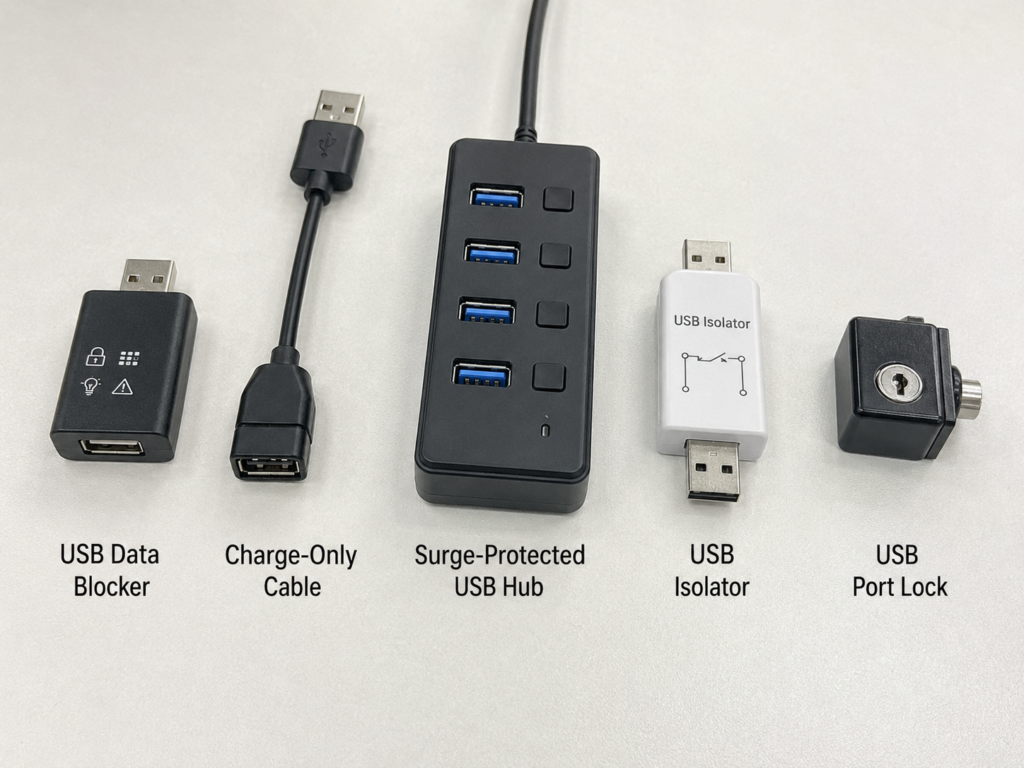
Types and Boundaries of Low-Cost Protection Tools
If you still want to add some protection, there are some low-cost tools on the market, but you must first figure out what they can and cannot do, don’t spend money and think you can sit back and relax. We do not recommend any specific brands, only talk about categories and boundaries:
- USB data blocker: Mainly disconnects data lines, reduces the risk of public charging data theft; but it is not equivalent to complete high-voltage protection, don’t think that with it you can casually plug into public USB ports.
- Charge-only cables: Only suitable for reducing data communication risks, with limited protection against abnormal voltage.
- USB hubs with overvoltage/surge protection: May protect the host within a certain range, but it depends on whether the product clearly marks the protection capability and parameters. Not all products called “with protection” are useful.
- USB isolator: Reduces some physical risks through electrical isolation, commonly used in industrial, testing, and debugging scenarios, but also has rate, power supply and tolerance limits, not omnipotent.
- Physical plug caps/port locks: Suitable for enterprise and public equipment, reducing the chance of strangers directly plugging in unknown USB devices, less used by individual users.
Important boundary: Any tool has a tolerance upper limit, cannot promise 100% protection against all USB Killers. They can only reduce risks, and cannot replace the core principle of “not plugging in strange devices”.
Advanced Reference: Basic Protection Ideas for Enterprises/Institutions
If you are an enterprise IT or administrative staff and need to do USB physical protection for the company, you can start from these aspects:
Formulate USB device usage specifications, prohibit foreign private USB devices from directly accessing office computers and intranet devices, and uniformly distribute trusted devices by the IT department.
Restrict unknown USB device access through BIOS/UEFI, operating system policies, and endpoint security software, such as only allowing devices on the whitelist to be used.
Physically block idle USB ports in public areas, or switch to dedicated charging devices that only supply power and are protected.
Install port locks, isolators or overvoltage protection devices on front desk machines, conference room machines, display machines, and self-service terminals, so that even if someone plugs in a malicious device, it will not easily damage the host.
Conduct employee training: do not pick up, plug in, or transfer unknown USB, do not use main devices to test suspicious accessories.
Establish incident procedures: after finding a suspicious USB device, take photos to record the location and time, hand it over to the IT/security department for handling, and do not touch it casually by yourself.
Emergency Handling: What to Do After Encountering Suspicious Devices/Accidental Insertion
Even if you know all the protection methods, there may be accidents, such as accidentally plugging in a strange USB drive, or using a suspicious public charging port without noticing. At this time, don’t panic, follow the steps below to minimize the loss.
How to Handle Suspicious USB Devices That Have Not Been Inserted
If you find or receive a suspicious USB device, remember these points:
Do not plug it into any computer, mobile phone, tablet or public device for testing — even if you want to “test if it’s broken” it won’t work, you may get attacked as soon as you test it.
Do not disassemble, hit, short-circuit or touch internal components by yourself. Some devices may have residual charge risk, which may shock you, or accidentally trigger discharge.
If an individual finds a suspicious USB device in a public place, it should be handed over to the venue staff or security for handling.
If you find a USB device of unknown origin at home, you can dispose of it according to the e-waste process, avoid giving it to others, and don’t give it to children as toys.
In enterprise scenarios, the discovery location, time, photos and related monitoring clues should be retained, and handed over to the IT or security department for handling according to the security incident process.
Emergency Steps When Abnormality Is Found Just After Insertion
If you find something wrong just after plugging it in, such as sudden black screen, crash, smoke, burning smell, hot interface, follow these steps:
If black screen, crash, smoke, peculiar smell, or interface abnormality occurs just after insertion, you should immediately stop using the USB device.
Pull out the suspicious USB device as soon as possible to reduce the possibility of repeated discharge or continued damage.
If the device smokes, has obvious heat or cannot respond, turn off the power immediately, do not repeatedly turn it on for testing — every time you turn it on, the damage may be more serious.
If the device can still be turned on normally, prioritize backing up important data, then check whether the USB port, charging, and peripheral recognition are abnormal.
Do not test the same suspicious USB device on another device to avoid expanding losses.
Handling After the Device Has Been Damaged
If the device is confirmed to be broken, such as unable to turn on, all interfaces are unusable, don’t mess around:
Do not disassemble and repair by yourself, to avoid residual charge, short circuit or expanding the damage range, or even damaging the storage chip, so that the data cannot be recovered.
Find official after-sales or reliable repair institutions to test the interface, motherboard, power management and storage status, to see if it can be repaired and if the data can be recovered.
First evaluate the value of the data, then decide to repair, replace the board, recover data or replace the whole machine — don’t save a few hundred yuan in repair fees and lose important data.
Enterprise equipment should be reported to the security department in time, and suspicious devices and damaged devices should be retained as evidence, and should not be discarded casually.
When it involves malicious destruction, property loss or public equipment damage, you can call the police/report the case according to the organizational process or local legal requirements.
Advanced Judgment: Quickly Distinguish Between Hardware Damage and Software Infection
Finally, let’s teach you a quick judgment method. If there is a problem after plugging in a strange USB, is it the hardware that is broken, or is it infected with a software virus?
- More like hardware damage: Instant black screen after insertion, crash, interface failure, unable to charge, unable to turn on, no obvious file interaction process;
- More like software infection: Pop-ups, automatic operation, file abnormalities, account abnormalities after insertion, the system can still run but behaves suspiciously.
The handling logic of the two is different: for hardware damage, don’t only rely on antivirus software for investigation; for software infection, you can’t just replace the interface. If the device can still be turned on, you should check both hardware functions and system security at the same time to prevent omissions caused by compound malicious devices.
Common Misconceptions and Truth Clarification
After talking so much, finally let’s clarify a few misconceptions that everyone is most likely to get wrong, don’t be misled by online rumors or wrong cognitions.
Cognitive Misconceptions
- Misconception 1: USB Killers are mainly used to steal data → Truth: The main target of typical USB Killers is hardware destruction, not actively reading files. But unknown USB devices may also be BadUSB, virus USB drives or compound malicious devices, so you can’t only handle them according to one risk. The safest way is not to plug them in.
- Misconception 2: Installing antivirus software can prevent USB Killers → Truth: Antivirus software targets software threats and cannot block hardware high-voltage shocks, just like a security door cannot stop lightning.
- Misconception 3: No pop-up after insertion means safety → Truth: USB Killers may cause damage before the system recognizes them, and no pop-up is not a safety signal at all.
- Misconception 4: Regular brand USB devices are also likely to be killers → Truth: Brand devices purchased through formal channels have very low risk. The real high-risk ones are devices of unknown origin or that have been swapped. Don’t lump all regular products together.
- Misconception 5: It doesn’t matter if cheap devices break → Truth: The real loss may be data, downtime, repair costs and evidence handling costs. The device itself may be worthless, but the value of data and time is often higher.
Protection Misconceptions
- Misconception 1: Using a USB extension cable can prevent USB Killers → Truth: Extension cables cannot reliably block abnormal high voltage. They just extend the interface, and electricity can still pass through normally, so they cannot be used as a protection solution.
- Misconception 2: Plugging in and pulling out immediately is fine → Truth: Abnormal pulses may occur in a very short time. No matter how fast your hands are, they can’t be faster than electricity. Short insertion may also damage the device, don’t gamble on your hand speed.
- Misconception 3: USB data blockers can provide 100% protection → Truth: Ordinary data blockers mainly prevent data communication risks and do not guarantee protection against high-voltage damage.
- Misconception 4: Unplugging the power cord of the device makes it safe → Truth: Laptops, mobile phones, and tablets have batteries, and the interface and motherboard may still be damaged. Unplugging the power cord is useless.
- Misconception 5: As long as you don’t open files, there is no risk → Truth: USB Killers don’t need you to open files. The insertion action itself may trigger hardware risks.
Device Misconceptions
- Misconception 1: Mobile phones and tablets will not be damaged by USB Killers → Truth: The USB/Type-C ports of mobile phones and tablets are also connected to control and power management circuits, and may also be damaged. Don’t think only computers will be attacked.
- Misconception 2: Mac or USB-C devices are absolutely safe → Truth: Safety depends on the specific hardware protection design, not absolutely determined by brand or interface type.
- Misconception 3: With overvoltage protection, it is 100% safe → Truth: All protection circuits have a tolerance range, and they may still fail if the range is exceeded, just like a fuse has a rated current.
- Misconception 4: Only old devices will break → Truth: New devices usually have better protection, but may still be damaged in the face of strong attacks.
- Misconception 5: Public USB ports only have data theft risks → Truth: Public USB ports may also have risks of modification, short circuit, inferior power supply or physical damage. Don’t only prevent data but not hardware.
Advanced Cognition: Boundaries of Risk Judgment
Finally, let’s talk about a few boundaries of risk judgment to help you view this matter more rationally, neither panicking nor taking it lightly:
There is no absolute rule that “all devices will break when plugged in”. The degree of damage depends on device protection, attack strength and connection status. Online demonstration videos often choose specific tools and specific devices, which cannot represent all real scenarios.
Also don’t take it too lightly. Although the probability is low, if you really get attacked, the loss may be large, especially data loss, which is irreversible in many cases.
Don’t panic excessively: USB devices purchased through formal channels, for personal use, and with clear sources have very low risk, just use them normally.
Don’t take the rules lightly: not plugging in untrusted USB devices is the most effective and lowest-cost protection.
Protection tools can only reduce risks and cannot replace source management and good usage habits.
Frequently Asked Questions
Do USB Killers Steal Data?
Typical USB Killers are mainly hardware destruction tools, not data theft tools. But unknown USB devices may also be BadUSB, virus USB drives or compound malicious devices, so you can’t only handle them according to one risk. Simply put: strange USB may damage the machine or damage the data. The safest way is not to plug it in.
Can USB Killers Be Blocked by Antivirus Software?
They cannot be reliably blocked, because they mainly attack hardware circuits, not run malicious software. Antivirus software is helpful for USB viruses, Trojans, and malicious files, but is powerless against high-voltage physical shocks.
Are Public USB Charging Ports Safe?
The main risks of public USB ports include data communication risks, inferior power supply risks, and rare but serious physical modification risks. A more reliable approach is to use your own charging head connected to the power socket, or use a trusted power bank. If you must use a public USB port, at least use a trusted data blocker, but understand that it is not equivalent to complete high-voltage protection.
Is the Type-C Interface Safer?
Type-C has a more complex power supply and negotiation mechanism, but it does not mean absolute safety. Whether it can withstand abnormal attacks depends on the protection circuit and interface design of the device manufacturer. Don’t plug in Type-C adapters, cables or small accessories of unknown origin just because the interface is new.
What Should I Do If I Find a USB Drive?
Do not plug it into your own computer or mobile phone to view the content. In scenarios such as companies, schools, shopping malls, hand it over to the front desk, security, IT department or lost and found office. If a suspicious USB drive is found in an enterprise environment, the location and time should be recorded and handled according to the security incident process.
Learning Summary: What You Can Now Judge and Do
Seeing here, you should already have a comprehensive understanding of USB Killers. In fact, you don’t need to remember too much complicated knowledge. As long as you can do these few things, it is enough to protect your devices and data:
First, you can accurately distinguish common USB-related threats, distinguish between USB Killers, USB viruses, BadUSB, inferior USB accessories and public charging data risks, know whether the risk occurs at the hardware layer or the software layer, will not use wrong methods to troubleshoot problems, and will not think that antivirus software can prevent hardware damage.
Second, you can identify high-risk scenarios and suspicious devices, comprehensively judge the risk of USB devices through “source, scenario, appearance, purpose”, know that USB devices found, given by strangers, and appearing in public scenarios have the highest risk, and also understand that appearance identification has limitations, and cannot take “looks normal” as proof of safety.
Third, you can implement basic protection measures, do not plug in untrusted USB devices, do not use main devices to test unknown accessories, prioritize using your own charging head, trusted cables and peripherals purchased from formal channels, can choose appropriate protection tools according to the scenario and understand their boundaries, and can also reduce data loss caused by hardware damage through regular backups.
Fourth, you can correctly handle emergency situations: do not test, disassemble, or transfer suspicious devices that have not been inserted, hand them over to the management or handle them according to the process; if abnormalities occur after accidental insertion, stop using, pull out the suspicious device, shut down and power off, back up data, send for inspection and repair; after the device is damaged, avoid repeatedly turning it on and testing on other devices, and report in time with evidence in enterprise scenarios. You can also distinguish between hardware damage and software infection, and if necessary, perform both hardware testing and system security checks at the same time.
Finally, just remember one sentence: For untrusted USB devices, first assume it may damage the machine, not first assume it can transfer files.
As long as you keep this bottom line, physical threats like USB Killers will have almost nothing to do with you.