
When buying a USB-C charger, do you often see a bunch of letters like “USB PD”, “PPS”, “PD 3.0” on the packaging? Some merchants say PPS is faster, some say PD is the universal standard, and some even think PPS is two completely different fast charging protocols from PD — they spend a high price on a PPS charger, only to find that when charging an iPhone, the speed is exactly the same as a regular 20W PD charger.
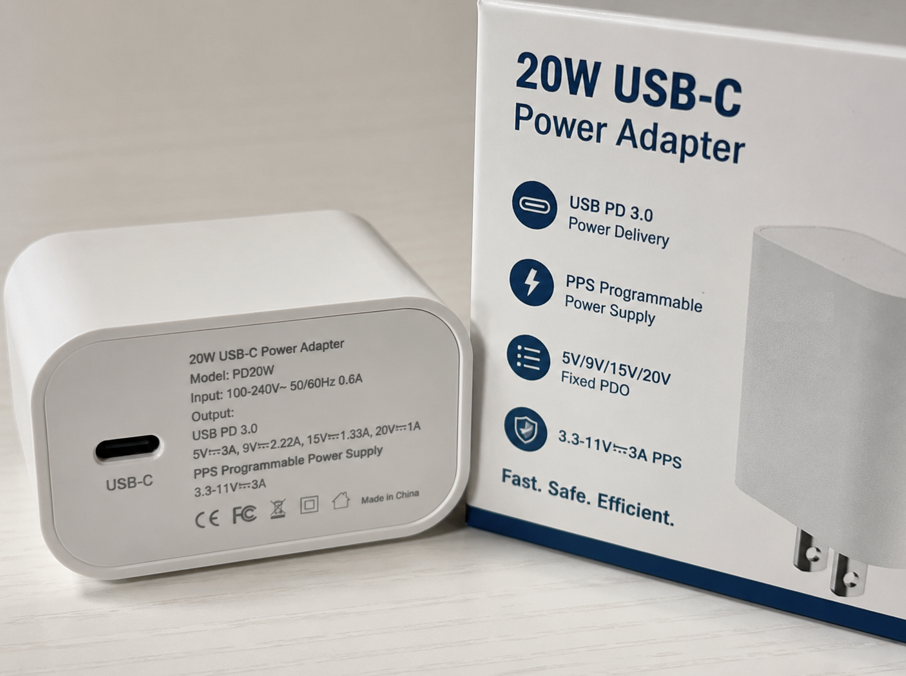
Today we will thoroughly explain the relationship, differences, compatibility, speed differences, and purchasing logic between USB PD and PPS. From beginner level to being able to judge for yourself whether it is worth spending extra money on PPS, you will no longer be confused by parameter tables.
1. First, Clarify the Basics: PD and PPS Are Not Peer-Level Protocols
Before talking about working principles and differences, let’s first clarify the most basic concept: PPS is not another set of fast charging standards that competes with PD, but an optional function within the PD system. Understanding this relationship will make all subsequent content much easier to understand.
1.1 What is USB PD: The Basic Rule of Universal Fast Charging
In plain language, USB PD is like a set of cross-brand “charging conversation rules”: after the charger and the device are connected via a cable, they first communicate their respective capabilities, then negotiate a voltage and current acceptable to both parties, and finally start power supply, to avoid problems caused by forcing inappropriate power.
Its full technical name is USB Power Delivery, abbreviated as USB PD. In Chinese, it is often called the USB power supply protocol or USB power transmission protocol. Its core function is to unify the fast charging negotiation method of the USB-C interface, reduce the fragmentation of “one device with one dedicated charger” in the past, and allow mobile phones, computers, and tablets of different brands to share chargers as much as possible.
At present, it can be seen in almost all mainstream USB-C consumer electronics: iPhone, iPad, MacBook, Android phones, Android tablets, thin and light laptops, Switch, various handheld consoles, power banks, portable monitors, etc., all generally support USB PD fast charging.
Its basic logic is fixed gears: the charger provides several fixed PDOs (Power Data Object, which can be understood as the output gears declared by the charger to the device), and the device selects a gear that it can use and is suitable according to its own battery status and charging strategy, before starting power supply.
A note on version boundaries: this article focuses on the most common USB PD 3.0/SPR scenarios in consumer electronics; the higher-power PD 3.1 EPR can reach up to 240W, which belongs to the professional high-power boundary. This article will only give a brief reminder and will not be included in the core comparison scope.
1.2 What is PPS: An Optional Fine Voltage Regulation Function Within the PD System
The plain-language definition of PPS is very simple: it is the “fine voltage adjustment function” in the PD protocol, not an independent protocol that competes at the same level as PD.
Its full technical name is Programmable Power Supply, abbreviated as PPS. From the specification level, PPS exists in the USB PD system in the form of APDO (Adjustable Power Data Object, i.e., adjustable output gears), and has been widely mentioned and adopted since PD 3.0.
Its core purpose is to allow the output voltage of the charger to be adjusted in very small steps, without being stuck in several fixed gears, so as to be closer to the real-time needs of the device battery and charging management chip, and reduce the internal conversion pressure of the device.
There is a very important relationship to remember: a charger that supports USB PD PPS must be a PD charger, but a charger that supports PD does not necessarily support PPS — because PPS is an optional function of PD, not a mandatory item. Many low-cost PD chargers only have fixed gears and do not have PPS capability.
A popular analogy: PD is “whether you can speak the universal language of USB-C fast charging”, and PPS is “whether you can make fine voltage adjustments in this universal language”.
1.3 Comparison Scope of This Article: Standard Fixed-Gear PD vs PPS-Equipped Voltage-Regulating PD
To avoid the subsequent conclusions being too general, let’s first clarify the comparison objects, applicable scope and premises of this article. All comparisons are carried out under a unified standard:
- Comparison objects: standard fixed-PDO PD charging without PPS, and PD charging with PPS APDO capability — essentially a comparison of two working modes within the PD protocol, not a confrontation between two independent protocols.
- Power range: focusing on the 18W-100W consumer scenarios common for mobile phones, tablets, and thin and light laptops; special scenarios with higher power are not included in the core comparison.
- Experience premise: the difference between the two is easier to observe when the room temperature is about 25°C, the screen is off or under low load, a compliant USB-C cable is used, and the device battery level is in the middle range of 20%-80%.
- Exclusion scope: manufacturers’ proprietary modified fast charging solutions, non-standard adapter solutions, industrial-grade PD applications, and high-power special scenarios such as PD 3.1 EPR 140W/180W/240W are all outside the comparison scope of this article.
- Prerequisite for activation: For PPS to actually work, both the charger and the device must support PPS. The cable only needs to meet the USB-C link and required current capacity; the cable itself does not participate in PPS protocol negotiation, so there is no such thing as a “PPS-supporting cable”.
1.4 4 Basic Misconceptions Most Easily Confused by Beginners
People who are new to fast charging are easy to fall into these cognitive pitfalls, which are corrected here at once:
- Misconception: PPS and PD are two peer-level independent protocols. Reality: PPS is an optional voltage regulation capability within the PD system, not another standard opposed to PD.
- Misconception: Supporting PD 3.0 means definitely supporting PPS. Reality: PPS is an optional feature of PD 3.0. Many low-cost PD chargers only support fixed PDO gears and do not have PPS function.
- Misconception: Apple devices do not use PD fast charging. Reality: iPhone 8 and later models, mainstream iPads and MacBooks all use USB PD fast charging, but they usually do not rely on PPS to improve charging speed.
- Misconception: Buying a PPS charger will make all phones charge faster. Reality: If the device itself does not support PPS, the charger will automatically fall back to ordinary fixed-gear PD, and the PPS function will be idle, which will not bring speed improvement.
2. How Do They Fast Charge? Explaining the Working Principle in Plain Language
After clarifying the relationship, let’s break down the differences in the charging process between the two, and why PPS is sometimes faster and sometimes makes no difference.
2.1 Ordinary Fixed-Gear PD: Like a Fan with Fixed Speed Gears
The charging logic of ordinary PD is very similar to the fixed-gear fan at home: there are only a few preset options like gear 1, gear 2, gear 3, gear 4; you can’t adjust to 1.5 or 2.3 gears, you can only choose from the existing ones.
Common fixed PD gears include these: 5V is the basic gear that all PD chargers have, and then according to different power, high gears such as 9V, 15V, and 20V will be added; some products may add an additional 12V gear, but 12V is not the core standard gear of PD, so don’t judge whether PD is正规 (standard-compliant) by whether there is 12V.
The charging “handshake” process is as follows: after the charger is plugged in, it first “broadcasts” all fixed voltage and current gears it supports. After receiving the broadcast, the device selects the most suitable gear according to its own battery status and charging strategy. After the two sides negotiate successfully, the charger will rise to the corresponding voltage for power supply — it does not directly supply high voltage as soon as it is plugged in. This safety mechanism is the basis of PD.
During the charging process, the output voltage of the charger will basically stabilize at the selected fixed gear, and the power management chip inside the mobile phone or computer will convert this voltage into the voltage required by the battery (for example, the mobile phone battery is generally about 3.7V-4.4V). There will be losses in this internal conversion process, most of which will turn into heat and remain inside the device.
The most typical example is the PD fast charging of iPhone: when an iPhone is charged with PD, it usually selects a gear of about 9V, then gradually reduces the power as the battery level increases and the temperature changes, and finally drops to a very low power when it is almost fully charged.
2.2 PPS: Like a Stepless Speed Regulation Fan
The charging logic of PPS is more like a stepless speed regulation fan: as long as it is within the allowable speed range, you can adjust it to whatever you want, without being stuck in fixed gears.
PPS still belongs to the USB PD negotiation framework: the charger will first declare the APDO/PPS voltage range and current upper limit it supports, and then the device will actively request a new voltage/current target from the charger at regular intervals within this allowable range, and the charger will adjust the output in small steps after confirmation.
There are many bases for the device to adjust the voltage: the current battery level, temperature, internal resistance, the load of the mobile phone (such as whether you are playing games), and the system’s charging strategy will all affect the requested voltage and current. For example, when the battery level is very low, a higher voltage may be required for fast charging; when the temperature is too high, it will actively reduce a little to avoid overheating.
The voltage regulation step of PPS is very small, commonly around 20mV — that is, 0.02V, so it is almost continuously adjustable, and the current can also be adjusted in small steps. The PPS range of different chargers is different, common ones are 3.3-11V⎓3A, 3.3-16V⎓3A, 3.3-21V⎓5A, depending on the parameter labeling of the product.
The most typical examples are Android flagships such as Samsung Galaxy and Google Pixel: models that support PPS can use PPS to make the charger output a voltage that exactly matches their needs at medium and low battery levels, so as to reach the fast charging power advertised by the manufacturer — for example, the 25W/45W Super Fast Charging of some Samsung models, and the maximum wired fast charging of some Pixel models usually rely on PPS. The specific power is subject to the official specifications and actual measurement conditions of the corresponding models.
2.3 What is the Core Difference Between the Two?
In the final analysis, the essential difference between the two is “who does the voltage regulation work”:
- Ordinary fixed-gear PD: the charger only outputs several fixed voltage gears, and the device needs to do more step-down conversion internally, with losses and heat generation more concentrated on the device side.
- PPS: the charger undertakes most of the front-end voltage regulation work, and the output voltage is closer to the actual voltage required by the battery, so the internal conversion pressure of the device is smaller, and the loss and heat generation may be lower.
Of course, PPS is not infinitely adjustable — it can only work within the PPS voltage range and current upper limit marked by the charger, not whatever you want.
Moreover, PPS is not “faster than ordinary PD throughout the whole process”. Its advantages are usually more easily reflected on models that support PPS, at low to medium battery levels, when the device allows higher power and the temperature does not trigger restrictions; after 80%, most devices will actively reduce speed to protect the battery, and at this time the gap between ordinary PD and PPS will usually narrow. Different models have different charging curves, and the specific differences shall be subject to official strategies or actual measurements.
2.4 Will They Break When Mixed? Automatic Fallback Rules
Many people worry: I bought a PPS charger, will it damage the device if I use it for a device that does not support PPS? Or if I use an ordinary PD charger for a PPS phone, will there be a problem?
Formal and compliant PD/PPS chargers all have automatic fallback mechanisms, so there is no need to worry too much:
- Charging ordinary PD devices with a PPS charger: it will automatically return to fixed PDO mode, negotiate according to ordinary PD rules, and will not forcibly output mismatched voltage.
- Charging PPS-supported devices with an ordinary PD charger: when the device finds that the charger does not have PPS gears, it will only use fixed PDO gears. The speed may not reach the nominal fastest level, but there will be no safety problems.
- USB-C to A or other adapter cables: usually cannot complete the full PD/PPS negotiation, and may only run 5V slow charging, or other compatible modes, basically unable to trigger PPS.
- It is also necessary to mention the safety boundary: standard PD/PPS all “negotiate first, then supply power”, and will not directly pour high voltage into the device just because the charger supports higher voltage; but if it is inferior, falsely labeled, or non-certified accessories, this is not necessarily the case, so try to choose products from regular brands.
3. Item-by-Item Comparison of Core Dimensions: Differences Under a Unified Standard
After understanding the working principles of the two, we will break down the core differences into 7 dimensions for item-by-item comparison, to help you quickly establish a complete difference framework, without having to slowly find the difference when looking at scenarios.
3.1 Comparison of Voltage Regulation Capability
Standard fixed-gear PD is mainly based on fixed PDO gears, common ones are 5V, 9V, 15V, 20V. The device can only choose from the available gears provided by the charger, and cannot fine-tune between gears. PPS is centered on APDO adjustable gears, with common continuous voltage ranges such as 3.3-11V, 3.3-16V, 3.3-21V, etc., supporting small-step voltage regulation, and the granularity is far finer than fixed gears.
To judge whether a charger has PPS, the key is to see if there are words like “PPS”, “Programmable Power Supply” in the parameter table, and a continuous voltage range label similar to “3.3-11V⎓3A”. Just writing “PD 3.0” or “Type-C fast charging” is not equivalent to supporting PPS. It should be noted that if the device itself only supports fixed PDO and does not support PPS APDO, even if the charger has PPS function, it can only work according to ordinary fixed-gear PD, and the voltage regulation capability cannot be used at all.
3.2 Comparison of Charging Speed
Under the premise that the device supports PPS, the charger has sufficient PPS power, the cable is qualified, and the temperature is appropriate, PPS is usually closer to the nominal fast charging speed of the device, especially in the middle battery range of 20%-80%, the difference is more obvious. If the device does not support PPS, there will be no speed difference at the protocol level between chargers with and without PPS, and the actual speed only depends on the power upper limit of the fixed PDO.
PPS does not mean automatically higher power. The actual power that can be achieved is jointly determined by the voltage range and current upper limit of the charger’s PPS, the request capability of the device, the current carrying capacity of the cable, and the system temperature control strategy. At the high battery stage above 80%, the vast majority of devices will actively reduce speed to protect the battery, and at this time the gap between PPS and ordinary PD will usually be greatly reduced. In low-power charging scenarios below 20W, the speed advantage brought by PPS is usually minimal and almost imperceptible.
3.3 Comparison of Heat Generation and Battery Impact
When charging with standard fixed-gear PD, the device side needs to convert the fixed voltage output by the charger into the voltage actually required by the battery. This part of the conversion loss is more concentrated inside the device, which easily makes the mobile phone or tablet feel hotter. Because the output voltage of PPS is closer to what the device needs, the step-down conversion pressure on the device side is smaller, and theoretically the temperature rise on the device side will be lower during high-power charging.
But regarding battery life, the impact of PPS is actually very limited: the battery aging rate depends more on factors such as operating temperature, number of charging cycles, system charging strategy, and whether it is stored at full charge for a long time. PPS may only reduce heat generation at high power, and cannot be directly equated with “better battery protection”. This heat difference does not exist in all scenarios: when charging at low power, the device is under low load, or the heat dissipation conditions are good, the heat difference between the two is very small and almost imperceptible. In addition, a misconception should be corrected: as long as it is standard-compliant ordinary PD charging and uses regular accessories, it will not damage the battery additionally because it is “not PPS”, so there is no need to be overly anxious.
3.4 Comparison of Compatibility
Formal and compliant PD chargers with PPS are usually compatible with ordinary PD devices. During negotiation, they will automatically fall back to fixed PDO mode, will not forcibly output mismatched voltage, and have strong versatility. Conversely, because ordinary PD chargers do not have PPS APDO gears, when charging devices that support PPS, they can only use fixed PDO gears, cannot trigger the high-power mode of PPS, and the speed may not reach the fastest value advertised by the manufacturer.
In terms of cables, the cable itself does not participate in PPS protocol negotiation, there is no such thing as “cable supporting PPS”. The cable only affects the current upper limit, E-Marker identification, and the stability of the USB-C link. In adapter scenarios, USB-C to Lightning can run PD fast charging for Apple devices, but will not give Apple devices PPS advantages; the USB-C to A link usually cannot complete full PD/PPS negotiation, and most can only run 5V or low-power compatible mode, unable to trigger PPS. Also note exceptions: multi-port chargers, inferior cables, falsely labeled accessories, and poor interface contact may all cause negotiation failure or gear reduction, so you can’t just look at the protocol support.
3.5 Comparison of Hardware Requirements
To achieve PPS fast charging, the charger, device, and cable must all meet the corresponding requirements: the charger side needs to support programmable output and finer voltage and current regulation, and the cost is usually slightly higher than that of ordinary PD chargers at the same power; the device side needs the power management chip and system charging strategy to support PPS requests, otherwise it is impossible to trigger the PPS gear at all; the cable side must meet the corresponding current carrying capacity, which has nothing to do with the PPS protocol itself.
From the hierarchical judgment of purchase: for mobile phone PPS below 30W, most regular 3A USB-C to C cables can meet the requirements; for 45W PPS, it depends on the specific solution. For example, some Samsung 45W fast charging requires a matching 5A cable to reach full speed; PD/PPS below 60W can usually be met by 3A cables; for PPS exceeding 60W or 100W level, a 5A cable with E-Marker is required; 240W belongs to the cable category of PD 3.1 EPR, and requires a cable clearly marked with 240W specification to support. In short, the higher the power, the stricter the current capacity requirements for the cable. For 45W, 65W, and 100W level PPS, you must carefully check the specifications of the cable and port.
3.6 Comparison of Applicable Device Coverage
The coverage of standard fixed-gear PD is much wider, and it can be seen in almost all consumer electronics that support USB-C fast charging: mobile phones, tablets, laptops, portable monitors, handheld consoles, power banks, and even some portable home appliances, all generally support standard PD.
The application scenarios of PPS are relatively focused, more common in Android flagship phones such as Samsung and Pixel, some tablets, some power banks and a few special devices. Its core function is to optimize the charging efficiency and temperature control performance of medium and high-power small battery devices. For laptops, the vast majority of models mainly use 20V fixed PDO gear for charging. The first priority when purchasing is whether the PD power is sufficient, not whether there is PPS. The voltage regulation function of PPS is mostly useless in laptop scenarios, and will not significantly improve charging speed.
3.7 Quick Reference Table of Core Differences
For your quick comparison, we have sorted out the core differences into a quick reference table:
| Comparison Dimension | Standard Fixed-Gear PD | PD PPS | Purchase/Usage Conclusion |
|---|---|---|---|
| Protocol Relationship | The basic universal framework for USB-C fast charging | Optional APDO voltage regulation function within the PD system | PPS is not an independent protocol, and chargers that support PPS must be PD chargers |
| Voltage Mode | Fixed gears such as 5V/9V/15V/20V, cannot be fine-tuned | Small-step adjustment within ranges such as 3.3-11V/3.3-16V/3.3-21V | Checking whether there is a continuous voltage range in the parameter table is the core basis for judging PPS |
| Speed Performance | Universal and stable, depends on fixed gear power | Easier to reach nominal full fast charging on PPS-supported devices, with obvious advantages at medium battery levels | When the device does not support PPS, there is no essential difference in speed between the two |
| Heat Performance | Higher conversion pressure on the device side, more obvious device temperature rise at high power | The charger undertakes more voltage regulation work, and the conversion loss on the device side may be lower | The difference is very small at low power and with good heat dissipation, do not equate PPS with “no heat at all” |
| Compatibility | Only supports fixed PDO, cannot trigger PPS | Regular products can fall back to fixed PDO, compatible with ordinary PD devices | Chargers with PPS have stronger versatility, but are usually slightly more expensive |
| Cable Requirements | Match 3A/5A cable according to power, E-Marker required for over 60W | Also depends on current capacity, no such thing as “cable supporting PPS” | 3A cable is sufficient for below 30W, check whether 5A E-Marker cable is needed for 45W and above |
| Suitable for Crowd | Apple users, laptop users, low-power device users | Samsung/Pixel and other Android flagship users, multi-device mixed users | Choose according to your main device, do not blindly pursue PPS |
Table note: All conclusions are jointly affected by device support, charger PPS range, cable current capacity, ambient temperature, battery level range, multi-port power distribution, and manufacturer’s charging strategy. The actual performance shall prevail in actual use.
4. How to Choose for Different Scenarios? Corresponding to Your Devices
After talking about parameter comparison, let’s fall into actual usage scenarios to see whether it is necessary to buy PPS for the devices you have.
4.1 iPhone/iPad/Mac Users
If you mainly use the Apple ecosystem, the conclusion is simple: ordinary PD chargers are sufficient, no need to buy PPS specifically.
Mainstream iPhones, iPads, and MacBooks all support USB PD fast charging, but their charging strategies are based on fixed PDO gears and do not rely on PPS to improve speed. When you buy a charger with PPS and use it for Apple devices, it will automatically return to ordinary PD mode; when the fixed PD gear and power of the charger meet the demand, the cable is compliant, and the temperature is similar, PPS usually does not bring perceptible additional speed increase, and the function is basically idle.
When purchasing, just focus on power matching and brand reliability: choose 20W-35W for iPhone, check the corresponding power for iPad, and prioritize PD power specifications recommended by the original factory such as 30W/67W/96W for MacBook, no need to纠结 (worry about) PPS. If it is a MacBook that requires higher power such as 140W, you also need to confirm whether the charger and cable support PD 3.1 EPR and the corresponding cable specifications, and PPS is still not the core judgment point.
4.2 Users of Samsung/Google Pixel and Other Android Flagships
If you use Android flagships such as Samsung Galaxy S/Z series, Google Pixel 6 and later models, then PPS is more important — ordinary PD chargers can charge, but may not reach the fastest speed advertised by the manufacturer.
For example, Samsung’s Super Fast Charging is usually implemented based on USB PD PPS. Both 25W and 45W fast charging require the charger to support the corresponding PPS voltage range and current capability, and a qualified cable to trigger full speed. Google Pixel models are similar. Most models of Pixel 6 series and later usually require USB PD PPS for maximum wired fast charging, and USB-C chargers that support PPS are more recommended. However, there are differences in peak and average power between different models, and the Pixel brand should not be directly equated with a unified 30W full speed. The specific details should be checked against official specifications or reliable actual measurements; if using an ordinary PD charger, the fast charging power of most models will be lower than the maximum value advertised by the manufacturer.
However, it should be noted that models from different regions, different models, and different years may have different strategies. You can’t just look at the brand name to judge whether it supports PPS. It is best to check whether the official parameters clearly state “USB PD PPS”.
4.3 Laptop Users
When choosing a charger for a laptop, PPS is basically not the focus of consideration, prioritize whether the PD power is sufficient.
The vast majority of USB-C charging laptops use the 20V fixed PDO gear, and the voltage regulation function of PPS is not used at all, nor will it improve charging speed. You just need to choose an ordinary PD charger with sufficient power: 45W/65W is generally enough for thin and light laptops, and for higher-power laptops, it depends on the power recommended by the original factory.
In terms of cables, if it exceeds 60W, remember to use a 5A cable with E-Marker; if it is a PD 3.1 EPR device of 140W and above, you also need to check whether both the charger and the cable support PD 3.1 EPR.
4.4 Scenarios for Low-Power Devices Such as Earphones and Watches
For charging low-power devices such as wireless earphones, smart watches, and e-book readers, PPS is completely unnecessary.
Most of these devices use 5V low-power input, and rarely even use the 9V gear, let alone the voltage regulation function of PPS. When purchasing, focusing on brand reliability, stable low-current output, and whether there is overheating or whining problems is much more useful than worrying about PPS.
There is also no need to worry that “a charger with too high wattage will damage small devices” — regular PD/PPS chargers will output the corresponding power according to the device’s request, giving as much as the device needs, and will not force high power, so you can use it with confidence.
4.5 Multi-Device Mixed Charging Scenarios
If you have an Android flagship, iPhone, tablet, and thin and light laptop at the same time, and want one charger to handle all devices as much as possible, then a PD charger with PPS will have better versatility.
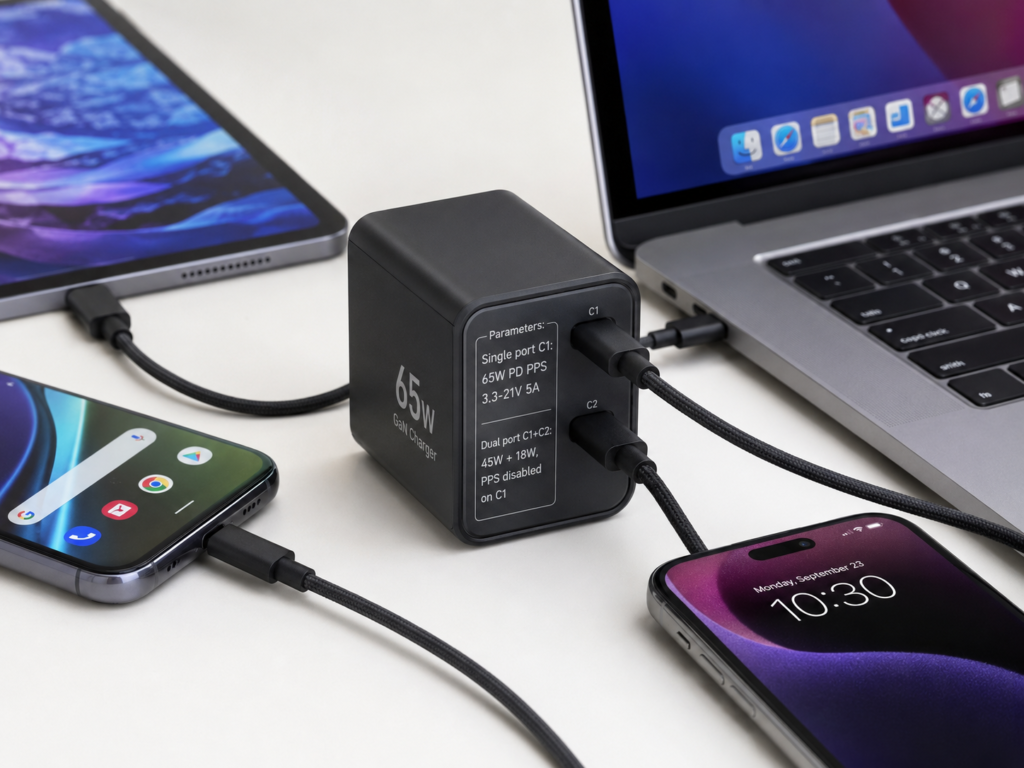
However, when buying a multi-port charger, there is a very easy pitfall: the “total power” marked on the packaging does not mean that each port can output full-speed PPS. For example, a dual-port charger marked 65W may only have 65W PPS when using C1 alone. When using both ports at the same time, C1 will drop to 45W, or even the PPS function will be directly turned off and return to fixed gear.
So when purchasing, be sure to find the “single-port output” and “dual-port/three-port simultaneous output” table in the product parameters, and carefully check the PPS power of each port under different conditions, don’t just look at the big number on the front of the packaging.
4.6 Scenarios of Charging While Using / High-Temperature Environments
If you often play games or watch videos while charging, or live in a region with relatively high temperatures, when the device supports PPS and the PPS range matches, PPS may reduce part of the conversion loss on the device side, making the temperature rise of the mobile phone slightly lower; but when charging while using, the screen, SoC load, ambient temperature, and heat dissipation of the phone case are usually the main factors affecting heat generation and speed reduction, so it cannot be guaranteed that PPS will be more stable or faster.
In fact, the most effective way to stabilize charging speed is: reduce screen brightness, remove thick phone cases, avoid direct sunlight, and turn off background high-load applications — only after doing these well, it makes sense to talk about protocol differences.
4.7 Car Charger / Power Bank Scenarios
The situation of car chargers and power banks is quite special, most of the time the bottleneck is not the protocol, but other factors.
Take car chargers for example: the temperature inside the car may be as high as 50-60°C in summer, the power supply quality of the cigarette lighter is uneven, and the heat dissipation of the car charger itself is not good. The impact of these factors on charging speed is much greater than whether it is PPS. Even if the car charger supports PPS, the mobile phone will actively reduce speed due to high temperature, and still cannot charge fast.
The same is true for power banks: the rate of the battery cells, the efficiency of buck-boost, the actual output power of a single port, and the remaining power will all affect the fast charging speed. It is not that having PPS will definitely be faster.
So when buying such products, only when the PPS range is clearly marked and just matches your mobile phone’s needs, it is worth spending extra money for “the fastest fast charging”; otherwise, prioritize choosing products with reliable brands and sufficient power.
5. Advanced: How to Judge Whether a Device/Accessory Supports PPS
If you want to judge by yourself whether the device or charger you have supports PPS, you don’t need professional instruments, just follow the method below.
5.1 Check Charger Parameters: First Find Keywords, Then Calculate Power
To judge whether a charger has PPS, the first step is to look at the keywords on the nameplate or official parameter page:
- PPS, Programmable Power Supply, PPS Output and other such words must appear to initially judge that it supports PPS.
- Just writing “PD 3.0”, “Type-C fast charging”, “65W fast charging” is not equivalent to supporting PPS — many low-cost PD 3.0 chargers only have fixed gears.
After finding the keywords, then look at its continuous voltage range, for example:
- “PPS: 3.3-11V⎓3A”: it means that the voltage can be adjusted between 3.3V and 11V, the maximum current is 3A, and the maximum available power of PPS is about 11V×3A=33W.
- “PPS: 3.3-21V⎓5A”: theoretically the maximum is 21V×5A=105W, but actually it is also limited by the nominal maximum power of this port. For example, if the port is nominally 65W, then the PPS can only reach up to 65W.
In simple calculation, the maximum available power of PPS ≈ upper voltage limit × upper current limit, and cannot exceed the nominal maximum power of this port.
5.2 Check Device Parameters: Don’t Mistake Proprietary Fast Charging for PPS
Many people mistake the “80W” “120W” proprietary fast charging advertised by manufacturers for universal PD PPS, which is a big misunderstanding.
To judge whether a device supports universal PPS, the most reliable way is to check whether the official parameter page clearly states “USB PD PPS”, “PD PPS”, “PPS charging”. Only when it is clearly written can it be counted.
- For Samsung, Super Fast Charging usually requires PPS, but the PPS range and current requirements corresponding to 25W and 45W are different, it is best to check the parameters of the specific model.
- For Google Pixel, most models of the 6 series and later rely on PPS fast charging, but the power of different models is different, and it is also subject to official parameters.
- Other brands such as Nothing, Motorola, and some domestic Android phones may support universal PPS, or may mainly use their own proprietary protocols, so you can’t take it for granted.
Remember: the proprietary fast charging power advertised by the brand does not represent the power of universal PD PPS. Many proprietary fast chargings can only use original or designated chargers, and universal PPS chargers cannot reach full speed.
5.3 How Can Ordinary Users Make a Rough Judgment Without Professional Instruments?
If you already have a charger and a mobile phone, and want to know whether PPS is triggered, you don’t need to buy a power meter, you can also make a rough judgment:
- Compare charging duration: use a charger that clearly supports PPS and has sufficient power, and an ordinary PD charger, under the premise of the same cable, the same starting battery level (such as 20%), room temperature, screen off, and background closed, compare the time to charge to 80% — if the PPS charger is significantly faster, it means your mobile phone supports PPS and it is triggered.
- Check whether it is close to the nominal speed: for example, the official says it charges to 50% in 30 minutes. If it takes 40 minutes with an ordinary PD charger and about 30 minutes with a PPS charger, then it is very likely that PPS is triggered. Don’t just look at the peak power in the first few minutes after plugging in, look at the average speed from 20% to 80%.
- Refer to third-party actual measurements: many tech media or evaluation bloggers will test the fast charging protocol of specific models. Search for your model + “PPS”, and you can usually find the answer, but pay attention to the test conditions.
There is an unreliable method: don’t just look at the fast charging icon. The fast charging icons of ordinary PD and PPS on many mobile phones are the same, or only have subtle differences, which ordinary people can’t tell at all.
5.4 The Impact of Charging Cables on PPS: Stop Saying “Cables Support PPS”
Emphasize again: there is no such thing as “cables support PPS protocol”. The cable only needs to meet the current carrying capacity and USB-C link requirements. PPS of different powers have different requirements for cables:
- PPS below 30W: the vast majority of regular USB-C to C 3A cables can meet the requirements, no need to buy expensive ones specifically.
- 45W PPS: it depends on the requirements of the device and charger. Some 45W PPS solutions require 5A current to reach full speed, and in this case, a 5A cable must be used.
- PD/PPS below 60W: usually 3A cables are sufficient; if it exceeds 60W, basically a 5A cable with E-Marker is required.
- 100W level: must use a 5A cable with E-Marker, and the cable body or packaging is usually marked with “100W” “5A”.
- 240W level: belongs to the cable category of PD 3.1 EPR, and must be clearly marked with 240W.
Pitfall avoidance reminder: USB-C to USB-A cables usually cannot fully support PD/PPS negotiation. Don’t use them to run PPS full speed, they will most likely only charge slowly or at low power.
5.5 How to Check PPS for Multi-Port Chargers
The PPS judgment of multi-port chargers should be more careful, don’t just look at the total power:
- Check the ports: not all C ports support PPS. Some multi-port chargers only have C1 or C2 port supporting high-power PPS, and USB-A ports basically do not support PD PPS.
- Check single-port power: a single port nominally 65W does not mean that PPS also has 65W. The PPS upper limit of some products is only 33W or 45W, which is lower than the power of fixed PD.
- Check multi-port simultaneous output: when two or three ports are used at the same time, the voltage range and current upper limit of PPS may change, or even directly return to fixed PDO mode. This must be checked against the multi-port output rules in the parameter table.
- The simplest method: find the “output specification table” in the product manual or parameter page, which will clearly state the output gears of each port under different conditions, which is much more reliable than looking at the promotional page.
5.6 Common English Keywords on Overseas Packaging
If you buy a charger overseas, most of the packaging is in English. Remember these keywords to quickly find PPS-related parameters:
- Protocol category: USB PD, PD 3.0, PD 3.1, PPS, Programmable Power Supply
- Gear category: Fixed PDO, APDO, PPS Output, Output Specs
- Parameter category: 3.3-11V, 3.3-16V, 3.3-21V, 3A, 5A, E-Marker
- Samsung related: Super Fast Charging, Super Fast Charging 2.0
- Google related: USB-C Charger, USB PD PPS, Fast Charging
6. Common Misconceptions and Troubleshooting
In this part, we have sorted out the most common pitfalls, as well as troubleshooting methods for PPS not working and charging overheating. If you encounter problems, you can find the reasons in order.
6.1 4 Misconceptions About Charging Speed
- “PPS must be faster than ordinary PD” — wrong. PPS may be faster only when the device supports PPS, the charger has sufficient PPS power, the cable meets the current requirements, and the temperature is appropriate; it is useless if any condition is missing.
- “The higher the wattage of the PPS charger, the faster the phone” — wrong. The mobile phone has its own power upper limit. After exceeding the upper limit, no matter how high the power is, it cannot be used, and it will not continue to be faster.
- “Using an ordinary PD charger for a mobile phone that supports PPS will damage the battery” — wrong. It will not damage the battery additionally because PPS is not used; compliant ordinary PD is a standard fast charging method, and the main factors that really affect battery aging are temperature, cycle times and long-term high battery level stay.
- “You can judge the speed only by looking at the peak power” — wrong. The real charging experience depends more on the average power and charging curve from 20% to 80%. Some mobile phones can only maintain peak power for a few minutes, and then it drops, so the actual speed is not necessarily fast.
6.2 4 Misconceptions About Compatibility
- “A charger with PPS can only be used for PPS devices” — wrong. Regular PPS chargers are compatible with ordinary PD devices, will automatically fall back, and have strong versatility.
- “PD 3.0 must have PPS” — wrong. PPS is an optional function of PD 3.0. You must check whether it is marked in the parameter table. Not all PD 3.0 has PPS.
- “PPS can only be used for mobile phones” — wrong. Some tablets, power banks, and handheld consoles may also support PPS, but the mobile phone scenario is the most common.
- “Cables support PPS” — wrong. The more accurate statement is that the cable meets the USB-C link, current and E-Marker requirements, and the cable does not participate in PPS protocol negotiation.
6.3 3 Misconceptions About Battery Life
- “PPS must be better for battery protection” — wrong. PPS may reduce the heat generation on the device side during high-power charging, but battery life mainly depends on temperature, cycle times, charging strategy and usage habits, and the impact of PPS is very small.
- “Ordinary PD will significantly shorten battery life” — wrong. Ordinary PD should not be demonized, but regular accessories should still be used and charging while using under high temperature should be avoided; as long as the accessories are compliant and the temperature is controlled, ordinary PD is a safe fast charging method, and there is no need to be overly anxious.
- “Slow charging must be healthier than fast charging” — wrong. Avoiding high temperature, overcharging, and long-term full charge stay has a much greater impact on battery life than “fast charging or slow charging”, and there is no need to deliberately use 5W slow charging to protect the battery.
6.4 PPS Not Working? Troubleshoot in This Order
If your mobile phone and charger both claim to support PPS, but the speed feels wrong, you can troubleshoot in order from easy to difficult:
- First confirm whether the device supports universal USB PD PPS: check the official parameter page, don’t just look at the brand or proprietary fast charging promotion.
- Check whether the PPS parameters of the charger are sufficient: is there a PPS mark? Can the voltage range and current upper limit cover the needs of the device?
- Check the cable: is it a USB-C to C cable? Is the current sufficient for 3A/5A? Is there an E-Marker if it exceeds 60W?
- Check if the battery level is too high: if it has reached more than 80%, the device will actively reduce speed to protect the battery, which is normal, not that PPS is not working.
- Eliminate temperature control factors: is the ambient temperature too high? Are you charging while using? Is the phone case too thick? These will cause the device to actively reduce speed.
- Check if it is multi-port simultaneous charging: when multiple ports are used together, PPS may reduce gear or be turned off. Try unplugging other devices.
- Cross test: try another cable, another port, another charger to judge whether the problem is with the device, cable or charger.
6.5 Abnormal Charging Heat? How to Troubleshoot
It is normal for the charger to be slightly warm during charging, but if it is hot to the touch, has peculiar smell, or frequently disconnects charging, you should pay attention. You can troubleshoot according to this method:
- First judge where the heat is coming from: if the mobile phone is obviously hot, it may be caused by internal conversion loss, too high screen brightness, or high background application load; if the charger is obviously hot, it may be normal loss of high-power conversion, or the charger itself uses poor materials.
- Eliminate external factors: are you using inferior cables? Is the socket in poor contact? Is the phone case too thick for good heat dissipation? Is it placed in direct sunlight or in a high-temperature car? These will all aggravate heat generation.
- What is normal heat generation: during high-power fast charging, it is normal for the charger and mobile phone to be warm, it will not be hot to the touch for a long time, nor will there be peculiar smell, deformation or frequent disconnection of charging.
- Treatment method: if the system prompts abnormal temperature, the device is obviously hot to the touch, or the high temperature does not drop for a long time, stop charging immediately, and try again with regular brand accessories; generally speaking, 45°C can be used as an empirical warning line, but it is not the only standard. You should pay attention if it feels hot to the touch.
7. Purchasing Decision: Is It Really Necessary to Buy PPS?
Finally, we return to the core question: when buying a charger, is it worth spending extra money to buy one with PPS? The answer depends entirely on your device and usage scenario.
7.1 Situations Where a PPS-Equipped PD Charger Is Preferred
If you meet any of the following situations, a PD charger with PPS is more worth buying:
- You have an Android flagship that supports USB PD PPS (such as Samsung Galaxy S/Z series, some Google Pixel models), and want to reach the fastest fast charging speed advertised by the manufacturer.
- You have an Android phone, iPhone, tablet and thin and light laptop at the same time, and hope that one USB-C charger can be as universal as possible to reduce the trouble of changing chargers.
- You often use your mobile phone while charging, or are more concerned about the heat generation of the mobile phone during high-power charging.
- You plan to change to an Android flagship in the next two or three years. A PD charger with PPS has a larger compatibility margin, so you don’t need to change the charger then.
7.2 Situations Where an Ordinary PD Charger Is Sufficient
If you meet any of the following situations, an ordinary PD charger is sufficient, and you don’t need to spend extra money on PPS:
- You mainly use iPhone, iPad, MacBook, and do not have Android devices that support PPS.
- You mainly charge laptops, and the core demand is sufficient power (such as 65W, 100W), not the full PPS speed of the mobile phone.
- You only charge low-power devices such as earphones, watches, and e-books.
- The budget is limited, and your device itself does not support PPS, it is more practical to prioritize buying an ordinary PD charger from a regular brand.
7.3 Pitfall Avoidance List for Purchasing
No matter which one you choose, these pitfalls should be avoided:
- Don’t just look at the “PD fast charging” promotion, confirm whether there is a PPS mark and continuous voltage range.
- Don’t just look at the total wattage on the packaging, look at the single-port PPS power and the parameter table of multi-port simultaneous output.
- Don’t blindly pursue high power. The device has a power upper limit. After exceeding it, it will not be faster, it is just a waste of money.
- Don’t buy cheap chargers with no brand or falsely labeled PPS. The voltage regulation stability, safety protection, and materials are not guaranteed, which is instead risky.
- Don’t ignore the cable. When it exceeds 60W or requires 5A current, be sure to use a regular 5A cable with E-Marker.
- Don’t treat the manufacturer’s proprietary fast charging power as universal PD PPS power, they are not the same thing.
7.4 Situations Where Your Decision May Change
Some conditions will change your choice. You can think clearly before buying:
- Plan to change to an Android flagship in the future: even if you are using an iPhone now, you can buy a PD head with PPS in advance, so you don’t need to change the charger when you change your mobile phone later.
- Often charge multiple devices at the same time: prioritize choosing models with clear multi-port output strategies and PPS that can also be used when multiple ports are connected, otherwise you won’t be able to use PPS even if you buy it.
- Unqualified cables: even if both the charger and the device support PPS, if the cable current is insufficient, it still cannot reach full speed. Remember to change the cable together.
- The operating environment is high temperature all year round: if the temperature is very high in summer, or you often charge in the car, then no matter how well the protocol matches, it will be limited by temperature control, and there is no need to spend too much extra money for PPS.
7.5 One-Sentence Purchase Advice
Finally, the simplest conclusion for different groups of people:
- iPhone users: just buy a regular 20W-35W PD charger, PPS is not a must.
- Users of Samsung/Pixel and other Android flagships: prioritize buying PD chargers with clearly marked PPS ranges and matching power.
- Laptop users: prioritize checking PD power, cables, and whether PD 3.1 EPR is needed, no need to worry about PPS.
- Multi-device users: prioritize choosing PD chargers with PPS, clear multi-port power distribution, and reliable brands, which have stronger versatility.
8. Summary: After Reading This Article, You Can Quickly Judge 5 Things
Finally, let’s sort out that after reading this article, you should already be able to independently judge these issues:
- Can distinguish the relationship between PD and PPS: PD is the basic protocol for USB-C fast charging, and PPS is an optional fine voltage regulation function within the PD system, not two peer-level protocols.
- Can judge whether your own device needs PPS: Apple devices and most laptops do not rely on PPS; some Android flagships such as Samsung and Pixel need to pay attention to PPS only if they want full-speed fast charging.
- Can read fast charging parameters: know how to find fixed PDO, continuous voltage range of PPS/APDO, 3A/5A current marks, and also know how to read the output table of single port and multi-port.
- Can understand speed differences: PPS is not necessarily faster throughout the whole process. It will only show advantages when the device supports it, the power is sufficient, the cable is qualified, and the temperature is appropriate.
- Can troubleshoot the problem of fast charging not working: follow the order of “device support → charger PPS parameters → cable current capacity → battery level and temperature → multi-port power distribution”, you can find the reason step by step.